air condition DODGE GRAND CARAVAN 2019 Owner's Guide
[x] Cancel search | Manufacturer: DODGE, Model Year: 2019, Model line: GRAND CARAVAN, Model: DODGE GRAND CARAVAN 2019Pages: 490, PDF Size: 3.84 MB
Page 371 of 490
pressure should be increased by 3 psi (21 kPa), which
equals 1 psi (7 kPa) for every 12°F (7°C) for this outside
temperature condition.
Tire pressure may increase from 2 to 6 psi (13 to 40 kPa)
during operation. DO NOT reduce this normal pressure
build up or your tire pressure will be too low.
Tire Pressures For High Speed Operation
The manufacturer advocates driving at safe speeds and
within posted speed limits. Where speed limits or condi-
tions are such that the vehicle can be driven at high speeds,
maintaining correct tire inflation pressure is very impor-
tant. Increased tire pressure and reduced vehicle loading
may be required for high-speed vehicle operation. Refer to
an authorized tire dealer or original equipment vehicle
dealer for recommended safe operating speeds, loading
and cold tire inflation pressures.
WARNING!
High speed driving with your vehicle under maximum
load is dangerous. The added strain on your tires could
cause them to fail. You could have a serious collision.
Do not drive a vehicle loaded to the maximum capacity
at continuous speeds above 75 mph (120 km/h).
Radial Ply Tires
WARNING!
Combining radial ply tires with other types of tires on
your vehicle will cause your vehicle to handle poorly.
The instability could cause a collision. Always use
radial ply tires in sets of four. Never combine them
with other types of tires.
Tire Repair
If your tire becomes damaged, it may be repaired if it meets
the following criteria:
• The tire has not been driven on when flat.
• The damage is only on the tread section of your tire
(sidewall damage is not repairable).
• The puncture is no greater thana¼ofaninch (6 mm).
Consult an authorized tire dealer for tire repairs and
additional information.
Damaged Run Flat tires, or Run Flat tires that have experi-
enced a loss of pressure should be replaced immediately with
another Run Flat tire of identical size and service description
(Load Index and Speed Symbol). Replace the tire pressure
sensor as well as it is not designed to be reused.
8
SERVICING AND MAINTENANCE 369
Page 372 of 490
Run Flat Tires — If Equipped
Run Flat tires allow you the capability to drive 50 miles
(80 km) at 50 mph (80 km/h) after a rapid loss of inflation
pressure. This rapid loss of inflation is referred to as the
Run Flat mode. A Run Flat mode occurs when the tire
inflation pressure is of/or below 14 psi (96 kPa). Once a
Run Flat tire reaches the run flat mode it has limited
driving capabilities and needs to be replaced immediately.
A Run Flat tire is not repairable. When a run flat tire is
changed after driving with underinflated tire condition,
please replace the TPM sensor as it is not designed to be
reused when driven under run flat mode (14 psi (96 kPa))
condition.
NOTE:TPM Sensor must be replaced after driving the
vehicle on a flat tire condition.
It is not recommended driving a vehicle loaded at full
capacity or to tow a trailer while a tire is in the run flat
mode.
See the tire pressure monitoring section for more informa-
tion.
Tire Spinning
When stuck in mud, sand, snow, or ice conditions, do not
spin your vehicle’s wheels above 30 mph (48 km/h) or for
longer than 30 seconds continuously without stopping.
Refer to “Freeing A Stuck Vehicle” in “In Case Of Emer-
gency” for further information.
WARNING!
Fast spinning tires can be dangerous. Forces generated
by excessive wheel speeds may cause tire damage or
failure. A tire could explode and injure someone. Do
not spin your vehicle’s wheels faster than 30 mph
(48 km/h) for more than 30 seconds continuously when
you are stuck, and do not let anyone near a spinning
wheel, no matter what the speed.
Tread Wear Indicators
Tread wear indicators are in the original equipment tires to
help you in determining when your tires should be re-
placed.
370 SERVICING AND MAINTENANCE
Page 383 of 490
WARNING!
The temperature grade for this tire is established for
a tire that is properly inflated and not overloaded.
Excessive speed, under-inflation, or excessive load-
ing, either separately or in combination, can cause
heat buildup and possible tire failure.
VEHICLE STORAGE
If you are leaving your vehicle dormant for more than 21
days, you may want to take steps to protect your battery.
You may do the following:
• Remove the 60 Amp cartridge in the Totally Integrated
Power Module (TIPM) labeled Ignition-Off Draw (IOD).
• Or, disconnect the negative cable from the battery.
• Anytime you store your vehicle, or keep it out of service
for two weeks or more, run the air conditioning system
at idle for about five minutes in the fresh air and high
blower setting. This will ensure adequate system lubri-
cation to minimize the possibility of compressor damage
when the system is started again.
BODYWORK
Protection From Atmospheric Agents
Vehicle body care requirements vary according to geographic
locations and usage. Chemicals that make roads passable in
snow and ice and those that are sprayed on trees and road
surfaces during other seasons are highly corrosive to the
metal in your vehicle. Outside parking, which exposes your
vehicle to airborne contaminants, road surfaces on which the
vehicle is operated, extreme hot or cold weather and other
extreme conditions will have an adverse effect on paint,
metal trim, and underbody protection.
The following maintenance recommendations will enable
you to obtain maximum benefit from the corrosion resis-
tance built into your vehicle.
What Causes Corrosion?
Corrosion is the result of deterioration or removal of paint
and protective coatings from your vehicle.
The most common causes are:
• Road salt, dirt and moisture accumulation.
• Stone and gravel impact.
• Insects, tree sap and tar.
8
SERVICING AND MAINTENANCE 381
Page 436 of 490
Voice Command Button
WARNING!
Any voice commanded system should be used only in
safe driving conditions following all applicable laws.
Your attention should be focused on safely operating
the vehicle. Failure to do so may result in a collision
causing serious injury or death.Actual button location may vary with the radio.
The individual buttons are described in the “Op-
eration” section.
The Uconnect Phone can be used with any Hands-Free
Profile certified Bluetooth mobile phone. See the Uconnect
website for supported phones. Refer to your mobile service
provider or the phone manufacturer for details.
The Uconnect Phone is fully integrated with the vehicle’s
audio system. The volume of the Uconnect Phone can be
adjusted either from the radio volume control knob or from
the steering wheel radio control (right switch), if so
equipped. The Uconnect display will be used for visual prompts from
the Uconnect Phone such as “CELL” or caller ID on certain
radios.Operation
Voice commands can be used to operate the Uconnect
Phone and to navigate through the Uconnect Phone menu
structure. Voice commands are required after most
Uconnect Phone prompts. You will be prompted for a
specific command and then guided through the available
options.
•
Prior to giving a voice command, one must wait for the
beep, which follows the “Ready” prompt or another
prompt.
• For certain operations, compound commands can be
used. For example, instead of saying “Setup” and then
“Phone Pairing,” the following compound command
can be said: “Setup Phone Pairing.”
• For each feature explanation in this section, only the
compound form of the voice command is given. You can
also break the commands into parts and say each part of
the command when you are asked for it. For example,
you can use the compound form voice command
434 MULTIMEDIA
Page 458 of 490
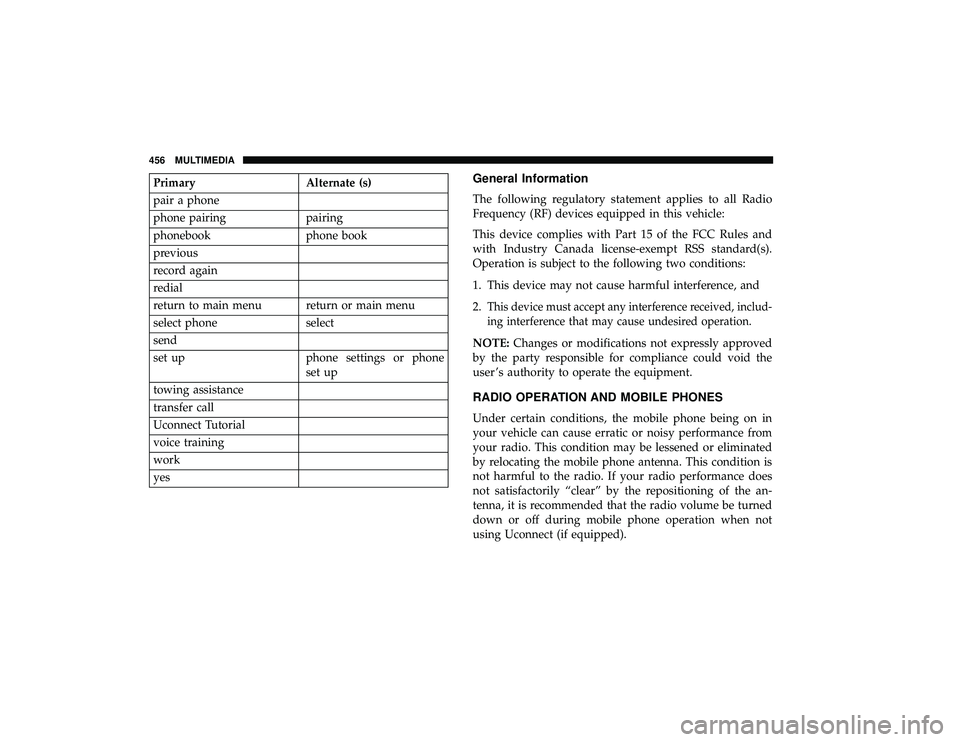
PrimaryAlternate (s)
pair a phone
phone pairing pairing
phonebook phone book
previous
record again
redial
return to main menu return or main menu
select phone select
send
set up phone settings or phone
set up
towing assistance
transfer call
Uconnect Tutorial
voice training
work
yesGeneral Information
The following regulatory statement applies to all Radio
Frequency (RF) devices equipped in this vehicle:
This device complies with Part 15 of the FCC Rules and
with Industry Canada license-exempt RSS standard(s).
Operation is subject to the following two conditions:
1. This device may not cause harmful interference, and
2.
This device must accept any interference received, includ-
ing interference that may cause undesired operation.
NOTE: Changes or modifications not expressly approved
by the party responsible for compliance could void the
user ’s authority to operate the equipment.
RADIO OPERATION AND MOBILE PHONES
Under certain conditions, the mobile phone being on in
your vehicle can cause erratic or noisy performance from
your radio. This condition may be lessened or eliminated
by relocating the mobile phone antenna. This condition is
not harmful to the radio. If your radio performance does
not satisfactorily “clear” by the repositioning of the an-
tenna, it is recommended that the radio volume be turned
down or off during mobile phone operation when not
using Uconnect (if equipped).
456 MULTIMEDIA
Page 459 of 490
Regulatory And Safety Information
USA/CANADA
Exposure to Radio Frequency Radiation
The radiated output power of the internal wireless radio is
far below the FCC and IC radio frequency exposure limits.
Nevertheless, the wireless radio will be used in such a
manner that the radio is 8 in (20 cm) or further from the
human body.
The internal wireless radio operates within guidelines
found in radio frequency safety standards and recommen-
dations, which reflect the consensus of the scientific com-
munity.
The radio manufacturer believes the internal wireless radio
is safe for use by consumers. The level of energy emitted is
far less than the electromagnetic energy emitted by wire-
less devices such as mobile phones. However, the use of
wireless radios may be restricted in some situations or
environments, such as aboard airplanes. If you are unsure
of restrictions, you are encouraged to ask for authorization
before turning on the wireless radio.The following regulatory statement applies to all Radio
Frequency (RF) devices equipped in this vehicle:
This device complies with Part 15 of the FCC Rules and
with Industry Canada license-exempt RSS standard(s).
Operation is subject to the following two conditions:
1. This device may not cause harmful interference, and
2. This device must accept any interference received, in-
cluding interference that may cause undesired opera-
tion.
NOTE: Changes or modifications not expressly approved
by the party responsible for compliance could void the
user ’s authority to operate the equipment.
10
MULTIMEDIA 457
Page 461 of 490
NOTE:If you do not say a command within a few seconds,
the system will present you with a list of options.
If you would like to interrupt the system while it lists
options, push the Voice Command
button, listen for
the beep, and say your command.
Pushing the Voice Commandbutton while the system
is speaking is known as “barging in.” The system will be
interrupted, and after the beep, you can add or change
commands. This will become helpful once you start to
learn the options.
NOTE: At any time, you can say the words “Cancel,”
“Help” or “Main Menu.”
These commands are universal and can be used from any
menu. All other commands can be used depending upon
the active application.
When using this system, you should speak clearly and at a
normal speaking volume.
The system will best recognize your speech if the windows
are closed, and the heater/air conditioning blower is set to
low.
At any point, if the system does not recognize one of your
commands, you will be prompted to repeat it. To hear the first available Menu, push the Voice Command
button and say “Help” or “Main Menu.”
Commands
The Voice Command system understands two types of
commands, Universal commands and Local commands.
Universal commands are available at all times. Local
commands are available if the supported radio mode is
active.
Changing The Volume
1. Start a dialogue by pushing the Voice Commandbut-
ton.
2. Say a command (e.g., “Help”).
3. Use the ON/OFF VOLUME rotary knob to adjust the volume to a comfortable level while the Voice Com-
mand system is speaking. Please note the volume set-
ting for Voice Command is different than the audio
system.
Main Menu
Start a dialogue by pushing the Voice Commandbut-
ton. You may say “Main Menu” to switch to the main
menu. 10
MULTIMEDIA 459
Page 465 of 490
CD/DVD DISC MAINTENANCE
To keep a CD/DVD in good condition, take the following
precautions:
•Handle the disc by its edge; avoid touching the surface.
• If the disc is stained, clean the surface with a soft cloth,
wiping from center to edge.
• Do not apply paper or tape to the disc; avoid scratching
the disc.
• Do not use solvents such as benzene, thinner, cleaners,
or anti-static sprays.
• Store the disc in its case after playing.
• Do not expose the disc to direct sunlight.
• Do not store the disc where temperatures may become
too high. NOTE:
If you experience difficulty in playing a particular
disc, it may be damaged (e.g., scratched, reflective coating
removed, a hair, moisture or dew on the disc), oversized, or
have protection encoding. Try a known good disc before
considering disc player service.
10
MULTIMEDIA 463
Page 474 of 490
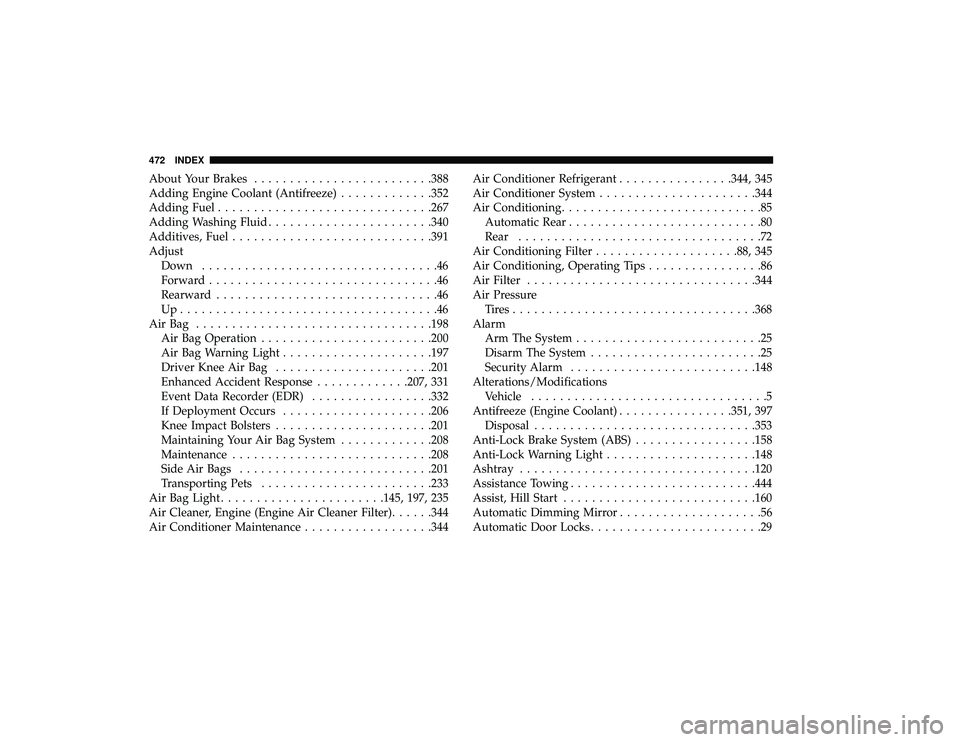
About Your Brakes........................ .388
Adding Engine Coolant (Antifreeze) .............352
Adding Fuel ............................. .267
Adding Washing Fluid ...................... .340
Additives, Fuel ........................... .391
Adjust Down .................................46
Forward ................................46
Rearward ...............................46
Up....................................46
AirBag ................................ .198
Air Bag Operation ....................... .200
Air Bag Warning Light .................... .197
Driver Knee Air Bag ..................... .201
Enhanced Accident Response .............207, 331
Event Data Recorder (EDR) .................332
If Deployment Occurs .................... .206
Knee Impact Bolsters ..................... .201
Maintaining Your Air Bag System .............208
Maintenance ........................... .208
Side Air Bags .......................... .201
Transporting Pets ....................... .233
Air Bag Light ...................... .145, 197, 235
Air Cleaner, Engine (Engine Air Cleaner Filter) ......344
Air Conditioner Maintenance ..................344Air Conditioner Refrigerant
................344, 345
Air Conditioner System ..................... .344
Air Conditioning ............................85
Automatic Rear ...........................80
Rear ..................................72
Air Conditioning Filter ................... .88, 345
Air Conditioning, Operating Tips ................86
Air Filter ............................... .344
Air Pressure Tires................................. .368
Alarm Arm The System ..........................25
Disarm The System ........................25
Security Alarm ......................... .148
Alterations/Modifications Vehicle .................................5
Antifreeze (Engine Coolant) ................351,
397
Disposal .............................. .353
Anti-Lock Brake System (ABS) .................158
Anti-Lock Warning Light .................... .148
Ashtray ................................ .120
Assistance Towing ......................... .444
Assist, Hill Start .......................... .160
Automatic Dimming Mirror ....................56
Automatic Door Locks ........................29
472 INDEX
Page 478 of 490
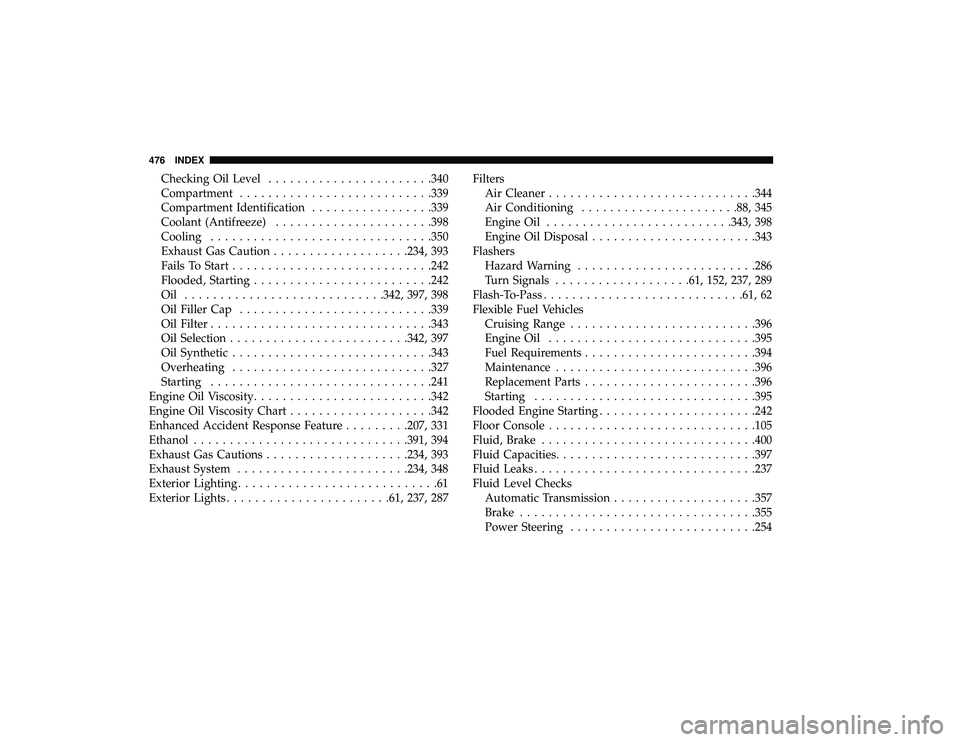
Checking Oil Level...................... .340
Compartment .......................... .339
Compartment Identification .................339
Coolant (Antifreeze) ..................... .398
Cooling .............................. .350
Exhaust Gas Caution .................. .234, 393
Fails To Start ........................... .242
Flooded, Starting ........................ .242
Oil ........................... .342, 397, 398
Oil Filler Cap .......................... .339
Oil Filter .............................. .343
Oil Selection ........................ .342, 397
Oil Synthetic ........................... .343
Overheating ........................... .327
Starting .............................. .241
Engine Oil Viscosity ........................ .342
Engine Oil Viscosity Chart ....................342
Enhanced Accident Response Feature .........207, 331
Ethanol ............................. .391, 394
Exhaust Gas Cautions ................... .234, 393
Exhaust System ....................... .234, 348
Exterior Lighting ............................61
Exterior Lights ...................... .61, 237, 287Filters
Air Cleaner ............................ .344
Air Conditioning ..................... .88, 345
Engine Oil ......................... .343, 398
Engine Oil Disposal ...................... .343
Flashers Hazard Warning ........................ .286
Turn Signals .................. .61, 152, 237, 289
Flash-To-Pass ........................... .61, 62
Flexible Fuel Vehicles Cruising Range ......................... .396
Engine Oil ............................ .395
Fuel Requirements ....................... .394
Maintenance ........................... .396
Replacement
Parts ....................... .396
Starting .............................. .395
Flooded Engine Starting ..................... .242
Floor Console ............................ .105
Fluid, Brake ............................. .400
Fluid Capacities ........................... .397
Fluid Leaks .............................. .237
Fluid Level Checks Automatic Transmission ................... .357
Brake ................................ .355
Power Steering ......................... .254
476 INDEX