ignition DODGE GRAND CARAVAN 2019 Manual PDF
[x] Cancel search | Manufacturer: DODGE, Model Year: 2019, Model line: GRAND CARAVAN, Model: DODGE GRAND CARAVAN 2019Pages: 490, PDF Size: 3.84 MB
Page 348 of 490
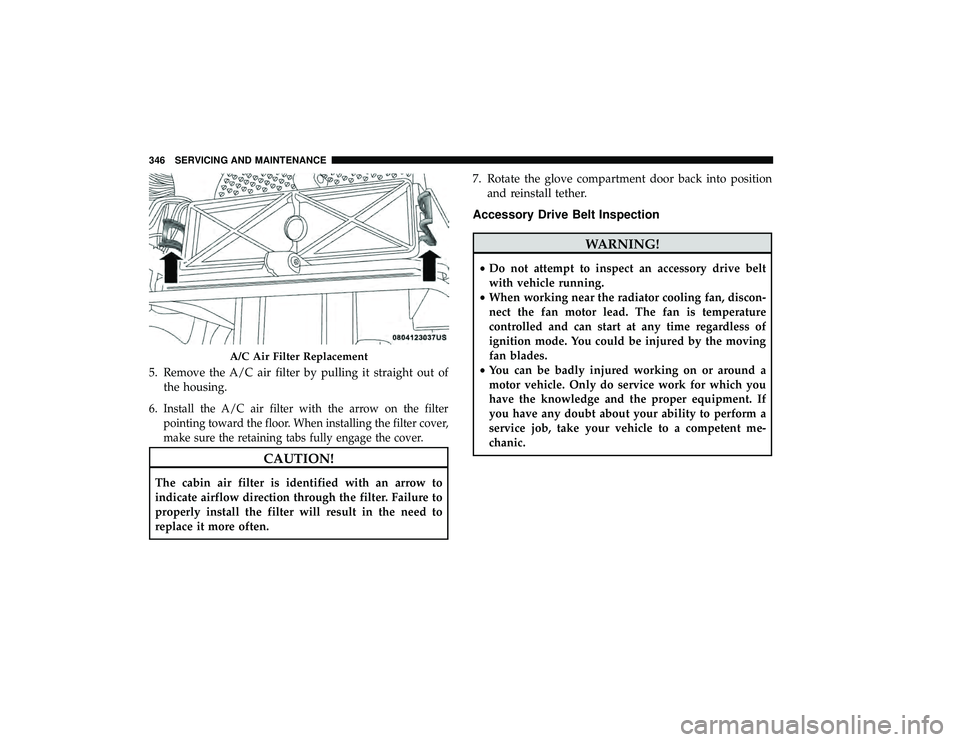
5. Remove the A/C air filter by pulling it straight out ofthe housing.
6.
Install the A/C air filter with the arrow on the filter
pointing toward the floor. When installing the filter cover,
make sure the retaining tabs fully engage the cover.
CAUTION!
The cabin air filter is identified with an arrow to
indicate airflow direction through the filter. Failure to
properly install the filter will result in the need to
replace it more often. 7. Rotate the glove compartment door back into position
and reinstall tether.
Accessory Drive Belt Inspection
WARNING!
•Do not attempt to inspect an accessory drive belt
with vehicle running.
• When working near the radiator cooling fan, discon-
nect the fan motor lead. The fan is temperature
controlled and can start at any time regardless of
ignition mode. You could be injured by the moving
fan blades.
• You can be badly injured working on or around a
motor vehicle. Only do service work for which you
have the knowledge and the proper equipment. If
you have any doubt about your ability to perform a
service job, take your vehicle to a competent me-
chanic.
A/C Air Filter Replacement
346 SERVICING AND MAINTENANCE
Page 352 of 490
To minimize the possibility of catalytic converter damage:
•Do not interrupt the ignition when the transmission is in
gear and the vehicle is in motion.
• Do not try to start the vehicle by pushing or towing the
vehicle.
• Do not idle the engine with any ignition components
disconnected or removed, such as when diagnostic
testing, or for prolonged periods during very rough idle
or malfunctioning operating conditions.
Cooling System
WARNING!
• You or others can be badly burned by hot engine
coolant (antifreeze) or steam from your radiator. If
you see or hear steam coming from under the hood,
do not open the hood until the radiator has had time
to cool. Never open a cooling system pressure cap
when the radiator or coolant bottle is hot.
(Continued)
WARNING! (Continued)
•Keep hands, tools, clothing, and jewelry away from
the radiator cooling fan when the hood is raised. The
fan starts automatically and may start at any time,
whether the engine is running or not.
• When working near the radiator cooling fan, discon-
nect the fan motor lead or turn the ignition to the
OFF mode. The fan is temperature controlled and can
start at any time the ignition is in the ON mode.
Engine Coolant Checks
Check the engine coolant (antifreeze) protection every 12
months (before the onset of freezing weather, where appli-
cable). If the engine coolant (antifreeze) is dirty, the system
should be drained, flushed, and refilled with fresh OAT
coolant (conforming to MS.90032) by an authorized dealer.
Check the front of the A/C condenser for any accumulation
of bugs, leaves, etc. If dirty, clean by gently spraying water
from a garden hose vertically down the face of the condenser.
Check the engine cooling system hoses for brittle rubber,
cracking, tears, cuts, and tightness of the connection at the
coolant recovery bottle and radiator. Inspect the entire
system for leaks. DO NOT REMOVE THE COOLANT
PRESSURE CAP WHEN THE COOLING SYSTEM IS HOT.
350 SERVICING AND MAINTENANCE
Page 383 of 490
WARNING!
The temperature grade for this tire is established for
a tire that is properly inflated and not overloaded.
Excessive speed, under-inflation, or excessive load-
ing, either separately or in combination, can cause
heat buildup and possible tire failure.
VEHICLE STORAGE
If you are leaving your vehicle dormant for more than 21
days, you may want to take steps to protect your battery.
You may do the following:
• Remove the 60 Amp cartridge in the Totally Integrated
Power Module (TIPM) labeled Ignition-Off Draw (IOD).
• Or, disconnect the negative cable from the battery.
• Anytime you store your vehicle, or keep it out of service
for two weeks or more, run the air conditioning system
at idle for about five minutes in the fresh air and high
blower setting. This will ensure adequate system lubri-
cation to minimize the possibility of compressor damage
when the system is started again.
BODYWORK
Protection From Atmospheric Agents
Vehicle body care requirements vary according to geographic
locations and usage. Chemicals that make roads passable in
snow and ice and those that are sprayed on trees and road
surfaces during other seasons are highly corrosive to the
metal in your vehicle. Outside parking, which exposes your
vehicle to airborne contaminants, road surfaces on which the
vehicle is operated, extreme hot or cold weather and other
extreme conditions will have an adverse effect on paint,
metal trim, and underbody protection.
The following maintenance recommendations will enable
you to obtain maximum benefit from the corrosion resis-
tance built into your vehicle.
What Causes Corrosion?
Corrosion is the result of deterioration or removal of paint
and protective coatings from your vehicle.
The most common causes are:
• Road salt, dirt and moisture accumulation.
• Stone and gravel impact.
• Insects, tree sap and tar.
8
SERVICING AND MAINTENANCE 381
Page 394 of 490
Do Not Use E-85 In Non-Flex Fuel Vehicles
Non-Flex Fuel Vehicles (FFV) are compatible with gasoline
containing up to 15% ethanol (E-15). Use of gasoline with
higher ethanol content may void the New Vehicle Limited
Warranty.
If a Non-FFV vehicle is inadvertently fueled with E-85 fuel,
the engine will have some or all of these symptoms:
•Operate in a lean mode.
• OBD II Malfunction Indicator Light on.
• Poor engine performance.
• Poor cold start and cold drivability.
• Increased risk for fuel system component corrosion.
CNG And LP Fuel System Modifications
Modifications that allow the engine to run on Compressed
Natural Gas (CNG) or Liquid Propane (LP) may result in
damage to the engine, emissions, and fuel system compo-
nents. Problems that result from running CNG or LP are
not the responsibility of the manufacturer and may void or
not be covered under the New Vehicle Limited Warranty.
MMT In Gasoline
Methylcyclopentadienyl Manganese Tricarbonyl (MMT) is
a manganese-containing metallic additive that is blended
into some gasoline to increase octane. Gasoline blended
with MMT provides no performance advantage beyond
gasoline of the same octane number without MMT. Gaso-
line blended with MMT reduces spark plug life and
reduces emissions system performance in some vehicles.
The manufacturer recommends that gasoline without
MMT be used in your vehicle. The MMT content of
gasoline may not be indicated on the gasoline pump;
therefore, you should ask your gasoline retailer whether
the gasoline contains MMT. MMT is prohibited in Federal
and California reformulated gasoline.
Fuel System Cautions
CAUTION!
Follow these guidelines to maintain your vehicle’s
performance:
•The use of leaded gasoline is prohibited by Federal
law. Using leaded gasoline can impair engine perfor-
mance and damage the emissions control system.
• An out-of-tune engine or certain fuel or ignition
(Continued)
392 TECHNICAL SPECIFICATIONS
Page 413 of 490
Browse
Browsing is not available on a Bluetooth Streaming Audio
(BTSA) device. Only the current song that is playing will
display info.
UCONNECT MULTIMEDIA — VIDEO
ENTERTAINMENT SYSTEM (VES) — IF EQUIPPED
Your rear seat Video Entertainment System (VES) is de-
signed to give your family years of enjoyment. You can
play your favorite CDs or DVDs, listen to audio over the
wireless headphones, or plug and play a variety of stan-
dard video games or audio devices. Please review this
Owner’s Manual to become familiar with its features and
operation.
NOTE:The screen is located in the 2nd row overhead
console.
Getting Started
• Screen located in the overhead console: Unfold the
overhead LCD screen(s) by pushing the button on the
overhead console behind the screen(s).
• Cycle the ignition to the ON or ACC position.
• Turn on the Player by pushing the Power button, located
on the far left, or by pushing the button on the Remote
Control.
• When the video screen is open and a DVD is inserted
into the VES player, the screen turns on automatically,
the headphone transmitters turn on and playback be-
gins.
• The system can be controlled by the front seat occupants
using either the touchscreen radio, the DVD, or by the
rear seat occupants using the remote control.
10
MULTIMEDIA 411
Page 421 of 490
Locking The Remote Control
All remote control functionality can be disabled as a
parental control feature.
•To disable the Remote Control from making any
changes, push the Video Lock button on the DVD player
(if equipped). If the vehicle is not equipped with a DVD
player, follow the radio’s instructions to turn Video Lock
on. The radio and the video screen(s) indicate when
Video Lock is active.
• Pushing the Video Lock again or turning the ignition
OFF turns Video Lock OFF and allows remote control
operation of the VES.
Replacing The Remote Control Batteries
The remote control requires two AAA batteries for opera-
tion. To replace the batteries:
1. Locate the battery compartment on the back of the remote, then slide the battery cover downward.
2. Replace the batteries, making sure to orient them ac- cording to the polarity diagram shown.
3. Replace the battery compartment cover.
10
MULTIMEDIA 419
Page 444 of 490
2. To bring the call back from hold, push and hold thePhone
button until you hear a single beep.
Redial
To redial the last number called from your mobile phone
using Voice Command:
1. Push the Phone
button to begin.
2. After the “Ready” prompt and the following beep, say “Redial.”
• The Uconnect Phone will call the last number that was
dialed from your mobile phone.
NOTE: This may not be the last number dialed from the
Uconnect Phone.
Call Continuation
Call continuation is the progression of a phone call on the
Uconnect Phone after the vehicle ignition has been
switched to OFF. Call continuation functionality available
on the vehicle can be any one of three types:
1. After the ignition is switched to OFF, a call can continue on the Uconnect Phone either until the call ends, or until the vehicle battery condition dictates cessation of the
call on the Uconnect Phone and transfer of the call to the
mobile phone.
2. After the ignition is cycled to OFF, a call can continue on the Uconnect Phone for a certain duration, after which
the call is automatically transferred from the Uconnect
Phone to the mobile phone.
3. An active call is automatically transferred to the mobile phone after the ignition is cycled to OFF.
Uconnect Phone Features
Language Selection
To change the language that the Uconnect Phone is using:
•Push the Phone
button to begin.
•After the “Ready” prompt and the following beep, say
the name of the language you wish to switch to English,
Espanol, or Francais.
• Continue to follow the system prompts to complete the
language selection.
After selecting one of the languages, all prompts and voice
commands will be in that language.
442 MULTIMEDIA
Page 453 of 490
List of Preset Messages:
1. Yes
2. No
3. Where are you?
4. I need more direction
5. L O L
6. Why
7. I love you
8. Call me
9. Call me later
10. Thanks11. See You in 15 minutes
12. Iamonmyway
13. I’ll be late
14. Are you there yet?
15. Where are we meeting?
16. Can this wait?
17. Bye for now
18. When can we meet?
19. Send number to call
20. Start without me
Turn SMS Incoming Announcement ON/OFF
Turning the SMS Incoming Announcement OFF will stop
the system from announcing the new incoming messages.
1. Push the Phone
button.
2. After the “Ready” prompt and the following beep, say “Setup, SMS Incoming Message Announcement,” you
will then be given a choice to change it.
Bluetooth Communication Link
Mobile phones have been found to lose connection to the
Uconnect Phone. When this happens, the connection can
generally be reestablished by switching the phone off/on.
Your mobile phone is recommended to remain in Bluetooth
ON mode.
Power-Up
After switching the ignition key from OFF to either the ON
or ACC position, or after a language change, you must wait
at least 15 seconds prior to using the system.
10
MULTIMEDIA 451
Page 480 of 490
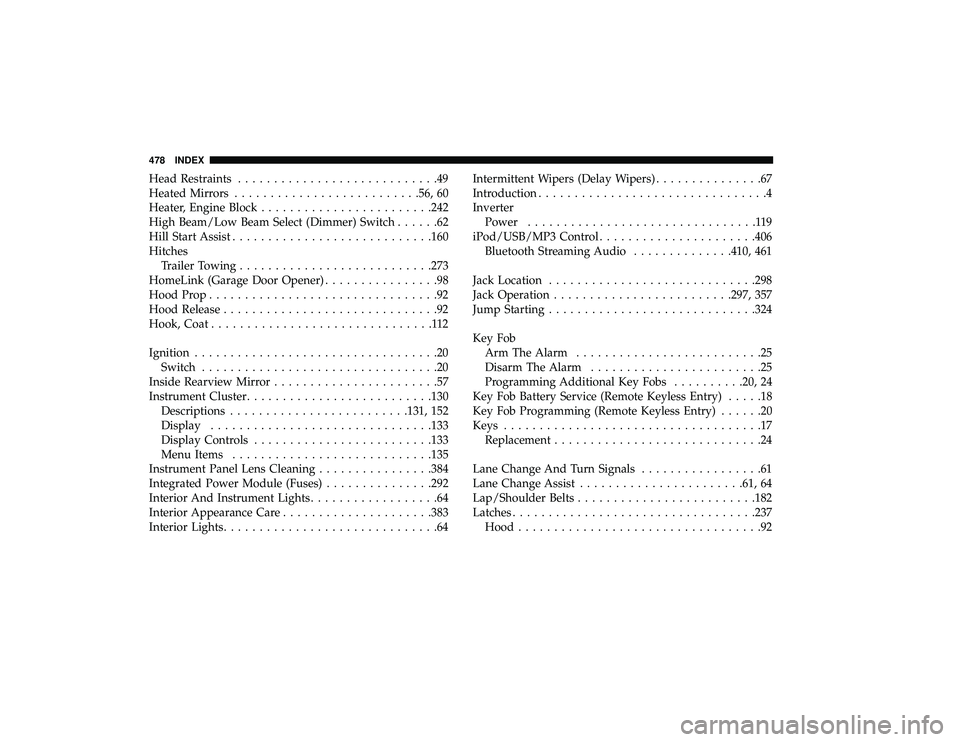
Head Restraints............................49
Heated Mirrors ......................... .56, 60
Heater, Engine Block ....................... .242
High Beam/Low Beam Select (Dimmer) Switch ......62
Hill Start Assist ........................... .160
Hitches Trailer Towing .......................... .273
HomeLink (Garage Door Opener) ................98
Hood Prop ................................92
Hood Release ..............................92
Hook, Coat ...............................112
Ignition ..................................20
Switch .................................20
Inside Rearview Mirror .......................57
Instrument Cluster ......................... .130
Descriptions ........................ .131, 152
Display .............................. .133
Display Controls ........................ .133
Menu Items ........................... .135
Instrument Panel Lens Cleaning ................384
Integrated Power Module (Fuses) ...............292
Interior And Instrument Lights ..................64
Interior Appearance Care .................... .383
Interior Lights ..............................64 Intermittent Wipers (Delay Wipers)
...............67
Introduction ................................4
Inverter Power ................................119
iPod/USB/MP3 Control ..................... .406
Bluetooth Streaming Audio ..............410, 461
Jack Location ............................ .298
Jack Operation ........................ .297, 357
Jump Starting ............................ .324
Key Fob Arm The Alarm ..........................25
Disarm The Alarm ........................25
Programming Additional Key Fobs ..........20, 24
Key Fob Battery Service (Remote Keyless Entry) .....18
Key Fob Programming (Remote Keyless Entry) ......20
Keys ....................................17
Replacement .............................24
Lane Change And Turn Signals .................61
Lane Change Assist ...................... .61, 64
Lap/Shoulder
Belts ........................ .182
Latches ................................. .237
Hood ..................................92
478 INDEX