radio controls DODGE GRAND CARAVAN 2020 User Guide
[x] Cancel search | Manufacturer: DODGE, Model Year: 2020, Model line: GRAND CARAVAN, Model: DODGE GRAND CARAVAN 2020Pages: 380, PDF Size: 14.92 MB
Page 342 of 380
340MULTIMEDIA
STEERING WHEEL AUDIO CONTROLS — IF
EQUIPPED
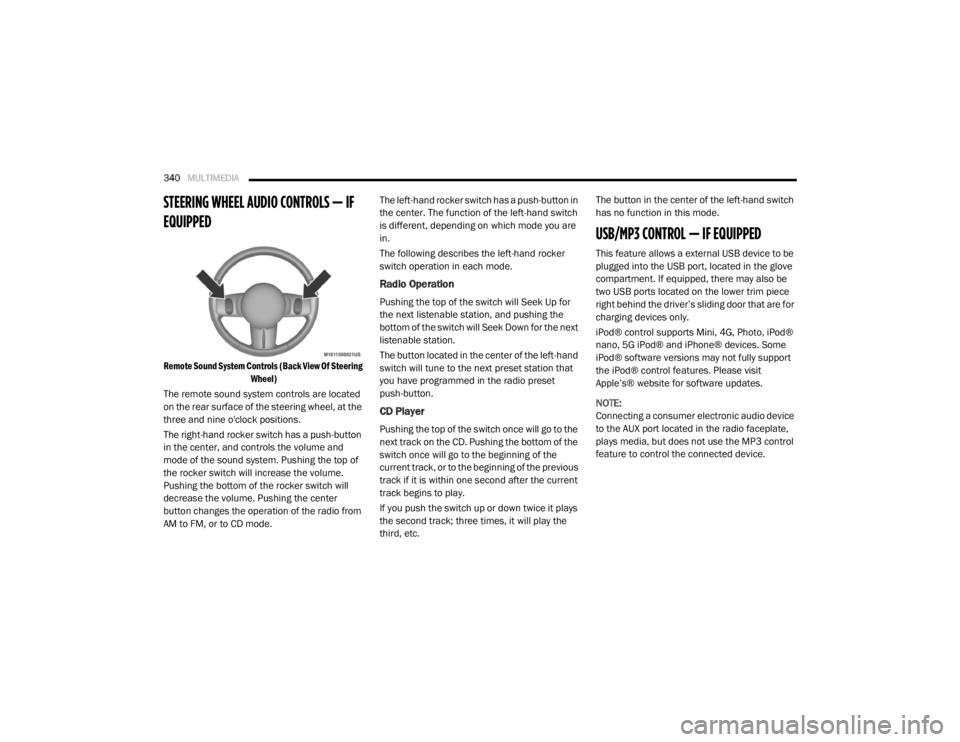
Remote Sound System Controls (Back View Of Steering
Wheel)
The remote sound system controls are located
on the rear surface of the steering wheel, at the
three and nine o'clock positions.
The right-hand rocker switch has a push-button
in the center, and controls the volume and
mode of the sound system. Pushing the top of
the rocker switch will increase the volume.
Pushing the bottom of the rocker switch will
decrease the volume. Pushing the center
button changes the operation of the radio from
AM to FM, or to CD mode. The left-hand rocker switch has a push-button in
the center. The function of the left-hand switch
is different, depending on which mode you are
in.
The following describes the left-hand rocker
switch operation in each mode.
Radio Operation
Pushing the top of the switch will Seek Up for
the next listenable station, and pushing the
bottom of the switch will Seek Down for the next
listenable station.
The button located in the center of the left-hand
switch will tune to the next preset station that
you have programmed in the radio preset
push-button.
CD Player
Pushing the top of the switch once will go to the
next track on the CD. Pushing the bottom of the
switch once will go to the beginning of the
current track, or to the beginning of the previous
track if it is within one second after the current
track begins to play.
If you push the switch up or down twice it plays
the second track; three times, it will play the
third, etc.The button in the center of the left-hand switch
has no function in this mode.
USB/MP3 CONTROL — IF EQUIPPED
This feature allows a external USB device to be
plugged into the USB port, located in the glove
compartment. If equipped, there may also be
two USB ports located on the lower trim piece
right behind the driver’s sliding door that are for
charging devices only.
iPod® control supports Mini, 4G, Photo, iPod®
nano, 5G iPod® and iPhone® devices. Some
iPod® software versions may not fully support
the iPod® control features. Please visit
Apple’s® website for software updates.
NOTE:
Connecting a consumer electronic audio device
to the AUX port located in the radio faceplate,
plays media, but does not use the MP3 control
feature to control the connected device.
20_RT_OM_EN_USC_t.book Page 340
Page 347 of 380
MULTIMEDIA345
When connecting an external source to the AUX
input, be sure to follow the standard color
coding for the VES jacks.
NOTE:
Certain high-end video game consoles will
exceed the power limit of the vehicle's Power
Inverter. Refer to “Power Inverter — If Equipped”
in “Getting To Know Your Vehicle” for more
information.
Using The Remote Control
1. Push the Mode button on the Remote
Control.
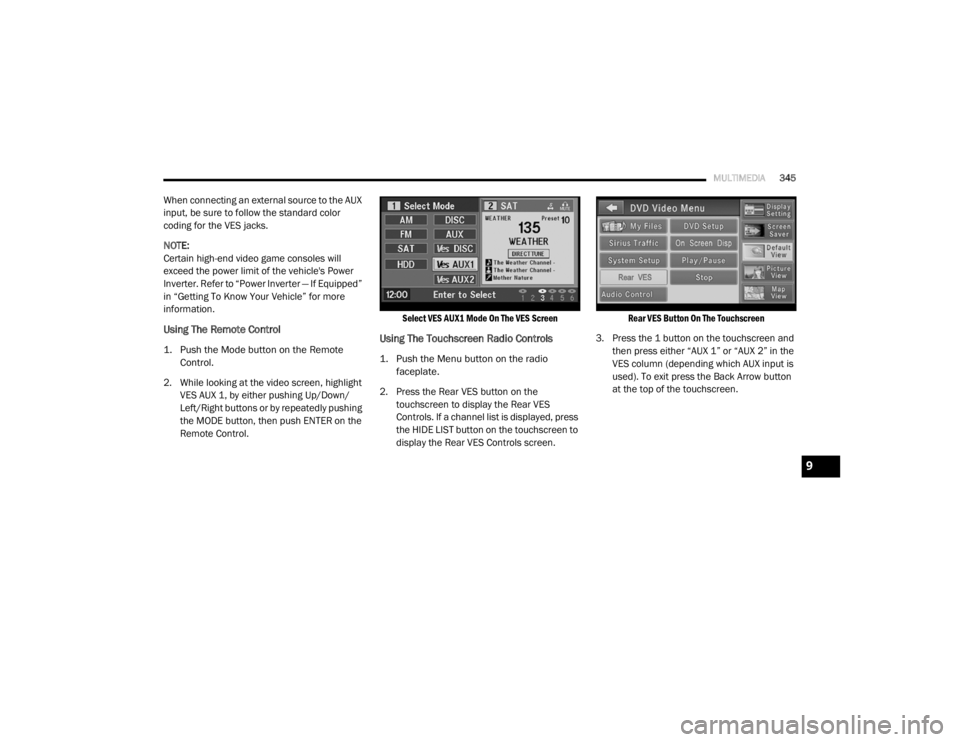
2. While looking at the video screen, highlight VES AUX 1, by either pushing Up/Down/
Left/Right buttons or by repeatedly pushing
the MODE button, then push ENTER on the
Remote Control.
Select VES AUX1 Mode On The VES Screen
Using The Touchscreen Radio Controls
1. Push the Menu button on the radio
faceplate.
2. Press the Rear VES button on the touchscreen to display the Rear VES
Controls. If a channel list is displayed, press
the HIDE LIST button on the touchscreen to
display the Rear VES Controls screen.
Rear VES Button On The Touchscreen
3. Press the 1 button on the touchscreen and then press either “AUX 1” or “AUX 2” in the
VES column (depending which AUX input is
used). To exit press the Back Arrow button
at the top of the touchscreen.
9
20_RT_OM_EN_USC_t.book Page 345
Page 348 of 380
346MULTIMEDIA
Play A DVD Using The Touchscreen Radio
NOTE:
Headunit DVD player does not play Blu-ray™
Discs.
1. Push the OPEN/CLOSE or LOAD button on
the radio faceplate (Touchscreen).
2. Insert the DVD with the label facing up. The radio automatically selects the appropriate
mode after the disc is recognized and
displays the menu screen or starts playing
the first track.
Using The Remote Control
1. Push the Source button on the Remote Control.
2. Highlight DISC by either pushing Up/Down/ Left/Right buttons or by repeatedly pushing
the Source button, then push “Enter/OK”.
NOTE:
The VES will retain the last setting when turned
off.
Using The Touchscreen Radio Controls
1. Push the Menu button on the radio faceplate.
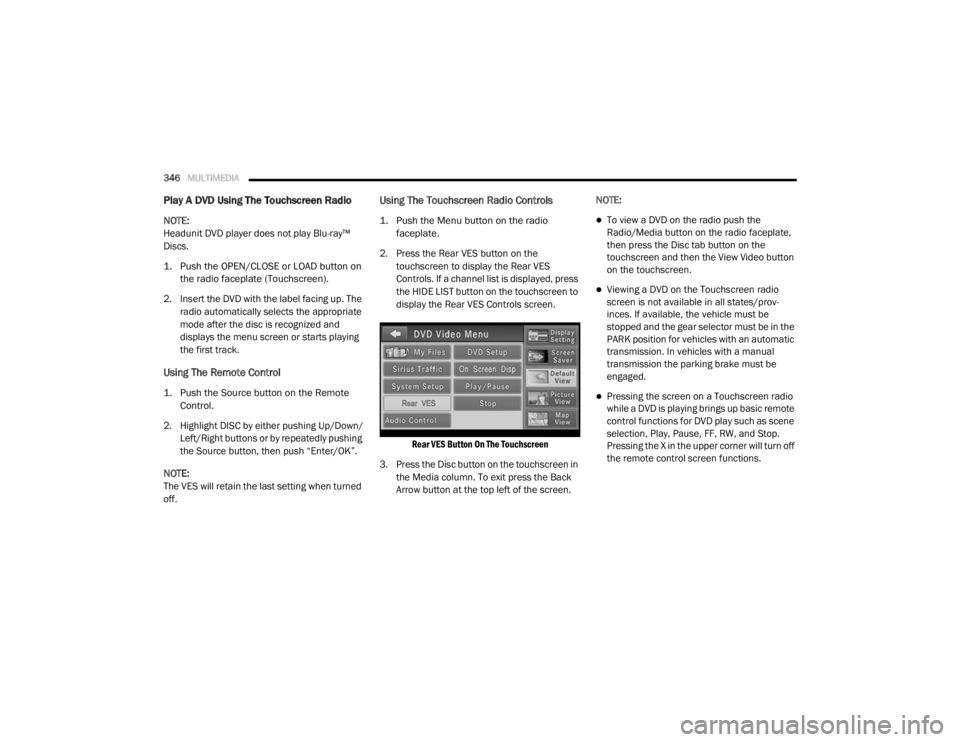
2. Press the Rear VES button on the touchscreen to display the Rear VES
Controls. If a channel list is displayed, press
the HIDE LIST button on the touchscreen to
display the Rear VES Controls screen.
Rear VES Button On The Touchscreen
3. Press the Disc button on the touchscreen in the Media column. To exit press the Back
Arrow button at the top left of the screen. NOTE:To view a DVD on the radio push the
Radio/Media button on the radio faceplate,
then press the Disc tab button on the
touchscreen and then the View Video button
on the touchscreen.
Viewing a DVD on the Touchscreen radio
screen is not available in all states/prov
-
inces. If available, the vehicle must be
stopped and the gear selector must be in the
PARK position for vehicles with an automatic
transmission. In vehicles with a manual
transmission the parking brake must be
engaged.
Pressing the screen on a Touchscreen radio
while a DVD is playing brings up basic remote
control functions for DVD play such as scene
selection, Play, Pause, FF, RW, and Stop.
Pressing the X in the upper corner will turn off
the remote control screen functions.
20_RT_OM_EN_USC_t.book Page 346
Page 349 of 380
MULTIMEDIA347
Play A DVD Using The VES Player — If
Equipped
Insert the DVD with the label facing up. The VES
player automatically selects the appropriate
mode after the disc is recognized and starts
playing the DVD.
NOTE:
The VES player has basic DVD control function
such as Menu, Play, Pause, FF, RW and Stop.
Using The Remote Control
1. Push the Source button on the Remote
Control.
2. Highlight VES DISC by either pushing Up/ Down/Left/Right buttons or by repeatedly
pushing the Source button, then push
“Enter/OK” on the Remote Control.
NOTE:
The VES will retain the last setting when turned
off.
Using The Touchscreen Radio Controls
1. Push the Menu button on the radio faceplate.
2. Press the Rear VES button on the touchscreen to display the Rear VES
Controls. If a channel list is displayed, press
the HIDE LIST button on the touchscreen to
display the Rear VES Controls screen.
Rear VES Button On The Touchscreen
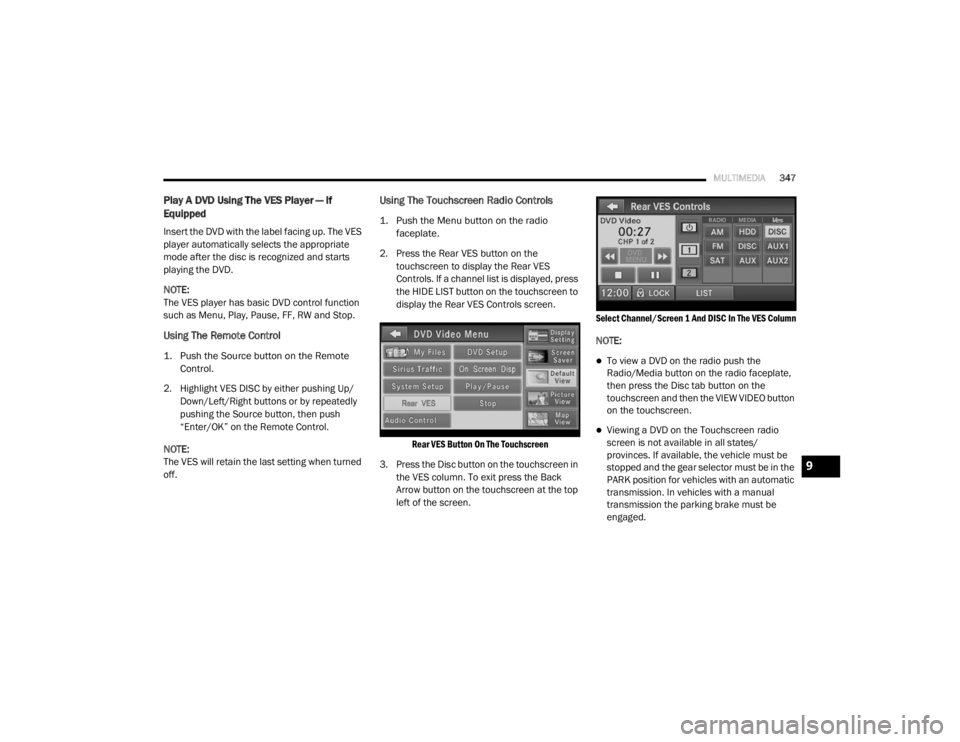
3. Press the Disc button on the touchscreen in the VES column. To exit press the Back
Arrow button on the touchscreen at the top
left of the screen.
Select Channel/Screen 1 And DISC In The VES Column
NOTE:
To view a DVD on the radio push the
Radio/Media button on the radio faceplate,
then press the Disc tab button on the
touchscreen and then the VIEW VIDEO button
on the touchscreen.
Viewing a DVD on the Touchscreen radio
screen is not available in all states/
provinces. If available, the vehicle must be
stopped and the gear selector must be in the
PARK position for vehicles with an automatic
transmission. In vehicles with a manual
transmission the parking brake must be
engaged.
9
20_RT_OM_EN_USC_t.book Page 347
Page 350 of 380
348MULTIMEDIA
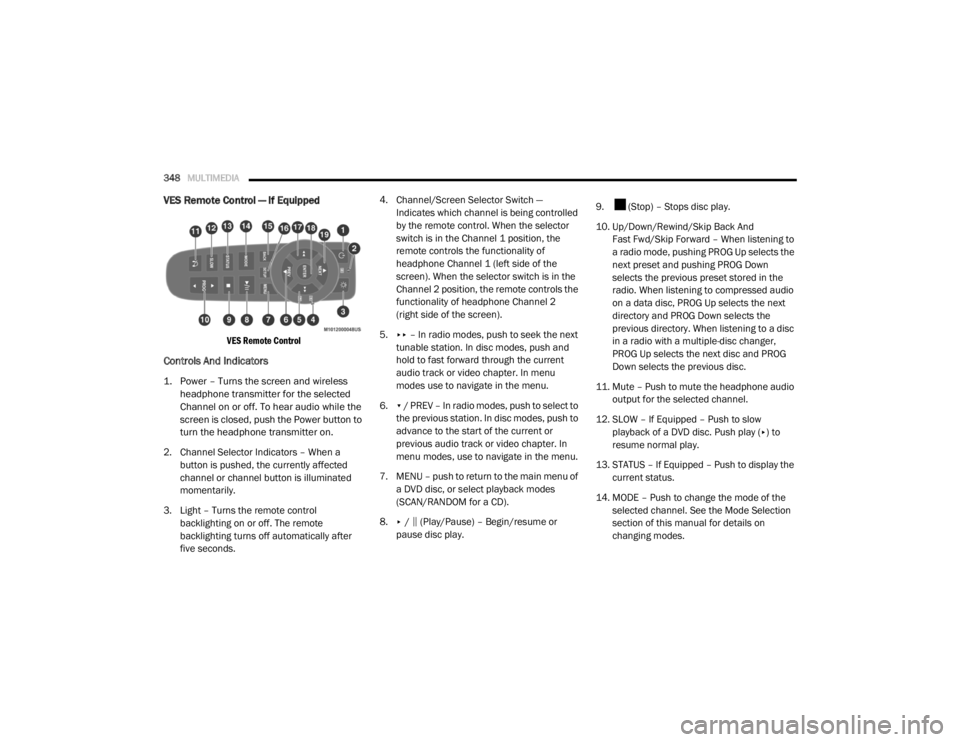
VES Remote Control — If Equipped
VES Remote Control
Controls And Indicators
1. Power – Turns the screen and wireless
headphone transmitter for the selected
Channel on or off. To hear audio while the
screen is closed, push the Power button to
turn the headphone transmitter on.
2. Channel Selector Indicators – When a button is pushed, the currently affected
channel or channel button is illuminated
momentarily.
3. Light – Turns the remote control backlighting on or off. The remote
backlighting turns off automatically after
five seconds. 4. Channel/Screen Selector Switch —
Indicates which channel is being controlled
by the remote control. When the selector
switch is in the Channel 1 position, the
remote controls the functionality of
headphone Channel 1 (left side of the
screen). When the selector switch is in the
Channel 2 position, the remote controls the
functionality of headphone Channel 2
(right side of the screen).
5. ▸▸ – In radio modes, push to seek the next
tunable station. In disc modes, push and
hold to fast forward through the current
audio track or video chapter. In menu
modes use to navigate in the menu.
6. ▾ / PREV – In radio modes, push to select to
the previous station. In disc modes, push to
advance to the start of the current or
previous audio track or video chapter. In
menu modes, use to navigate in the menu.
7. MENU – push to return to the main menu of a DVD disc, or select playback modes
(SCAN/RANDOM for a CD).
8. ▸ / ‖ (Play/Pause) – Begin/resume or
pause disc play. 9. (Stop) – Stops disc play.
10. Up/Down/Rewind/Skip Back And
Fast Fwd/Skip Forward – When listening to
a radio mode, pushing PROG Up selects the
next preset and pushing PROG Down
selects the previous preset stored in the
radio. When listening to compressed audio
on a data disc, PROG Up selects the next
directory and PROG Down selects the
previous directory. When listening to a disc
in a radio with a multiple-disc changer,
PROG Up selects the next disc and PROG
Down selects the previous disc.
11. Mute – Push to mute the headphone audio output for the selected channel.
12. SLOW – If Equipped – Push to slow playback of a DVD disc. Push play ( ▸) to
resume normal play.
13. STATUS – If Equipped – Push to display the current status.
14. MODE – Push to change the mode of the selected channel. See the Mode Selection
section of this manual for details on
changing modes.
20_RT_OM_EN_USC_t.book Page 348
Page 352 of 380
350MULTIMEDIA
Headphones Operation
Front seat occupants receive some headphone
audio coverage to allow them to adjust the
headphone volume for the young rear seat
occupants that may not be able to do so for
themselves.
If no audio is heard after increasing the volume
control, verify that the screen is turned on and
in the down position and that the channel is not
muted. If audio is still not heard, check that fully
charged batteries are installed in the
headphones.
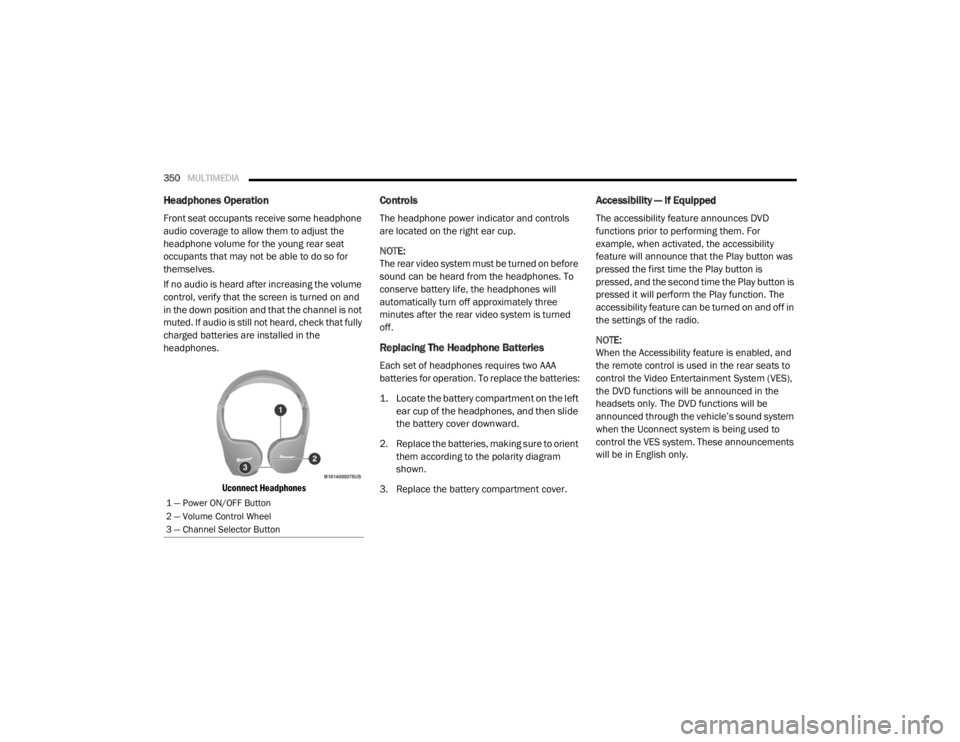
Uconnect Headphones
Controls
The headphone power indicator and controls
are located on the right ear cup.
NOTE:
The rear video system must be turned on before
sound can be heard from the headphones. To
conserve battery life, the headphones will
automatically turn off approximately three
minutes after the rear video system is turned
off.
Replacing The Headphone Batteries
Each set of headphones requires two AAA
batteries for operation. To replace the batteries:
1. Locate the battery compartment on the left ear cup of the headphones, and then slide
the battery cover downward.
2. Replace the batteries, making sure to orient them according to the polarity diagram
shown.
3. Replace the battery compartment cover.
Accessibility — If Equipped
The accessibility feature announces DVD
functions prior to performing them. For
example, when activated, the accessibility
feature will announce that the Play button was
pressed the first time the Play button is
pressed, and the second time the Play button is
pressed it will perform the Play function. The
accessibility feature can be turned on and off in
the settings of the radio.
NOTE:
When the Accessibility feature is enabled, and
the remote control is used in the rear seats to
control the Video Entertainment System (VES),
the DVD functions will be announced in the
headsets only. The DVD functions will be
announced through the vehicle’s sound system
when the Uconnect system is being used to
control the VES system. These announcements
will be in English only.
1 — Power ON/OFF Button
2 — Volume Control Wheel
3 — Channel Selector Button
20_RT_OM_EN_USC_t.book Page 350
Page 354 of 380

352MULTIMEDIA
When in shared disc mode both the radio and
the VES have control of the video functions. The
VES has the ability to control the following video
modes:
1. CD: Ability to Fast Forward, Rewind, Scan,
and Track Up/Down.
2. CD Changer (in radio): Ability to Disk Up/Down and program all listed CD controls
(Fast Forward, Rewind, Scan, and Track
Up/Down).
The VES can even control radio modes or video
modes while the radio is turned off. The VES can
access the radio modes or disc modes by
navigating to those modes on the VES and
activating a radio mode or disc mode.
Station List Menu
When listening to Satellite audio, pushing the
remote control’s Pop-Up/Menu button displays
a list of all available channels. Navigate this list
using the remote control’s navigation buttons
(▴, ▾ ) to find the desired station, push the
remote control’s Enter/OK button to tune to
that station. To jump through the list more
quickly, navigate to the Page Up and Page Down
icons on the screen.
Disc Menu
When listening to a CD Audio or CD Data disc,
pushing the remote control’s Pop-Up/Menu
button displays a list of all commands which
control playback of the disc. Using the options
you can activate or cancel Scan play and
Random play.
Display Settings
When watching a video source (DVD Video with
the disc in Play mode, Aux Video, etc.), pushing
the remote control’s Setup button activates the
Display Settings menu. These settings control
the appearance of the video on the screen. The
factory default settings are already set for
optimum viewing, so there is no need to change
these settings under normal circumstances.
To change the settings, push the remote
control’s navigation buttons ( ▴, ▾) to select an
item, then push the remote control’s navigation
buttons ( ▸, ◂) to change the value for the
currently selected item. To reset all values back
to the original settings, select the Default
Settings menu option and press the remote
control’s Enter/OK button. Disc Features control the remote DVD settings
of DVD being watched in the remote player.
Listening To Audio With The Screen Closed
To listen to only audio portion of the channel
with the screen closed:
1. Set the audio to the desired source and
channel.
2. Close the video screen.
3. To change the current audio mode, push the remote control’s Mode button. This will
automatically select the next available
audio mode without using the Mode/Select
menu.
If the screen is closed and there is no audio
heard, verify that the headphones are turned on
(the On indicator is illuminated) and the
headphone selector switch is on the desired
channel. If the headphones are turned on, push
the remote control’s power button to turn audio
on. If audio is still not heard, check that fully
charged batteries are installed in the
headphones.
20_RT_OM_EN_USC_t.book Page 352
Page 375 of 380

373
Mini-Trip Computer
................................... 87, 93Mirrors...................................................... 34, 36Automatic Dimming..................................... 34Electric Remote........................................... 36Exterior Folding........................................... 36Heated................................................. 34, 37Outside................................................. 34, 35Rearview.............................................. 34, 35Vanity.......................................................... 37Modifications/Alterations Vehicle.......................................................... 8Monitor, Tire Pressure System....................... 115Mopar Parts................................................... 366MP3 Control.................................................. 340Multi-Function Control Lever............................ 37
N
New Vehicle Break-In Period.......................... 163
O
Occupant Restraints...................................... 119Octane Rating, Gasoline (Fuel)............ 267, 272Oil Change IndicatorReset........................................................... 87Oil Filter, Change........................................... 234Oil Filter, Selection......................................... 234Oil Pressure Light............................................ 96Oil, Engine........................................... 233, 272Capacity.................................................... 271Change Interval......................................... 233
Checking................................................... 232Disposal................................................... 234Filter................................................ 234, 272Filter Disposal........................................... 234Identification Logo.................................... 234Materials Added To.................................. 234Pressure Warning Light............................... 96Recommendation............................ 233, 271Synthetic.................................................. 234Viscosity.......................................... 234, 271Onboard Diagnostic System.......................... 101Operating Precautions.................................. 101Operator ManualOwner's Manual.................................... 8, 367Outside Rearview Mirrors......................... 34, 35Overhead Console........................................... 71Overhead Travel Information Center................ 71Overheating, Engine...................................... 221Owner’s Manual (Operator Manual)................... 8
P
Paint Care..................................................... 262Parking Brake............................................... 164ParkSense System, Rear.............................. 175Personal Settings............................................. 90Pets.............................................................. 159Phone, Hands-Free (Uconnect)..................... 304Placard, Tire And Loading Information.......... 249
PowerBrakes...................................................... 266Door Locks...................................................17Inverter........................................................77Mirrors.........................................................36Outlet (Auxiliary Electrical Outlet).................75Seats...........................................................27Steering........................................... 172, 173Vent Windows..............................................59Power SeatsDown...........................................................28Forward.......................................................28Rearward.....................................................28Up................................................................28Pregnant Women And Seat Belts.................. 127Preparation For Jacking................................ 206PretensionersSeat Belts................................................. 127Programmable Electronic Features..................90
R
Radial Ply Tires.............................................. 254Radiator Cap (Coolant Pressure Cap)............ 241Radio Operation............................................ 359Radio Remote Controls................................. 340Rear Air Conditioning.......................................45Rear Camera................................................. 179Rear Cross Path............................................ 113Rear ParkSense System................................ 175Reclining Rear Seats........................................21
11
20_RT_OM_EN_USC_t.book Page 373