automatic transmission DODGE GRAND CARAVAN 2020 Owner's Manual
[x] Cancel search | Manufacturer: DODGE, Model Year: 2020, Model line: GRAND CARAVAN, Model: DODGE GRAND CARAVAN 2020Pages: 380, PDF Size: 14.92 MB
Page 209 of 380
IN CASE OF EMERGENCY207
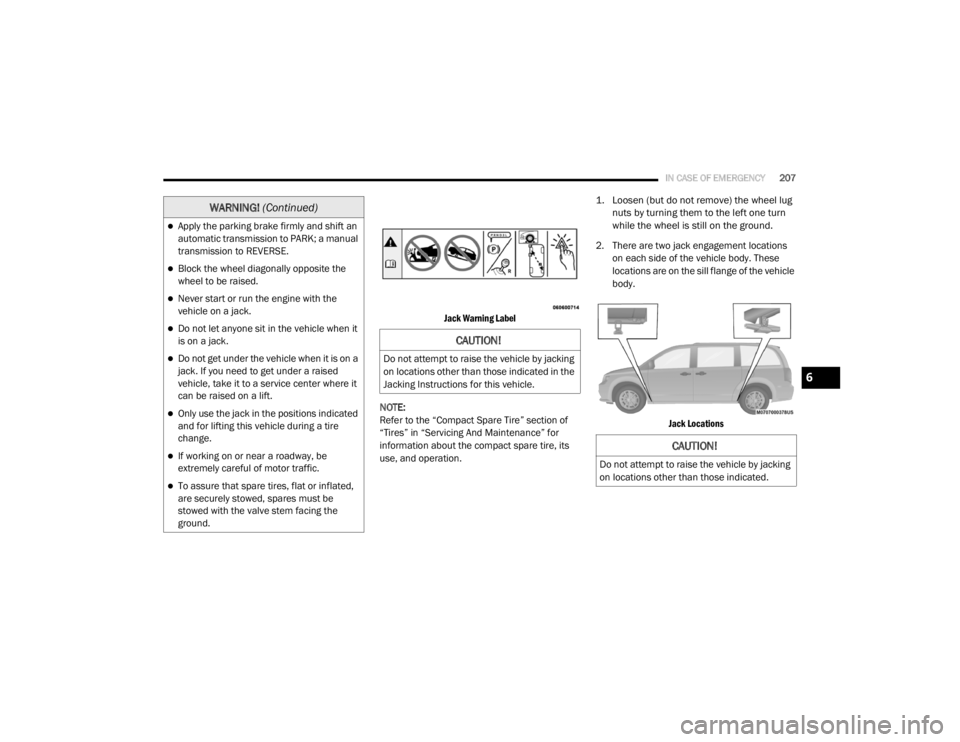
Jack Warning Label
NOTE:
Refer to the “Compact Spare Tire” section of
“Tires” in “Servicing And Maintenance” for
information about the compact spare tire, its
use, and operation.
1. Loosen (but do not remove) the wheel lug
nuts by turning them to the left one turn
while the wheel is still on the ground.
2. There are two jack engagement locations on each side of the vehicle body. These
locations are on the sill flange of the vehicle
body.
Jack Locations
Apply the parking brake firmly and shift an
automatic transmission to PARK; a manual
transmission to REVERSE.
Block the wheel diagonally opposite the
wheel to be raised.
Never start or run the engine with the
vehicle on a jack.
Do not let anyone sit in the vehicle when it
is on a jack.
Do not get under the vehicle when it is on a
jack. If you need to get under a raised
vehicle, take it to a service center where it
can be raised on a lift.
Only use the jack in the positions indicated
and for lifting this vehicle during a tire
change.
If working on or near a roadway, be
extremely careful of motor traffic.
To assure that spare tires, flat or inflated,
are securely stowed, spares must be
stowed with the valve stem facing the
ground.
WARNING! (Continued)
CAUTION!
Do not attempt to raise the vehicle by jacking
on locations other than those indicated in the
Jacking Instructions for this vehicle.
CAUTION!
Do not attempt to raise the vehicle by jacking
on locations other than those indicated.
6
20_RT_OM_EN_USC_t.book Page 207
Page 221 of 380
IN CASE OF EMERGENCY219
(Continued)
JUMP STARTING
If your vehicle has a discharged battery it can be
jump started using a set of jumper cables and a
battery in another vehicle or by using a portable
battery booster pack. Jump starting can be
dangerous if done improperly so please follow
the procedures in this section carefully.
NOTE:
When using a portable battery booster pack
follow the manufacturer’s operating
instructions and precautions.
Preparations For Jump Start
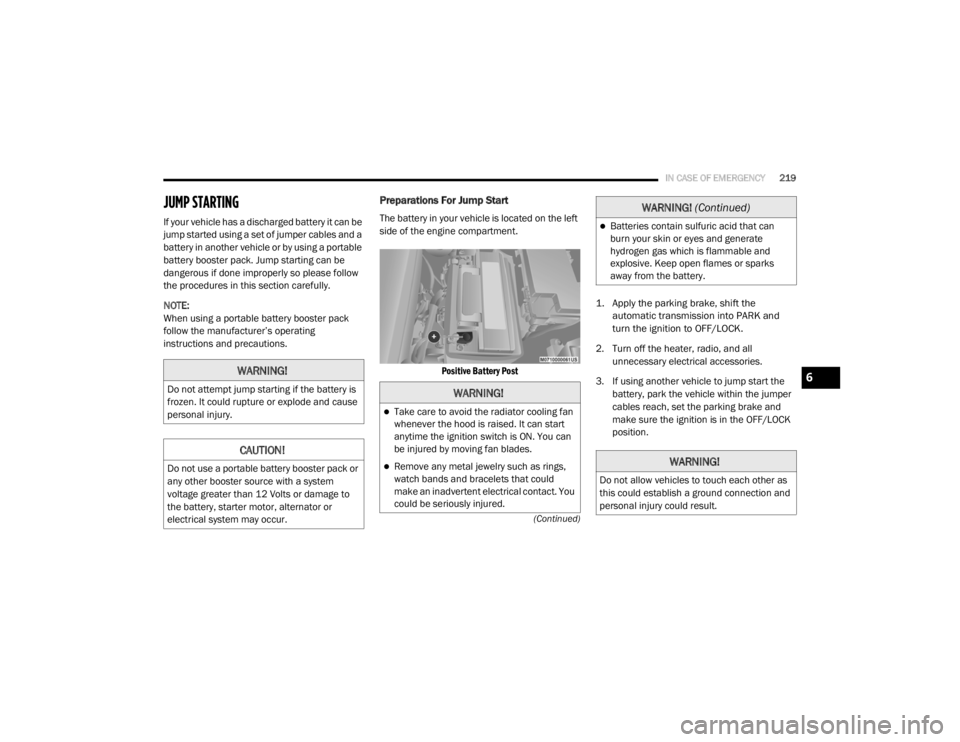
The battery in your vehicle is located on the left
side of the engine compartment.
Positive Battery Post
1. Apply the parking brake, shift the
automatic transmission into PARK and
turn the ignition to OFF/LOCK.
2. Turn off the heater, radio, and all unnecessary electrical accessories.
3. If using another vehicle to jump start the battery, park the vehicle within the jumper
cables reach, set the parking brake and
make sure the ignition is in the OFF/LOCK
position.
WARNING!
Do not attempt jump starting if the battery is
frozen. It could rupture or explode and cause
personal injury.
CAUTION!
Do not use a portable battery booster pack or
any other booster source with a system
voltage greater than 12 Volts or damage to
the battery, starter motor, alternator or
electrical system may occur.
WARNING!
Take care to avoid the radiator cooling fan
whenever the hood is raised. It can start
anytime the ignition switch is ON. You can
be injured by moving fan blades.
Remove any metal jewelry such as rings,
watch bands and bracelets that could
make an inadvertent electrical contact. You
could be seriously injured.
Batteries contain sulfuric acid that can
burn your skin or eyes and generate
hydrogen gas which is flammable and
explosive. Keep open flames or sparks
away from the battery.
WARNING!
Do not allow vehicles to touch each other as
this could establish a ground connection and
personal injury could result.
WARNING! (Continued)
6
20_RT_OM_EN_USC_t.book Page 219
Page 231 of 380

SERVICING AND MAINTENANCE229
Change automatic transmission fluid
and filter if using your vehicle for any of
the following: police, taxi, fleet, or
frequent trailer towing. X
X
Change automatic transmission fluid
and filter. X
Inspect and replace PCV valve if
necessary. X
1. The spark plug change interval is mileage based only, yearly intervals do not apply.
Mileage or time passed (whichever
comes first)
20,000
30,000
40,000
50,000
60,000
70,000
80,000
90,000
100,000
110,000
120,000
130,000
140,000
150,000
Or Years: 2 3 4 5 6 7 8 9 10 11 12 13 14 15
Or Kilometers:
32,000
48,000
64,000
80,000
96,000
112,000
128,000
144,000
160,000
176,000
192,000
208,000
224,000
240,000
7
20_RT_OM_EN_USC_t.book Page 229
Page 245 of 380
SERVICING AND MAINTENANCE243
(Continued)
Master Cylinder — Brake Fluid Level Check
The fluid level in the master cylinder should be
checked when performing underhood services,
or immediately if the “Brake System Warning
Light” indicates system failure.
Clean the top of the master cylinder area before
removing the cap. Add fluid to bring the level up
to the top of the “FULL” mark on the side of the
master cylinder reservoir.
Overfilling of fluid is not recommended because
it may cause leaking in the system.
Add enough fluid to bring the level up to the
requirements described on the brake fluid
reservoir. With disc brakes, fluid level can be
expected to fall as the brake pads wear.
However, low fluid level may be caused by a
leak and a checkup may be needed.
Use only manufacturer's recommended brake
fluid. Refer to “Fluids And Lubricants” in
“Technical Specifications” for further
information.
Automatic Transmission
Selection Of Lubricant
It is important to use the proper transmission
fluid to ensure optimum transmission
performance and life. Use only the
manufacturer's specified transmission fluid.
Refer to “Fluids And Lubricants” in “Technical
Specifications” for fluid specifications. It is
important to maintain the transmission fluid at
the correct level using the recommended fluid.
No chemical flushes should be used in any
transmission; only the approved lubricant
should be used.
WARNING!
Use only manufacturer's recommended
brake fluid. Refer to “Fluids And Lubri -
cants” in “Technical Specifications” for
further information. Using the wrong type of
brake fluid can severely damage your brake
system and/or impair its performance. The
proper type of brake fluid for your vehicle is
also identified on the original factory
installed hydraulic master cylinder
reservoir.
To avoid contamination from foreign matter
or moisture, use only new brake fluid or
fluid that has been in a tightly closed
container. Keep the master cylinder reser -
voir cap secured at all times. Brake fluid in
a open container absorbs moisture from
the air resulting in a lower boiling point. This
may cause it to boil unexpectedly during
hard or prolonged braking, resulting in
sudden brake failure. This could result in a
collision.
Overfilling the brake fluid reservoir can
result in spilling brake fluid on hot engine
parts, causing the brake fluid to catch fire.
Brake fluid can also damage painted and
vinyl surfaces, care should be taken to
avoid its contact with these surfaces.
Do not allow petroleum based fluid to
contaminate the brake fluid. Brake seal
components could be damaged, causing
partial or complete brake failure. This could
result in a collision.
WARNING! (Continued)
7
20_RT_OM_EN_USC_t.book Page 243
Page 246 of 380
244SERVICING AND MAINTENANCE
Special Additives
The manufacturer strongly recommends
against using any special additives in the
transmission. Automatic Transmission Fluid
(ATF) is an engineered product and its
performance may be impaired by supplemental
additives. Therefore, do not add any fluid
additives to the transmission. The only
exception to this policy is the use of special dyes
for diagnosing fluid leaks. Avoid using
transmission sealers as they may adversely
affect seals.
Fluid Level Check
The fluid level is preset at the factory and does
not require adjustment under normal operating
conditions. Routine fluid level checks are not
required, therefore the transmission fill tube is
capped and no dipstick is provided. An
authorized dealer can check your transmission
fluid level using a special service dipstick. If you
notice fluid leakage or transmission
malfunction, visit an authorized dealer
immediately to have the transmission fluid level
checked. Operating the vehicle with an
improper fluid level can cause severe
transmission damage.
Fluid And Filter Changes
Refer to the “Maintenance Plan” in this section
for the proper maintenance intervals.
In addition, change the fluid and filter if the fluid
becomes contaminated (with water, etc.), or if
the transmission is disassembled for any
reason.
RAISING THE VEHICLE
In the case where it is necessary to raise the
vehicle, go to an authorized dealer or service
station.
CAUTION!
Using a transmission fluid other than the
manufacturer’s recommended fluid may
cause deterioration in transmission shift
quality and/or torque converter shudder, and
will require more frequent fluid and filter
changes. Refer to “Fluids And Lubricants” in
“Technical Specifications” for fluid
specifications.
CAUTION!
Do not use chemical flushes in your
transmission as the chemicals can damage
your transmission components. Such damage
is not covered by the New Vehicle Limited
Warranty.
CAUTION!
If a transmission fluid leak occurs, visit an
authorized dealer immediately. Severe
transmission damage may occur. An
authorized dealer has the proper tools to
adjust the fluid level accurately.
20_RT_OM_EN_USC_t.book Page 244
Page 276 of 380
274TECHNICAL SPECIFICATIONS
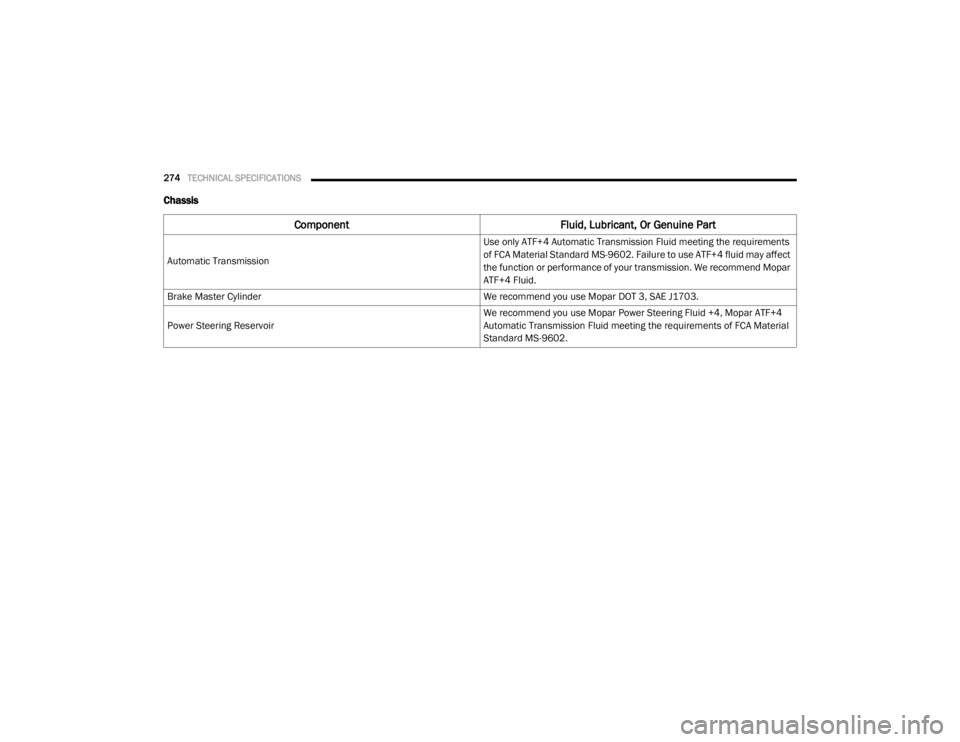
Chassis
Component Fluid, Lubricant, Or Genuine Part
Automatic Transmission
Use only ATF+4 Automatic Transmission Fluid meeting the requirements
of FCA Material Standard MS-9602. Failure to use ATF+4 fluid may affect
the function or performance of your transmission. We recommend Mopar
ATF+4 Fluid.
Brake Master Cylinder We recommend you use Mopar DOT 3, SAE J1703.
Power Steering Reservoir
We recommend you use Mopar Power Steering Fluid +4, Mopar ATF+4
Automatic Transmission Fluid meeting the requirements of FCA Material
Standard MS-9602.
20_RT_OM_EN_USC_t.book Page 274
Page 292 of 380

290MULTIMEDIA
3. Press a button with a folder symbol to open
a folder.
4. Press the Folder Up button to close a folder.
Playing A Video DVD
NOTE:
Viewing a DVD video on the radio screen is not
available in all states, the vehicle must be
stopped and the shifter must be in the PARK
position for vehicles with an automatic
transmission. In vehicles with a manual
transmission the parking brake must be
engaged.
First insert a video DVD.
The playback starts automatically after the DVD
video is recognized by the disc drive. Press the Chapters button to display a list of
available chapters or tracks. Press a Chapter or
Track button in the list to start playback from
the selected section.
Press the View Video button to view the video on
the screen.
DVD MENU Controls
If you insert a DVD video disc that contains a top
menu, a menu may appear.
Press the Cursor Arrow buttons to select the title
you want to view, then press the Enter button to
start playback.
Press the DVD Move button to move
the controls to the right part of the
screen. Press the Close button to close the
DVD MENU Controls.
DVD Playback Controls
In video playback mode, press anywhere on the
touchscreen to show the DVD Playback
Controls.
To pause playback, press the Pause button.
To stop playback, press the Stop button.
Press the Fast Reverse (double left arrows)
button during playback to fast reverse playback.
Press the Fast Forward (double right arrows)
button during playback to fast forward
playback.
Press the Next button to locate succeeding
chapters or tracks.
20_RT_OM_EN_USC_t.book Page 290
Page 348 of 380
346MULTIMEDIA
Play A DVD Using The Touchscreen Radio
NOTE:
Headunit DVD player does not play Blu-ray™
Discs.
1. Push the OPEN/CLOSE or LOAD button on
the radio faceplate (Touchscreen).
2. Insert the DVD with the label facing up. The radio automatically selects the appropriate
mode after the disc is recognized and
displays the menu screen or starts playing
the first track.
Using The Remote Control
1. Push the Source button on the Remote Control.
2. Highlight DISC by either pushing Up/Down/ Left/Right buttons or by repeatedly pushing
the Source button, then push “Enter/OK”.
NOTE:
The VES will retain the last setting when turned
off.
Using The Touchscreen Radio Controls
1. Push the Menu button on the radio faceplate.
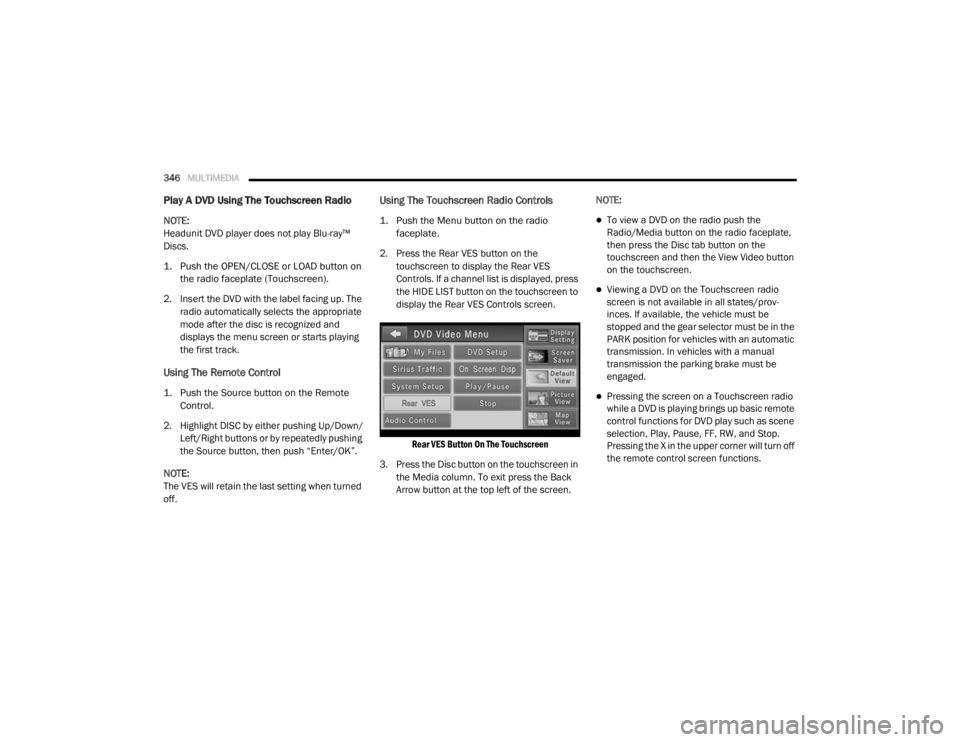
2. Press the Rear VES button on the touchscreen to display the Rear VES
Controls. If a channel list is displayed, press
the HIDE LIST button on the touchscreen to
display the Rear VES Controls screen.
Rear VES Button On The Touchscreen
3. Press the Disc button on the touchscreen in the Media column. To exit press the Back
Arrow button at the top left of the screen. NOTE:To view a DVD on the radio push the
Radio/Media button on the radio faceplate,
then press the Disc tab button on the
touchscreen and then the View Video button
on the touchscreen.
Viewing a DVD on the Touchscreen radio
screen is not available in all states/prov
-
inces. If available, the vehicle must be
stopped and the gear selector must be in the
PARK position for vehicles with an automatic
transmission. In vehicles with a manual
transmission the parking brake must be
engaged.
Pressing the screen on a Touchscreen radio
while a DVD is playing brings up basic remote
control functions for DVD play such as scene
selection, Play, Pause, FF, RW, and Stop.
Pressing the X in the upper corner will turn off
the remote control screen functions.
20_RT_OM_EN_USC_t.book Page 346
Page 349 of 380
MULTIMEDIA347
Play A DVD Using The VES Player — If
Equipped
Insert the DVD with the label facing up. The VES
player automatically selects the appropriate
mode after the disc is recognized and starts
playing the DVD.
NOTE:
The VES player has basic DVD control function
such as Menu, Play, Pause, FF, RW and Stop.
Using The Remote Control
1. Push the Source button on the Remote
Control.
2. Highlight VES DISC by either pushing Up/ Down/Left/Right buttons or by repeatedly
pushing the Source button, then push
“Enter/OK” on the Remote Control.
NOTE:
The VES will retain the last setting when turned
off.
Using The Touchscreen Radio Controls
1. Push the Menu button on the radio faceplate.
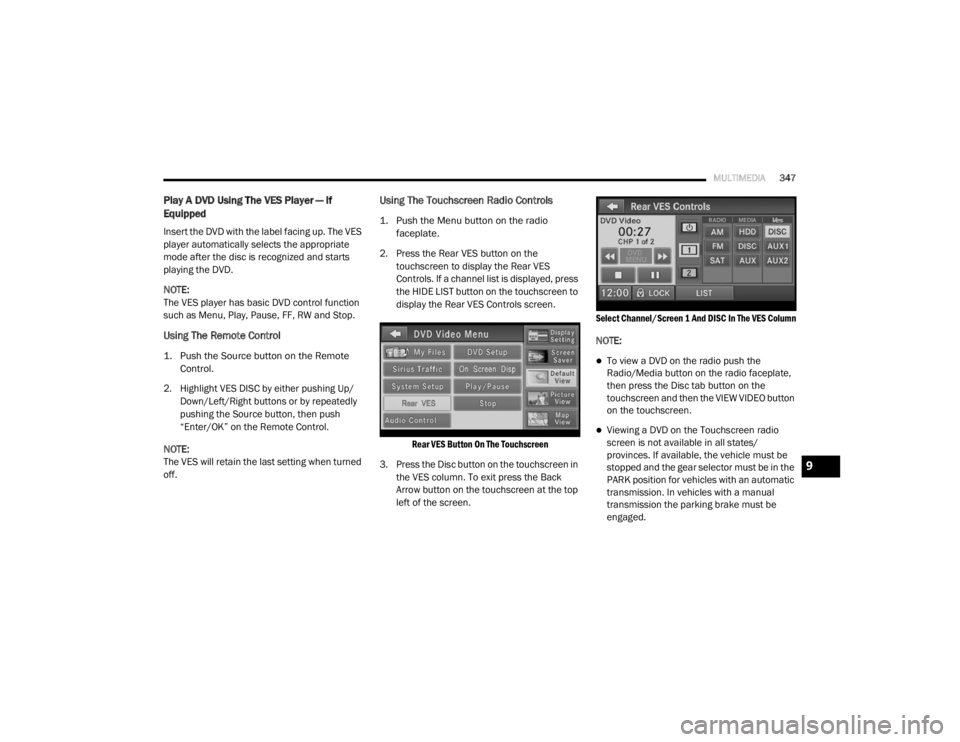
2. Press the Rear VES button on the touchscreen to display the Rear VES
Controls. If a channel list is displayed, press
the HIDE LIST button on the touchscreen to
display the Rear VES Controls screen.
Rear VES Button On The Touchscreen
3. Press the Disc button on the touchscreen in the VES column. To exit press the Back
Arrow button on the touchscreen at the top
left of the screen.
Select Channel/Screen 1 And DISC In The VES Column
NOTE:
To view a DVD on the radio push the
Radio/Media button on the radio faceplate,
then press the Disc tab button on the
touchscreen and then the VIEW VIDEO button
on the touchscreen.
Viewing a DVD on the Touchscreen radio
screen is not available in all states/
provinces. If available, the vehicle must be
stopped and the gear selector must be in the
PARK position for vehicles with an automatic
transmission. In vehicles with a manual
transmission the parking brake must be
engaged.
9
20_RT_OM_EN_USC_t.book Page 347
Page 370 of 380

368
INDEX
A
About Your Brakes......................................... 266Adding Engine Coolant (Antifreeze)............... 240Adding Fuel.................................................... 181Adding Washing Fluid.................................... 232Additives, Fuel............................................... 268AdjustDown........................................................... 28Forward....................................................... 28Rearward..................................................... 28Up................................................................ 28Air Bag........................................................... 132Air Bag Operation...................................... 133Air Bag Warning Light................................ 131Driver Knee Air Bag................................... 134Enhanced Accident Response......... 138, 225Event Data Recorder (EDR)....................... 225If Deployment Occurs................................ 138Knee Impact Bolsters................................ 134Maintaining Your Air Bag System.............. 139Maintenance............................................. 139Side Air Bags............................................. 134Transporting Pets...................................... 159Air Bag Light..................................94, 131, 160Air Cleaner, Engine
(Engine Air Cleaner Filter).............................. 235
Air Conditioner Maintenance........................ 235Air Conditioner Refrigerant........................... 235Air Conditioner System................................. 235Air Conditioning................................................ 56Automatic Rear............................................ 51Rear............................................................. 45Air Conditioning Filter..............................58, 235Air Conditioning, Operating Tips....................... 57Air Filter........................................................ 235Air PressureTires......................................................... 253AlarmArm The System.......................................... 15Disarm The System..................................... 15Security Alarm............................................. 97Alterations/ModificationsVehicle........................................................... 8Antifreeze (Engine Coolant)................. 240, 271Disposal................................................... 242Anti-Lock Brake System (ABS)...................... 103Anti-Lock Warning Light................................... 97Ashtray............................................................. 78Assist, Hill Start............................................. 108Assistance Towing........................................ 312Automatic Dimming Mirror............................... 34Automatic Door Locks............................... 17, 18
Automatic Headlights.......................................38Automatic Transmission....................... 165, 244Adding Fluid..................................... 244, 274Fluid And Filter Change............................. 244Fluid Change............................................. 244Fluid Level Check............................. 243, 244Fluid Type........................................ 243, 274Gear Ranges............................................. 168Special Additives...................................... 244Torque Converter...................................... 172Axle Fluid....................................................... 274Axle Lubrication............................................ 274
B
Battery................................................... 95, 232Charging System Light.................................95Jump Starting........................................... 219Keyless Key Fob Replacement....................10Battery Saver Feature......................................39Belts, Seat.................................................... 160Body Mechanism Lubrication........................ 237B-Pillar Location............................................ 249Brake Assist System..................................... 104Brake Control System, Electronic.................. 104Brake Fluid.................................................... 274
20_RT_OM_EN_USC_t.book Page 368