brake light DODGE GRAND CARAVAN 2020 Owner's Manual
[x] Cancel search | Manufacturer: DODGE, Model Year: 2020, Model line: GRAND CARAVAN, Model: DODGE GRAND CARAVAN 2020Pages: 380, PDF Size: 14.92 MB
Page 195 of 380
STARTING AND OPERATING193
(Continued)
Shallow Standing Water
Although your vehicle is capable of driving
through shallow standing water, consider the
following Warnings and Cautions before doing so.
WARNING!
Driving through standing water limits your
vehicle’s traction capabilities. Do not
exceed 5 mph (8 km/h) when driving
through standing water.
Driving through standing water limits your
vehicle’s braking capabilities, which
increases stopping distances. Therefore,
after driving through standing water, drive
slowly and lightly press on the brake pedal
several times to dry the brakes.
Failure to follow these warnings may result
in injuries that are serious or fatal to you,
your passengers, and others around you.
CAUTION!
Always check the depth of the standing
water before driving through it. Never drive
through standing water that is deeper than
the bottom of the tire rims mounted on the
vehicle.
Determine the condition of the road or the
path that is under water and if there are any
obstacles in the way before driving through
the standing water.
Do not exceed 5 mph (8 km/h) when
driving through standing water. This will
minimize wave effects.
Driving through standing water may cause
damage to your vehicle’s drivetrain compo -
nents. Always inspect your vehicle’s fluids
(i.e., engine oil, transmission, axle, etc.) for
signs of contamination (i.e., fluid that is
milky or foamy in appearance) after driving
through standing water. Do not continue to
operate the vehicle if any fluid appears
contaminated, as this may result in further
damage. Such damage is not covered by
the New Vehicle Limited Warranty.
Getting water inside your vehicle’s engine
can cause it to lock up and stall out, and
cause serious internal damage to the
engine. Such damage is not covered by the
New Vehicle Limited Warranty.
CAUTION! (Continued)
5
20_RT_OM_EN_USC_t.book Page 193
Page 202 of 380

200IN CASE OF EMERGENCY
J2120 Amp Blue –Front/Rear Washer
J22 25 Amp Clear –Sunroof Module
M1 –15 Amp Blue Rear Center Brake Lamp/Brake Switch
M2 –20 Amp Yellow Front Fog Lamps
M3 –20 Amp Yellow Vacuum Pump Motor
M5 –25 Amp Clear Inverter
M6 –20 Amp Yellow Power Outlet #1 (ACC), Rain Sensor, Cigar Lighter
(Instrument Panel or with Console Rear)
M7 –20 Amp Yellow Power Outlet #2 (BATT/ACC SELECT) – Center Seat or with
Console Rear
M8 –20 Amp Yellow Front Heated Seat — If Equipped
M9 –20 Amp Yellow Rear Heated Seat — If Equipped
M10 –15 Amp BlueIgnition Off Draw — Video System, Satellite Radio, DVD,
Hands-Free Module, Universal Garage Door Opener, Vanity
Lamp, Streaming Video Module — If Equipped
M11 –10 Amp Red Climate Control System
M12 –30 Amp Green Amplifier/Radio
M13 –20 Amp Yellow Instrument Cluster, SIREN, Clock Module, Multifunction
Control Switch – If Equipped
M14 –20 Amp Yellow Trailer Tow — If Equipped
M15 –20 Amp Yellow Rear View Mirror, Instrument Cluster, Multifunction Control
Switch, Tire Pressure Monitor
Cavity
Cartridge Fuse Mini-Fuse Description
20_RT_OM_EN_USC_t.book Page 200
Page 204 of 380
202IN CASE OF EMERGENCY
(Continued)
(Continued)
The power windows are fused by a 25 Amp circuit breaker located in the Totally Integrated Power Module.
JACKING AND TIRE CHANGING
M34
–10 Amp RedPark Assist, Heater Climate Control Module, Headlamp
Wash, Compass, Rear Camera, Door Lamps, Flashlight,
Relay Diesel Cabin Heater
M35 –10 Amp Red Heated Mirrors
M36 –20 Amp Yellow Power Outlet #3 (Instrument Panel Or With Console
Center)
M37 –10 Amp Red Antilock Brakes, Stability Control, Stop Lamp, Fuel Pump
M38 –25 Amp Clear Door Lock/Unlock Motors, Liftgate Lock/Unlock Motors
CavityCartridge Fuse Mini-Fuse Description
WARNING!
Do not attempt to change a tire on the side
of the vehicle close to moving traffic. Pull
far enough off the road to avoid the danger
of being hit when operating the jack or
changing the wheel.
Being under a jacked-up vehicle is
dangerous. The vehicle could slip off the
jack and fall on you. You could be crushed.
Never put any part of your body under a
vehicle that is on a jack. If you need to get
under a raised vehicle, take it to a service
center where it can be raised on a lift.
Never start or run the engine while the
vehicle is on a jack.
WARNING! (Continued)
The jack is designed to be used as a tool for
changing tires only. The jack should not be
used to lift the vehicle for service purposes.
The vehicle should be jacked on a firm level
surface only. Avoid ice or slippery areas.
WARNING! (Continued)
20_RT_OM_EN_USC_t.book Page 202
Page 228 of 380
226
SERVICING AND MAINTENANCE
SCHEDULED SERVICING
This vehicle is equipped with an automatic oil
change indicator system. The oil change
indicator system will remind you that it is time to
take your vehicle in for scheduled maintenance.
Based on engine operation conditions, the oil
change indicator message will illuminate. This
means that service is required for your vehicle.
Operating conditions such as frequent
short-trips, trailer tow, extremely hot or cold
ambient temperatures, and E85 fuel usage will
influence when the “Oil Change Required”
message is displayed. Severe Operating
Conditions can cause the change oil message
to illuminate as early as 3,500 miles
(5,600 km) since last reset. Have your vehicle
serviced as soon as possible, within the next
500 miles (805 km).An authorized dealer will reset the oil change
indicator message after completing the
scheduled oil change. If a scheduled oil change
is performed by someone other than an
authorized dealer, the message can be reset by
referring to the steps described under
“Instrument Cluster Display” in “Getting To
Know Your Instrument Panel” for further
information.
NOTE:
Under no circumstances should oil change
intervals exceed 10,000 miles (16,000 km),
12 months or 350 hours of engine run time,
whichever comes first. The 350 hours of engine
run or idle time is generally only a concern for
fleet customers.
Severe Duty All Models
Change engine oil at 4,000 miles (6,500 km) if
the vehicle is operated in a dusty and off road
environment or is operated predominately at
idle or only very low engine RPM. This type of
vehicle use is considered Severe Duty.Once A Month Or Before A Long Trip:Check engine oil level.
Check windshield washer fluid level.
Check tire pressure and look for unusual
wear or damage. Rotate tires at the first sign
of irregular wear, even if it occurs before the
oil indicator system turns on.
Check the fluid levels of the coolant reservoir,
brake master cylinder, and power steering
and fill as needed.
Check function of all interior and exterior
lights.
20_RT_OM_EN_USC_t.book Page 226
Page 245 of 380
SERVICING AND MAINTENANCE243
(Continued)
Master Cylinder — Brake Fluid Level Check
The fluid level in the master cylinder should be
checked when performing underhood services,
or immediately if the “Brake System Warning
Light” indicates system failure.
Clean the top of the master cylinder area before
removing the cap. Add fluid to bring the level up
to the top of the “FULL” mark on the side of the
master cylinder reservoir.
Overfilling of fluid is not recommended because
it may cause leaking in the system.
Add enough fluid to bring the level up to the
requirements described on the brake fluid
reservoir. With disc brakes, fluid level can be
expected to fall as the brake pads wear.
However, low fluid level may be caused by a
leak and a checkup may be needed.
Use only manufacturer's recommended brake
fluid. Refer to “Fluids And Lubricants” in
“Technical Specifications” for further
information.
Automatic Transmission
Selection Of Lubricant
It is important to use the proper transmission
fluid to ensure optimum transmission
performance and life. Use only the
manufacturer's specified transmission fluid.
Refer to “Fluids And Lubricants” in “Technical
Specifications” for fluid specifications. It is
important to maintain the transmission fluid at
the correct level using the recommended fluid.
No chemical flushes should be used in any
transmission; only the approved lubricant
should be used.
WARNING!
Use only manufacturer's recommended
brake fluid. Refer to “Fluids And Lubri -
cants” in “Technical Specifications” for
further information. Using the wrong type of
brake fluid can severely damage your brake
system and/or impair its performance. The
proper type of brake fluid for your vehicle is
also identified on the original factory
installed hydraulic master cylinder
reservoir.
To avoid contamination from foreign matter
or moisture, use only new brake fluid or
fluid that has been in a tightly closed
container. Keep the master cylinder reser -
voir cap secured at all times. Brake fluid in
a open container absorbs moisture from
the air resulting in a lower boiling point. This
may cause it to boil unexpectedly during
hard or prolonged braking, resulting in
sudden brake failure. This could result in a
collision.
Overfilling the brake fluid reservoir can
result in spilling brake fluid on hot engine
parts, causing the brake fluid to catch fire.
Brake fluid can also damage painted and
vinyl surfaces, care should be taken to
avoid its contact with these surfaces.
Do not allow petroleum based fluid to
contaminate the brake fluid. Brake seal
components could be damaged, causing
partial or complete brake failure. This could
result in a collision.
WARNING! (Continued)
7
20_RT_OM_EN_USC_t.book Page 243
Page 268 of 380
266
TECHNICAL SPECIFICATIONS
IDENTIFICATION DATA
Vehicle Identification Number
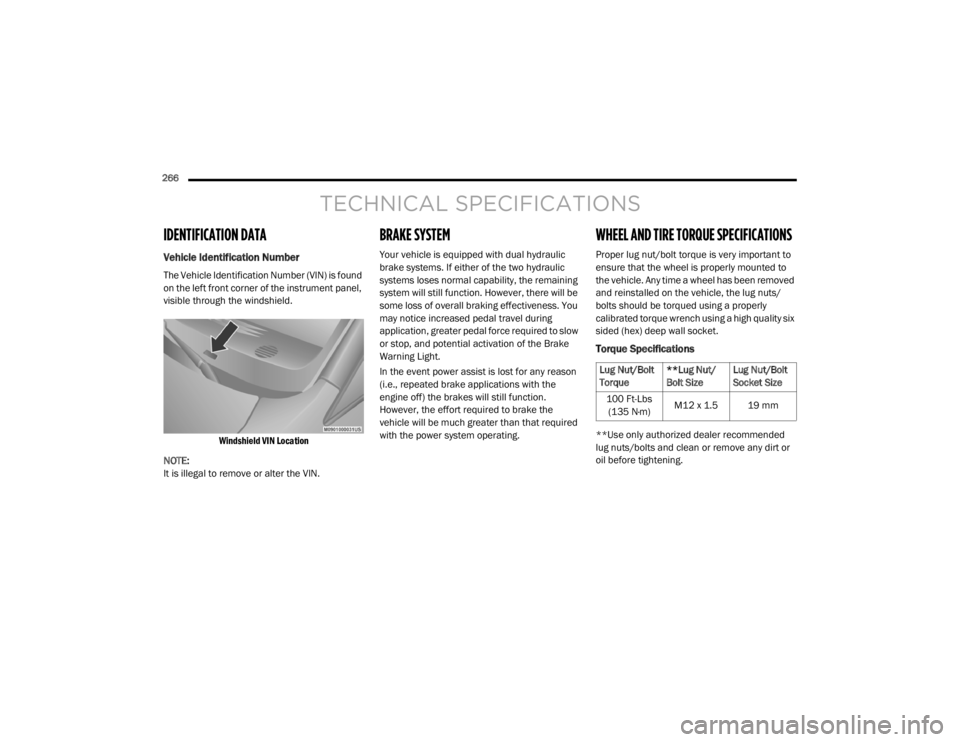
The Vehicle Identification Number (VIN) is found
on the left front corner of the instrument panel,
visible through the windshield.
Windshield VIN Location
NOTE:
It is illegal to remove or alter the VIN.
BRAKE SYSTEM
Your vehicle is equipped with dual hydraulic
brake systems. If either of the two hydraulic
systems loses normal capability, the remaining
system will still function. However, there will be
some loss of overall braking effectiveness. You
may notice increased pedal travel during
application, greater pedal force required to slow
or stop, and potential activation of the Brake
Warning Light.
In the event power assist is lost for any reason
(i.e., repeated brake applications with the
engine off) the brakes will still function.
However, the effort required to brake the
vehicle will be much greater than that required
with the power system operating.
WHEEL AND TIRE TORQUE SPECIFICATIONS
Proper lug nut/bolt torque is very important to
ensure that the wheel is properly mounted to
the vehicle. Any time a wheel has been removed
and reinstalled on the vehicle, the lug nuts/
bolts should be torqued using a properly
calibrated torque wrench using a high quality six
sided (hex) deep wall socket.
Torque Specifications
**Use only authorized dealer recommended
lug nuts/bolts and clean or remove any dirt or
oil before tightening.
Lug Nut/Bolt
Torque **Lug Nut/
Bolt SizeLug Nut/Bolt
Socket Size
100 Ft-Lbs (135 N·m) M12 x 1.5 19 mm
20_RT_OM_EN_USC_t.book Page 266
Page 348 of 380
346MULTIMEDIA
Play A DVD Using The Touchscreen Radio
NOTE:
Headunit DVD player does not play Blu-ray™
Discs.
1. Push the OPEN/CLOSE or LOAD button on
the radio faceplate (Touchscreen).
2. Insert the DVD with the label facing up. The radio automatically selects the appropriate
mode after the disc is recognized and
displays the menu screen or starts playing
the first track.
Using The Remote Control
1. Push the Source button on the Remote Control.
2. Highlight DISC by either pushing Up/Down/ Left/Right buttons or by repeatedly pushing
the Source button, then push “Enter/OK”.
NOTE:
The VES will retain the last setting when turned
off.
Using The Touchscreen Radio Controls
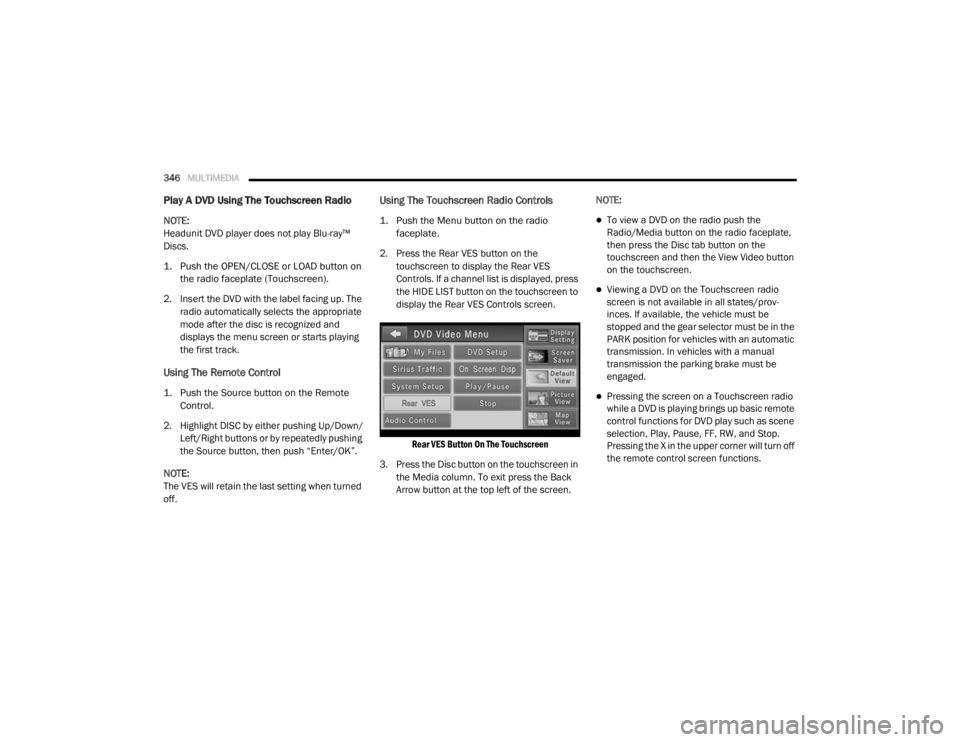
1. Push the Menu button on the radio faceplate.
2. Press the Rear VES button on the touchscreen to display the Rear VES
Controls. If a channel list is displayed, press
the HIDE LIST button on the touchscreen to
display the Rear VES Controls screen.
Rear VES Button On The Touchscreen
3. Press the Disc button on the touchscreen in the Media column. To exit press the Back
Arrow button at the top left of the screen. NOTE:To view a DVD on the radio push the
Radio/Media button on the radio faceplate,
then press the Disc tab button on the
touchscreen and then the View Video button
on the touchscreen.
Viewing a DVD on the Touchscreen radio
screen is not available in all states/prov
-
inces. If available, the vehicle must be
stopped and the gear selector must be in the
PARK position for vehicles with an automatic
transmission. In vehicles with a manual
transmission the parking brake must be
engaged.
Pressing the screen on a Touchscreen radio
while a DVD is playing brings up basic remote
control functions for DVD play such as scene
selection, Play, Pause, FF, RW, and Stop.
Pressing the X in the upper corner will turn off
the remote control screen functions.
20_RT_OM_EN_USC_t.book Page 346
Page 349 of 380
MULTIMEDIA347
Play A DVD Using The VES Player — If
Equipped
Insert the DVD with the label facing up. The VES
player automatically selects the appropriate
mode after the disc is recognized and starts
playing the DVD.
NOTE:
The VES player has basic DVD control function
such as Menu, Play, Pause, FF, RW and Stop.
Using The Remote Control
1. Push the Source button on the Remote
Control.
2. Highlight VES DISC by either pushing Up/ Down/Left/Right buttons or by repeatedly
pushing the Source button, then push
“Enter/OK” on the Remote Control.
NOTE:
The VES will retain the last setting when turned
off.
Using The Touchscreen Radio Controls
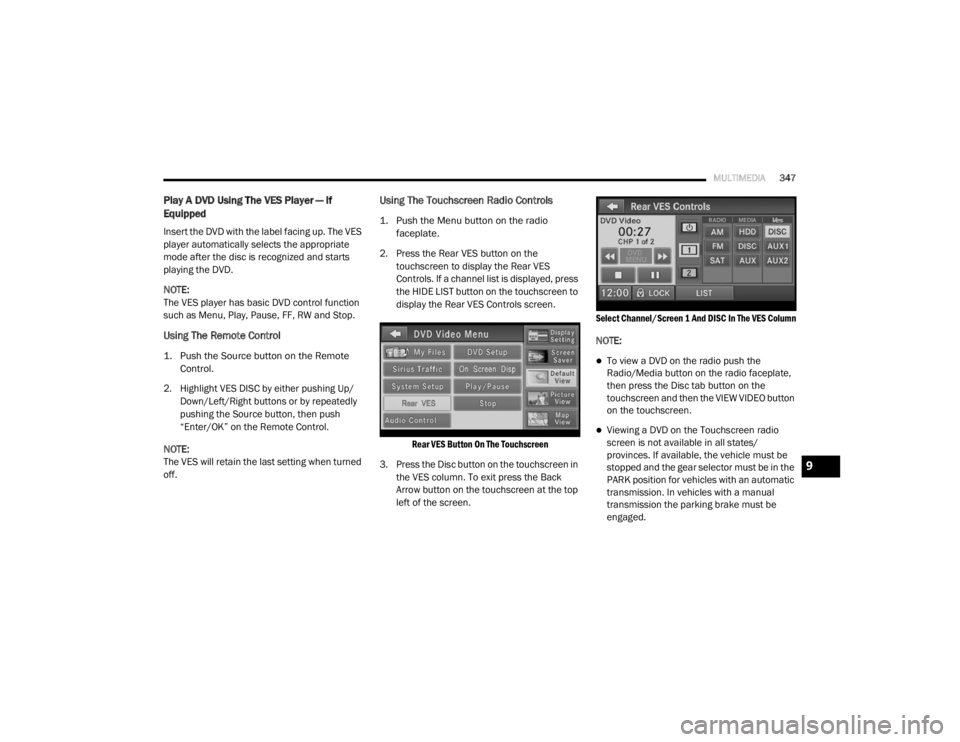
1. Push the Menu button on the radio faceplate.
2. Press the Rear VES button on the touchscreen to display the Rear VES
Controls. If a channel list is displayed, press
the HIDE LIST button on the touchscreen to
display the Rear VES Controls screen.
Rear VES Button On The Touchscreen
3. Press the Disc button on the touchscreen in the VES column. To exit press the Back
Arrow button on the touchscreen at the top
left of the screen.
Select Channel/Screen 1 And DISC In The VES Column
NOTE:
To view a DVD on the radio push the
Radio/Media button on the radio faceplate,
then press the Disc tab button on the
touchscreen and then the VIEW VIDEO button
on the touchscreen.
Viewing a DVD on the Touchscreen radio
screen is not available in all states/
provinces. If available, the vehicle must be
stopped and the gear selector must be in the
PARK position for vehicles with an automatic
transmission. In vehicles with a manual
transmission the parking brake must be
engaged.
9
20_RT_OM_EN_USC_t.book Page 347
Page 370 of 380

368
INDEX
A
About Your Brakes......................................... 266Adding Engine Coolant (Antifreeze)............... 240Adding Fuel.................................................... 181Adding Washing Fluid.................................... 232Additives, Fuel............................................... 268AdjustDown........................................................... 28Forward....................................................... 28Rearward..................................................... 28Up................................................................ 28Air Bag........................................................... 132Air Bag Operation...................................... 133Air Bag Warning Light................................ 131Driver Knee Air Bag................................... 134Enhanced Accident Response......... 138, 225Event Data Recorder (EDR)....................... 225If Deployment Occurs................................ 138Knee Impact Bolsters................................ 134Maintaining Your Air Bag System.............. 139Maintenance............................................. 139Side Air Bags............................................. 134Transporting Pets...................................... 159Air Bag Light..................................94, 131, 160Air Cleaner, Engine
(Engine Air Cleaner Filter).............................. 235
Air Conditioner Maintenance........................ 235Air Conditioner Refrigerant........................... 235Air Conditioner System................................. 235Air Conditioning................................................ 56Automatic Rear............................................ 51Rear............................................................. 45Air Conditioning Filter..............................58, 235Air Conditioning, Operating Tips....................... 57Air Filter........................................................ 235Air PressureTires......................................................... 253AlarmArm The System.......................................... 15Disarm The System..................................... 15Security Alarm............................................. 97Alterations/ModificationsVehicle........................................................... 8Antifreeze (Engine Coolant)................. 240, 271Disposal................................................... 242Anti-Lock Brake System (ABS)...................... 103Anti-Lock Warning Light................................... 97Ashtray............................................................. 78Assist, Hill Start............................................. 108Assistance Towing........................................ 312Automatic Dimming Mirror............................... 34Automatic Door Locks............................... 17, 18
Automatic Headlights.......................................38Automatic Transmission....................... 165, 244Adding Fluid..................................... 244, 274Fluid And Filter Change............................. 244Fluid Change............................................. 244Fluid Level Check............................. 243, 244Fluid Type........................................ 243, 274Gear Ranges............................................. 168Special Additives...................................... 244Torque Converter...................................... 172Axle Fluid....................................................... 274Axle Lubrication............................................ 274
B
Battery................................................... 95, 232Charging System Light.................................95Jump Starting........................................... 219Keyless Key Fob Replacement....................10Battery Saver Feature......................................39Belts, Seat.................................................... 160Body Mechanism Lubrication........................ 237B-Pillar Location............................................ 249Brake Assist System..................................... 104Brake Control System, Electronic.................. 104Brake Fluid.................................................... 274
20_RT_OM_EN_USC_t.book Page 368
Page 371 of 380

369
Brake System
...................................... 242, 266Anti-Lock (ABS).......................................... 266Fluid Check..................................... 243, 274Parking...................................................... 164Warning Light.............................................. 94Brake/Transmission Interlock....................... 166Bulb Replacement......................................... 194Bulbs, Light.......................................... 161, 194
C
Calibration Compass
..................................................... 89Camera, Rear................................................ 179Capacities, Fluid............................................ 271Caps, FillerOil (Engine)................................................ 231Power Steering.......................................... 173Radiator (Coolant Pressure)...................... 241Car Washes................................................... 263Carbon Monoxide Warning.................. 159, 270CargoVehicle Loading........................................... 63Cargo Area Cover............................................. 63Cargo Compartment........................................ 63Luggage Carrier........................................... 79Cellular Phone..................................... 304, 359Center High Mounted Stop Light...................197Certification Label......................................... 182Chains, Tire.................................................... 260Change Oil Indicator........................................ 87
Changing A Flat Tire............................. 202, 244Chart, Tire Sizing........................................... 246Check Engine Light
(Malfunction Indicator Light)......................... 102Checking Your Vehicle For Safety................. 159Checks, Safety.............................................. 159Child Restraint.............................................. 141Child RestraintsBooster Seats........................................... 144Child Seat Installation..................... 153, 155How To Stow An unused ALR Seat Belt.... 152Infant And Child Restraints....................... 142Locating The LATCH Anchorages.............. 149Lower Anchors And Tethers For Children.. 146Older Children And Child Restraints......... 143Seating Positions...................................... 145Using The Top Tether Anchorage.............. 157Clean Air Gasoline......................................... 268CleaningWheels..................................................... 259Climate Control................................................ 42Automatic.................................................... 48Manual........................................................ 42Coat Hook........................................................ 73Cold Weather Operation............................... 163Compact Spare Tire...................................... 257Compass.......................................................... 88Calibration................................................... 89Variance...................................................... 89Computer, Trip/Travel............................... 87, 93
Console............................................................69Floor............................................................69Console, Overhead...........................................71Contract, Service........................................... 365Cooling Pressure Cap (Radiator Cap)............ 241Cooling System............................................. 239Adding Coolant (Antifreeze)...................... 240Cooling Capacity....................................... 271Disposal Of Used Coolant......................... 242Drain, Flush, And Refill............................. 240Inspection................................................. 240Points To Remember................................ 242Pressure Cap............................................ 241Radiator Cap............................................. 241Selection Of Coolant
(Antifreeze).............................240, 271, 272Corrosion Protection..................................... 262Cruise Light................................................... 100Cupholders............................................. 73, 265Customer Assistance.................................... 364Cybersecurity................................................ 275
D
Daytime Brightness, Interior Lights..................41Daytime Running Lights............................37, 38Dealer Service............................................... 233Defroster, Windshield................................... 160Delay (Intermittent) Wipers..............................42Diagnostic System, Onboard......................... 101
11
20_RT_OM_EN_USC_t.book Page 369