steering wheel DODGE GRAND CARAVAN 2020 Owner's Manual
[x] Cancel search | Manufacturer: DODGE, Model Year: 2020, Model line: GRAND CARAVAN, Model: DODGE GRAND CARAVAN 2020Pages: 380, PDF Size: 14.92 MB
Page 175 of 380
STARTING AND OPERATING173
Power Steering Fluid Check
Checking the power steering fluid level at a
defined service interval is not required. The fluid
should only be checked if a leak is suspected,
abnormal noises are apparent, and/or the
system is not functioning as anticipated.
Coordinate inspection efforts through an
authorized dealer. If necessary, add fluid to restore to the proper
indicated level. With a clean cloth, wipe any
spilled fluid from all surfaces. Refer to “Fluids
And Lubricants” in “Technical Specifications”
for the correct fluid type.
SPEED CONTROL — IF EQUIPPED
When engaged, the Speed Control takes over
accelerator operations at speeds greater than
25 mph (40 km/h).
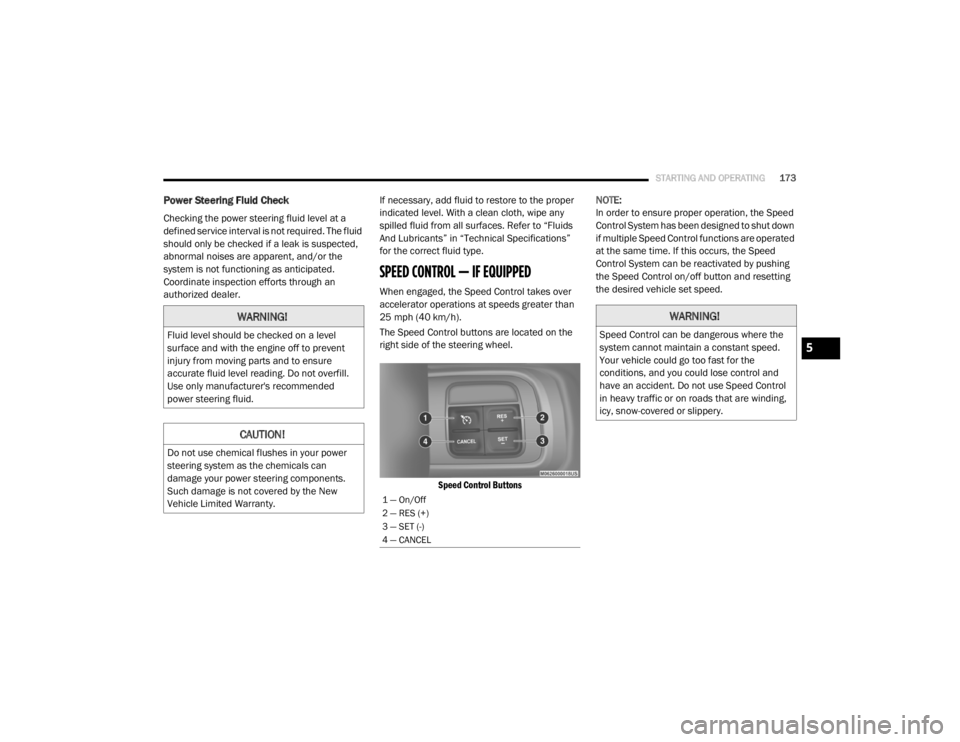
The Speed Control buttons are located on the
right side of the steering wheel.
Speed Control Buttons
NOTE:
In order to ensure proper operation, the Speed
Control System has been designed to shut down
if multiple Speed Control functions are operated
at the same time. If this occurs, the Speed
Control System can be reactivated by pushing
the Speed Control on/off button and resetting
the desired vehicle set speed.
WARNING!
Fluid level should be checked on a level
surface and with the engine off to prevent
injury from moving parts and to ensure
accurate fluid level reading. Do not overfill.
Use only manufacturer's recommended
power steering fluid.
CAUTION!
Do not use chemical flushes in your power
steering system as the chemicals can
damage your power steering components.
Such damage is not covered by the New
Vehicle Limited Warranty.
1 — On/Off
2 — RES (+)
3 — SET (-)
4 — CANCEL
WARNING!
Speed Control can be dangerous where the
system cannot maintain a constant speed.
Your vehicle could go too fast for the
conditions, and you could lose control and
have an accident. Do not use Speed Control
in heavy traffic or on roads that are winding,
icy, snow-covered or slippery.
5
20_RT_OM_EN_USC_t.book Page 173
Page 186 of 380

184STARTING AND OPERATING
Tongue Weight (TW)
The tongue weight is the downward force
exerted on the hitch ball by the trailer. You must
consider this as part of the load on your vehicle.
Trailer Frontal Area
The frontal area is the maximum height
multiplied by the maximum width of the front of
a trailer.
Trailer Sway Control
The Trailer Sway Control can be a mechanical
telescoping link that can be installed between
the hitch receiver and the trailer tongue that
typically provides adjustable friction associated
with the telescoping motion to dampen any
unwanted trailer swaying motions while
traveling.
If equipped, the electronic Trailer Sway Control
(TSC) recognizes a swaying trailer and automat -
ically applies individual wheel brakes and/or
reduces engine power to attempt to eliminate
the trailer sway.
Weight-Carrying Hitch
A weight-carrying hitch supports the trailer
tongue weight, just as if it were luggage located
at a hitch ball or some other connecting point of
the vehicle. These kinds of hitches are the most
popular on the market today and they are
commonly used to tow small and medium sized
trailers.
Weight-Distributing Hitch
A weight-distributing system works by applying
leverage through spring (load) bars. They are
typically used for heavier loads to distribute
trailer tongue weight to the tow vehicle's front
axle and the trailer axle(s). When used in
accordance with the manufacturer's directions,
it provides for a more level ride, offering more
consistent steering and brake control thereby
enhancing towing safety. The addition of a
friction/hydraulic sway control also dampens
sway caused by traffic and crosswinds and
contributes positively to tow vehicle and trailer
stability. Trailer sway control and a weight distributing
(load equalizing) hitch are recommended for
heavier Tongue Weights (TW) and may be
required depending on vehicle and trailer
configuration/loading to comply with Gross Axle
Weight Rating (GAWR) requirements.
Trailer Hitch Classification
The following chart provides the industry
standard for the maximum trailer weight a given
trailer hitch class can tow and should be used to
assist you in selecting the correct trailer hitch
for your intended towing condition.
WARNING!
An improperly adjusted Weight Distributing
Hitch system may reduce handling,
stability, braking performance, and could
result in a collision.
Weight Distributing Systems may not be
compatible with Surge Brake Couplers.
Consult with your hitch and trailer manufac
-
turer or a reputable Recreational Vehicle
dealer for additional information.
20_RT_OM_EN_USC_t.book Page 184
Page 203 of 380

IN CASE OF EMERGENCY201
M16 –10 Amp Red Airbag Module/Occupant Classification Module
M17 –15 Amp Blue Left Tail/License/Park Lamp, Running Lamps
M18 –15 Amp Blue Right Tail/Park/Run Lamp
M19 –25 Amp Clear Powertrain
M20 –15 Amp BlueInstrument Cluster Interior Light, Switch Bank, Steering
Column Module, Switch Steering Wheel
M21 –20 Amp Yellow Powertrain
M22 –10 Amp Red Horn
M23 –10 Amp Red Horn
M24 –25 Amp Clear Rear Wiper
M25 –20 Amp Yellow Fuel Pump
M26 –10 Amp Red Power Mirror Switch, Driver Window Switch
M27
– 10 Amp Red Wireless Control Module, Keyless Entry Module
M28 –10 Amp Red Powertrain, Transmission Control Module
M29 –10 Amp Red Occupant Classification Module
M30 –15 Amp Blue Diagnostic Feed
M31 –20 Amp Yellow Back-Up Lamps
M32 –10 Amp Red Airbag Module, THATCHUM — If Equipped
M33 –10 Amp Red Powertrain
CavityCartridge Fuse Mini-Fuse Description
6
20_RT_OM_EN_USC_t.book Page 201
Page 218 of 380
216IN CASE OF EMERGENCY
If the sealant (white fluid) does not flow within
0 – 10 seconds through the Sealant Hose:
1. Push the Power Button to turn Off the Tire
Service Kit. Disconnect the Sealant Hose
from the valve stem. Make sure the valve
stem is free of debris. Reconnect the
Sealant Hose to the valve stem. Check that
the Mode Select Knob is in the Sealant
Mode position and not Air Mode. Push the
Power Button to turn On the Tire Service
Kit.
2. Connect the Power Plug to a different 12 Volt power outlet in your vehicle or
another vehicle, if available. Make sure the
vehicle is running before turning ON the Tire
Service Kit.
3. The Sealant Bottle may be empty due to previous use. Call for assistance. If the sealant (white fluid) does flow through the
Sealant Hose:
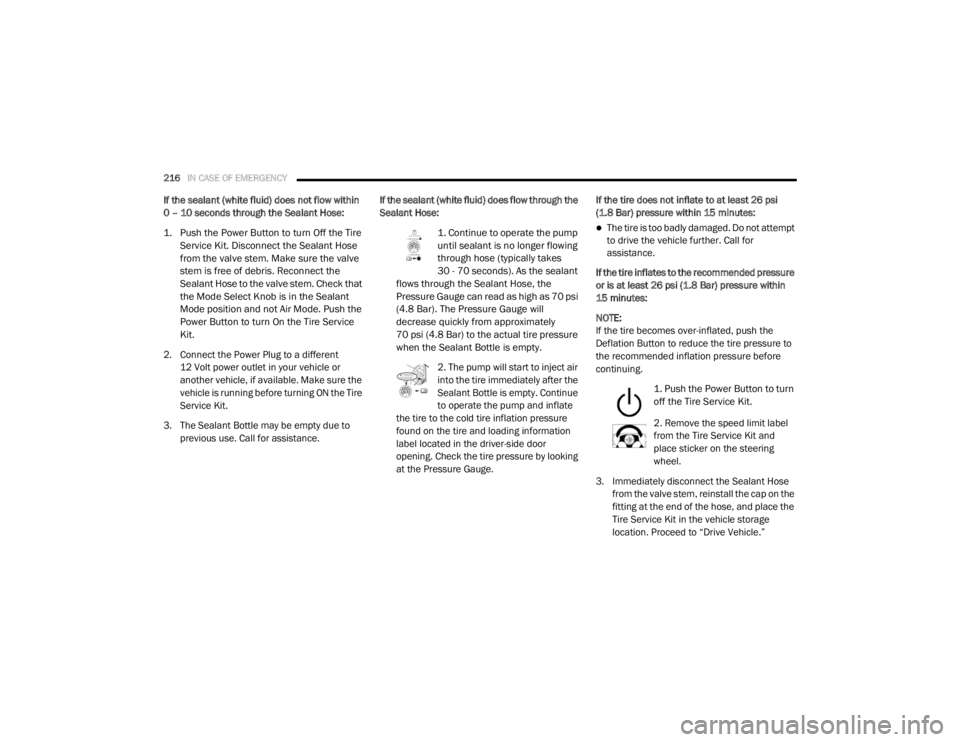
1. Continue to operate the pump
until sealant is no longer flowing
through hose (typically takes
30 - 70 seconds). As the sealant
flows through the Sealant Hose, the
Pressure Gauge can read as high as 70 psi
(4.8 Bar). The Pressure Gauge will
decrease quickly from approximately
70 psi (4.8 Bar) to the actual tire pressure
when the Sealant Bottle is empty.
2. The pump will start to inject air
into the tire immediately after the
Sealant Bottle is empty. Continue
to operate the pump and inflate
the tire to the cold tire inflation pressure
found on the tire and loading information
label located in the driver-side door
opening. Check the tire pressure by looking
at the Pressure Gauge. If the tire does not inflate to at least 26 psi
(1.8 Bar) pressure within 15 minutes:
The tire is too badly damaged. Do not attempt
to drive the vehicle further. Call for
assistance.
If the tire inflates to the recommended pressure
or is at least 26 psi (1.8 Bar) pressure within
15 minutes:
NOTE:
If the tire becomes over-inflated, push the
Deflation Button to reduce the tire pressure to
the recommended inflation pressure before
continuing.
1. Push the Power Button to turn
off the Tire Service Kit.
2. Remove the speed limit label
from the Tire Service Kit and
place sticker on the steering
wheel.
3. Immediately disconnect the Sealant Hose from the valve stem, reinstall the cap on the
fitting at the end of the hose, and place the
Tire Service Kit in the vehicle storage
location. Proceed to “Drive Vehicle.”
20_RT_OM_EN_USC_t.book Page 216
Page 219 of 380
IN CASE OF EMERGENCY217
Drive Vehicle:
Immediately after injecting sealant
and inflating the tire, drive the vehicle
5 miles (8 km) or 10 minutes to
ensure distribution of the Tire Service
Kit Sealant within the tire. Do not exceed
50 mph (80 km/h).
After Driving:
Pull over to a safe location. Refer to “Whenever
You Stop To Use Tire Service Kit” in this section
before continuing.
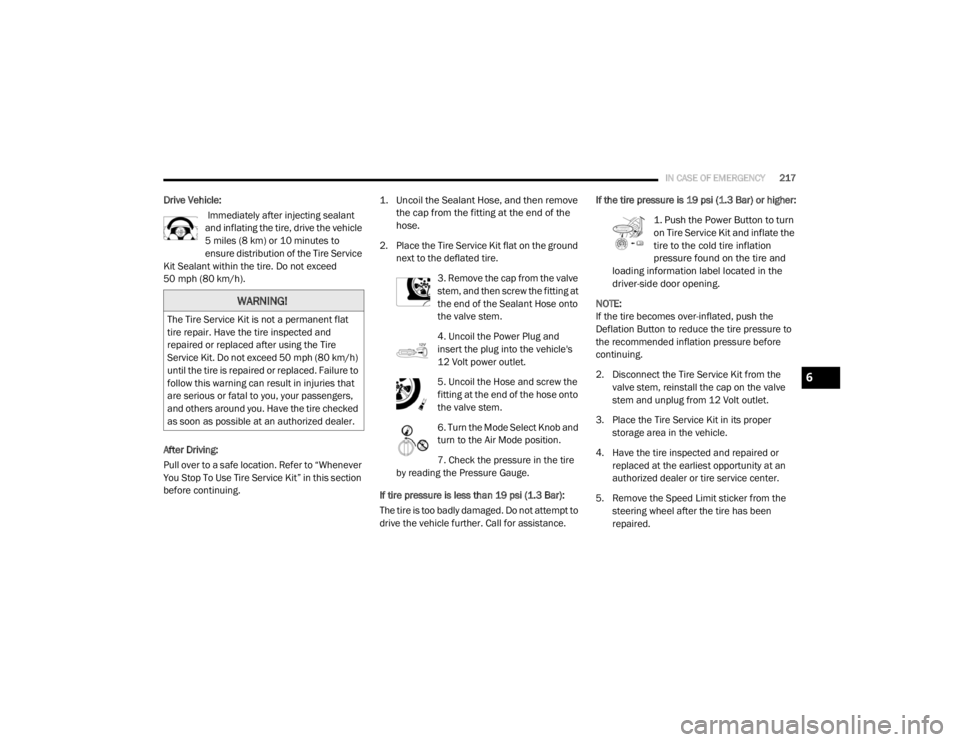
1. Uncoil the Sealant Hose, and then remove
the cap from the fitting at the end of the
hose.
2. Place the Tire Service Kit flat on the ground next to the deflated tire.
3. Remove the cap from the valve
stem, and then screw the fitting at
the end of the Sealant Hose onto
the valve stem.
4. Uncoil the Power Plug and
insert the plug into the vehicle's
12 Volt power outlet.
5. Uncoil the Hose and screw the
fitting at the end of the hose onto
the valve stem.
6. Turn the Mode Select Knob and
turn to the Air Mode position.
7. Check the pressure in the tire
by reading the Pressure Gauge.
If tire pressure is less than 19 psi (1.3 Bar):
The tire is too badly damaged. Do not attempt to
drive the vehicle further. Call for assistance. If the tire pressure is 19 psi (1.3 Bar) or higher:
1. Push the Power Button to turn
on Tire Service Kit and inflate the
tire to the cold tire inflation
pressure found on the tire and
loading information label located in the
driver-side door opening.
NOTE:
If the tire becomes over-inflated, push the
Deflation Button to reduce the tire pressure to
the recommended inflation pressure before
continuing.
2. Disconnect the Tire Service Kit from the valve stem, reinstall the cap on the valve
stem and unplug from 12 Volt outlet.
3. Place the Tire Service Kit in its proper storage area in the vehicle.
4. Have the tire inspected and repaired or replaced at the earliest opportunity at an
authorized dealer or tire service center.
5. Remove the Speed Limit sticker from the steering wheel after the tire has been
repaired.
WARNING!
The Tire Service Kit is not a permanent flat
tire repair. Have the tire inspected and
repaired or replaced after using the Tire
Service Kit. Do not exceed 50 mph (80 km/h)
until the tire is repaired or replaced. Failure to
follow this warning can result in injuries that
are serious or fatal to you, your passengers,
and others around you. Have the tire checked
as soon as possible at an authorized dealer.
6
20_RT_OM_EN_USC_t.book Page 217
Page 225 of 380
IN CASE OF EMERGENCY223
FREEING A STUCK VEHICLE
If your vehicle becomes stuck in mud, sand, or
snow, it can often be moved using a rocking
motion. Turn the steering wheel right and left to
clear the area around the front wheels. Then,
shift back and forth between DRIVE and
REVERSE while gently pressing the accelerator.
Use the least amount of accelerator pedal
pressure that will maintain the rocking motion,
without spinning the wheels or racing the
engine. Push the "ESC OFF" switch, to place
the Electronic Stability Control (ESC)
system in "ESC Partial OFF" mode,
before rocking the vehicle. Refer to
“Electronic Brake Control System” in “Safety”
for further information. Once the vehicle has
been freed, push the "ESC OFF" switch again to
restore "ESC ON" mode.
CAUTION!
Racing the engine or spinning the wheels may
lead to transmission overheating and failure.
Allow the engine to idle with the transmission
in NEUTRAL for at least one minute after
every five rocking-motion cycles. This will
minimize overheating and reduce the risk of
transmission failure during prolonged efforts
to free a stuck vehicle.
WARNING!
Fast spinning tires can be dangerous. Forces
generated by excessive wheel speeds may
cause damage, or even failure, of the axle
and tires. A tire could explode and injure
someone. Do not spin your vehicle's wheels
faster than 30 mph (48 km/h) or for longer than 30 seconds continuously without
stopping when you are stuck and do not let
anyone near a spinning wheel, no matter
what the speed.
CAUTION!
When “rocking” a stuck vehicle by shifting
between DRIVE and REVERSE, do not spin
the wheels faster than 15 mph (24 km/h), or drivetrain damage may result.
Revving the engine or spinning the wheels
too fast may lead to transmission over -
heating and failure. It can also damage the
tires. Do not spin the wheels above 30 mph
(48 km/h) while in gear (no transmission
shifting occurring).
6
20_RT_OM_EN_USC_t.book Page 223
Page 258 of 380

256SERVICING AND MAINTENANCE
(Continued)
It is recommended to replace the two front tires
or two rear tires as a pair. Replacing just one tire
can seriously affect your vehicle’s handling. If
you ever replace a wheel, make sure that the
wheel’s specifications match those of the
original wheels.
It is recommended you contact an authorized
tire dealer or original equipment dealer with any
questions you may have on tire specifications or
capability. Failure to use equivalent
replacement tires may adversely affect the
safety, handling, and ride of your vehicle.
Tire Types
All Season Tires — If Equipped
All Season tires provide traction for all seasons
(Spring, Summer, Autumn, and Winter). Traction
levels may vary between different all season
tires. All season tires can be identified by the
M+S, M&S, M/S or MS designation on the tire
sidewall. Use all season tires only in sets of four; failure to do so may adversely affect the safety
and handling of your vehicle.
Summer Or Three Season Tires — If Equipped
Summer tires provide traction in both wet and
dry conditions, and are not intended to be
driven in snow or on ice. If your vehicle is
equipped with Summer tires, be aware these
tires are not designed for Winter or cold driving
conditions. Install Winter tires on your vehicle
when ambient temperatures are less than 40°F
(5°C) or if roads are covered with ice or snow.
For more information, contact an authorized
dealer.
Summer tires do not contain the all season
designation or mountain/snowflake symbol on
the tire sidewall. Use Summer tires only in sets
of four; failure to do so may adversely affect the
safety and handling of your vehicle.
WARNING!
Do not use a tire, wheel size, load rating, or
speed rating other than that specified for
your vehicle. Some combinations of unap
-
proved tires and wheels may change
suspension dimensions and performance
characteristics, resulting in changes to
steering, handling, and braking of your
vehicle. This can cause unpredictable
handling and stress to steering and
suspension components. You could lose
control and have a collision resulting in
serious injury or death. Use only the tire and
wheel sizes with load ratings approved for
your vehicle.
Never use a tire with a smaller load index or
capacity, other than what was originally
equipped on your vehicle. Using a tire with
a smaller load index could result in tire
overloading and failure. You could lose
control and have a collision.
Failure to equip your vehicle with tires
having adequate speed capability can
result in sudden tire failure and loss of
vehicle control.
CAUTION!
Replacing original tires with tires of a
different size may result in false speedometer
and odometer readings.
WARNING! (Continued)
WARNING!
Do not use Summer tires in snow/ice
conditions. You could lose vehicle control,
resulting in severe injury or death. Driving too
fast for conditions also creates the possibility
of loss of vehicle control.
20_RT_OM_EN_USC_t.book Page 256
Page 278 of 380

276MULTIMEDIA
SAFETY AND GENERAL INFORMATION
Safety Guidelines
Ensure that all persons read this manual
carefully before using the system. It contains
instructions on how to use the system in a safe
and effective manner.
Do NOT attach any object to the touchscreen.
Doing so can result in damage to the
touchscreen.
Please read and follow these safety
precautions. Failure to do so may result in injury
or property damage.
Glance at the screen only when safe to do so.
If prolonged viewing of the screen is required,
park in a safe location and set the parking
brake.
Stop use immediately if a problem occurs.
Failure to do so may cause injury or damage
to the product. Return it to an authorized
dealer for repair.
Ensure the volume level of the system is set
to a level that still allows you to hear outside
traffic and emergency vehicles.
Safe Usage Of The Uconnect System
Read all instructions in this manual carefully
before using your system to ensure proper
usage.
The Uconnect system is a sophisticated elec -
tronic device. Do not let young children use
the system.
Permanent hearing loss may occur if you play
your music or the system at loud volumes.
Exercise caution when setting the volume on
the system.
Keep drinks, rain and other sources of mois -
ture away from the system. Besides damage
to the system, moisture can cause electric
shocks as with any electronic device. NOTE:
Many features of this system are speed
dependent. For your own safety, it is not
possible to use some of the touchscreen
features while the vehicle is in motion.
Exposure To Radio Frequency Radiation
The internal wireless radio operates within
guidelines found in radio frequency safety
standards and recommendations, which reflect
the consensus of the scientific community. The
radio manufacturer believes the internal
wireless radio is safe for use by consumers. The
level of energy emitted is far less than the
electromagnetic energy emitted by wireless
devices such as mobile phones. However, the
use of wireless radios may be restricted in some
situations or environments, such as aboard
airplanes. If you are unsure of restrictions, you
are encouraged to ask for authorization before
turning on the wireless radio.
WARNING!
ALWAYS drive safely with your hands on the
steering wheel. You have full responsibility
and assume all risks related to the use of the
Uconnect features and applications in this
vehicle. Only use Uconnect when it is safe to
do so. Failure to do so may result in an
accident involving serious injury or death.
20_RT_OM_EN_USC_t.book Page 276
Page 307 of 380
MULTIMEDIA305
Uconnect Phone Button
The radio or steering wheel controls (if
equipped) contain the two control buttons
(Uconnect Phone button and Voice
Command button) that enables you to
access the system. When you push the button
you hear the word Uconnect followed by a BEEP.
The beep is your signal to give a command.
NOTE:
The driver side upper windshield trim contains
the microphone for the Uconnect Phone.
Voice Command Button
Actual button location may vary with the radio.
The individual buttons are described in the
“Operation” section. The Uconnect Phone can be used with any
Hands-Free Profile certified Bluetooth® mobile
phone. See the Uconnect website for supported
phones. Refer to your mobile service provider or
the phone manufacturer for details.
The Uconnect Phone is fully integrated with the
vehicle's audio system. The volume of the
Uconnect Phone can be adjusted either from
the radio volume control knob or from the
steering wheel radio control (right switch), if
equipped.
The Uconnect display will be used for visual
prompts from the Uconnect Phone such as
“CELL” or caller ID on certain radios.
Operation
Voice commands can be used to operate the
Uconnect Phone and to navigate through the
Uconnect Phone menu structure. Voice
commands are required after most Uconnect
Phone prompts. You will be prompted for a
specific command and then guided through the
available options.
Prior to giving a voice command, wait for the
beep, which follows the “Ready” prompt or
another prompt.
For certain operations, compound
commands can be used. For example,
instead of saying “Setup” and then “Phone
Pairing,” the following compound command
can be said: “Setup Phone Pairing.”
For each feature explanation in this section,
only the compound form of the voice
command is given. You can also break the
commands into parts and say each part of
the command when you are asked for it. For
example, you can use the compound form
voice command “Phonebook New Entry,” or
you can break the compound form command
into two voice commands: “Phonebook” and
“New Entry.” Please remember, the Uconnect
Phone works best when you talk in a normal
conversational tone, as if speaking to
someone sitting a few feet/meters away from
you.
Help Command
If you need assistance at any prompt, or if you
want to know your options at any prompt, say
“Help” following the beep. The Uconnect Phone
will play all the options at any prompt if you ask
for help.
WARNING!
Any voice commanded system should be
used only in safe driving conditions following
all applicable laws. Your attention should be
focused on safely operating the vehicle.
Failure to do so may result in a collision
causing serious injury or death.
9
20_RT_OM_EN_USC_t.book Page 305
Page 319 of 380
MULTIMEDIA317
3. You can either say the message you wish to
send or say “List Messages.” There are 20
preset messages.
To send a message, push the Voice Command button while the system is listing the
message and say “Send”.
Uconnect Phone will prompt you to say the
name or number of the person you wish to send
the message to.
List of Preset Messages:
1. Yes
2. No
3. Where are you?
4. I need more direction
5. L O L
6. Why
7. I love you
8. Call me
9. Call me later
10. Thanks 11. See You in 15 minutes
12. I am on my way
13. I’ll be late
14. Are you there yet?
15. Where are we meeting?
16. Can this wait?
17. Bye for now
18. When can we meet?
19. Send number to call
20. Start without me
Turn SMS Incoming Announcement ON/OFF
Turning the SMS Incoming Announcement Off
will stop the system from announcing the new
incoming messages.
1. Push the Phone button .
2. After the “Ready” prompt and the following beep, say “Setup, SMS Incoming Message
Announcement,” you will then be given a
choice to change it. Bluetooth® Communication Link
Mobile phones have been found to lose
connection to the Uconnect Phone. When this
happens, the connection can generally be
reestablished by switching the phone off/on.
Your mobile phone is recommended to remain
in Bluetooth® On mode.
Navigation — If Equipped
Safety Precautions And Important
Information
WARNING!
ALWAYS drive safely with your hands on the
steering wheel. You have full responsibility
and assume all risks related to the use of
the Uconnect features and applications in
this vehicle. Only use Uconnect when it is
safe to do so. Failure to do so may result in
an accident involving serious injury or
death.
ALWAYS follow the law! Failure to follow
traffic laws may result in serious injury or
death.9
20_RT_OM_EN_USC_t.book Page 317