ESP DODGE GRAND CARAVAN 2020 Service Manual
[x] Cancel search | Manufacturer: DODGE, Model Year: 2020, Model line: GRAND CARAVAN, Model: DODGE GRAND CARAVAN 2020Pages: 380, PDF Size: 14.92 MB
Page 270 of 380

268TECHNICAL SPECIFICATIONS
Poor quality gasoline can cause problems such
as hard starting, stalling, and hesitations. If you
experience these symptoms, try another brand
of gasoline before considering service for the
vehicle.
Reformulated Gasoline
Many areas of the country require the use of
cleaner burning gasoline referred to as
“Reformulated Gasoline”. Reformulated
gasoline contains oxygenates and are specif -
ically blended to reduce vehicle emissions and
improve air quality.
The use of reformulated gasoline is
recommended. Properly blended reformulated
gasoline will provide improved performance
and durability of engine and fuel system
components.
Materials Added To Fuel
Besides using unleaded gasoline with the
proper octane rating, gasolines that contain
detergents, corrosion and stability additives are
recommended. Using gasolines that have these
additives will help improve fuel economy,
reduce emissions, and maintain vehicle
performance.
Designated TOP TIER Detergent
Gasoline contains a higher level of
detergents to further aide in
minimizing engine and fuel system
deposits. When available, the usage of TOP
TIER Detergent Gasoline is recommended.
Visit www.toptiergas.com for a list of TOP TIER
Detergent Gasoline Retailers.
Indiscriminate use of fuel system cleaning
agents should be avoided. Many of these
materials intended for gum and varnish
removal may contain active solvents or similar
ingredients. These can harm fuel system gasket
and diaphragm materials.
Gasoline/Oxygenate Blends
Some fuel suppliers blend unleaded gasoline
with oxygenates such as ethanol.
Problems that result from using gasoline
containing more than 15% ethanol (E-15) or
gasoline containing methanol are not the
responsibility of the manufacturer and may void
or not be covered under New Vehicle Limited
Warranty.
CAUTION!
DO NOT use E-85, gasoline containing
methanol, or gasoline containing more than
15% ethanol (E-15). Use of these blends may
result in starting and drivability problems,
damage critical fuel system components,
cause emissions to exceed the applicable
standard, and/or cause the Malfunction
Indicator Light to illuminate. Please observe
pump labels as they should clearly
communicate if a fuel contains greater than
15% ethanol (E-15).
20_RT_OM_EN_USC_t.book Page 268
Page 271 of 380

TECHNICAL SPECIFICATIONS269
Do Not Use E-85 In Non-Flex Fuel Vehicles
Non-Flex Fuel Vehicles (FFV) are compatible
with gasoline containing up to 15% ethanol
(E-15). Use of gasoline with higher ethanol
content may void the New Vehicle Limited
Warranty.
If a Non-FFV vehicle is inadvertently fueled with
E-85 fuel, the engine will have some or all of
these symptoms:
Operate in a lean mode.
OBD II Malfunction Indicator Light on.
Poor engine performance.
Poor cold start and cold drivability.
Increased risk for fuel system component
corrosion.
CNG And LP Fuel System Modifications
Modifications that allow the engine to run on
Compressed Natural Gas (CNG) or Liquid
Propane (LP) may result in damage to the
engine, emissions, and fuel system
components. Problems that result from running
CNG or LP are not the responsibility of the
manufacturer and may void or not be covered
under the New Vehicle Limited Warranty.
MMT In Gasoline
Methylcyclopentadienyl Manganese Tricarbonyl
(MMT) is a manganese-containing metallic
additive that is blended into some gasoline to
increase octane. Gasoline blended with MMT
provides no performance advantage beyond
gasoline of the same octane number without
MMT. Gasoline blended with MMT reduces
spark plug life and reduces emissions system
performance in some vehicles. The
manufacturer recommends that gasoline
without MMT be used in your vehicle. The MMT
content of gasoline may not be indicated on the
gasoline pump; therefore, you should ask your
gasoline retailer whether the gasoline contains
MMT. MMT is prohibited in Federal and
California reformulated gasoline.
8
20_RT_OM_EN_USC_t.book Page 269
Page 272 of 380

270TECHNICAL SPECIFICATIONS
(Continued)
Fuel System Cautions
NOTE:
Intentional tampering with the emissions
control system can result in civil penalties being
assessed against you.
Carbon Monoxide Warnings
CAUTION!
Follow these guidelines to maintain your
vehicle’s performance:
The use of leaded gasoline is prohibited by
Federal law. Using leaded gasoline can
impair engine performance and damage
the emissions control system.
An out-of-tune engine or certain fuel or igni -
tion malfunctions can cause the catalytic
converter to overheat. If you notice a
pungent burning odor or some light smoke,
your engine may be out of tune or malfunc -
tioning and may require immediate service.
Contact an authorized dealer for service
assistance.
The use of fuel additives, which are now
being sold as octane enhancers, is not
recommended. Most of these products
contain high concentrations of methanol.
Fuel system damage or vehicle perfor -
mance problems resulting from the use of
such fuels or additives is not the responsi -
bility of the manufacturer and may void or
not be covered under the New Vehicle
Limited Warranty.
CAUTION! (Continued)
WARNING!
Carbon monoxide (CO) in exhaust gases is
deadly. Follow the precautions below to
prevent carbon monoxide poisoning:
Do not inhale exhaust gases. They contain
carbon monoxide, a colorless and odorless
gas, which can kill. Never run the engine in
a closed area, such as a garage, and never
sit in a parked vehicle with the engine
running for an extended period. If the
vehicle is stopped in an open area with the
engine running for more than a short
period, adjust the ventilation system to
force fresh, outside air into the vehicle.
Guard against carbon monoxide with
proper maintenance. Have the exhaust
system inspected every time the vehicle is
raised. Have any abnormal conditions
repaired promptly. Until repaired, drive with
all side windows fully open.
20_RT_OM_EN_USC_t.book Page 270
Page 278 of 380

276MULTIMEDIA
SAFETY AND GENERAL INFORMATION
Safety Guidelines
Ensure that all persons read this manual
carefully before using the system. It contains
instructions on how to use the system in a safe
and effective manner.
Do NOT attach any object to the touchscreen.
Doing so can result in damage to the
touchscreen.
Please read and follow these safety
precautions. Failure to do so may result in injury
or property damage.
Glance at the screen only when safe to do so.
If prolonged viewing of the screen is required,
park in a safe location and set the parking
brake.
Stop use immediately if a problem occurs.
Failure to do so may cause injury or damage
to the product. Return it to an authorized
dealer for repair.
Ensure the volume level of the system is set
to a level that still allows you to hear outside
traffic and emergency vehicles.
Safe Usage Of The Uconnect System
Read all instructions in this manual carefully
before using your system to ensure proper
usage.
The Uconnect system is a sophisticated elec -
tronic device. Do not let young children use
the system.
Permanent hearing loss may occur if you play
your music or the system at loud volumes.
Exercise caution when setting the volume on
the system.
Keep drinks, rain and other sources of mois -
ture away from the system. Besides damage
to the system, moisture can cause electric
shocks as with any electronic device. NOTE:
Many features of this system are speed
dependent. For your own safety, it is not
possible to use some of the touchscreen
features while the vehicle is in motion.
Exposure To Radio Frequency Radiation
The internal wireless radio operates within
guidelines found in radio frequency safety
standards and recommendations, which reflect
the consensus of the scientific community. The
radio manufacturer believes the internal
wireless radio is safe for use by consumers. The
level of energy emitted is far less than the
electromagnetic energy emitted by wireless
devices such as mobile phones. However, the
use of wireless radios may be restricted in some
situations or environments, such as aboard
airplanes. If you are unsure of restrictions, you
are encouraged to ask for authorization before
turning on the wireless radio.
WARNING!
ALWAYS drive safely with your hands on the
steering wheel. You have full responsibility
and assume all risks related to the use of the
Uconnect features and applications in this
vehicle. Only use Uconnect when it is safe to
do so. Failure to do so may result in an
accident involving serious injury or death.
20_RT_OM_EN_USC_t.book Page 276
Page 293 of 380
MULTIMEDIA291
Press the PREV button to start playback from
the beginning of the current chapter or track.
When you press the button twice in quick
succession, playback starts from the beginning
of the preceding chapter or track.
DISC Menu
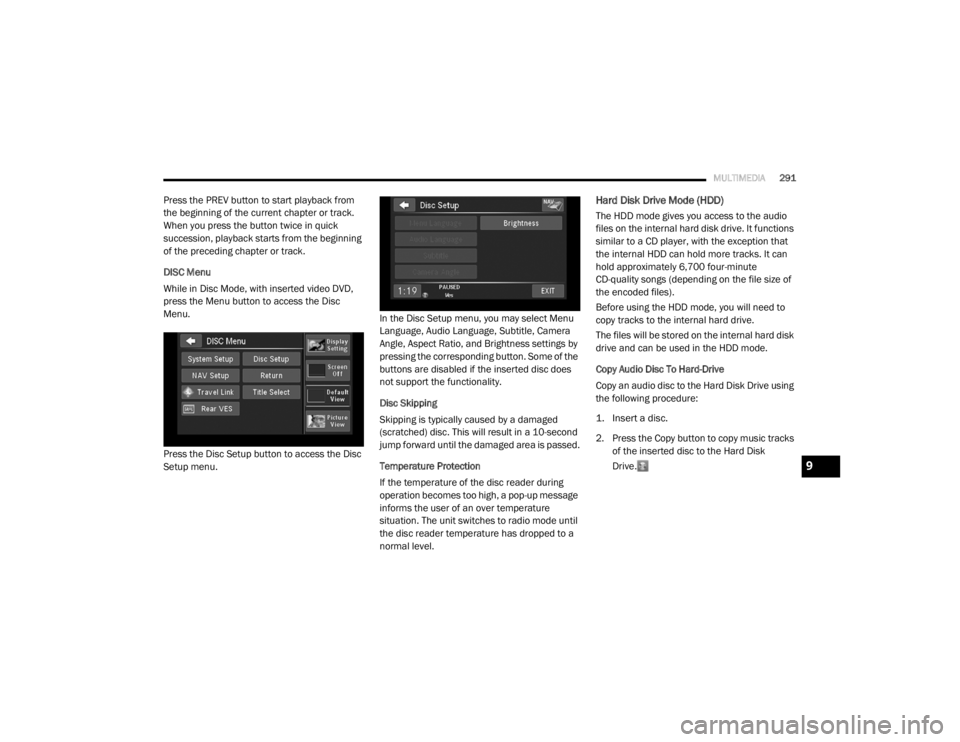
While in Disc Mode, with inserted video DVD,
press the Menu button to access the Disc
Menu.
Press the Disc Setup button to access the Disc
Setup menu. In the Disc Setup menu, you may select Menu
Language, Audio Language, Subtitle, Camera
Angle, Aspect Ratio, and Brightness settings by
pressing the corresponding button. Some of the
buttons are disabled if the inserted disc does
not support the functionality.
Disc Skipping
Skipping is typically caused by a damaged
(scratched) disc. This will result in a 10-second
jump forward until the damaged area is passed.
Temperature Protection
If the temperature of the disc reader during
operation becomes too high, a pop-up message
informs the user of an over temperature
situation. The unit switches to radio mode until
the disc reader temperature has dropped to a
normal level.Hard Disk Drive Mode (HDD)
The HDD mode gives you access to the audio
files on the internal hard disk drive. It functions
similar to a CD player, with the exception that
the internal HDD can hold more tracks. It can
hold approximately 6,700 four-minute
CD-quality songs (depending on the file size of
the encoded files).
Before using the HDD mode, you will need to
copy tracks to the internal hard drive.
The files will be stored on the internal hard disk
drive and can be used in the HDD mode.
Copy Audio Disc To Hard-Drive
Copy an audio disc to the Hard Disk Drive using
the following procedure:
1. Insert a disc.
2. Press the Copy button to copy music tracks
of the inserted disc to the Hard Disk
Drive.
9
20_RT_OM_EN_USC_t.book Page 291
Page 306 of 380
304MULTIMEDIA
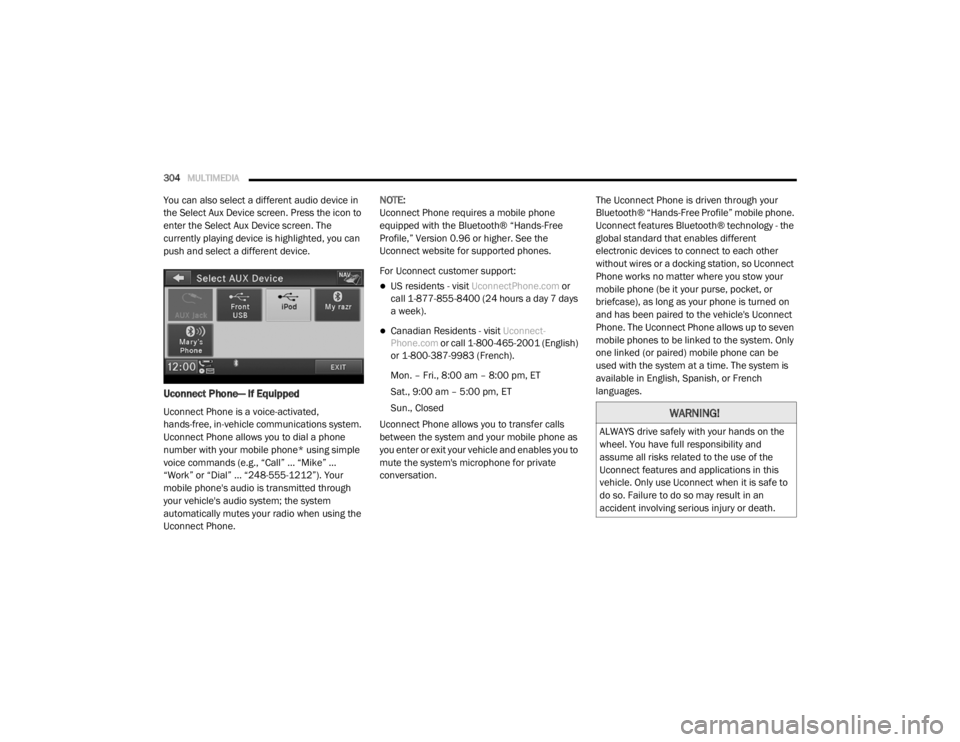
You can also select a different audio device in
the Select Aux Device screen. Press the icon to
enter the Select Aux Device screen. The
currently playing device is highlighted, you can
push and select a different device.
Uconnect Phone— If Equipped
Uconnect Phone is a voice-activated,
hands-free, in-vehicle communications system.
Uconnect Phone allows you to dial a phone
number with your mobile phone* using simple
voice commands (e.g., “Call” … “Mike” …
“Work” or “Dial” … “248-555-1212”). Your
mobile phone's audio is transmitted through
your vehicle's audio system; the system
automatically mutes your radio when using the
Uconnect Phone. NOTE:
Uconnect Phone requires a mobile phone
equipped with the Bluetooth® “Hands-Free
Profile,” Version 0.96 or higher. See the
Uconnect website for supported phones.
For Uconnect customer support:
US residents - visit
UconnectPhone.com or
call 1-877-855-8400 (24 hours a day 7 days
a week).
Canadian Residents - visit Uconnect-
Phone.com or call 1-800-465-2001 (English)
or 1-800-387-9983 (French).
Mon. – Fri., 8:00 am – 8:00 pm, ET
Sat., 9:00 am – 5:00 pm, ET
Sun., Closed
Uconnect Phone allows you to transfer calls
between the system and your mobile phone as
you enter or exit your vehicle and enables you to
mute the system's microphone for private
conversation. The Uconnect Phone is driven through your
Bluetooth® “Hands-Free Profile” mobile phone.
Uconnect features Bluetooth® technology - the
global standard that enables different
electronic devices to connect to each other
without wires or a docking station, so Uconnect
Phone works no matter where you stow your
mobile phone (be it your purse, pocket, or
briefcase), as long as your phone is turned on
and has been paired to the vehicle's Uconnect
Phone. The Uconnect Phone allows up to seven
mobile phones to be linked to the system. Only
one linked (or paired) mobile phone can be
used with the system at a time. The system is
available in English, Spanish, or French
languages.
WARNING!
ALWAYS drive safely with your hands on the
wheel. You have full responsibility and
assume all risks related to the use of the
Uconnect features and applications in this
vehicle. Only use Uconnect when it is safe to
do so. Failure to do so may result in an
accident involving serious injury or death.
20_RT_OM_EN_USC_t.book Page 304
Page 309 of 380

MULTIMEDIA307
Call By Saying A Name
Push the Phone button to begin.
After the “Ready” prompt and the following
beep, say “Call.”
The system will prompt you to say the name
of the person you want to call.
After the “Ready” prompt and the following
beep, say the name of the person you want to
call. For example, you can say “John Doe,”
where John Doe is a previously stored name
entry in the Uconnect phonebook or down -
loaded phonebook. To learn how to store a
name in the phonebook, refer to “Add Names
To Your Uconnect Phonebook”, in this
section.
The Uconnect system will confirm the name
and then dial the corresponding phone
number, which may appear in the display of
certain radios.
Phonebook Download – Automatic
Phonebook Transfer From Mobile Phone
If equipped and specifically supported by your
phone, Uconnect Phone automatically
downloads names (text names) and number
entries from your mobile phone’s phonebook.
Specific Bluetooth® Phones with Phone Book
Access Profile may support this feature. See
Uconnect website for supported phones.
To call a name from downloaded (or
Uconnect) Phonebook, follow the procedure
in “Call by Saying a Name” section.
Automatic download and update, if
supported, begins as soon as the Bluetooth®
wireless phone connection is made to the
Uconnect Phone, for example, after you start
the vehicle.
A maximum of 1,000 entries per phone will
be downloaded and updated every time a
phone is connected to the Uconnect Phone.
Depending on the maximum number of
entries downloaded, there may be a short
delay before the latest downloaded names
can be used. Until then, if available, the
previous downloaded phonebook is available
for use.
Only the phonebook of the currently
connected mobile phone is accessible.
Only the mobile phone’s phonebook is down -
loaded. SIM card phonebook is not part of
the Mobile phonebook.
This downloaded phonebook cannot be
edited or deleted on the Uconnect Phone.
These can only be edited on the mobile
phone. The changes are transferred and
updated to Uconnect Phone on the next
phone connection.
Add Names To Your Uconnect Phonebook
NOTE:
Adding names to the Uconnect Phonebook is
recommended when the vehicle is not in
motion.
Push the Phone button to begin.
After the “Ready” prompt and the following
beep, say “Phonebook New Entry.”
When prompted, say the name of the new
entry. Use of long names helps the Voice
Command system, and it is recommended.
For example, say “Robert Smith” or “Robert”
instead of “Bob.”
9
20_RT_OM_EN_USC_t.book Page 307
Page 314 of 380
312MULTIMEDIA
NOTE:
The emergency number dialed is based on
the country where the vehicle is purchased
(911 for the US and Canada and 060 for
Mexico). The number dialed may not be appli -
cable with the available mobile service and
area.
If supported, this number may be program -
mable on some systems. To do this, push the
Phone button and say “Setup,” followed
by “Emergency.”
The Uconnect Phone does slightly lower your
chances of successfully making a phone call. Roadside Assistance/Towing Assistance
If you need roadside assistance:
Push the Phone button to begin.
After the “Ready” prompt and the following
beep, say “Towing Assistance”.
NOTE:
You should program the desired Towing
Assistance phone number using the Voice
Command system. To do this, push the Phone
button and say “Setup,” followed by “Towing
Assistance.” When prompted say
1-800-521-2779 for U.S., 1-800-363-4869 for
Canada, 55-14-3454 for Mexico City and
1-800-712-3040 for outside Mexico City in
Mexico.
Paging
To learn how to page, refer to “Working With
Automated Systems.” Paging works properly
except for pagers of certain companies, which
time out a little too soon to work properly with
the Uconnect Phone.
Voice Mail Calling
To learn how to access your voice mail, refer to
“Working With Automated Systems.” Working With Automated Systems
This method is used in instances where one
generally has to press numbers on the mobile
phone keypad while navigating through an
automated telephone system.
You can use your Uconnect Phone to access a
voice mail system or an automated service,
such as a paging service or automated
customer service line. Some services require
immediate response selection. In some
instances, that may be too quick for use of the
Uconnect Phone.
When calling a number with your Uconnect
Phone that normally requires you to enter in a
touch-tone sequence on your mobile phone
keypad, you can push the Voice Recognition
button and say the sequence you wish to
enter, followed by the word “Send.” For
example, if required to enter your PIN followed
with a pound, (3 7 4 6 #), you can push the
Voice Recognition button and say, “3 7 4 6 #
Send.” Saying a number, or sequence of
numbers, followed by “Send,” is also to be used
for navigating through an automated customer
service center menu structure, and to leave a
number on a pager.
WARNING!
To use your Uconnect Phone System in an
emergency, your mobile phone must be:
Turned on.
Paired to the Uconnect System.
Have network coverage.
20_RT_OM_EN_USC_t.book Page 312
Page 315 of 380

MULTIMEDIA313
You can also send stored Uconnect Phonebook
entries as tones for fast and easy access to
voice mail and pager entries. To use this
feature, dial the number you wish to call and
then push the Voice Command button and
say, “Send.” The system will prompt you to enter
the name or number and say the name of the
phonebook entry you wish to send. The
Uconnect Phone will then send the
corresponding phone number associated with
the phonebook entry, as tones over the phone.
NOTE:
You may not hear all of the tones due to
mobile phone network configurations. This is
normal.
Some paging and voice mail systems have
system time out settings that are too short
and may not allow the use of this feature.
Barge In – Overriding Prompts
The “Voice Command” button can be used
when you wish to skip part of a prompt and
issue your voice command immediately. For
example, if a prompt is asking “Would you like to pair a phone, clear a...,” you could push the
Voice Recognition button and say, “Pair a
Phone” to select that option without having to
listen to the rest of the voice prompt.
Turning Confirmation Prompts On/Off
Turning confirmation prompts off will stop the
system from confirming your choices (e.g., the
Uconnect Phone will not repeat a phone
number before you dial it).
To turn confirmation prompts on or off using
Voice Command:
1. Push the Phone button to begin.
2. After the “Ready” prompt and the following
beep, say:“Setup Confirmations Prompts On” or
“Setup Confirmations Prompts Off”
Phone And Network Status Indicators
If available on the radio and/or on a premium
display such as the instrument panel cluster,
and supported by your mobile phone, the
Uconnect Phone will provide notification to
inform you of your phone and network status when you are attempting to make a phone call
using Uconnect Phone. The status is given for
roaming, network signal strength, phone battery
strength, etc.
Dialing Using The Mobile Phone Keypad
You can dial a phone number with your mobile
phone keypad and still use the Uconnect Phone
(while dialing via the mobile phone keypad, the
user must exercise caution and take precau
-
tionary safety measures). By dialing a number
with your paired Bluetooth® mobile phone, the
audio will be played through your vehicles audio
system. The Uconnect Phone will work the same
as if you dial the number using Voice Command.
NOTE:
Certain brands of mobile phones do not send
the dial ring to the Uconnect Phone to play it on
the vehicle audio system, so you will not hear it.
Under this situation, after successfully dialing a
number the user may feel that the call did not
go through even though the call is in progress.
Once your call is answered, you will hear the
audio.
9
20_RT_OM_EN_USC_t.book Page 313
Page 319 of 380

MULTIMEDIA317
3. You can either say the message you wish to
send or say “List Messages.” There are 20
preset messages.
To send a message, push the Voice Command button while the system is listing the
message and say “Send”.
Uconnect Phone will prompt you to say the
name or number of the person you wish to send
the message to.
List of Preset Messages:
1. Yes
2. No
3. Where are you?
4. I need more direction
5. L O L
6. Why
7. I love you
8. Call me
9. Call me later
10. Thanks 11. See You in 15 minutes
12. I am on my way
13. I’ll be late
14. Are you there yet?
15. Where are we meeting?
16. Can this wait?
17. Bye for now
18. When can we meet?
19. Send number to call
20. Start without me
Turn SMS Incoming Announcement ON/OFF
Turning the SMS Incoming Announcement Off
will stop the system from announcing the new
incoming messages.
1. Push the Phone button .
2. After the “Ready” prompt and the following beep, say “Setup, SMS Incoming Message
Announcement,” you will then be given a
choice to change it. Bluetooth® Communication Link
Mobile phones have been found to lose
connection to the Uconnect Phone. When this
happens, the connection can generally be
reestablished by switching the phone off/on.
Your mobile phone is recommended to remain
in Bluetooth® On mode.
Navigation — If Equipped
Safety Precautions And Important
Information
WARNING!
ALWAYS drive safely with your hands on the
steering wheel. You have full responsibility
and assume all risks related to the use of
the Uconnect features and applications in
this vehicle. Only use Uconnect when it is
safe to do so. Failure to do so may result in
an accident involving serious injury or
death.
ALWAYS follow the law! Failure to follow
traffic laws may result in serious injury or
death.9
20_RT_OM_EN_USC_t.book Page 317