engine DODGE GRAND CARAVAN 2020 Manual Online
[x] Cancel search | Manufacturer: DODGE, Model Year: 2020, Model line: GRAND CARAVAN, Model: DODGE GRAND CARAVAN 2020Pages: 380, PDF Size: 14.92 MB
Page 271 of 380

TECHNICAL SPECIFICATIONS269
Do Not Use E-85 In Non-Flex Fuel Vehicles
Non-Flex Fuel Vehicles (FFV) are compatible
with gasoline containing up to 15% ethanol
(E-15). Use of gasoline with higher ethanol
content may void the New Vehicle Limited
Warranty.
If a Non-FFV vehicle is inadvertently fueled with
E-85 fuel, the engine will have some or all of
these symptoms:
Operate in a lean mode.
OBD II Malfunction Indicator Light on.
Poor engine performance.
Poor cold start and cold drivability.
Increased risk for fuel system component
corrosion.
CNG And LP Fuel System Modifications
Modifications that allow the engine to run on
Compressed Natural Gas (CNG) or Liquid
Propane (LP) may result in damage to the
engine, emissions, and fuel system
components. Problems that result from running
CNG or LP are not the responsibility of the
manufacturer and may void or not be covered
under the New Vehicle Limited Warranty.
MMT In Gasoline
Methylcyclopentadienyl Manganese Tricarbonyl
(MMT) is a manganese-containing metallic
additive that is blended into some gasoline to
increase octane. Gasoline blended with MMT
provides no performance advantage beyond
gasoline of the same octane number without
MMT. Gasoline blended with MMT reduces
spark plug life and reduces emissions system
performance in some vehicles. The
manufacturer recommends that gasoline
without MMT be used in your vehicle. The MMT
content of gasoline may not be indicated on the
gasoline pump; therefore, you should ask your
gasoline retailer whether the gasoline contains
MMT. MMT is prohibited in Federal and
California reformulated gasoline.
8
20_RT_OM_EN_USC_t.book Page 269
Page 272 of 380
270TECHNICAL SPECIFICATIONS
(Continued)
Fuel System Cautions
NOTE:
Intentional tampering with the emissions
control system can result in civil penalties being
assessed against you.
Carbon Monoxide Warnings
CAUTION!
Follow these guidelines to maintain your
vehicle’s performance:
The use of leaded gasoline is prohibited by
Federal law. Using leaded gasoline can
impair engine performance and damage
the emissions control system.
An out-of-tune engine or certain fuel or igni -
tion malfunctions can cause the catalytic
converter to overheat. If you notice a
pungent burning odor or some light smoke,
your engine may be out of tune or malfunc -
tioning and may require immediate service.
Contact an authorized dealer for service
assistance.
The use of fuel additives, which are now
being sold as octane enhancers, is not
recommended. Most of these products
contain high concentrations of methanol.
Fuel system damage or vehicle perfor -
mance problems resulting from the use of
such fuels or additives is not the responsi -
bility of the manufacturer and may void or
not be covered under the New Vehicle
Limited Warranty.
CAUTION! (Continued)
WARNING!
Carbon monoxide (CO) in exhaust gases is
deadly. Follow the precautions below to
prevent carbon monoxide poisoning:
Do not inhale exhaust gases. They contain
carbon monoxide, a colorless and odorless
gas, which can kill. Never run the engine in
a closed area, such as a garage, and never
sit in a parked vehicle with the engine
running for an extended period. If the
vehicle is stopped in an open area with the
engine running for more than a short
period, adjust the ventilation system to
force fresh, outside air into the vehicle.
Guard against carbon monoxide with
proper maintenance. Have the exhaust
system inspected every time the vehicle is
raised. Have any abnormal conditions
repaired promptly. Until repaired, drive with
all side windows fully open.
20_RT_OM_EN_USC_t.book Page 270
Page 273 of 380

TECHNICAL SPECIFICATIONS271
FLUID CAPACITIES
US Metric
Fuel (Approximate) 20 Gallons76 Liters
Engine Oil with Filter
3.6L Engine
(SAE 5W-20, API Certified). 6 Quarts
5.6 Liters
Cooling System *
3.6L Engine (Mopar Antifreeze/
Engine Coolant 10 Year/150,000
Mile (240,000 km) Formula or
equivalent) meeting the
requirements of FCA Material
Standard MS.90032. 13.4 Quarts
12.6 Liters
* Includes heater and coolant recovery bottle filled to MAX level. Add 2.9 Quarts (2.8 Liters) if equipped with a rear heater.
8
20_RT_OM_EN_USC_t.book Page 271
Page 274 of 380

272TECHNICAL SPECIFICATIONS
FLUIDS AND LUBRICANTS
Engine
Component Fluid, Lubricant, Or Genuine Part
Engine CoolantWe recommend you use Mopar Antifreeze/Coolant 10 Year/150,000 Mile (240,000 km) Formula OAT (Organic
Additive Technology) meeting the requirements of FCA Material Standard MS.90032.
Engine Oil We recommend you use API Certified SAE 5W-20 Engine Oil, meeting the requirements of FCA Material
Standard MS-6395 such as Mopar, Pennzoil, and Pennzoil Gold Semi-Synthetic. Refer to your engine oil filler
cap for correct SAE grade.
Engine Oil Filter We recommend you use Mopar Engine Oil Filters.
Spark Plugs We recommend you use Mopar Spark Plugs.
Fuel Selection – 3.6L Engine 87 Octane (R+M)/2, 0-15% Ethanol.
20_RT_OM_EN_USC_t.book Page 272
Page 275 of 380

TECHNICAL SPECIFICATIONS273
(Continued)
(Continued)
CAUTION!
Mixing of engine coolant (antifreeze) other
than specified Organic Additive Technology
(OAT) engine coolant (antifreeze), may
result in engine damage and may decrease
corrosion protection. Organic Additive Tech -
nology (OAT) engine coolant is different and
should not be mixed with Hybrid Organic
Additive Technology (HOAT) engine coolant
(antifreeze) or any “globally compatible”
coolant (antifreeze). If a non-OAT engine
coolant (antifreeze) is introduced into the
cooling system in an emergency, the
cooling system will need to be drained,
flushed, and refilled with fresh OAT coolant
(conforming to MS.90032), by an autho -
rized dealer as soon as possible.Do not use water alone or alcohol-based
engine coolant (antifreeze) products. Do
not use additional rust inhibitors or antirust
products, as they may not be compatible
with the radiator engine coolant and may
plug the radiator.
CAUTION! (Continued)
This vehicle has not been designed for use
with propylene glycol-based engine coolant
(antifreeze). Use of propylene glycol-based
engine coolant (antifreeze) is not
recommended.
CAUTION! (Continued)
8
20_RT_OM_EN_USC_t.book Page 273
Page 301 of 380
MULTIMEDIA299
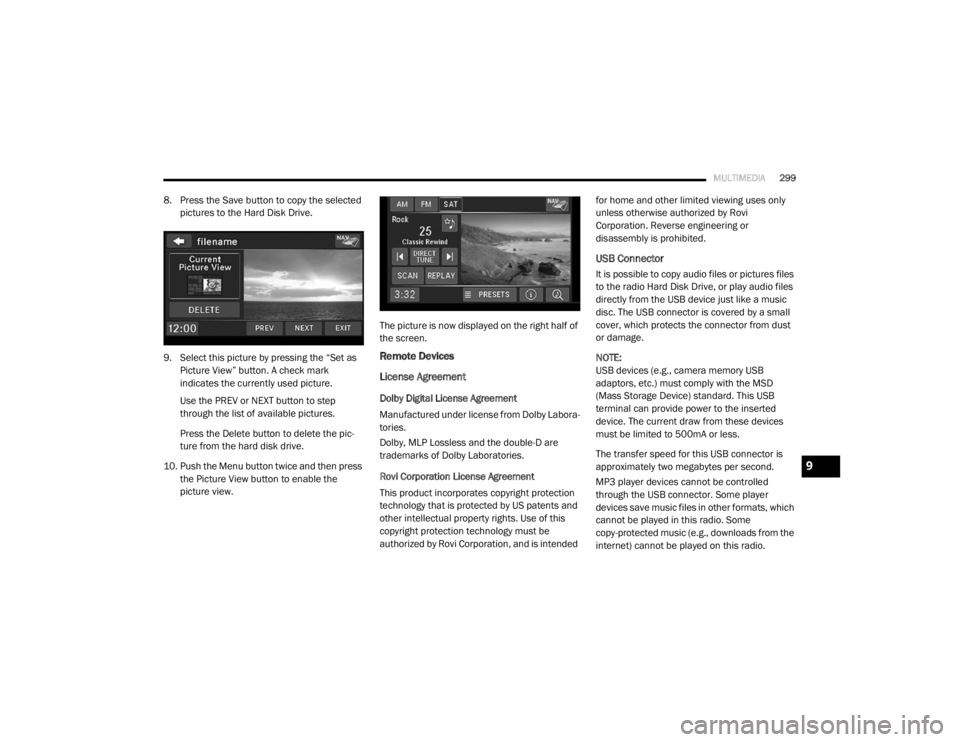
8. Press the Save button to copy the selected
pictures to the Hard Disk Drive.
9. Select this picture by pressing the “Set as Picture View” button. A check mark
indicates the currently used picture.
Use the PREV or NEXT button to step
through the list of available pictures.
Press the Delete button to delete the pic -
ture from the hard disk drive.
10. Push the Menu button twice and then press the Picture View button to enable the
picture view. The picture is now displayed on the right half of
the screen.
Remote Devices
License Agreement
Dolby Digital License Agreement
Manufactured under license from Dolby Labora-
tories.
Dolby, MLP Lossless and the double-D are
trademarks of Dolby Laboratories.
Rovi Corporation License Agreement
This product incorporates copyright protection
technology that is protected by US patents and
other intellectual property rights. Use of this
copyright protection technology must be
authorized by Rovi Corporation, and is intended for home and other limited viewing uses only
unless otherwise authorized by Rovi
Corporation. Reverse engineering or
disassembly is prohibited.
USB Connector
It is possible to copy audio files or pictures files
to the radio Hard Disk Drive, or play audio files
directly from the USB device just like a music
disc. The USB connector is covered by a small
cover, which protects the connector from dust
or damage.
NOTE:
USB devices (e.g., camera memory USB
adaptors, etc.) must comply with the MSD
(Mass Storage Device) standard. This USB
terminal can provide power to the inserted
device. The current draw from these devices
must be limited to 500mA or less.
The transfer speed for this USB connector is
approximately two megabytes per second.
MP3 player devices cannot be controlled
through the USB connector. Some player
devices save music files in other formats, which
cannot be played in this radio. Some
copy-protected music (e.g., downloads from the
internet) cannot be played on this radio.
9
20_RT_OM_EN_USC_t.book Page 299
Page 317 of 380
MULTIMEDIA315
At the next prompt, say “Delete” and follow
the prompts.
You can also push the Voice Recognition
button at any time while the list is being
played, and then choose the phone you wish
to delete.
Things You Should Know About Your
Uconnect Phone
Uconnect Phone Tutorial
To hear a brief tutorial of the system features,
push the Phone button and say “Uconnect
Tutorial.”
Voice Training
For users experiencing difficulty with the system
recognizing their voice commands or numbers,
the Uconnect Phone Voice Training feature may
be used. To enter this training mode, follow one
of the two following procedures:
From outside the Uconnect Phone mode
(e.g., from radio mode), push and hold the
Voice Recognition button for five seconds
until the session begins, or,
Push the Voice Recognition button and
say the “Voice Training,” “System Training,”
or “Start Voice Training” command.
You can either push the Uconnect Phone button
to restore the factory setting or repeat the
words and phrases when prompted by the
Uconnect Phone. For best results, the Voice
Training session should be completed when the
vehicle is parked with the engine running, all
windows closed, and the blower fan switched
off.
This procedure may be repeated with a new
user. The system will adapt to the last trained
voice only.
Reset
To Reset all settings using Voice Command:
1. Push the Phone button .
2. After the “Ready” prompt and the following beep, say “Setup,” then “Reset.”
This will delete all phone pairing, phone
book entries, and other settings in all
language modes. The System will prompt
you before resetting to factory settings. Voice Command
For best performance:
Adjust the rearview mirror to provide at least
1/2-inch (1 cm) gap between the overhead
console (if equipped) and the mirror.
Always wait for the beep before speaking.
Speak normally without pausing, just as you
would speak to a person sitting a few feet/
meters away from you.
Make sure that no one other than you is
speaking during a Voice Command period.
Performance is maximized under:
Low-to-medium blower setting
Low-to-medium vehicle speed
Low road noise
Smooth road surface
Fully closed windows
Dry weather condition
9
20_RT_OM_EN_USC_t.book Page 315
Page 320 of 380

318MULTIMEDIA
Warning
Read this information carefully before starting
to operate the navigation system and follow the
instructions in this manual. Neither the FCA US
LLC nor Garmin® shall be liable for problems or
accidents resulting from failure to observe the
instructions in this manual.
Failure to avoid the following potentially
hazardous situations could result in an accident
or collision resulting in death or serious injury.
Always drive safely. Only use the navigation
features in this vehicle when it is safe to do
so. You accept full responsibility for the use
of the features in this vehicle.
When navigating, carefully compare informa -
tion displayed on the navigation system to all
available navigation sources, including road
signs, road closures, road conditions, traffic
congestion, weather conditions, and other
factors that may affect safety while driving.
For safety, always resolve any discrepancies
before continuing navigation, and defer to
posted road signs and road conditions.
The navigation system is designed to provide
route suggestions. It is not a replacement for
driver attentiveness and good judgment. Do
not follow route suggestions if they suggest
an unsafe or illegal maneuver or would place
the vehicle in an unsafe situation.
Be careful of the ambient temperature. Using
the navigation system at extreme tempera -
tures can lead to malfunction or damage.
Also note that the unit can be damaged by
strong vibration, metal objects, or by water
getting inside the unit.
Caution
The navigation system is designed to provide
you with route suggestions. It does not reflect
road closures or road conditions, weather
conditions, or other factors that may affect
safety or timing while driving.
Use the navigation system only as a naviga -
tional aid. Do not attempt to use the navigation
system for any purpose requiring precise
measurement of direction, distance, location,
or topography. The Global Positioning System (GPS) is
operated by the United States government,
which is solely responsible for its accuracy and
maintenance. The government system is
subject to changes that could affect the
accuracy and performance of all GPS
equipment, including the navigation system.
Notice
This navigation system can be used when the
ignition key is turned to ON/RUN or ACC. To
preserve the battery, however, it should be used
with the engine running whenever possible.
Using the navigation system for a long time with
the engine switched off can cause the battery to
run down.
Map Data Information
Garmin® uses a combination of governmental
and private data sources. Virtually all data
sources contain some inaccurate or incomplete
data. In some countries, complete and accurate
map information is either not available or is
prohibitively expensive.
20_RT_OM_EN_USC_t.book Page 318
Page 334 of 380

332MULTIMEDIA
NOTE:
SiriusXM® Travel Link data services
subscription is separate from your SiriusXM®
Satellite Radio (audio) subscription.
SiriusXM® and all related marks and logos are
trademarks of SiriusXM® Radio Inc. and its
subsidiaries. SiriusXM® Radio requires a
subscription, sold separately after trial
subscription included with vehicle purchase.
Prices and programming are provided by
SiriusXM® and are subject to change.
Subscriptions governed by Terms & Conditions
available at www.sirius.com/serviceterms .
SiriusXM® Radio U.S. service only available to
those at least 18 years of age in the 48
contiguous United States, D.C., & PR. Visit
www.sirius.com/TravelLink for more
information on SIRIUS Travel Link.End-User License Agreement
Software License Agreement
BY USING THE NAVIGATION SYSTEM, YOU
AGREE TO BE BOUND BY THE TERMS AND
CONDITIONS OF THE FOLLOWING SOFTWARE
LICENSE AGREEMENT. PLEASE READ THIS
AGREEMENT CAREFULLY.
Garmin® Ltd. and its subsidiaries (“Garmin®”)
grant you a limited license to use the software
embedded in this device (the “Software”) in
binary executable form in the normal operation
of the product. Title, ownership rights, and
intellectual property rights in and to the
Software remain in Garmin® and/or its
third-party providers.
You acknowledge that the Software is the
property of Garmin® and/or its third-party
providers and is protected under the United
States of America copyright laws and interna -
tional copyright treaties. You further
acknowledge that the structure, organization,
and code of the Software, for which source code
is not provided, are valuable trade secrets of
Garmin® and/or its third-party providers and
that the Software in source code form remains
a valuable trade secret of Garmin® and/or its
third-party providers. You agree not to decompile, disassemble, modify, reverse
assemble, reverse engineer, or reduce to
human readable form the Software or any part
thereof or create any derivative works based on
the Software. You agree not to export or
re-export the Software to any country in
violation of the export control laws of the United
States of America or the export control laws of
any other applicable country.
NAVTEQ End-user License Agreement
The software embedded in your Garmin®
product (the “Software”) is owned by Garmin®
Ltd. or its subsidiaries (“Garmin®”). The
third-party map data embedded in or
accompanying your Garmin® product
(the “Map Data”) is owned by NAVTEQ North
America LLC and/or its affiliates (“NAVTEQ”)
and is licensed to Garmin®. Garmin® also
licenses information, text, images, graphics,
photographs, audio, video, images and other
applications and data from third party data
providers (“Third Party Content Data”). The Map
Data and Third Party Content Data are collec
-
tively the “Data”. Both the Software and Data
are protected under copyright laws and interna-
tional copyright treaties. The Software and Data
are licensed, not sold. The Software and Data
are provided under the following license and
CAUTION!
Neither SiriusXM® nor FCA US LLC is
responsible for any errors in accuracies in the
SiriusXM® data services or its use in
vehicles.
20_RT_OM_EN_USC_t.book Page 332
Page 335 of 380

MULTIMEDIA333
are subject to the following terms and
conditions which are agreed to by End User
(“you” or “your”), on the one hand, and
Garmin® and its licensors (including their
licensors and suppliers) and affiliated
companies on the other hand.
IMPORTANT: CAREFULLY READ THIS LICENSE
BEFORE USING THIS PRODUCT. INSTALLING,
COPYING, OR OTHERWISE USING THIS
PRODUCT INDICATES YOUR ACKNOWL -
EDGMENT THAT YOU HAVE READ THIS LICENSE
AND AGREE TO ITS TERMS. IF YOU DO NOT
AGREE, RETURN THE COMPLETE PRODUCT
WITHIN 7 DAYS OF THE DATE YOU ACQUIRED IT
(IF PURCHASED NEW) FOR A FULL REFUND TO
THE DEALER FROM WHICH YOU PURCHASED
THIS PRODUCT.
License Terms And Conditions
Garmin® (“we” or “us”) provides you with
storage media containing the computer
Software (the “Software”) and the embedded or
accompanying Data, including any “online” or
electronic documentation and printed materials
(together called the “Product” for purposes of
this License Agreement), and grants you a
limited, non-exclusive license to use the
Product in accordance with the terms of this
Agreement. You agree to use this Data together with the Garmin® product for solely personal, or
if applicable, for use in your business’ internal
operations, and not for service bureau,
time-sharing, resale or other similar purposes.
Accordingly, but subject to the restrictions set
forth in the following paragraphs, you may copy
this Data only as necessary for your use to (i)
view it, and (ii) save it, provided that you do not
remove any copyright notices that appear and
do not modify the Software or Data in any way.
You agree not to otherwise reproduce, copy,
modify, decompile, disassemble, reverse
engineer or create derivative works of any
portion of the Product, and may not transfer or
distribute it in any form, for any purpose, except
to the extent permitted by mandatory laws.
Garmin® also reserves the right to discontinue
offering any Data supplied by any third party
supplier if such supplier ceases to supply such
content or Garmin’s® contract with such
supplier terminates for any reason.
Restrictions
. Except where you have been
specifically licensed to do so by Garmin®, and
without limiting the preceding paragraph, you
may not use this Data with any products,
systems, or applications installed or otherwise
connected to or in communication with
vehicles, and which are capable of dispatch, fleet management or similar applications where
the Data is used by a central control center in
dispatching a fleet of vehicles. In addition, you
are prohibited from renting or leasing the Data
or the Garmin® products containing the Data to
any other person or third party. Only those
rental car companies that are specifically
authorized by Garmin® in writing to rent
Garmin® products containing the Data to their
rental customers are permitted to rent out such
products.
nüMaps Lifetime
. If you purchase a nüMaps
Lifetime subscription (sold separately) or if your
Garmin® product comes bundled with a
nüMaps Lifetime subscription, you will receive
up to four (4) Map Data updates per year, when
and as such updates are made available on
Garmin’s® website, for one (1) compatible
Garmin® product until your product’s useful life
expires or Garmin® no longer receives Map
Data from NAVTEQ, whichever is shorter. A
product’s “useful life” means the period during
which the product (a) has sufficient memory
capacity and other required technical
capabilities to utilize current map data and (b) is
capable of operating as intended without major
repairs. A product will be deemed to be out of
service and its useful life to be ended if no
9
20_RT_OM_EN_USC_t.book Page 333