lights DODGE GRAND CARAVAN 2020 Owners Manual
[x] Cancel search | Manufacturer: DODGE, Model Year: 2020, Model line: GRAND CARAVAN, Model: DODGE GRAND CARAVAN 2020Pages: 380, PDF Size: 14.92 MB
Page 4 of 380

2
INTRODUCTION
HOW TO USE THIS MANUAL .................................. 8
Essential Information .................................... 8
Symbols .......................................................... 8
WARNINGS AND CAUTIONS ................................. 8
VEHICLE MODIFICATIONS/ALTERATIONS ........... 8
GETTING TO KNOW YOUR VEHICLE
KEYS ........................................................................ 9
Key Fobs ......................................................... 9
IGNITION SWITCH .................................................11
Wireless Ignition Node (WIN) ...................... 11
REMOTE START — IF EQUIPPED .........................12
How To Use Remote Start ........................... 12
Remote Start Abort Messages .................... 12
To Enter Remote Start Mode ...................... 12
To Exit Remote Start Mode Without
Driving The Vehicle ..................................... 13 To Exit Remote Start Mode And Drive The
Vehicle .......................................................... 13 General Information .................................... 13
SENTRY KEY ..........................................................13
Key Programming ....................................... 14
Replacement Keys....................................... 14
General Information .................................... 14
VEHICLE SECURITY ALARM — IF EQUIPPED .....15
Rearming Of The System............................. 15
To Arm The System ..................................... 15
To Disarm The System ................................ 15
Tamper Alert................................................. 16 DOORS .................................................................. 16
Manual Door Locks...................................... 16
Power Door Locks — If Equipped ............... 17
Power Sliding Side Door — If Equipped ...... 18
Child Locks ................................................... 19
SEATS .................................................................... 20
Manual Adjustment (Front Seats) — If
Equipped ...................................................... 20 Manual Adjustment (Rear Seats) ............... 21
Power Seats — If Equipped ......................... 27
Heated Seats — If Equipped ....................... 28
Plastic Grocery Bag Retainer Hooks........... 30
HEAD RESTRAINTS .............................................. 30
Supplemental Active Head Restraints
— Front Seats ............................................... 30 Head Restraints — Second Row Quad
Seats............................................................. 31 Head Restraints — Second Row Bench ...... 32
Head Restraints — Third Row...................... 32
STEERING WHEEL ............................................... 33
Tilt/Telescoping Steering Column .............. 33
Heated Steering Wheel — If Equipped ....... 34
MIRRORS .............................................................. 34
Automatic Dimming Mirror
— If Equipped .............................................. 34 Automatic Dimming Mirror With Rear
View Camera Display — If Equipped ........... 35 Outside Mirrors ........................................... 35
Interior Observation Mirror.......................... 36
Power Mirrors — If Equipped ...................... 36
Outside Mirrors Folding Feature ................. 36 Heated Mirrors — If Equipped ..................... 37
Illuminated Vanity Mirrors
— If Equipped .............................................. 37
EXTERIOR LIGHTS ...............................................37
Headlight Switch.......................................... 37
Multifunction Lever .................................... 37
Daytime Running Lights (DRLs)
— If Equipped ............................................... 38 High/Low Beam Switch .............................. 38
Flash-To-Pass ............................................... 38
Automatic Headlights ................................. 38
Headlights On With Wipers
— If Equipped ............................................... 38 Headlight Delay — If Equipped.................... 38
Lights-On Reminder ..................................... 39
Front Fog Lights — If Equipped .................. 39
Turn Signals ................................................. 39
Lane Change Assist ..................................... 39
Battery Protection ....................................... 39
INTERIOR LIGHTS ................................................39
Courtesy/Interior Lighting ........................... 39
WINDSHIELD WIPER AND WASHERS ...............41
Windshield Wiper Operation ....................... 41
Rear Wiper And Washer .............................. 42
CLIMATE CONTROLS ...........................................42
Manual Climate Control Overview .............. 42
Automatic Climate Control Overview .......... 48
Climate Control Functions........................... 56
Automatic Temperature Control (ATC)
— If Equipped ............................................... 56 Operating Tips ............................................. 57
20_RT_OM_EN_USC_t.book Page 2
Page 5 of 380

3
WINDOWS ............................................................59 Power Vent Windows — If Equipped .......... 59
Power Windows ............................................ 59
HOOD......................................................................61
Opening The Hood ....................................... 61
Closing The Hood ......................................... 61
LIFTGATE ................................................................62
Opening ........................................................ 62
Closing .......................................................... 62
Power Liftgate — If Equipped ...................... 62
Cargo Area Features ................................... 63
LOAD LEVELING SYSTEM — IF EQUIPPED .........63
GARAGE DOOR OPENER — IF EQUIPPED ..........63
Before You Begin Programming
HomeLink® .................................................. 64 Programming A Rolling Code ...................... 64
Programming A Non-Rolling Code............... 65
Canadian/Gate Operator Programming ..... 66
Using HomeLink® ........................................ 67
Security......................................................... 67
Troubleshooting Tips ................................... 67
General Information .................................... 68
INTERNAL EQUIPMENT ........................................68
Storage ......................................................... 68
Cupholders .................................................. 73
Sun Screens — If Equipped ......................... 75
Electrical Power Outlets — If Equipped....... 75
Power Inverter — If Equipped ...................... 77
Smoker's Package Kit — If Equipped ......... 78
Sunglass Storage Bin — If Equipped........... 78 ROOF LUGGAGE RACK — IF EQUIPPED ............. 79
Deploying The Crossbars............................. 79
Stowing The Crossbars................................ 80
GETTING TO KNOW YOUR INSTRUMENT PANEL
INSTRUMENT CLUSTER ...................................... 82 Instrument Cluster Descriptions ................ 84
INSTRUMENT CLUSTER DISPLAY ..................... 85
Instrument Cluster Display Location And
Controls ....................................................... 85 Oil Life Reset ................................................ 87
Instrument Cluster Display Menu Items .... 87
TRIP COMPUTER ................................................. 93
WARNING LIGHTS AND MESSAGES .................. 94 Red Warning Lights ..................................... 94
Yellow Warning Lights ................................. 97
White Indicator Lights ............................... 100Green Indicator Lights ............................... 100Blue Indicator Lights.................................. 100
ONBOARD DIAGNOSTIC SYSTEM — OBD II..... 101
Onboard Diagnostic System (OBD II)
Cybersecurity ............................................. 101
EMISSIONS INSPECTION AND
MAINTENANCE PROGRAMS .............................102
SAFETY
SAFETY FEATURES .............................................103
Anti-Lock Brake System (ABS) ................. 103
Electronic Brake Control (EBC) System ... 104 AUXILIARY DRIVING SYSTEMS ........................ 110
Blind Spot Monitoring (BSM)
— If Equipped ............................................. 110 Tire Pressure Monitoring System
(TPMS) ........................................................ 115
OCCUPANT RESTRAINT SYSTEMS ................. 119
Occupant Restraint Systems Features .... 119
Important Safety Precautions ................... 119
Seat Belt Systems .................................... 120Supplemental Restraint Systems (SRS)... 131
Child Restraints ......................................... 141Transporting Pets ..................................... 159
SAFETY TIPS ...................................................... 159
Transporting Passengers .......................... 159
Exhaust Gas ............................................... 159
Safety Checks You Should Make
Inside The Vehicle .................................... 160 Periodic Safety Checks You Should
Make Outside The Vehicle ........................ 161
STARTING AND OPERATING
STARTING THE ENGINE .................................... 162
Normal Starting ......................................... 162Cold Weather Operation
(Below –22°F Or −30°C) ......................... 163 After Starting — Warming Up The
Engine ........................................................ 163 If Engine Fails To Start ............................. 163
ENGINE BLOCK HEATER — IF EQUIPPED ........ 163
20_RT_OM_EN_USC_t.book Page 3
Page 10 of 380

8
HOW TO USE THIS MANUAL
Essential Information
Consult the Table of Contents to determine which section contains the information you desire.
Since the specification of your vehicle depends on the items of equipment ordered, certain descriptions and illustrations may differ from your vehicle's
equipment.
The detailed Index at the back of this Owner's Manual contains a complete listing of all subjects.
Symbols
Some vehicle components have colored labels whose symbols indicate precautions to be observed when using this component. Refer to “Warning
Lights and Messages” in “Getting To Know Your Instrument Panel” for further information on the symbols used in your vehicle.
WARNINGS AND CAUTIONS
This Owner’s Manual contains WARNINGS against operating procedures that could result in a collision, bodily injury and/or death. It also contains
CAUTIONS against procedures that could result in damage to your vehicle. If you do not read this entire Owner’s Manual, you may miss important
information. Observe all Warnings and Cautions.
VEHICLE MODIFICATIONS/ALTERATIONS
WARNING!
Any modifications or alterations to this vehicle could seriously affect its roadworthiness and safety and may lead to a collision resulting in serious
injury or death.
20_RT_OM_EN_USC_t.book Page 8
Page 11 of 380
9GETTING TO KNOW YOUR VEHICLE
KEYS
Key Fobs
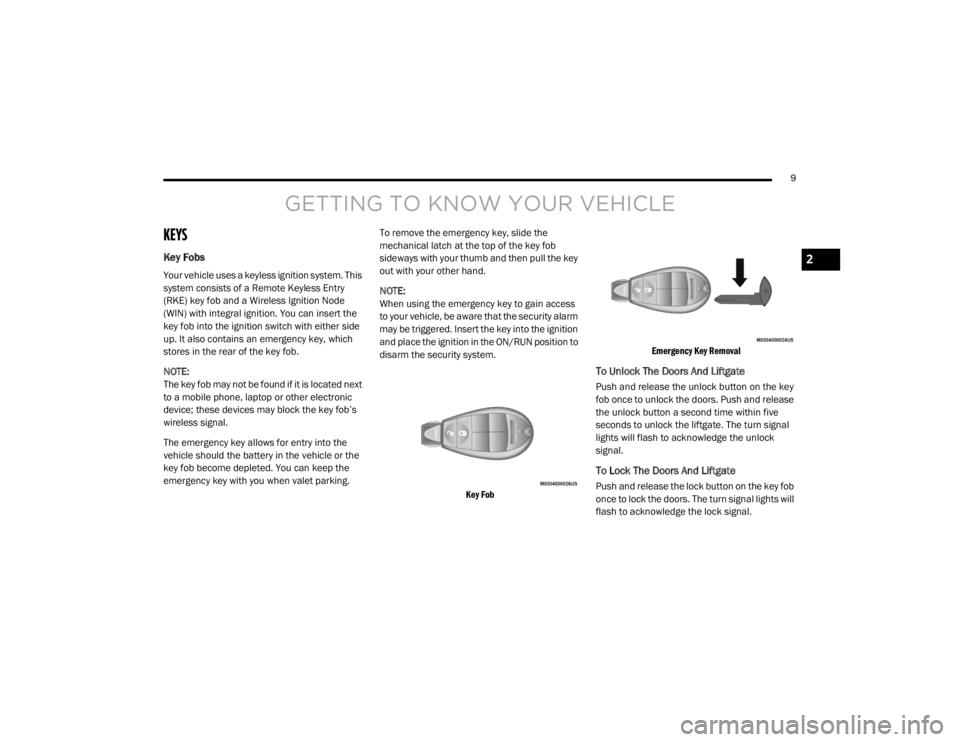
Your vehicle uses a keyless ignition system. This
system consists of a Remote Keyless Entry
(RKE) key fob and a Wireless Ignition Node
(WIN) with integral ignition. You can insert the
key fob into the ignition switch with either side
up. It also contains an emergency key, which
stores in the rear of the key fob.
NOTE:
The key fob may not be found if it is located next
to a mobile phone, laptop or other electronic
device; these devices may block the key fob’s
wireless signal.
The emergency key allows for entry into the
vehicle should the battery in the vehicle or the
key fob become depleted. You can keep the
emergency key with you when valet parking.
To remove the emergency key, slide the
mechanical latch at the top of the key fob
sideways with your thumb and then pull the key
out with your other hand.
NOTE:
When using the emergency key to gain access
to your vehicle, be aware that the security alarm
may be triggered. Insert the key into the ignition
and place the ignition in the ON/RUN position to
disarm the security system.
Key Fob Emergency Key Removal
To Unlock The Doors And Liftgate
Push and release the unlock button on the key
fob once to unlock the doors. Push and release
the unlock button a second time within five
seconds to unlock the liftgate. The turn signal
lights will flash to acknowledge the unlock
signal.
To Lock The Doors And Liftgate
Push and release the lock button on the key fob
once to lock the doors. The turn signal lights will
flash to acknowledge the lock signal.
2
20_RT_OM_EN_USC_t.book Page 9
Page 18 of 380
16GETTING TO KNOW YOUR VEHICLE
(Continued)
NOTE:
The driver's door key cylinder and the liftgate
button on the key fob cannot arm or disarm
the vehicle security alarm.
The vehicle security alarm remains armed
during power liftgate entry. Pushing the lift-
gate button will not disarm the vehicle secu -
rity alarm. If someone enters the vehicle
through the liftgate and opens any door, the
alarm will sound.
When the vehicle security alarm is armed,
the interior power door lock switches will not
unlock the doors.
The vehicle security alarm is designed to protect
your vehicle. However, you can create
conditions where the system will give you a false
alarm. If one of the previously described arming
sequences has occurred, the vehicle security
alarm will arm regardless of whether you are in
the vehicle or not. If you remain in the vehicle
and open a door, the alarm will sound. If this
occurs, disarm the vehicle security alarm. If the vehicle security alarm is armed and the
battery becomes disconnected, the vehicle
security alarm will remain armed when the
battery is reconnected; the exterior lights will
flash, and the horn will sound. If this occurs,
disarm the vehicle security alarm.
Tamper Alert
If something has triggered the vehicle security
alarm in your absence, the horn will sound three
times and the exterior lights will blink three
times when you disarm the vehicle security
alarm. Check the vehicle for tampering.
DOORS
Manual Door Locks
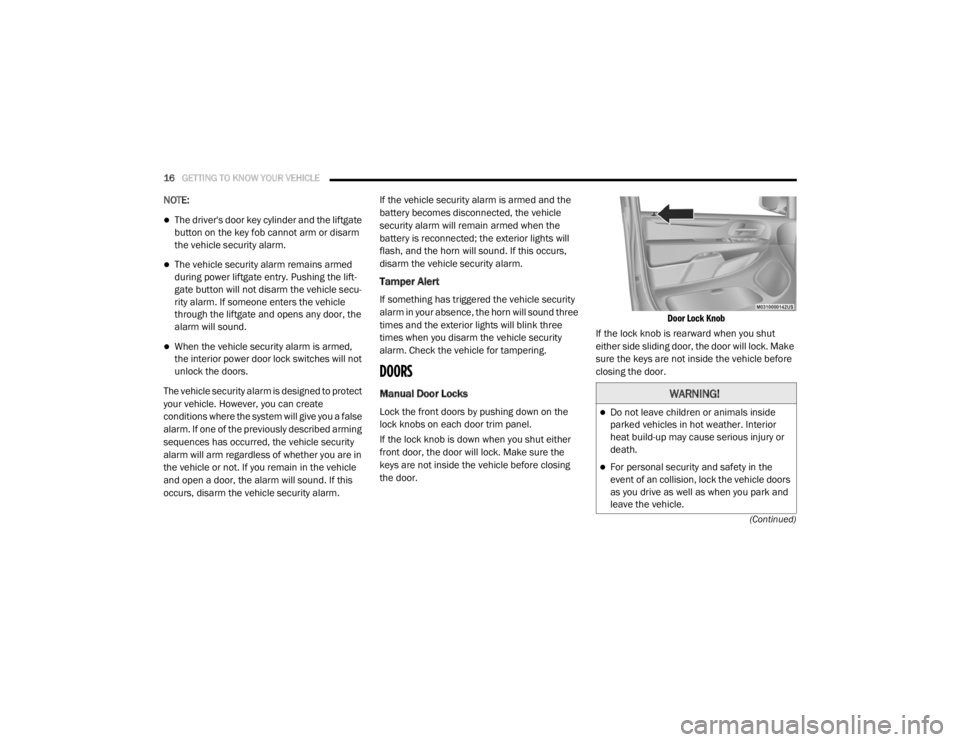
Lock the front doors by pushing down on the
lock knobs on each door trim panel.
If the lock knob is down when you shut either
front door, the door will lock. Make sure the
keys are not inside the vehicle before closing
the door.
Door Lock Knob
If the lock knob is rearward when you shut
either side sliding door, the door will lock. Make
sure the keys are not inside the vehicle before
closing the door.
WARNING!
Do not leave children or animals inside
parked vehicles in hot weather. Interior
heat build-up may cause serious injury or
death.
For personal security and safety in the
event of an collision, lock the vehicle doors
as you drive as well as when you park and
leave the vehicle.
20_RT_OM_EN_USC_t.book Page 16
Page 31 of 380

GETTING TO KNOW YOUR VEHICLE29
Front Heated Seats
There are two heated seat switches that allow
the driver and passenger to operate the seats
independently. The controls for each heater are
located on the switch bank below the climate
controls. You can choose from HI, LO or OFF heat
settings. Amber indicator lights in each switch
indicate the level of heat in use. Two indicator
lights will illuminate for HI, one for LO and none
for OFF.
Push the heated seat button once to turn
the HI setting on.
Push the heated seat button a second
time to turn the LO setting on.
Push the heated seat button a third time
to turn the heating elements off.
NOTE:
Once a heat setting is selected, heat will be felt
within two to five minutes.
If the HI-level setting is selected, the system will
automatically switch to LO-level after approxi -
mately 60 minutes of continuous operation. At
that time, the display will change from HI to LO,
indicating the change. The LO-level setting will
turn off automatically after approximately
45 minutes. Vehicles Equipped With Remote Start
On models that are equipped with remote start,
the heated seats can be programmed to come
on during a remote start.
This feature can be programmed through the
instrument cluster display. Refer to “Instrument
Cluster Display” in “Getting To Know Your
Instrument Panel” for further information.
WARNING!
Persons who are unable to feel pain to the
skin because of advanced age, chronic
illness, diabetes, spinal cord injury, medica
-
tion, alcohol use, exhaustion or other phys -
ical condition must exercise care when
using the seat heater. It may cause burns
even at low temperatures, especially if
used for long periods of time.
Do not place anything on the seat or seat -
back that insulates against heat, such as a
blanket or cushion. This may cause the seat
heater to overheat. Sitting in a seat that has
been overheated could cause serious
burns due to the increased surface
temperature of the seat.
WARNING!
Persons who are unable to feel pain to the
skin because of advanced age, chronic
illness, diabetes, spinal cord injury, medica -
tion, alcohol use, exhaustion or other phys -
ical condition must exercise care when
using the seat heater. It may cause burns
even at low temperatures, especially if
used for long periods of time.
Do not place anything on the seat or seat -
back that insulates against heat, such as a
blanket or cushion. This may cause the seat
heater to overheat. Sitting in a seat that has
been overheated could cause serious
burns due to the increased surface
temperature of the seat.
2
20_RT_OM_EN_USC_t.book Page 29
Page 39 of 380
GETTING TO KNOW YOUR VEHICLE37
Heated Mirrors — If Equipped
These mirrors are heated to melt frost
or ice. This feature will be activated
whenever you turn on the rear window
defroster (if equipped). Refer to “Climate
Controls” in this chapter for further information.
Illuminated Vanity Mirrors — If Equipped
An illuminated vanity mirror is located on the
sun visor. To use the mirror, rotate the sun visor
down and swing the mirror cover upward. The
lights turn on automatically. Closing the mirror
cover turns off the lights.
Lift Mirror Cover
EXTERIOR LIGHTS
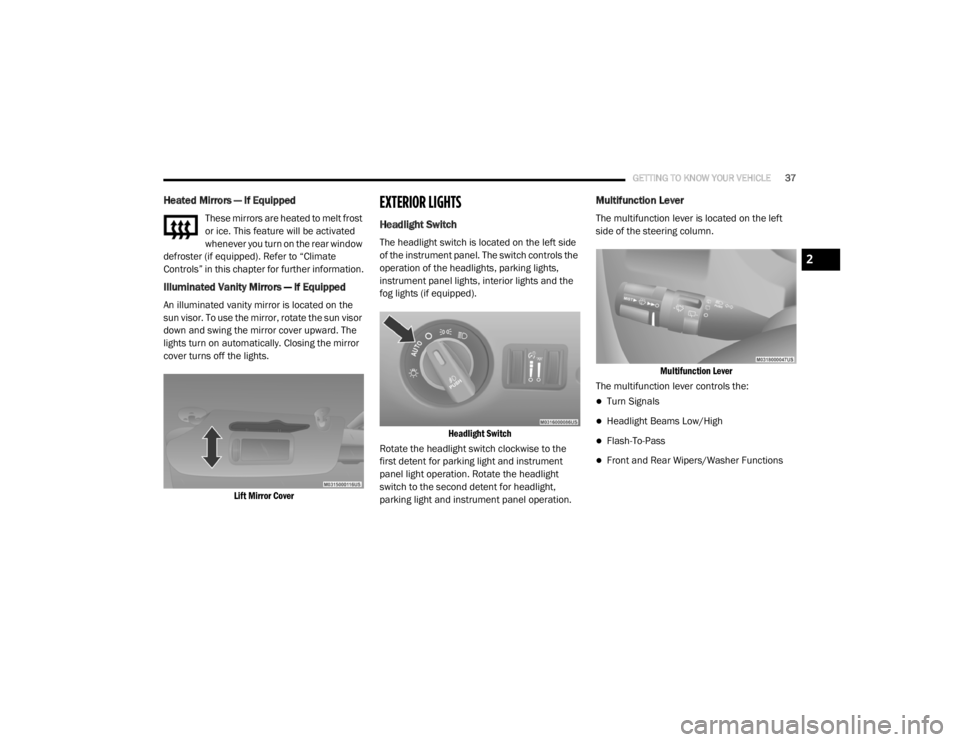
Headlight Switch
The headlight switch is located on the left side
of the instrument panel. The switch controls the
operation of the headlights, parking lights,
instrument panel lights, interior lights and the
fog lights (if equipped).
Headlight Switch
Rotate the headlight switch clockwise to the
first detent for parking light and instrument
panel light operation. Rotate the headlight
switch to the second detent for headlight,
parking light and instrument panel operation.
Multifunction Lever
The multifunction lever is located on the left
side of the steering column.
Multifunction Lever
The multifunction lever controls the:
Turn Signals
Headlight Beams Low/High
Flash-To-Pass
Front and Rear Wipers/Washer Functions
2
20_RT_OM_EN_USC_t.book Page 37
Page 40 of 380

38GETTING TO KNOW YOUR VEHICLE
Daytime Running Lights (DRLs) — If
Equipped
The headlights on your vehicle will illuminate
when the engine is started and the
transmission is in any gear except PARK. This
provides a constant "lights on" condition until
the ignition is placed in the OFF position. The
lights illuminate at less than half of normal
intensity. If the parking brake is applied, the
Daytime Running Lights (DRLs) will turn off.
Also, if a turn signal is activated, the DRL lamp
on the same side of the vehicle may turn off for
the duration of the turn signal activation. Once
the turn signal is no longer active, the DRL lamp
will illuminate.
High/Low Beam Switch
Push the multifunction lever toward the
instrument panel to switch the headlights to
high beams. Pulling the multifunction lever
back toward the steering wheel will return the
lights to low beams.
Flash-To-Pass
You can signal another vehicle with your
headlights by lightly pulling the multifunction
lever toward you. This will cause the high beam
headlights to turn on, and remain on, until the
lever is released.
Automatic Headlights
This system automatically turns the headlights
on or off according to ambient light levels. To
turn the system on, rotate the headlight switch
counterclockwise to the AUTO position. When
the system is on, the headlight time delay
feature is also on. This means the headlights
will stay on for up to 90 seconds after you place
the ignition into the OFF position. The headlight
time delay can be programmed to 0, 30, 60, or
90 seconds. Refer to “Headlight Delay” in this
section for further information.
To turn the automatic system off, move the
headlight switch out of the AUTO position.
NOTE:
The engine must be running before the
headlights will come on in the automatic mode.
Headlights On With Wipers — If Equipped
When your headlights are in the AUTO mode
and the engine is running, the headlights will
automatically turn on when the wiper system is
also turned on. Headlights on when windshield
wipers are on may be found on vehicles
equipped with an automatic headlight system.
NOTE:
The Headlights with Wipers feature can be
turned on or off through the instrument cluster
display. Refer to “Instrument Cluster Display” in
“Getting To Know Your Instrument Panel” for
further information.
Headlight Delay — If Equipped
This feature provides the safety of headlight
illumination for up to 90 seconds after exiting
your vehicle.
To activate the delay feature, place the ignition
in the OFF position while the headlights are still
on. Then turn off the headlights within 45
seconds. The 90 second delay interval begins
when the headlight switch is turned off. If the
headlights or parking lights are turned back on
or the ignition switch is placed in the ON
position, the delay will be cancelled.
20_RT_OM_EN_USC_t.book Page 38
Page 41 of 380

GETTING TO KNOW YOUR VEHICLE39
When exiting the vehicle the driver can choose
to have the headlights remain on for 30, 60 or
90 seconds or not remain on. To change the
timer setting, see an authorized dealer.
The headlight delay time is programmable on
vehicles equipped with an instrument cluster
display. Refer to “Instrument Cluster Display” in
“Getting To Know Your Instrument Panel” for
further information.
If the headlights are turned off before the
ignition, they will turn off in the normal manner.
NOTE:
The headlights must be turned off within 45
seconds of placing the ignition in the OFF
position to activate this feature.
Lights-On Reminder
If the headlights or the parking lights are left on,
or if the dimmer control is in the extreme top
position after the ignition has been placed in
the OFF position, a chime will sound when the
driver's door is opened.
Front Fog Lights — If Equipped
To activate the front fog lights, turn on the
parking lights or the low beam headlights and
push in the headlight switch control knob. Pushing the headlight switch control knob a
second time will turn the front fog lights off.
Turn Signals
Move the multifunction lever up or down and
the arrows on each side of the instrument
cluster display will flash to show proper
operation of the front and rear turn signal lights.
NOTE:
If either light remains on and does not flash, or
there is a very fast flash rate, check for a
defective outside light bulb. If an indicator fails
to light when the lever is moved, it would
suggest that the indicator bulb is defective.
Turn Signal Warning
If the vehicle electronics sense that the vehicle
has traveled at over 18 mph (29 km/h) for
about 1 mile (1.6 km) with the turn signals on, a
chime will sound to alert the driver.
Lane Change Assist
Tap the lever up or down once, without moving
beyond the detent, and the turn signal (right or
left) will flash three times then automatically
turn off.
Battery Protection
This feature provides battery protection to avoid
wearing down the battery if the headlights or
parking lights are left on for extended periods of
time when the ignition is in the OFF position.
After eight minutes of the ignition being placed
in the OFF position, and the headlight switch in
any position other than OFF or AUTO, the lights
will turn off automatically until the next cycle of
the ignition or headlight switch.
The battery protection feature will be disabled if
the ignition is placed in any position other than
OFF during the eight minute delay.
INTERIOR LIGHTS
Courtesy/Interior Lighting
At the forward end of the overhead console are
two courtesy lights (standard dome light has
two buttons). These interior lights are turned on
when a door or the liftgate is opened, the
remote keyless entry key fob is activated, or
when the dimmer control is moved to the
extreme top.
2
20_RT_OM_EN_USC_t.book Page 39
Page 42 of 380

40GETTING TO KNOW YOUR VEHICLE
The interior lights will automatically turn off in
approximately 10 minutes for the first
activation and 90 seconds every activation
thereafter until the engine is started, if one of
the following occur:
A door, sliding door or the liftgate is left open.
Any overhead reading light is left on.
NOTE:
The ignition must be placed in the OFF position
for this feature to operate.
The courtesy lights also function as reading
lights. Push in on each lens to turn these lights
on while inside the vehicle. Push a second time
to turn each light off. You may adjust the
direction of these lights by pushing the outside
ring, which is identified with four directional
arrows (LED lamps only).
Rear Courtesy/Reading Lights — If Equipped
The overhead console has two sets of courtesy
lights. The lights turn on when a front door, a
sliding door or the liftgate is opened. If your
vehicle is equipped with Remote Keyless Entry,
the lights will also turn on when the unlock
button on the key fob is pushed.
The courtesy lights also function as reading
lights. Push in on each lens to turn these lights
on while inside the vehicle. Push the lens a
second time to turn each light off. You may
adjust the direction of these lights by pushing
the outside ring, which is identified with four
directional arrows.
Reading Lights
Rear Console Halo Lighting
Halo lights are strategically placed soft lighting
that help to illuminate specific areas to aid the
occupants in locating specific features while
driving at night.
The rear overhead console has recessed halo
lighting around the perimeter of the console
base. This feature provides additional lighting
options while traveling and is controlled by the
ambient light dimmer control of the headlight
switch.
Ambient Light Dimmer Control
20_RT_OM_EN_USC_t.book Page 40