rack DODGE GRAND CARAVAN 2020 Owners Manual
[x] Cancel search | Manufacturer: DODGE, Model Year: 2020, Model line: GRAND CARAVAN, Model: DODGE GRAND CARAVAN 2020Pages: 380, PDF Size: 14.92 MB
Page 5 of 380

3
WINDOWS ............................................................59 Power Vent Windows — If Equipped .......... 59
Power Windows ............................................ 59
HOOD......................................................................61
Opening The Hood ....................................... 61
Closing The Hood ......................................... 61
LIFTGATE ................................................................62
Opening ........................................................ 62
Closing .......................................................... 62
Power Liftgate — If Equipped ...................... 62
Cargo Area Features ................................... 63
LOAD LEVELING SYSTEM — IF EQUIPPED .........63
GARAGE DOOR OPENER — IF EQUIPPED ..........63
Before You Begin Programming
HomeLink® .................................................. 64 Programming A Rolling Code ...................... 64
Programming A Non-Rolling Code............... 65
Canadian/Gate Operator Programming ..... 66
Using HomeLink® ........................................ 67
Security......................................................... 67
Troubleshooting Tips ................................... 67
General Information .................................... 68
INTERNAL EQUIPMENT ........................................68
Storage ......................................................... 68
Cupholders .................................................. 73
Sun Screens — If Equipped ......................... 75
Electrical Power Outlets — If Equipped....... 75
Power Inverter — If Equipped ...................... 77
Smoker's Package Kit — If Equipped ......... 78
Sunglass Storage Bin — If Equipped........... 78 ROOF LUGGAGE RACK — IF EQUIPPED ............. 79
Deploying The Crossbars............................. 79
Stowing The Crossbars................................ 80
GETTING TO KNOW YOUR INSTRUMENT PANEL
INSTRUMENT CLUSTER ...................................... 82 Instrument Cluster Descriptions ................ 84
INSTRUMENT CLUSTER DISPLAY ..................... 85
Instrument Cluster Display Location And
Controls ....................................................... 85 Oil Life Reset ................................................ 87
Instrument Cluster Display Menu Items .... 87
TRIP COMPUTER ................................................. 93
WARNING LIGHTS AND MESSAGES .................. 94 Red Warning Lights ..................................... 94
Yellow Warning Lights ................................. 97
White Indicator Lights ............................... 100Green Indicator Lights ............................... 100Blue Indicator Lights.................................. 100
ONBOARD DIAGNOSTIC SYSTEM — OBD II..... 101
Onboard Diagnostic System (OBD II)
Cybersecurity ............................................. 101
EMISSIONS INSPECTION AND
MAINTENANCE PROGRAMS .............................102
SAFETY
SAFETY FEATURES .............................................103
Anti-Lock Brake System (ABS) ................. 103
Electronic Brake Control (EBC) System ... 104 AUXILIARY DRIVING SYSTEMS ........................ 110
Blind Spot Monitoring (BSM)
— If Equipped ............................................. 110 Tire Pressure Monitoring System
(TPMS) ........................................................ 115
OCCUPANT RESTRAINT SYSTEMS ................. 119
Occupant Restraint Systems Features .... 119
Important Safety Precautions ................... 119
Seat Belt Systems .................................... 120Supplemental Restraint Systems (SRS)... 131
Child Restraints ......................................... 141Transporting Pets ..................................... 159
SAFETY TIPS ...................................................... 159
Transporting Passengers .......................... 159
Exhaust Gas ............................................... 159
Safety Checks You Should Make
Inside The Vehicle .................................... 160 Periodic Safety Checks You Should
Make Outside The Vehicle ........................ 161
STARTING AND OPERATING
STARTING THE ENGINE .................................... 162
Normal Starting ......................................... 162Cold Weather Operation
(Below –22°F Or −30°C) ......................... 163 After Starting — Warming Up The
Engine ........................................................ 163 If Engine Fails To Start ............................. 163
ENGINE BLOCK HEATER — IF EQUIPPED ........ 163
20_RT_OM_EN_USC_t.book Page 3
Page 25 of 380

GETTING TO KNOW YOUR VEHICLE23
(Continued)
6. Push the seat into the storage bin.
Seat In Storage Bin
7. Close the storage bin cover.
To Unstow Second Row Seats
To unstow the second row seat, proceed as
follows:
1. Pull up on the storage bin latch to open the cover.
2. Pull up on the strap to lift the seat out of the
storage bin and push the seat rearward to
latch the seat anchors.
3. Lift the seatback to the full upright position.
4. Return the head restraint to its upright position, close the storage bin cover and
slide the storage bin locking mechanism to
the “unlocked” position.
WARNING!
In a collision, serious injury could result if the
seat storage bin covers are not properly
latched:
Do not drive the vehicle with the storage bin
covers open.
Keep the storage bin covers closed and
latched while the vehicle is in motion.
Do not use a storage bin latch as a tie
down.
CAUTION!
The storage bin cover must be locked and
flat to avoid damage from contact with the
front seat tracks, which have minimal clear -
ance to the cover.
Do not sit on the second row seat when it is
in the stowed position with the seatback
upright otherwise damage to the seat may
occur.
WARNING! (Continued)
WARNING!
In a collision, you or others in your vehicle
could be injured if seats are not properly
latched to their floor attachments. Always
be sure the seats are fully latched.
Sitting in a seat with the head restraint in its
lowered position could result in serious
injury or death in a collision. Always make
sure the head restraints are in their upright
positions when the seat is to be occupied.
2
20_RT_OM_EN_USC_t.book Page 23
Page 71 of 380
GETTING TO KNOW YOUR VEHICLE69
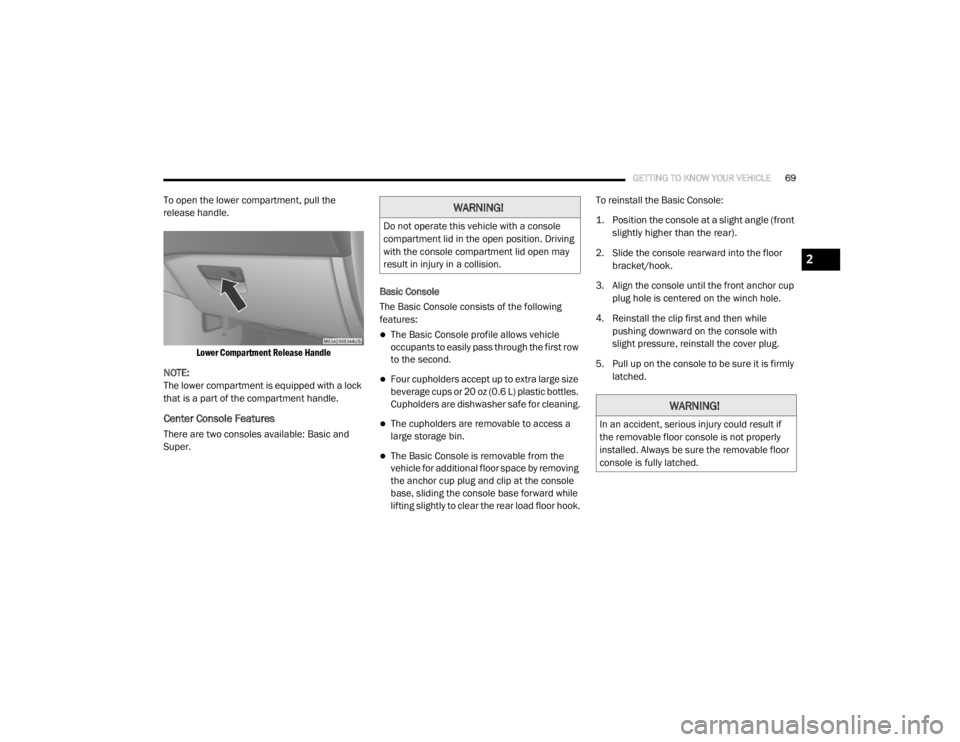
To open the lower compartment, pull the
release handle.
Lower Compartment Release Handle
NOTE:
The lower compartment is equipped with a lock
that is a part of the compartment handle.
Center Console Features
There are two consoles available: Basic and
Super. Basic Console
The Basic Console consists of the following
features:
The Basic Console profile allows vehicle
occupants to easily pass through the first row
to the second.
Four cupholders accept up to extra large size
beverage cups or 20 oz (0.6 L) plastic bottles.
Cupholders are dishwasher safe for cleaning.
The cupholders are removable to access a
large storage bin.
The Basic Console is removable from the
vehicle for additional floor space by removing
the anchor cup plug and clip at the console
base, sliding the console base forward while
lifting slightly to clear the rear load floor hook.To reinstall the Basic Console:
1. Position the console at a slight angle (front
slightly higher than the rear).
2. Slide the console rearward into the floor bracket/hook.
3. Align the console until the front anchor cup plug hole is centered on the winch hole.
4. Reinstall the clip first and then while pushing downward on the console with
slight pressure, reinstall the cover plug.
5. Pull up on the console to be sure it is firmly latched.
WARNING!
Do not operate this vehicle with a console
compartment lid in the open position. Driving
with the console compartment lid open may
result in injury in a collision.
WARNING!
In an accident, serious injury could result if
the removable floor console is not properly
installed. Always be sure the removable floor
console is fully latched.
2
20_RT_OM_EN_USC_t.book Page 69
Page 74 of 380
72GETTING TO KNOW YOUR VEHICLE
(Continued)
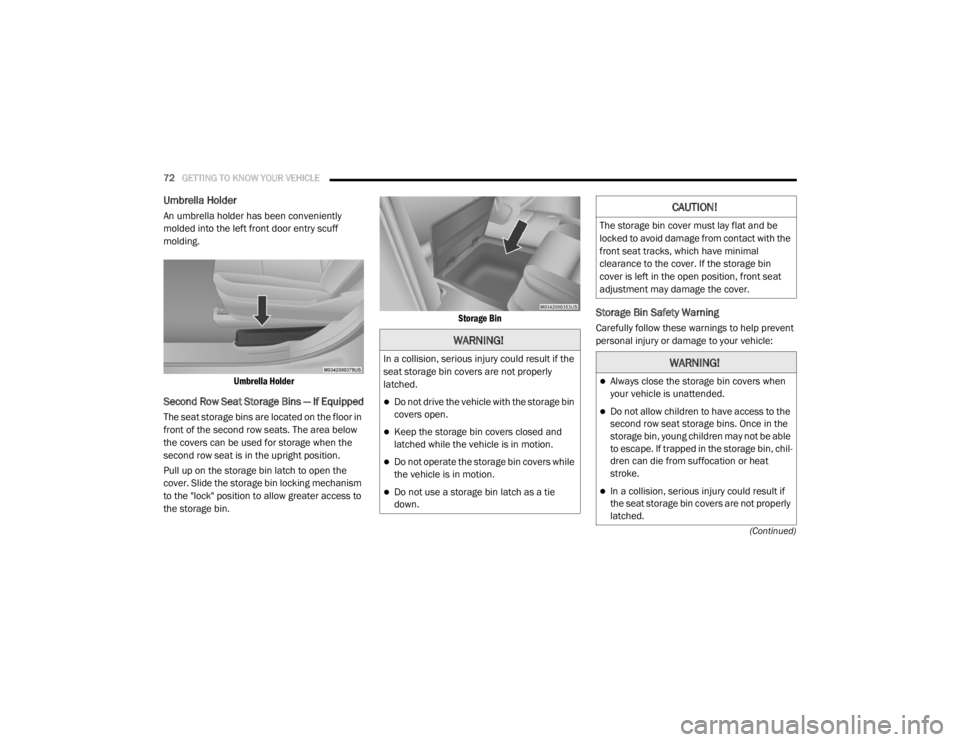
Umbrella Holder
An umbrella holder has been conveniently
molded into the left front door entry scuff
molding.
Umbrella Holder
Second Row Seat Storage Bins — If Equipped
The seat storage bins are located on the floor in
front of the second row seats. The area below
the covers can be used for storage when the
second row seat is in the upright position.
Pull up on the storage bin latch to open the
cover. Slide the storage bin locking mechanism
to the "lock" position to allow greater access to
the storage bin.
Storage Bin
Storage Bin Safety Warning
Carefully follow these warnings to help prevent
personal injury or damage to your vehicle:
WARNING!
In a collision, serious injury could result if the
seat storage bin covers are not properly
latched.
Do not drive the vehicle with the storage bin
covers open.
Keep the storage bin covers closed and
latched while the vehicle is in motion.
Do not operate the storage bin covers while
the vehicle is in motion.
Do not use a storage bin latch as a tie
down.
CAUTION!
The storage bin cover must lay flat and be
locked to avoid damage from contact with the
front seat tracks, which have minimal
clearance to the cover. If the storage bin
cover is left in the open position, front seat
adjustment may damage the cover.
WARNING!
Always close the storage bin covers when
your vehicle is unattended.
Do not allow children to have access to the
second row seat storage bins. Once in the
storage bin, young children may not be able
to escape. If trapped in the storage bin, chil
-
dren can die from suffocation or heat
stroke.
In a collision, serious injury could result if
the seat storage bin covers are not properly
latched.
20_RT_OM_EN_USC_t.book Page 72
Page 75 of 380
GETTING TO KNOW YOUR VEHICLE73
Seat Storage Bin Cover Emergency Release
Lever
As a security measure, the Seat Storage Bin
Cover has an Emergency Release Lever built
into the latching mechanism.
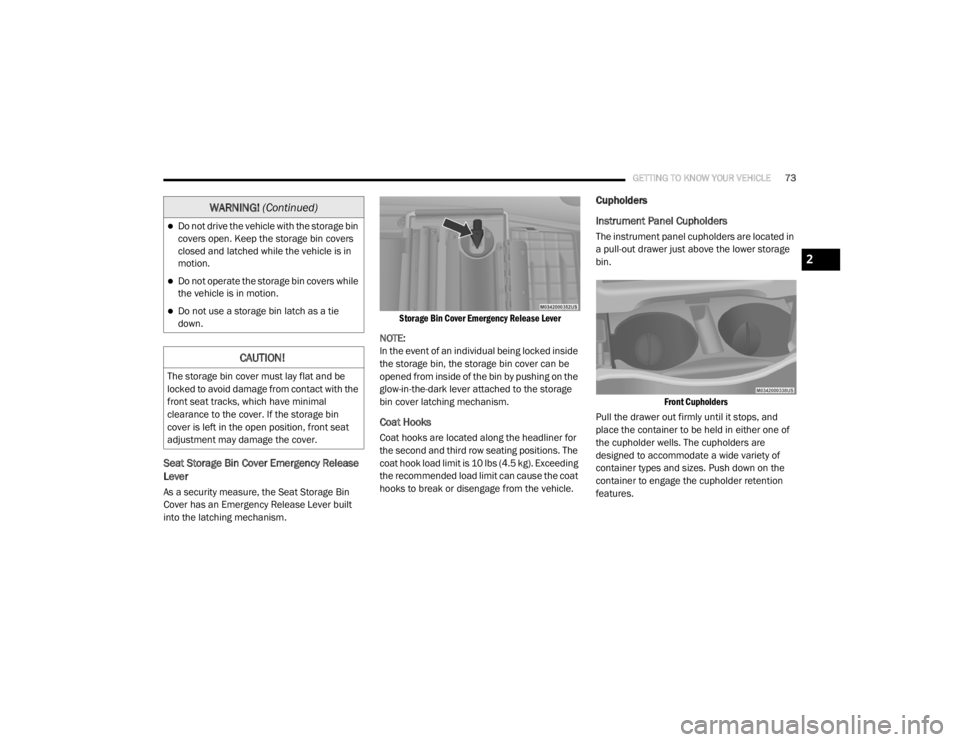
Storage Bin Cover Emergency Release Lever
NOTE:
In the event of an individual being locked inside
the storage bin, the storage bin cover can be
opened from inside of the bin by pushing on the
glow-in-the-dark lever attached to the storage
bin cover latching mechanism.
Coat Hooks
Coat hooks are located along the headliner for
the second and third row seating positions. The
coat hook load limit is 10 lbs (4.5 kg). Exceeding
the recommended load limit can cause the coat
hooks to break or disengage from the vehicle.
Cupholders
Instrument Panel Cupholders
The instrument panel cupholders are located in
a pull-out drawer just above the lower storage
bin.
Front Cupholders
Pull the drawer out firmly until it stops, and
place the container to be held in either one of
the cupholder wells. The cupholders are
designed to accommodate a wide variety of
container types and sizes. Push down on the
container to engage the cupholder retention
features.Do not drive the vehicle with the storage bin
covers open. Keep the storage bin covers
closed and latched while the vehicle is in
motion.
Do not operate the storage bin covers while
the vehicle is in motion.
Do not use a storage bin latch as a tie
down.
CAUTION!
The storage bin cover must lay flat and be
locked to avoid damage from contact with the
front seat tracks, which have minimal
clearance to the cover. If the storage bin
cover is left in the open position, front seat
adjustment may damage the cover.
WARNING! (Continued)
2
20_RT_OM_EN_USC_t.book Page 73
Page 79 of 380
GETTING TO KNOW YOUR VEHICLE77
Power Inverter — If Equipped
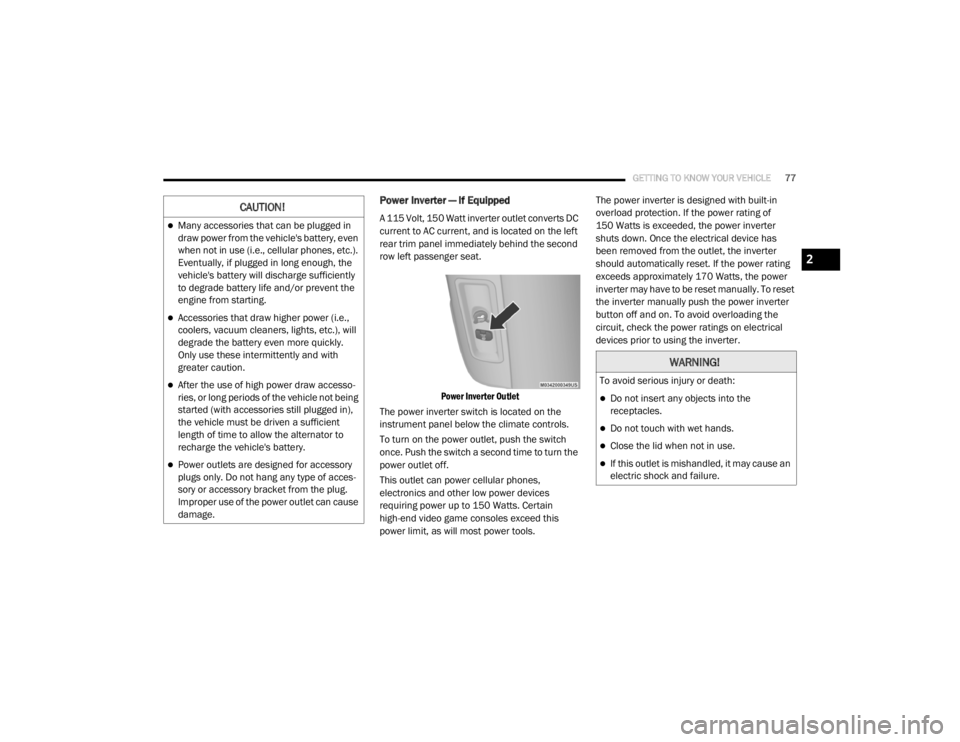
A 115 Volt, 150 Watt inverter outlet converts DC
current to AC current, and is located on the left
rear trim panel immediately behind the second
row left passenger seat.
Power Inverter Outlet
The power inverter switch is located on the
instrument panel below the climate controls.
To turn on the power outlet, push the switch
once. Push the switch a second time to turn the
power outlet off.
This outlet can power cellular phones,
electronics and other low power devices
requiring power up to 150 Watts. Certain
high-end video game consoles exceed this
power limit, as will most power tools. The power inverter is designed with built-in
overload protection. If the power rating of
150 Watts is exceeded, the power inverter
shuts down. Once the electrical device has
been removed from the outlet, the inverter
should automatically reset. If the power rating
exceeds approximately 170 Watts, the power
inverter may have to be reset manually. To reset
the inverter manually push the power inverter
button off and on. To avoid overloading the
circuit, check the power ratings on electrical
devices prior to using the inverter.CAUTION!
Many accessories that can be plugged in
draw power from the vehicle's battery, even
when not in use (i.e., cellular phones, etc.).
Eventually, if plugged in long enough, the
vehicle's battery will discharge sufficiently
to degrade battery life and/or prevent the
engine from starting.
Accessories that draw higher power (i.e.,
coolers, vacuum cleaners, lights, etc.), will
degrade the battery even more quickly.
Only use these intermittently and with
greater caution.
After the use of high power draw accesso
-
ries, or long periods of the vehicle not being
started (with accessories still plugged in),
the vehicle must be driven a sufficient
length of time to allow the alternator to
recharge the vehicle's battery.
Power outlets are designed for accessory
plugs only. Do not hang any type of acces -
sory or accessory bracket from the plug.
Improper use of the power outlet can cause
damage.
WARNING!
To avoid serious injury or death:
Do not insert any objects into the
receptacles.
Do not touch with wet hands.
Close the lid when not in use.
If this outlet is mishandled, it may cause an
electric shock and failure.
2
20_RT_OM_EN_USC_t.book Page 77
Page 81 of 380
GETTING TO KNOW YOUR VEHICLE79
ROOF LUGGAGE RACK — IF EQUIPPED
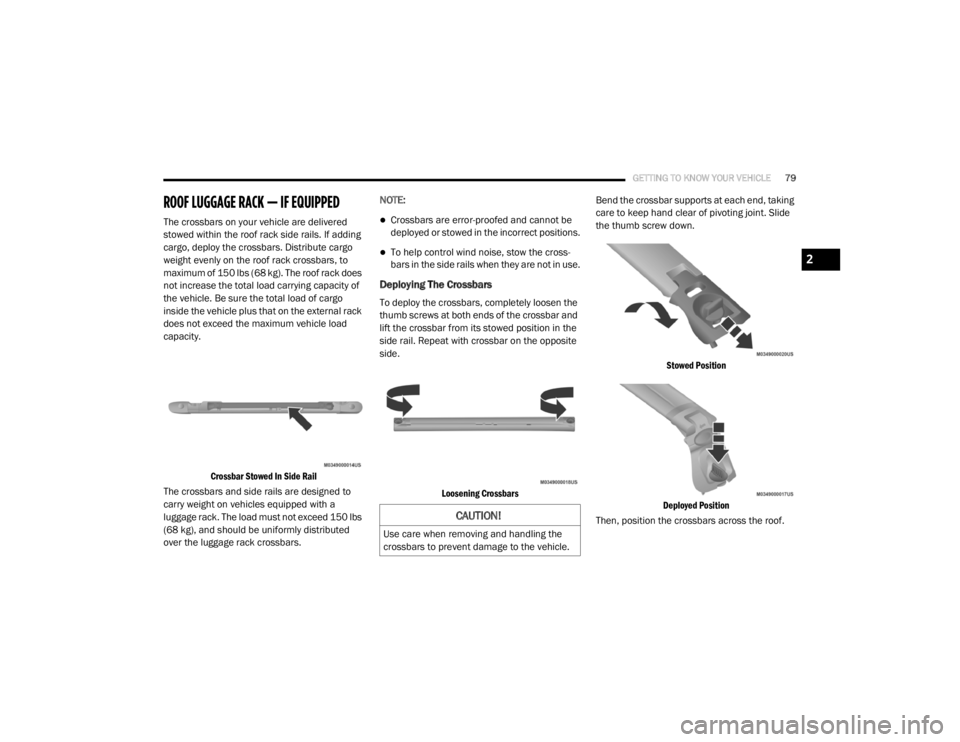
The crossbars on your vehicle are delivered
stowed within the roof rack side rails. If adding
cargo, deploy the crossbars. Distribute cargo
weight evenly on the roof rack crossbars, to
maximum of 150 lbs (68 kg). The roof rack does
not increase the total load carrying capacity of
the vehicle. Be sure the total load of cargo
inside the vehicle plus that on the external rack
does not exceed the maximum vehicle load
capacity.
Crossbar Stowed In Side Rail
The crossbars and side rails are designed to
carry weight on vehicles equipped with a
luggage rack. The load must not exceed 150 lbs
(68 kg), and should be uniformly distributed
over the luggage rack crossbars. NOTE:Crossbars are error-proofed and cannot be
deployed or stowed in the incorrect positions.
To help control wind noise, stow the cross
-
bars in the side rails when they are not in use.
Deploying The Crossbars
To deploy the crossbars, completely loosen the
thumb screws at both ends of the crossbar and
lift the crossbar from its stowed position in the
side rail. Repeat with crossbar on the opposite
side.
Loosening Crossbars
Bend the crossbar supports at each end, taking
care to keep hand clear of pivoting joint. Slide
the thumb screw down.
Stowed Position
Deployed Position
Then, position the crossbars across the roof.
CAUTION!
Use care when removing and handling the
crossbars to prevent damage to the vehicle.
2
20_RT_OM_EN_USC_t.book Page 79
Page 83 of 380

GETTING TO KNOW YOUR VEHICLE81
(Continued)
(Continued)
WARNING!
Cargo must be securely tied down before
driving your vehicle. Improperly secured loads
can fly off the vehicle, particularly at high
speeds, resulting in personal injury or
property damage. Follow the roof rack
cautions when carrying cargo on your roof
rack.
CAUTION!
To prevent damage to the roof of your
vehicle, DO NOT carry any loads on the roof
rack without the crossbars deployed. The
load should be secured and placed on top
of the crossbars, not directly on the roof. If
it is necessary to place the load on the roof,
place a blanket or other protective layer
between the load and the roof surface.
To avoid damage to the roof rack and
vehicle, do not exceed the maximum roof
rack load capacity of 150 lb (68 kg). Always
distribute heavy loads as evenly as possible
and secure the load appropriately.
Load should always be secured to cross
bars first, with tie down loops used as addi -
tional securing points if needed. Tie loops
are intended as supplementary tie down
points only. Do not use ratcheting mecha -
nisms with the tie loops. Check the straps
and thumb wheels frequently to be sure
that the load remains securely attached.
CAUTION! (Continued)
Long loads that extend over the windshield,
such as wood panels or surfboards, or
loads with large frontal area should be
secured to both the front and rear of the
vehicle.
Travel at reduced speeds and turn corners
carefully when carrying large or heavy loads
on the roof rack. Wind forces, due to
natural causes or nearby truck traffic, can
add sudden upward lift to a load. This is
especially true on large flat loads and may
result in damage to the cargo or your
vehicle.
CAUTION! (Continued)
2
20_RT_OM_EN_USC_t.book Page 81
Page 91 of 380
GETTING TO KNOW YOUR INSTRUMENT PANEL89
Automatic Compass Calibration
This compass is self-calibrating, which
eliminates the need to set the compass
manually. When the vehicle is new, the
compass may appear erratic, and the
instrument cluster display will display “CAL”
until the compass is calibrated. You may also
calibrate the compass by completing one or
more 360–degree turns (in an area free from
large metal or metallic objects) until the “CAL”
message displayed in the instrument cluster
display turns off. The compass will now function
normally.
NOTE:
A good calibration requires a level surface and
an environment free from large metallic objects
such as buildings, bridges, underground cables,
railroad tracks, etc.
Manual Compass Calibration
If the compass appears erratic and the CAL
indicator does not appear in the instrument
cluster display, you must put the compass into
the Calibration Mode manually, as follows:
1. Turn ON the ignition switch.
2. Push and release the
up or down arrow
button until the System Setup
(Customer-Programmable Features) menu
is reached, then push and release the right
arrow button.
3. Push and release the down button until
“Calibrate Compass” is displayed in the
instrument cluster display then push and
release the right button.
4. Push and release the right button to start
the calibration. The “CAL” indicator will be
displayed in the instrument cluster display.
5. Complete one or more 360–degree turns (in an area free from large metal or metallic
objects) until the “CAL” indicator turns off.
The compass will now function normally.
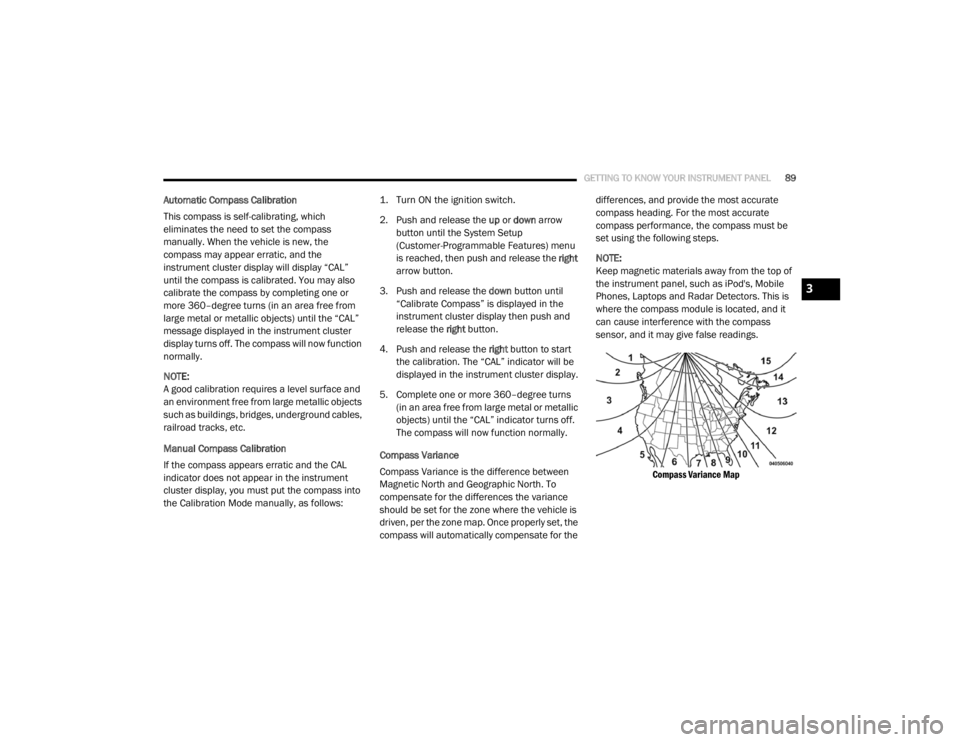
Compass Variance
Compass Variance is the difference between
Magnetic North and Geographic North. To
compensate for the differences the variance
should be set for the zone where the vehicle is
driven, per the zone map. Once properly set, the
compass will automatically compensate for the differences, and provide the most accurate
compass heading. For the most accurate
compass performance, the compass must be
set using the following steps.
NOTE:
Keep magnetic materials away from the top of
the instrument panel, such as iPod's, Mobile
Phones, Laptops and Radar Detectors. This is
where the compass module is located, and it
can cause interference with the compass
sensor, and it may give false readings.
Compass Variance Map
3
20_RT_OM_EN_USC_t.book Page 89
Page 103 of 380

GETTING TO KNOW YOUR INSTRUMENT PANEL101
ONBOARD DIAGNOSTIC SYSTEM — OBD II
Your vehicle is equipped with a sophisticated
Onboard Diagnostic system called OBD II. This
system monitors the performance of the
emissions, engine, and automatic transmission
control systems. When these systems are
operating properly, your vehicle will provide
excellent performance and fuel economy, as
well as emissions well within current
government regulations.
If any of these systems require service, the
OBD II system will turn on the Malfunction
Indicator Light (MIL). It will also store diagnostic
codes and other information to assist your
service technician in making repairs. Although
your vehicle will usually be drivable and not
need towing, see an authorized dealer for
service as soon as possible.
Onboard Diagnostic System (OBD II)
Cybersecurity
Your vehicle is required to have an Onboard
Diagnostic system (OBD II) and a connection
port to allow access to information related to
the performance of your emissions controls.
Authorized service technicians may need to
access this information to assist with the
diagnosis and service of your vehicle and
emissions system. For further information, refer to “Cybersecurity”
in “Multimedia”.
CAUTION!
Prolonged driving with the MIL on could
cause further damage to the emission
control system. It could also affect fuel
economy and driveability. The vehicle must
be serviced before any emissions tests can
be performed.
If the MIL is flashing while the vehicle is
running, severe catalytic converter damage
and power loss will soon occur. Immediate
service is required.
WARNING!
ONLY an authorized service technician
should connect equipment to the OBD II
connection port in order to read the VIN,
diagnose, or service your vehicle.
If unauthorized equipment is connected to
the OBD II connection port, such as a
driver-behavior tracking device, it may:
Be possible that vehicle systems,
including safety related systems, could
be impaired or a loss of vehicle control
could occur that may result in an
accident involving serious injury or
death.
Access, or allow others to access,
information stored in your vehicle
systems, including personal
information.
3
20_RT_OM_EN_USC_t.book Page 101