belt DODGE HORNET 2023 User Guide
[x] Cancel search | Manufacturer: DODGE, Model Year: 2023, Model line: HORNET, Model: DODGE HORNET 2023Pages: 288, PDF Size: 14.2 MB
Page 82 of 288
80
STARTING AND OPERATING
STARTING THE ENGINE
Before starting your vehicle, adjust your seat, adjust both
inside and outside mirrors, and fasten your seat belts.Start the engine with the gear selector in the NEUTRAL or
PARK position. Apply the brake before shifting to any
driving range.
NORMAL STARTING
Place the ignition switch in the START position and release
when the engine starts. If the engine fails to start within
10 seconds, place the ignition switch in the OFF position,
wait 10 to 15 seconds, then repeat the “Normal Starting”
procedure.
Tip Start Feature
Place the ignition switch in the START position and release
it as soon as the starter engages. The starter motor will
continue to run, and will automatically disengage itself
when the engine is running. If the engine fails to start,
place the ignition switch in the OFF position, wait 10 to
15 seconds, then repeat the “Normal Starting” procedure.
Automatic Transmission
The gear selector must be in the NEUTRAL or PARK
position before you can start the engine. Apply the brakes
before shifting into any driving gear.Keyless Enter ’n Go™ Functions — Using The ENGINE
START/STOP Button
1. The transmission must be in PARK or NEUTRAL.
2. Press and hold the brake pedal while pushing the
ENGINE START/STOP button once.
3. The system starts the vehicle. If the vehicle fails to start, the starter will disengage automatically after
10 seconds.
4. If you wish to stop the cranking of the engine prior to the engine starting, push the ENGINE START/STOP
button again.
WARNING!
When exiting the vehicle, always remove the key fob
from the vehicle and lock your vehicle.
Never leave children alone in a vehicle, or with
access to an unlocked vehicle.
Allowing children to be in a vehicle unattended is
dangerous for a number of reasons. A child or others
could be seriously or fatally injured. Children should
be warned not to touch the parking brake, brake
pedal or the transmission gear selector.
Do not leave the key fob in or near the vehicle, or in
a location accessible to children, and do not leave
the ignition of a vehicle equipped with Keyless
Enter ’n Go™ in the ON/RUN position. A child could
operate power windows, other controls, or move the
vehicle.
Do not leave children or animals inside parked
vehicles in hot weather. Interior heat buildup may
cause serious injury or death.
CAUTION!
Damage to the transmission may occur if the following
precautions are not observed:
Do not shift between PARK, REVERSE, NEUTRAL, or
DRIVE when the engine is above idle speed.
Shift into or out of PARK or REVERSE only after the
vehicle has come to a complete stop.
Before shifting into any gear, make sure your foot is
firmly on the brake pedal.
23_GG_OM_EN_USC_t.book Page 80
Page 85 of 288
STARTING AND OPERATING83
(Continued)
NOTE:The EPB Warning Light will illuminate if the EPB switch is
held for longer than 60 seconds in either the released or
applied position. The light will extinguish upon releasing
the switch.
If the Auto Park Brake feature is enabled, the parking
brake will automatically engage whenever the
transmission is placed into PARK. If your foot is on the
brake pedal, you may notice a small amount of brake
pedal movement while the parking brake is engaging.
The parking brake will release automatically when the
ignition switch is ON/RUN, the transmission is in DRIVE or
REVERSE, the driver’s seat belt is buckled, and an attempt
is made to drive away.
To release the parking brake manually, the ignition switch
must be in the ON/RUN position. Put your foot on the
brake pedal, then push the EPB switch down momentarily.
You may hear a sound from the back of the car while the
parking brake disengages. You may also notice a small
amount of movement in the brake pedal. Once the parking
brake is fully disengaged, the Brake Warning Light in the
instrument cluster and the LED indicator on the switch will
extinguish.
NOTE:When parking on a hill, it is important to turn the front
wheels toward the curb on a downhill grade and away from
the curb on an uphill grade. Apply the parking brake before
placing the gear selector in PARK, otherwise the load on
the transmission locking mechanism may make it difficult to move the gear selector out of PARK. The parking brake
should always be applied whenever the driver is not in the
vehicle.
If exceptional circumstances should make it necessary to
engage the parking brake while the vehicle is in motion,
maintain upward pressure on the EPB switch for as long as
engagement is desired. The Brake Warning Light will
illuminate, and a continuous chime will sound. The rear
stop lamps will also be illuminated automatically while the
vehicle remains in motion.
To disengage the parking brake while the vehicle is in
motion, release the switch. If the vehicle is brought to a
complete stop using the parking brake, when the vehicle
reaches approximately 3 mph, (5 km/h) the parking brake
will remain engaged.
WARNING!
Do not rely on the parking brake to operate effec -
tively if the rear brakes have been immersed in water
or mud.
Never use the PARK position as a substitute for the
parking brake. Always apply the parking brake fully
when parked to guard against vehicle movement and
possible injury or damage.
When leaving the vehicle, always remove the key fob
from the ignition and lock your vehicle.
Never leave children alone in a vehicle, or with
access to an unlocked vehicle. Allowing children to
be in a vehicle unattended is dangerous for a
number of reasons. A child or others could be seri -
ously or fatally injured. Children should be warned
not to touch the parking brake, brake pedal or the
gear selector.
Do not leave the key fob in or near the vehicle, or in
a location accessible to children, and do not leave
the ignition of a vehicle equipped with Keyless
Enter ’n Go™ in the ACC or ON/RUN position. A child
could operate power windows, other controls, or
move the vehicle.
Be sure the parking brake is fully disengaged before
driving; failure to do so can lead to brake failure and
a collision.
Always fully apply the parking brake when leaving
your vehicle, or it may roll and cause damage or
injury. Also be certain to leave the transmission in
PARK. Failure to do so may allow the vehicle to roll
and cause damage or injury.
CAUTION!
If the Brake System Warning Light remains on with the
parking brake released, a brake system malfunction is
indicated. Have the brake system serviced by an
authorized dealer immediately.
WARNING!
4
23_GG_OM_EN_USC_t.book Page 83
Page 86 of 288
84STARTING AND OPERATING
In the unlikely event of a malfunction of the EPB system, a
yellow EPB Warning Light will illuminate. This may be
accompanied by the Brake Warning Light flashing. In this
event, urgent service of the EPB system is required. Do not
rely on the parking brake to hold the vehicle stationary.
Auto Park Brake
The EPB can be programmed to be applied automatically
whenever the vehicle speed is below 1.9 mph (3 km/h)
and the transmission is placed in PARK. Auto Park Brake
is enabled and disabled by customer selection through the
Customer Programmable Features section of the
Uconnect Settings
Úpage 130.
Any single Auto Park Brake application can be bypassed by
pushing the EPB switch to the release position while the
transmission is placed in PARK and the ignition is in the
ON/RUN position.
SafeHold
SafeHold is a safety feature of the EPB system that will
engage the parking brake automatically if the vehicle is
left unsecured while the ignition switch is in ON/RUN. For automatic transmissions, the EPB will automatically
engage if all of the following conditions are met:
Vehicle speed is below 1.9 mph (3 km/h).
There is no attempt to press the brake pedal and
accelerator pedal.
The seat belt is unbuckled.
The driver’s door is open.
The vehicle is not in the PARK position.
SafeHold can be temporarily bypassed by pushing the EPB
switch while the driver’s door is open and the brake pedal
is pressed. Once manually bypassed, SafeHold will be
enabled again once the vehicle reaches 12 mph
(20 km/h) or the ignition is turned to the OFF position and
back to ON/RUN again.
Hold ‘N Go— If Equipped
Hold ‘N Go is a comfort feature that allows the driver to
remove their foot from the brake pedal once the vehicle
has come to a stop. The vehicle must be held at a
standstill for a predetermined amount of time by hydraulic
braking. The EPB will then engage and continue to hold
the vehicle at a stop until the driver applies the accelerator
pedal. Hold ‘N Go is enabled and disabled by customer
selection through the customer programmable features
section of the Uconnect Settings
Úpage 130.
The following conditions must be met for Hold ‘N Go to
activate:
Driver’s door is closed
Driver's seat belt is fastened
Vehicle is at a standstill
Forward gear is selected
EPB is not applied
Brake Service Mode
We recommend having your brakes serviced by an
authorized dealer.
You should only make repairs for which you have the
knowledge and the right equipment. You should only enter
Brake Service Mode during brake service.
When servicing your rear brakes, it may be necessary for
you or your technician to push the rear piston into the rear
caliper bore. With the EPB system, this can only be done
after retracting the EPB actuator. The actuator retraction
can be done easily by entering Brake Service Mode
through the Uconnect Settings in your vehicle. This
menu-based system will guide you through the steps
necessary to retract the EPB actuator in order to perform
rear brake service.
Brake Service Mode has requirements that must be met in
order to be activated:
The vehicle must be at a standstill.
The parking brake must be disabled.
The transmission must be in PARK or NEUTRAL.
The EPB switch not activated.
The vehicle ignition in the ON/RUN position.
The brake pedal not pressed.
While in Service Mode, the EPB Warning Light will flash
continuously while the ignition switch is in ON/RUN.
NOTE:A dedicated message will appear in the instrument cluster
display if Brake Service Mode cannot be activated.
WARNING!
Driving the vehicle with the parking brake engaged, or
repeated use of the parking brake to slow the vehicle,
may cause serious damage to the brake system.
Be sure the parking brake is fully disengaged before
driving; failure to do so can lead to brake failure and
a collision.
23_GG_OM_EN_USC_t.book Page 84
Page 91 of 288
STARTING AND OPERATING89
If the “POWER STEERING SYSTEM HOT -
PERFORMANCE MAY BE LIMITED” message
and a steering wheel icon display on the
instrument cluster, it indicates that extreme
steering maneuvers may have occurred, which caused an
over temperature condition in the electric power steering
system. You will lose power steering assistance
momentarily until the over temperature condition no
longer exists. Once driving conditions are safe, pull over
and let the vehicle idle for a few moments until the light
turns off
Úpage 66.
NOTE:
Even if the power steering system is no longer opera -
tional, it is still possible to steer the vehicle. Under
these conditions there will be a substantial increase in
steering effort, especially at low speeds and during
parking maneuvers.
If the condition persists, see an authorized dealer for
service.
STOP/START SYSTEM — IF EQUIPPED
The Stop/Start function is designed to reduce fuel
consumption. The system will stop the engine
automatically during a vehicle stop if the required
conditions are met. Releasing the brake pedal or pressing
the accelerator pedal will automatically restart the engine.
This vehicle has been upgraded with a heavy-duty starter,
enhanced battery, and other upgraded engine parts, to
handle the additional engine starts.
AUTOSTOP MODE
The Stop/Start feature is enabled after every normal
customer engine start. At that time, the system will go into
STOP/START READY.
To Activate The Autostop Mode, The Following Must Occur:
The system must be in STOP/START READY state. A
“STOP/START READY” message will be displayed in the
instrument cluster display within the Stop/Start
section
Úpage 66.
The vehicle must be completely stopped.
The gear selector must be in a forward gear and the
brake pedal pressed.
The engine will shut down, the tachometer will move to the
zero position, and the Stop/Start telltale will illuminate
indicating you are in Autostop. Customer settings will be
maintained upon return to an engine-running condition.
POSSIBLE REASONS THE ENGINE DOES
N
OT AUTOSTOP
Prior to engine shut down, the system will check many
safety and comfort conditions to see if they are fulfilled.
Detailed information about the operation of the Stop/Start
system may be viewed in the instrument cluster display
Stop/Start Screen. In the following situations the engine
will not stop:
Driver’s seat belt is not buckled.
Driver’s door is not closed.
Battery temperature is too warm or cold.
Battery charge is low.
The vehicle is on a steep grade.
Cabin heating or cooling is in process and an accept -
able cabin temperature has not been achieved.
HVAC is set to full defrost mode at a high blower speed.
HVAC is set to MAX A/C.
Engine has not reached normal operating temperature.
The transmission is not in a forward gear.
Hood is open.
Brake pedal is not pressed with sufficient pressure.
Accelerator pedal input.
Engine temperature is too high.
5 mph (8 km/h) threshold has not been achieved from
previous Autostop.
Steering angle beyond threshold.
Adaptive Cruise Control is on and speed is set.
It may be possible for the vehicle to be driven several
times without the Stop/Start system going into a STOP/
START READY state under more extreme conditions of the
items listed previously.
4
23_GG_OM_EN_USC_t.book Page 89
Page 92 of 288
90STARTING AND OPERATING
TO START THE ENGINE WHILE IN
A
UTOSTOP MODE
While in a forward gear, the engine will start when the
brake pedal is released or the accelerator pedal is
pressed. The transmission will automatically re-engage
upon engine restart.
Conditions That Will Cause The Engine To Start
Automatically While In Autostop Mode:
The transmission selector is moved out of DRIVE (D).
To maintain cabin temperature comfort.
HVAC is set to full defrost mode.
HVAC system temperature or fan speed is manually
adjusted.
Battery voltage drops too low.
Stop/Start OFF switch is pressed.
A Stop/Start system error occurs.
Steering wheel is turned beyond threshold.
Conditions That Force An Application Of The Electric Park
Brake While In Autostop Mode:
The driver’s door is open and brake pedal released.
The driver’s door is open and the driver’s seat belt is
unbuckled.
The engine hood has been opened.
A Stop/Start system error occurs.
If the Electric Park Brake (EPB) is applied with the engine
off, the engine may require a manual restart and the EPB
may require a manual release (press brake pedal and
press EPB switch)
Úpage 66.
TO MANUALLY TURN OFF THE STOP/
S
TART SYSTEM
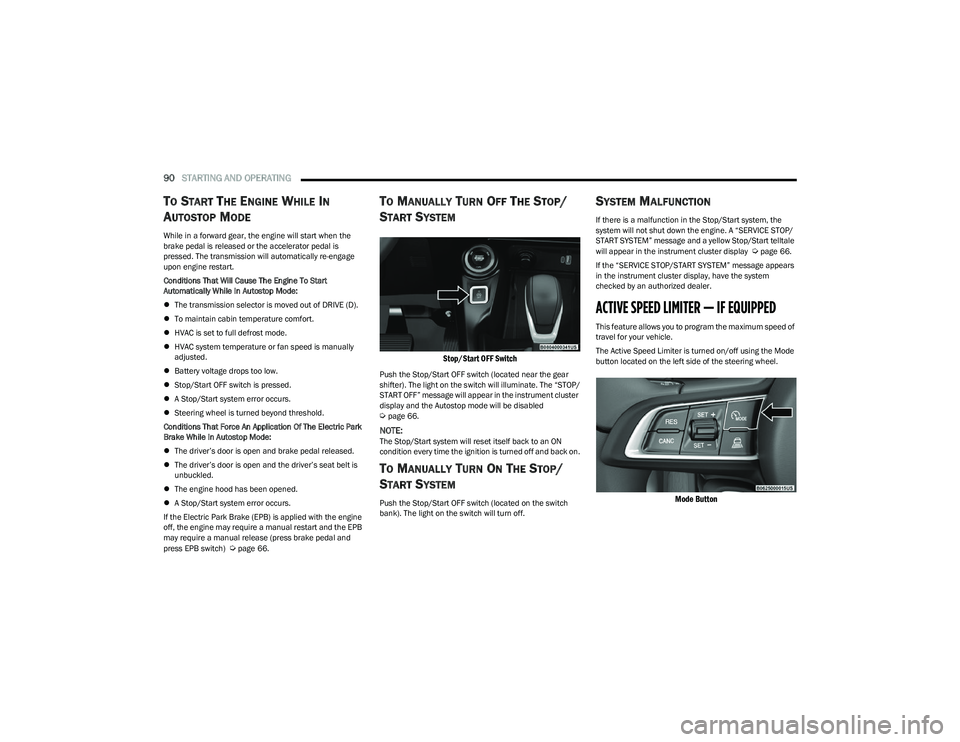
Stop/Start OFF Switch
Push the Stop/Start OFF switch (located near the gear
shifter). The light on the switch will illuminate. The “STOP/
START OFF” message will appear in the instrument cluster
display and the Autostop mode will be disabled
Úpage 66.
NOTE:The Stop/Start system will reset itself back to an ON
condition every time the ignition is turned off and back on.
TO MANUALLY TURN ON THE STOP/
S
TART SYSTEM
Push the Stop/Start OFF switch (located on the switch
bank). The light on the switch will turn off.
SYSTEM MALFUNCTION
If there is a malfunction in the Stop/Start system, the
system will not shut down the engine. A “SERVICE STOP/
START SYSTEM” message and a yellow Stop/Start telltale
will appear in the instrument cluster display
Úpage 66.
If the “SERVICE STOP/START SYSTEM” message appears
in the instrument cluster display, have the system
checked by an authorized dealer.
ACTIVE SPEED LIMITER — IF EQUIPPED
This feature allows you to program the maximum speed of
travel for your vehicle.
The Active Speed Limiter is turned on/off using the Mode
button located on the left side of the steering wheel.
Mode Button
23_GG_OM_EN_USC_t.book Page 90
Page 96 of 288
94STARTING AND OPERATING
Adaptive Cruise Control Off
When ACC is deactivated, all ACC visualizations will not be
shown in the instrument cluster display.
Adaptive Cruise Control Ready
When ACC is activated, but the vehicle speed setting has
not been selected, the white ACC icon will illuminate above
dashes in place of a speed in the instrument cluster
display.
Adaptive Cruise Control Set
When the vehicle has reached the desired speed, push
the SET switch up or down briefly, then release. When the
ACC speed is set, the green ACC icon over the set speed
will illuminate in the instrument cluster display.
When the ACC menu screen is not being viewed in the
instrument cluster display, a green triangle will illuminate
on the speedometer at the location of the set speed.
NOTE:If the ACC system is canceled or paused, the triangle on
the speedometer will change to white, indicating the
saved set speed for when the RES button pushed.
Activating Adaptive Cruise Control (ACC)
The minimum set speed for the ACC system is 19 mph
(30 km/h).
NOTE:You cannot engage ACC under the following conditions:
When the brakes are applied
When the parking brake is applied
When the gear selector is in PARK, REVERSE or
NEUTRAL
When the vehicle speed is below the minimum speed
range
When the brakes are overheated
When the driver’s door is open at low speeds
When the driver’s seat belt is unbuckled at low speeds
When there is a stationary vehicle in front of your
vehicle in close proximity
To Activate/Deactivate
Push and release the Mode button located on the left side
of the steering wheel to activate ACC. Then proceed to
setting the desired speed as described in the next section.
NOTE:Active Speed Limiter will be unavailable while ACC is in
use.
To turn the system off, push and release the Mode button
again. At this time, the system will turn off and Active
Speed Limiter will be active.
The system will also turn off during any of the conditions
listed in “To Turn Off”
Úpage 95.
To Set A Desired Speed
When the vehicle has reached the desired speed, push
the SET switch up or down briefly, then release. The
instrument cluster display will show the set speed.
If ACC is set when the vehicle speed is
below
19 mph
(30 km/h), the set speed will default to 19 mph (30 km/h).
If either system is set when the vehicle speed is above
19 mph (30 km/h), the set speed shall be the current speed of the vehicle.
NOTE:
Keeping your foot on the accelerator pedal can cause
the vehicle to continue to accelerate beyond the set
speed.
If you continue to accelerate beyond the set speed
while ACC is enabled, the system will not be controlling
the distance between your vehicle and the vehicle
ahead. The vehicle speed will only be determined by
the position of the accelerator pedal.
WARNING!
Leaving the Adaptive Cruise Control (ACC) system on
when not in use is dangerous. You could accidentally
set the system or cause it to go faster than you want.
You could lose control and have a collision. Always leave
the system off when you are not using it.
WARNING!
If the Active Speed Limiter is active, the system will not
react to vehicles ahead. In addition, the proximity
warning does not activate and no alarm will sound even
if you are too close to the vehicle ahead since neither
the presence of the vehicle ahead nor the
vehicle-to-vehicle distance is detected. Be sure to
maintain a safe distance between your vehicle and the
vehicle ahead. Always be aware which mode is
selected.
23_GG_OM_EN_USC_t.book Page 94
Page 97 of 288
STARTING AND OPERATING95
To Cancel
The following conditions cancel ACC:
The brake pedal is applied
The CANC (cancel) button is pushed
The Anti-Lock Brake System (ABS) activates
The gear selector is removed from the DRIVE position
The Electronic Stability Control/Traction Control
System (ESC/TCS) activates
The vehicle parking brake is applied
The Trailer Sway Control (TSC) activates
The driver switches ESC to Full Off mode
The braking temperature exceeds normal range
(overheated)
Driver seat belt is unbuckled at low speeds
Driver door is opened at low speeds
To Turn Off
The system will turn off and clear the set speed in memory
if:
The Mode button is pushed
The ignition is placed in the OFF position
To Resume
If ACC was canceled, and there is a set speed in memory,
push the RES (resume) button and remove your foot from
the accelerator pedal. The instrument cluster display will
show the last set speed. Resume can be used at any speed above 0 mph (0 km/h)
when ACC is active.
NOTE:ACC cannot be resumed if there is a stationary vehicle in
front of your vehicle in close proximity.
To Vary The Speed Setting
To Increase Or Decrease The Set Speed
After setting a speed, you can adjust the speed by pushing
the SET switch upward or decrease the speed by pushing
the SET switch downward.
U.S. Speed (mph)
Pushing the SET switch upward or downward to the first
detent will result in a 1 mph speed adjustment. Each
subsequent movement of the switch to the first detent
will result in an adjustment of 1 mph.
If the switch is pushed upward or downward briefly to
the second detent, the set speed will adjust in 5 mph
increments. The new set speed is reflected in the
instrument cluster display.
If the switch is held upward or downward, the set speed
will continue to adjust until the switch is released.
Metric Speed (km/h)
Pushing the SET switch upward or downward to the first
detent will result in a 1 km/h speed adjustment. Each
subsequent movement of the switch to the first detent
will result in an adjustment of 1 km/h.
If the switch is pushed upward or downward briefly to
the second detent, the set speed will adjust in 10 km/h
increments. The new set speed is reflected in the instru -
ment cluster display.
If the switch is held upward or downward, the set speed
will continue to adjust until the switch is released.
NOTE:
When you override the set speed by pushing the SET
switch upward or downward, the new set speed will be
the current speed of the vehicle.
When you use the SET switch to decelerate, if the
engine’s braking power does not slow the vehicle suffi -
ciently to reach the set speed, the brake system will
automatically slow the vehicle.
The ACC system maintains set speed when driving
uphill and downhill. However, a slight speed change on
moderate hills is normal. In addition, downshifting may
occur while climbing uphill or descending downhill. This
is normal operation and necessary to maintain set
speed. When driving uphill and downhill, the ACC
system will cancel if the braking temperature exceeds
normal range (overheated).
WARNING!
The Resume function should only be used if traffic and
road conditions permit. Resuming a set speed that is
too high or too low for prevailing traffic and road
conditions could cause the vehicle to accelerate or
decelerate too sharply for safe operation. Failure to
follow these warnings can result in a collision and death
or serious personal injury.
4
23_GG_OM_EN_USC_t.book Page 95
Page 104 of 288
102STARTING AND OPERATING
TURNING ACTIVE DRIVING ASSIST ON
O
R OFF
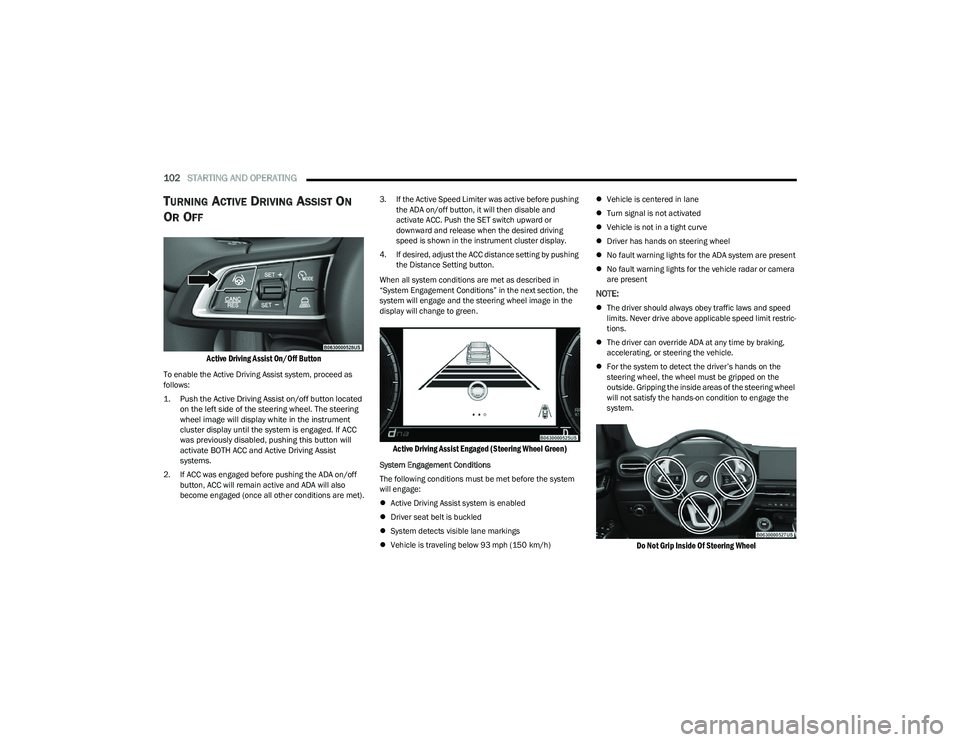
Active Driving Assist On/Off Button
To enable the Active Driving Assist system, proceed as
follows:
1. Push the Active Driving Assist on/off button located
on the left side of the steering wheel. The steering
wheel image will display white in the instrument
cluster display until the system is engaged. If ACC
was previously disabled, pushing this button will
activate BOTH ACC and Active Driving Assist
systems.
2. If ACC was engaged before pushing the ADA on/off button, ACC will remain active and ADA will also
become engaged (once all other conditions are met). 3. If the Active Speed Limiter was active before pushing
the ADA on/off button, it will then disable and
activate ACC. Push the SET switch upward or
downward and release when the desired driving
speed is shown in the instrument cluster display.
4. If desired, adjust the ACC distance setting by pushing the Distance Setting button.
When all system conditions are met as described in
“System Engagement Conditions” in the next section, the
system will engage and the steering wheel image in the
display will change to green.
Active Driving Assist Engaged (Steering Wheel Green)
System Engagement Conditions
The following conditions must be met before the system
will engage:
Active Driving Assist system is enabled
Driver seat belt is buckled
System detects visible lane markings
Vehicle is traveling below 93 mph (150 km/h)
Vehicle is centered in lane
Turn signal is not activated
Vehicle is not in a tight curve
Driver has hands on steering wheel
No fault warning lights for the ADA system are present
No fault warning lights for the vehicle radar or camera
are present
NOTE:
The driver should always obey traffic laws and speed
limits. Never drive above applicable speed limit restric -
tions.
The driver can override ADA at any time by braking,
accelerating, or steering the vehicle.
For the system to detect the driver’s hands on the
steering wheel, the wheel must be gripped on the
outside. Gripping the inside areas of the steering wheel
will not satisfy the hands-on condition to engage the
system.
Do Not Grip Inside Of Steering Wheel
23_GG_OM_EN_USC_t.book Page 102
Page 105 of 288
STARTING AND OPERATING103
System Deactivation
The system will be deactivated in any of the following
situations:
If the system has detected driver inattentiveness, and
has gone through all escalation warnings after hands
are no longer detected on the steering wheel
If the vehicle is driving in constant traffic
If lane markings are no longer detected
If the brake pedal is pressed or ACC system is deacti -
vated
If the Active Driving Assist on/off button is pushed
again (ADA will turn off)
If a turn signal is used (unless a target is in the blind
spot zone on the same side the turn signal is being
applied)
If the driver applies enough input to the steering wheel
If the driver’s seat belt is released
If the vehicle speed exceeds 93 mph (150 km/h)
If the Active Driving Assist on/off button is pushed
again (ADA will turn off)
If the Forward Collision Warning (FCW) system
becomes active and is providing warnings/braking
If there is glare from the sun on the vehicle’s camera
If the vehicle is driving on tight curves
If the camera has decreased visibility due to rain,
snow, etc.
If the driver quickly applies the accelerator pedal
NOTE:
Pushing the Active Driving Assist on/off button or deac -
tivating ACC will turn the system off. All other deactiva -
tion conditions will place the system back into the
“enabled” state with the steering wheel indicator
displayed in white until all engagement conditions are
met again.
When the system is deactivated, the system status
indicator lights will turn off, the LaneSense system will
return to its previous state, and ACC will disable.
INDICATIONS ON THE DISPLAY
The Active Driving Assist system status can always be
viewed in the instrument cluster display, and status
changes are shown by changes in color of the system’s
indicator lights.
As the system detects driver inattentiveness as previously
described
Úpage 101, the system status indicator lights
will change from green, to yellow, to red. The following
indicators will change in color as warnings to the driver
escalate:
Active Driving Assist Indicator (steering wheel icon in
the instrument cluster display)
Glow effect of the instrument cluster display
If driver attention is not returned, the system will
deactivate. Active Driving Assist Indicators Are Off
ADA is not turned on/enabled by the driver.
Active Driving Assist Indicators Are White
ADA is turned on/enabled by the driver, but the system
is not actively steering and providing speed control for
the vehicle.
Active Driving Assist Indicators Are Green
The system detects driver is attentive and is actively
steering and providing speed control for the vehicle.
Active Driving Assist Indicators Are Yellow
Driver inattentiveness has been detected, warning the
driver to place hands on the steering wheel.
Active Driving Assist Indicators Are Red
Driver inattentiveness is still being detected, or driver
take-over is being requested, warning the driver to
place hands on the steering wheel. This warning is also
issued when the system has detected a tight curve and
is warning the driver to take control.NOTE:The driver MUST replace hands on the steering wheel and
take control of the vehicle when the system is deactivated.
4
23_GG_OM_EN_USC_t.book Page 103
Page 170 of 288
168SAFETY
To reactivate the TPMS, replace all four wheel and tire
assemblies (road tires) with tires equipped with TPMS
sensors. Then, drive the vehicle for up to 20 minutes
above 15 mph (24 km/h). The TPMS will chime, the Tire
Pressure Monitoring System Warning Light will flash on
and off for 75 seconds and then turn off. The instrument
cluster will display the “SERVICE TPM SYSTEM” message
and then display pressure values in place of the dashes.
On the next ignition cycle the "SERVICE TPM SYSTEM"
message will no longer be displayed as long as no system
fault exists.
OCCUPANT RESTRAINT SYSTEMS
Some of the most important safety features in your vehicle
are the restraint systems:
OCCUPANT RESTRAINT SYSTEMS
F
EATURES
Seat Belt Systems
Supplemental Restraint Systems (SRS) Air Bags
Child Restraints
Some of the safety features described in this section may
be standard equipment on some models, or may be
optional equipment on others. If you are not sure, ask an
authorized dealer.
IMPORTANT SAFETY PRECAUTIONS
Please pay close attention to the information in this
section. It tells you how to use your restraint system
properly, to keep you and your passengers as safe as
possible.
Here are some simple steps you can take to minimize the
risk of harm from a deploying air bag:
1. Children 12 years old and under should always ride buckled up in the rear seat of a vehicle with a rear
seat.
2. A child who is not big enough to wear the vehicle seat belt properly must be secured in the appropriate child
restraint or belt-positioning booster seat in a rear
seating position
Úpage 188.
3. If a child from 2 to 12 years old (not in a rear-facing child restraint) must ride in the front passenger seat,
move the seat as far back as possible and use the
proper child restraint
Úpage 188.
4. Never allow children to slide the shoulder belt behind them or under their arm.
5. You should read the instructions provided with your child restraint to make sure that you are using it
properly.
6. All occupants should always wear their lap and shoulder belts properly. 7. The driver and front passenger seats should be
moved back as far as practical to allow the front air
bags room to inflate.
8. Do not lean against the door or window. If your vehicle has side air bags, and deployment occurs, the side air
bags will inflate forcefully into the space between
occupants and the door and occupants could be
injured.
9. If the air bag system in this vehicle needs to be modified to accommodate a disabled person, see
Úpage 270 for customer service contact
information.
WARNING!
Never place a rear-facing child restraint in front of an
air bag. A deploying passenger front air bag can
cause death or serious injury to a child 12 years or
younger, including a child in a rear-facing child
restraint.
Never install a rear-facing child restraint in the front
seat of a vehicle. Only use a rear-facing child
restraint in the rear seat. If the vehicle does not have
a rear seat, do not transport a rear-facing child
restraint in that vehicle.
23_GG_OM_EN_USC_t.book Page 168