brake sensor DODGE HORNET 2023 Owners Manual
[x] Cancel search | Manufacturer: DODGE, Model Year: 2023, Model line: HORNET, Model: DODGE HORNET 2023Pages: 288, PDF Size: 14.2 MB
Page 6 of 288
4
STARTING AND OPERATING
STARTING THE ENGINE ......................................................80
Normal Starting ........................................................... 80
Cold Weather Operation
(Below –22°F Or −30°C) .......................................... 81
Extended Park Starting............................................... 81
After Starting — Warming Up The Engine .................. 81
If Engine Fails To Start ............................................... 81
Stopping The Engine ................................................... 82
ENGINE BREAK-IN RECOMMENDATIONS .......................82
PARK BRAKE ....................................................................... 82 Electric Park Brake (EPB) .......................................... 82
AUTOMATIC TRANSMISSION .............................................85 Ignition Park Interlock................................................. 86
Brake/Transmission Shift Interlock (BTSI)
System ......................................................................... 86
9-Speed Automatic Transmission ............................. 86
ALL-WHEEL DRIVE (AWD) ..................................................88
SPORT MODE — IF EQUIPPED ...........................................88
POWER STEERING ..............................................................88
STOP/START SYSTEM — IF EQUIPPED.............................89 Autostop Mode ............................................................ 89
Possible Reasons The Engine Does Not Autostop.... 89
To Start The Engine While In Autostop Mode............ 90
To Manually Turn Off The Stop/Start System ........... 90
To Manually Turn On The Stop/Start System............ 90
System Malfunction .................................................... 90 ACTIVE SPEED LIMITER — IF EQUIPPED .......................... 90
Activation...................................................................... 91
Exceeding The Set Speed ........................................... 91
Deactivation ................................................................. 91
INTELLIGENT SPEED ASSIST (ISA) —
IF EQUIPPED ........................................................................ 91 Activation...................................................................... 92
Sign Capture Modes .................................................... 92
Exceeding The Set Speed ........................................... 92
Deactivation ................................................................. 92
CRUISE CONTROL SYSTEMS ............................................. 92 Adaptive Cruise Control (ACC)..................................... 92
TRAFFIC SIGN RECOGNITION —
IF EQUIPPED ........................................................................ 99 Activation/Deactivation ............................................... 99
Traffic Sign Recognition Modes .................................. 99
Indications On The Display....................................... 100
INTELLIGENT ADAPTIVE CRUISE CONTROL —
IF EQUIPPED ..................................................................... 100 Activation/Deactivation ............................................ 100
ACTIVE DRIVING ASSIST SYSTEM —
IF EQUIPPED ..................................................................... 101 Operation................................................................... 101
Turning Active Driving Assist On Or Off ................... 102
Indications On The Display....................................... 103
Minimum Risk Maneuver ......................................... 104
System Status ........................................................... 104
System Operation/Limitations................................. 104 PARKSENSE FRONT/REAR PARK ASSIST SYSTEM —
IF EQUIPPED ....................................................................105
ParkSense Sensors ................................................... 105
ParkSense Warning Display...................................... 105ParkSense Display .................................................... 105
Enabling And Disabling ParkSense .......................... 106
Service The ParkSense Park Assist System ............ 106
Cleaning The ParkSense System ............................. 106
ParkSense System Usage Precautions .................... 106
Side Distance Warning (SDW) System..................... 107
PARKSENSE ACTIVE PARK ASSIST SYSTEM —
IF EQUIPPED......................................................................108 Enabling And Disabling The ParkSense Active
Park Assist System .................................................... 109
Parallel/Perpendicular Parking Space Assistance
Operation ................................................................... 110Exiting The Parking Space ........................................ 112
LANESENSE — IF EQUIPPED .......................................... 113 LaneSense Operation ............................................... 113Turning LaneSense On Or Off ................................... 114
LaneSense Warning Message .................................. 114
Changing LaneSense Status .................................... 116
PARKVIEW REAR BACK UP CAMERA ............................ 116
SURROUND VIEW CAMERA SYSTEM —
IF EQUIPPED......................................................................117
REFUELING THE VEHICLE ................................................119
VEHICLE LOADING ...........................................................120 Certification Label ..................................................... 120
23_GG_OM_EN_USC_t.book Page 4
Page 12 of 288
10
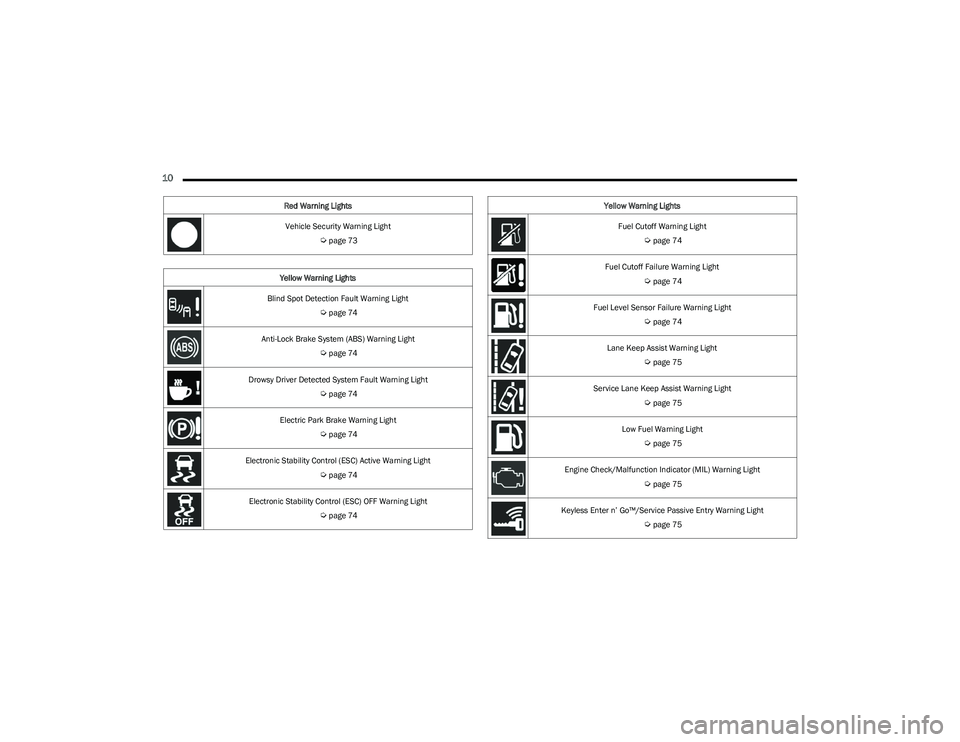
Vehicle Security Warning Light
Úpage 73
Yellow Warning Lights
Blind Spot Detection Fault Warning Light
Úpage 74
Anti-Lock Brake System (ABS) Warning Light
Úpage 74
Drowsy Driver Detected System Fault Warning Light
Úpage 74
Electric Park Brake Warning Light
Úpage 74
Electronic Stability Control (ESC) Active Warning Light
Úpage 74
Electronic Stability Control (ESC) OFF Warning Light
Úpage 74
Red Warning Lights
Fuel Cutoff Warning Light
Úpage 74
Fuel Cutoff Failure Warning Light
Úpage 74
Fuel Level Sensor Failure Warning Light
Úpage 74
Lane Keep Assist Warning Light
Úpage 75
Service Lane Keep Assist Warning Light
Úpage 75
Low Fuel Warning Light
Úpage 75
Engine Check/Malfunction Indicator (MIL) Warning Light
Úpage 75
Keyless Enter n’ Go™/Service Passive Entry Warning Light
Úpage 75
Yellow Warning Lights
23_GG_OM_EN_USC_t.book Page 10
Page 76 of 288
74GETTING TO KNOW YOUR INSTRUMENT PANEL
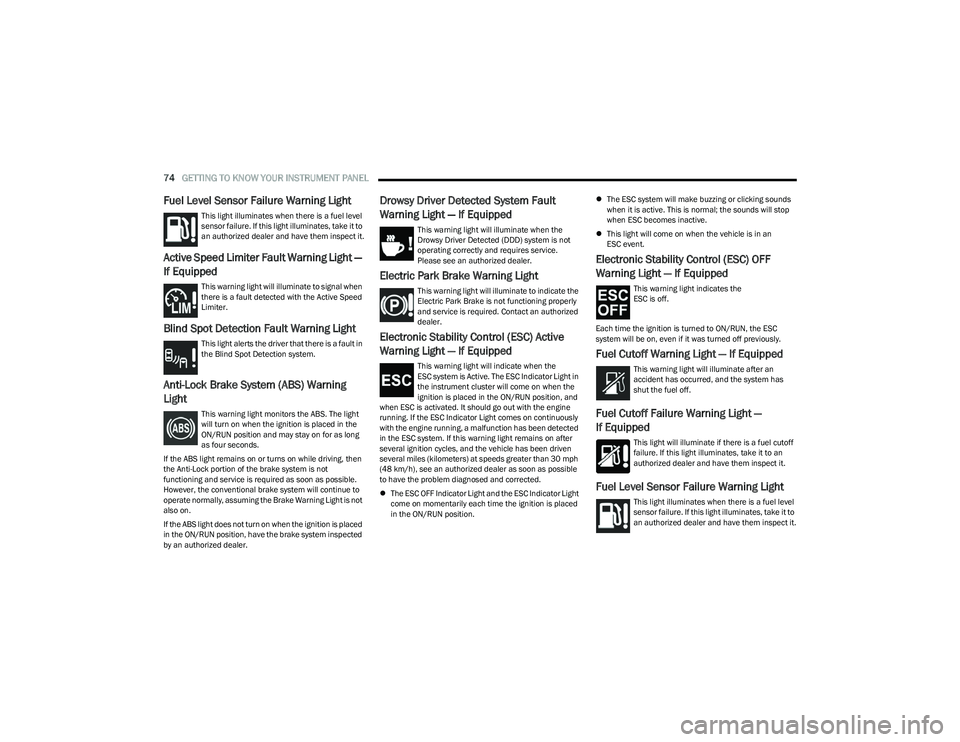
Fuel Level Sensor Failure Warning Light
This light illuminates when there is a fuel level
sensor failure. If this light illuminates, take it to
an authorized dealer and have them inspect it.
Active Speed Limiter Fault Warning Light —
If Equipped
This warning light will illuminate to signal when
there is a fault detected with the Active Speed
Limiter.
Blind Spot Detection Fault Warning Light
This light alerts the driver that there is a fault in
the Blind Spot Detection system.
Anti-Lock Brake System (ABS) Warning
Light
This warning light monitors the ABS. The light
will turn on when the ignition is placed in the
ON/RUN position and may stay on for as long
as four seconds.
If the ABS light remains on or turns on while driving, then
the Anti-Lock portion of the brake system is not
functioning and service is required as soon as possible.
However, the conventional brake system will continue to
operate normally, assuming the Brake Warning Light is not
also on.
If the ABS light does not turn on when the ignition is placed
in the ON/RUN position, have the brake system inspected
by an authorized dealer.
Drowsy Driver Detected System Fault
Warning Light — If Equipped
This warning light will illuminate when the
Drowsy Driver Detected (DDD) system is not
operating correctly and requires service.
Please see an authorized dealer.
Electric Park Brake Warning Light
This warning light will illuminate to indicate the
Electric Park Brake is not functioning properly
and service is required. Contact an authorized
dealer.
Electronic Stability Control (ESC) Active
Warning Light — If Equipped
This warning light will indicate when the
ESC system is Active. The ESC Indicator Light in
the instrument cluster will come on when the
ignition is placed in the ON/RUN position, and
when ESC is activated. It should go out with the engine
running. If the ESC Indicator Light comes on continuously
with the engine running, a malfunction has been detected
in the ESC system. If this warning light remains on after
several ignition cycles, and the vehicle has been driven
several miles (kilometers) at speeds greater than 30 mph
(48 km/h), see an authorized dealer as soon as possible
to have the problem diagnosed and corrected.
The ESC OFF Indicator Light and the ESC Indicator Light
come on momentarily each time the ignition is placed
in the ON/RUN position.
The ESC system will make buzzing or clicking sounds
when it is active. This is normal; the sounds will stop
when ESC becomes inactive.
This light will come on when the vehicle is in an
ESC event.
Electronic Stability Control (ESC) OFF
Warning Light — If Equipped
This warning light indicates the
ESC is off.
Each time the ignition is turned to ON/RUN, the ESC
system will be on, even if it was turned off previously.
Fuel Cutoff Warning Light — If Equipped
This warning light will illuminate after an
accident has occurred, and the system has
shut the fuel off.
Fuel Cutoff Failure Warning Light —
If Equipped
This light will illuminate if there is a fuel cutoff
failure. If this light illuminates, take it to an
authorized dealer and have them inspect it.
Fuel Level Sensor Failure Warning Light
This light illuminates when there is a fuel level
sensor failure. If this light illuminates, take it to
an authorized dealer and have them inspect it.
23_GG_OM_EN_USC_t.book Page 74
Page 95 of 288
STARTING AND OPERATING93
(Continued)
ACC will allow you to keep Cruise Control engaged in light
to moderate traffic conditions without the constant need
to reset your speed. ACC utilizes a radar sensor and a
forward facing camera designed to detect a vehicle
directly ahead of you to maintain a set speed.
NOTE:
If the ACC sensor detects a vehicle ahead, ACC will
apply limited braking or accelerate (not to exceed the
original set speed) automatically to maintain a preset
following distance, while matching the speed of the
vehicle ahead.
Any chassis/suspension or tire size modifications to
the vehicle will affect the performance of the Adaptive
Cruise Control and Forward Collision Warning system.
Adaptive Cruise Control (ACC) Operation
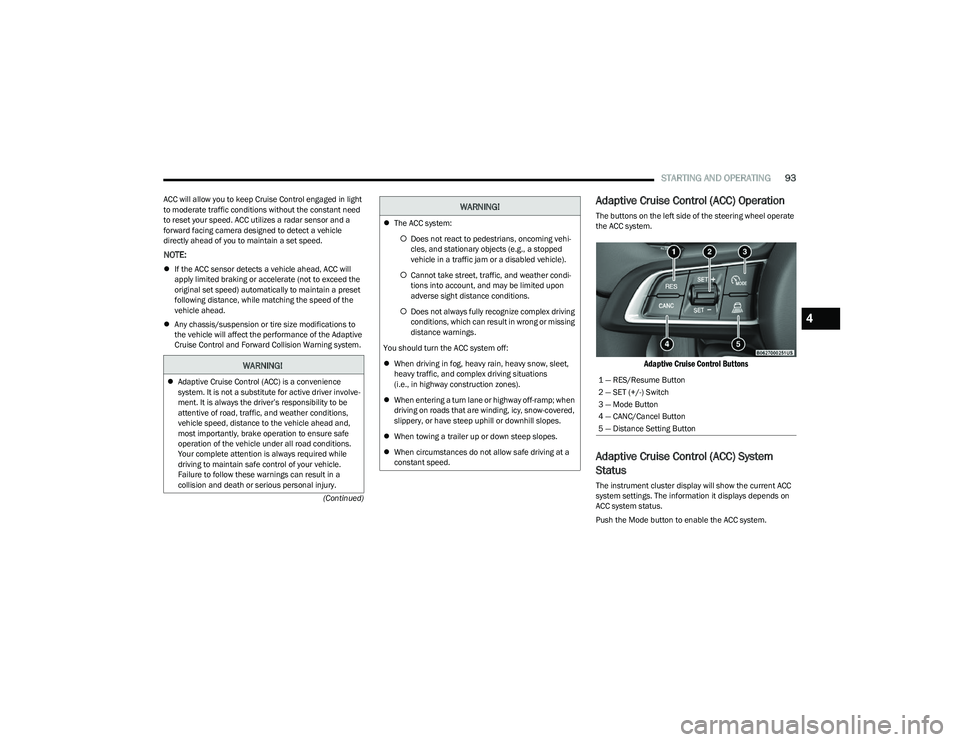
The buttons on the left side of the steering wheel operate
the ACC system.
Adaptive Cruise Control Buttons
Adaptive Cruise Control (ACC) System
Status
The instrument cluster display will show the current ACC
system settings. The information it displays depends on
ACC system status.
Push the Mode button to enable the ACC system.
WARNING!
Adaptive Cruise Control (ACC) is a convenience
system. It is not a substitute for active driver involve -
ment. It is always the driver’s responsibility to be
attentive of road, traffic, and weather conditions,
vehicle speed, distance to the vehicle ahead and,
most importantly, brake operation to ensure safe
operation of the vehicle under all road conditions.
Your complete attention is always required while
driving to maintain safe control of your vehicle.
Failure to follow these warnings can result in a
collision and death or serious personal injury.
The ACC system:
Does not react to pedestrians, oncoming vehi -
cles, and stationary objects (e.g., a stopped
vehicle in a traffic jam or a disabled vehicle).
Cannot take street, traffic, and weather condi -
tions into account, and may be limited upon
adverse sight distance conditions.
Does not always fully recognize complex driving
conditions, which can result in wrong or missing
distance warnings.
You should turn the ACC system off:
When driving in fog, heavy rain, heavy snow, sleet,
heavy traffic, and complex driving situations
(i.e., in highway construction zones).
When entering a turn lane or highway off-ramp; when
driving on roads that are winding, icy, snow-covered,
slippery, or have steep uphill or downhill slopes.
When towing a trailer up or down steep slopes.
When circumstances do not allow safe driving at a
constant speed.
WARNING!
1 — RES/Resume Button
2 — SET (+/-) Switch
3 — Mode Button
4 — CANC/Cancel Button
5 — Distance Setting Button
4
23_GG_OM_EN_USC_t.book Page 93
Page 98 of 288
96STARTING AND OPERATING
TO ACCELERATE FOR PASSING
While the Cruise Control is set, press the accelerator to
pass as you would normally. When the pedal is released,
the vehicle will return to the set speed.
Using Cruise Control On Hills
The transmission may downshift on hills to maintain the
vehicle set speed.
The Cruise Control system maintains speed up and down
hills. A slight speed change on moderate hills is normal.
On steep hills, a greater speed loss or gain may occur so it
may be preferable to drive without Cruise Control.
Setting The Following Distance In ACC
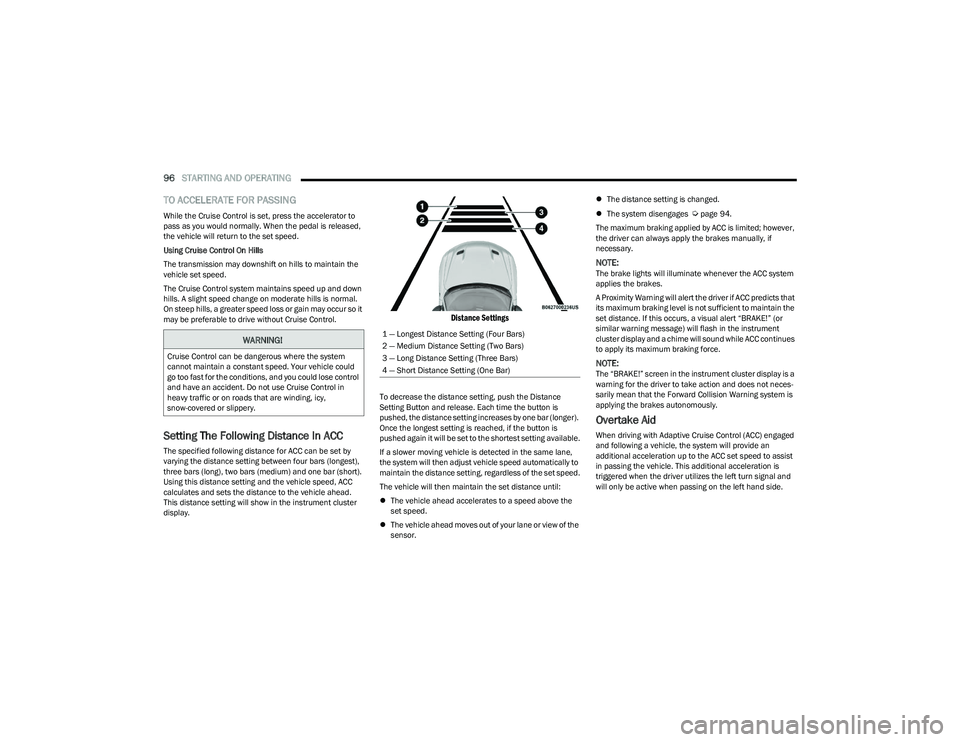
The specified following distance for ACC can be set by
varying the distance setting between four bars (longest),
three bars (long), two bars (medium) and one bar (short).
Using this distance setting and the vehicle speed, ACC
calculates and sets the distance to the vehicle ahead.
This distance setting will show in the instrument cluster
display.
Distance Settings
To decrease the distance setting, push the Distance
Setting Button and release. Each time the button is
pushed, the distance setting increases by one bar (longer).
Once the longest setting is reached, if the button is
pushed again it will be set to the shortest setting available.
If a slower moving vehicle is detected in the same lane,
the system will then adjust vehicle speed automatically to
maintain the distance setting, regardless of the set speed.
The vehicle will then maintain the set distance until:
The vehicle ahead accelerates to a speed above the
set speed.
The vehicle ahead moves out of your lane or view of the
sensor.
The distance setting is changed.
The system disengages
Úpage 94.
The maximum braking applied by ACC is limited; however,
the driver can always apply the brakes manually, if
necessary.
NOTE:The brake lights will illuminate whenever the ACC system
applies the brakes.
A Proximity Warning will alert the driver if ACC predicts that
its maximum braking level is not sufficient to maintain the
set distance. If this occurs, a visual alert “BRAKE!” (or
similar warning message) will flash in the instrument
cluster display and a chime will sound while ACC continues
to apply its maximum braking force.
NOTE:The “BRAKE!” screen in the instrument cluster display is a
warning for the driver to take action and does not neces -
sarily mean that the Forward Collision Warning system is
applying the brakes autonomously.
Overtake Aid
When driving with Adaptive Cruise Control (ACC) engaged
and following a vehicle, the system will provide an
additional acceleration up to the ACC set speed to assist
in passing the vehicle. This additional acceleration is
triggered when the driver utilizes the left turn signal and
will only be active when passing on the left hand side.
WARNING!
Cruise Control can be dangerous where the system
cannot maintain a constant speed. Your vehicle could
go too fast for the conditions, and you could lose control
and have an accident. Do not use Cruise Control in
heavy traffic or on roads that are winding, icy,
snow-covered or slippery.
1 — Longest Distance Setting (Four Bars)
2 — Medium Distance Setting (Two Bars)
3 — Long Distance Setting (Three Bars)
4 — Short Distance Setting (One Bar)
23_GG_OM_EN_USC_t.book Page 96
Page 99 of 288
STARTING AND OPERATING97
Display Warnings And Maintenance
LIMITED OPERATION WARNING
If a warning message appears in the instrument cluster
display indicating limited operation of the ACC system, a
fault or obstruction of the system’s radar or camera may
have occurred.
If an obstruction is detected, clean the area of the
windshield opposite the interior rearview mirror, where the
camera is located, as well as the area of the front fascia/
bumper where the sensor is located. Then check that the
message has disappeared.
When the conditions limiting the system function as been
corrected, normal operation will resume.
Should the fault persist, contact an authorized dealer.
Precautions While Driving With ACC
In certain driving situations, ACC may have detection
issues. In these cases, ACC may brake late or
unexpectedly. The driver needs to stay alert and may need
to intervene. The following are examples of these types of
situations:
TOWING A TRAILER
Towing a trailer is not recommended when using ACC.
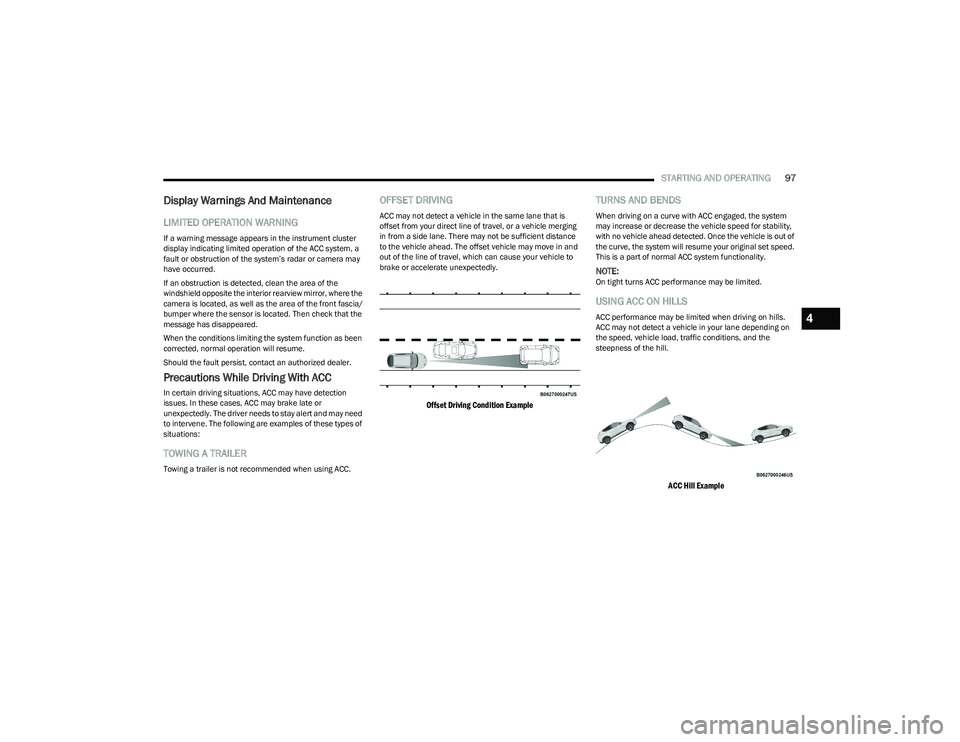
OFFSET DRIVING
ACC may not detect a vehicle in the same lane that is
offset from your direct line of travel, or a vehicle merging
in from a side lane. There may not be sufficient distance
to the vehicle ahead. The offset vehicle may move in and
out of the line of travel, which can cause your vehicle to
brake or accelerate unexpectedly.
Offset Driving Condition Example
TURNS AND BENDS
When driving on a curve with ACC engaged, the system
may increase or decrease the vehicle speed for stability,
with no vehicle ahead detected. Once the vehicle is out of
the curve, the system will resume your original set speed.
This is a part of normal ACC system functionality.
NOTE:On tight turns ACC performance may be limited.
USING ACC ON HILLS
ACC performance may be limited when driving on hills.
ACC may not detect a vehicle in your lane depending on
the speed, vehicle load, traffic conditions, and the
steepness of the hill.
ACC Hill Example
4
23_GG_OM_EN_USC_t.book Page 97
Page 103 of 288
STARTING AND OPERATING101
Setting The ACC Speed Using Confirmation Mode
When Confirmation Mode is selected, and the Traffic Sign
Recognition (TSR) system detects a new speed limit sign,
the driver will confirm this new speed by pushing
the SET switch upward briefly, then releasing. This
confirmation of the new speed must be done within
five seconds of a newly detected speed limit sign being
shown in the instrument cluster display.
Setting The ACC Speed Using Automatic Mode
When Automatic Mode is selected, the ACC system will
automatically adjust the speed setting when the TSR
system detects a new speed limit sign.
The driver can reject this new speed by pushing the SET
switch upward briefly, then releasing within five seconds
of the new speed limit sign being detected and the speed
being adjusted.
Set the desired following distance as you normally would
using the ACC system
Úpage 96.
ACTIVE DRIVING ASSIST SYSTEM —
IF EQUIPPED
OPERATION
The Active Driving Assist (ADA) system is combined with
the Adaptive Cruise Control (ACC) system, and centers the
vehicle in the driving lane while traveling at speeds up to
93 mph (150 km/h). For ACC system operating instructions and system
limitations, see
Úpage 92.
NOTE:
The driver should always obey traffic laws and speed
limits. Never drive above applicable speed limit restric -
tions.
The driver can override ADA at any time by braking,
accelerating, or steering the vehicle.
Just like ACC, ADA will maintain a set speed as long as the
set distance between your vehicle and the vehicle in front
is maintained. ADA will also keep your vehicle centered
between the lane lines, and monitor for other vehicles in
adjacent lanes by utilizing the Blind Spot Monitoring
sensors.
ADA uses sensors within the steering wheel to measure
driver attentiveness. ADA requires the driver’s hands on
the steering wheel at all times. The system will generally
aim to keep the vehicle centered in the lane, but when the
driver turns the steering wheel (e.g. to move farther away
from a large vehicle in an adjacent lane) the system will
reduce its control and enter "co-steering" mode. While in
co-steering mode, the system will provide reduced
assistance and allow the driver to control the path of the
vehicle. Once the driver stops providing input to the
steering wheel, the system will require a few seconds to
fully resume lane centering assistance, especially during
curves.
WARNING!
The Active Driving Assist (ADA) system is a convenience
system. It is not a substitute for active driver
involvement. It is always the driver’s responsibility to be
attentive of road traffic, weather conditions, vehicle
speed, distance to the vehicle ahead, position in the
lane compared to other vehicles, and brake operation
to ensure safe operation of the vehicle under all road
conditions. Your complete attention is always required
while driving to maintain safe control of your vehicle.
Failure to follow these warnings can result in a collision
and death or serious personal injury.
You should turn off the Active Driving Assist system:
When driving in complex driving situations
(e.g. urban environments, construction zones, etc.),
adverse weather or low visibility conditions (e.g. rain,
snow, fog, sleet, dust), or adverse road conditions
(e.g. heavy traffic, worn or missing lane markings,
etc.).
When entering a highway off-ramp, when driving on
roads that are icy, snow covered, or slippery.
When driving during difficult or uncertain conditions.
4
23_GG_OM_EN_USC_t.book Page 101
Page 106 of 288
104STARTING AND OPERATING
MINIMUM RISK MANEUVER
When the vehicle begins the hands-off steering wheel
warning escalation, previously described, the system will
initiate the Minimum Risk Maneuver for bringing the
vehicle to a stop.
After 23 seconds from the initial absence of the hands on
the steering wheel, the Adaptive Cruise Control (ACC)
system will apply a brake jerk to warn the driver to take
vehicle control. If, after another 3 seconds the driver does
not take the control of the vehicle, the system will apply a
second brake jerk.
If the absence of hands on the steering wheel persists, the
system will apply automatic braking to bring the vehicle to
the stop and activate the vehicle’s hazard warning lights.
After the vehicle is stopped, the system will unlock the
doors (if previously locked).
NOTE:If the driver takes control of the vehicle during the
Minimum Risk Maneuver by placing hands on the steering
wheel or pressing the accelerator, the system Minimum
Risk Maneuver will be canceled, and the ADA system will
resume normal function.
SYSTEM STATUS
Along with changes in the system’s indicator lights (green,
yellow, and red), the system can also issue several
accompanying warnings intended to provide the driver
with enough time to react, avoid or mitigate a potential
collision.
Two haptic brake jerk warnings will be issued (red
warning light is being issued).
A steering wheel vibration warning (if enabled) will
occur if the vehicle crosses a lane marker, for example,
when driving on a tight curve. The steering wheel vibra -
tion feature can be turned on or off within the Uconnect
system
Úpage 130.
SYSTEM OPERATION/LIMITATIONS
The Active Driving Assist system DOES NOT:
Warn or prevent collisions with other vehicles
Steer your vehicle around stopped vehicles, slower
vehicles, construction equipment, pedestrians, or
animals
Respond to traffic lights or stop signs
Merge onto highways or exit off ramps
Turn your vehicle
Change lanes
React to cross traffic
NOTE:Adaptive Cruise Control (ACC) is a core component of ADA.
For ACC system limitations, see Úpage 92.
The Active Driving Assist system may have limited or
reduced functionality when one of the following conditions
occur:
The vehicle’s radar sensors and/or forward facing
camera is damaged, covered, misaligned, or
obstructed (e.g. by mud, ice, snow, etc.)
If the suspension alignment is not correct, if the vehicle
is modified (e.g. lifting or lowering the suspension,
installing different sized wheels or tires)
Driving near highway toll booths
NOTE:If damage to the windshield occurs, have the windshield
replaced by an authorized dealer as soon as possible.
WARNING!
The DDD system is an aid for driving and does not
relieve the driver of the responsibility of driving the
vehicle. If you experience fatigue while driving, pull over
safely for a break without waiting for the DDD warnings.
Only return to the road when you are in the right
physical and mental condition to prevent endangering
yourself and other drivers.
23_GG_OM_EN_USC_t.book Page 104
Page 110 of 288
108STARTING AND OPERATING
(Continued)
Side Distance Warning Usage Precautions
Some conditions may influence the performance of the
Side Distance Warning system:
NOTE:
Ensure that the front and rear fascias/bumpers are
free of snow, ice, mud, dirt and debris to keep the
ParkSense system operating properly.
Construction equipment, large trucks, and other vibra -
tions could affect the performance of ParkSense.
ParkSense, when on, will reduce the volume of the
radio when it is sounding a tone.
Clean the ParkSense sensors regularly, taking care not
to scratch or damage them. The sensors must not be
covered with ice, snow, slush, mud, dirt or debris.
Failure to do so can result in the system not working
properly. The ParkSense system might not detect an
obstacle behind or in front of the fascia/bumper, or it
could provide a false indication that an obstacle is
behind or in front of the fascia/bumper.
The presence of a tow hook without a trailer may inter -
fere with the correct operation of the parking sensors.
Before using the ParkSense system, it is recom -
mended to remove the removable tow hook ball
assembly and any attachments from the vehicle when
it is not used for towing operations. If you leave the tow
hook fitted when not towing a trailer, the tow hook
could be detected as an obstacle by the sensors.
Contact your authorized dealer to update the
ParkSense system operations.
PARKSENSE ACTIVE PARK ASSIST SYSTEM —
IF EQUIPPED
The ParkSense Active Park Assist system is intended to
assist the driver during parallel, perpendicular, and
parallel park exit maneuvers by identifying a proper
parking space, providing audible/visual instructions, and
controlling the steering wheel. The ParkSense Active Park
Assist system is defined as “semi-automatic” since the
driver maintains control of the accelerator, gear selector
and brakes. Depending on the driver's parking maneuver
selection, the ParkSense Active Park Assist system is
capable of maneuvering a vehicle into a parallel or a
perpendicular parking space on either side (i.e., driver
side or passenger side), as well as exiting a parallel
parking space.
NOTE:
The driver is always responsible for controlling the
vehicle, responsible for any surrounding objects, and
must intervene as required.
The system is designed to assist the driver and not to
substitute the driver.
WARNING!
Drivers must be careful when backing up even when
using ParkSense. Always check carefully behind your
vehicle, look behind you, and be sure to check for
pedestrians, animals, other vehicles, obstructions,
and blind spots before backing up. You are respon -
sible for safety and must continue to pay attention to
your surroundings. Failure to do so can result in
serious injury or death.
Before using ParkSense, it is strongly recommended
that the ball mount and hitch ball assembly be
disconnected from the vehicle when the vehicle is
not used for towing. Failure to do so can result in
injury or damage to vehicles or obstacles because
the hitch ball will be much closer to the obstacle than
the rear fascia/bumper when the vehicle sounds the
continuous tone. Also, the sensors could detect the
ball mount and hitch ball assembly, depending on its
size and shape, giving a false indication that an
obstacle is behind the vehicle.
CAUTION!
ParkSense is only a parking aid and it is unable to
recognize every obstacle, including small obstacles.
Parking curbs might be temporarily detected or not
detected at all. Obstacles located above or below the
sensors will not be detected when they are in close
proximity.
The vehicle must be driven slowly when using
ParkSense in order to be able to stop in time when
an obstacle is detected. It is recommended that
the driver looks over his/her shoulder when using
ParkSense.
CAUTION!
23_GG_OM_EN_USC_t.book Page 108
Page 113 of 288
STARTING AND OPERATING111
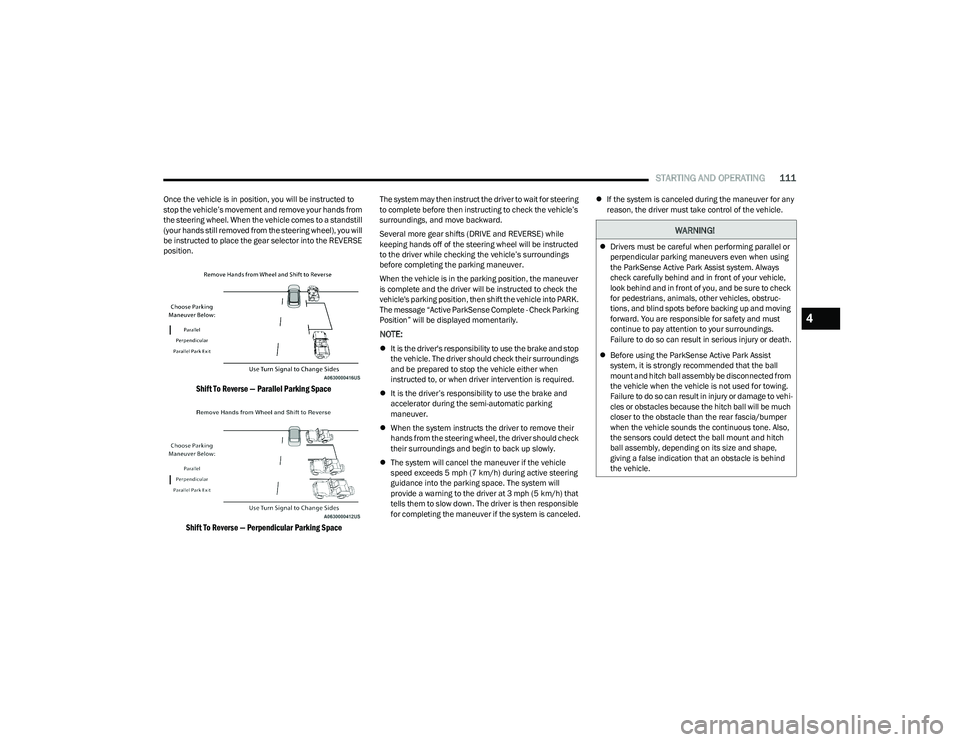
Once the vehicle is in position, you will be instructed to
stop the vehicle’s movement and remove your hands from
the steering wheel. When the vehicle comes to a standstill
(your hands still removed from the steering wheel), you will
be instructed to place the gear selector into the REVERSE
position.
Shift To Reverse — Parallel Parking Space
Shift To Reverse — Perpendicular Parking Space
The system may then instruct the driver to wait for steering
to complete before then instructing to check the vehicle’s
surroundings, and move backward.
Several more gear shifts (DRIVE and REVERSE) while
keeping hands off of the steering wheel will be instructed
to the driver while checking the vehicle’s surroundings
before completing the parking maneuver.
When the vehicle is in the parking position, the maneuver
is complete and the driver will be instructed to check the
vehicle's parking position, then shift the vehicle into PARK.
The message “Active ParkSense Complete - Check Parking
Position” will be displayed momentarily.
NOTE:
It is the driver's responsibility to use the brake and stop
the vehicle. The driver should check their surroundings
and be prepared to stop the vehicle either when
instructed to, or when driver intervention is required.
It is the driver’s responsibility to use the brake and
accelerator during the semi-automatic parking
maneuver.
When the system instructs the driver to remove their
hands from the steering wheel, the driver should check
their surroundings and begin to back up slowly.
The system will cancel the maneuver if the vehicle
speed exceeds 5 mph (7 km/h) during active steering
guidance into the parking space. The system will
provide a warning to the driver at 3 mph (5 km/h) that
tells them to slow down. The driver is then responsible
for completing the maneuver if the system is canceled.
If the system is canceled during the maneuver for any
reason, the driver must take control of the vehicle.
WARNING!
Drivers must be careful when performing parallel or
perpendicular parking maneuvers even when using
the ParkSense Active Park Assist system. Always
check carefully behind and in front of your vehicle,
look behind and in front of you, and be sure to check
for pedestrians, animals, other vehicles, obstruc -
tions, and blind spots before backing up and moving
forward. You are responsible for safety and must
continue to pay attention to your surroundings.
Failure to do so can result in serious injury or death.
Before using the ParkSense Active Park Assist
system, it is strongly recommended that the ball
mount and hitch ball assembly be disconnected from
the vehicle when the vehicle is not used for towing.
Failure to do so can result in injury or damage to vehi -
cles or obstacles because the hitch ball will be much
closer to the obstacle than the rear fascia/bumper
when the vehicle sounds the continuous tone. Also,
the sensors could detect the ball mount and hitch
ball assembly, depending on its size and shape,
giving a false indication that an obstacle is behind
the vehicle.
4
23_GG_OM_EN_USC_t.book Page 111