climate control DODGE JOURNEY 2009 1.G User Guide
[x] Cancel search | Manufacturer: DODGE, Model Year: 2009, Model line: JOURNEY, Model: DODGE JOURNEY 2009 1.GPages: 523
Page 289 of 523
NOTE:This setting works best in cold or snowy condi-
tions that require extra heat to the windshield. This
setting is good for maintaining comfort while reducing
moisture on the windshield.
•Defrost Air is directed through the windshield and side
window demist outlets. For vehicles equipped
with a three-zone system, air is directed through the floor
outlet in the right quarter trim panel, unless the climate
control for the rear passengers is ON and in Panel mode.
NOTE: Use this mode with maximum blower and
temperature settings for best windshield and side win-
dow defrosting.
•Recirculation Control Use this button to block the flow of outside air
from coming into the passenger compartment. NOTE:
•Only use the Recirculation mode as a temporary
means to block out any outside odors, smoke, or dust,
and to cool the interior rapidly upon initial start up in
very hot or humid weather.
•Continuous use of the Recirculation mode may make
the inside air stuffy and window fogging may occur.
Extended use of this mode is not recommended.
•The use of the Recirculation mode in cold or damp
weather will cause windows to fog on the inside,
because of moisture build-up inside the vehicle. Select
the outside air position for maximum defogging.
UNDERSTANDING YOUR INSTRUMENT PANEL 287
4
Page 290 of 523
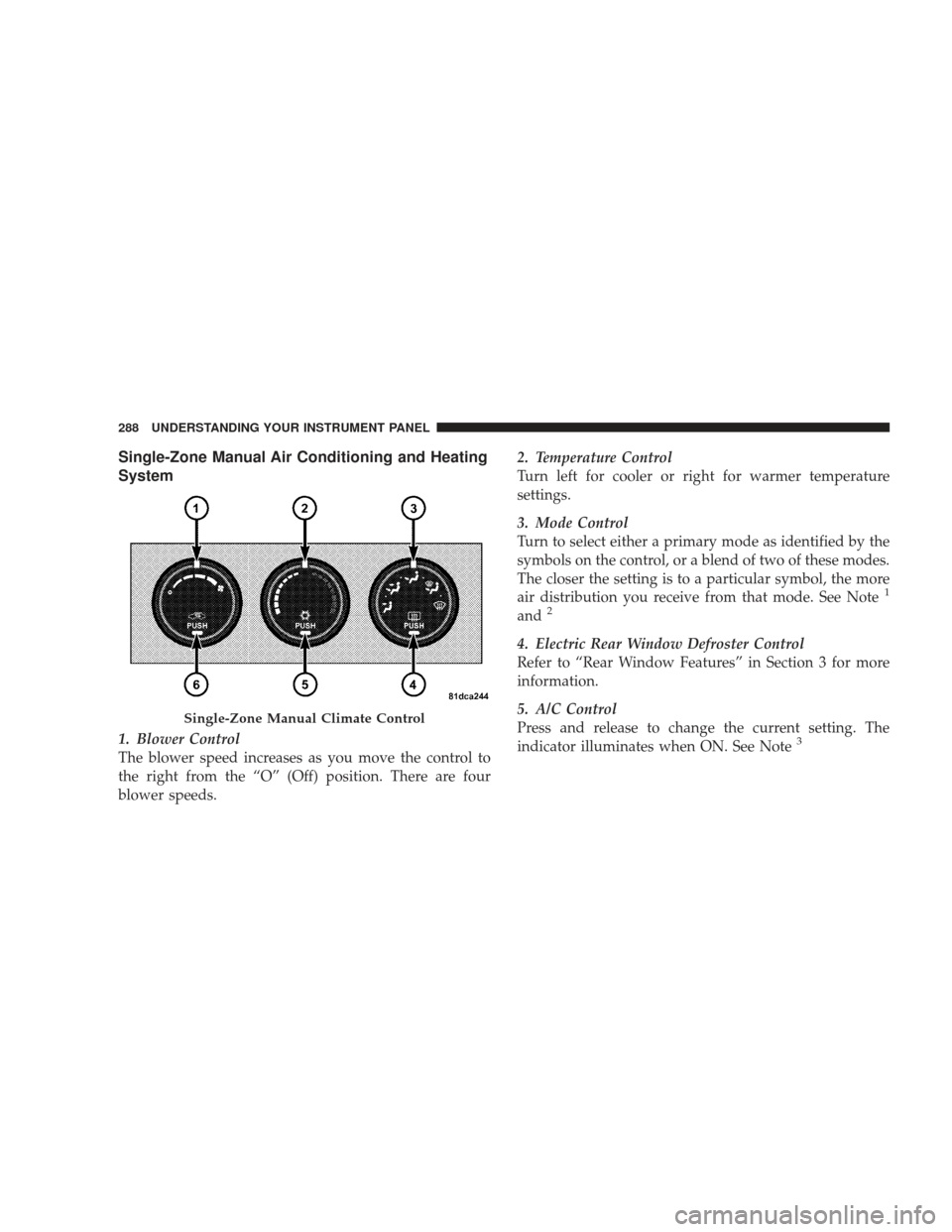
Single-Zone Manual Air Conditioning and Heating
System
1. Blower Control
The blower speed increases as you move the control to
the right from the “O” (Off) position. There are four
blower speeds.2. Temperature Control
Turn left for cooler or right for warmer temperature
settings.
3. Mode Control
Turn to select either a primary mode as identified by the
symbols on the control, or a blend of two of these modes.
The closer the setting is to a particular symbol, the more
air distribution you receive from that mode. See Note
1
and2
4. Electric Rear Window Defroster Control
Refer to “Rear Window Features” in Section 3 for more
information.
5. A/C Control
Press and release to change the current setting. The
indicator illuminates when ON. See Note
3
Single-Zone Manual Climate Control
288 UNDERSTANDING YOUR INSTRUMENT PANEL
Page 291 of 523
6. Recirculation Mode Control
Press and release to change the current setting. The
indicator illuminates when ON.
Note
1-The A/C compressor operates in Mix and
Defrost, or a blend of these modes, even if the A/C
control is not pressed. This dehumidifies the air to help
dry the windshield. To improve fuel economy, use these
modes only when necessary.
Note
2- The A/C will engage automatically to prevent
fogging when the Recirculation button is pressed and the
Mode control is set to Panel or Panel/Floor. The A/C can
be deselected manually without disturbing the Mode
control selection.
Note
3- For maximum cooling, use A/C and recirculation
at the same time. If economy mode is desired, turn OFF
the A/C and turn the Temperature control to the desired
temperature setting.
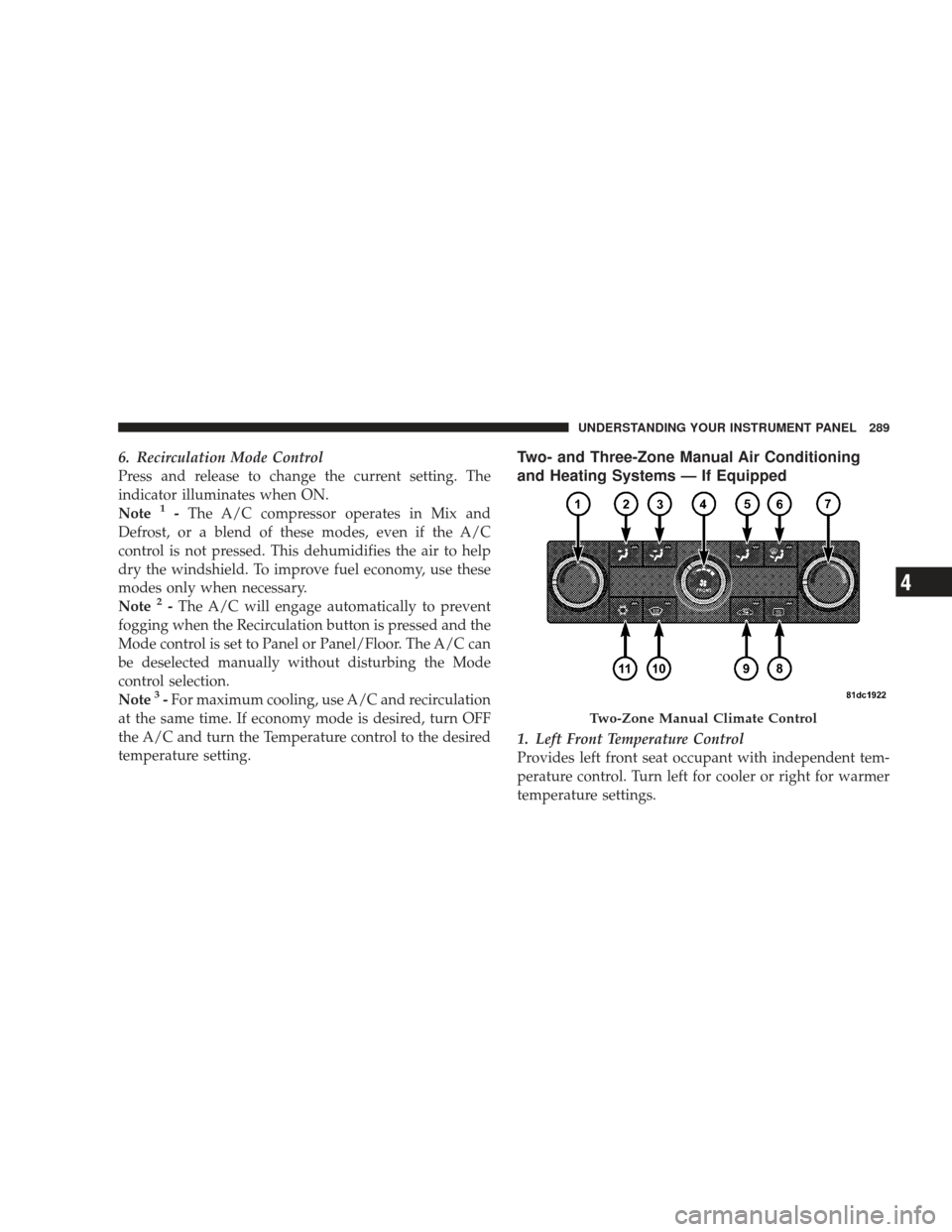
Two- and Three-Zone Manual Air Conditioning
and Heating Systems — If Equipped
1. Left Front Temperature Control
Provides left front seat occupant with independent tem-
perature control. Turn left for cooler or right for warmer
temperature settings.
Two-Zone Manual Climate Control
UNDERSTANDING YOUR INSTRUMENT PANEL 289
4
Page 293 of 523
11. A/C Button
Press and release to change the current setting. The
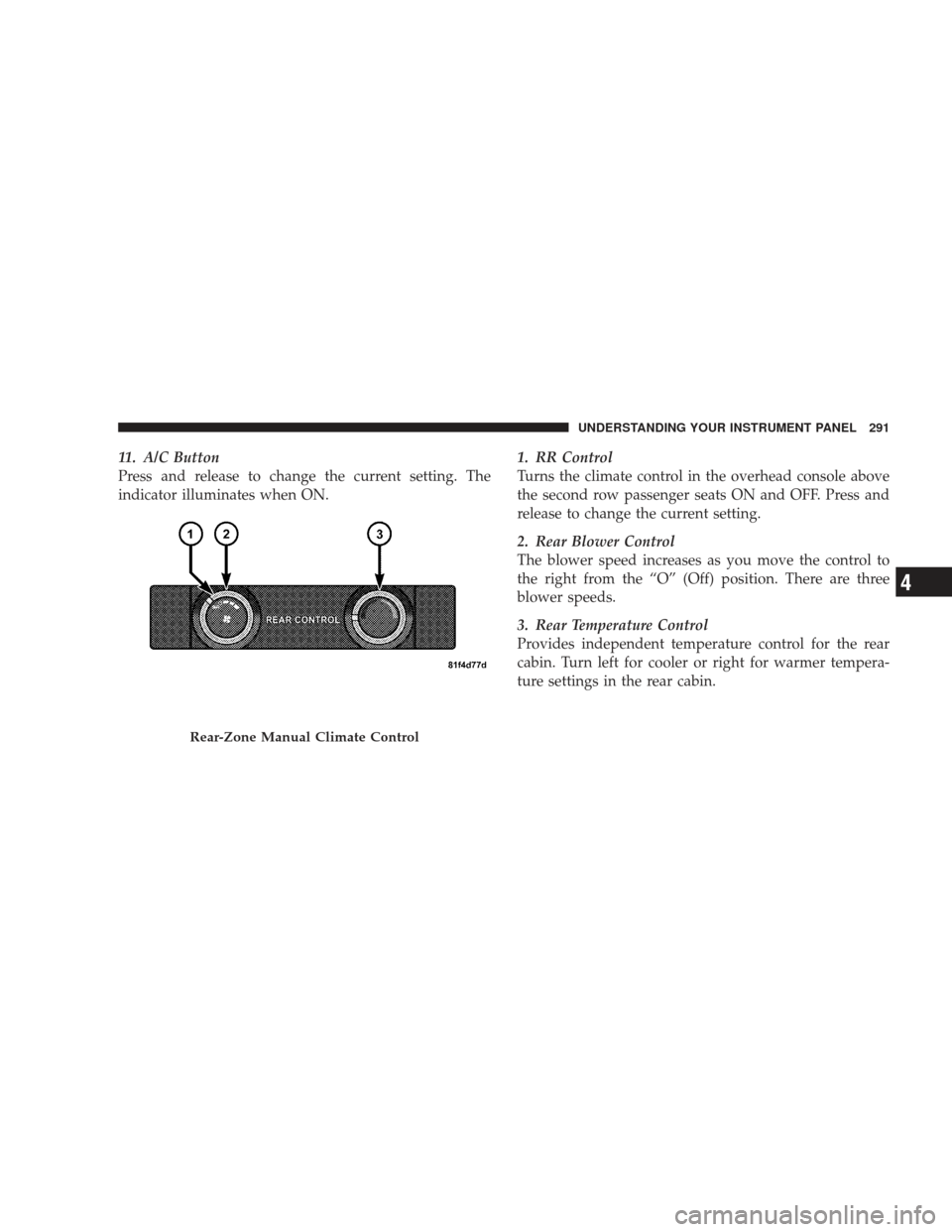
indicator illuminates when ON.1. RR Control
Turns the climate control in the overhead console above
the second row passenger seats ON and OFF. Press and
release to change the current setting.
2. Rear Blower Control
The blower speed increases as you move the control to
the right from the “O” (Off) position. There are three
blower speeds.
3. Rear Temperature Control
Provides independent temperature control for the rear
cabin. Turn left for cooler or right for warmer tempera-
ture settings in the rear cabin.
Rear-Zone Manual Climate Control
UNDERSTANDING YOUR INSTRUMENT PANEL 291
4
Page 294 of 523
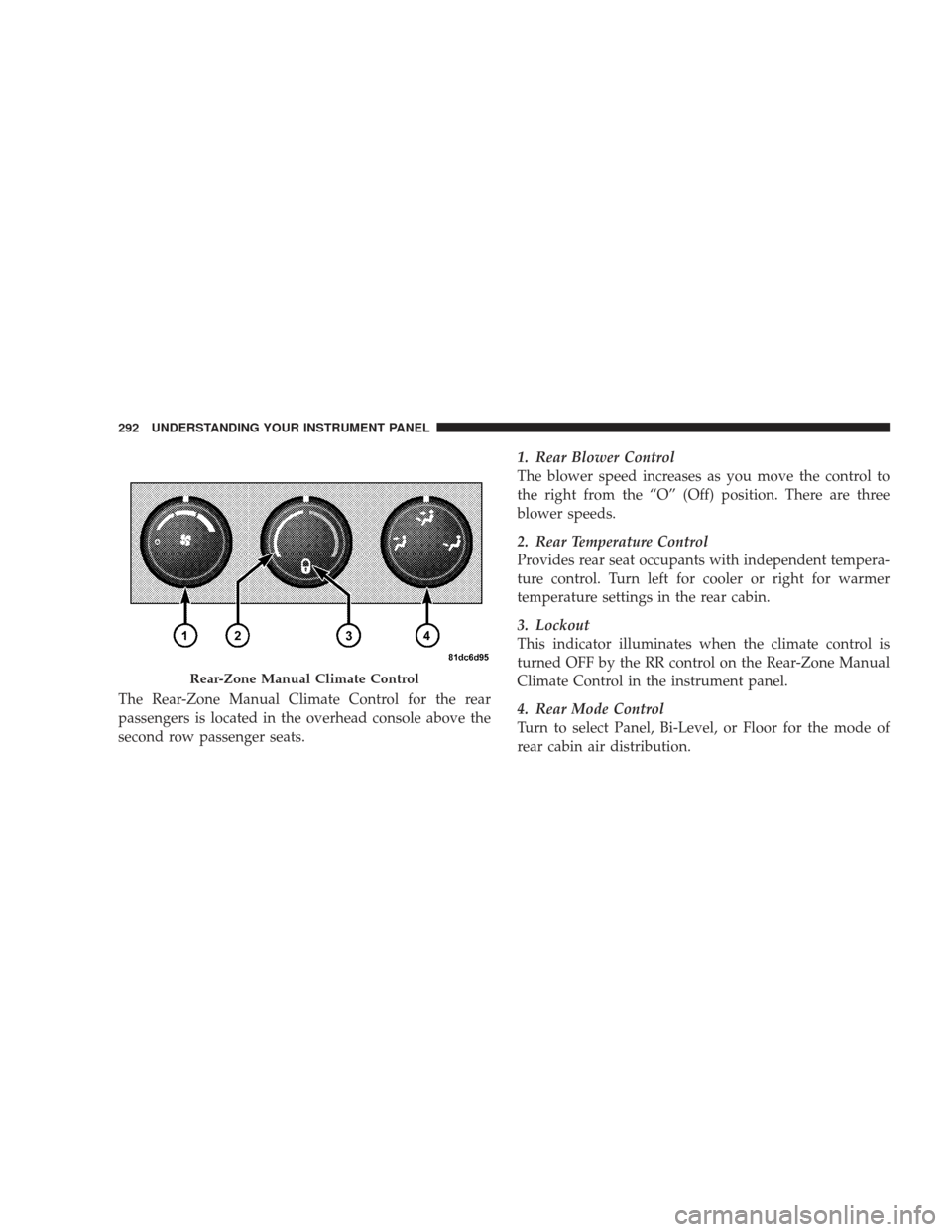
The Rear-Zone Manual Climate Control for the rear
passengers is located in the overhead console above the
second row passenger seats.1. Rear Blower Control
The blower speed increases as you move the control to
the right from the “O” (Off) position. There are three
blower speeds.
2. Rear Temperature Control
Provides rear seat occupants with independent tempera-
ture control. Turn left for cooler or right for warmer
temperature settings in the rear cabin.
3. Lockout
This indicator illuminates when the climate control is
turned OFF by the RR control on the Rear-Zone Manual
Climate Control in the instrument panel.
4. Rear Mode Control
Turn to select Panel, Bi-Level, or Floor for the mode of
rear cabin air distribution.
Rear-Zone Manual Climate Control
292 UNDERSTANDING YOUR INSTRUMENT PANEL
Page 298 of 523
Note1-To prevent window fogging, Recirculation Mode
will not operate when either Defrost or Mix mode is
selected. Doing so will cause the indicator to blink and
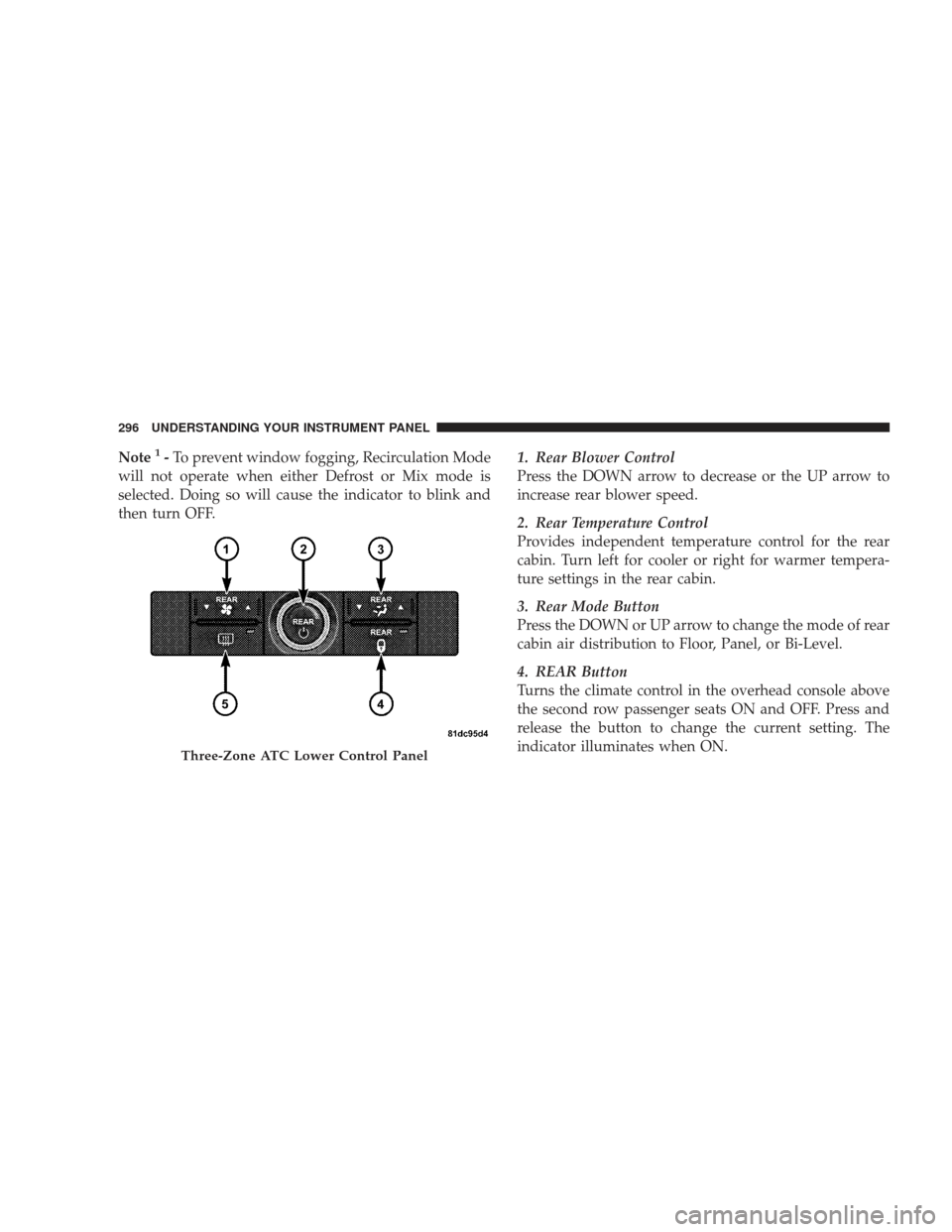
then turn OFF. 1. Rear Blower Control
Press the DOWN arrow to decrease or the UP arrow to
increase rear blower speed.
2. Rear Temperature Control
Provides independent temperature control for the rear
cabin. Turn left for cooler or right for warmer tempera-
ture settings in the rear cabin.
3. Rear Mode Button
Press the DOWN or UP arrow to change the mode of rear
cabin air distribution to Floor, Panel, or Bi-Level.
4. REAR Button
Turns the climate control in the overhead console above
the second row passenger seats ON and OFF. Press and
release the button to change the current setting. The
indicator illuminates when ON.
Three-Zone ATC Lower Control Panel
296 UNDERSTANDING YOUR INSTRUMENT PANEL
Page 299 of 523
5. Electric Rear Window Defroster Button
Refer to “Rear Window Features” in Section 3 for more
information.
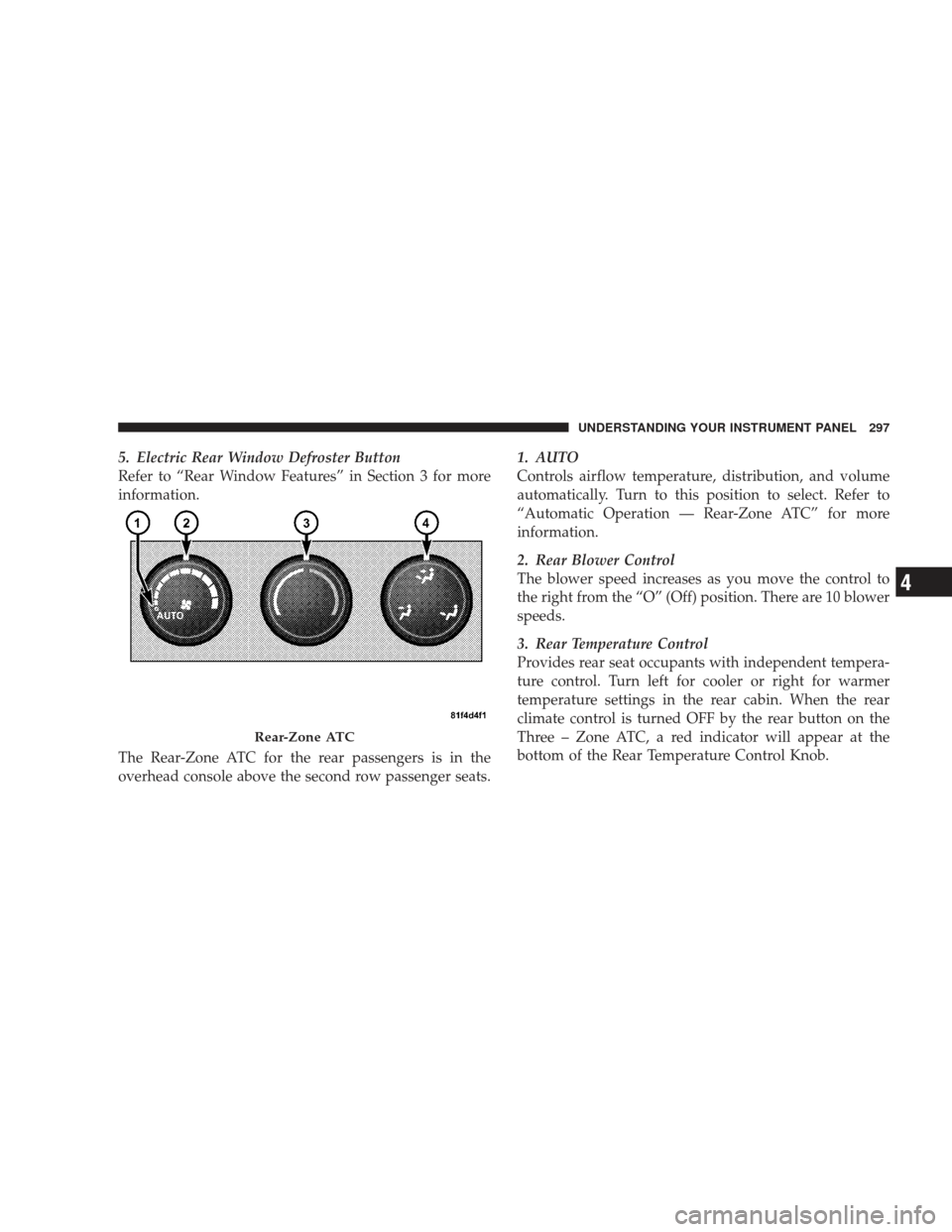
The Rear-Zone ATC for the rear passengers is in the
overhead console above the second row passenger seats.1. AUTO
Controls airflow temperature, distribution, and volume
automatically. Turn to this position to select. Refer to
“Automatic Operation — Rear-Zone ATC” for more
information.
2. Rear Blower Control
The blower speed increases as you move the control to
the right from the “O” (Off) position. There are 10 blower
speeds.
3. Rear Temperature Control
Provides rear seat occupants with independent tempera-
ture control. Turn left for cooler or right for warmer
temperature settings in the rear cabin. When the rear
climate control is turned OFF by the rear button on the
Three – Zone ATC, a red indicator will appear at the
bottom of the Rear Temperature Control Knob.
Rear-Zone ATC
UNDERSTANDING YOUR INSTRUMENT PANEL 297
4
Page 300 of 523
4. Rear Mode Control
Turn to select Panel, Bi-Level, or Floor for the mode of
rear cabin air distribution.
Automatic Operation — Two- and Three-Zone ATC
The Two- and Three-Zone ATC systems automatically
maintain the climate in the cabin of the vehicle. To
accomplish this, the system gathers information from the
climate controls, from a dual sun-sensor located in the
top of the instrument panel, from an infrared sensor
located between the sun visors, and from various sensors
located throughout the vehicle.
•The climate controls provide the system with operator
input.
•The dual sun-sensor monitors sun load coming
through the windshield.
•The infrared sensor independently measures the sur-
face temperature of the driver and passengers.
•Other sensors take into account vehicle-speed, A/C
pressure, outside temperature, and engine cooling
temperature.
Using all of these inputs, the system automatically ad-
justs airflow temperature, airflow distribution, airflow
volume, and the amount of outside air recirculation. This
maintains a comfortable temperature even under chang-
ing conditions.
To select automatic operation, perform the following
steps:
1. Press and release the AUTO button and the ATC
displays the word “AUTO,” along with current settings
for temperature, mode, and blower speed. It also displays
the snowflake icon if the A/C is running.
2. Turn the Left Front Temperature Control, the Right
Front, and if so equipped, the Rear Temperature Control
to dial in the temperature that you want the system to
298 UNDERSTANDING YOUR INSTRUMENT PANEL
Page 335 of 523
active. The ESP/TCS Indicator Light also flashes when
TCS is active. If the ESP/TCS Indicator Light begins to
flash during acceleration, ease up on the accelerator and
apply as little throttle as possible. Be sure to adapt your
speed and driving to the prevailing road conditions.
WARNING!
ESP cannot prevent the natural laws of physics from
acting on the vehicle, nor can it increase the traction
afforded by prevailing road conditions. ESP cannot
prevent accidents, including those resulting from
excessive speed in turns, driving on very slippery
surfaces, or hydroplaning. Only a safe, attentive, and
skillful driver can prevent accidents. The capabilities
of an ESP-equipped vehicle must never be exploited
in a reckless or dangerous manner, which could
jeopardize the user’s safety or the safety of others.
ESP Operating Modes
The ESP system has two available operating modes.
Full On
This is the normal operating mode for ESP. Whenever the
vehicle is started the system will be in this mode. This
mode should be used for most driving situations. ESP
should only be turned to “Partial Off” for specific reasons
as noted. Refer to “Partial Off” for additional informa-
tion.
Partial Off
The ESP OFF button is located in the switch bank above
the climate Control. To enter the “Partial Off” mode,
momentarily depress the ESP OFF button and the ESP/
TCS Indicator Light will illuminate. To turn the ESP on
again, momentarily depress the ESP OFF button and the
ESP/TCS Indicator Light will turn off. This will restore
the normal “ESP On” mode of operation.
STARTING AND OPERATING 333
5
Page 396 of 523
HAZARD WARNING FLASHER
The HAZARD switch is located in the instrument panel
switch bank above the climate controls.Push and release the switch to turn on the hazard
warning flashers. When the hazard warning is
activated, all directional turn signals will flash on
and off to warn oncoming traffic of an emergency. Push
and release the switch a second time to turn off the
flashers.
This is an emergency warning system and it should not
be used when the vehicle is in motion. Use it when your
vehicle is disabled and it is creating a safety hazard for
other motorists.
When you must leave the vehicle to seek assistance, the
hazard warning flashers will continue to operate even
though the ignition switch is in the LOCK position. NOTE:
With extended use, the hazard warning flashers
may wear down your battery.
IF YOUR ENGINE OVERHEATS
In any of the following situations, you can reduce the
potential for overheating by taking the appropriate action.
•On the highways — Slow down.
•In city traffic — While stopped, put the transaxle in
NEUTRAL, but do not increase engine idle speed.
NOTE: There are steps that you can take to slow down
an impending overheat condition. If your Air Condition-
ing A/C system is on, turn it off. The A/C system adds
heat to the engine cooling system and turning off the
A/C system removes this heat. You can also turn the
Temperature control to maximum heat, the Mode control
to floor, and the Blower control to High. This allows the
heater core to act as a supplement to the radiator and aids
in removing heat from the engine cooling system.
394 WHAT TO DO IN EMERGENCIES