reset DODGE JOURNEY 2010 1.G Owner's Manual
[x] Cancel search | Manufacturer: DODGE, Model Year: 2010, Model line: JOURNEY, Model: DODGE JOURNEY 2010 1.GPages: 512
Page 211 of 512
•Magnetic materials should be kept away from the top
of the instrument panel, as this is where the compass
sensor is located.
1. Turn the ignition switch ON.
2. Press and release the MENU button until Personal
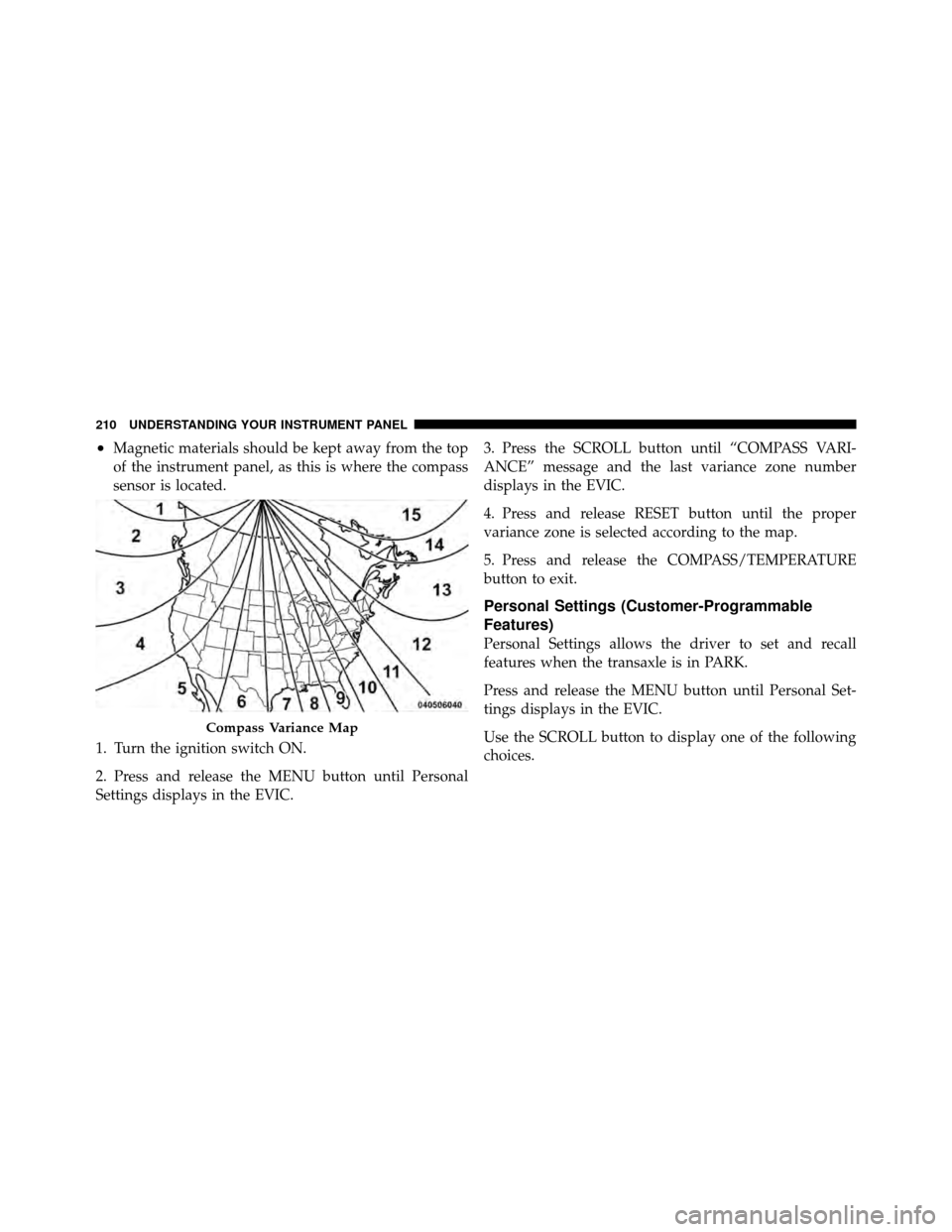
Settings displays in the EVIC. 3. Press the SCROLL button until “COMPASS VARI-
ANCE” message and the last variance zone number
displays in the EVIC.
4. Press and release RESET button until the proper
variance zone is selected according to the map.
5. Press and release the COMPASS/TEMPERATURE
button to exit.
Personal Settings (Customer-Programmable
Features)
Personal Settings allows the driver to set and recall
features when the transaxle is in PARK.
Press and release the MENU button until Personal Set-
tings displays in the EVIC.
Use the SCROLL button to display one of the following
choices.
Compass Variance Map
210 UNDERSTANDING YOUR INSTRUMENT PANEL
Page 212 of 512
“Language”
When in this display you may select one of three lan-
guages for all display nomenclature, including the trip
functions and the navigation system (if equipped). Press
the RESET button while in this display to select English,
French, or Spanish. Then, as you continue, the informa-
tion will display in the selected language.
NOTE:The EVIC will not change the Uconnect™ lan-
guage selection.
“Auto UNLK On Exit”
When ON is selected, all doors and the liftgate will
unlock when the vehicle is stopped and the transaxle is in
the PARK or NEUTRAL position and the driver’s door is
opened. To make your selection, press and release the
RESET button until “ON” or “OFF” appears.
“RKE Unlock”
When Driver Door 1st Press is selected, only the driver’s
door will unlock on the first press of the Remote Keyless
Entry (RKE) UNLOCK button. When Driver Door 1st
Press is selected, you must press the RKE UNLOCK
button twice to unlock the passenger doors and liftgate.
When All Doors 1st Press is selected, all doors and the
liftgate will unlock on the first press of the RKE UN-
LOCK button. To make your selection, press and release
the RESET button until “Driver Door 1st Press” or “All
Doors 1st Press” appears.
“Sound Horn With Lock”
When ON is selected, a short horn sound will occur when
the RKE LOCK button is pressed. This feature may be
selected with or without the Flash Lamp with Lock
feature. To make your selection, press and release the
RESET button until “ON” or “OFF” appears.
4
UNDERSTANDING YOUR INSTRUMENT PANEL 211
Page 213 of 512
“Flash Lamp With Lock”
When ON is selected, the front and rear turn signals will
flash when the doors are locked or unlocked with the
RKE transmitter. This feature may be selected with or
without the sound horn on lock feature selected. To make
your selection, press and release the RESET button until
“ON” or “OFF” appears.
“Headlamp Off Delay”
When this feature is selected, the driver can choose to
have the headlights remain on for 0, 30, 60, or 90 seconds
after turning the ignition to the LOCK position. To make
your selection, press and release the RESET button until
“0,” “30,” “60,” or “90” appears.
“Headlamps With Wipers” (Available with Auto
Headlights Only)
When ON is selected, and the multifunction lever is
placed in the AUTO position, the headlights will turn on
approximately 10 seconds after the wipers are turnedON. The headlights will also turn off when the wipers are
turned OFF if they were turned ON by this feature. To
make your selection, press and release the RESET button
until “ON” or “OFF” appears.
“Key-Off Power Delay”
When this feature is selected, the power window
switches, radio, Uconnect™ Phone (if equipped), DVD
video system (if equipped), power sunroof (if equipped),
and ignition powered outlets will remain active for up to
10 minutes after the ignition switch is turned OFF.
Opening a vehicle door will cancel this feature. To make
your selection, press and release the RESET button until
“Off,” “45 sec.,” “5 min.,” or “10 min.” appears.
212 UNDERSTANDING YOUR INSTRUMENT PANEL
Page 214 of 512
“ILLUMIN Approach”
When this feature is selected, the headlights will activate
and remain on for up to 90 seconds when the doors are
unlocked with the RKE transmitter. To make your selec-
tion, press and hold the RESET button until “Off,”
“30 sec,” “60 sec,” or “90 sec” appears.
Display ECO — If Equipped
The “ECO” message can be turned on or off. To make
your selection, press and release the FUNCTION SE-
LECT button until “ON” or “OFF” appears.
“Display Units In”
The EVIC, odometer, and navigation system (if
equipped) can be changed between English and Metric
units of measure. To make your selection, press andrelease the RESET button until “ENGLISH” or “MET-
RIC” appears.
“NAV Turn By Turn” — If Equipped
When ON is selected, the Turn-by-Turn directions will
appear in the display as the vehicle approaches a desig-
nated turn within a programmed route. To make your
selection, press and release the RESET button until “ON”
or “OFF” appears.
Compass Variance
Refer to “Compass Variance” under “Compass Display.”
Calibrate Compass
Refer to “Manual Compass Calibration” under “Com-
pass Display.”
4
UNDERSTANDING YOUR INSTRUMENT PANEL 213
Page 219 of 512
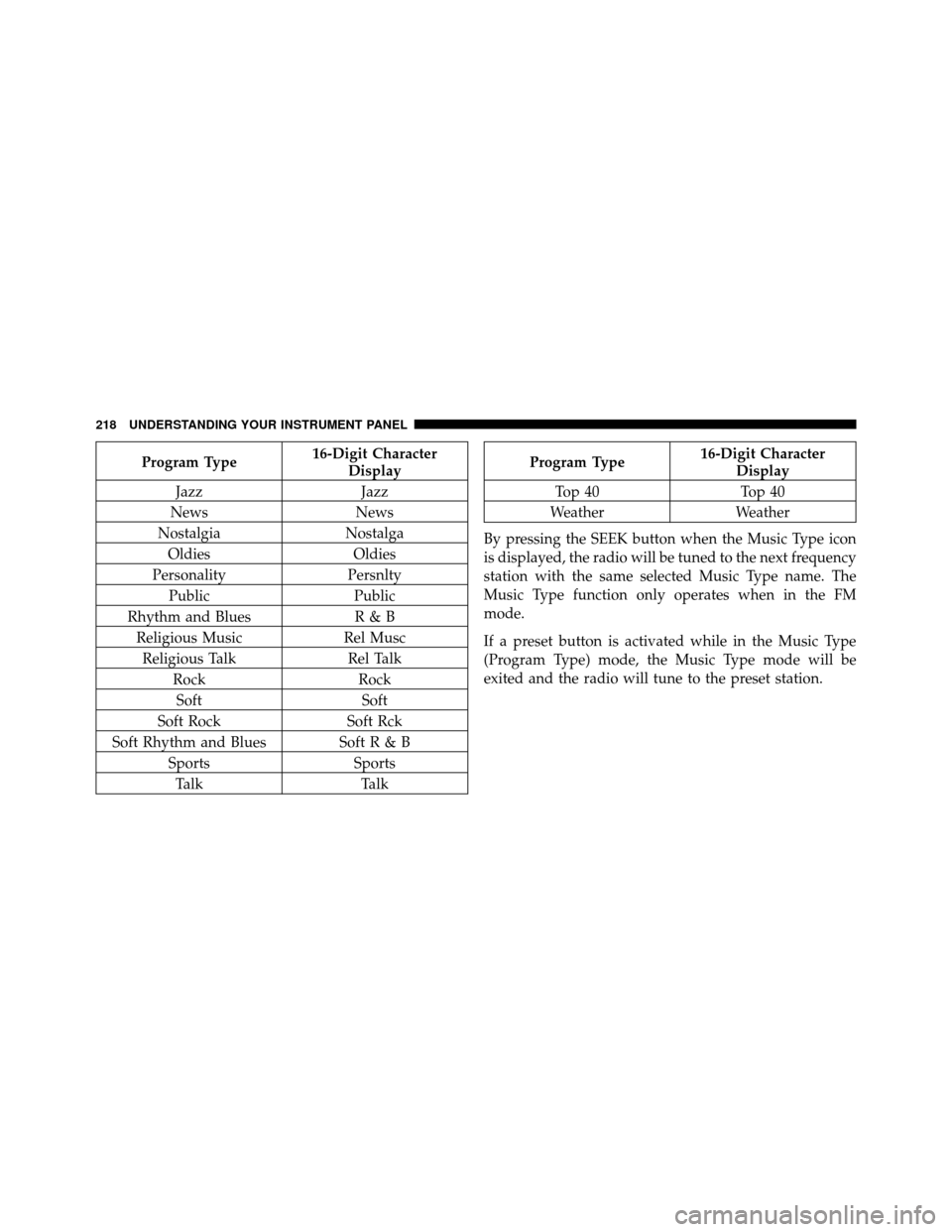
Program Type16-Digit Character
Display
Jazz Jazz
News News
Nostalgia Nostalga
Oldies Oldies
Personality Persnlty
Public Public
Rhythm and Blues R & B
Religious Music Rel Musc
Religious Talk Rel Talk
Rock Rock
Soft Soft
Soft Rock Soft Rck
Soft Rhythm and Blues SoftR&B Sports Sports
Talk TalkProgram Type16-Digit Character
Display
Top 40 Top 40
Weather Weather
By pressing the SEEK button when the Music Type icon
is displayed, the radio will be tuned to the next frequency
station with the same selected Music Type name. The
Music Type function only operates when in the FM
mode.
If a preset button is activated while in the Music Type
(Program Type) mode, the Music Type mode will be
exited and the radio will tune to the preset station.
218 UNDERSTANDING YOUR INSTRUMENT PANEL
Page 223 of 512
You may add a second station to each pushbutton by
repeating the above procedure with this exception: Press
the SET button twice and SET 2 will show in the display
window. Each button can be set for SET 1 and SET 2 in
both AM and FM. This allows a total of 12 AM, 12 FM,
and 12 Satellite (if equipped) stations to be stored into
pushbutton memory. The stations stored in SET 2
memory can be selected by pressing the pushbutton
twice.
Every time a preset button is used, a corresponding
button number will display.
Buttons1-6
These buttons tune the radio to the stations that you
commit to pushbutton memory {12 AM, 12 FM, and 12
Satellite (if equipped) stations}.
DISC Button
Pressing the DISC button will allow you to switch from
AM/FM modes to Disc modes.
Operation Instructions - (DISC MODE for CD and
MP3/WMA Audio Play, DVD-VIDEO)
The radio DVD player and many DVD discs are coded by
geographic region. These region codes must match in
order for the disc to play. If the region code for the DVD
disc does not match the region code for the radio DVD
player, it will not play the disc. Customers may take their
vehicle to an authorized dealer to change the region code
of the player a maximum of five times.
CAUTION!
The radio may shut down during extremely hot
conditions. When this occurs, the radio will indicate
“Disc Hot” and shut off until a safe temperature is
reached. This shutdown is necessary to protect the
optics of the DVD player and other radio internal
components.
222 UNDERSTANDING YOUR INSTRUMENT PANEL
Page 234 of 512
SET 2 in both AM and FM. This allows a total of 12 AM
and 12 FM stations to be stored into pushbutton memory.
The stations stored in SET 2 memory can be selected by
pressing the pushbutton twice.
Every time a preset button is used, a corresponding
button number will display.
Buttons1-6
These buttons tune the radio to the stations that you
commit to pushbutton memory (12 AM and 12 FM
stations).
DISC Button
Pressing the DISC button will allow you to switch from
AM/FM modes to Disc modes.
Operation Instructions — CD MODE For CD And
MP3 Audio Play
NOTE:
•The ignition switch must be in the ON or ACC
position to operate the radio.
•This radio is capable of playing compact discs (CD),
recordable compact discs (CD-R), rewritable compact
discs (CD-RW), compact discs with MP3 tracks and
multisession compact discs with CD and MP3 tracks.
Inserting Compact Disc(s)
Gently insert one CD into the CD player with the CD
label facing up. The CD will automatically be pulled into
the CD player and the CD icon will illuminate on the
radio display. If a CD does not go into the slot more than
1.0 in (2.5 cm), a disc may already be loaded and must be
ejected before a new disc can be loaded.
4
UNDERSTANDING YOUR INSTRUMENT PANEL 233
Page 244 of 512
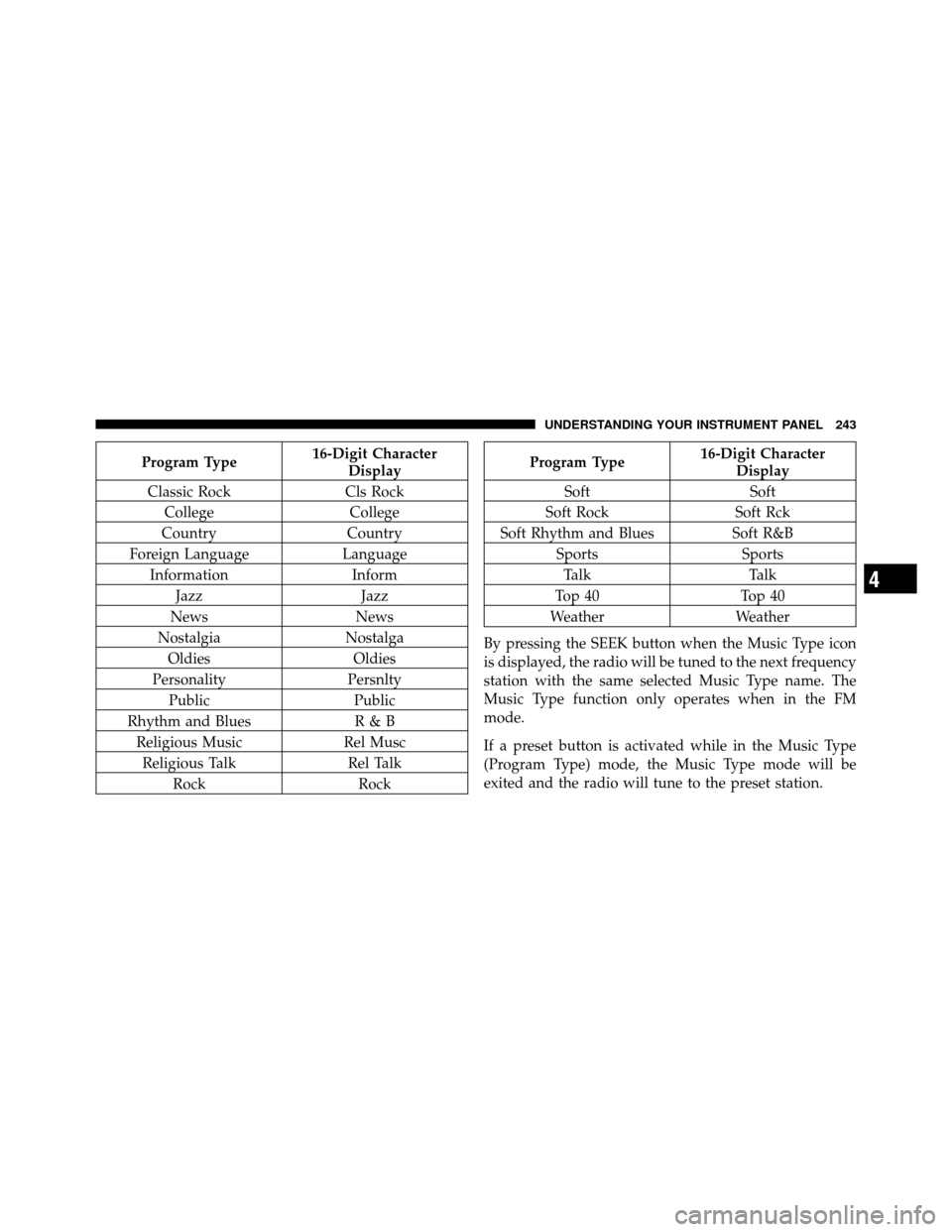
Program Type16-Digit Character
Display
Classic Rock Cls Rock
College College
Country Country
Foreign Language Language
Information Inform
Jazz Jazz
News News
Nostalgia Nostalga
Oldies Oldies
Personality Persnlty
Public Public
Rhythm and Blues R & B
Religious Music Rel Musc
Religious Talk Rel Talk
Rock RockProgram Type16-Digit Character
Display
Soft Soft
Soft Rock Soft Rck
Soft Rhythm and Blues Soft R&B
Sports Sports
Talk Talk
Top 40 Top 40
Weather Weather
By pressing the SEEK button when the Music Type icon
is displayed, the radio will be tuned to the next frequency
station with the same selected Music Type name. The
Music Type function only operates when in the FM
mode.
If a preset button is activated while in the Music Type
(Program Type) mode, the Music Type mode will be
exited and the radio will tune to the preset station.
4
UNDERSTANDING YOUR INSTRUMENT PANEL 243
Page 245 of 512
SETUP Button
Pressing the SETUP button allows you to select between
the following items:
•Set Clock— Pressing the SELECT button will allow
you to set the clock. Adjust the hours by turning the
TUNE/SCROLL control knob. After adjusting the
hours, press the TUNE/SCROLL control knob to set
the minutes. The minutes will begin to blink. Adjust
the minutes using the right side TUNE/SCROLL
control knob. Press the TUNE/SCROLL control knob
to save time change.
AM/FM Button
Press the button to select either AM or FM mode.
SET/RND Button — To Set the Pushbutton
Memory
When you are receiving a station that you wish to
commit to pushbutton memory, press the SET/RND
button. The symbol SET 1 will now show in the display window. Select the button (1–6) you wish to lock onto this
station and press and release that button. If a button is
not selected within five seconds after pressing the SET/
RND button, the station will continue to play but will not
be stored into pushbutton memory.
You may add a second station to each pushbutton by
repeating the above procedure with this exception: Press
the SET/RND button twice and SET 2 will show in the
display window. Each button can be set for SET 1 and
SET 2 in both AM and FM. This allows a total of 12 AM
and 12 FM stations to be stored into pushbutton memory.
The stations stored in SET 2 memory can be selected by
pressing the pushbutton twice.
Every time a preset button is used, a corresponding
button number will display.
244 UNDERSTANDING YOUR INSTRUMENT PANEL
Page 253 of 512
An auxiliary input jack permits passengers to listen to a
portable MP3 player through the vehicle’s speakers. For
vehicles equipped with the Video Entertainment System
(VES)™, separate audio outputs allow passengers to
listen to the vehicle speakers while different audio tracks
play through the system’s wireless headphones. This
means rear-seat passengers can watch a DVD on the
optional rear-seat entertainment system while the driver
and front-seat passenger listen to the radio.
Other special features include music type selections,
traffic messaging (optional), easy store presets, parental
lockout for VES™ (if equipped), and a backup camera
display for vehicles equipped with a backup camera.
Refer to your “Navigation User’s Manual” for detailed
operating instructions.Operating Instructions — Uconnect™ Multimedia
(Satellite Radio)
Refer to your “Navigation User’s Manual” for detailed
operating instructions.
Operating Instructions — Uconnect™ Phone
Refer to your “Navigation User’s Manual” for detailed
operating instructions.
Clock Setting Procedure
The GPS receiver in this system is synchronized to the
time data being transmitted by the GPS satellites. The
satellites’ clock is Greenwich Mean Time (GMT). This is
the worldwide standard for time. This makes the sys-
tem’s clock very accurate once the appropriate time zone
and daylight savings information is set.
252 UNDERSTANDING YOUR INSTRUMENT PANEL