ad blue DODGE JOURNEY 2012 1.G Owner's Guide
[x] Cancel search | Manufacturer: DODGE, Model Year: 2012, Model line: JOURNEY, Model: DODGE JOURNEY 2012 1.GPages: 603
Page 308 of 603
your selection, touch the Channel Skip soft-key, select the
channels you would like to skip. Then touch the arrow
back soft-key.
•Subscription Info
New vehicle purchasers or lessees will receive a free
limited time subscription to SIRIUS Satellite Radio with
your radio. Following the expiration of the free services,
it will be necessary to access the information on the
Subscription Information screen in order to re-subscribe.
Touch the Subscription Info soft-key to access the Sub-
scription Information screen.
Write down the SIRIUS ID numbers for your receiver. To
reactivate your service, either call the number listed on
the screen or visit the provider online.
NOTE: SIRIUS Travel Link is a separate subscription.
Customer Programmable Features — Uconnect
Touch™ System 8.4 Settings
Touch the More soft-key, then touch the Settings soft-key
to display the menu setting screen. In this mode the
Uconnect Touch™ system allows you to access program-
mable features that may be equipped such as Display,
Clock, Safety/Assistance, Lights, Doors & Locks,
Auto-On Comfort & Remote Start, Engine Off Operation,
Compass Settings, Audio, Phone/Bluetooth and SIRIUS
Setup.
NOTE:Only one touchscreen area may be selected at a
time.
306 UNDERSTANDING YOUR INSTRUMENT PANEL
Page 320 of 603
•Music Info Cleanup
This feature helps organize music files for optimized
music navigation. To make your selection, touch the
Music Info Cleanup soft-key, select On or Off followed by
pressing the arrow back soft-key.
Phone/Bluetooth
After pressing the Phone/Bluetooth soft-key the follow-
ing settings will be available.
•Paired Devices
This feature shows which phones are paired to the
Phone/Bluetooth system. For further information, refer
to the Uconnect Touch™ Supplement.
SIRIUS Setup
After pressing the SIRIUS Setup soft-key the following
settings will be available.
•Channel Skip
SIRIUS can be programmed to designate a group of
channels that are the most desirable to listen to or to
exclude undesirable channels while scanning. To make
your selection, touch the Channel Skip soft-key, select the
channels you would like to skip followed by pressing the
arrow back soft-key.
•Subscription Information
New vehicle purchasers or lessees will receive a free
limited time subscription to SIRIUS Satellite Radio with
your radio. Following the expiration of the free services,
it will be necessary to access the information on the
Subscription Information screen in order to re-subscribe.
Touch the Subscription Info soft-key to access the Sub-
scription Information screen.
318 UNDERSTANDING YOUR INSTRUMENT PANEL
Page 354 of 603
14. Temperature Control
(Manual Temperature Control Only)
Press the temperature soft-key to regulate the tempera-
ture of the air inside the passenger compartment. Moving
the temperature bar into the red area, indicates warmer
temperatures. Moving the temperature bar into the blue
area indicates cooler temperatures.
15. Rear Climate Control — If Equipped
Press the rear climate control soft-key to enter the rear
climate control screen.
Climate Control Functions
A/C (Air Conditioning)
The Air Conditioning (A/C) button allows the operator
to manually activate or deactivate the air conditioning
system. When the air conditioning system is turned on,
cool dehumidified air will flow through the outlets into
the cabin. For improved fuel economy, press the A/Cbutton to turn off the air conditioning and manually
adjust the blower and airflow mode settings.
NOTE:
•For Manual Climate Controls, if the system is in Mix or
Defrost Mode, the A/C can be turned off.
•If fog or mist appears on the windshield or side glass,
select Defrost mode and increase blower speed.
•If your air conditioning performance seems lower than
expected, check the front of the A/C condenser (lo-
cated in front of the radiator), for an accumulation of
dirt or insects. Clean with a gentle water spray from
behind the radiator and through the condenser. Fabric
front fascia protectors may reduce airflow to the
condenser, reducing air conditioning performance.
352 UNDERSTANDING YOUR INSTRUMENT PANEL
Page 537 of 603
FUSES
Interior Fuses
The interior fuse panel is located on the passenger side
under the instrument panel.
CavityCartridge
Fuse Mini-
Fuse Description
F100 30 Amp
Pink 110V AC Inverter –
If Equipped
F101 10 Amp
Red Interior Lights
F102 20 Amp
Yellow Cigar Lighter in
Instrument Panel/
Left Rear Power
Outlet
F103 20 Amp
Yellow Power Outlet in
Console Bin/Power
Outlet in Rear of
Console
Cavity
Cartridge
Fuse Mini-
Fuse Description
F105 20 Amp
Yellow Heated Seats – If
Equipped
F106 20 Amp
Yellow Rear Power Outlet
F107 10 Amp
Red Rear Camera – If
Equipped
F108 15 Amp
Blue Instrument Panel
F109 10 Amp
Red Climate Control/
HVAC
F110 10 Amp
Red Occupant Restraint
Controller
F112 10 Amp
Red Spare
F114 20 Amp
Yellow Rear HVAC Blower/
Motor
7
MAINTAINING YOUR VEHICLE 535
Page 538 of 603
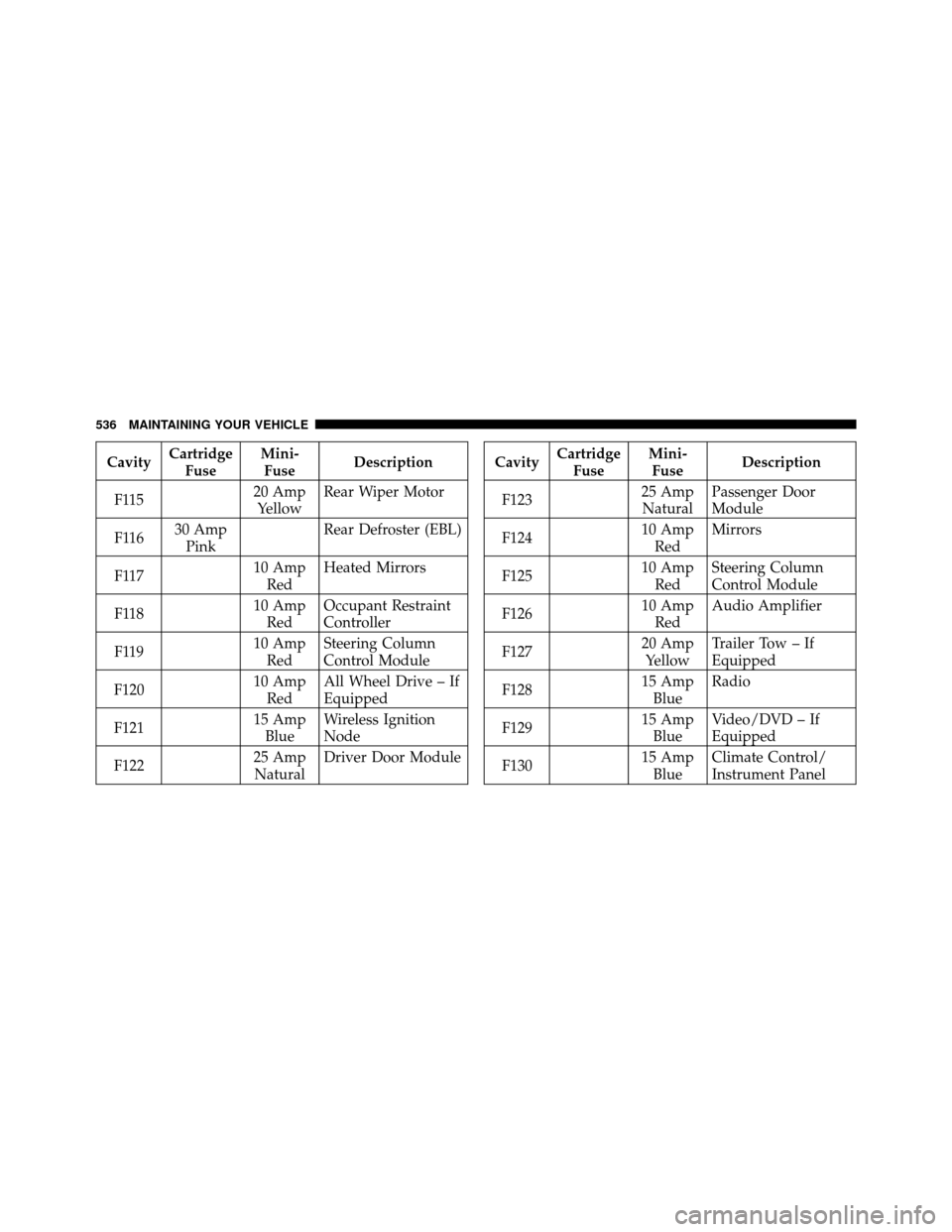
CavityCartridge
Fuse Mini-
Fuse Description
F115 20 Amp
Yellow Rear Wiper Motor
F116 30 Amp
Pink Rear Defroster (EBL)
F117 10 Amp
Red Heated Mirrors
F118 10 Amp
Red Occupant Restraint
Controller
F119 10 Amp
Red Steering Column
Control Module
F120 10 Amp
Red All Wheel Drive – If
Equipped
F121 15 Amp
Blue Wireless Ignition
Node
F122 25 Amp
Natural Driver Door ModuleCavity
Cartridge
Fuse Mini-
Fuse Description
F123 25 Amp
Natural Passenger Door
Module
F124 10 Amp
Red Mirrors
F125 10 Amp
Red Steering Column
Control Module
F126 10 Amp
Red Audio Amplifier
F127 20 Amp
Yellow Trailer Tow – If
Equipped
F128 15 Amp
Blue Radio
F129 15 Amp
Blue Video/DVD – If
Equipped
F130 15 Amp
Blue Climate Control/
Instrument Panel
536 MAINTAINING YOUR VEHICLE
Page 542 of 603
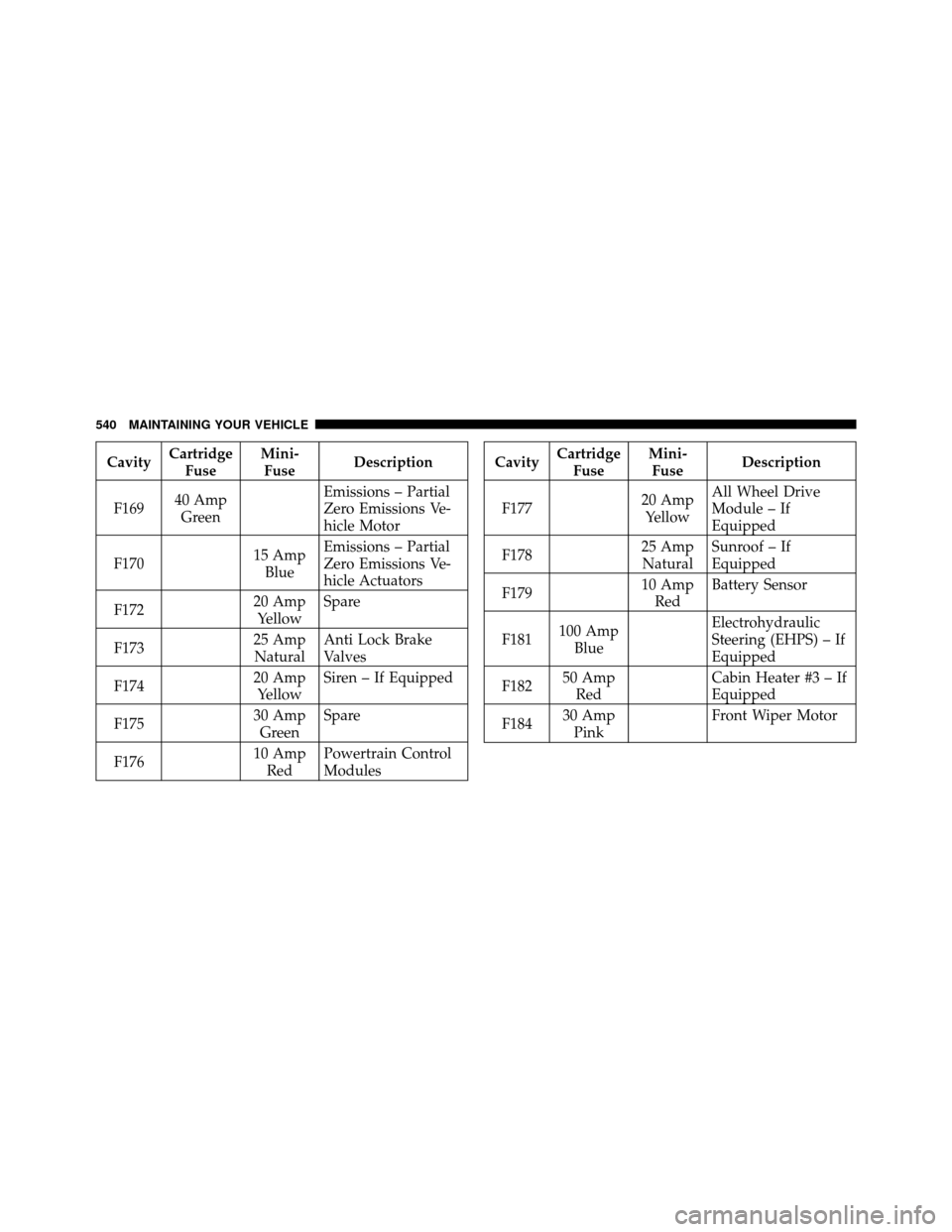
CavityCartridge
Fuse Mini-
Fuse Description
F169 40 Amp
Green Emissions – Partial
Zero Emissions Ve-
hicle Motor
F170 15 Amp
Blue Emissions – Partial
Zero Emissions Ve-
hicle Actuators
F172 20 Amp
Yellow Spare
F173 25 Amp
Natural Anti Lock Brake
Valves
F174 20 Amp
Yellow Siren – If Equipped
F175 30 Amp
Green Spare
F176 10 Amp
Red Powertrain Control
ModulesCavity
Cartridge
Fuse Mini-
Fuse Description
F177 20 Amp
Yellow All Wheel Drive
Module – If
Equipped
F178 25 Amp
Natural Sunroof – If
Equipped
F179 10 Amp
Red Battery Sensor
F181 100 Amp
Blue Electrohydraulic
Steering (EHPS) – If
Equipped
F182 50 Amp
Red Cabin Heater #3 – If
Equipped
F184 30 Amp
Pink Front Wiper Motor
540 MAINTAINING YOUR VEHICLE