sunroof DODGE JOURNEY 2013 1.G User Guide
[x] Cancel search | Manufacturer: DODGE, Model Year: 2013, Model line: JOURNEY, Model: DODGE JOURNEY 2013 1.GPages: 630
Page 263 of 630
Pinch Protect Feature
This feature will detect an obstruction in the opening of
the sunroof during Express Close operation. If an ob-
struction in the path of the sunroof is detected, the
sunroof will automatically retract. Remove the obstruc-
tion if this occurs. Next, press the switch forward and
release to Express Close.
NOTE:If three consecutive sunroof close attempts result
in Pinch Protect reversals, the fourth close attempt will be
a Manual Close movement with Pinch Protect disabled.
Venting Sunroof — Express
Press and release the Vent button within one half second
and the sunroof will open to the vent position. This is
called “Express Vent”, and it will occur regardless of
sunroof position. During Express Vent operation, any
movement of the switch will stop the sunroof.
Sunshade Operation
The sunshade can be opened manually. However, the
sunshade will open automatically as the sunroof opens.
NOTE:The sunshade cannot be closed if the sunroof is
open.
Wind Buffeting
Wind buffeting can be described as the perception of
pressure on the ears or a helicopter-type sound in the
ears. Your vehicle may exhibit wind buffeting with the
windows down, or the sunroof (if equipped) in certain
open or partially open positions. This is a normal occur-
rence and can be minimized. If the buffeting occurs with
the rear windows open, open the front and rear windows
together to minimize the buffeting. If the buffeting occurs
with the sunroof open, adjust the sunroof opening to
minimize the buffeting or open any window.
3
UNDERSTANDING THE FEATURES OF YOUR VEHICLE 261
Page 264 of 630
Sunroof Maintenance
Use only a nonabrasive cleaner and a soft cloth to clean
the glass panel.
Ignition Off Operation
For vehicles not equipped with the Electronic Vehicle
Information Center (EVIC)
The power sunroof switch will remain active for 45 seconds
after the ignition switch is turned to the LOCK position.
Opening either front door will cancel this feature.
For vehicles equipped with the EVIC
The power sunroof switch will remain active for up to
10 minutes after the ignition switch is turned to the
LOCK position. Opening either front door will cancel this
feature.NOTE:The delay time if programmable using the
Uconnect Touch™ system. Refer to “Uconnect Touch™
System” in “Understanding Your Instrument Panel” for
further information.
Sunroof Fully Closed
Press the switch forward and release to ensure that the
sunroof is fully closed.
ELECTRICAL POWER OUTLETS
A 12 Volt (13 Amp) power outlet located in the center
console below the radio. The power outlet has power
available when the ignition switch in the ON/RUN or
ACC position.
262 UNDERSTANDING THE FEATURES OF YOUR VEHICLE
Page 327 of 630
Engine Off Options
•Headlight Off Delay
Touch the Headlight Off Delay soft-key to change this
display. When this feature is selected, the driver can
choose to have the headlights remain on for 0, 30, 60, or
90 seconds when exiting the vehicle. To change the
Headlight Off Delay status, touch the 0, 30, 60 or 90
soft-key. Then touch the arrow back soft-key.
•Engine Off Power Delay
Touch the Engine Off Power Delay soft-key to change this
display. When this feature is selected, the power window
switches, radio, Uconnect® phone system (if equipped),
DVD video system (if equipped), power sunroof (if
equipped), and power outlets will remain active for up to10 minutes after the ignition is cycled to OFF. Opening
either front door will cancel this feature. To change the
Engine Off Power Delay status, touch the 0 seconds,
45 seconds, 5 minutes or 10 minutes soft-key. Then touch
the arrow back soft-key.
Compass Settings
•Variance
Touch the Variance soft-key to change this display. Com-
pass Variance is the difference between Magnetic North
and Geographic North. To compensate for the differences,
the variance should be set for the zone where the vehicle is
driven, per the zone map. Once properly set, the compass
will automatically compensate for the differences, and
provide the most accurate compass heading.
4
UNDERSTANDING YOUR INSTRUMENT PANEL 325
Page 340 of 630
•Auto-On Driver Heated Seat With Vehicle Start — If
Equipped
When this feature is selected the driver’s heated seat will
automatically turn on when temperatures are below 40° F
(4.4° C). To make your selection, touch the Auto Heated
Seats soft-key, until a check-mark appears next to setting,
showing that setting has been selected. Touch the back
arrow soft-key to return to the previous menu.
Engine Off Options
After pressing the Engine Off Options soft-key the fol-
lowing settings will be available.
•Engine Off Power Delay
When this feature is selected, the power window
switches, radio, Uconnect® system (if equipped), DVD
video system (if equipped), power sunroof (if equipped),
and power outlets will remain active for up to 10 minutesafter the ignition is cycled to OFF. Opening either front
door will cancel this feature. To change the Engine Off
Power Delay status touch the 0 seconds, 45 seconds,
5 minutes or 10 minutes soft-key. Then touch the arrow
back soft-key.
•Headlight Off Delay
When this feature is selected, the driver can choose to
have the headlights remain on for 0, 30, 60, or 90 seconds
when exiting the vehicle. To change the Headlight Off
Delay status touch the + or - soft-key to select your
desired time interval. Touch the back arrow soft-key to
return to the previous menu.
Compass Settings
After pressing the Compass Settings soft-key the follow-
ing settings will be available.
338 UNDERSTANDING YOUR INSTRUMENT PANEL
Page 573 of 630
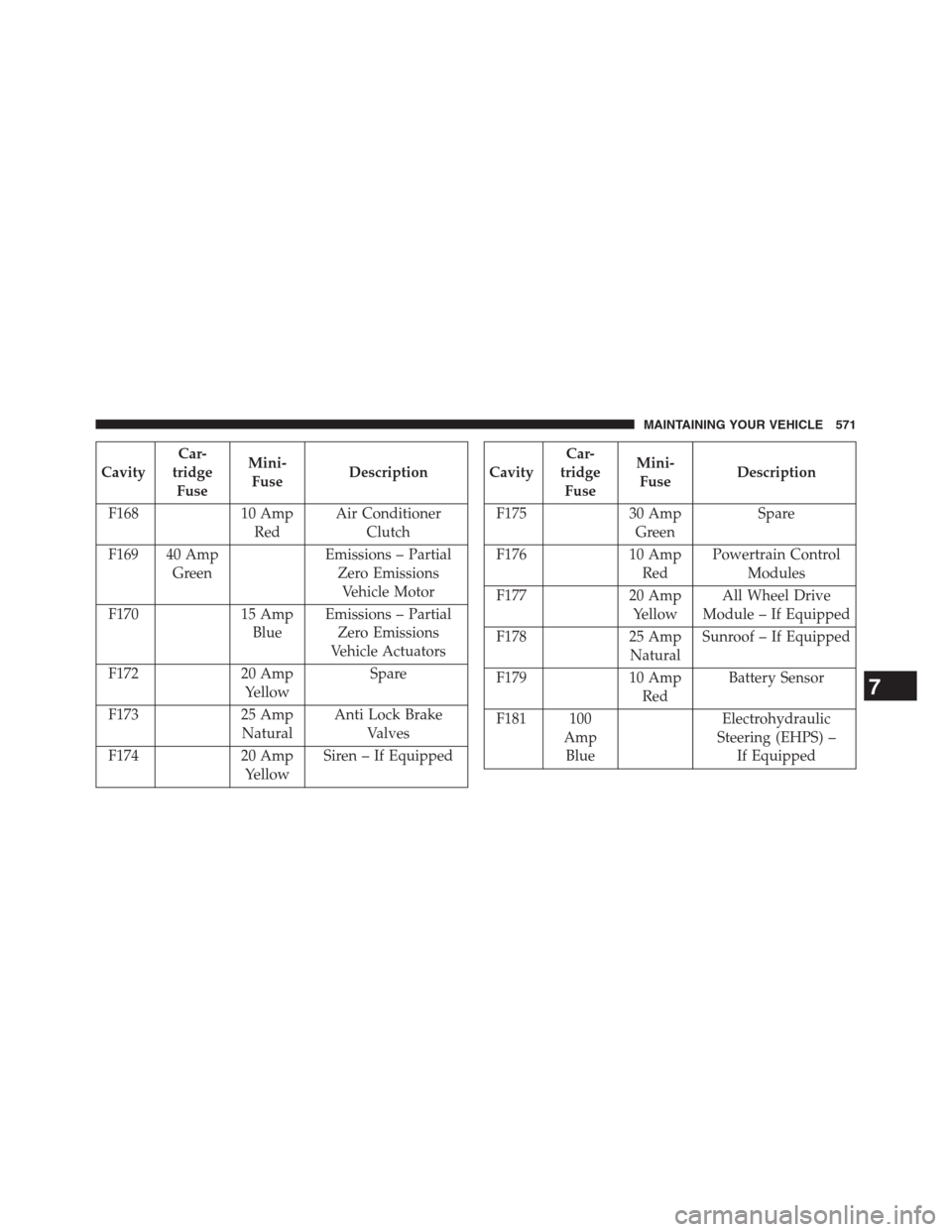
CavityCar-
tridge
FuseMini-
FuseDescription
F168 10 Amp
RedAir Conditioner
Clutch
F169 40 Amp
GreenEmissions – Partial
Zero Emissions
Vehicle Motor
F170 15 Amp
BlueEmissions – Partial
Zero Emissions
Vehicle Actuators
F172 20 Amp
YellowSpare
F173 25 Amp
NaturalAnti Lock Brake
Valves
F174 20 Amp
YellowSiren – If EquippedCavityCar-
tridge
FuseMini-
FuseDescription
F175 30 Amp
GreenSpare
F176 10 Amp
RedPowertrain Control
Modules
F177 20 Amp
YellowAll Wheel Drive
Module – If Equipped
F178 25 Amp
NaturalSunroof – If Equipped
F179 10 Amp
RedBattery Sensor
F181 100
Amp
BlueElectrohydraulic
Steering (EHPS) –
If Equipped
7
MAINTAINING YOUR VEHICLE 571
Page 621 of 630
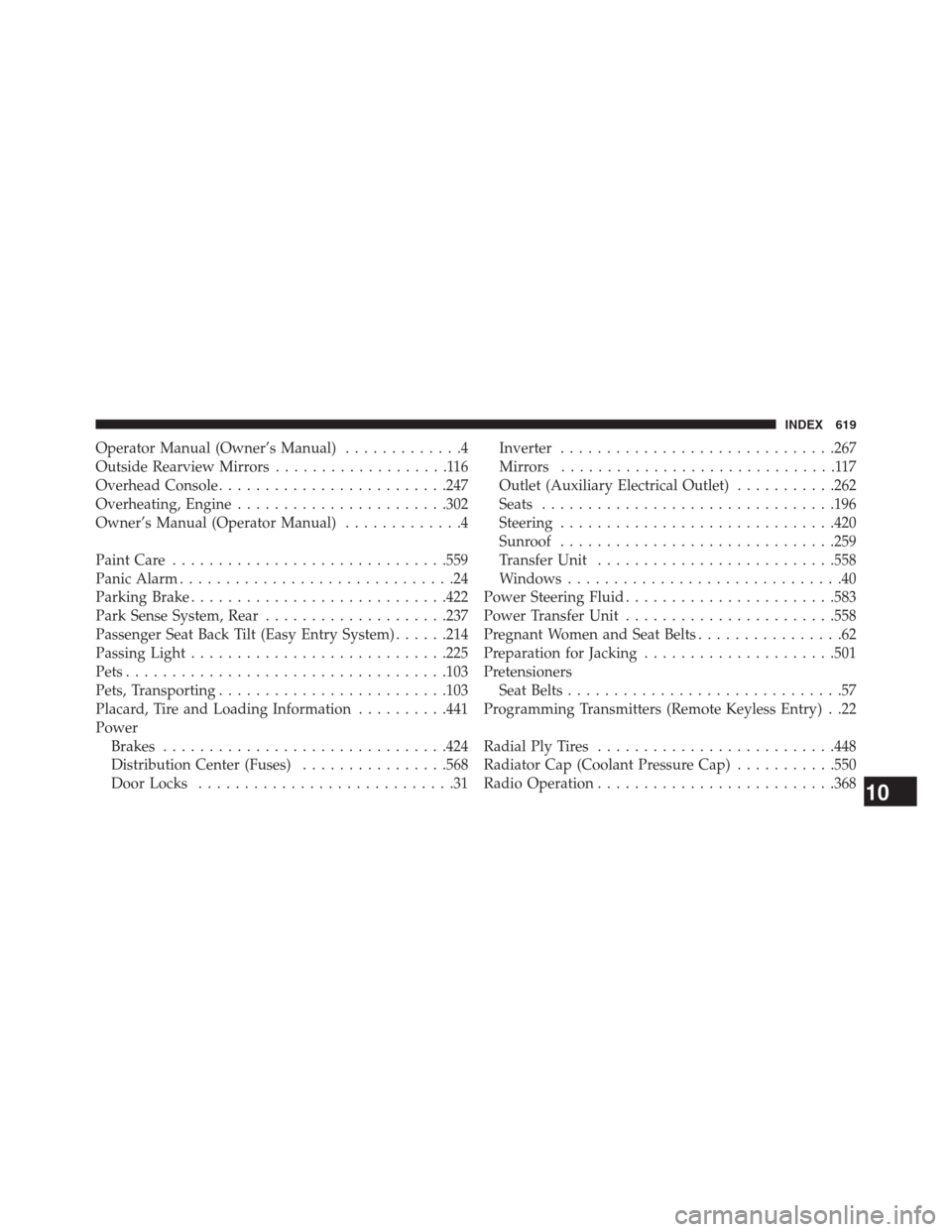
Operator Manual (Owner’s Manual).............4
Outside Rearview Mirrors...................116
Overhead Console.........................247
Overheating, Engine.......................302
Owner’s Manual (Operator Manual).............4
Paint Care..............................559
Panic Alarm..............................24
Parking Brake............................422
Park Sense System, Rear....................237
Passenger Seat Back Tilt (Easy Entry System)......214
Passing Light............................225
Pets...................................103
Pets, Transporting.........................103
Placard, Tire and Loading Information..........441
Power
Brakes...............................424
Distribution Center (Fuses)................568
Door Locks............................31Inverter..............................267
Mirrors..............................117
Outlet (Auxiliary Electrical Outlet)...........262
Seats................................196
Steering..............................420
Sunroof..............................259
Transfer Unit..........................558
Windows..............................40
Power Steering Fluid.......................583
Power Transfer Unit.......................558
Pregnant Women and Seat Belts................62
Preparation for Jacking.....................501
Pretensioners
Seat Belts..............................57
Programming Transmitters (Remote Keyless Entry) . .22
Radial Ply Tires..........................448
Radiator Cap (Coolant Pressure Cap)...........550
Radio Operation..........................368
10
INDEX 619