tow DODGE JOURNEY 2013 1.G User Guide
[x] Cancel search | Manufacturer: DODGE, Model Year: 2013, Model line: JOURNEY, Model: DODGE JOURNEY 2013 1.GPages: 630
Page 121 of 630
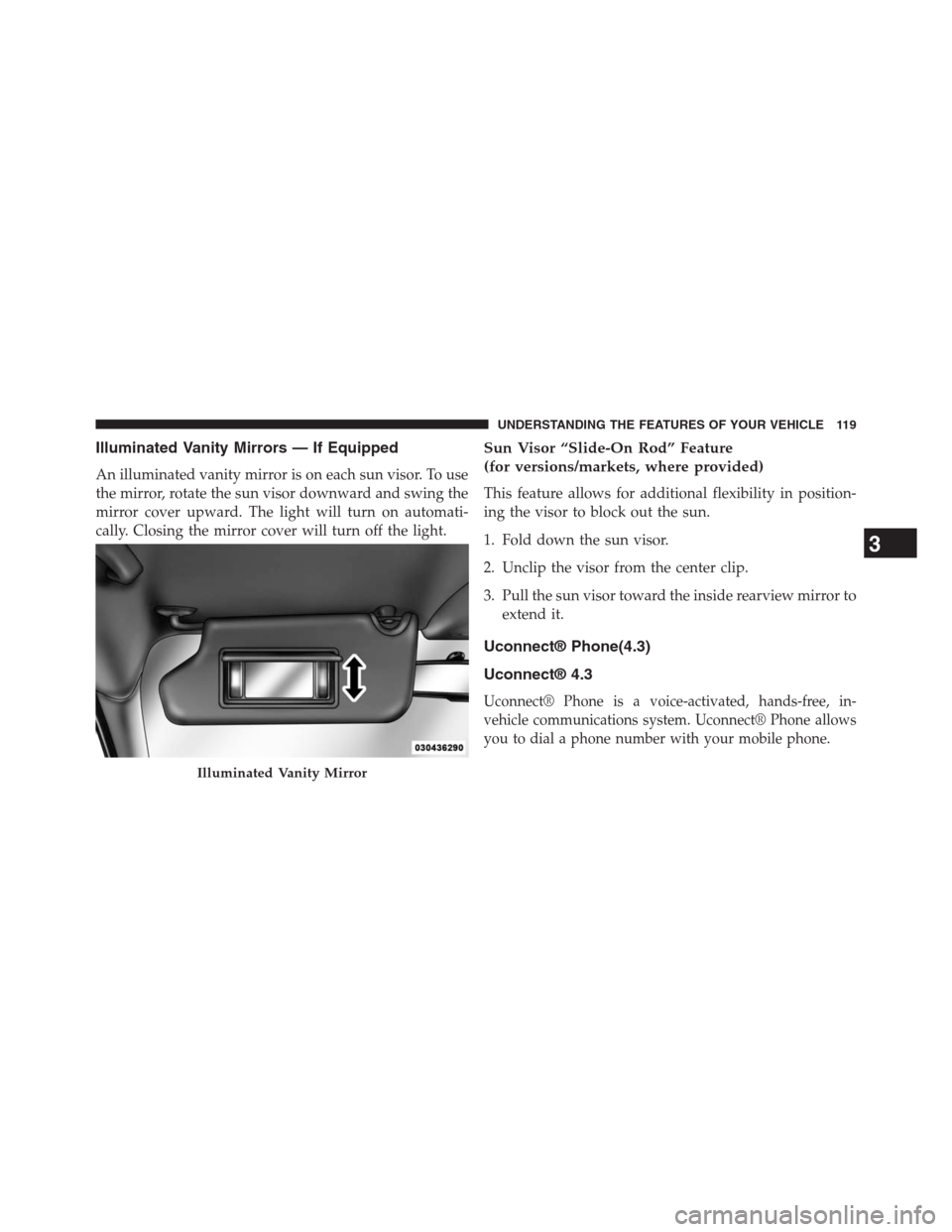
Illuminated Vanity Mirrors — If Equipped
An illuminated vanity mirror is on each sun visor. To use
the mirror, rotate the sun visor downward and swing the
mirror cover upward. The light will turn on automati-
cally. Closing the mirror cover will turn off the light.
Sun Visor “Slide-On Rod” Feature
(for versions/markets, where provided)
This feature allows for additional flexibility in position-
ing the visor to block out the sun.
1. Fold down the sun visor.
2. Unclip the visor from the center clip.
3. Pull the sun visor toward the inside rearview mirror to
extend it.
Uconnect® Phone(4.3)
Uconnect® 4.3
Uconnect® Phone is a voice-activated, hands-free, in-
vehicle communications system. Uconnect® Phone allows
you to dial a phone number with your mobile phone.
Illuminated Vanity Mirror
3
UNDERSTANDING THE FEATURES OF YOUR VEHICLE 119
Page 123 of 630
If your mobile phone only supports the Headset Profile
you may not be able to use any Uconnect® Phone
features. Refer to your mobile service provider or the
phone manufacturer for details.
Uconnect® Phone allows you to transfer calls between
the system and your mobile phone as you enter or exit
your vehicle and enables you to mute the system’s
microphone for private conversation.
WARNING!
Any voice commanded system should be used only
in safe driving conditions following all applicable
laws, including laws regarding phone use. Your at-
tention should be focused on safely operating the
vehicle. Failure to do so may result in a collision
causing serious injury or death.
The Uconnect® Phone is driven through your Bluetooth®
“Hands-Free Profile” mobile phone. Uconnect® features
Bluetooth® technology - the global standard that enables
different electronic devices to connect to each other without
wires or a docking station, so Uconnect® Phone works no
matter where you stow your mobile phone (be it your
purse, pocket, or briefcase), as long as your phone is turned
on and has been paired to the vehicle’s Uconnect® Phone.
The Uconnect® Phone allows up to ten mobile phones or
audio devices to be linked to the system. Only one linked
(or paired) mobile phone and one audio device can be used
with the system at a time. The system is available in
English, Spanish, or French languages.
3
UNDERSTANDING THE FEATURES OF YOUR VEHICLE 121
Page 131 of 630
Emergency And Towing Assistance
The 911/Help numbers can only be altered. These can not
be deleted or the names can not be changed.
To change the 911/Help number follow these steps.
•Touch the “phonebook” soft-key from the Phone main
screen,
•Touch the “911/Help” soft-key. Touch the appropriate
listing to alter, Emergency for example,
•Once Emergency is touched, the Edit soft-key appears.
Touch the “Edit” soft-key and you will be given the
choice to Edit Number or Reset to Default,
•Follow the on-screen prompts to complete the task.
Phone Call Features
The following features can be accessed through the
Uconnect® Phone if the feature(s) are available on your
mobile service plan. For example, if your mobile service
plan provides three-way calling, this feature can be
accessed through the Uconnect® Phone. Check with your
mobile service provider for the features that you have.
Ways To Initiate A Phone Call
Listed below are all the ways you can initiate a phone call
with Uconnect® Phone.
•Redial,
•Dial by touching in the number,
•Voice Commands (Dial by Saying a Number, Call by
Saying a Phonebook Name, Redial, or Call Back),
•Mobile Phonebook,
•Recent Call Log.
3
UNDERSTANDING THE FEATURES OF YOUR VEHICLE 129
Page 148 of 630
wires or a docking station, so Uconnect® Phone works no
matter where you stow your mobile phone (be it your purse,
pocket, or briefcase), as long as your phone is turned on and
has been paired to the vehicle’s Uconnect® Phone. The
Uconnect® Phone allows up to ten mobile phones or audio
devices to be linked to the system. Only one linked (or
paired) mobile phone and one audio device can be used with
the system at a time. The system is available in English,
Spanish, or French languages.
Uconnect® Phone Button
The Uconnect® Phone
Button is used to get
into the phone mode and make calls, show
recent, incoming, outgoing calls, view phone-
book etc., When you press the button you will
hear a BEEP. The beep is your signal to give a command.Uconnect® Voice Command Button
The Uconnect® Voice Command
Button is
only used for “barge in” and when you are
already in a call and you want to send Tones or
make another call.
The
button is also used to access the Voice Com-
mands for the Uconnect® Voice Command features if
your vehicle is equipped. Please see the Uconnect® Voice
Command section for direction on how to use the
button.
The Uconnect® Phone is fully integrated with the ve-
hicles audio system. The volume of the Uconnect® Phone
can be adjusted either from the radio volume control
knob or from the steering wheel radio control (right
switch), if so equipped.
146 UNDERSTANDING THE FEATURES OF YOUR VEHICLE
Page 159 of 630
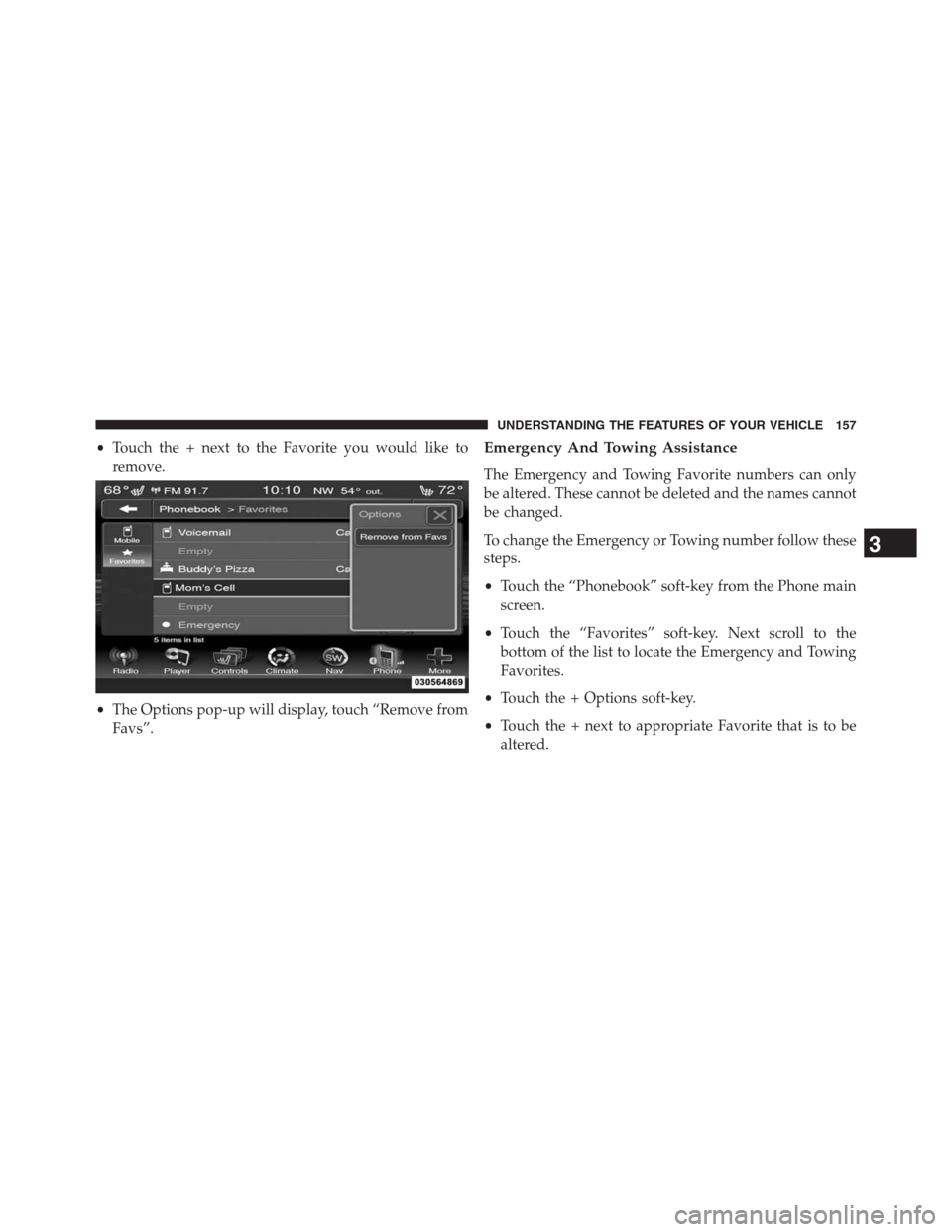
•Touch the + next to the Favorite you would like to
remove.
•The Options pop-up will display, touch “Remove from
Favs”.Emergency And Towing Assistance
The Emergency and Towing Favorite numbers can only
be altered. These cannot be deleted and the names cannot
be changed.
To change the Emergency or Towing number follow these
steps.
•Touch the “Phonebook” soft-key from the Phone main
screen.
•Touch the “Favorites” soft-key. Next scroll to the
bottom of the list to locate the Emergency and Towing
Favorites.
•Touch the + Options soft-key.
•Touch the + next to appropriate Favorite that is to be
altered.
3
UNDERSTANDING THE FEATURES OF YOUR VEHICLE 157
Page 179 of 630
NOTE:
1. You can replace “John Smith” with any name in your
mobile or favorite phone book. You can also say “Send
a message to John Smith” and the system will ask you
which phone number you want to send a message to
for John Smith.
2. You can replace “Mobile” with “Home”, “Work” or
“Other”.
3. You can replace “Incoming Calls” with “Outgoing
Calls” or “Missed Calls”.
4. You can replace “248 555 1212” with any phone
number supported by your Mobile phone.
5. These commands can be used during a phone call after
pushing the Uconnect® Voice Command button on
the steering wheel. Please note the call will be muted
while the VR session is active.6.Send dial tones for automated systems is available while
a call is active. This is an example that uses a Phonebook
Record named “Voicemail Password.”
7. Storing Dial tones in contact names is possible but
only the first number encountered in a contact name
will be sent. For example if there is a number stored in
the Home and Work numbers for the contact “Voice-
mail password” only the Home number will be sent
8.
If your phone does not support phonebook download or
call log download over Bluetooth then these commands
will return a response that the contact does not exist in
the phonebook.
9.Emergency and Towing assistance are contacts that have
been pre-loaded in the phonebooks. Commands such as
“Call Emergency” and “Call Towing Assistance” will call
the corresponding number stored with those contacts.
NOTE:Available Voice Commands are shown in bold
face and underlined in the gray shaded boxes.
3
UNDERSTANDING THE FEATURES OF YOUR VEHICLE 177
Page 219 of 630
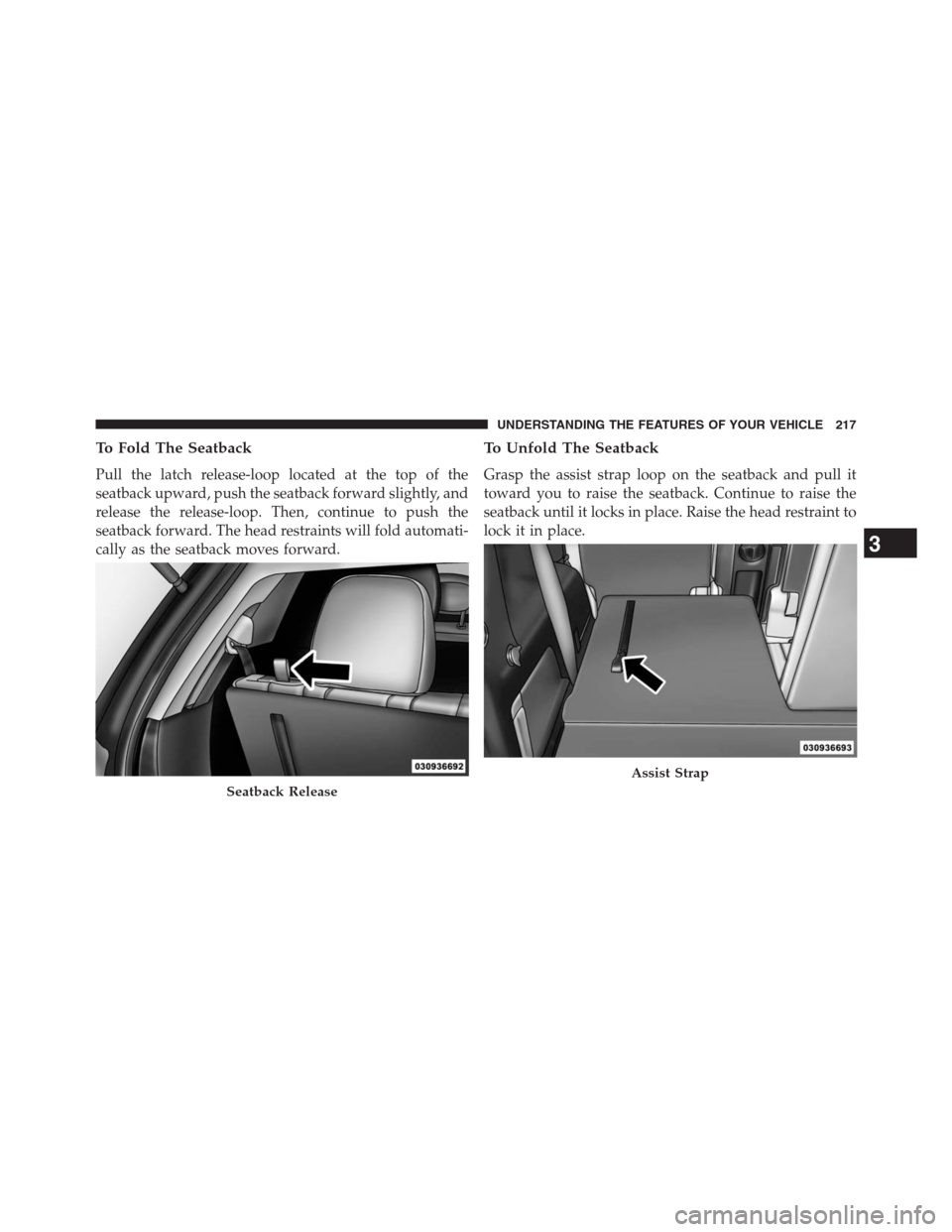
To Fold The Seatback
Pull the latch release-loop located at the top of the
seatback upward, push the seatback forward slightly, and
release the release-loop. Then, continue to push the
seatback forward. The head restraints will fold automati-
cally as the seatback moves forward.
To Unfold The Seatback
Grasp the assist strap loop on the seatback and pull it
toward you to raise the seatback. Continue to raise the
seatback until it locks in place. Raise the head restraint to
lock it in place.
Seatback Release
Assist Strap
3
UNDERSTANDING THE FEATURES OF YOUR VEHICLE 217
Page 227 of 630
Lane Change Assist
Tap the lever up or down once, without moving beyond
the detent, and the turn signal (right or left) will flash
three times then automatically turn off.
High/Low Beam Switch
Push the multifunction lever away from you to switch
the headlights to high beam. Pull the multifunction lever
toward you to switch the headlights back to low beam.
Flash-To-Pass
You can signal another vehicle with your headlights by
lightly pulling the multifunction lever toward you. This
will turn on the high beams headlights until the lever is
released.
Interior Lights
The interior lights come on when a door is opened.
To protect the battery, the interior lights will turn off
automatically 10 minutes after the ignition is moved to
the LOCK position. This will occur if the interior lights
were switched on manually or are on because a door is
open. This includes the glove box light, but not the trunk
light. To restore interior light operation, either turn the
ignition switch ON or cycle the light switch.
3
UNDERSTANDING THE FEATURES OF YOUR VEHICLE 225
Page 246 of 630
CAUTION!
•ParkSense® is only a parking aid and it is unable to
recognize every obstacle, including small obstacles.
Parking curbs might be temporarily detected or not
detected at all. Obstacles located above or below the
sensors will not be detected when they are in close
proximity.
•The vehicle must be driven slowly when using
ParkSense® in order to be able to stop in time when an
obstacle is detected. It is recommended that the driver
looks over his/her shoulder when using ParkSense®.
WARNING!
•Drivers must be careful when backing up even when
using ParkSense®. Always check carefully behind
your vehicle, look behind you, and be sure to check
(Continued)
WARNING!(Continued)
for pedestrians, animals, other vehicles, obstructions,
and blind spots before backing up. You are respon-
sible for safety and must continue to pay attention to
your surroundings. Failure to do so can result in
serious injury or death.
•Before using ParkSense®, it is strongly recom-
mended that the ball mount and hitch ball assem-
bly is disconnected from the vehicle when the
vehicle is not used for towing. Failure to do so can
result in injury or damage to vehicles or obstacles
because the hitch ball will be much closer to the
obstacle than the rear fascia when the loudspeaker
sounds the continuous tone. Also, the sensors
could detect the ball mount and hitch ball assem-
bly, depending on its size and shape, giving a false
indication that an obstacle is behind the vehicle.
244 UNDERSTANDING THE FEATURES OF YOUR VEHICLE
Page 275 of 630
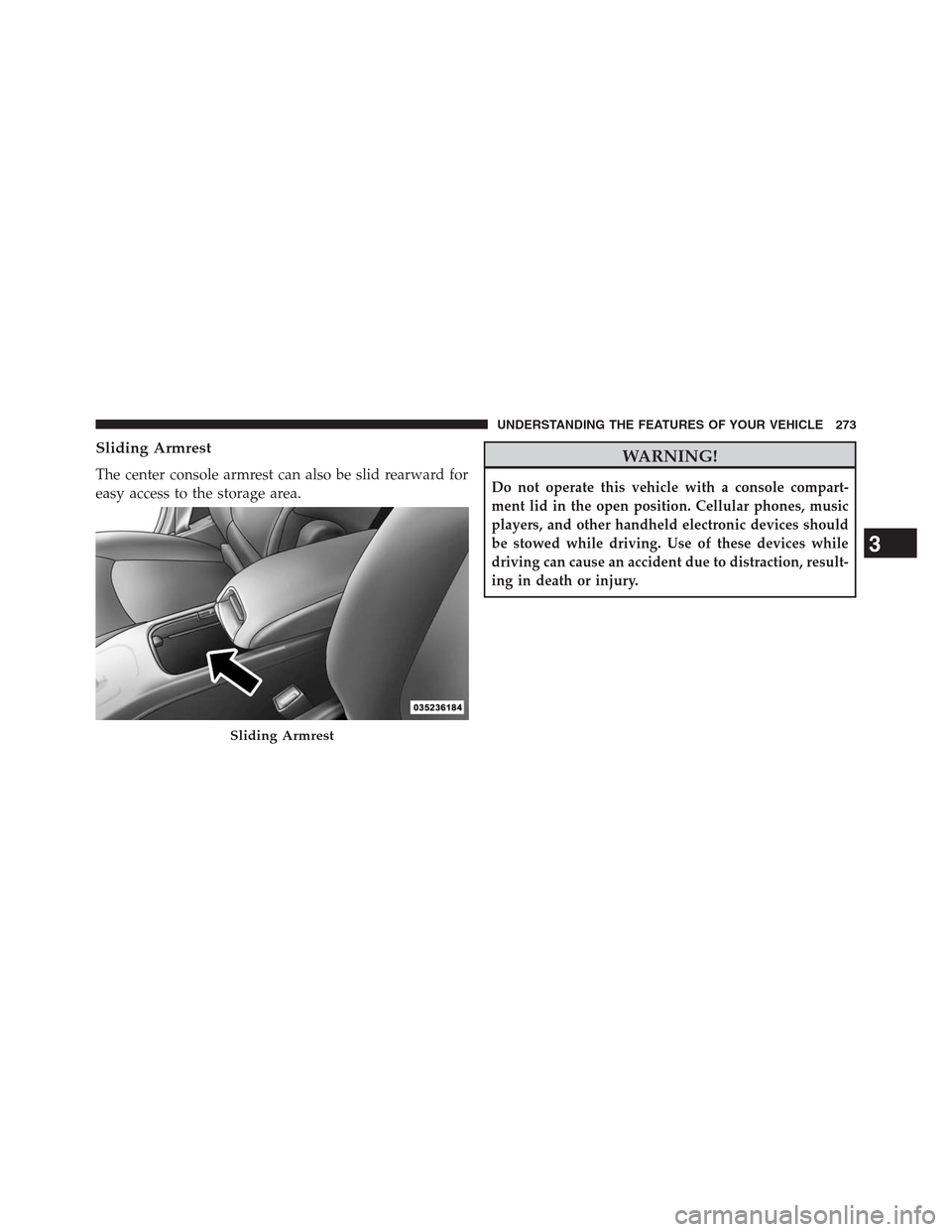
Sliding Armrest
The center console armrest can also be slid rearward for
easy access to the storage area.
WARNING!
Do not operate this vehicle with a console compart-
ment lid in the open position. Cellular phones, music
players, and other handheld electronic devices should
be stowed while driving. Use of these devices while
driving can cause an accident due to distraction, result-
ing in death or injury.
Sliding Armrest
3
UNDERSTANDING THE FEATURES OF YOUR VEHICLE 273