display DODGE JOURNEY 2013 1.G Owner's Manual
[x] Cancel search | Manufacturer: DODGE, Model Year: 2013, Model line: JOURNEY, Model: DODGE JOURNEY 2013 1.GPages: 630
Page 202 of 630
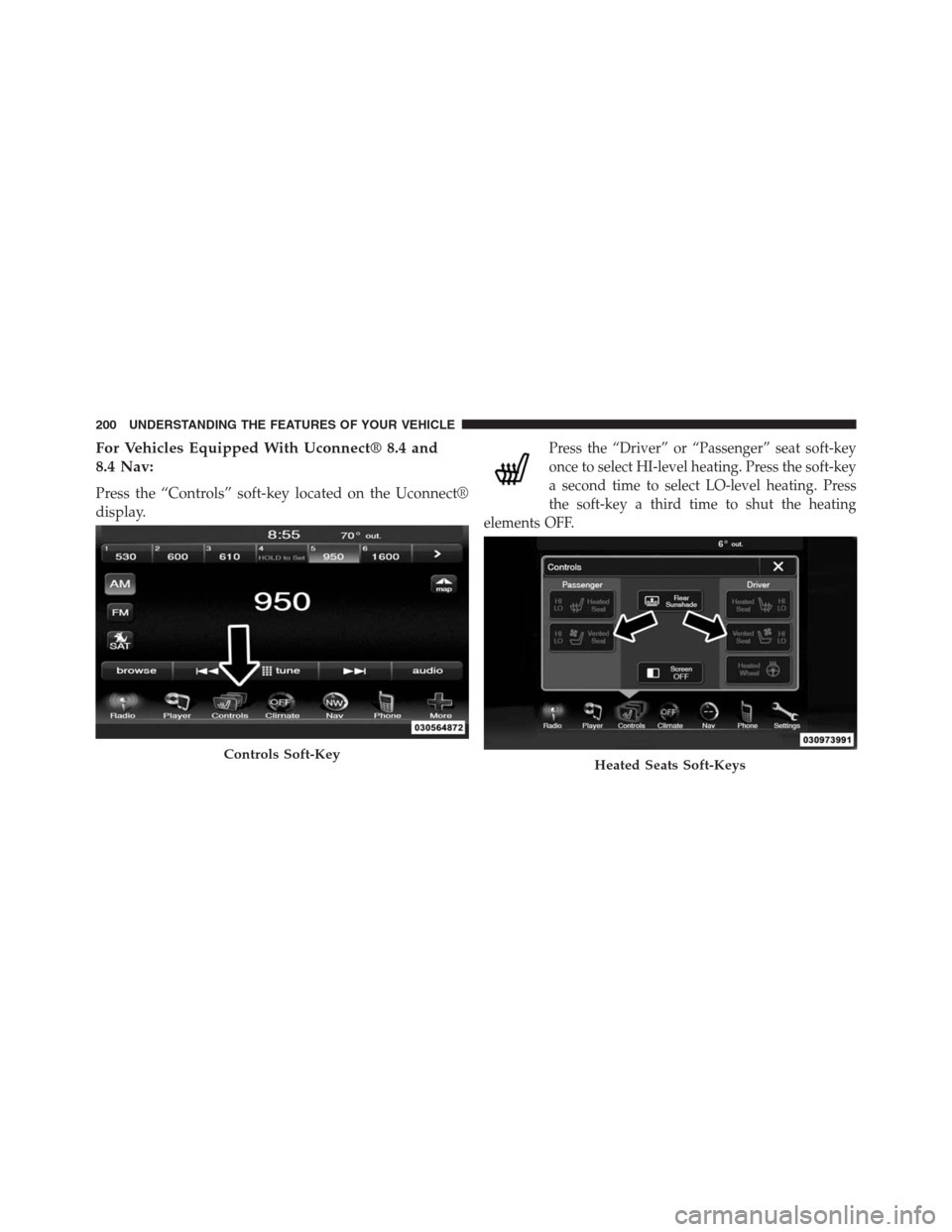
For Vehicles Equipped With Uconnect® 8.4 and
8.4 Nav:
Press the “Controls” soft-key located on the Uconnect®
display.
Press the “Driver” or “Passenger” seat soft-key
once to select HI-level heating. Press the soft-key
a second time to select LO-level heating. Press
the soft-key a third time to shut the heating
elements OFF.
Controls Soft-KeyHeated Seats Soft-Keys
200 UNDERSTANDING THE FEATURES OF YOUR VEHICLE
Page 228 of 630
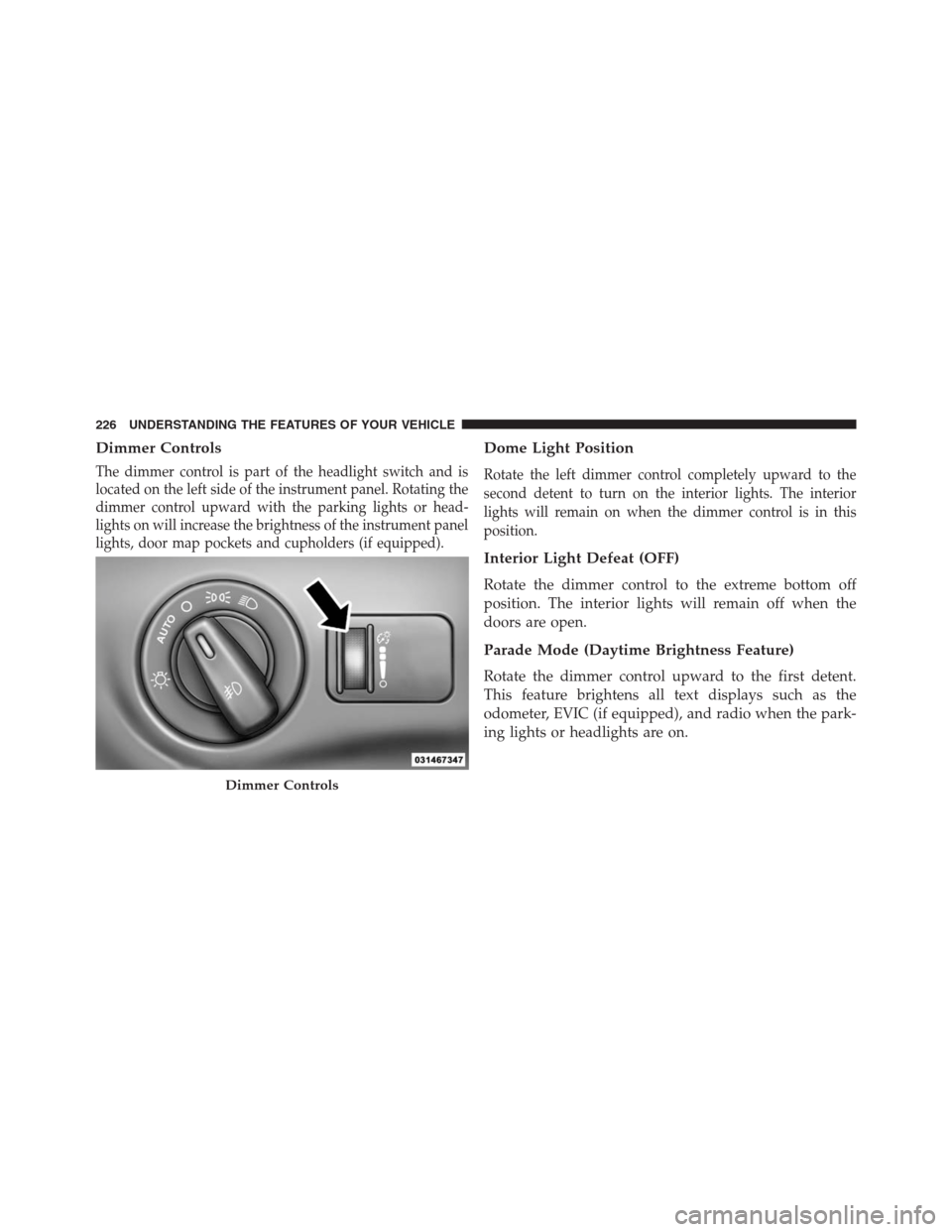
Dimmer Controls
The dimmer control is part of the headlight switch and is
located on the left side of the instrument panel. Rotating the
dimmer control upward with the parking lights or head-
lights on will increase the brightness of the instrument panel
lights, door map pockets and cupholders (if equipped).
Dome Light Position
Rotate the left dimmer control completely upward to the
second detent to turn on the interior lights. The interior
lights will remain on when the dimmer control is in this
position.
Interior Light Defeat (OFF)
Rotate the dimmer control to the extreme bottom off
position. The interior lights will remain off when the
doors are open.
Parade Mode (Daytime Brightness Feature)
Rotate the dimmer control upward to the first detent.
This feature brightens all text displays such as the
odometer, EVIC (if equipped), and radio when the park-
ing lights or headlights are on.
Dimmer Controls
226 UNDERSTANDING THE FEATURES OF YOUR VEHICLE
Page 240 of 630
ParkSense® Sensors
The four ParkSense® sensors, located in the rear fascia/
bumper, monitor the area behind the vehicle that is within
the sensors’ field of view. The sensors can detect obstacles
from approximately 18 in (45 cm) up to 79 in (200 cm) from
the rear fascia/bumper in the horizontal direction, depend-
ing on the location, type and orientation of the obstacle.
ParkSense® Warning Display
The ParkSense® Warning screen will only be displayed if
Sound and Display is selected from the Uconnect®
System. Refer to “Uconnect® Settings” in “Understand-
ing Your Instrument Panel” for further information.
The ParkSense® Warning screen is located within the Elec-
tronic Vehicle Information Center (EVIC). It provides visual
warnings to indicate the distance between the rear fascia/
bumper and the detected obstacle. Refer to “Electronic
Vehicle Information Center (EVIC)/Settings” in Under-
standing Your Instrument Panel” for further information.
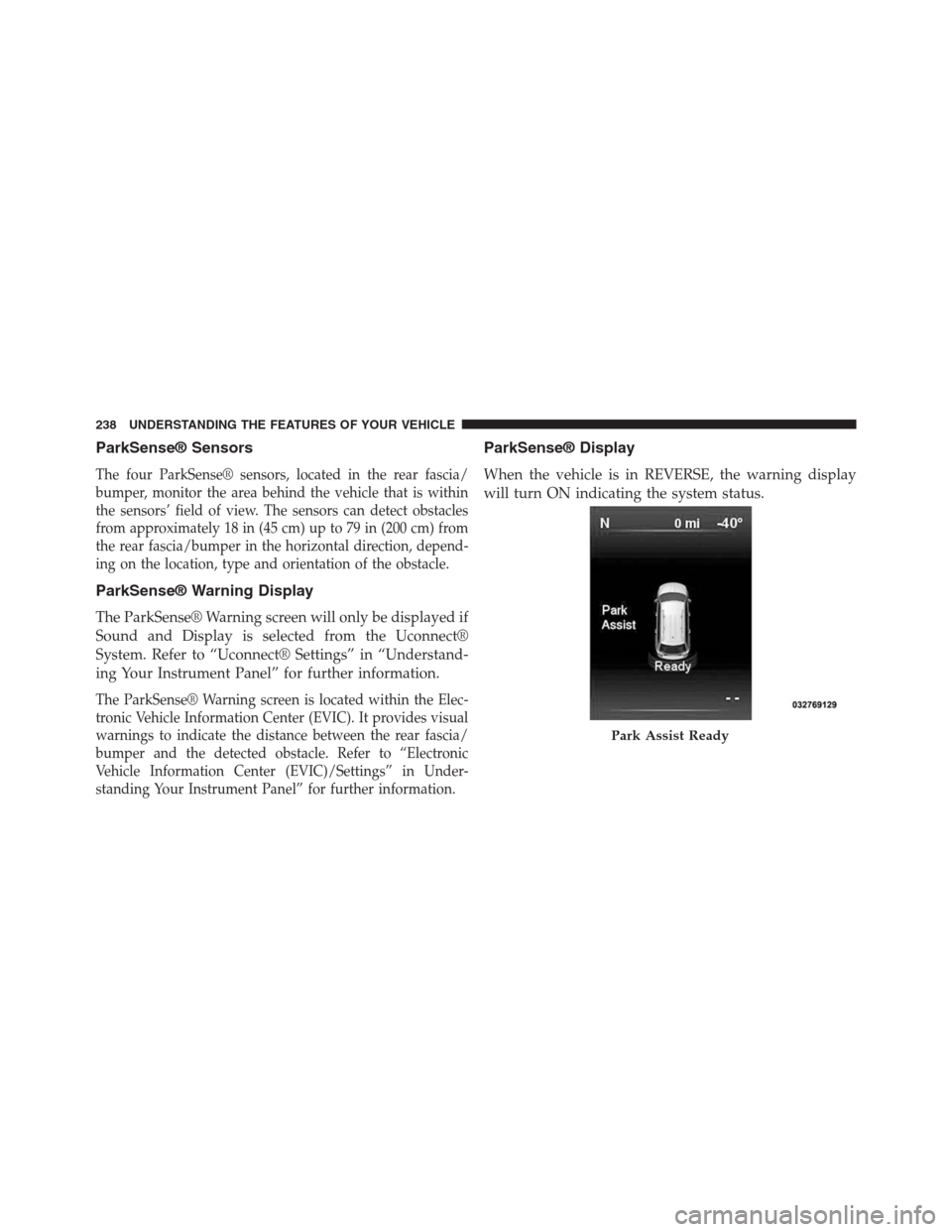
ParkSense® Display
When the vehicle is in REVERSE, the warning display
will turn ON indicating the system status.
Park Assist Ready
238 UNDERSTANDING THE FEATURES OF YOUR VEHICLE
Page 241 of 630
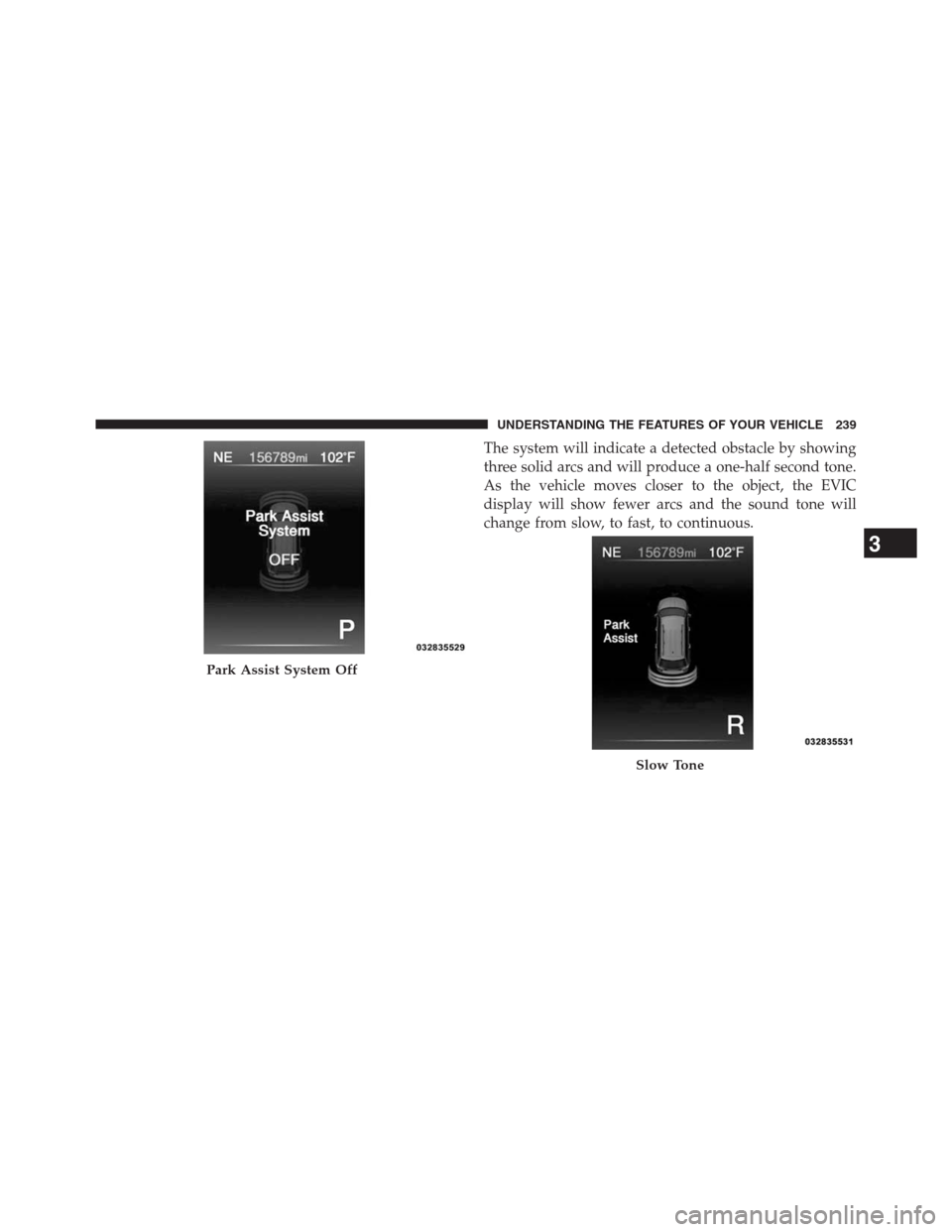
The system will indicate a detected obstacle by showing
three solid arcs and will produce a one-half second tone.
As the vehicle moves closer to the object, the EVIC
display will show fewer arcs and the sound tone will
change from slow, to fast, to continuous.
Park Assist System Off
Slow Tone
3
UNDERSTANDING THE FEATURES OF YOUR VEHICLE 239
Page 242 of 630
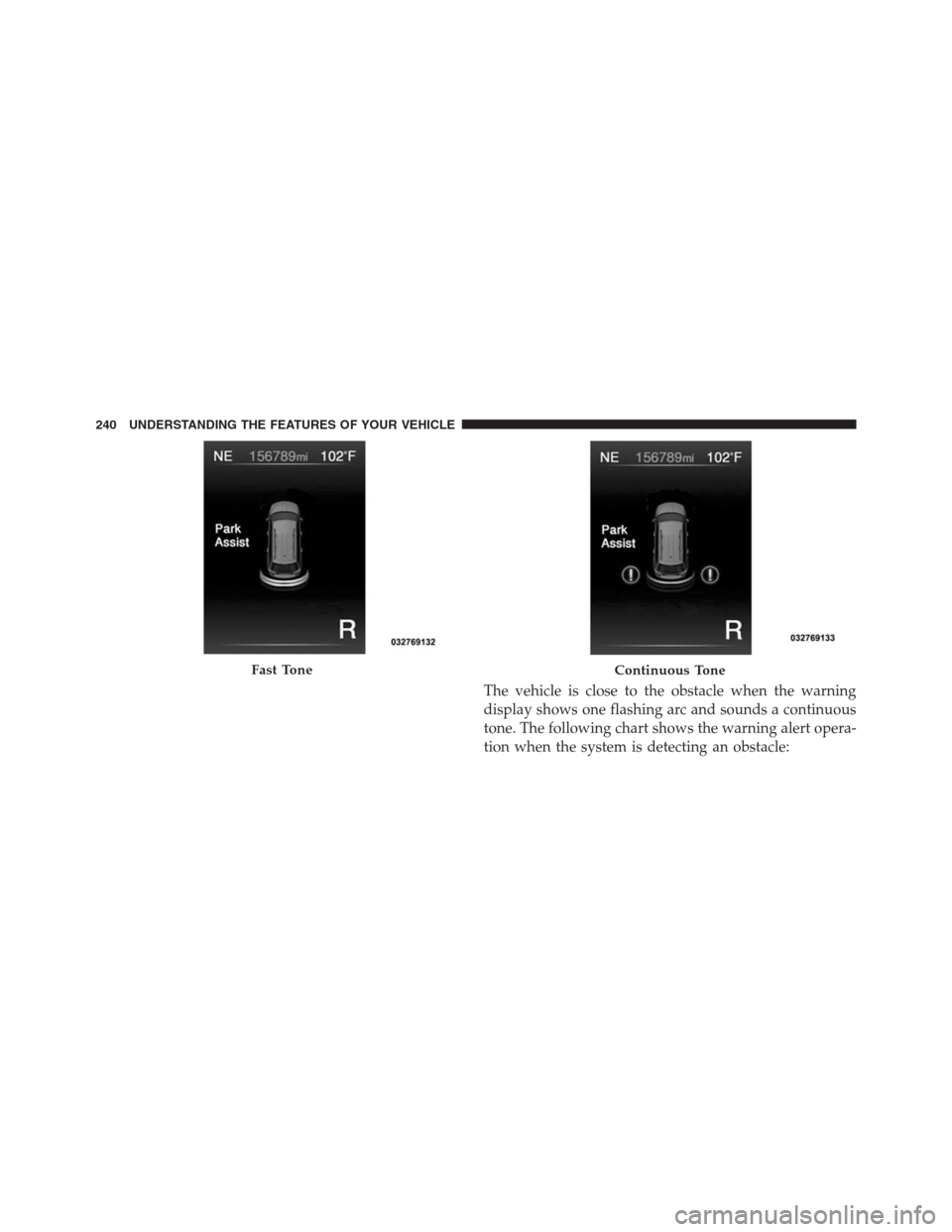
The vehicle is close to the obstacle when the warning
display shows one flashing arc and sounds a continuous
tone. The following chart shows the warning alert opera-
tion when the system is detecting an obstacle:
Fast ToneContinuous Tone
240 UNDERSTANDING THE FEATURES OF YOUR VEHICLE
Page 243 of 630
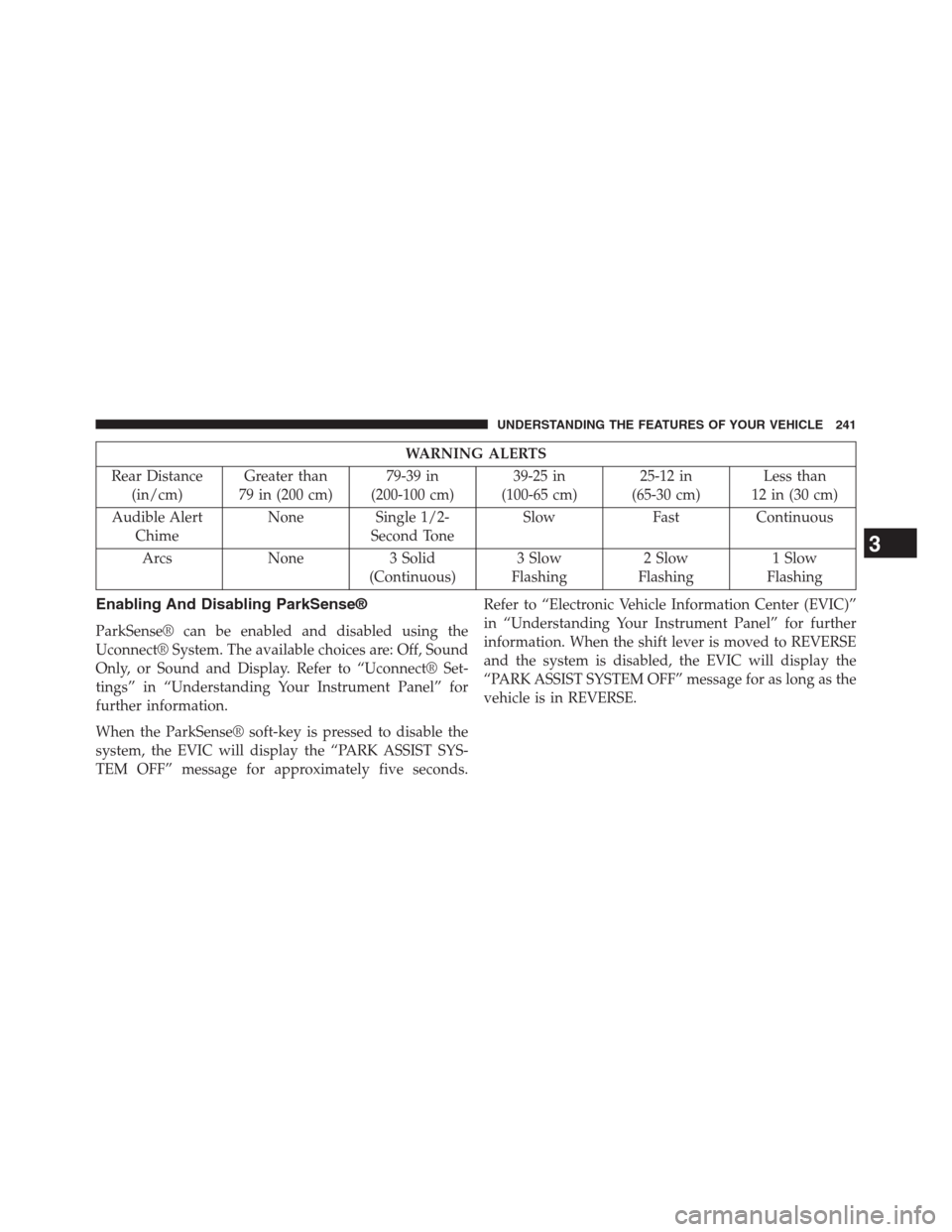
WARNING ALERTS
Rear Distance
(in/cm)Greater than
79 in (200 cm)79-39 in
(200-100 cm)39-25 in
(100-65 cm)25-12 in
(65-30 cm)Less than
12 in (30 cm)
Audible Alert
ChimeNone Single 1/2-
Second ToneSlow Fast Continuous
Arcs None 3 Solid
(Continuous)3 Slow
Flashing2 Slow
Flashing1 Slow
Flashing
Enabling And Disabling ParkSense®
ParkSense® can be enabled and disabled using the
Uconnect® System. The available choices are: Off, Sound
Only, or Sound and Display. Refer to “Uconnect® Set-
tings” in “Understanding Your Instrument Panel” for
further information.
When the ParkSense® soft-key is pressed to disable the
system, the EVIC will display the “PARK ASSIST SYS-
TEM OFF” message for approximately five seconds.Refer to “Electronic Vehicle Information Center (EVIC)”
in “Understanding Your Instrument Panel” for further
information. When the shift lever is moved to REVERSE
and the system is disabled, the EVIC will display the
“PARK ASSIST SYSTEM OFF” message for as long as the
vehicle is in REVERSE.
3
UNDERSTANDING THE FEATURES OF YOUR VEHICLE 241
Page 244 of 630
Service The ParkSense® Rear Park Assist
System
When the ParkSense® Rear Park Assist system is mal-
functioning, the Electronic Vehicle Information Center
(EVIC) will actuate a single chime, once per ignition
cycle, and it will display the “CLEAN PARK ASSIST”,
“SERVICE PARK ASSIST”, or “SERVICE PARK ASSIST
SYSTEM” message. Refer to “Electronic Vehicle Informa-
tion Center (EVIC)” in “Understanding Your Instrument
Panel” for further information. When the shift lever is
moved to REVERSE and the system has detected a fault
condition, the EVIC will display the “PARK ASSIST
SYSTEM OFF” message for as long as the vehicle is in
REVERSE. Under this condition, ParkSense® will not
operate.If “CLEAN PARK ASSIST” appears in the Electronic
Vehicle Information Center (EVIC) make sure the outer
surface and the underside of the rear fascia/bumper is
clean and clear of snow, ice, mud, dirt or other obstruc-
tion and then cycle the ignition. If the message continues
to appear see an authorized dealer.
If “SERVICE PARK ASSIST” or “SERVICE PARK ASSIST
SYSTEM” appears in the EVIC, see an authorized dealer.
Cleaning The ParkSense® System
Clean the ParkSense® sensors with water, car wash soap
and a soft cloth. Do not use rough or hard cloths. Do not
scratch or poke the sensors. Otherwise, you could dam-
age the sensors.
242 UNDERSTANDING THE FEATURES OF YOUR VEHICLE
Page 245 of 630
ParkSense® System Usage Precautions
NOTE:
•Ensure that the rear bumper is free of snow, ice, mud,
dirt and debris to keep the ParkSense® system oper-
ating properly.
•Jackhammers, large trucks, and other vibrations could
affect the performance of ParkSense®.
•When you turn ParkSense® off, the EVIC will display
“PARK ASSIST SYSTEM OFF.” Furthermore, once you
turn ParkSense® off, it remains off until you turn it on
again, even if you cycle the ignition key.
•When you move the shift lever to the REVERSE
position and ParkSense® is turned off, the EVIC will
display the “PARK ASSIST SYSTEM OFF” message for
as long as the vehicle is in REVERSE•Clean the ParkSense® sensors regularly, taking care
not to scratch or damage them. The sensors must not
be covered with ice, snow, slush, mud, dirt or debris.
Failure to do so can result in the system not working
properly. The ParkSense® system might not detect an
obstacle behind the fascia/bumper, or it could provide
a false indication that an obstacle is behind the
fascia/bumper.
•Objects such as bicycle carriers, trailer hitches, etc.,
must not be placed within 12 in (30 cm) from the rear
fascia/bumper while driving the vehicle. Failure to do
so can result in the system misinterpreting a close
object as a sensor problem, causing the “SERVICE
PARK ASSIST” message to be displayed in the EVIC.
3
UNDERSTANDING THE FEATURES OF YOUR VEHICLE 243
Page 247 of 630
PARKVIEW® REAR BACK UP CAMERA —
IF EQUIPPED
Your vehicle may be equipped with the ParkView® Rear
Back Up Camera that allows you to see an on-screen
image of the rear surroundings of your vehicle whenever
the shift lever is put into REVERSE. The image will be
displayed on the touchscreen display along with a cau-
tion note to “check entire surroundings” across the top of
the screen. After five seconds this note will disappear.The ParkView® camera is located on the rear of the
vehicle above the rear License plate.
When the vehicle is shifted out of REVERSE, the rear
camera mode is exited and the navigation or audio screen
appears again.
When displayed, static grid lines will illustrate the width
of the vehicle and will show separate zones that will help
indicate the distance to the rear of the vehicle.The follow-
ing table shows the approximate distances for each zone:
Zone Distance to the rear of the vehicle
Red 0 - 1 ft (0 - 30 cm)
Yellow 1 ft - 3 ft (30 cm - 1 m)
Green 3 ft or greater (1 m or greater)
3
UNDERSTANDING THE FEATURES OF YOUR VEHICLE 245
Page 270 of 630
inverter should automatically reset. If the power rating
exceeds approximately 170 Watts, the power inverter
may have to be reset manually. To reset the inverter
manually press the power inverter button OFF and ON.
To avoid overloading the circuit, check the power ratings
on electrical devices prior to using the inverter.
NOTE:Due to built-in overload protection, the power
outlet will shut down if the 115 Volt AC (150 Watt
maximum) power rating is exceeded.
WARNING!
To avoid serious injury or death:
•Do not use a three-prong adaptor.
•Do not insert any objects into the receptacles.
•Do not touch with wet hands.
•Close the lid when not in use.
•If this outlet is mishandled, it may cause an electric
shock and failure.
Power Inverter Operation
The power inverter is turned on and off using the
Uconnect® System.
Vehicles Equipped With Uconnect® 4.3
To turn the power inverter on or off perform the following:
1. Press the “More” hard-key (located next to the
Uconnect® display).
2. Press the “Outlet” soft-key (located on the Uconnect®
display) to turn the power inverter On or Off.
Vehicles Equipped With Uconnect® 8.4 and 8.4 Nav
To enable or disable the power inverter perform the
following:
1. Press the “Controls” soft-key.
2. Press the “Outlet” soft-key to turn the power inverter
On or Off.
268 UNDERSTANDING THE FEATURES OF YOUR VEHICLE