Video DODGE JOURNEY 2015 1.G User Guide
[x] Cancel search | Manufacturer: DODGE, Model Year: 2015, Model line: JOURNEY, Model: DODGE JOURNEY 2015 1.GPages: 648
Page 356 of 648
switch is in the Channel 2, position the remote controls
the functionality of headphone Channel 2 (left side of
the screen).
5.!!– In radio modes, push to seek the next tunable
station. In disc modes, push and hold to fast forward
through the current audio track or video chapter. In
menu modes use to navigate in the menu.
6."/ Prev – In radio modes, push to select to the
previous station. In disc modes, push to advance to the
start of the current or previous audio track or video
chapter. In menu modes, use to navigate in the menu.
7. MENU – Push to return to the main menu of a DVD
disc, to select a satellite audio or video channel from
the Station list, or select playback modes (SCAN/
RANDOM for a CD).
8.!/$(Play/Pause) – Begin/resume or pause disc play.
9.▪(Stop) – Stops disc play.
10. PROG Up/Down – When listening to a radio mode,
pushing PROG Up selects the next preset and push-
ing PROG Down selects the previous preset stored in
the radio.
11. MUTE – Push to mute the headphone audio output
for the selected channel.
12. SLOW – Push to slow playback of a DVD disc. Push
play (!) to resume normal play.
13. STATUS – Push to display the current status.
14. MODE – Push to change the mode of the selected
channel. See the Mode Selection section of this
manual for details on changing modes.
15. SETUP – When in a video mode, push the SETUP
button to access the display settings (see the display
settings section) to access the DVD setup menu, select
the menu button on the radio. When a disc is loaded
in the DVD player (if equipped) and the VES™ mode
354 UNDERSTANDING YOUR INSTRUMENT PANEL
Page 357 of 648
is selected and the disc is stopped, push the SETUP
button to access the DVD Setup menu. (see the DVD
Setup Menu of this manual.)
16. BACK – When navigating in menu mode, push to
return to the previous screen. When navigating a
DVDs disc menu, the operation depends on the disc’s
contents.
17.##– In radio modes, push to seek to the previous
tunable station. In disc modes, push and hold to fast
rewind through the current audio track or video
chapter. In menu modes use to navigate in the menu.
18. ENTER – Push to select the highlighted option in a
menu.
19.$/ NEXT – In radio modes, push to select to the next
station. In disc modes, push to advance to the next
audio track or video chapter. In menu modes, use to
navigate in the menu.
4
UNDERSTANDING YOUR INSTRUMENT PANEL 355
Page 358 of 648
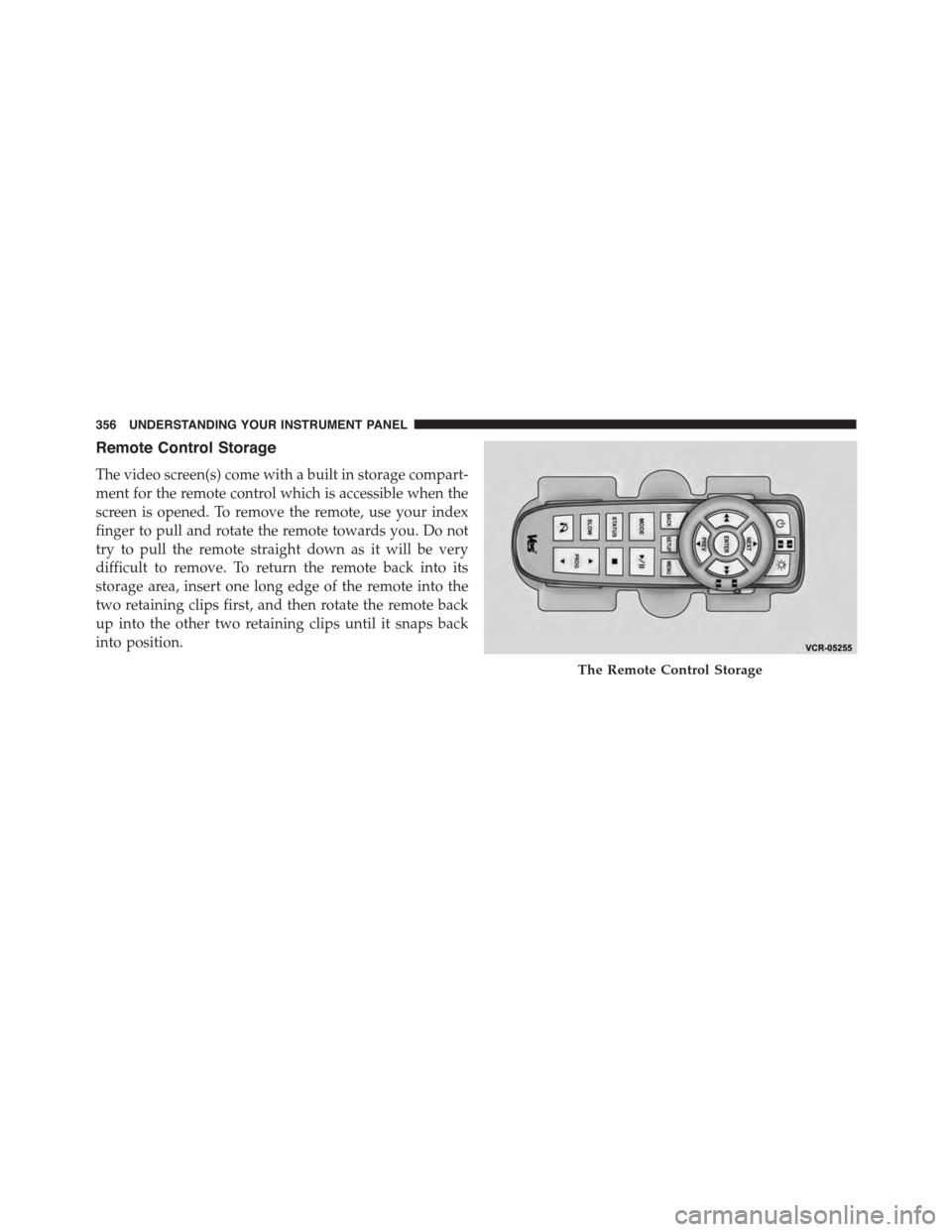
Remote Control Storage
The video screen(s) come with a built in storage compart-
ment for the remote control which is accessible when the
screen is opened. To remove the remote, use your index
finger to pull and rotate the remote towards you. Do not
try to pull the remote straight down as it will be very
difficult to remove. To return the remote back into its
storage area, insert one long edge of the remote into the
two retaining clips first, and then rotate the remote back
up into the other two retaining clips until it snaps back
into position.
The Remote Control Storage
356 UNDERSTANDING YOUR INSTRUMENT PANEL
Page 359 of 648
Locking The Remote Control
All remote control functionality can be disabled as a
parental control feature.
1. Press the “MORE” button on the touchscreen.
2. Press the “Rear Entertainment” button on the touch-
screen to display the Rear Entertainment Controls.
3. Press the “Lock-out” button on the touchscreen to lock
the remote control. Pressing the “Lock-out” button on
the touchscreen a second time will unlock the remote
control.
NOTE:Remote control lock-out will only apply to the
current ignition cycle. The VES™ will automatically
remove the lock-out if the ignition is cycled to “OFF”.
Replacing The Remote Control Batteries
The remote control requires two AAA batteries for op-
eration. To replace the batteries:
•Locate the battery compartment on the back of the
remote, then slide the battery cover downward.
•Replace the batteries, making sure to orient them
according to the polarity diagram shown.
•Replace the battery compartment cover.
Headphones Operation
The headphones receive two separate channels of audio
using an infrared transmitter from the video screen.
If no audio is heard after increasing the volume control,
verify that the screen is turned on and in the down
position and that the channel is not muted and the
headphone channel selector switch is on the desired
4
UNDERSTANDING YOUR INSTRUMENT PANEL 357
Page 361 of 648
NOTE:The rear video system must be turned on before
sound can be heard from the headphones. To conserve
battery life, the headphones will automatically turn off
approximately three minutes after the rear video system
is turned off.
Changing The Audio Mode For Headphones
1. Ensure the Remote Control channel/screen selector
switch is in the same position as the headphone
selector switch.
NOTE:
•When both switches are on Channel 1, the Remote is
controlling Channel 1 and the headphones are tuned
to the audio of the VES™ Channel 1.
•When both switches are on Channel 2, the Remote is
controlling Channel 2 and the headphones are tuned
to the audio of the VES™ Channel 2.
2. Push the MODE button on the remote control.
3. If the video screen is displaying a video source (such
as a DVD Video), pushing STATUS shows the status
on a popup banner at the bottom of the screen.
Pushing the MODE button will advance to the next
mode. When the mode is in an audio only source (such
as FM), the Mode Selection menu appears on screen.
4. When the Mode Selection menu appears on screen,
use the cursor buttons on the remote control to navi-
gate to the available modes and push the ENTER
button to select the new mode.
5. To cancel out of the Mode Selection menu, push the
BACK button on the remote control.
Unwired® Stereo Headphone Lifetime Limited
Warranty
Who Does This Warranty Cover?This warranty covers
the initial user or purchaser (#you#or#your#) of this
4
UNDERSTANDING YOUR INSTRUMENT PANEL 359
Page 364 of 648
to the items called out by number, the remaining infor-
mation displays the current status of the source (such as
station frequency, name, preset or track number, song
title, artist name, album name, etc.).
1. Channel 1 Mode – Displays the current source for
Channel 1.
2. Channel 1 Audio Only/Mute — Audio: The audio
only icon is not used on Channel 1, in a single screen
system. Mute: when the Mute icon is displayed, the
audio for Channel 1 has been muted using the remote
control’s MUTE button.
3. Channel 2 Audio Only/Mute — Audio: Only in a
single screen system: The audio only icon is displayed
on Channel 2 when Channel 1 is in a video mode.
Mute: when the Mute icon is displayed, the audio for
Channel 2 has been muted using the remote control’s
MUTE button.
4. Channel 2 Mode — Displays the current source for
Channel 2.
5. Remote Locked Out—When the icon is displayed, the
remote control functions are disabled.
6. Clock — Displays the time.
7. Channel 1 Shared Status — When the icon is dis-
played, the audio for Channel 1 is also shared with the
radio and playing through the cabin speakers.
362 UNDERSTANDING YOUR INSTRUMENT PANEL
Page 366 of 648
Station List Menu
When listening to Satellite audio, pushing the remote
control’s MENU button displays a list of all available
channels. Navigate this list using the remote control’s
navigation buttons to find the desired station, push the
remote control’s ENTER button to tune to that station. To
jump through the list more quickly, navigate to the Page
Up and Page Down icons on the screen.
Disc Menu
When listening to a CD Audio or CD Data disc, pushing
the remote control’s MENU button displays a list of all
commands which control playback of the disc. Using the
options you can activate or cancel Random play.
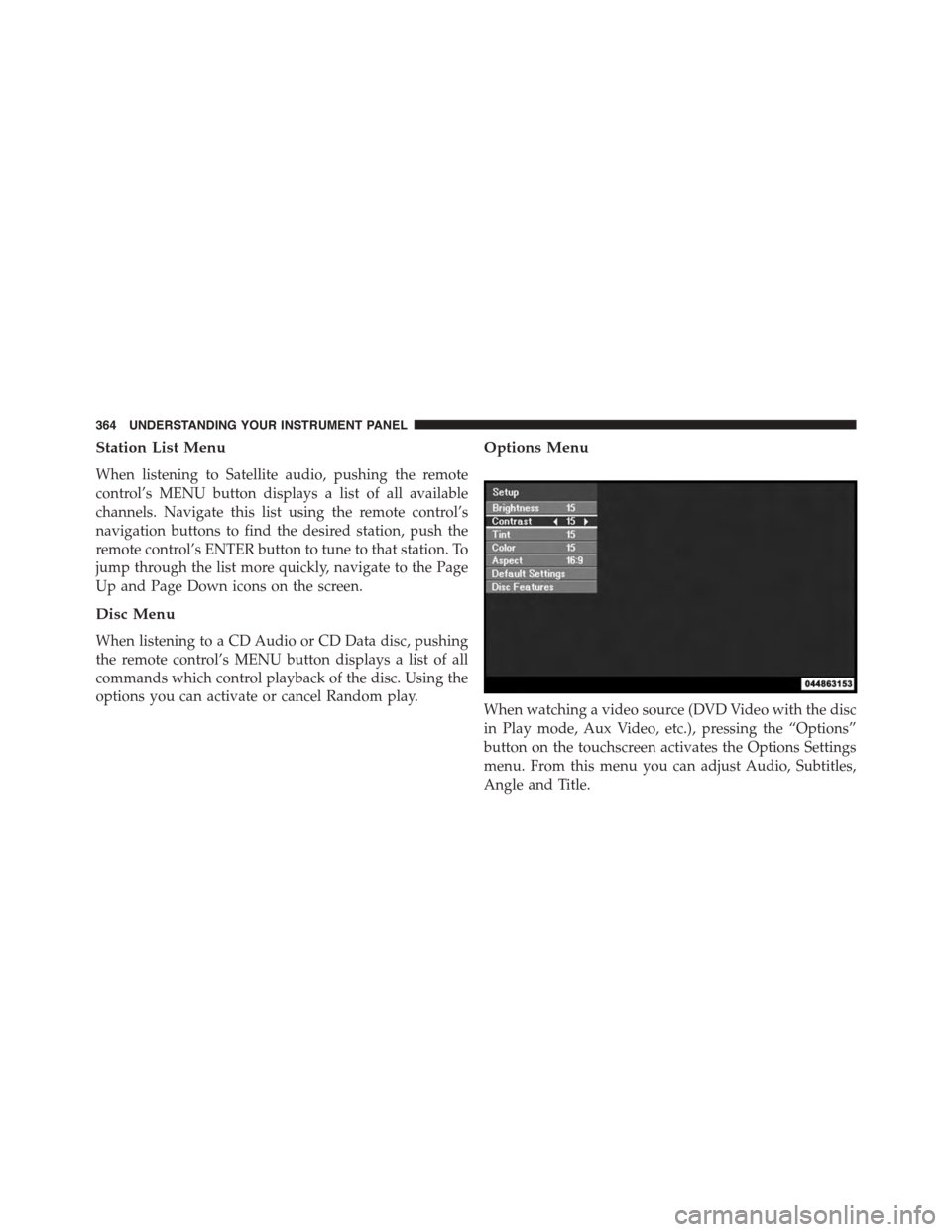
Options Menu
When watching a video source (DVD Video with the disc
in Play mode, Aux Video, etc.), pressing the “Options”
button on the touchscreen activates the Options Settings
menu. From this menu you can adjust Audio, Subtitles,
Angle and Title.
364 UNDERSTANDING YOUR INSTRUMENT PANEL
Page 367 of 648
Display Settings
When watching a video source (DVD Video with the disc
in Play mode, Aux Video, etc.), pushing the remote
control’s SETUP button activates the Display Settings
menu. These settings control the appearance of the video
on the screen. The factory default settings are already set
for optimum viewing, so there is no need to change these
settings under normal circumstances.
To change the settings, push the remote control’s naviga-
tion buttons to select an item, then push the remote
control’s navigation buttons to change the value for the
currently selected item. To reset all values back to the
original settings, select the Default Settings menu option
and push the remote control’s ENTER button.
Listening To Audio With The Screen Closed
To listen to only audio portion of the channel with the
screen closed:
•Set the audio to the desired source and channel.
•Close the video screen.
•To change the current audio mode, push the remote
control’s MODE button. This will automatically select
the next available audio mode without using the
MODE/SOURCE Select menu.
If the screen is closed and there is no audio heard, verify
that the headphones are turned on (the ON indicator is
illuminated) and the headphone selector switch is on the
desired channel. If the headphones are turned on, push
the remote control’s power button to turn audio on. If
audio is still not heard, check that fully charged batteries
are installed in the headphones.
4
UNDERSTANDING YOUR INSTRUMENT PANEL 365
Page 368 of 648
Disc Formats
The DVD player is capable of playing the following types
of discs (12 cm or 8 cm diameter):
•DVD-Video discs (MPEG-2 video compression) (see
notes about DVD Region Codes)
•Audio Compact Discs (CDs)
•CD Data discs with MP3 and WMA compressed audio
format files
•Video CDs (MPEG-1 video compression)
DVD Region Codes
The DVD player and many DVD discs are coded by
geographic region. These region codes must match in
order for the disc to play. If the region code for the DVD
disc does not match the region code for the player, the
disc will stop playing and a warning will be displayed.
DVD Audio Support
When a DVD-Audio disc is inserted in the DVD player,
the DVD-Audio title on the disc is played by default
(most DVD-Audio discs also have a Video title, but the
Video title is ignored). All multi-channel program mate-
rial is automatically mixed down to two channels, which
may result in a lowered apparent volume level. If you
increase the volume level to account for this change in
level, remember to lower the volume before changing the
disc or to another mode.
Recorded Discs
The DVD player will play CD-R and CD-RW discs
recorded in CD-Audio or Video-CD format, or as a
CD-ROM containing MP3 or WMA files. The player will
also play DVD-Video content recorded to a DVD-R,
DVD-RW and DVD-ROM discs.
366 UNDERSTANDING YOUR INSTRUMENT PANEL
Page 369 of 648
If you record a disc using a personal computer, there may
be cases where the DVD player may not be able to play
some or the entire disc, even if it is recorded in a
compatible format and is playable on other players. To
help avoid playback problems, use the following guide-
lines when recording discs.
•Open sessions are ignored. Only sessions that are
closed are playable.
•For multi-session CDs that contain only multiple CD-
Audio sessions, the player will renumber the tracks so
each track number is unique.
•For CD Data (or CD-ROM) discs, always use the
ISO-9660 (Level 1 or Level 2), Joliet, or UDF format.
CD-DA may also be used for PCM Audio contained on
CD-Based Data.
•The player recognizes a maximum of 512 files and 99
folders per CD-R and CD-RW disc.
•Mixed media recordable DVD formats will only play
the Video_TS portion of the disc.
If you are still having trouble writing a disc that is
playable in the DVD player, check with the disc recording
software publisher for more information about burning
playable discs.
The recommended method for labeling recordable discs
(CD-R, CD-RW, DVD-R and DVD-RW) is with a perma-
nent marker. Do not use adhesive labels as they may
separate from the disc, become stuck, and cause perma-
nent damage to the DVD player.
Compressed Audio Files (MP3, WMA AND ACC)
The DVD player is capable of playing MP3 (MPEG-1
Audio Layer 3 with data bitrates from 32 to 320 kbit/s,
including variable bit rates), WMA (All Standard 8.x, 9.x
4
UNDERSTANDING YOUR INSTRUMENT PANEL 367