reset DODGE JOURNEY 2015 1.G Owner's Manual
[x] Cancel search | Manufacturer: DODGE, Model Year: 2015, Model line: JOURNEY, Model: DODGE JOURNEY 2015 1.GPages: 648
Page 320 of 648
Vehicle Speed
Push and release the UP or DOWN button until “Vehicle
Speed” displays highlighted in the EVIC. Push the SE-
LECT button to display the current speed in mph or
km/h. Pushing the SELECT button a second time will
toggle the unit of measure between mph or km/h.
NOTE:Changing the unit of measure in the Vehicle
Speed menu will not change the unit of measure in the
EVIC.
Trip Info
Push and release the UP or DOWN button until “Trip
Info” displays highlighted in the EVIC and push the
SELECT button. Pushing the SELECT button with#Trip
Info#highlighted will cause the EVIC display to show
Trip A, Trip B, and Elapsed Time all in one display. If you
want to reset one of the three functions you use the UP or
DOWN buttons to highlight (select) the feature that you
want to reset. Pushing the SELECT button will cause the
selected feature to reset individually. The three features
can only be reset individually. The following Trip func-
tions display in the EVIC:
•Trip A
•Trip B
•Elapsed Time
The Trip Functions mode displays the following informa-
tion:
Trip A
Shows the total distance traveled for Trip A since the last
reset.
Trip B
Shows the total distance traveled for Trip B since the last
reset.
318 UNDERSTANDING YOUR INSTRUMENT PANEL
Page 321 of 648
Elapsed Time
Shows the total elapsed time of travel since the last reset.
Elapsed time will increment when the ignition is in the
ON/RUN position.
To Reset The Display
Reset will only occur while a resettable function is being
displayed. Push and release the SELECT button once to
clear the resettable function.
Tire PSI
Push and release the UP or DOWN button until “Tire
PSI:” displays highlighted in the EVIC. Push the SELECT
button to view a graphic of the vehicle with a tire
pressure value at each corner of the graphic.
Vehicle Info (Customer Information Features)
Push and release the UP or DOWN button until “Vehicle
Info” displays in the EVIC and push the SELECT button.
Push the UP and DOWN button to scroll through the
available information displays.
•Coolant Temp
Displays the actual coolant temperature.
•Oil Temperature
Displays the actual oil temperature.
•Oil Pressure
Displays the actual oil pressure.
•Trans Temperature
Displays the actual transmission temperature.
•Engine Hours
Displays the number of hours of engine operation.
4
UNDERSTANDING YOUR INSTRUMENT PANEL 319
Page 333 of 648
•Calibration
Press the “Calibration” button on the touchscreen to
change this setting. This compass is self-calibrating,
which eliminates the need to manually reset the compass.
When the vehicle is new, the compass may appear erratic
and the EVIC will display CAL until the compass is
calibrated. You may also calibrate the compass by press-
ing the “ON” button on the touchscreen and completing
one or more 360-degree turns (in an area free from large
metal or metallic objects) until the CAL indicator dis-
played in the EVIC turns off. The compass will now
function normally.
NOTE:A good calibration requires a level surface and an
environment free from large metallic objects such as
buildings, bridges, underground cables, railroad tracks,
etc.
Audio
•Equalizer
Press the “Equalizer” button on the touchscreen to
change this display. When in this display, you may adjust
the Bass, Mid and Treble settings. Adjust the settings with
the “+” and “–” setting buttons on the touchscreen or by
selecting any point on the scale between the “+” and “–”
buttons on the touchscreen. Then press the back arrow
button on the touchscreen.
NOTE:Bass/Mid/Treble allow you to simply slide your
finger up or down to change the setting as well as press
directly on the desired setting.
•Balance/Fade
Press the “Balance/Fade” button on the touchscreen to
change this display. When in this display, you may adjust
the Balance and Fade settings.
4
UNDERSTANDING YOUR INSTRUMENT PANEL 331
Page 347 of 648
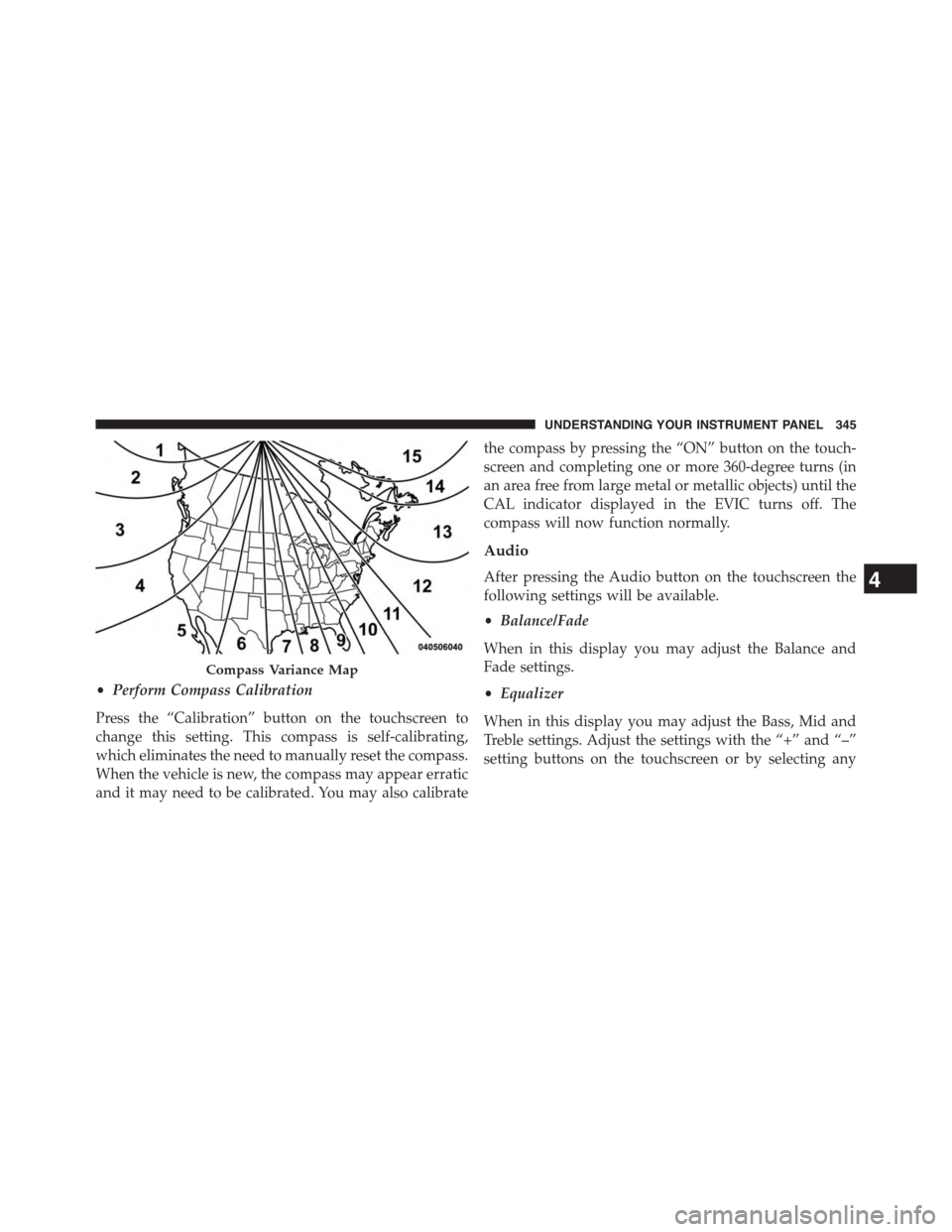
•Perform Compass Calibration
Press the “Calibration” button on the touchscreen to
change this setting. This compass is self-calibrating,
which eliminates the need to manually reset the compass.
When the vehicle is new, the compass may appear erratic
and it may need to be calibrated. You may also calibrate
the compass by pressing the “ON” button on the touch-
screen and completing one or more 360-degree turns (in
an area free from large metal or metallic objects) until the
CAL indicator displayed in the EVIC turns off. The
compass will now function normally.
Audio
After pressing the Audio button on the touchscreen the
following settings will be available.
•Balance/Fade
When in this display you may adjust the Balance and
Fade settings.
•Equalizer
When in this display you may adjust the Bass, Mid and
Treble settings. Adjust the settings with the “+” and “–”
setting buttons on the touchscreen or by selecting any
Compass Variance Map
4
UNDERSTANDING YOUR INSTRUMENT PANEL 345
Page 356 of 648
switch is in the Channel 2, position the remote controls
the functionality of headphone Channel 2 (left side of
the screen).
5.!!– In radio modes, push to seek the next tunable
station. In disc modes, push and hold to fast forward
through the current audio track or video chapter. In
menu modes use to navigate in the menu.
6."/ Prev – In radio modes, push to select to the
previous station. In disc modes, push to advance to the
start of the current or previous audio track or video
chapter. In menu modes, use to navigate in the menu.
7. MENU – Push to return to the main menu of a DVD
disc, to select a satellite audio or video channel from
the Station list, or select playback modes (SCAN/
RANDOM for a CD).
8.!/$(Play/Pause) – Begin/resume or pause disc play.
9.▪(Stop) – Stops disc play.
10. PROG Up/Down – When listening to a radio mode,
pushing PROG Up selects the next preset and push-
ing PROG Down selects the previous preset stored in
the radio.
11. MUTE – Push to mute the headphone audio output
for the selected channel.
12. SLOW – Push to slow playback of a DVD disc. Push
play (!) to resume normal play.
13. STATUS – Push to display the current status.
14. MODE – Push to change the mode of the selected
channel. See the Mode Selection section of this
manual for details on changing modes.
15. SETUP – When in a video mode, push the SETUP
button to access the display settings (see the display
settings section) to access the DVD setup menu, select
the menu button on the radio. When a disc is loaded
in the DVD player (if equipped) and the VES™ mode
354 UNDERSTANDING YOUR INSTRUMENT PANEL
Page 364 of 648
to the items called out by number, the remaining infor-
mation displays the current status of the source (such as
station frequency, name, preset or track number, song
title, artist name, album name, etc.).
1. Channel 1 Mode – Displays the current source for
Channel 1.
2. Channel 1 Audio Only/Mute — Audio: The audio
only icon is not used on Channel 1, in a single screen
system. Mute: when the Mute icon is displayed, the
audio for Channel 1 has been muted using the remote
control’s MUTE button.
3. Channel 2 Audio Only/Mute — Audio: Only in a
single screen system: The audio only icon is displayed
on Channel 2 when Channel 1 is in a video mode.
Mute: when the Mute icon is displayed, the audio for
Channel 2 has been muted using the remote control’s
MUTE button.
4. Channel 2 Mode — Displays the current source for
Channel 2.
5. Remote Locked Out—When the icon is displayed, the
remote control functions are disabled.
6. Clock — Displays the time.
7. Channel 1 Shared Status — When the icon is dis-
played, the audio for Channel 1 is also shared with the
radio and playing through the cabin speakers.
362 UNDERSTANDING YOUR INSTRUMENT PANEL
Page 367 of 648
Display Settings
When watching a video source (DVD Video with the disc
in Play mode, Aux Video, etc.), pushing the remote
control’s SETUP button activates the Display Settings
menu. These settings control the appearance of the video
on the screen. The factory default settings are already set
for optimum viewing, so there is no need to change these
settings under normal circumstances.
To change the settings, push the remote control’s naviga-
tion buttons to select an item, then push the remote
control’s navigation buttons to change the value for the
currently selected item. To reset all values back to the
original settings, select the Default Settings menu option
and push the remote control’s ENTER button.
Listening To Audio With The Screen Closed
To listen to only audio portion of the channel with the
screen closed:
•Set the audio to the desired source and channel.
•Close the video screen.
•To change the current audio mode, push the remote
control’s MODE button. This will automatically select
the next available audio mode without using the
MODE/SOURCE Select menu.
If the screen is closed and there is no audio heard, verify
that the headphones are turned on (the ON indicator is
illuminated) and the headphone selector switch is on the
desired channel. If the headphones are turned on, push
the remote control’s power button to turn audio on. If
audio is still not heard, check that fully charged batteries
are installed in the headphones.
4
UNDERSTANDING YOUR INSTRUMENT PANEL 365
Page 373 of 648
Right-Hand Switch Functions
•Push the top of the switch to increase the volume.
•Push the bottom of the switch to decrease the volume.
•Push the button in the center of the switch to change
modes (i.e., AM, FM, etc.).
Left-Hand Switch Functions For Radio Operation
•Push the top of the switch to SEEK the next listenable
station up from the current setting.
•Push the bottom of the switch to SEEK the next
listenable station down from the current setting.
•Push the button in the center of the switch to tune to
the next preset that you have programmed.
Left-Hand Switch Functions For Media (i.e., CD)
Operation
•Push the top of the switch once to listen to the next
track.
•Push the bottom of the switch once either to listen to
the beginning of the current track or to listen to the
beginning of the previous track if it is within eight
seconds after the current track begins to play.
•Push the switch up or down twice to listen to the
second track, three times to listen to the third track,
and so forth.
•Push the button located in the center of the switch to
change to the next preset that you have programmed.
4
UNDERSTANDING YOUR INSTRUMENT PANEL 371
Page 424 of 648
Transmission Limp Home Mode
Transmission function is monitored electronically for
abnormal conditions. If a condition is detected that could
result in transmission damage, Transmission Limp Home
Mode is activated. In this mode, the transmission remains
in second gear (for four-speed transmission) or third gear
(for six-speed transmission) regardless of which forward
gear is selected. PARK, REVERSE, and NEUTRAL will
continue to operate. The Malfunction Indicator Light
(MIL) may be illuminated. Limp Home Mode allows the
vehicle to be driven to an authorized dealer for service
without damaging the transmission.
In the event of a momentary problem, the transmission
can be reset to regain all forward gears by performing the
following steps:
1. Stop the vehicle.
2. Shift the transmission into PARK.
3. Turn the ignition switch to the LOCK/OFF position.
4. Wait approximately 10 seconds.
5. Restart the engine.
6. Shift into the desired gear range. If the problem is no
longer detected, the transmission will return to normal
operation.
NOTE:Even if the transmission can be reset, we recom-
mend that you visit your authorized dealer at your
earliest possible convenience. Your authorized dealer has
diagnostic equipment to determine if the problem could
recur.
If the transmission cannot be reset, authorized dealer
service is required.
422 STARTING AND OPERATING
Page 484 of 648
Problems that result from using gasoline containing
Methanol or gasoline containing more than 10% Ethanol
are not the responsibility of the manufacturer and may
not be covered under New Vehicle Limited Warranty.
E-85 Usage In Non-Flex Fuel Vehicles
Non-Flex Fuel Vehicles (FFV) are compatible with gaso-
line containing 10% ethanol (E10). Gasoline with higher
ethanol content may void the New Vehicle Limited
Warranty.
If a Non-FFV vehicle is inadvertently fueled with E-85
fuel, the engine will have some or all of these symptoms:
•Operate in a lean mode.
•OBD II “Malfunction Indicator Light” on.
•Poor engine performance.
•Poor cold start and cold drivability.
•Increased risk for fuel system component corrosion.
To fix a Non-FFV vehicle inadvertently fueled once with
E-85 perform the following:
•Drain the fuel tank (see your authorized dealer).
•Change the engine oil and oil filter.
•Disconnect and reconnect the battery to reset the
engine controller memory.
More extensive repairs will be required for prolonged
exposure to E-85 fuel.
MMT In Gasoline
Methylcyclopentadienyl Manganese Tricarbonyl (MMT)
is a manganese-containing metallic additive that is
blended into some gasoline to increase octane. Gasoline
blended with MMT provides no performance advantage
beyond gasoline of the same octane number without
MMT. Gasoline blended with MMT reduces spark plug
life and reduces emissions system performance in some
vehicles. The manufacturer recommends that gasoline
482 STARTING AND OPERATING