window DODGE JOURNEY 2015 1.G Owner's Manual
[x] Cancel search | Manufacturer: DODGE, Model Year: 2015, Model line: JOURNEY, Model: DODGE JOURNEY 2015 1.GPages: 648
Page 119 of 648
WARNING!
Vehicles and other objects seen in the passenger side
convex mirror will look smaller and farther away
than they really are. Relying too much on your
passenger side convex mirror could cause you to
collide with another vehicle or other object. Use your
inside mirror when judging the size or distance of a
vehicle seen in the passenger side convex mirror.
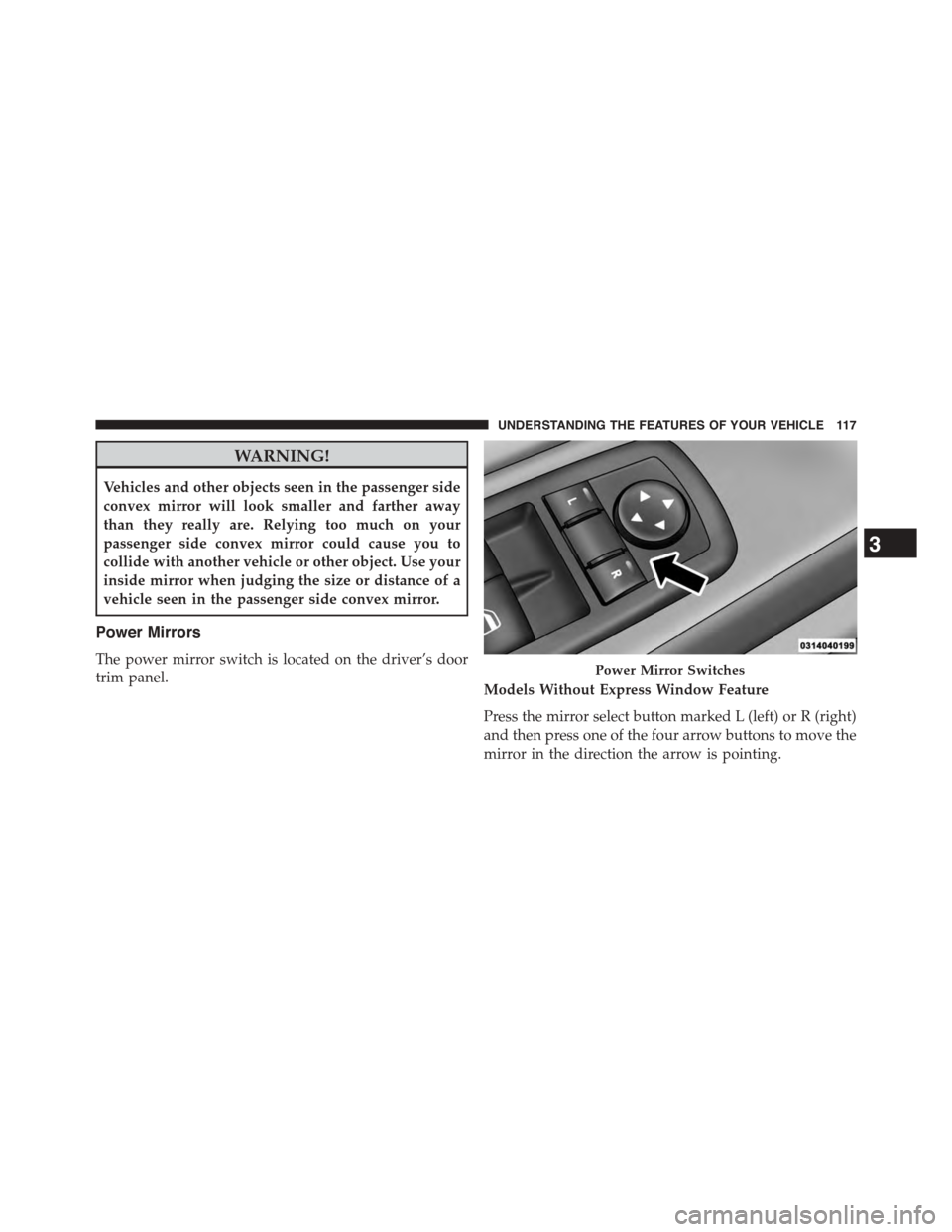
Power Mirrors
The power mirror switch is located on the driver’s door
trim panel.Models Without Express Window Feature
Press the mirror select button marked L (left) or R (right)
and then press one of the four arrow buttons to move the
mirror in the direction the arrow is pointing.
Power Mirror Switches
3
UNDERSTANDING THE FEATURES OF YOUR VEHICLE 117
Page 120 of 648
Models With Express Window Feature
Press and release the mirror select button marked L (left)
or R (right) and then press one of the four arrow buttons
to move the mirror in the direction the arrow is pointing.
The selection times out after 30 seconds of inactivity in
order to guard against accidentally changing a mirror
position following an adjustment.
NOTE:A light in the selected button will illuminate
indicating the mirror is activated and can be adjusted.
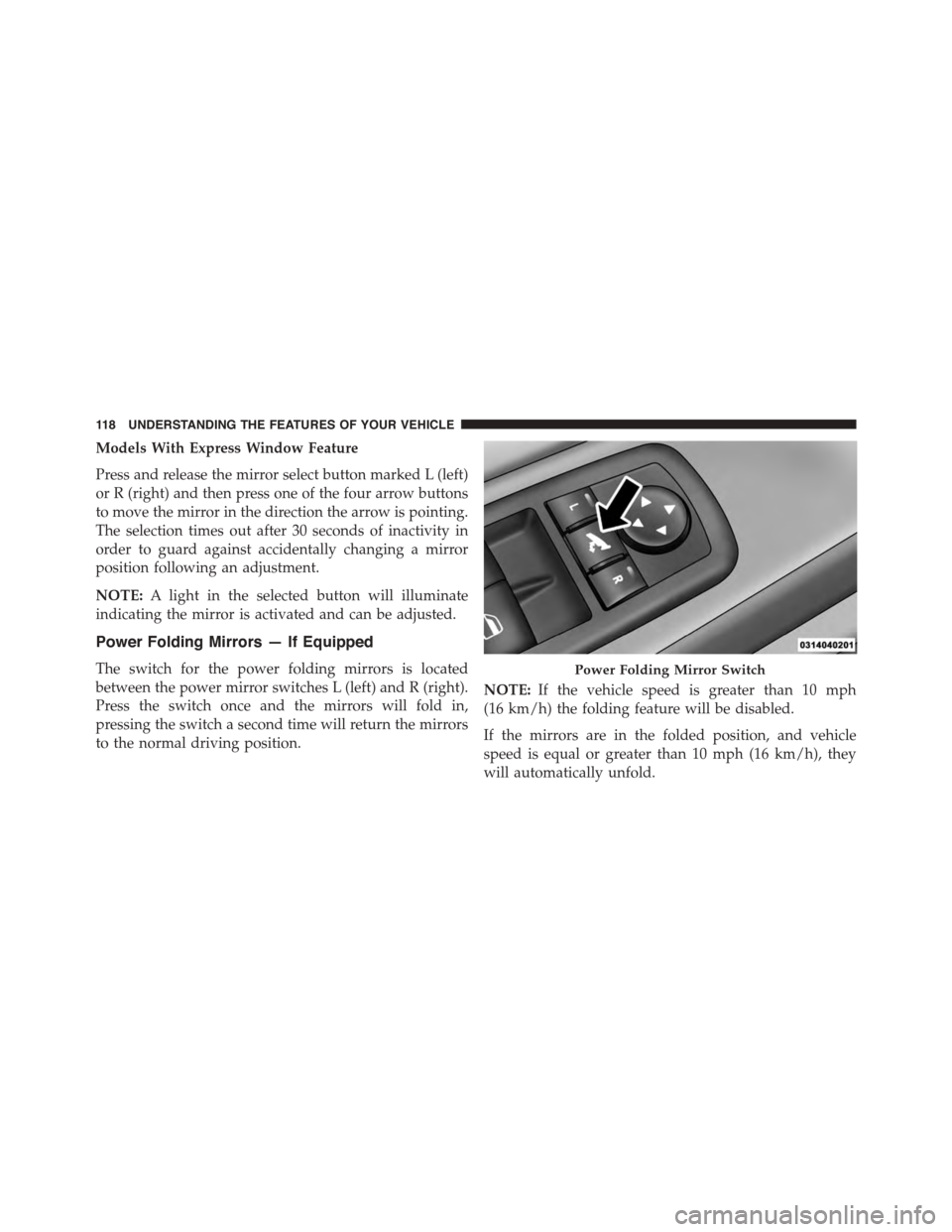
Power Folding Mirrors — If Equipped
The switch for the power folding mirrors is located
between the power mirror switches L (left) and R (right).
Press the switch once and the mirrors will fold in,
pressing the switch a second time will return the mirrors
to the normal driving position.
NOTE:If the vehicle speed is greater than 10 mph
(16 km/h) the folding feature will be disabled.
If the mirrors are in the folded position, and vehicle
speed is equal or greater than 10 mph (16 km/h), they
will automatically unfold.
Power Folding Mirror Switch
11 8 U N D E R S TA N D I N G T H E F E AT U R E S O F Y O U R V E H I C L E
Page 121 of 648
Resetting the Power Folding Outside Mirrors
You may need to reset the power folding mirrors if the
following occurs:
•The mirrors are accidentally blocked while folding.
•The mirrors are accidentally manually folded/
unfolded.
•The mirrors come out of the unfolded position.
•The mirrors shake and vibrate at normal driving
speeds.
To reset the power folding mirrors: Fold and unfold them
by pressing the button. (This may require multiple button
pushes). This resets them to their normal position.
Manual Folding Mirrors — If Equipped
Some models have exterior mirrors that are hinged. The
hinge allows the mirror to pivot forward and rearward to
resist damage. The hinge has three detent positions:
forward, rearward and normal.
Heated Mirrors — If Equipped
These mirrors are heated to melt frost or ice. This
feature can be activated whenever you turn on the
rear window defroster (if equipped). Refer to “Rear
Window Features” in “Understanding The Features Of
Your Vehicle” for further information.
3
UNDERSTANDING THE FEATURES OF YOUR VEHICLE 119
Page 143 of 648
•Speak normally without pausing, just as you would
speak to a person sitting a few feet/meters away from
you.
•Make sure that no one other than you is speaking
during a Voice Command period.
Performance is maximized under:
•Low-to-medium blower setting
•Low-to-medium vehicle speed
•Low road noise
•Smooth road surface
•Fully closed windows
•Dry weather condition
NOTE:
•Even though the system is designed for users speaking
in North American English, French, and Spanish ac-
cents, the system may not always work for some.
•When navigating through an automated system such
as voice mail, or when sending a page, at the end of
speaking the digit string, make sure to say “Send.”
•Storing names in the phonebook when the vehicle is
not in motion is recommended.
•It is not recommended to store similar sounding names
in the Uconnect® Phonebook.
•Phonebook (Downloaded and Uconnect® Phone Lo-
cal) name recognition rate is optimized when the
entries are not similar.
3
UNDERSTANDING THE FEATURES OF YOUR VEHICLE 141
Page 144 of 648
•Numbers must be spoken in single digits. “800” must
be spoken “eight-zero-zero” not “eight hundred.”
•You can say “O” (letter “O”) for “0” (zero).
•Even though international dialing for most number
combinations is supported, some shortcut dialing
number combinations may not be supported.
•In a convertible vehicle, system performance may be
compromised with the convertible top down.
Far End Audio Performance
Audio quality is maximized under:
•Low-To-Medium Blower Setting
•Low-To-Medium Vehicle Speed
•Low Road Noise
•Smooth Road Surface
•Fully Closed Windows
•Dry Weather Conditions
•Operation From The Driver’s Seat
•Performance, such as audio clarity, echo, and loudness
to a large degree rely on the phone and network, and
not the Uconnect® Phone
•Echo at the phone far end can sometimes be reduced
by lowering the in-vehicle audio volume
•In a convertible vehicle, system performance may be
compromised with the convertible top down
142 UNDERSTANDING THE FEATURES OF YOUR VEHICLE
Page 173 of 648
Things You Should Know About Your Uconnect®
Phone
Voice Command
•For best performance, adjust the rearview mirror to
provide at least½inch (1 cm) gap between the
overhead console (if equipped) and the mirror.
•Always wait for the beep before speaking.
•Speak normally, without pausing, just as you would
speak to a person sitting a few feet/meters away from
you.
•Ensure that no one other than you is speaking during
a voice command period.
Performance is maximized under:
•Low-To-Medium Blower Setting
•Low-To-Medium Vehicle Speed
•Low Road Noise
•Smooth Road Surface
•Fully Closed Windows
•Dry Weather Condition
Even though the system is designed for many languages
and accents, the system may not always work for some.
When navigating through an automated system such as
voice mail, or when sending a page, before speaking the
digit string, make sure to say “Send.”
NOTE:It is recommended that you do not store names in
your favorites phonebook while the vehicle is in motion.
Phonebook (Mobile and Favorites) name recognition rate
is optimized when the entries are not similar. You can say
“O” (letter “O”) for “0” (zero).
3
UNDERSTANDING THE FEATURES OF YOUR VEHICLE 171
Page 174 of 648
Even though international dialing for most number com-
binations is supported, some shortcut dialing number
combinations may not be supported.
Far End Audio Performance
Audio quality is maximized under:
•Low-To-Medium Blower Setting
•Low-To-Medium Vehicle Speed
•Low Road Noise
•Smooth Road Surface
•Fully Closed Windows
•Dry Weather Conditions
•Operation From The Driver’s Seat
Performance such as audio clarity, echo, and loudness to
a large degree rely on the phone and network, and not
the Uconnect® Phone.
Echo at the far end can sometimes be reduced by
lowering the in-vehicle audio volume.
In a convertible vehicle, system performance may be
compromised with the convertible top down.
Voice Text Reply
Uconnect® Phone can read or send new messages on
your phone.
Your phone must support SMS over Bluetooth® to use
this feature. If the Uconnect® Phone determines your
phone is not compatible with SMS messaging over
Bluetooth® the “Messaging” button will be grayed out
and the feature will not be available for use.
172 UNDERSTANDING THE FEATURES OF YOUR VEHICLE
Page 232 of 648
the rear window wiper/washer, refer to “Rear Window
Features” in “Understanding The Features Of Your Ve-
hicle”.
Intermittent Wiper System
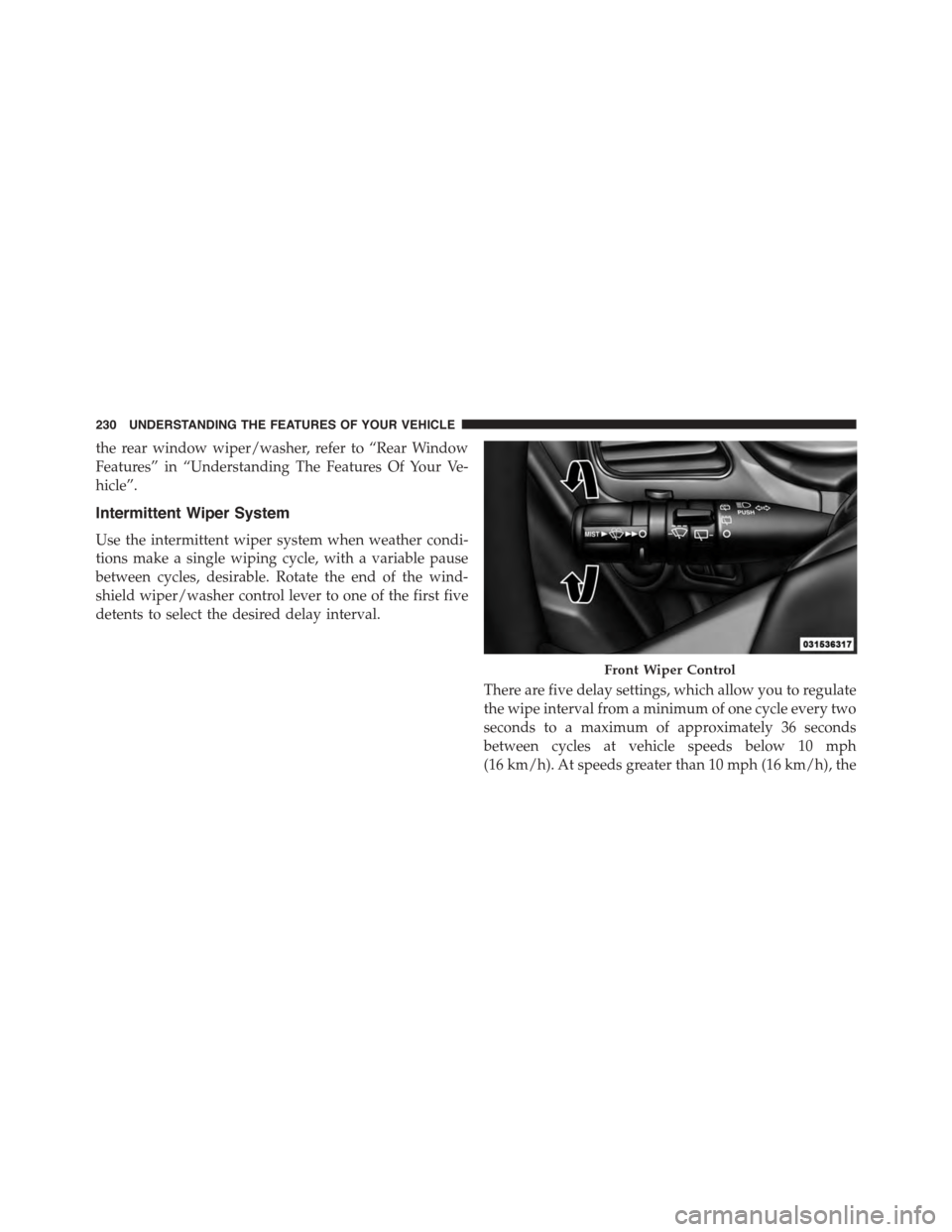
Use the intermittent wiper system when weather condi-
tions make a single wiping cycle, with a variable pause
between cycles, desirable. Rotate the end of the wind-
shield wiper/washer control lever to one of the first five
detents to select the desired delay interval.
There are five delay settings, which allow you to regulate
the wipe interval from a minimum of one cycle every two
seconds to a maximum of approximately 36 seconds
between cycles at vehicle speeds below 10 mph
(16 km/h). At speeds greater than 10 mph (16 km/h), the
Front Wiper Control
230 UNDERSTANDING THE FEATURES OF YOUR VEHICLE
Page 268 of 648
Sunshade Operation
The sunshade can be opened manually. However, the
sunshade will open automatically as the sunroof opens.
NOTE:The sunshade cannot be closed if the sunroof is
open.
Wind Buffeting
Wind buffeting can be described as the perception of
pressure on the ears or a helicopter-type sound in the
ears. Your vehicle may exhibit wind buffeting with the
windows down, or the sunroof (if equipped) in certain
open or partially open positions. This is a normal occur-
rence and can be minimized. If the buffeting occurs with
the rear windows open, open the front and rear windows
together to minimize the buffeting. If the buffeting occurs
with the sunroof open, adjust the sunroof opening to
minimize the buffeting or open any window.
Sunroof Maintenance
Use only a nonabrasive cleaner and a soft cloth to clean
the glass panel.
Ignition Off Operation
The power sunroof switch will remain active for up to
approximately ten minutes after the ignition switch is
turned to the LOCK position. Opening either front door
will cancel this feature.
NOTE:Ignition Off time is programmable through the
Uconnect® System. Refer to “Uconnect® Settings/
Customer Programmable Features” in “Understanding
Your Instrument Panel” for further information.
ELECTRICAL POWER OUTLETS
A 12 Volt (13 Amp) power outlet is located in the center
console below the radio. The power outlet has power
available when the ignition in the ON/RUN or ACC
position.
266 UNDERSTANDING THE FEATURES OF YOUR VEHICLE
Page 288 of 648
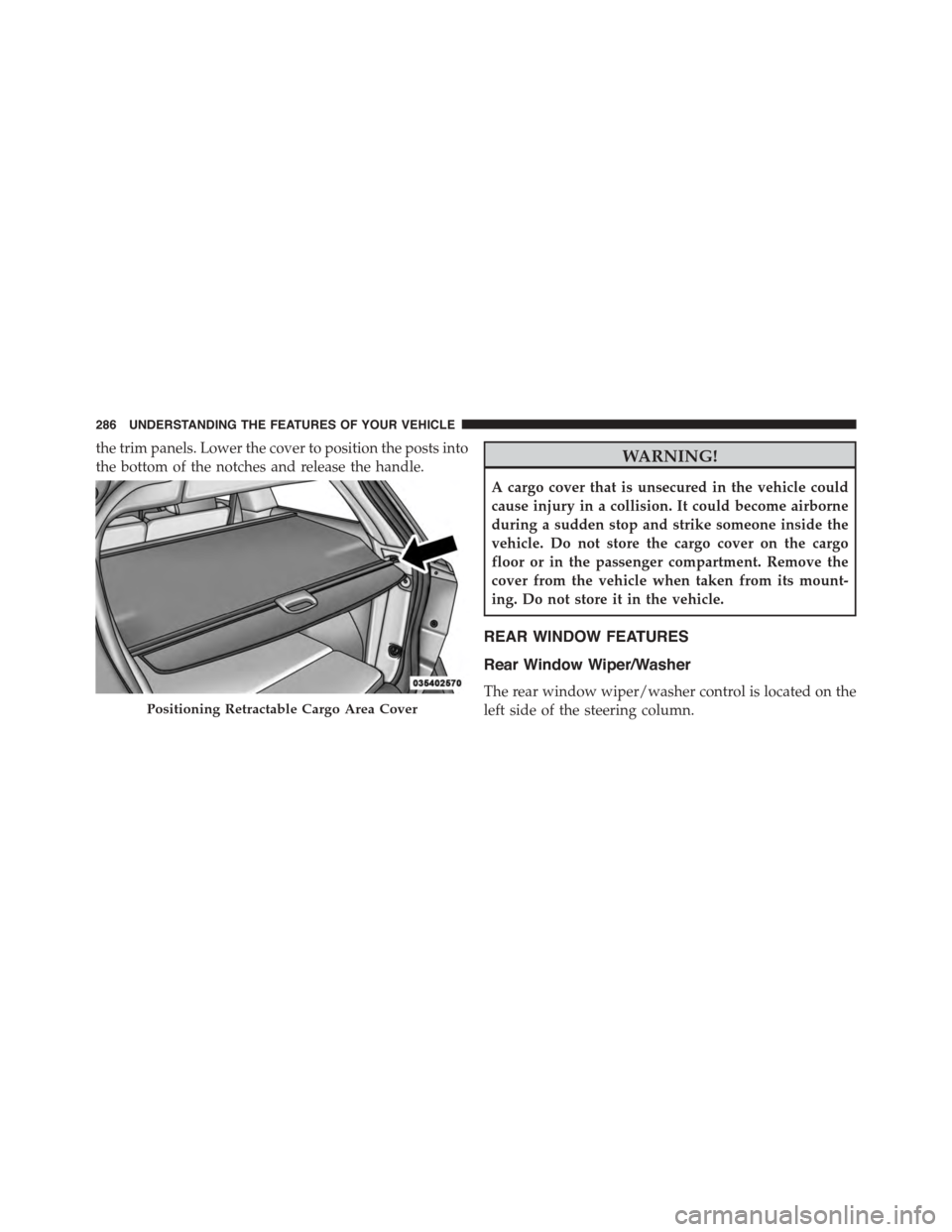
the trim panels. Lower the cover to position the posts into
the bottom of the notches and release the handle.WARNING!
A cargo cover that is unsecured in the vehicle could
cause injury in a collision. It could become airborne
during a sudden stop and strike someone inside the
vehicle. Do not store the cargo cover on the cargo
floor or in the passenger compartment. Remove the
cover from the vehicle when taken from its mount-
ing. Do not store it in the vehicle.
REAR WINDOW FEATURES
Rear Window Wiper/Washer
The rear window wiper/washer control is located on the
left side of the steering column.Positioning Retractable Cargo Area Cover
286 UNDERSTANDING THE FEATURES OF YOUR VEHICLE