lock DODGE JOURNEY 2015 1.G Manual PDF
[x] Cancel search | Manufacturer: DODGE, Model Year: 2015, Model line: JOURNEY, Model: DODGE JOURNEY 2015 1.GPages: 648
Page 296 of 648
▫Buttons On The Touchscreen..............320
▫Customer Programmable Features —
Uconnect® 4.3 Settings..................321
▫Customer Programmable Features —
Uconnect® System 8.4 Settings............333
!Uconnect® MULTIMEDIA — VIDEO
ENTERTAINMENT SYSTEM (VES™) — IF
EQUIPPED...........................347
▫Getting Started.......................348
▫Single Video Screen....................348
▫Play Video Games.....................349
▫Listen To An Audio Source On Channel 2 While A
Video Is Playing On Channel 1............350
▫Important Notes For Single Video Screen
System.............................351
▫Play A DVD Using The Touchscreen Radio . . .352
▫VES™ Remote Control — If Equipped.......353
▫Remote Control Storage.................356
▫Locking The Remote Control.............357
▫Replacing The Remote Control Batteries......357
▫Headphones Operation.................357
▫Replacing The Headphone Batteries.........358
▫Controls............................358
▫Unwired® Stereo Headphone Lifetime Limited
Warranty...........................359
▫System Information....................361
294 UNDERSTANDING YOUR INSTRUMENT PANEL
Page 305 of 648
if the driver’s seat belt remains unbuckled, the Seat Belt
Reminder Light will illuminate and the chime will sound.
Refer to “Occupant Restraints” in “Things To Know
Before Starting Your Vehicle” for further information.
12. Brake Warning Light
This light monitors various brake functions,
including brake fluid level and parking brake
application. If the brake light turns on it may
indicate that the parking brake is applied, that
the brake fluid level is low, or that there is a problem with
the anti-lock brake system reservoir.
If the light remains on when the parking brake has been
disengaged, and the fluid level is at the full mark on the
master cylinder reservoir, it indicates a possible brake
hydraulic system malfunction or that a problem with the
Brake Booster has been detected by the Anti-Lock Brake
System (ABS) / Electronic Stability Control (ESC) system.
In this case, the light will remain on until the condition
has been corrected. If the problem is related to the brake
booster, the ABS pump will run when applying the brake
and a brake pedal pulsation may be felt during each stop.
The dual brake system provides a reserve braking capac-
ity in the event of a failure to a portion of the hydraulic
system. A leak in either half of the dual brake system is
indicated by the Brake Warning Light, which will turn on
when the brake fluid level in the master cylinder has
dropped below a specified level.
The light will remain on until the cause is corrected.
NOTE:The light may flash momentarily during sharp
cornering maneuvers, which change fluid level condi-
tions. The vehicle should have service performed, and
the brake fluid level checked.
If brake failure is indicated, immediate repair is neces-
sary.
4
UNDERSTANDING YOUR INSTRUMENT PANEL 303
Page 306 of 648
WARNING!
Driving a vehicle with the red brake light on is
dangerous. Part of the brake system may have failed.
It will take longer to stop the vehicle. You could have
a collision. Have the vehicle checked immediately.
Vehicles equipped with the Anti-Lock Brake System
(ABS), are also equipped with Electronic Brake Force
Distribution (EBD). In the event of an EBD failure, the
Brake Warning Light will turn on along with the ABS
Light. Immediate repair to the ABS system is required.
Operation of the Brake Warning Light can be checked by
turning the ignition switch from the OFF position to the
ON/RUN position. The light should illuminate for ap-
proximately two seconds. The light should then turn off
unless the parking brake is applied or a brake fault is
detected. If the light does not illuminate, have the light
inspected by an authorized dealer.
The light also will turn on when the parking brake is
applied with the ignition switch in the ON/RUN posi-
tion.
NOTE:This light shows only that the parking brake is
applied. It does not show the degree of brake application.
13. Anti-Lock Brake (ABS) Light
This light monitors the Anti-Lock Brake System
(ABS). The light will turn on when the ignition
switch is turned to the ON/RUN position and
may stay on for as long as four seconds.
If the ABS light remains on or turns on while driving, it
indicates that the Anti-Lock portion of the brake system
is not functioning and that service is required. However,
the conventional brake system will continue to operate
normally if the BRAKE warning light is not on.
If the ABS light is on, the brake system should be serviced
as soon as possible to restore the benefits of Anti-Lock
304 UNDERSTANDING YOUR INSTRUMENT PANEL
Page 318 of 648
Unless reset, this message will continue to display each
time you cycle the ignition to the ON/RUN position. To
turn off the message temporarily, push and release the
MENU button. To reset the oil change indicator system
(after performing the scheduled maintenance), perform
the following procedure:
1. Without pushing the brake pedal, push the ENGINE
START/STOP button and cycle the ignition to the
ON/RUN position (do not start the engine.)
2. Fully depress the accelerator pedal, slowly, three times
within 10 seconds.
3. Without pushing the brake pedal, push the ENGINE
START/STOP button once to return the ignition to the
OFF/LOCK position.
NOTE:If the indicator message illuminates when you
start the vehicle, the oil change indicator system did not
reset. If necessary, repeat this procedure.
Fuel Economy
Push and release the UP or DOWN button until “Fuel
Economy” displays highlighted in the EVIC and push the
SELECT button. The following Fuel Economy functions
will display in the EVIC:
•Average Fuel Economy
•Distance To Empty (DTE)
•Miles Per Gallon (MPG)
Average Fuel Economy
Shows the average fuel economy since the last reset.
When the fuel economy is reset, the display will read
“RESET” or show dashes for two seconds. Then, the
history information will be erased, and the averaging will
continue from the last fuel average reading before the
reset.
316 UNDERSTANDING YOUR INSTRUMENT PANEL
Page 323 of 648
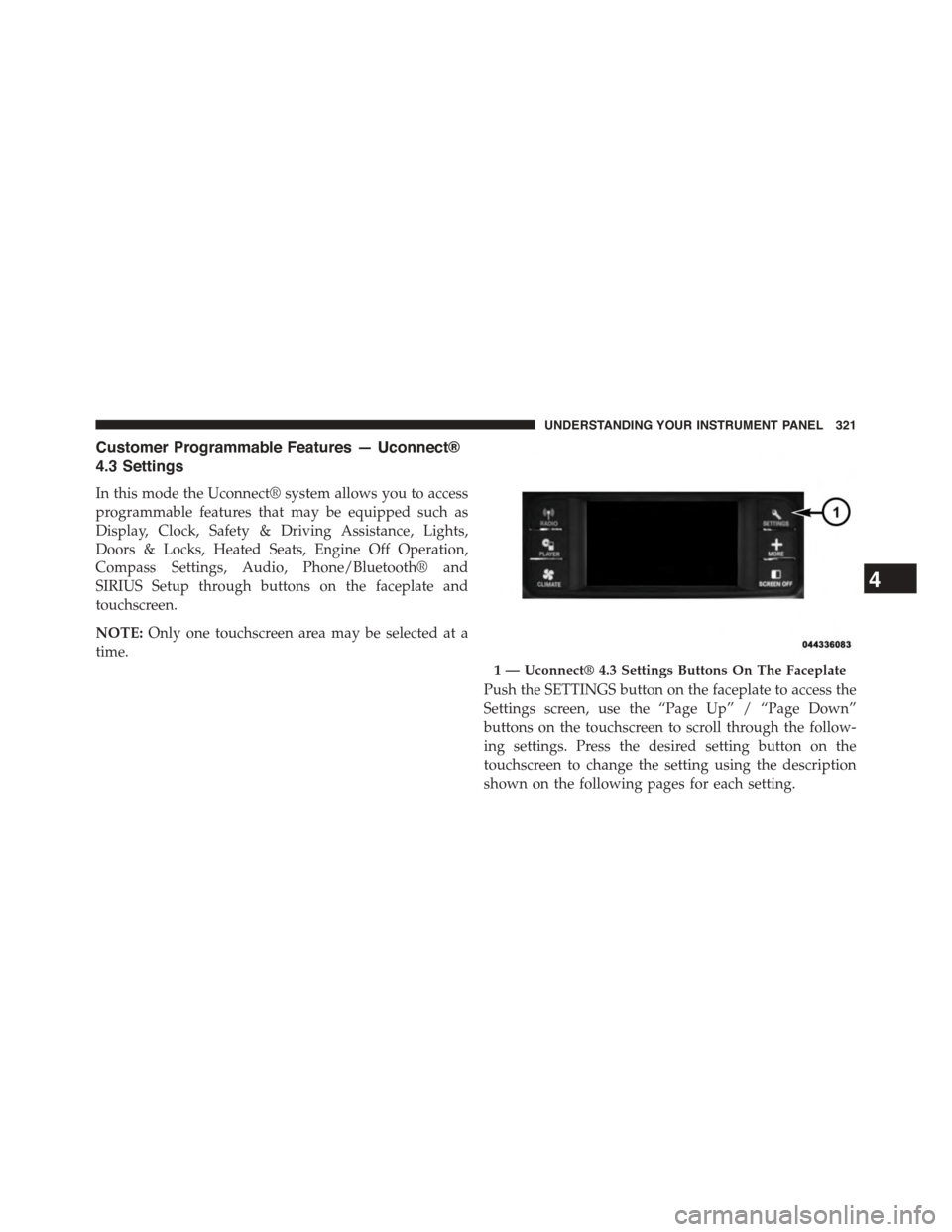
Customer Programmable Features — Uconnect®
4.3 Settings
In this mode the Uconnect® system allows you to access
programmable features that may be equipped such as
Display, Clock, Safety & Driving Assistance, Lights,
Doors & Locks, Heated Seats, Engine Off Operation,
Compass Settings, Audio, Phone/Bluetooth® and
SIRIUS Setup through buttons on the faceplate and
touchscreen.
NOTE:Only one touchscreen area may be selected at a
time.
Push the SETTINGS button on the faceplate to access the
Settings screen, use the “Page Up” / “Page Down”
buttons on the touchscreen to scroll through the follow-
ing settings. Press the desired setting button on the
touchscreen to change the setting using the description
shown on the following pages for each setting.
1 — Uconnect® 4.3 Settings Buttons On The Faceplate
4
UNDERSTANDING YOUR INSTRUMENT PANEL 321
Page 325 of 648
the language preferred. Then press the back arrow button
on the touchscreen. As you continue, the information will
display in the selected language.
•Units
Press the “Units” button on the touchscreen to change
this display. When in this display, you may switch the
EVIC, odometer, and navigation system (if equipped)
between US and Metric units of measure. Press “US” or
“Metric” then press the back arrow button on the touch-
screen. As you continue, the information will display in
the selected units of measure.
•Voice Response
Press the “Voice Response” button on the touchscreen to
change the Voice Response Length settings. To change the
Voice Response Length, press and release the “Brief” or
“Long” button on the touchscreen. Then press the back
arrow button on the touchscreen.
•Touchscreen Beep
Press the “Touchscreen Beep” button on the touchscreen
to turn on or shut off the sound heard when a button on
the touchscreen is pressed. To change the Touchscreen
Beep setting press and release the “ON” or “OFF” button
on the touchscreen, then press the back arrow button on
the touchscreen.
Clock
•Set Time
Press the “Set Time” button on the touchscreen to change
this display. When in this display, you may select the time
display settings. To make your selection, press the “Set
Time” button on the touchscreen, adjust the hours and
minutes using the up and down buttons on the touch-
screen, select AM or PM, select 12 hr or 24 hr. Then press
the back arrow button on the touchscreen when all
selections are complete.
4
UNDERSTANDING YOUR INSTRUMENT PANEL 323
Page 326 of 648
•Show Time Status
Press the “Show Time Status” button on the touchscreen
to change this display. When in this display, you may
turn on or shut off the digital clock in the status bar. To
change the Show Time Status setting, press and release
the “ON” or “OFF” button on the touchscreen. Then
press the back arrow button on the touchscreen.
•Sync Time — If Equipped
Press the “Sync Time” button on the touchscreen to
change this display. When in this display, you may have
the radio set the time automatically. To change the Sync
Time setting, press and release the “ON” or “OFF” button
on the touchscreen. Then press the back arrow button on
the touchscreen.
Safety & Driving Assistance
•Park Assist
Press the “Park Assist” button on the touchscreen to
change this display. The Rear Park Assist system will
scan for objects behind the vehicle when the transmission
shift lever is in REVERSE and the vehicle speed is less
than 11 mph (18 km/h). The system can be enabled with
Sound Only, Sound and Display, or turned OFF. To
change the Park Assist status, press and release the
“OFF,” “Sound Only” or “Sounds and Display” button
on the touchscreen. Then press the back arrow button on
the touchscreen. Refer to “ParkSense® Rear Park Assist”
in “Understanding The Features Of Your Vehicle” for
system function and operating information.
•Hill Start Assist — If Equipped
Press the “Hill Start Assist” button on the touchscreen to
change this display. When this feature is selected, the Hill
Start Assist (HSA) system is active. Refer to “Electronic
324 UNDERSTANDING YOUR INSTRUMENT PANEL
Page 327 of 648
Brake Control System” in “Starting And Operating” for
system function and operating information. To make
your selection, press the “Hill Start Assist” button on the
touchscreen and select “ON” or “OFF.” Then press the
back arrow button on the touchscreen.
Lights
•Illuminated Approach
Press the “Illuminated Approach” button on the touch-
screen to change this display. When this feature is se-
lected, the headlights will activate and remain on for 0,
30, 60, or 90 seconds when the doors are unlocked with
the Remote Keyless Entry (RKE) transmitter. To change
the Illuminated Approach status, press the “0,” “30,”
“60” or “90” button on the touchscreen. Then press the
back arrow button on the touchscreen.
•Headlights With Wipers
Press the “Headlights With Wipers” button on the touch-
screen to change this display. When this feature is se-
lected, and the headlight switch is in the AUTO position,
the headlights will turn on approximately 10 seconds
after the wipers are turned on. The headlights will also
turn off when the wipers are turned off if they were
turned on by this feature. To make your selection, press
the “Headlights With Wipers” button on the touchscreen
and select “ON” or “OFF.” Then press the back arrow
button on the touchscreen.
•Auto High Beams
Press the “Auto High Beams” button on the touchscreen
to change this display. When this feature is selected, the
high beam headlights will deactivate automatically un-
der certain conditions. To make your selection, press the
“Auto High Beams” button on the touchscreen and select
“ON” or “OFF.” Then press the back arrow button on the
4
UNDERSTANDING YOUR INSTRUMENT PANEL 325
Page 328 of 648
touchscreen. Refer to “Lights/SmartBeam™ — If
Equipped” in “Understanding The Features Of Your
Vehicle” for further information.
•Daytime Running Lights — If Available
Press the “Daytime Running Lights” button on the touch-
screen to change this display. When this feature is se-
lected, the headlights will turn on whenever the engine is
running. To make your selection, press the “Daytime
Running Lights” button on the touchscreen and select
“ON” or “OFF.” Then press the back arrow button on the
touchscreen.
•Steering Directed Lights — If Equipped
Press the “Steering Directed Lights” button on the touch-
screen to change this display. When this feature is se-
lected, the headlights turn relative to a change in direc-
tion of the steering wheel. To make your selection, press
the “Steering Directed Lights” button on the touchscreen
and select “ON” or ‘OFF.” Then press the back arrow
button on the touchscreen.
•Flash Lamps With Lock
Press the “Flash Lamps With Lock” button on the touch-
screen to change this display. When this feature is se-
lected, the exterior lights will flash when the doors are
locked with the Remote Keyless Entry (RKE) transmitter.
This feature may be selected with or without the sound
horn on lock feature selected. To make your selection,
press the “Flash Lamps With Lock” button on the touch-
screen and select “ON” or “OFF.” Then press the back
arrow button on the touchscreen.
326 UNDERSTANDING YOUR INSTRUMENT PANEL
Page 329 of 648
Doors & Locks
•Auto Unlock On Exit
Press the “Auto Unlock On Exit” button on the touch-
screen to change this display. When this feature is se-
lected, all doors will unlock when the vehicle is stopped
and the transmission is in the PARK or NEUTRAL
position and the driver’s door is opened. To make your
selection, press the “Auto Unlock On Exit” button on the
touchscreen and select “ON” or “OFF.” Then press the
back arrow button on the touchscreen.
•Auto Lock
When this feature is selected, all doors will lock auto-
matically when the vehicle reaches a speed of 15 mph
(24 km/h). To make your selection, press the “Auto
Lock” button on the touchscreen, until a check-mark
appears next to setting, indicating that the setting has
been selected. Press the back arrow button on the touch-
screen to return to the previous menu.
•Flash Lamps With Lock
Press the “Flash Lamps With Lock” button on the touch-
screen to change this display. When this feature is se-
lected, the exterior lamps will flash when the doors are
locked or unlocked with the Remote Keyless Entry (RKE)
transmitter. To make your selection, press the “Flash
Lights With Lock” button on the touchscreen and select
“ON” or “OFF.” Then press the back arrow button on the
touchscreen.
•Sound Horn With Remote Start
Press the “Sound Horn With Remote Start” button on the
touchscreen to change this display. When this feature is
selected, the horn will sound when the remote start is
activated. To make your selection, press the “Sound Horn
With Remote Start” button on the touchscreen and select
“ON” or “OFF.” Then press the back arrow button on the
touchscreen.
4
UNDERSTANDING YOUR INSTRUMENT PANEL 327