tow DODGE JOURNEY 2016 1.G User Guide
[x] Cancel search | Manufacturer: DODGE, Model Year: 2016, Model line: JOURNEY, Model: DODGE JOURNEY 2016 1.GPages: 664
Page 141 of 664
NOTE:
•The emergency number dialed is based on the country
where the vehicle is purchased (911 for the U.S. and
Canada and 060 for Mexico). The number dialed may
not be applicable with the available mobile service and
area.
• The Uconnect Phone does slightly lower your chances
of successfully making a phone call as to that for the
mobile phone directly.
WARNING!
Your phone must be turned on and connected to the
Uconnect Phone to allow use of this vehicle feature
in emergency situations, when the mobile phone has
network coverage and stays connected to the
Uconnect Phone.
Roadside Assistance/Towing Assistance
If you need roadside/towing assistance:
• Push the Phone
button to begin.
•After the “Listening” prompt and the following beep,
say “Roadside Assistance” or say “Towing Assis-
tance.”
NOTE: The roadside/towing assistance number dialed is
based on the country where the vehicle is purchased
(1-800-521-2779 for U.S./Canada, 55-14-3454 for Mexico
City and 1-800-712-3040 for outside Mexico City in
Mexico). Please refer to the FCA US LLC 24-Hour “Road-
side Assistance” coverage details in the Warranty Infor-
mation Booklet and on the 24-Hour Roadside Assistance
Card.
Voice Mail Calling
To learn how to access your voice mail, refer to “Working
with Automated Systems.”
3
UNDERSTANDING THE FEATURES OF YOUR VEHICLE 139
Page 152 of 664
WARNING!
Any voice commanded system should be used only
in safe driving conditions following all applicable
laws, including laws regarding phone use. Your at-
tention should be focused on safely operating the
vehicle. Failure to do so may result in an accident
causing serious injury or death.
The Uconnect Phone is driven through your Bluetooth
“Hands-Free Profile” mobile phone. Uconnect features
Bluetooth technology - the global standard that enables
different electronic devices to connect to each other
without wires or a docking station, so Uconnect Phone
works no matter where you stow your mobile phone (be
it your purse, pocket, or briefcase), as long as your phone
is turned on and has been paired to the vehicle’s
Uconnect Phone. The Uconnect Phone allows up to ten mobile phones or
audio devices to be linked to the system. Only one linked
(or paired) mobile phone and one audio device can be
used with the system at a time. The system is available in
English, Spanish, or French languages.
Uconnect Phone Button
The Uconnect Phone
button is used to
enter the phone mode and make calls, show
recent incoming and outgoing calls, view
phonebook along with other features. When
you push the button you will hear a BEEP. The beep is
your signal to give a command.
Uconnect Voice Command Button
The Uconnect Voice Command
button is
only used for “barge in” and when you are
already in a call and you want to send Tones
or make another call.
150 UNDERSTANDING THE FEATURES OF YOUR VEHICLE
Page 164 of 664
Emergency And Towing Assistance
The Emergency and Towing Assistance Favorite numbers
can only be altered. These cannot be deleted and the
names cannot be changed.
To change the Emergency or Towing Assistance numbers
follow these steps.
1. Press the “Phonebook” button from the Phone mainscreen.
2. Press the “Favorites” button on the touchscreen. Scroll to the bottom of the list to locate the Emergency and
Towing Assistance Favorites.
3. Press the “+” Options button on the touchscreen.
4. Press the “+” next to appropriate Favorite that is to be altered. 5. The Options pop-up will appear and you can choose
between Editing the number or resetting the number
to default.
Emergency And Breakdown Assistance
162 UNDERSTANDING THE FEATURES OF YOUR VEHICLE
Page 171 of 664
WARNING!
Your phone must be turned on and connected to the
Uconnect Phone to allow use of this vehicle feature
in emergency situations, when the mobile phone has
network coverage and stays connected to the
Uconnect Phone.
Roadside Assistance/Towing Assistance
If you need roadside/towing assistance:
1. Push the Phone
button to begin.
2.After the “Listening” prompt and the following beep,
say “Roadside Assistance” or say “Towing Assistance.”
NOTE:The roadside/towing assistance number dialed is
based on the country where the vehicle is purchased
(1-800-521-2779 for the U.S./Canada, 55-14-3454 for
Mexico City and 1-800-712-3040 for outside Mexico City
in Mexico). Please refer to the FCA US LLC 24-Hour
“Roadside Assistance” coverage details in the Warranty
Information Booklet and in the Owner ’s Information
Manual on the DVD under “Other References.”
Voice Mail Calling
To learn how to access your voice mail, refer to “Working
with Automated Systems.”
3
UNDERSTANDING THE FEATURES OF YOUR VEHICLE 169
Page 183 of 664
NOTE:
1. You can replace “John Smith” with any name in yourmobile or favorite phone book. You can also say “Send
a message to John Smith” and the system will ask you
which phone number you want to send a message to
for John Smith.
2. You can replace “Mobile” with “Home,” “Work” or “Other.”
3. You can replace “Incoming Calls” with “Outgoing Calls” or “Missed Calls.”
4. You can replace “248 555 1212” with any phone number supported by your Mobile phone.
5. These commands can be used during a phone call after pushing the Uconnect Voice Command button on the
steering wheel. Please note the call will be muted
while the VR session is active. 6. Send dial tones for automated systems is available
while a call is active. This is an example that uses a
Phonebook Record named “Voicemail Password.”
7. Storing Dial tones in contact names is possible but only the first number encountered in a contact name
will be sent. For example if there is a number stored in
the Home and Work numbers for the contact “Voice-
mail password” only the Home number will be sent.
8.
If your phone does not support phonebook download or
call log download over Bluetooth then these commands
will return a response that the contact does not exist in the
phonebook.
9.Emergency and Towing assistance are contacts that have
been pre-loaded in the phonebook. Commands such as
“Call Emergency” and “Call Towing Assistance” will call
the corresponding number stored with those contacts.
NOTE: Available Voice Commands are shown in bold
face and underlined in the gray shaded boxes.
3
UNDERSTANDING THE FEATURES OF YOUR VEHICLE 181
Page 213 of 664
WARNING!
A loose head restraint thrown forward in a collision
or hard stop could cause serious injury or death to
occupants of the vehicle. Always securely stow re-
moved head restraints in a location outside the occu-
pant compartment.
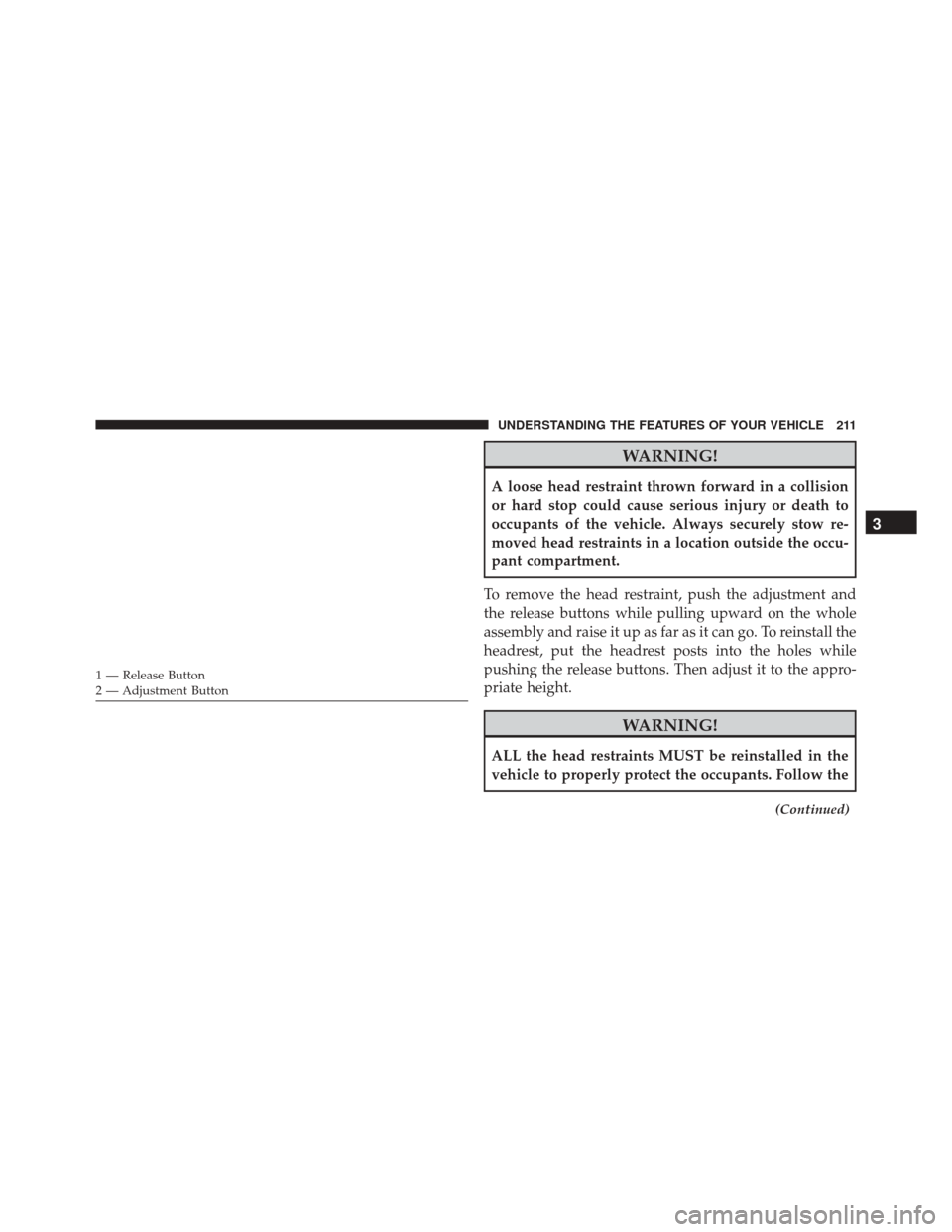
To remove the head restraint, push the adjustment and
the release buttons while pulling upward on the whole
assembly and raise it up as far as it can go. To reinstall the
headrest, put the headrest posts into the holes while
pushing the release buttons. Then adjust it to the appro-
priate height.
WARNING!
ALL the head restraints MUST be reinstalled in the
vehicle to properly protect the occupants. Follow the
(Continued)
1 — Release Button
2 — Adjustment Button
3
UNDERSTANDING THE FEATURES OF YOUR VEHICLE 211
Page 223 of 664
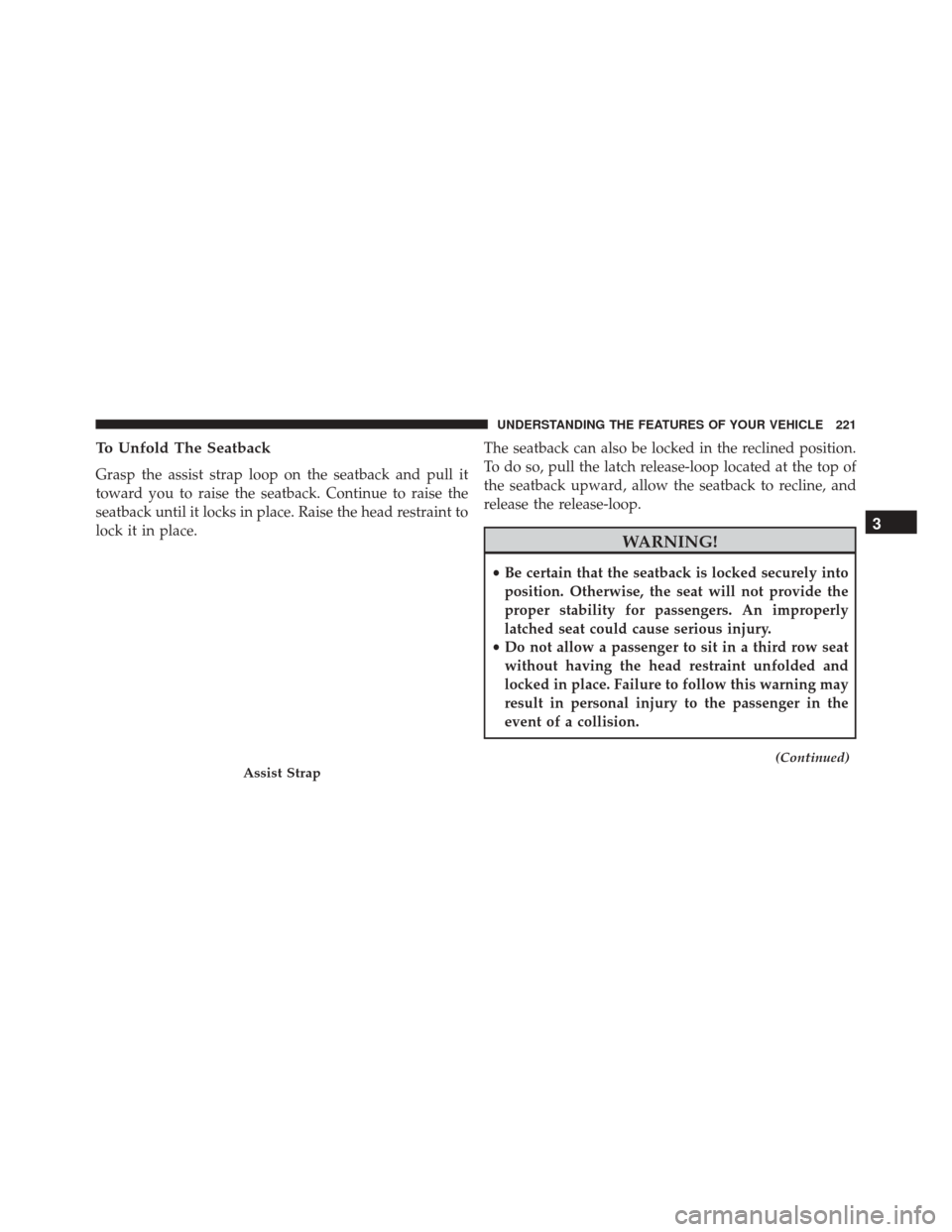
To Unfold The Seatback
Grasp the assist strap loop on the seatback and pull it
toward you to raise the seatback. Continue to raise the
seatback until it locks in place. Raise the head restraint to
lock it in place.The seatback can also be locked in the reclined position.
To do so, pull the latch release-loop located at the top of
the seatback upward, allow the seatback to recline, and
release the release-loop.
WARNING!
•
Be certain that the seatback is locked securely into
position. Otherwise, the seat will not provide the
proper stability for passengers. An improperly
latched seat could cause serious injury.
• Do not allow a passenger to sit in a third row seat
without having the head restraint unfolded and
locked in place. Failure to follow this warning may
result in personal injury to the passenger in the
event of a collision.
(Continued)Assist Strap
3
UNDERSTANDING THE FEATURES OF YOUR VEHICLE 221
Page 231 of 664
NOTE:
•If either light remains on and does not flash, or there is
a very fast flash rate, check for a defective outside light
bulb. If an indicator fails to light when the lever is
moved, it would suggest that the indicator bulb is
defective.
• A “Turn Signal On” message will appear in the Elec-
tronic Vehicle Information Center (EVIC) and a con-
tinuous chime will sound if the vehicle is driven more
than 1 mile (1.6 km) with either turn signal on.
Lane Change Assist
Tap the lever up or down once, without moving beyond
the detent, and the turn signal (right or left) will flash
three times then automatically turn off.
High/Low Beam Switch
Push the multifunction lever away from you to switch
the headlights to high beam. Pull the multifunction lever
toward you to switch the headlights back to low beam.
Flash-To-Pass
You can signal another vehicle with your headlights by
lightly pulling the multifunction lever toward you. This
will turn on the high beams headlights until the lever is
released.
Interior Lights
The interior lights come on when a door is opened.
To protect the battery, the interior lights will turn off
automatically 10 minutes after the ignition is moved to
the LOCK position. This will occur if the interior lights
were switched on manually or are on because a door is
open. This includes the glove box light and the trunk
3
UNDERSTANDING THE FEATURES OF YOUR VEHICLE 229
Page 252 of 664
WARNING!
•Drivers must be careful when backing up even
when using ParkSense. Always check carefully
behind your vehicle, look behind you, and be sure
to check for pedestrians, animals, other vehicles,
obstructions, and blind spots before backing up.
You are responsible for safety and must continue to
pay attention to your surroundings. Failure to do so
can result in serious injury or death.
• Before using ParkSense, it is strongly recom-
mended that the ball mount and hitch ball assem-
bly is disconnected from the vehicle when the
vehicle is not used for towing. Failure to do so can
result in injury or damage to vehicles or obstacles
because the hitch ball will be much closer to the
obstacle than the rear fascia when the loudspeaker
sounds the continuous tone. Also, the sensors
(Continued)
WARNING! (Continued)
could detect the ball mount and hitch ball assem-
bly, depending on its size and shape, giving a false
indication that an obstacle is behind the vehicle.
PARKVIEW REAR BACK UP CAMERA — IF
EQUIPPED
Your vehicle may be equipped with the ParkView Rear
Back Up Camera that allows you to see an on-screen
image of the rear surroundings of your vehicle whenever
the shift lever is put into REVERSE. The image will be
displayed in the touchscreen display along with a caution
note to “check entire surroundings” across the top of the
screen. After five seconds this note will disappear. The
ParkView camera is located on the rear of the vehicle
above the rear License plate.
250 UNDERSTANDING THE FEATURES OF YOUR VEHICLE
Page 281 of 664
Sliding Armrest
The center console armrest can also slide rearward for
easy access to the storage area.
WARNING!
Do not operate this vehicle with a console compart-
ment lid in the open position. Driving with the
console compartment lid open may result in injury in
a collision.
Flip ’n Stow Front Passenger Seat Storage — If
Equipped
The seat latch release-loop is located in the center of the
seat cushion between the seat cushion and the seatback.
Pull the loop upward to release the latch and then
forward to open the seat to the detent position.
Sliding Armrest
3
UNDERSTANDING THE FEATURES OF YOUR VEHICLE 279