ESP DODGE JOURNEY 2016 1.G Owner's Manual
[x] Cancel search | Manufacturer: DODGE, Model Year: 2016, Model line: JOURNEY, Model: DODGE JOURNEY 2016 1.GPages: 664
Page 185 of 664
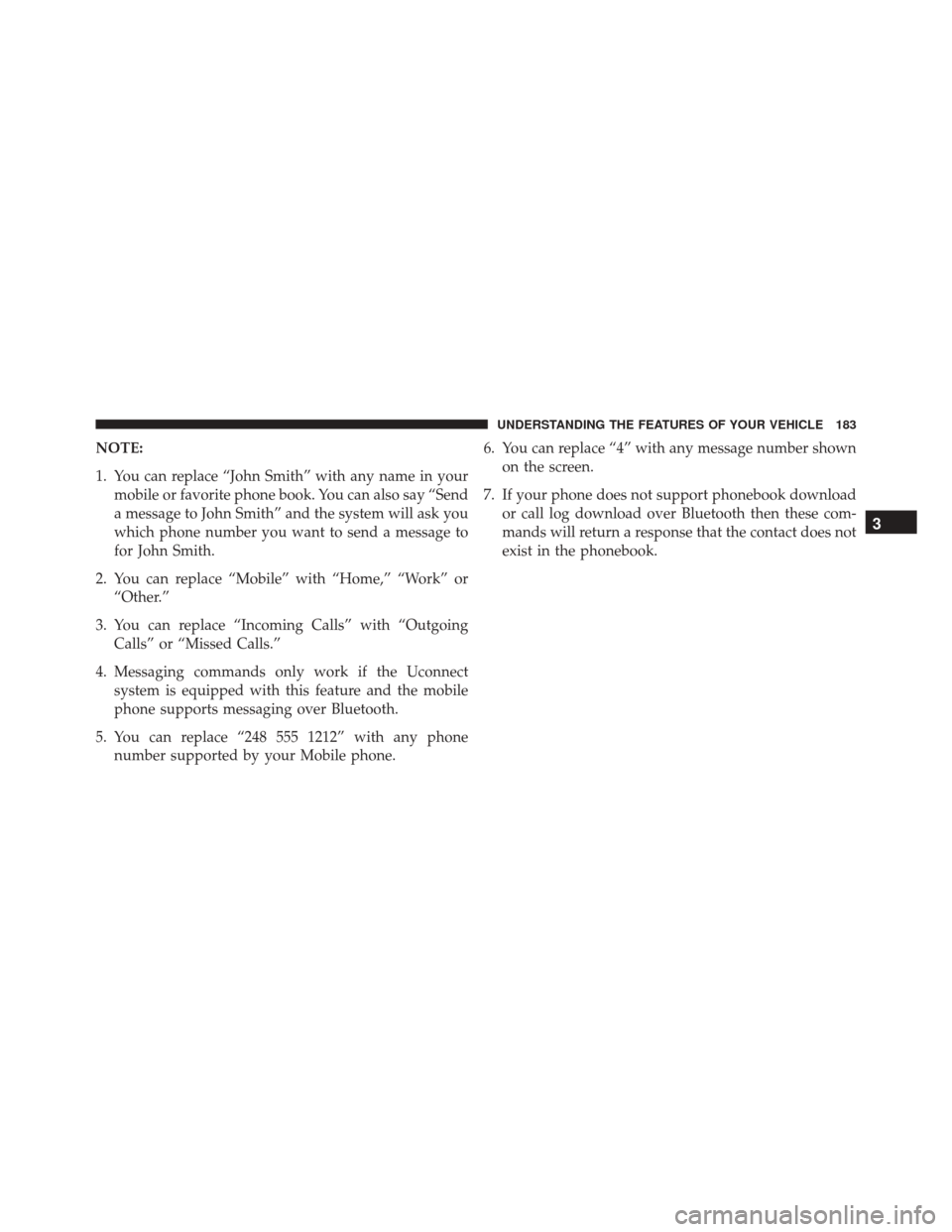
NOTE:
1. You can replace “John Smith” with any name in yourmobile or favorite phone book. You can also say “Send
a message to John Smith” and the system will ask you
which phone number you want to send a message to
for John Smith.
2. You can replace “Mobile” with “Home,” “Work” or “Other.”
3. You can replace “Incoming Calls” with “Outgoing Calls” or “Missed Calls.”
4. Messaging commands only work if the Uconnect system is equipped with this feature and the mobile
phone supports messaging over Bluetooth.
5. You can replace “248 555 1212” with any phone number supported by your Mobile phone. 6. You can replace “4” with any message number shown
on the screen.
7. If your phone does not support phonebook download or call log download over Bluetooth then these com-
mands will return a response that the contact does not
exist in the phonebook.
3
UNDERSTANDING THE FEATURES OF YOUR VEHICLE 183
Page 187 of 664
NOTE:Available Voice Commands are shown in bold
face and underlined in the gray shaded boxes.
General Information
This device complies with Part 15 of the FCC rules and
RSS 210 of Industry Canada. Operation is subject to the
following conditions:
• Changes or modifications not expressly approved by
the party responsible for compliance could void the
user’s authority to operate the equipment.
• This device may not cause harmful interference.
• This device must accept any interference received,
including interference that may cause undesired op-
eration.
VOICE COMMAND
Uconnect 8.4/8.4 Nav
The Uconnect Voice Command system allows
you to control your AM, FM radio, satellite
radio, disc player, SD Card, USB/iPod and
SiriusXM Travel Link.
NOTE: Take care to speak into the Voice Command
system as calmly and normally as possible. The ability of
the Voice Command system to recognize user voice
commands may be negatively affected by rapid speaking
or a raised voice level.3
UNDERSTANDING THE FEATURES OF YOUR VEHICLE 185
Page 188 of 664
WARNING!
Any voice commanded system should be used only
in safe driving conditions following all applicable
laws, including laws regarding phone use. Your at-
tention should be focused on safely operating the
vehicle. Failure to do so may result in a collision
causing serious injury or death.
When you push the Uconnect Voice Command
but-
ton, you will hear a beep. The beep is your signal to give
a command. If no command is spoken the system will say one of two
responses:
•
I didn’t understand
• I didn’t get that, etc.
If a command is not spoken a second time, the system
will respond with an error and give some direction as
what can be said based on the context you are in. After
three consecutive failures of a spoken command the VR
session will end.
186 UNDERSTANDING THE FEATURES OF YOUR VEHICLE
Page 190 of 664
Natural Speech
Natural speech allows the user to speak commands in
phrases or complete sentences. The system filters out
certain non-word utterances and sounds such as “ah”
and “eh.” The system handles fill-in words such as “I
would like to.”
The system handles multiple inputs in the same phrase
or sentence such as “make a phone call” and “to Kelly
Smith.” For multiple inputs in the same phrase or sen-
tence, the system identifies the topic or context and
provides the associated follow-up prompt such as “Who
do you want to call?” in the case where a phone call was
requested but the specific name was not recognized.The system utilizes continuous dialog; when the system
requires more information from the user it will ask a
question to which the user can respond without pressing
the Uconnect Voice Command
button.
Uconnect Voice Commands
The Uconnect Voice Command system understands two
types of commands. Universal commands are available at
all times. Local commands are available if the supported
radio mode is active.
Start a dialogue by pushing the Uconnect Voice Com-
mand
button.
188 UNDERSTANDING THE FEATURES OF YOUR VEHICLE
Page 195 of 664
NOTE:
•You can replace the album, artist, song, genre, playlist,
podcast and audio book names with any correspond-
ing names on the current device that is playing.
• You can replace “8” with any track on the CD that is
currently playing. Command is only available when
CD is playing.
• Playlist, Podcast and audio book commands are only
available when the iPod is connected and playing.
• VR commands, Albums, Artists, and Genre names are
based on the music metadata contained on the loaded/
connected device.
• Available Voice Commands are shown in bold face and
shaded grey.
3
UNDERSTANDING THE FEATURES OF YOUR VEHICLE 193
Page 205 of 664
NOTE:The engine must be running for the heated seats
to operate.
Vehicles Equipped With Remote Start
On models that are equipped with remote start, the
heated seats can be programed to come on during a
remote start.
This feature can be programmed through the Uconnect
system. Refer to “Uconnect Settings” in “Understanding
Your Instrument Panel” for further information.
WARNING!
• Persons who are unable to feel pain to the skin
because of advanced age, chronic illness, diabetes,
spinal cord injury, medication, alcohol use, exhaus-
tion or other physical condition must exercise care
when using the seat heater. It may cause burns
(Continued)
WARNING! (Continued)
even at low temperatures, especially if used for
long periods of time.
• Do not place anything on the seat or seatback that
insulates against heat, such as a blanket or cushion.
This may cause the seat heater to overheat. Sitting
in a seat that has been overheated could cause
serious burns due to the increased surface tempera-
ture of the seat.
Manual Front Seat Adjustments
For models equipped with manual seats, the driver and
passenger seats can be adjusted forward or rearward by
using a bar located by the front of the seat cushion, near
the floor.
3
UNDERSTANDING THE FEATURES OF YOUR VEHICLE 203
Page 239 of 664
HEATED STEERING WHEEL — IF EQUIPPED
The steering wheel contains a heating element that helps
warm your hands in cold weather. The heated steering
wheel has only one temperature setting. Once the heated
steering wheel has been turned on it will operate for up
to 80 minutes before automatically shutting off. The
heated steering wheel can shut off early or may not turn
on when the steering wheel is already warm.
The heated steering wheel control button is located
within the Uconnect system. You can gain access to the
control button through the climate screen or the controls
screen.
•Press the heated steering wheel button
once to
turn the heating element ON.
• Press the heated steering wheel buttona second
time to turn the heating element OFF.
NOTE: The engine must be running for the heated
steering wheel to operate. Vehicles Equipped With Remote Start
On models that are equipped with remote start, the
heated steering wheel can be programmed to come on
during a remote start through the Uconnect system. Refer
to “Uconnect Settings” in “Understanding Your Instru-
ment Panel” for further information.
WARNING!
•
Persons who are unable to feel pain to the skin
because of advanced age, chronic illness, diabetes,
spinal cord injury, medication, alcohol use, exhaus-
tion, or other physical conditions must exercise
care when using the steering wheel heater. It may
cause burns even at low temperatures, especially if
used for long periods.
• Do not place anything on the steering wheel that
insulates against heat, such as a blanket or steering
(Continued)
3
UNDERSTANDING THE FEATURES OF YOUR VEHICLE 237
Page 252 of 664
WARNING!
•Drivers must be careful when backing up even
when using ParkSense. Always check carefully
behind your vehicle, look behind you, and be sure
to check for pedestrians, animals, other vehicles,
obstructions, and blind spots before backing up.
You are responsible for safety and must continue to
pay attention to your surroundings. Failure to do so
can result in serious injury or death.
• Before using ParkSense, it is strongly recom-
mended that the ball mount and hitch ball assem-
bly is disconnected from the vehicle when the
vehicle is not used for towing. Failure to do so can
result in injury or damage to vehicles or obstacles
because the hitch ball will be much closer to the
obstacle than the rear fascia when the loudspeaker
sounds the continuous tone. Also, the sensors
(Continued)
WARNING! (Continued)
could detect the ball mount and hitch ball assem-
bly, depending on its size and shape, giving a false
indication that an obstacle is behind the vehicle.
PARKVIEW REAR BACK UP CAMERA — IF
EQUIPPED
Your vehicle may be equipped with the ParkView Rear
Back Up Camera that allows you to see an on-screen
image of the rear surroundings of your vehicle whenever
the shift lever is put into REVERSE. The image will be
displayed in the touchscreen display along with a caution
note to “check entire surroundings” across the top of the
screen. After five seconds this note will disappear. The
ParkView camera is located on the rear of the vehicle
above the rear License plate.
250 UNDERSTANDING THE FEATURES OF YOUR VEHICLE
Page 254 of 664
WARNING!
Drivers must be careful when backing up even when
using the ParkView Rear Back Up Camera. Always
check carefully behind your vehicle, and be sure to
check for pedestrians, animals, other vehicles, ob-
structions, or blind spots before backing up. You are
responsible for the safety of your surroundings and
must continue to pay attention while backing up.
Failure to do so can result in serious injury or death.
CAUTION!
•To avoid vehicle damage, ParkView should only be
used as a parking aid. The ParkView camera is
unable to view every obstacle or object in your
drive path.
(Continued)
CAUTION! (Continued)
•To avoid vehicle damage, the vehicle must be
driven slowly when using ParkView to be able to
stop in time when an obstacle is seen. It is recom-
mended that the driver look frequently over his/her
shoulder when using ParkView.
NOTE: If snow, ice, mud, or any foreign substance builds
up on the camera lens, clean the lens, rinse with water,
and dry with a soft cloth. Do not cover the lens.
OVERHEAD CONSOLE
The overhead console contains courtesy/reading lights,
storage for sunglasses, an interior observation mirror and
an optional power sunroof switch.
252 UNDERSTANDING THE FEATURES OF YOUR VEHICLE
Page 266 of 664
WARNING!(Continued)
after 1982. Do not use a garage door opener without
these safety features. Call toll-free 1-800-355-3515
or, on the Internet at HomeLink.com for safety
information or assistance.
General Information
This device complies with FCC rules Part 15 and Industry
Canada RSS-210. Operation is subject to the following
two conditions:
1. This device may not cause harmful interference.
2. This device must accept any interference that may be
received including interference that may cause unde-
sired operation. NOTE:
•
The transmitter has been tested and it complies with
FCC and IC rules. Changes or modifications not ex-
pressly approved by the party responsible for compli-
ance could void the user ’s authority to operate the
device.
• The term IC before the certification/registration num-
ber only signifies that Industry Canada technical speci-
fications were met.
POWER SUNROOF — IF EQUIPPED
The power sunroof switch is located between the sun
visors on the overhead console.
264 UNDERSTANDING THE FEATURES OF YOUR VEHICLE