air condition DODGE JOURNEY 2017 1.G User Guide
[x] Cancel search | Manufacturer: DODGE, Model Year: 2017, Model line: JOURNEY, Model: DODGE JOURNEY 2017 1.GPages: 510
Page 299 of 510
CD/DVD DISC MAINTENANCE
To keep a CD/DVD in good condition, take the following
precautions:
1. Handle the disc by its edge; avoid touching the surface.
2. If the disc is stained, clean the surface with a soft cloth,wiping from center to edge.
3. Do not apply paper or tape to the disc; avoid scratching the disc.
4. Do not use solvents such as benzene, thinner, cleaners, or anti-static sprays.
5. Store the disc in its case after playing.
6. Do not expose the disc to direct sunlight.
7. Do not store the disc where temperatures may become too high.
NOTE: If you experience difficulty in playing a particular
disc, it may be damaged (e.g., scratched, reflective coating
removed, a hair, moisture or dew on the disc) oversized, or
have protection encoding. Try a known good disc before
considering disc player service.
RADIO OPERATION AND MOBILE DEVICES
Under certain conditions, an “on” mobile device in your
vehicle can cause erratic or noisy performance from your
radio. This condition may be lessened or eliminated by
relocating the mobile device antenna. This condition is not
harmful to the radio. If your radio performance does not
satisfactorily “clear” by the repositioning of the antenna, it
is recommended that the radio volume be turned down or
off during mobile device operation when not using
Uconnect (if equipped).
CLIMATE CONTROLS
The air conditioning and heating system is designed to
make you comfortable in all types of weather. This system
can be operated through either the instrument panel or
through the Uconnect system display.
When the Uconnect system is in different modes (Radio,
Player, Settings, More, etc.) the driver and passenger
temperature settings will be indicated at the top of the
display.
4
UNDERSTANDING YOUR INSTRUMENT PANEL 297
Page 304 of 510
11. Modes
The airflow distribution mode can be adjusted so air comes
from the instrument panel outlets, floor outlets, and demist
outlets. The Mode settings are as follows:•Panel Mode
Air comes from the outlets in the instrument
panel. Each of these outlets can be individually
adjusted to direct the flow of air. The air vanes
of the center outlets and outboard outlets can be moved
up and down or side to side to regulate airflow
direction. There is a shut off wheel located below the
air vanes to shut off or adjust the amount of airflow
from these outlets.
• Bi-Level Mode
Air comes from the instrument panel outlets
and floor outlets. A slight amount of air is
directed through the defrost and side window
demister outlets.
NOTE: BI-LEVEL mode is designed under comfort condi-
tions to provide cooler air out of the panel outlets and
warmer air from the floor outlets. •
Floor Mode
Air comes from the floor outlets. A slight
amount of air is directed through the defrost
and side window demister outlets.
• Mix Mode
Air comes from the floor, defrost and side
window demist outlets. This mode works best
in cold or snowy conditions.
12. Climate Control OFF Button
Press and release this button to turn the Climate Control
ON/OFF.
13. Driver Temperature Control Down Button (Radio 8.4
Only)
Provides the driver with independent temperature control.
Push the button for cooler temperature settings.
NOTE: In Sync mode, this button will also automatically
adjust the passenger temperature setting at the same time.
14. Driver Temperature Control Up Button (Radio 8.4
Only)
Provides the driver with independent temperature control.
Push the button for warmer temperature settings.
302 UNDERSTANDING YOUR INSTRUMENT PANEL
Page 305 of 510
NOTE:In Sync mode, this button will also automatically
adjust the passenger temperature setting at the same time.
15. Temperature Control (Radio 4.3 Only)
Press the driver or passenger temperature button on the
touchscreen to regulate the temperature of the air inside
the passenger compartment. Moving the temperature bar
into the red area, indicates warmer temperatures. Moving
the temperature bar into the blue area indicates cooler
temperatures. Driver and passenger have independent
temperature control if Sync mode is not illuminated.
Climate Control Functions
A/C (Air Conditioning)
The Air Conditioning (A/C) button allows the operator to
manually activate or deactivate the air conditioning sys-
tem. When the air conditioning system is turned on, cool
dehumidified air will flow through the outlets into the
cabin. For improved fuel economy, press the A/C button to
turn off the air conditioning and manually adjust the
blower and airflow mode settings. Also, make sure to select
only Panel, Bi-Level or Floor modes. NOTE:
•
For Manual Climate Controls, if the system is in Mix,
Floor or Defrost Mode, the A/C can be turned off, but
the A/C system shall remain active to prevent fogging of
the windows.
• If fog or mist appears on the windshield or side glass,
select Defrost mode and adjust blower speed if needed.
• If your air conditioning performance seems lower than
expected, check the front of the A/C condenser (located
in front of the radiator), for an accumulation of dirt or
insects. Clean with a gentle water spray from the front of
the radiator and through the condenser.
MAX A/C
MAX A/C sets the control for maximum cooling perfor-
mance.
Press and release to toggle between MAX A/C and the
prior settings. The button on the touchscreen illuminates
when MAX A/C is ON.
In MAX A/C, the blower level and mode position can be
adjusted to desired user settings. Pressing other settings
will cause the MAX A/C operation to switch to the selected
setting and MAX A/C to exit.
4
UNDERSTANDING YOUR INSTRUMENT PANEL 303
Page 314 of 510
•Floor Mode
Air comes from the floor outlets. A slight
amount of air is directed through the defrost
and side window demister outlets.
• Mix Mode
Air comes from the floor, defrost and side
window demist outlets. This mode works best
in cold or snowy conditions.
13. Climate Control OFF Button
Press and release this button to turn the Climate Control
ON/OFF.
14. Driver Temperature Control Down Button (Radio 8.4)
Provides the driver with independent temperature control.
Push the button for cooler temperature settings.
NOTE: In Sync mode, this button will also automatically
adjust the passenger temperature setting at the same time.
15. Driver Temperature Control Up Button (Radio 8.4)
Provides the driver with independent temperature control.
Push the button for warmer temperature settings.
NOTE: In Sync mode, this button will also automatically
adjust the passenger temperature setting at the same time. 16. Temperature Control (Radio 4.3)
Press the driver or passenger temperature button on the
touchscreen to regulate the temperature of the air inside
the passenger compartment. Moving the temperature bar
into the red area, indicates warmer temperatures. Moving
the temperature bar into the blue area indicates cooler
temperatures. Driver and passenger have independent
temperature control if Sync mode is not illuminated.
Climate Control Functions
A/C (Air Conditioning)
The Air Conditioning (A/C) button allows the operator to
manually activate or deactivate the air conditioning sys-
tem. When the air conditioning system is turned on, cool
dehumidified air will flow through the outlets into the
cabin. For improved fuel economy, press the A/C button to
turn off the air conditioning and manually adjust the
blower and airflow mode settings. Also, make sure to select
only Panel, Bi-Level or Floor modes.
NOTE:
If fog or mist appears on the windshield or side
glass, select Defrost mode and adjust blower speed if
needed.
312 UNDERSTANDING YOUR INSTRUMENT PANEL
Page 320 of 510
Rear Mode Control
Auto Mode
•The rear system automatically maintains the correct
mode and comfort level desired by the rear seat occu-
pants.
Headliner Mode
Air comes from the outlets in the headliner. Each of
these outlets can be individually adjusted to direct
the flow of air. Moving the air vanes of the outlets to one
side will shut off the airflow.
Bi-Level Mode
Air comes from both the headliner outlets and the
floor outlets.
NOTE: In many temperature positions, the BI-LEVEL
mode is designed to provide cooler air out of the headliner
outlets and warmer air from the floor outlets.
Floor Mode
Air comes from the floor outlets.
Operating Tips
NOTE: Refer to the chart at the end of this section for
suggested control settings for various weather conditions.
Summer Operation
The engine cooling system must be protected with a
high-quality antifreeze coolant to provide proper corrosion
protection and to protect against engine overheating. A
solution of 50% OAT (Organic Additive Technology) cool-
ant that meets the requirements of FCA Material Standard
MS.90032 and 50% water is recommended. Refer to “Main-
tenance Procedures” in “Maintaining Your Vehicle” for
proper coolant selection.
Winter Operation
Use of the air Recirculation mode during winter months is
not recommended because it may cause window fogging.
Vacation Storage
Any time you store your vehicle or keep it out of service
(i.e., vacation) for two weeks or more, run the air condi-
tioning system at idle for about five minutes in the fresh air
and high blower setting. This will ensure adequate system
lubrication to minimize the possibility of compressor dam-
age when the system is started again.
318 UNDERSTANDING YOUR INSTRUMENT PANEL
Page 346 of 510
Electronic Brake Force Distribution (EBD)
This function manages the distribution of the braking
torque between the front and rear axles by limiting braking
pressure to the rear axle. This is done to prevent overslip of
the rear wheels to avoid vehicle instability, and to prevent
the rear axle from entering ABS before the front axle.
Brake System Warning Light
The red “Brake System Warning Light” will turn on when
the ignition switch is turned to the ON position and may
stay on for as long as four seconds.
If the “Brake System Warning Light” remains on or comes
on while driving, it indicates that the brake system is not
functioning properly and that immediate service is re-
quired. If the “Brake System Warning Light” does not come
on when the ignition switch is turned to the ON position,
have the light repaired as soon as possible.
Anti-Lock Brake System (ABS)
The Anti-Lock Brake System (ABS) provides increased
vehicle stability and brake performance under most brak-
ing conditions. The system automatically prevents wheel
lock, and enhances vehicle control during braking.The ABS performs a self-check cycle to ensure that the ABS
is working properly each time the vehicle is started and
driven. During this self-check, you may hear a slight
clicking sound as well as some related motor noises.
ABS is activated during braking when the system detects
one or more wheels begins to lock. Road conditions such as
ice, snow, gravel, bumps, railroad tracks, loose debris, or
panic stops may increase the likelihood of ABS activa-
tion(s).
You also may experience the following when ABS activates:
•
The ABS motor noise (it may continue to run for a short
time after the stop).
• The clicking sound of solenoid valves.
• Brake pedal pulsations.
• A slight drop of the brake pedal at the end of the stop.
These are all normal characteristics of ABS.WARNING!
• The ABS contains sophisticated electronic equip-
ment that may be susceptible to interference caused
(Continued)
344 STARTING AND OPERATING
Page 347 of 510
WARNING!(Continued)
by improperly installed or high output radio trans-
mitting equipment. This interference can cause pos-
sible loss of anti-lock braking capability. Installation
of such equipment should be performed by qualified
professionals.
• Pumping of the Anti-Lock Brakes will diminish their
effectiveness and may lead to a collision. Pumping
makes the stopping distance longer. Just press firmly
on your brake pedal when you need to slow down or
stop.
• The ABS cannot prevent the natural laws of physics
from acting on the vehicle, nor can it increase brak-
ing or steering efficiency beyond that afforded by the
condition of the vehicle brakes and tires or the
traction afforded.
• The ABS cannot prevent collisions, including those
resulting from excessive speed in turns, following
another vehicle too closely, or hydroplaning.
• The capabilities of an ABS equipped vehicle must
never be exploited in a reckless or dangerous manner
that could jeopardize the user ’s safety or the safety of
others. ABS is designed to function with the OEM tires. Modifica-
tion may result in degraded ABS performance.Anti-Lock Brake Warning Light
The yellow “Anti-Lock Brake Warning Light” will turn on
when the ignition switch is turned to the ON position and
may stay on for as long as four seconds.
If the “Anti-Lock Brake Warning Light” remains on or
comes on while driving, it indicates that the anti-lock
portion of the brake system is not functioning and that
service is required. However, the conventional brake sys-
tem will continue to operate normally if the “Brake System
Warning Light” is not on.
If the “Anti-Lock Brake Warning Light” is on, the brake
system should be serviced as soon as possible to restore the
benefits of anti-lock brakes. If the “Anti-Lock Brake Warn-
ing Light” does not come on when the ignition switch is
turned to the ON position, have the light repaired as soon
as possible.
Brake Assist System (BAS)
The BAS is designed to optimize the vehicle’s braking
capability during emergency braking maneuvers. The sys-
tem detects an emergency braking situation by sensing the
rate and amount of brake application and then applies
5
STARTING AND OPERATING 345
Page 366 of 510
pressure should be increased by 3 psi (21 kPa), which
equals 1 psi (7 kPa) for every 12°F (7°C) for this outside
temperature condition.
Tire pressure may increase from 2 to 6 psi (13 to 40 kPa)
during operation. DO NOT reduce this normal pressure
build up or your tire pressure will be too low.
Tire Pressures For High Speed Operation
The manufacturer advocates driving at safe speeds and
within posted speed limits. Where speed limits or condi-
tions are such that the vehicle can be driven at high speeds,
maintaining correct tire inflation pressure is very impor-
tant. Increased tire pressure and reduced vehicle loading
may be required for high-speed vehicle operation. Refer to
your authorized tire dealer or original equipment vehicle
dealer for recommended safe operating speeds, loading
and cold tire inflation pressures.
WARNING!
High speed driving with your vehicle under maximum
load is dangerous. The added strain on your tires could
cause them to fail. You could have a serious collision.
Do not drive a vehicle loaded to the maximum capacity
at continuous speeds above 75 mph (120 km/h).
Radial Ply Tires
WARNING!
Combining radial ply tires with other types of tires on
your vehicle will cause your vehicle to handle poorly.
The instability could cause a collision. Always use
radial ply tires in sets of four. Never combine them
with other types of tires.
Tire Repair
If your tire becomes damaged, it may be repaired if it meets
the following criteria:
• The tire has not been driven on when flat.
• The damage is only on the tread section of your tire
(sidewall damage is not repairable).
• The puncture is no greater thana¼ofaninch (6 mm).
Consult an authorized tire dealer for tire repairs and
additional information.
Damaged Run Flat tires, or Run Flat tires that have
experienced a loss of pressure should be replaced immedi-
ately with another Run Flat tire of identical size and service
description (Load Index and Speed Symbol).
364 STARTING AND OPERATING
Page 382 of 510
display pressure values in place of the dashes. On the next
ignition switch cycle the “SERVICE TPM SYSTEM” mes-
sage will no longer be displayed as long as no system fault
exists.
General Information
This device complies with Part 15 of the FCC rules and
RSS-210 of Industry Canada. Operation is subject to the
following two conditions:
(1) This device may not cause harmful interference.
(2) This device must accept any interference received,
including interference that may cause undesired operation.
NOTE:Changes or modifications not expressly approved
by the party responsible for compliance could void the
user ’s authority to operate the equipment.
FUEL REQUIREMENTS
This engine is designed to meet all emis-
sions regulations and provide optimum
fuel economy and performance when
using high quality unleaded “Regular”
gasoline having a posted octane number
of 87 as specified by the (R+M)/2 method. The use of higher octane “Premium” gasoline is
not required, as it will not provide any benefit over
“Regular” gasoline in these engines.
While operating on gasoline with an octane number of 87,
hearing a light knocking sound from the engine is not a
cause for concern. However, if the engine is heard making
a heavy knocking sound, see your dealer immediately. Use
of gasoline with an octane number lower than 87 can cause
engine failure and may void or not be covered by the New
Vehicle Limited Warranty.
Poor quality gasoline can cause problems such as hard
starting, stalling, and hesitations. If you experience these
symptoms, try another brand of gasoline before consider-
ing service for the vehicle.
Reformulated Gasoline
Many areas of the country require the use of cleaner
burning gasoline referred to as “Reformulated Gasoline”.
Reformulated gasoline contains oxygenates and are specifi-
cally blended to reduce vehicle emissions and improve air
quality.
The use of reformulated gasoline is recommended. Properly
blended reformulated gasoline will provide improved perfor-
mance and durability of engine and fuel system components.
380 STARTING AND OPERATING
Page 402 of 510
Cooling System
To reduce potential for engine and transmission overheat-
ing, take the following actions:
City Driving
When stopped for short periods, shift the transmission into
NEUTRAL and increase engine idle speed.Highway Driving
Reduce speed.
Air Conditioning
Turn off temporarily.
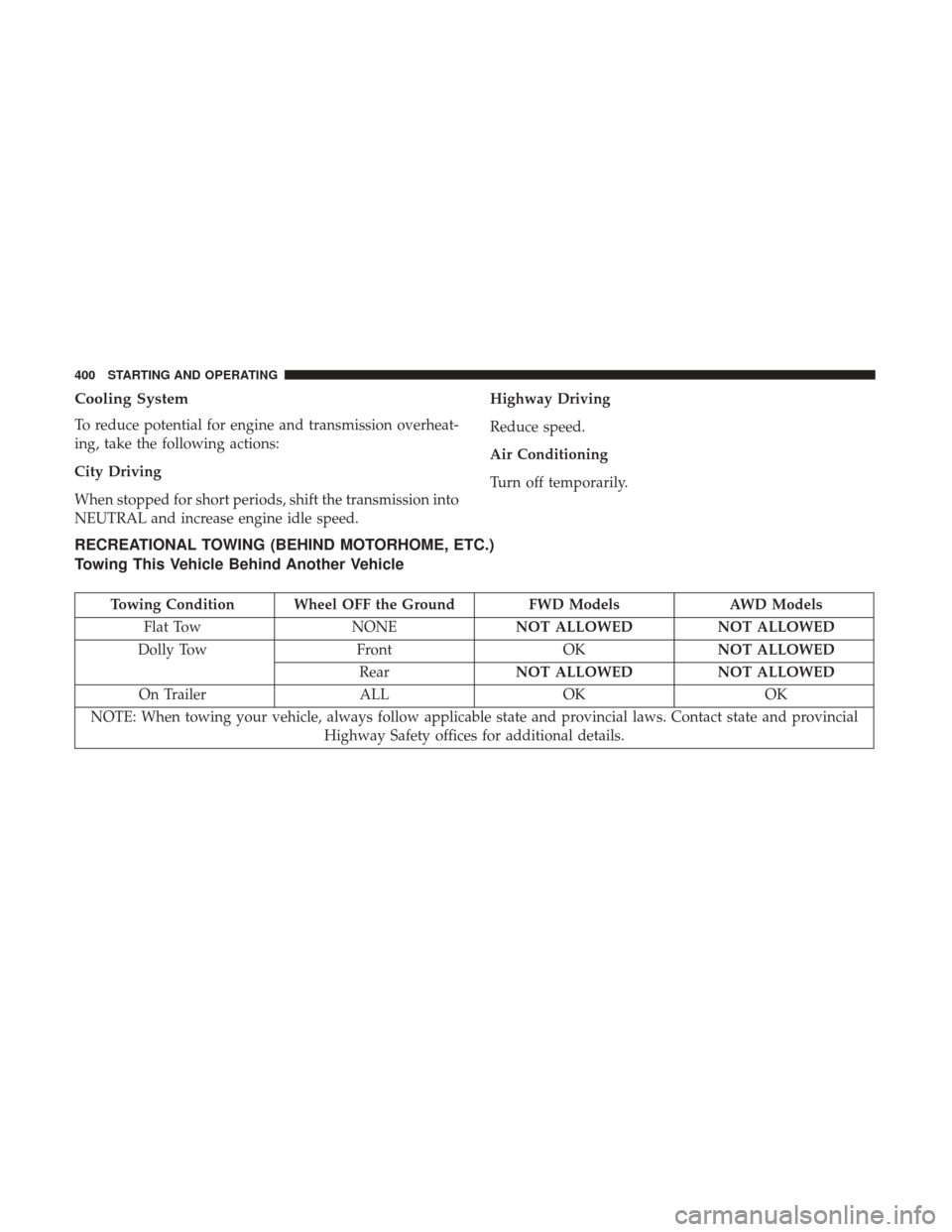
RECREATIONAL TOWING (BEHIND MOTORHOME, ETC.)
Towing This Vehicle Behind Another Vehicle
Towing Condition Wheel OFF the Ground
FWD ModelsAWD Models
Flat Tow NONENOT ALLOWED NOT ALLOWED
Dolly Tow FrontOKNOT ALLOWED
Rear NOT ALLOWED NOT ALLOWED
On Trailer ALLOKOK
NOTE: When towing your vehicle, always follow applicable state and provincial laws. Contact state and provincial Highway Safety offices for additional details.
400 STARTING AND OPERATING