mirror DODGE JOURNEY 2019 User Guide
[x] Cancel search | Manufacturer: DODGE, Model Year: 2019, Model line: JOURNEY, Model: DODGE JOURNEY 2019Pages: 524, PDF Size: 5.29 MB
Page 146 of 524
In cases when the IBS detects charging system failure, or
the vehicle battery conditions are deteriorating, electrical
load reduction actions will take place to extend the driving
time and distance of the vehicle. This is done by reducing
power to or turning off non-essential electrical loads.
Load reduction is only active when the engine is running.
It will display a message if there is a risk of battery
depletion to the point where the vehicle may stall due to
lack of electrical supply, or will not restart after the current
drive cycle.
When load reduction is activated, the message “Battery
Saver On” or “Battery Saver Mode” will appear in the
instrument cluster.
These messages indicate the vehicle battery has a low state
of charge and continues to lose electrical charge at a rate
that the charging system cannot sustain.
NOTE:
•The charging system is independent from load reduc-
tion. The charging system performs a diagnostic on the
charging system continuously. •
If the Battery Charge Warning Light is on it may indicate
a problem with the charging system. Refer to “Battery
Charge Warning Light” in “Getting To Know Your
Instrument Panel” for further information.
The electrical loads that may be switched off (if equipped),
and vehicle functions which can be affected by load
reduction:
• Heated Seat/Vented Seats/Heated Wheel
• Rear Defroster And Heated Mirrors
• HVAC System
• 115V AC Power Inverter System
• Audio and Telematics System
Loss of the battery charge may indicate one or more of the
following conditions:
• The charging system cannot deliver enough electrical
power to the vehicle system because the electrical loads
are larger than the capability of charging system. The
charging system is still functioning properly.
144 GETTING TO KNOW YOUR INSTRUMENT PANEL
Page 231 of 524
STARTING THE ENGINE
Before starting your vehicle, adjust your seat, adjust the
inside and outside mirrors, fasten your seat belt, and if
present, instruct all other occupants to buckle their seat
belts.
WARNING!
•When exiting the vehicle, always make sure the
ignition is in “OFF” mode, remove the key fob from
the vehicle and lock the vehicle.
• Never leave children alone in a vehicle, or with
access to an unlocked vehicle. Leaving children in a
vehicle unattended is dangerous for a number of
reasons. A child or others could be seriously or
fatally injured. Children should be warned not to
touch the parking brake, brake pedal or the trans-
mission gear selector.
• Do not leave the key fob in or near the vehicle (or in
a location accessible to children), and do not leave
the ignition (of a vehicle equipped with Keyless
Enter-N-Go) in the ACC or ON/RUN mode. A child
could operate power windows, other controls, or
move the vehicle.
(Continued)
WARNING! (Continued)
•Do not leave children or animals inside parked
vehicles in hot weather. Interior heat build-up may
cause serious injury or death.
Automatic Transmission
The gear selector must be in the NEUTRAL or PARK
position before you can start the engine. Apply the brakes
before shifting into any driving gear.
CAUTION!
Damage to the transmission may occur if the following
precautions are not observed:
• Do not shift from REVERSE, PARK, or NEUTRAL
into any forward gear when the engine is above idle
speed.
• Shift into PARK only after the vehicle has come to a
complete stop.
• Shift into or out of REVERSE only after the vehicle
has come to a complete stop and the engine is at idle
speed.
• Before shifting into any gear, make sure your foot is
firmly on the brake pedal.
6
STARTING AND OPERATING 229
Page 258 of 524
When the vehicle is shifted out of REVERSE, the rear
camera mode is exited and the last selected touchscreen
appears again.
The camera image is also available in the rearview mirror
if the touchscreen display is unavailable.
If your vehicle is equipped with the Camera Delay feature
and it is turned on, the rear camera image will be displayed
for up to 10 seconds when the vehicle is shifted out of
REVERSE unless the forward vehicle speed exceeds 8 mph
(13 km/h), the transmission is shifted into PARK, the X
button on the camera display screen is pressed, or the
vehicle’s ignition is cycled to the OFF position.Static grid lines will illustrate the width of the vehicle.
These lines will show separate zones that will help indicate
the distance to the rear of the vehicle.
NOTE:
The ParkView Rear Back Up Camera has program-
mable modes of operation that may be selected through the
Uconnect System. Refer to “Uconnect Settings” in “Multi-
media” for further information.
Different colored zones indicate the distance to the rear of
the vehicle.
The following table shows the approximate distances for
each zone:
Zone Distance To The Rear Of The Vehicle
Red 0 - 1 ft (0 - 30 cm)
Yellow 1 ft - 3 ft (30 cm - 1 m)
Green 3 ft or greater (1 m or greater)
256 STARTING AND OPERATING
Page 286 of 524
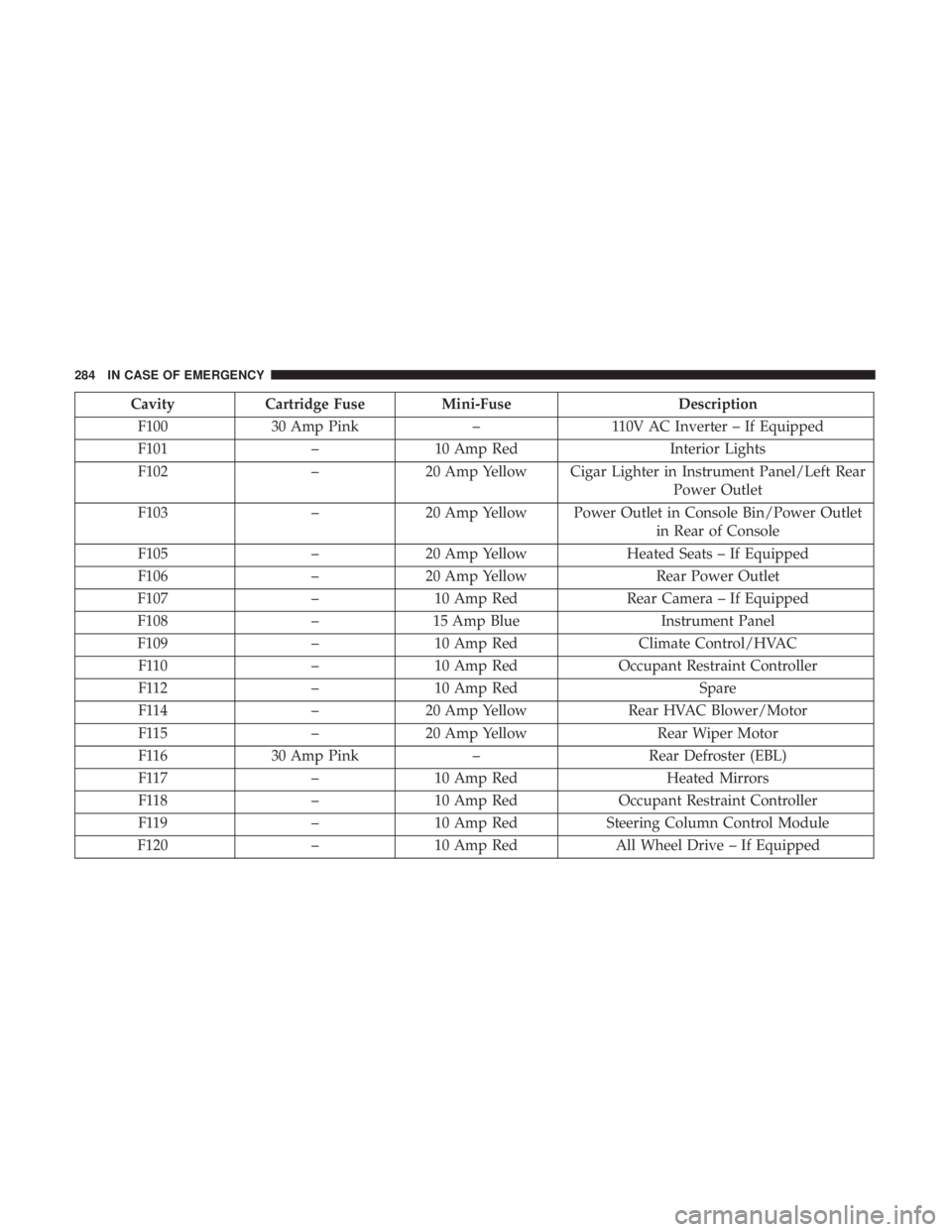
CavityCartridge Fuse Mini-Fuse Description
F100 30 Amp Pink –110V AC Inverter – If Equipped
F101 –10 Amp Red Interior Lights
F102 –20 Amp Yellow Cigar Lighter in Instrument Panel/Left Rear
Power Outlet
F103 –20 Amp Yellow Power Outlet in Console Bin/Power Outlet
in Rear of Console
F105 –20 Amp Yellow Heated Seats – If Equipped
F106 –20 Amp Yellow Rear Power Outlet
F107 –10 Amp Red Rear Camera – If Equipped
F108 –15 Amp Blue Instrument Panel
F109 –10 Amp Red Climate Control/HVAC
F110 –10 Amp Red Occupant Restraint Controller
F112 –10 Amp Red Spare
F114 –20 Amp Yellow Rear HVAC Blower/Motor
F115 –20 Amp Yellow Rear Wiper Motor
F116 30 Amp Pink –Rear Defroster (EBL)
F117 –10 Amp Red Heated Mirrors
F118 –10 Amp Red Occupant Restraint Controller
F119 –10 Amp Red Steering Column Control Module
F120 –10 Amp Red All Wheel Drive – If Equipped
284 IN CASE OF EMERGENCY
Page 287 of 524
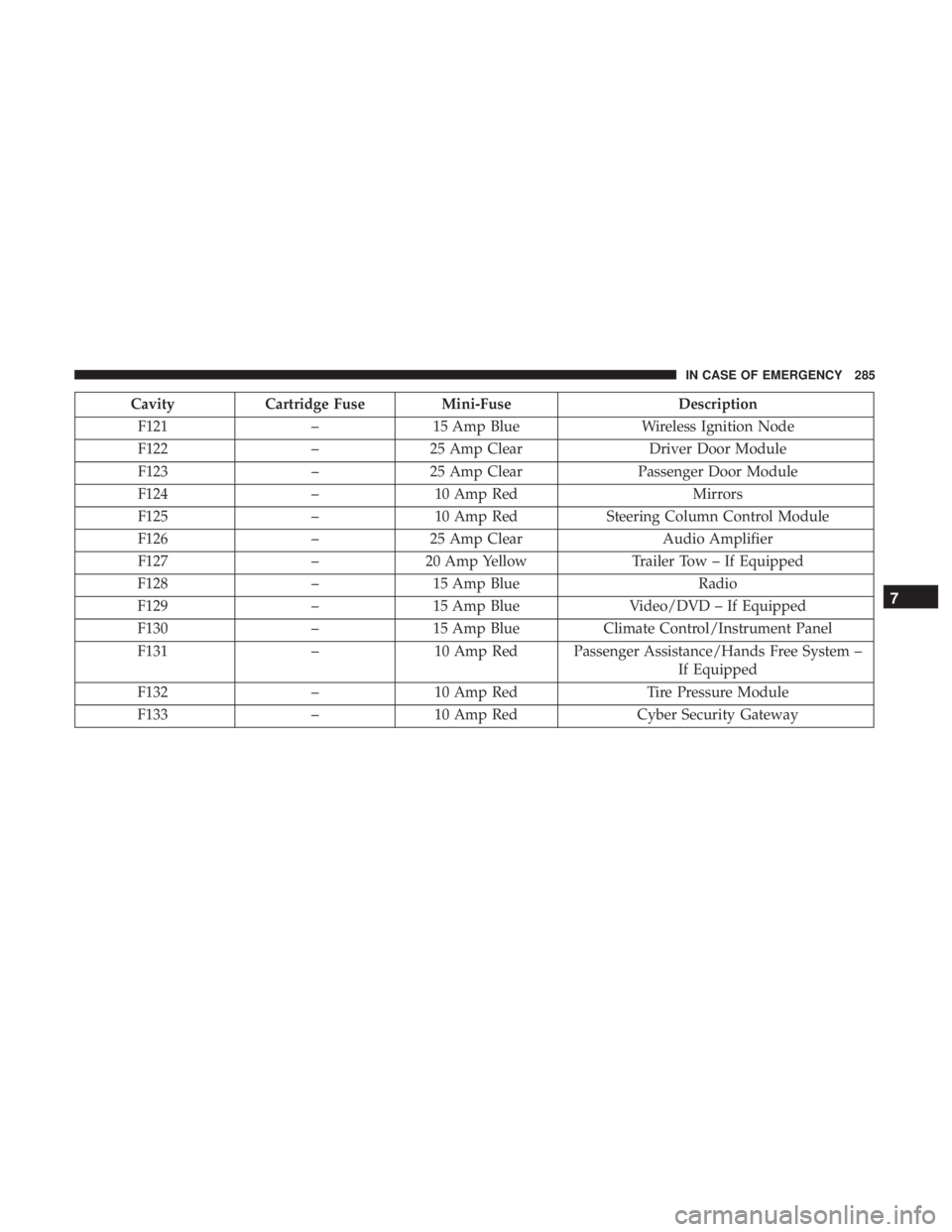
CavityCartridge Fuse Mini-Fuse Description
F121 –15 Amp Blue Wireless Ignition Node
F122 –25 Amp Clear Driver Door Module
F123 –25 Amp Clear Passenger Door Module
F124 –10 Amp Red Mirrors
F125 –10 Amp Red Steering Column Control Module
F126 –25 Amp Clear Audio Amplifier
F127 –20 Amp Yellow Trailer Tow – If Equipped
F128 –15 Amp Blue Radio
F129 –15 Amp Blue Video/DVD – If Equipped
F130 –15 Amp Blue Climate Control/Instrument Panel
F131 –10 Amp Red Passenger Assistance/Hands Free System –
If Equipped
F132 –10 Amp Red Tire Pressure Module
F133 –10 Amp Red Cyber Security Gateway
7
IN CASE OF EMERGENCY 285
Page 372 of 524
NOTE:If equipped with light colored leather, it tends to
show any foreign material, dirt, and fabric dye transfer
more so than darker colors. The leather is designed for easy
cleaning, and FCA recommends Mopar total care leather
cleaner applied on a cloth to clean the leather seats as
needed.
CAUTION!
Do not use Alcohol and Alcohol-based and/or Ketone
based cleaning products to clean leather upholstery, as
damage to the upholstery may result.
Glass Surfaces
All glass surfaces should be cleaned on a regular basis with
Mopar Glass Cleaner, or any commercial household-type
glass cleaner. Never use an abrasive type cleaner. Use
caution when cleaning the inside rear window equipped
with electric defrosters or windows equipped with radio
antennas. Do not use scrapers or other sharp instruments
that may scratch the elements. When cleaning the rear view mirror, spray cleaner on the
towel or cloth that you are using. Do not spray cleaner
directly on the mirror.
Cleaning The Cupholders
Clean with a damp cloth or towel using a mild detergent.
370 SERVICING AND MAINTENANCE
Page 399 of 524
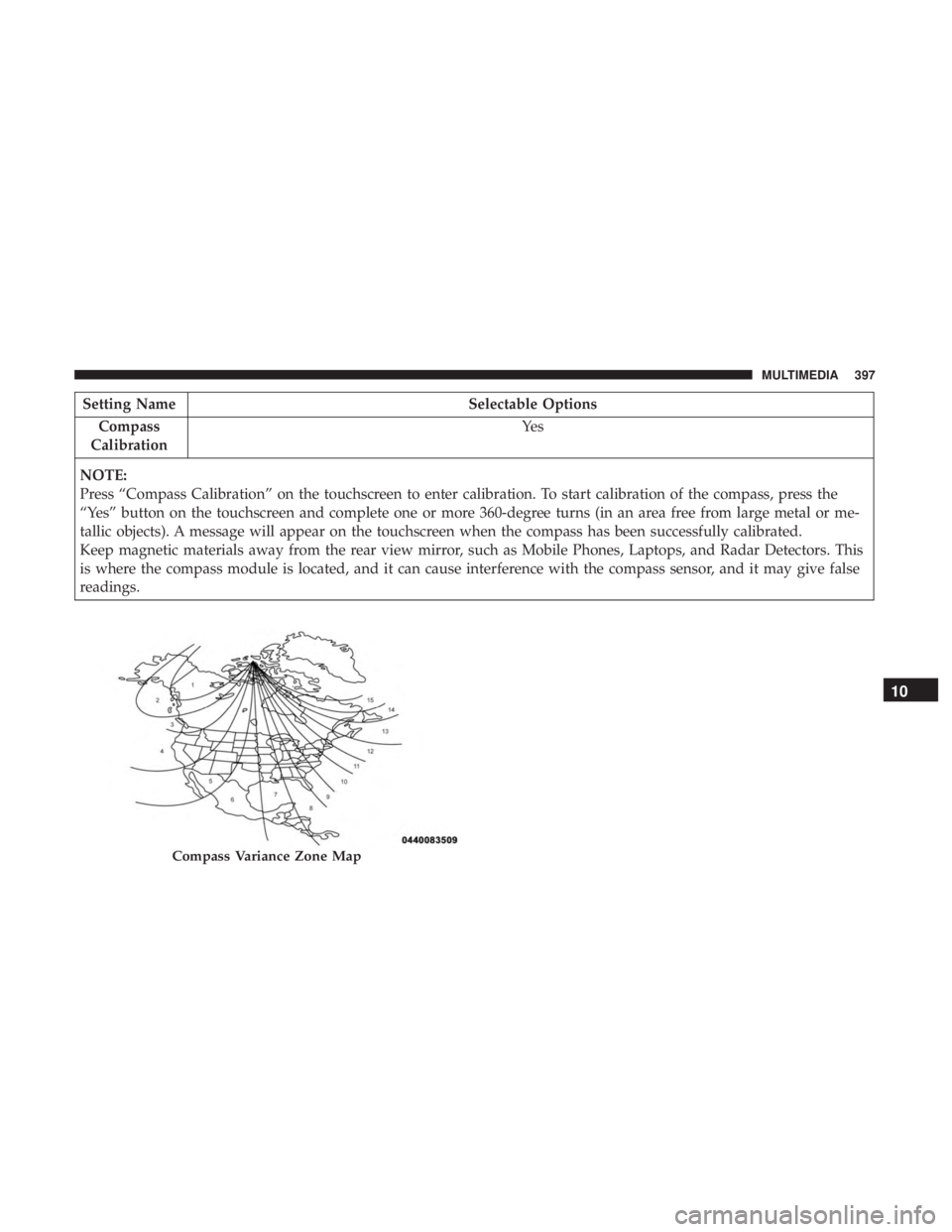
Setting NameSelectable Options
Compass
Calibration Ye s
NOTE:
Press “Compass Calibration” on the touchscreen to enter calibration. To start calibration of the compass, press the
“Yes” button on the touchscreen and complete one or more 360-degree turns (in an area free from large metal or me-
tallic objects). A message will appear on the touchscreen when the compass has been successfully calibrated.
Keep magnetic materials away from the rear view mirror, such as Mobile Phones, Laptops, and Radar Detectors. This
is where the compass module is located, and it can cause interference with the compass sensor, and it may give false
readings.
Compass Variance Zone Map
10
MULTIMEDIA 397
Page 412 of 524
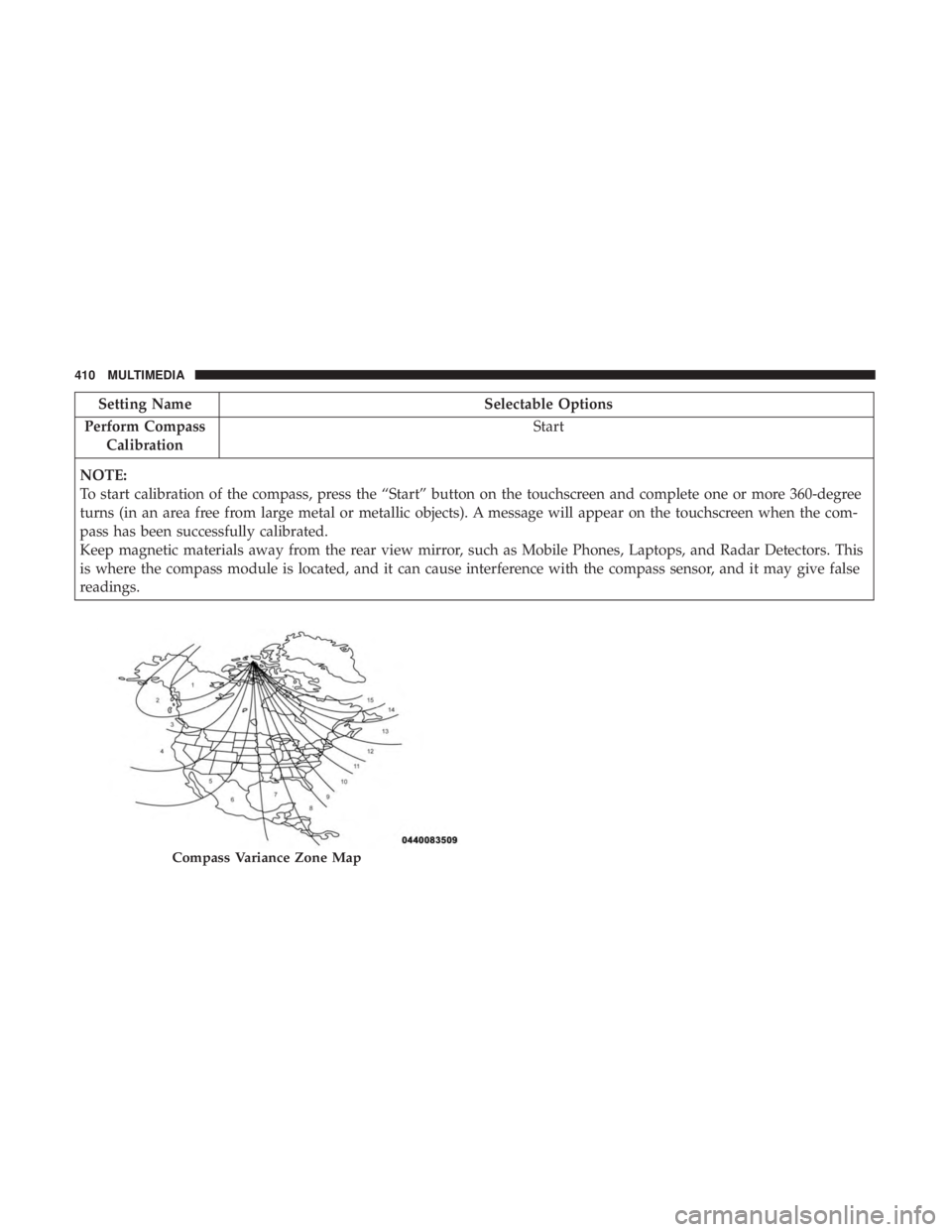
Setting NameSelectable Options
Perform Compass Calibration Start
NOTE:
To start calibration of the compass, press the “Start” button on the touchscreen and complete one or more 360-degree
turns (in an area free from large metal or metallic objects). A message will appear on the touchscreen when the com-
pass has been successfully calibrated.
Keep magnetic materials away from the rear view mirror, such as Mobile Phones, Laptops, and Radar Detectors. This
is where the compass module is located, and it can cause interference with the compass sensor, and it may give false
readings.
Compass Variance Zone Map
410 MULTIMEDIA
Page 447 of 524
Dialing Using The Mobile Phone Keypad
You can dial a phone number with your mobile phone
keypad and still use the Uconnect Phone (while dialing via
the mobile phone keypad, the user must exercise caution
and take precautionary safety measures). By dialing a
number with your connected Bluetooth mobile phone, the
audio will be played through your vehicle’s audio system.
The Uconnect Phone will work the same as if you dial the
number using a voice command.
NOTE:Certain brands of mobile phones do not send the
dial ring to the Uconnect Phone to play it on the vehicle
audio system, so you will not hear it. Under this situation,
after successfully dialing a number the user may feel that
the call did not go through even though the call is in
progress. Once your call is answered, you will hear the
audio.
Mute/Un-Mute (Mute OFF)
When you mute the Uconnect Phone, you will still be able
to hear the conversation coming from the other party, but
the other party will not be able to hear you. To mute the
Uconnect Phone simply press the “Mute” button on the
Phone main screen.
Advanced Phone Connectivity
Transfer Call To And From Mobile Phone
The Uconnect Phone allows ongoing calls to be transferred
from your mobile phone to the Uconnect Phone without
terminating the call. To transfer an ongoing call from your
connected mobile phone to the Uconnect Phone or vice
versa, press the “Transfer” button on the Phone main
screen.
Connect Or Disconnect Link Between the Uconnect
Phone And Mobile Phone
If you would like to connect or disconnect the Bluetooth
connection between a Uconnect Phone paired mobile
phone and the Uconnect Phone, follow the instructions
described in your mobile phone User’s Manual.
Things You Should Know About Your Uconnect
Phone
Voice Command
For best performance:
• Adjust the rearview mirror to provide at least ½ inch
(1 cm) gap between the overhead console (if equipped)
and the mirror.
10
MULTIMEDIA 445
Page 470 of 524
Things You Should Know About Your Uconnect
Phone
Voice Command
For the best performance:
•Adjust the rearview mirror to provide at least ½ inch (1
cm) gap between the overhead console (if equipped) and
the mirror.
• Always wait for the beep before speaking.
• Speak normally, without pausing, just as you would
speak to a person sitting a few feet/meters away from
you.
• Ensure that no one other than you is speaking during a
voice command period. Performance is maximized under:
•
Low-To-Medium Blower Setting
• Low-To-Medium Vehicle Speed
• Low Road Noise
• Smooth Road Surface
• Fully Closed Windows
• Dry Weather Condition
WARNING!
ALWAYS drive safely with your hands on the wheel.
You have full responsibility and assume all risks
related to the use of the Uconnect features and appli-
cations in this vehicle. Only use Uconnect when it is
safe to do so. Failure to do so may result in an accident
involving serious injury or death.
468 MULTIMEDIA