USB port DODGE JOURNEY 2020 User Guide
[x] Cancel search | Manufacturer: DODGE, Model Year: 2020, Model line: JOURNEY, Model: DODGE JOURNEY 2020Pages: 396, PDF Size: 25.53 MB
Page 326 of 396
324 MULTIMEDIA
Fast Seek Up
Press and hold the Seek Up button and the
Bluetooth® device will begin to fast forward
th
rough the current track until the button is
released.
Fast Seek Down
Press and hold the Seek Down button and
the Bluetooth® device will begin to rewind
t h
rough the current track until the button is
released.
Source
Press the Source button on the touchscreen to
s e
lect the desired audio source, Disc/USB/SD
Card/AUX/ or Bluetooth®. This screen will time
out after a few seconds and return to the main
radio screen if no selection is made.
Repeat
Press the Repeat button to toggle the repeat
f u
nctionality. The Repeat button is highlighted
when active. The Radio will continue to play the
current track, repeatedly, as long as the repeat
is active. Info
Press the Info button to display the current
t
r
ack information. Press the Info button a
second time to cancel this feature.
Audio
Refer to “Audio” in “Radio Mode” for further
i n
formation on adjusting the audio settings.
UCONNECT PHONE
Uconnect Phone is a voice-activated,
hands-free, in-vehicle communications system.
Uconnect Phone allows you to dial a phone
number with your mobile phone.
Uconnect Phone supports the following
fe
atures:
Voice Activated Features:
Hands-Free dialing via Voice (“Call John
Smith Mobile” or, “Dial 248 555 1212”).
Hands-Free text-to-speech listening of your
incoming SMS messages.
Hands-Free text messaging (“Send a
message to John Smith Mobile”).
Redialing last dialed numbers (“Redial”).
Calling Back the last incoming call number
(“Call Back”).
Viewing Call logs on screen (“Show Incoming
Calls,” “Show Outgoing Calls,” “Show Missed
Calls,” “Show Recent Calls”).
Searching Contacts phone number (“Search
for John Smith Mobile”).
Screen Activated Features
Dialing via Keypad using touchscreen.
Viewing and Calling contacts from Phone -
books displayed on the touchscreen.
Setting Favorite Contact Phone numbers so
they are easily accessible on the Main Phone
screen.
Viewing and Calling contacts from Recent
Call logs.
Reviewing your recent Incoming SMS.
Sending a text message via the touchscreen.
Page 356 of 396
354 MULTIMEDIA
Custom Points of Interest (POIs)
NOTE:
Custom POI files must be named “poi.gpi”. and
l o
cated on the USB storage device in a folder
named “POI” within a folder named “Garmin®”
(Garmin®/POI/).
You can manually load custom POI databases,
av
ailable from various companies on the
Internet. Some custom POI databases contain
alert information for points such as safety
cameras and school zones. The navigation
system can notify you when you approach one
of these points. You are responsible for
ensuring that your use of safety camera
information is lawful in your area. NOTE:
Each time you load custom POIs to the naviga -
tion system, any other custom POIs already
s a
ved in the system will be overwritten.
Finding Custom POIs
You can view a list of the custom POIs loaded in
y o
ur navigation system.
Press Where To? > Extras > Custom POIs .Deleting Custom POIs
1. P
ress
T
ools > My Data > Delete Custom
POI(s)
.
2. P ress Yes
to confirm.
NOTE:
All custom POIs will be deleted from your navi -
gation system.
Saving Trip Logs
Trip logs are recorded while you navigate a
r o
ute.
SiriusXM® Travel Link (US Market Only)
Now, in addition to delivering over 130 channels
of the best sports, entertainment, talk and
commercial-free music, SiriusXM® now offers
premium infotainment services that work in
conjunction with compatible navigation systems.
To access SiriusXM® Travel Link, press the
ME
NU button then press the Travel Link button.
CAUTION!
Garmin® and FCA US LLC are not responsible
for the consequences of using custom POI
databases, or for the accuracy of custom POI
databases.
After downloading your POI database, use the
Ga
rmin® POI Loader to install the POIs onto a
USB mass storage device. Use the USB mass
storage device to load the POIs. The POI
Loader is available at
garmin.com/products/
poiloader
. Refer to the POI Loader Help file for
more information; click H
e
lp to open the Help
file. The file name can only be POI.gpi. No other
file name or extension should be used.
Page 366 of 396
364 MULTIMEDIA
The left-hand control is a rocker-type switch with
a push button in the center. The function of the
left-hand control is different depending on
which mode you are in.
The following describes the left-hand control
op
eration in each mode:
RADIO OPERATION
Pushing the top of the switch will “Seek” up for
the next listenable station and pushing the
bottom of the switch will “Seek” down for the
next listenable station.
The button located in the center of the left-hand
co
ntrol will tune to the next preset station that
you have programmed in the radio preset
button.
MEDIA MODE
Pushing the top of the switch once goes to the
next track on the selected media (AUX/USB/
Bluetooth®). Pushing the bottom of the switch
once goes to the beginning of the current track,
or to the beginning of the previous track if it is
within eight seconds after the current track
begins to play.
IPOD®/USB/MP3 CONTROL
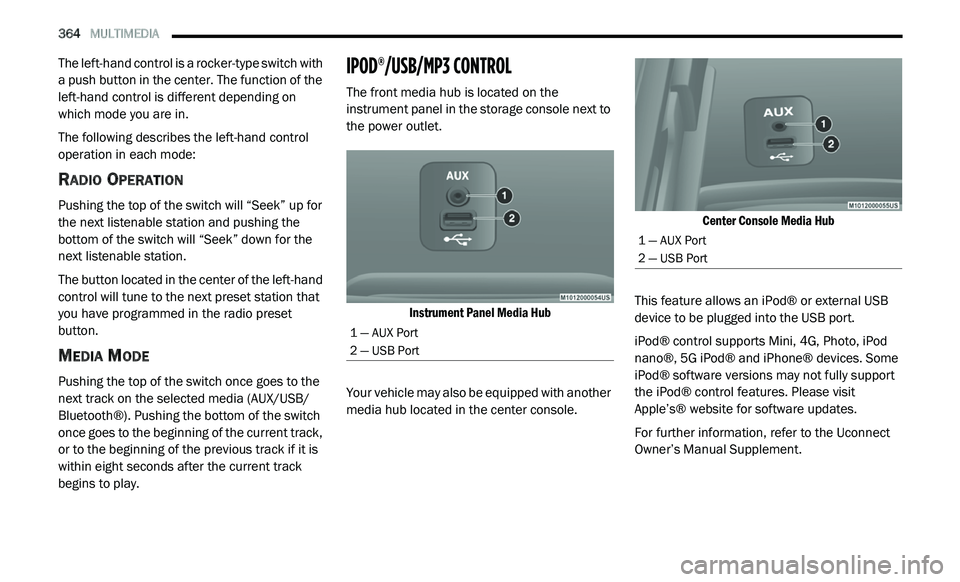
The front media hub is located on the
instrument panel in the storage console next to
the power outlet.
Instrument Panel Media Hub
Your vehicle may also be equipped with another
me
dia hub located in the center console.
Center Console Media Hub
This feature allows an iPod® or external USB
d e
vice to be plugged into the USB port.
iPod® control supports Mini, 4G, Photo, iPod
n a
no®, 5G iPod® and iPhone® devices. Some
iPod® software versions may not fully support
the iPod® control features. Please visit
Apple’s® website for software updates.
For further information, refer to the Uconnect
Ow
ner’s Manual Supplement.
1 — AUX Port
2 — USB Port
1 — AUX Port
2 — USB Port
Page 394 of 396
392
Towing...........................................................178Disabled Vehicle........................................212Guide.........................................................181Recreational..............................................186Weight.......................................................181Towing Behind A Motorhome.........................186Towing Eyes...................................................213Traction.........................................................187Traction Control.............................................115Trailer Towing................................................178Cooling System Tips..................................185Hitches......................................................180Minimum Requirements............................182Tips...........................................................184Trailer And Tongue Weight........................181Wiring........................................................184Trailer Towing Guide......................................181Trailer Weight................................................181Transaxle
Autostick...................................................166TransmissionAutomatic........................................161, 233Fluid..........................................................233Maintenance.............................................233Transporting Pets..........................................154Tread Wear Indicators...................................245Trip Computer..................................................97Turn Signals...................................42, 106, 192
U
UconnectAdvanced Phone Connectivity
..................304Phone Call Features........................299, 302Uconnect Settings.......................10, 16, 266Uconnect (Hands-Free Phone)Making A Phone Call........................300, 332Uconnect Phone...........................................294Making A Call............................................332Pairing......................................................327Receiving A Call........................................333Uconnect Voice Command............................378Underhood Fuses..........................................196Uniform Tire Quality Grades..........................251Unleaded Gasoline.......................................257Untwisting Procedure, Seat Belt...................125USB...............................................................364
V
Vanity Mirrors..................................................40Vehicle Certification Label............................177Vehicle Identification Number (VIN)..............256Vehicle Loading..........................177, 178, 239Vehicle Modifications/Alterations......................8Vehicle Storage................................................71Video Entertainment System........................365Viscosity, Engine Oil......................................223Voice Command...................................337, 378
W
Warning Flashers, Hazard.............................189Warning Lights (Instrument Cluster
Descriptions).................................................104Warnings And Cautions......................................8Warranty Information....................................382Washer Adding Fluid..............................................221Washers, Windshield......................44, 45, 221Washing Vehicle............................................253WaterDriving Through........................................187Wheel And Wheel Tire Care...........................249Wheel And Wheel Tire Trim...........................249Wind Buffeting..........................................74, 75Window Fogging...............................................71Windows..........................................................72Power...........................................................72Reset Auto-Up..............................................73Windshield Defroster....................................155Windshield Washers.................................44, 45Fluid..........................................................221Windshield Wiper Blades..............................226Windshield Wipers...........................................44Wipers Blade Replacement...........................226Wipers, Intermittent.........................................45Wipers, Rear....................................................46Wrecker Towing.............................................212