clock DODGE JOURNEY 2020 User Guide
[x] Cancel search | Manufacturer: DODGE, Model Year: 2020, Model line: JOURNEY, Model: DODGE JOURNEY 2020Pages: 396, PDF Size: 25.53 MB
Page 202 of 396
200 IN CASE OF EMERGENCY
SPARE TIRE LOCATION AND REMOVAL
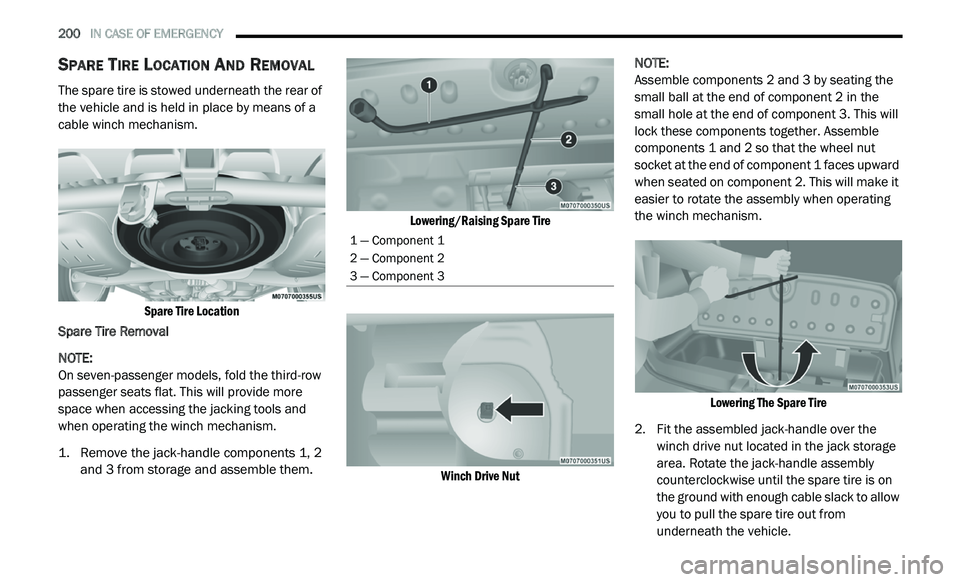
The spare tire is stowed underneath the rear of
the vehicle and is held in place by means of a
cable winch mechanism.
Spare Tire Location
Spare Tire Removal
NOTE:
On seven-passenger models, fold the third-row
p a
ssenger seats flat. This will provide more
space when accessing the jacking tools and
when operating the winch mechanism.
1. Remove the jack-handle components 1, 2 a
nd 3 from storage and assemble them.
Lowering/Raising Spare Tire
Winch Drive Nut
NOTE:
Assemble components 2 and 3 by seating the
s m
all ball at the end of component 2 in the
s m
all hole at the end of component 3. This will
lock these components together. Assemble
components 1 and 2 so that the wheel nut
socket at the end of component 1 faces upward
when seated on component 2. This will make it
easier to rotate the assembly when operating
the winch mechanism.
Lowering The Spare Tire
2. F it the assembled jack-handle over the
w
inch drive nut located in the jack storage
area. Rotate the jack-handle assembly
counterclockwise until the spare tire is on
the ground with enough cable slack to allow
you to pull the spare tire out from
underneath the vehicle.
1 — Component 1
2 — Component 2
3 — Component 3
Page 204 of 396
202 IN CASE OF EMERGENCY
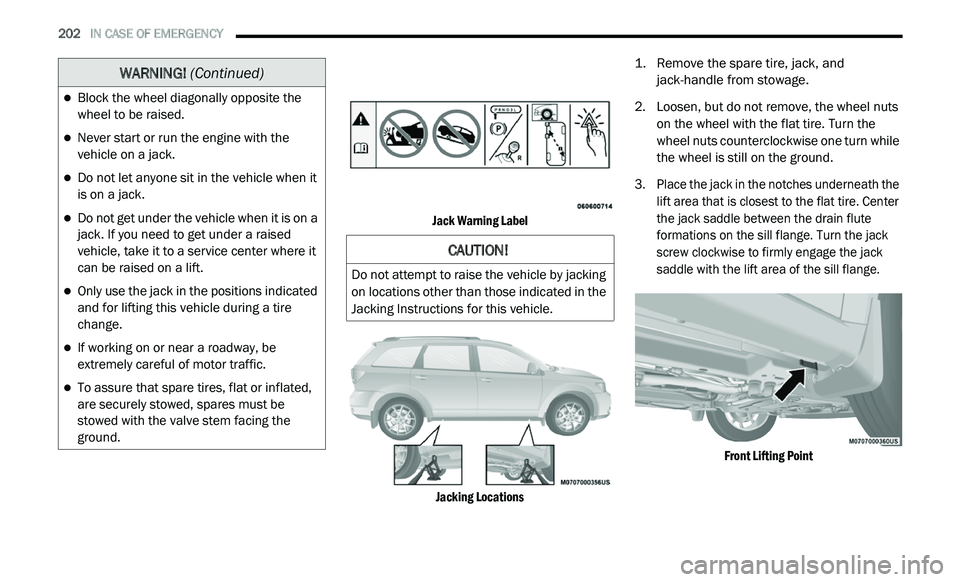
Jack Warning Label
Jacking Locations
1. R
emove the spare tire, jack, and
j
ack-handle from stowage.
2. Lo osen, but do not remove, the wheel nuts
o
n the wheel with the flat tire. Turn the
wheel nuts counterclockwise one turn while
the wheel is still on the ground.
3. Place the jack in the notches underneath the l
ift area that is closest to the flat tire. Center
the jack saddle between the drain flute
formations on the sill flange. Turn the jack
screw clockwise to firmly engage the jack
saddle with the lift area of the sill flange.
Front Lifting Point
Block the wheel diagonally opposite the
wheel to be raised.
Never start or run the engine with the
vehicle on a jack.
Do not let anyone sit in the vehicle when it
is on a jack.
Do not get under the vehicle when it is on a
jack. If you need to get under a raised
vehicle, take it to a service center where it
can be raised on a lift.
Only use the jack in the positions indicated
and for lifting this vehicle during a tire
change.
If working on or near a roadway, be
extremely careful of motor traffic.
To assure that spare tires, flat or inflated,
are securely stowed, spares must be
stowed with the valve stem facing the
ground.
WARNING! (Continued)
CAUTION!
Do not attempt to raise the vehicle by jacking
on locations other than those indicated in the
Jacking Instructions for this vehicle.
Page 206 of 396
204 IN CASE OF EMERGENCY
NOTE:
For vehicles so equipped, do not attempt to
install a center cap or wheel cover on the
compact spare.
Refer to “Compact Spare Tire” and to
“Limited Use Spare” under “Tires” in
“Servicing And Maintenance” for additional
warnings, cautions, and information about
the spare tire, its use, and operation.
7. I nstall the wheel nuts with the cone-shaped
e
nd of the nut toward the wheel. Lightly
tighten the wheel nuts.
8. Lo wer the vehicle by turning the jack screw
c
ounterclockwise with the jack handle.
9. F
inish tightening the lug nuts. Push down on
t
he wrench while at the end of the handle for
increased leverage. Tighten the lug nuts in
a star pattern until each nut has been
t i
ghtened twice. For the correct lug nut
torque, refer to “Wheel And Tire Torque
Specifications” in “Technical Specifications”.
If in doubt about the correct tightness, have
them checked with a torque wrench by an
authorized dealer or service station.
10. Lo wer the jack to its fully closed position.
1
1. P lace the deflated (flat) tire in the cargo
a
rea. Do not stow the deflated tire in the
spare tire stowage location. Have the
deflated (flat) tire repaired or replaced as
soon as possible.
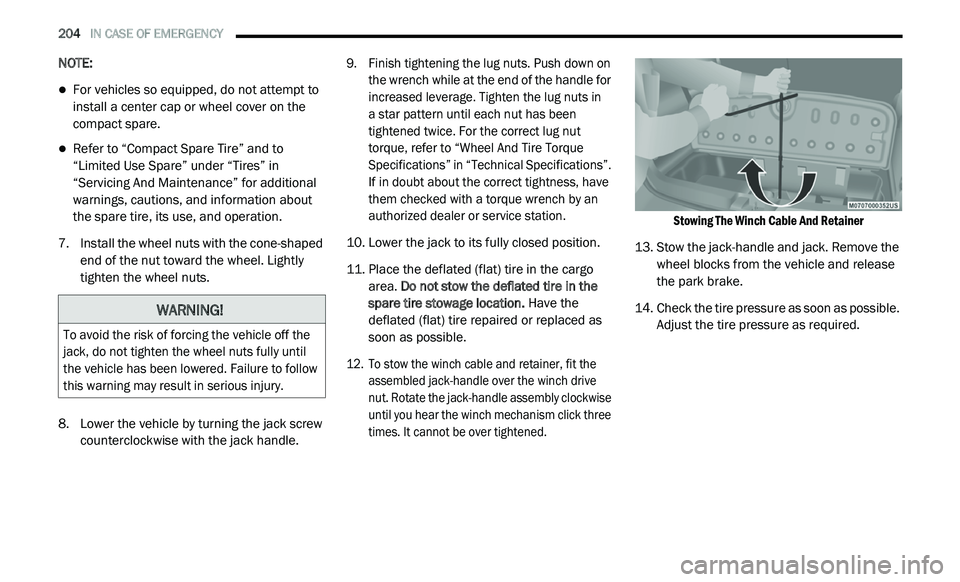
12. T o stow the winch cable and retainer, fit the
a
ssembled jack-handle over the winch drive
nut. Rotate the jack-handle assembly clockwise
until you hear the winch mechanism click three
times. It cannot be over tightened.
Stowing The Winch Cable And Retainer
13. S tow the jack-handle and jack. Remove the
w
heel blocks from the vehicle and release
the park brake.
14. C heck the tire pressure as soon as possible.
A
djust the tire pressure as required.WARNING!
To avoid the risk of forcing the vehicle off the
jack, do not tighten the wheel nuts fully until
the vehicle has been lowered. Failure to follow
this warning may result in serious injury.
Page 207 of 396
IN CASE OF EMERGENCY 205
ROAD TIRE INSTALLATION
Vehicles Equipped With Wheel Covers
1. Mount the road tire on the axle.
2. T o ease the installation process for steel
w
heels with wheel covers, install two lug nuts
on the mounting studs which are on each
side of the valve stem. Install the lug nuts
with the cone shaped end of the nut toward
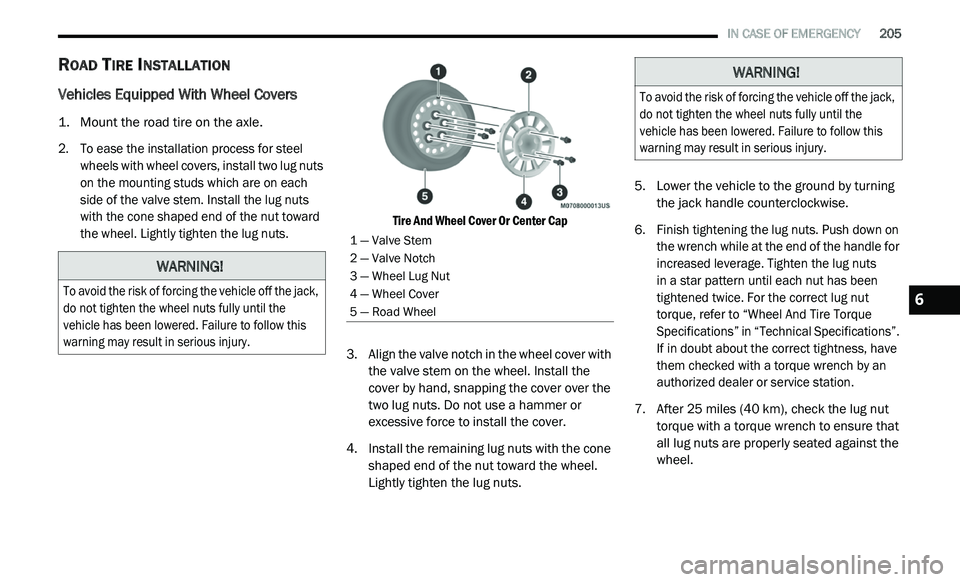
the wheel. Lightly tighten the lug nuts. Tire And Wheel Cover Or Center Cap
3. A lign the valve notch in the wheel cover with
t
he valve stem on the wheel. Install the
cover by hand, snapping the cover over the
two lug nuts. Do not use a hammer or
excessive force to install the cover.
4. I nstall the remaining lug nuts with the cone
s
haped end of the nut toward the wheel.
Lightly tighten the lug nuts. 5. Lo
wer the vehicle to the ground by turning
t
he jack handle counterclockwise.
6. F inish tightening the lug nuts. Push down on
t
he wrench while at the end of the handle for
increased leverage. Tighten the lug nuts
in a star pattern until each nut has been
t i
ghtened twice. For the correct lug nut
torque, refer to “Wheel And Tire Torque
Specifications” in “Technical Specifications”.
If in doubt about the correct tightness, have
them checked with a torque wrench by an
authorized dealer or service station.
7. A fter 25
miles (40 km), check the lug nut
to
rque with a torque wrench to ensure that
all lug nuts are properly seated against the
wheel.
WARNING!
To avoid the risk of forcing the vehicle off the jack,
do not tighten the wheel nuts fully until the
vehicle has been lowered. Failure to follow this
warning may result in serious injury.
1 — Valve Stem
2 — Valve Notch
3 — Wheel Lug Nut
4 — Wheel Cover
5 — Road Wheel
WARNING!
To avoid the risk of forcing the vehicle off the jack,
do not tighten the wheel nuts fully until the
vehicle has been lowered. Failure to follow this
warning may result in serious injury.
6
Page 208 of 396
206 IN CASE OF EMERGENCY
Vehicles Without Wheel Covers
1. Mount the road tire on the axle.
2. I nstall the remaining lug nuts with the cone
s
haped end of the nut toward the wheel.
Lightly tighten the lug nuts.
3. Lo wer the vehicle to the ground by turning
t
he jack handle counterclockwise.
4. F inish tightening the lug nuts. Push down on
t
he wrench while at the end of the handle
for increased leverage. Tighten the lug nuts
in a star pattern until each nut has been
tightened twice. For proper lug nut torque,
refer to “Wheel And Tire Torque Specifi -
cations” in “Technical Specifications”. If in
d o
ubt about the correct tightness, have
them checked with a torque wrench by an
authorized dealer or service station.
5. A
fter 25
miles (40 km), check the lug nut torque
wi
th a torque wrench to ensure that all lug nuts
are properly seated against the wheel.
SPARE TIRE STOWAGE
NOTE:
Refer to “Spare Tire Location And Removal” in
t h
is section, for information on assembling the
winch tools.
1. P lace the spare tire near the winch cable.
H
old the spare upright so that the tire's
tread is on the ground and the valve stem
is at the top of the wheel facing away from
the rear of the vehicle.
2. T ilt the retainer at the end of the winch
c
able and drop it through the center of the
wheel. Then place the spare tire with the
cable and retainer underneath the vehicle.
3. Fit the assembled jack-handle over the winch d
rive nut. Rotate the jack-handle assembly
clockwise to raise the spare tire into the storage
area. Continue to rotate the jack-handle
assembly until you hear the winch mechanism
click three times. It cannot be over tightened.
Push against the tire several times to be sure it
is held securely in place.
JUMP STARTING
If your vehicle has a discharged battery, it can
be jump started using a set of jumper cables
and a battery in another vehicle, or by using a
portable battery booster pack. Jump starting
can be dangerous if done improperly, so please
follow the procedures in this section carefully.
NOTE:
When using a portable battery booster pack,
f o
llow the manufacturer's operating instruc -
tions and precautions.
WARNING!
To avoid the risk of forcing the vehicle off the
jack, do not tighten the wheel nuts fully until
the vehicle has been lowered. Failure to follow
this warning may result in serious injury.
WARNING!
Do not attempt jump starting if the battery is
frozen. It could rupture or explode and cause
personal injury.
CAUTION!
Do not use a portable battery booster pack or
any other booster source with a system
voltage greater than 12 Volts or damage to
the battery, starter motor, alternator or
electrical system may occur.
Page 268 of 396
266 MULTIMEDIA
UCONNECT SETTINGS
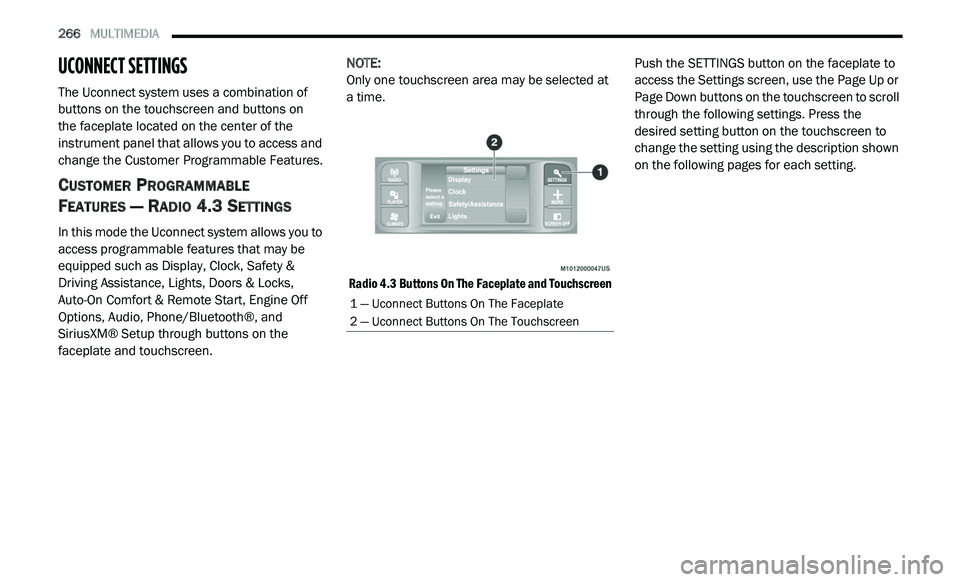
The Uconnect system uses a combination of
buttons on the touchscreen and buttons on
the faceplate located on the center of the
i n
strument panel that allows you to access and
change the Customer Programmable Features.
CUSTOMER PROGRAMMABLE
F
EATURES — RADIO 4.3 SETTINGS
In this mode the Uconnect system allows you to
access programmable features that may be
equipped such as Display, Clock, Safety &
Driving Assistance, Lights, Doors & Locks,
Auto-On Comfort & Remote Start, Engine Off
Options, Audio, Phone/Bluetooth®, and
SiriusXM® Setup through buttons on the
faceplate and touchscreen. NOTE:
Only one touchscreen area may be selected at
a
time.
Radio 4.3 Buttons On The Faceplate and Touchscreen
Push the SETTINGS button on the faceplate to
a
c
cess the Settings screen, use the Page Up or
Page Down buttons on the touchscreen to scroll
through the following settings. Press the
desired setting button on the touchscreen to
change the setting using the description shown
on the following pages for each setting.
1 — Uconnect Buttons On The Faceplate
2 — Uconnect Buttons On The Touchscreen
Page 269 of 396
MULTIMEDIA 267
Display
After pressing the Display button on the touchscreen, the following settings will be available:
Clock
After pressing the Clock button on the touchscreen, the following settings will be available:
Setting Name Selectable Options
Brightness+ –
NOTE:
The “Brightness” setting can also be adjusted by selecting any point on the scale between the + and – buttons on the touchscreen.
Mode DayNight Auto
Language EnglishFrançais Español
NOTE:
When in the “Language” feature, you may select one of three languages for all display nomenclature.
Units US Metric
Voice Response Brief Long
Touchscreen Beep On Off
Setting NameSelectable Options
Set Time and Format12 hr
24 hr
AM PM
NOTE:
Within the “Set Time and Format” setting, press the corresponding Arrow buttons on the touchscreen to adjust to the correct time.
9
Page 276 of 396
274 MULTIMEDIA
CUSTOMER PROGRAMMABLE FEATURES —
U
CONNECT 3/ 3 NAV SETTINGS
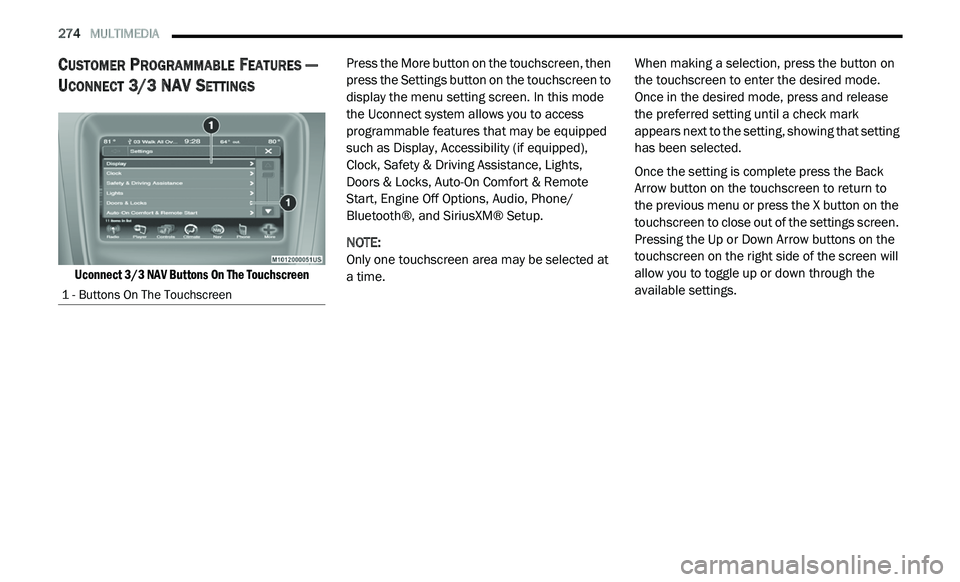
Uconnect 3/3 NAV Buttons On The Touchscreen
Press the More button on the touchscreen, then
p
r
ess the Settings button on the touchscreen to
display the menu setting screen. In this mode
the Uconnect system allows you to access
programmable features that may be equipped
such as Display, Accessibility (if equipped),
Clock, Safety & Driving Assistance, Lights,
Doors & Locks, Auto-On Comfort & Remote
Start, Engine Off Options, Audio, Phone/
Bluetooth®, and SiriusXM® Setup.
NOTE:
Only one touchscreen area may be selected at
a
time. When making a selection, press the button on
t
h
e touchscreen to enter the desired mode.
Once in the desired mode, press and release
the preferred setting until a check mark
appears next to the setting, showing that setting
has been selected.
Once the setting is complete press the Back
A r
row button on the touchscreen to return to
the previous menu or press the X button on the
touchscreen to close out of the settings screen.
Pressing the Up or Down Arrow buttons on the
touchscreen on the right side of the screen will
allow you to toggle up or down through the
available settings.
1 - Buttons On The Touchscreen
Page 279 of 396
MULTIMEDIA 277
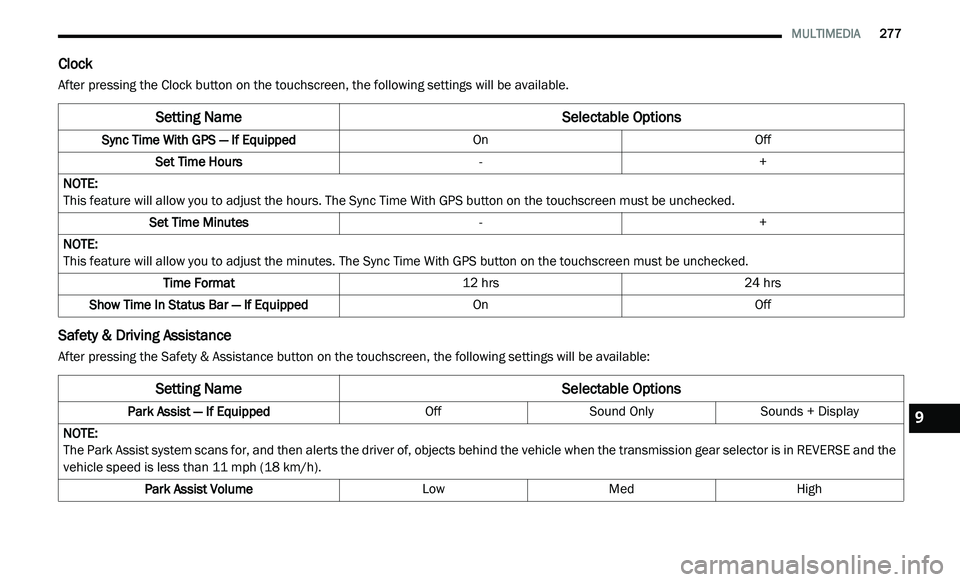
Clock
After pressing the Clock button on the touchscreen, the following settings will be available.
Safety & Driving Assistance
After pressing the Safety & Assistance button on the touchscreen, the following settings will be available:
Setting Name Selectable Options
Sync Time With GPS — If Equipped OnOff
Set Time Hours -+
NOTE:
This feature will allow you to adjust the hours. The Sync Time With GPS button on the touchscreen must be unchecked.
Set Time Minutes -+
NOTE:
This feature will allow you to adjust the minutes. The Sync Time With GPS button on the touchscreen must be unchecked.
Time Format 12 hrs24 hrs
Show Time In Status Bar — If Equipped OnOff
Setting NameSelectable Options
Park Assist — If Equipped OffSound Only Sounds + Display
NOTE:
The Park Assist system scans for, and then alerts the driver of, objects behind the vehicle when the transmission gear selector is in REVERSE and the
v e
hicle speed is less than 11 mph (18 km/h).
Park Assist Volume LowMed High
9
Page 288 of 396
286 MULTIMEDIA
Care And Maintenance
Touchscreen
Do not press the touchscreen with any hard
or sharp objects (pen, USB stick, jewelry,
etc.), which could scratch the touchscreen
surface!
Do not spray any liquid or caustic chemicals
directly on the screen! Use a clean and dry
microfiber lens cleaning cloth in order to
clean the touchscreen.
If necessary, use a lint-free cloth dampened
with a cleaning solution, such as isopropyl
alcohol or an isopropyl alcohol and water
solution ratio of 50:50. Be sure to follow the
solvent manufacturer's precautions and
directions.
RADIO 4.3
INTRODUCTION
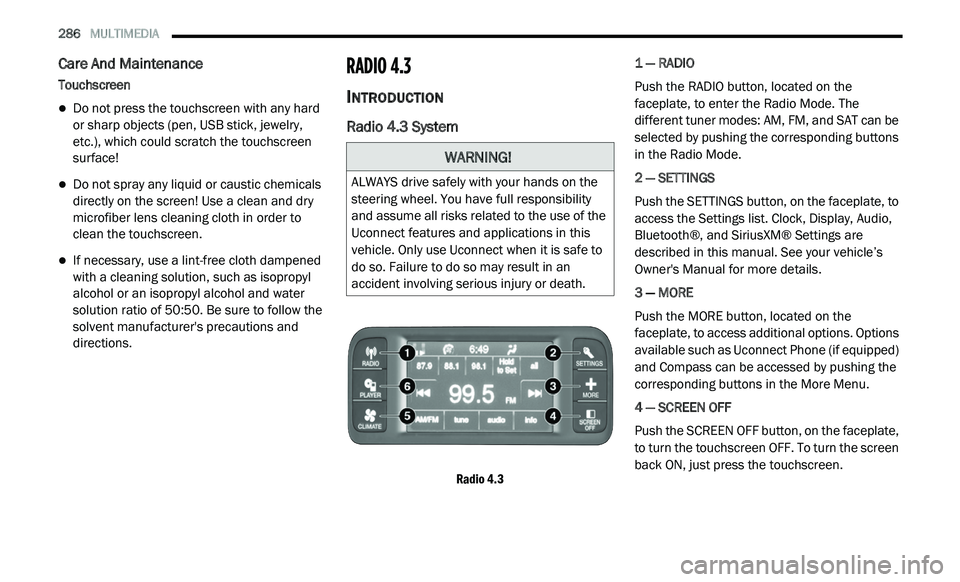
Radio 4.3 System
Radio 4.3
1 — RADIO
Push the RADIO button, located on the
f
a
ceplate, to enter the Radio Mode. The
different tuner modes: AM, FM, and SAT can be
selected by pushing the corresponding buttons
in the Radio Mode.
2 — SETTINGS
Push the SETTINGS button, on the faceplate, to
a c
cess the Settings list. Clock, Display, Audio,
Bluetooth®, and SiriusXM® Settings are
described in this manual. See your vehicle’s
Owner's Manual for more details.
3 — MORE
Push the MORE button, located on the
f a
ceplate, to access additional options. Options
available such as Uconnect Phone (if equipped)
and Compass can be accessed by pushing the
corresponding buttons in the More Menu.
4 — SCREEN OFF
Push the SCREEN OFF button, on the faceplate,
t o
turn the touchscreen OFF. To turn the screen
back ON, just press the touchscreen.
WARNING!
ALWAYS drive safely with your hands on the
steering wheel. You have full responsibility
and assume all risks related to the use of the
Uconnect features and applications in this
vehicle. Only use Uconnect when it is safe to
do so. Failure to do so may result in an
accident involving serious injury or death.