ad blue DODGE JOURNEY 2020 Owner's Manual
[x] Cancel search | Manufacturer: DODGE, Model Year: 2020, Model line: JOURNEY, Model: DODGE JOURNEY 2020Pages: 396, PDF Size: 25.53 MB
Page 307 of 396
MULTIMEDIA 305
Phonebook (Downloaded and Uconnect
Phone Local) name recognition rate is opti -
mized when the entries are not similar.
Numbers must be spoken in single digits.
“800” must be spoken “eight-zero-zero” not
“eight hundred.”
You can say “O” (letter “O”) for “0” (zero).
Even though international dialing for most
number combinations is supported, some
shortcut dialing number combinations may
not be supported.
Far End Audio Performance
Audio quality is maximized under:
Low-to-medium blower setting
Low-to-medium vehicle speed
Low road noise
Smooth road surface
Fully closed windows
Dry weather conditions
Operation from the driver's seat
Performance, such as audio clarity, echo,
and loudness to a large degree, relies on the
phone and network, and not the Uconnect
Phone
Echo at the phone far end can sometimes be
reduced by lowering the in-vehicle audio
volume
Bluetooth® Communication Link
Mobile phones have been found to lose
c o
nnection to the Uconnect Phone. When this
happens, the connection can generally be
reestablished by switching the phone off/on.
Your mobile phone is recommended to remain
in Bluetooth® ON mode.
Power-Up
After switching the ignition key from OFF to
e i
ther the ON/RUN or ACC position, or after a
language change, you must wait at least
15 seconds prior to using the system.
MORE MODE
More Button
Push the MORE button to display the More Main
Menu. The More Main Menu contains the
following options:
Economy — If Equipped
Phone
Outlet — If Equipped
Time
Compass
Clock Setting
1. P ush the MORE button on the right side of
t
he display, then press the Time button.
Next, press the Set button.
Or,
Push the SETTINGS button on the right side
of
the display, then press the Clock button.
The Time setting screen is displayed and
t h
e clock can be adjusted as described in
the following procedure.
9
Page 316 of 396
314 MULTIMEDIA
Traffic & Weather
Press the Traffic & Weather button to tune to a
Si
riusXM® Traffic & Weather channel.
Press the Up and Down Arrows to the right side
o f
the list to view all the available cities. This
operation can also be done with operation of
the TUNE/SCROLL knob.
Press the check box next to the desired City. A
c h
eck mark appears besides the selected City.
Audio
Press the Audio button to activate the Audio
settings screen to adjust Balance/Fade,
Equalizer and Speed Adjusted Volume.
You can return to the Radio screen by pressing
th
e X button located at the top right. Balance/Fade
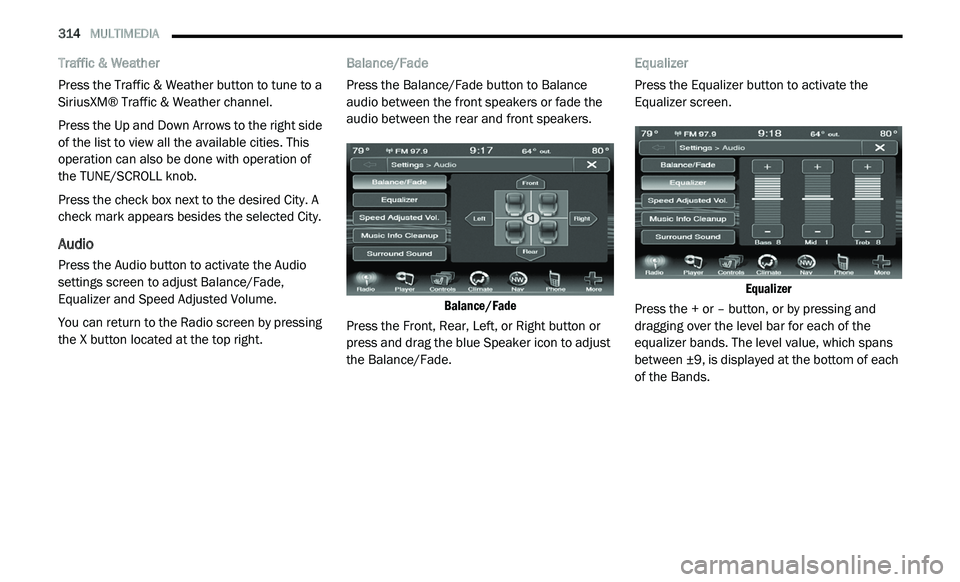
Press the Balance/Fade button to Balance
a
u
dio between the front speakers or fade the
audio between the rear and front speakers.
Balance/Fade
Press the Front, Rear, Left, or Right button or
p r
ess and drag the blue Speaker icon to adjust
the Balance/Fade. Equalizer
Press the Equalizer button to activate the
E
q
ualizer screen.
Equalizer
Press the + or – button, or by pressing and
d r
agging over the level bar for each of the
equalizer bands. The level value, which spans
between ±9, is displayed at the bottom of each
of the Bands.
Page 319 of 396
MULTIMEDIA 317
Fast Seek Down
Press and hold the Left Arrow button and the
Di
sc player will begin to rewind through the
current track until the button is released.
Browse
Press the Browse button to display the browse
w i
ndow. The left side of the browse window
displays a list of ways you can browse through
the contents of the Disc. If supported by the
device, you can browse by Folders, Artists,
Playlists, Albums, Songs, etc. Press the desired
button on the left side of the screen. The center
of the browse window shows items and it’s
sub-functions, which can be scrolled by
pressing the Up and Down buttons to the right.
The TUNE/SCROLL knob can also be used to
scroll.
Source
Press the Source button on the touchscreen to
s e
lect the desired audio source: Disc/USB/SD
Card/AUX/Bluetooth®. This screen will time out
after a few seconds and return to the main radio
screen if no selection is made. Repeat
Press the Repeat button to toggle the repeat
f
u
nctionality. The Repeat button is highlighted
when active. The radio will continue to play the
current track, repeatedly, as long as the repeat
is active.
Shuffle
Press the Shuffle button to play the selections
o n
the compact disc in random order to provide
an interesting change of pace. Press the Shuffle
button a second time to turn this feature off.
Info
Press the Info button to display the current
t r
ack information. Press the Info button a
second time to cancel this feature.
Tracks
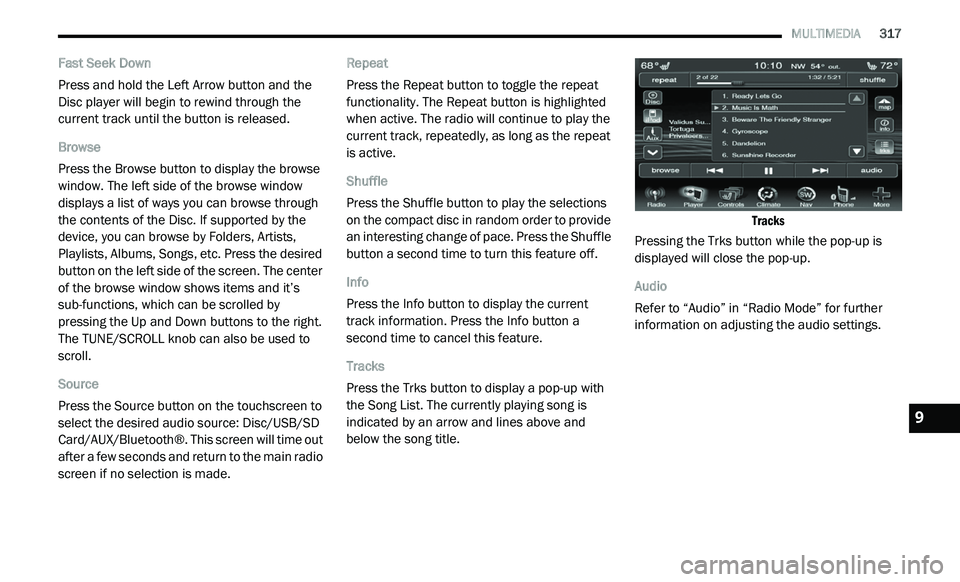
Press the Trks button to display a pop-up with
t h
e Song List. The currently playing song is
indicated by an arrow and lines above and
below the song title.
Tracks
Pressing the Trks button while the pop-up is
d i
splayed will close the pop-up.
Audio
Refer to “Audio” in “Radio Mode” for further
i n
formation on adjusting the audio settings.
9
Page 321 of 396
MULTIMEDIA 319
NOTE:
Many features of this system are speed depen -
dent. For your own safety these features may be
g r
ayed out and not accessible while the vehicle
is in motion. Pull over at a safe location to
complete your task.
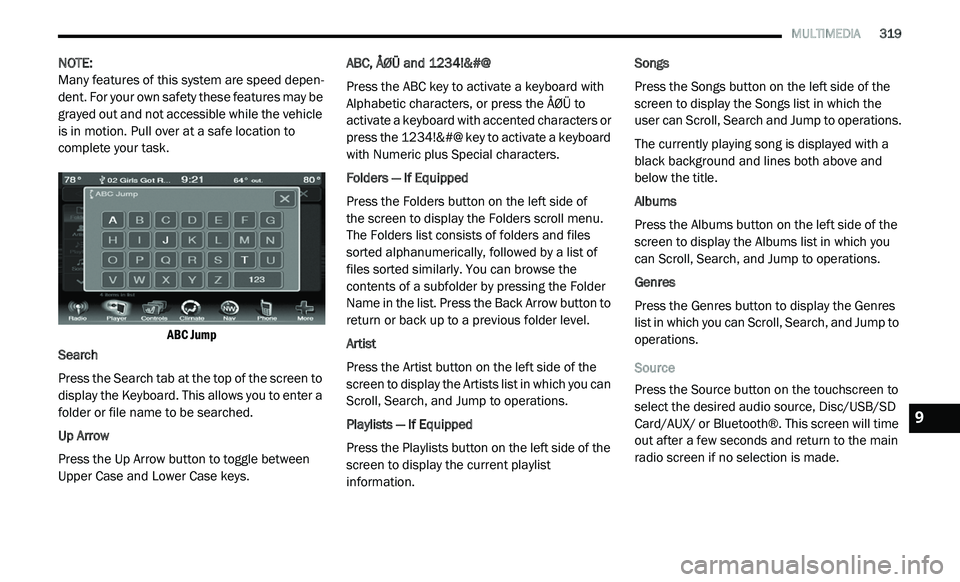
ABC Jump
Search
Press the Search tab at the top of the screen to
d i
splay the Keyboard. This allows you to enter a
folder or file name to be searched.
Up Arrow
Press the Up Arrow button to toggle between
U p
per Case and Lower Case keys. ABC, ÅØÜ and 1234!&#@
Press the ABC key to activate a keyboard with
A
l
phabetic characters, or press the ÅØÜ to
activate a keyboard with accented characters or
press the 1234!&#@ key to activate a keyboard
with Numeric plus Special characters.
Folders — If Equipped
Press the Folders button on the left side of
the screen to display the Folders scroll menu.
T h
e Folders list consists of folders and files
sorted alphanumerically, followed by a list of
files sorted similarly. You can browse the
contents of a subfolder by pressing the Folder
Name in the list. Press the Back Arrow button to
return or back up to a previous folder level.
Artist
Press the Artist button on the left side of the
s c
reen to display the Artists list in which you can
Scroll, Search, and Jump to operations.
Playlists — If Equipped
Press the Playlists button on the left side of the
s c
reen to display the current playlist
information. Songs
Press the Songs button on the left side of the
sc
reen to display the Songs list in which the
user can Scroll, Search and Jump to operations.
The currently playing song is displayed with a
b la
ck background and lines both above and
below the title.
Albums
Press the Albums button on the left side of the
s c
reen to display the Albums list in which you
can Scroll, Search, and Jump to operations.
Genres
Press the Genres button to display the Genres
l i
st in which you can Scroll, Search, and Jump to
operations.
Source
Press the Source button on the touchscreen to
s e
lect the desired audio source, Disc/USB/SD
Card/AUX/ or Bluetooth®. This screen will time
out after a few seconds and return to the main
radio screen if no selection is made.
9
Page 323 of 396
MULTIMEDIA 321
NOTE:
The vehicle radio unit is acting as the amplifier
f o
r audio output from the Auxiliary device.
Therefore if the volume control on the Auxiliary
device is set too low, there will be insufficient
audio signal for the radio unit to play the music
on the device.
Source
Press the Source button on the touchscreen to
s e
lect the desired audio source, Disc/USB/SD
Card/AUX/ or Bluetooth®. This screen will time
out after a few seconds and return to the main
radio screen if no selection is made.
Audio
Refer to “Audio” in “Radio Mode” for further
i n
formation on adjusting the audio settings.
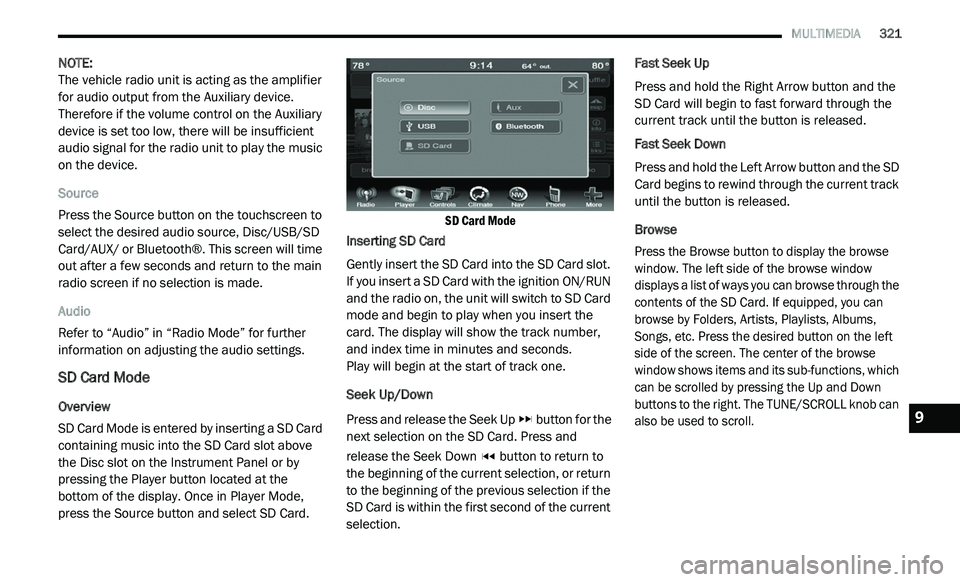
SD Card Mode
Overview
SD Card Mode is entered by inserting a SD Card
co
ntaining music into the SD Card slot above
the Disc slot on the Instrument Panel or by
pressing the Player button located at the
bottom of the display. Once in Player Mode,
press the Source button and select SD Card.
SD Card Mode
Inserting SD Card
Gently insert the SD Card into the SD Card slot.
I f
you insert a SD Card with the ignition ON/RUN
and the radio on, the unit will switch to SD Card
mode and begin to play when you insert the
card. The display will show the track number,
and index time in minutes and seconds.
Play will begin at the start of track one.
Seek Up/Down
Press and release the Seek Up button for the
next selection on the SD Card. Press and
r e
lease the Seek Down button to return to
the beginning of the current selection, or return
t o
the beginning of the previous selection if the
SD Card is within the first second of the current
selection. Fast Seek Up
Press and hold the Right Arrow button and the
S
D
Card will begin to fast forward through the
current track until the button is released.
Fast Seek Down
Press and hold the Left Arrow button and the SD
C a
rd begins to rewind through the current track
until the button is released.
Browse
Press the Browse button to display the browse
w i
ndow. The left side of the browse window
displays a list of ways you can browse through the
contents of the SD Card. If equipped, you can
browse by Folders, Artists, Playlists, Albums,
Songs, etc. Press the desired button on the left
side of the screen. The center of the browse
window shows items and its sub-functions, which
can be scrolled by pressing the Up and Down
buttons to the right. The TUNE/SCROLL knob can
also be used to scroll.
9
Page 324 of 396
322 MULTIMEDIA
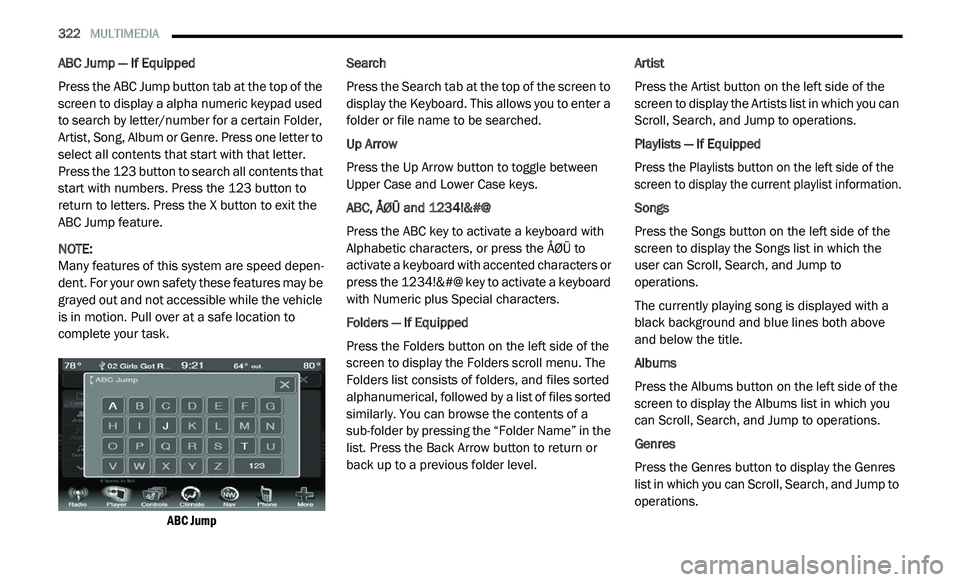
ABC Jump — If Equipped
Press the ABC Jump button tab at the top of the
sc
reen to display a alpha numeric keypad used
to search by letter/number for a certain Folder,
Artist, Song, Album or Genre. Press one letter to
select all contents that start with that letter.
Press the 123 button to search all contents that
start with numbers. Press the 123 button to
return to letters. Press the X button to exit the
ABC Jump feature.
NOTE:
Many features of this system are speed depen -
dent. For your own safety these features may be
g r
ayed out and not accessible while the vehicle
is in motion. Pull over at a safe location to
complete your task.
ABC Jump
Search
Press the Search tab at the top of the screen to
d
i
splay the Keyboard. This allows you to enter a
folder or file name to be searched.
Up Arrow
Press the Up Arrow button to toggle between
U p
per Case and Lower Case keys.
ABC, ÅØÜ and 1234!&#@
Press the ABC key to activate a keyboard with
Al
phabetic characters, or press the ÅØÜ to
activate a keyboard with accented characters or
press the 1234!&#@ key to activate a keyboard
with Numeric plus Special characters.
Folders — If Equipped
Press the Folders button on the left side of the
s c
reen to display the Folders scroll menu. The
Folders list consists of folders, and files sorted
alphanumerical, followed by a list of files sorted
similarly. You can browse the contents of a
sub-folder by pressing the “Folder Name” in the
list. Press the Back Arrow button to return or
back up to a previous folder level. Artist
Press the Artist button on the left side of the
s
c
reen to display the Artists list in which you can
Scroll, Search, and Jump to operations.
Playlists — If Equipped
Press the Playlists button on the left side of the
s c
reen to display the current playlist information.
Songs
Press the Songs button on the left side of the
sc
reen to display the Songs list in which the
user can Scroll, Search, and Jump to
operations.
The currently playing song is displayed with a
b la
ck background and blue lines both above
and below the title.
Albums
Press the Albums button on the left side of the
s c
reen to display the Albums list in which you
can Scroll, Search, and Jump to operations.
Genres
Press the Genres button to display the Genres
l i
st in which you can Scroll, Search, and Jump to
operations.
Page 325 of 396
MULTIMEDIA 323
Source
Press the Source button on the touchscreen to
se
lect the desired audio source, Disc/USB/SD
Card/AUX/ or Bluetooth®. This screen will time
out after a few seconds and return to the main
radio screen if no selection is made.
Repeat
Press the Repeat button to toggle the repeat
f u
nctionality. The Repeat button is highlighted
when active. The Radio will continue to play the
current track, repeatedly, as long as the repeat
is active.
Shuffle
Press the Shuffle button to play the selections
o n
the Auxiliary device in random order to
provide an interesting change of pace. Press
the Shuffle button a second time to turn this
feature off.
Info
Press the Info button to display the current
t r
ack information. Press the Info button a
second time to cancel this feature. Tracks
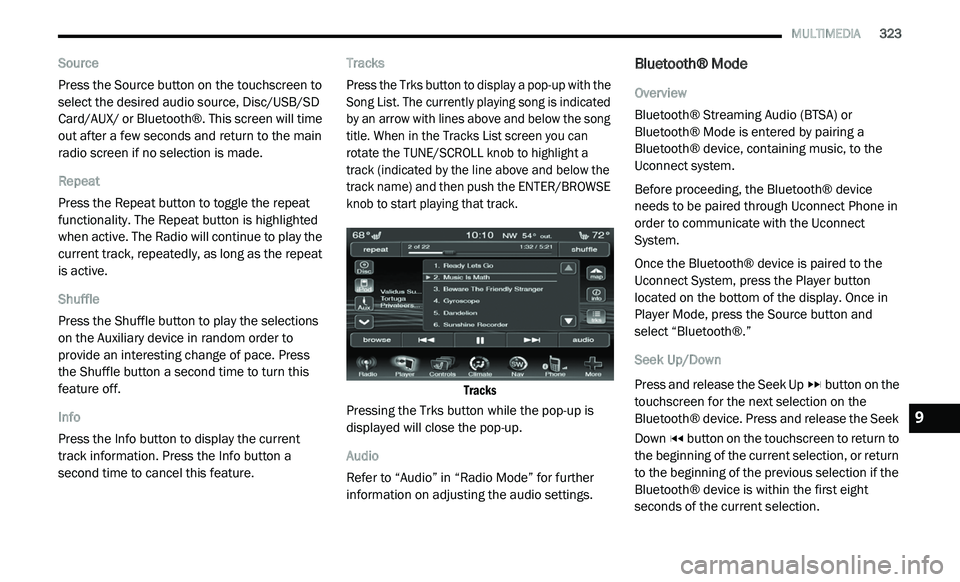
Press the Trks button to display a pop-up with the
S
o
ng List. The currently playing song is indicated
by an arrow with lines above and below the song
title. When in the Tracks List screen you can
rotate the TUNE/SCROLL knob to highlight a
track (indicated by the line above and below the
track name) and then push the ENTER/BROWSE
knob to start playing that track.
Tracks
Pressing the Trks button while the pop-up is
d i
splayed will close the pop-up.
Audio
Refer to “Audio” in “Radio Mode” for further
i n
formation on adjusting the audio settings.
Bluetooth® Mode
Overview
Bluetooth® Streaming Audio (BTSA) or
Bl
uetooth® Mode is entered by pairing a
Bluetooth® device, containing music, to the
Uconnect system.
Before proceeding, the Bluetooth® device
n e
eds to be paired through Uconnect Phone in
order to communicate with the Uconnect
System.
Once the Bluetooth® device is paired to the
U c
onnect System, press the Player button
located on the bottom of the display. Once in
Player Mode, press the Source button and
select “Bluetooth®.”
Seek Up/Down
Press and release the Seek Up button on the
touchscreen for the next selection on the
B l
uetooth® device. Press and release the Seek
Down button on the touchscreen to return to
the beginning of the current selection, or return
t o
the beginning of the previous selection if the
Bluetooth® device is within the first eight
seconds of the current selection.
9
Page 326 of 396
324 MULTIMEDIA
Fast Seek Up
Press and hold the Seek Up button and the
Bluetooth® device will begin to fast forward
th
rough the current track until the button is
released.
Fast Seek Down
Press and hold the Seek Down button and
the Bluetooth® device will begin to rewind
t h
rough the current track until the button is
released.
Source
Press the Source button on the touchscreen to
s e
lect the desired audio source, Disc/USB/SD
Card/AUX/ or Bluetooth®. This screen will time
out after a few seconds and return to the main
radio screen if no selection is made.
Repeat
Press the Repeat button to toggle the repeat
f u
nctionality. The Repeat button is highlighted
when active. The Radio will continue to play the
current track, repeatedly, as long as the repeat
is active. Info
Press the Info button to display the current
t
r
ack information. Press the Info button a
second time to cancel this feature.
Audio
Refer to “Audio” in “Radio Mode” for further
i n
formation on adjusting the audio settings.
UCONNECT PHONE
Uconnect Phone is a voice-activated,
hands-free, in-vehicle communications system.
Uconnect Phone allows you to dial a phone
number with your mobile phone.
Uconnect Phone supports the following
fe
atures:
Voice Activated Features:
Hands-Free dialing via Voice (“Call John
Smith Mobile” or, “Dial 248 555 1212”).
Hands-Free text-to-speech listening of your
incoming SMS messages.
Hands-Free text messaging (“Send a
message to John Smith Mobile”).
Redialing last dialed numbers (“Redial”).
Calling Back the last incoming call number
(“Call Back”).
Viewing Call logs on screen (“Show Incoming
Calls,” “Show Outgoing Calls,” “Show Missed
Calls,” “Show Recent Calls”).
Searching Contacts phone number (“Search
for John Smith Mobile”).
Screen Activated Features
Dialing via Keypad using touchscreen.
Viewing and Calling contacts from Phone -
books displayed on the touchscreen.
Setting Favorite Contact Phone numbers so
they are easily accessible on the Main Phone
screen.
Viewing and Calling contacts from Recent
Call logs.
Reviewing your recent Incoming SMS.
Sending a text message via the touchscreen.
Page 327 of 396
MULTIMEDIA 325
Listening to Music on your Bluetooth®
Device via the touchscreen.
Pairing up to 10 phones/audio devices for
easy access to connect to them quickly.
NOTE:
Your phone must be capable of SMS messaging
v i
a Bluetooth® for messaging features to work
properly. Your mobile phone’s audio is trans -
mitted through your vehicles audio system; the
s y
stem will automatically mute your radio when
using the Uconnect Phone. For Uconnect
customer support, visit the following website:
US residents — visit UconnectPhone.com or
call 1-877-855-8400.
Canadian residents — visit Uconnect-
Phone.com or call 1-800-465-2001 (English)
or 1-800-387-9983 (French).
Uconnect Phone allows you to transfer calls
b e
tween the system and your mobile phone as
you enter or exit your vehicle and enables you to
mute the system's microphone for private
conversation. The Uconnect Phone is driven through your
B
l
uetooth® “Hands-Free Profile” mobile phone.
Uconnect features Bluetooth® technology — the
global standard that enables different
electronic devices to connect to each other
without wires or a docking station, so Uconnect
Phone works no matter where you stow your
mobile phone (be it your purse, pocket, or
briefcase), as long as your phone is turned on
and has been paired to the vehicle's Uconnect
Phone.
The Uconnect Phone allows up to 10 mobile
p h
ones or audio devices to be linked to the
system. Only one linked (or paired) mobile
phone and one audio device can be used with
the system at a time. The system is available in
English, Spanish, or French languages. Uconnect Phone Button
The Uconnect Phone button
is used to enter
the phone mode and make calls, show recent
i n
coming and outgoing calls, view phonebook
along with other features. When you push the
button you will hear a BEEP. The beep is your
signal to give a command.
Uconnect Voice Command Button
The Voice Recognition button is only used for
“barge in” and when you are already in a call and
y o
u want to send Tones or make another call.
The Voice Recognition button is also used to
access the Voice Commands for the Uconnect
V o
ice Command features if your vehicle is
equipped. Please see the Uconnect Voice
Command section for direction on how to use
the Voice Command button.
The Uconnect Phone is fully integrated with the
ve
hicle’s audio system. The volume of the
Uconnect Phone can be adjusted either from the
radio volume control knob or from the steering
wheel radio control (right switch), if so equipped.
WARNING!
Any voice commanded system should be
used only in safe driving conditions following
all applicable laws, including laws regarding
phone use. Your attention should be focused
on safely operating the vehicle. Failure to do
so may result in an accident causing serious
injury or death.
9
Page 329 of 396
MULTIMEDIA 327
Cancel Command
At any prompt, after the beep, you can say
“C
ancel” and you will be returned to the main
menu.
You can also push the VR button or
Phone button (if active) on your steering
wheel when the system is listening for a
c o
mmand and be returned to the main or
previous menu.
Pair (Link) Uconnect Phone To A Mobile Phone
To begin using your Uconnect Phone, you must
p a
ir your compatible Bluetooth® enabled
mobile phone.
NOTE:
You must have Bluetooth® enabled on your
mobile phone to complete this procedure.
The vehicle must be in PARK.
To complete the pairing process, you will need
t o
reference your mobile phone Owner's
Manual. The Uconnect website may also
provide detailed instructions for pairing.
1. P
ress the Phone button on the
t
ouchscreen to begin.
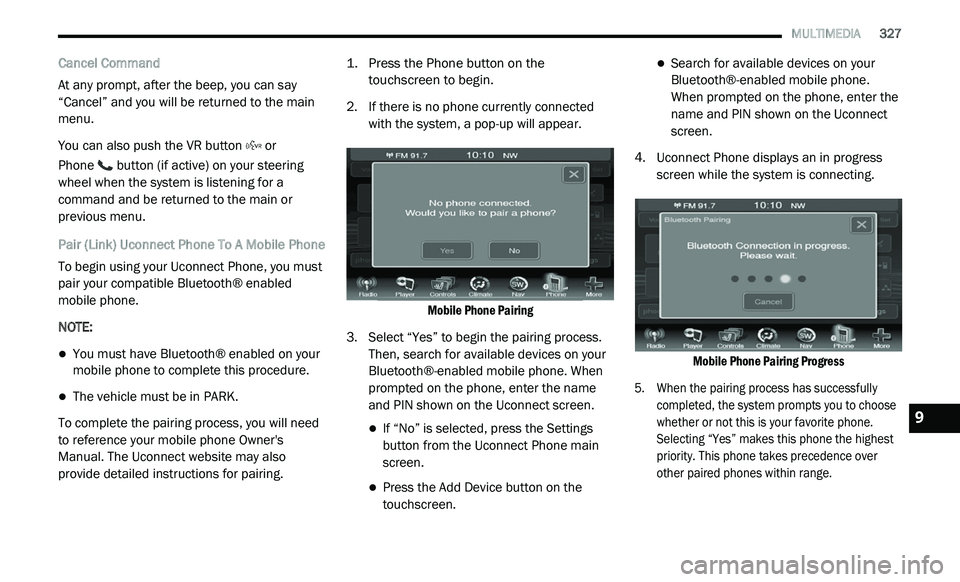
2. I f there is no phone currently connected
w
ith the system, a pop-up will appear.
Mobile Phone Pairing
3. S elect “Yes” to begin the pairing process.
T
hen, search for available devices on your
Bluetooth®-enabled mobile phone. When
prompted on the phone, enter the name
and PIN shown on the Uconnect screen.
If “No” is selected, press the Settings
button from the Uconnect Phone main
screen.
Press the Add Device button on the
touchscreen.
Search for available devices on your
Bluetooth®-enabled mobile phone.
When prompted on the phone, enter the
name and PIN shown on the Uconnect
screen.
4. U connect Phone displays an in progress
s
creen while the system is connecting.
Mobile Phone Pairing Progress
5. W hen the pairing process has successfully
c
ompleted, the system prompts you to choose
whether or not this is your favorite phone.
Selecting “Yes” makes this phone the highest
priority. This phone takes precedence over
other paired phones within range.
9