reset DODGE MAGNUM 2008 1.G User Guide
[x] Cancel search | Manufacturer: DODGE, Model Year: 2008, Model line: MAGNUM, Model: DODGE MAGNUM 2008 1.GPages: 482, PDF Size: 6.94 MB
Page 202 of 482

to the car speakers while different audio tracks play
through the system's wireless headphones. This means
rear seat passengers can watch a DVD on the optional
rear-seat entertainment system while the driver and front
seat passenger listen to the radio.
Other special features include direct tune, music type
selections, easy store presets, backup camera display for
vehicles equipped with a backup camera, and on some
models a dual display screen operation. Refer to your
Radio Specific User's Manual for detailed operating
instructions.
Operating Instructions Ð Satellite Radio (If
Equipped)
Refer to your Radio Specific User's Manual for detailed
operating instructions.
Operating Instructions Ð Hands-Free
Communication (UConnectŸ) (If Equipped)
Refer to ªHands-Free Communication (UConnectŸ)º in
Section 3 of this manual for detailed operating instruc-
tions.
Clock Setting Procedure
Setting the Clock
1. Turn on the system.
2. Touch the screen where the time is displayed. The
clock setting menu will appear on the screen.
3. To move the hour forward, touch the screen where the
word ªHourº with the arrow pointing upward is dis-
played. To move the hour backward, touch the screen
where the word ªHourº with the arrow pointing down-
ward is displayed.
202 UNDERSTANDING YOUR INSTRUMENT PANEL
Page 209 of 482

By pressing the SEEK button when the Music Type icon
is displayed, the radio will be tuned to the next frequency
station with the same selected Music Type name. The
Music Type function only operates when in the FM
mode.
If a preset button is activated while in the Music Type
(Program Type) mode, the Music Type mode will be
exited and the radio will tune to the preset station.
SETUP Button
Pressing the SETUP button allows you to select between
the following items:
NOTE:Use the Tune Control Knob to scroll through the
entries. Push the Audio/Select button to select an entry
and make changes.
²DVD Enter -When the disc is in DVD Menu mode,
selecting DVD Enter will allow you to play the current
highlighted selection. Use the remote control to scroll
up and down the menu (If Equipped).
²DISC Play/Pause -You can toggle between
playing the DVD and pausing the DVD by
pushing the SELECT button (If Equipped).
²DVD Play Options -Selecting the DVD Play Options
will display the following:
²Subtitle ± Repeatedly Pressing SELECT will switch
subtitles to different subtitle languages that are
available on the disc (If Equipped).
²Audio Stream ± Repeatedly Pressing SELECT will
switch to different audio languages (if supported on
the disc) (If Equipped).
UNDERSTANDING YOUR INSTRUMENT PANEL 209
4
Page 212 of 482

NOTE:The user will have to set these defaults before
loading a disc. If changes are made to these settings after
a disc is loaded, changes will not be effective. Also, the
defaults are effective only if the disc supports the
customer-preferred settings.
AM and FM Buttons (Radio Mode)
Press the buttons to select AM or FM Modes.
SET Button (Radio Mode) Ð To Set the
Push-Button Memory
When you are receiving a station that you wish to
commit to push-button memory, press the SET button.
The symbol SET 1 will now show in the display window.
Select the button (1-6) you wish to lock onto this station
and press and release that button. If a button is not
selected within 5 seconds after pressing the SET button,
the station will continue to play but will not be stored
into push-button memory.You may add a second station to each push-button by
repeating the above procedure with this exception: Press
the SET button twice and SET 2 will show in the display
window. Each button can be set for SET 1 and SET 2 in
both AM and FM. This allows a total of 12 AM, 12 FM,
and 12 Satellite (if equipped) stations to be stored into
push-button memory. The stations stored in SET 2
memory can be selected by pressing the push-button
twice.
Every time a preset button is used, a corresponding
button number will display.
Buttons1-6(Radio Mode)
These buttons tune the Radio to the stations that you
commit to push-button memory {12 AM, 12 FM, and 12
Satellite (if equipped) stations}.
DISC Button
Pressing the DISC button will allow you to switch from
AM/FM modes to Disc modes.
212 UNDERSTANDING YOUR INSTRUMENT PANEL
Page 228 of 482
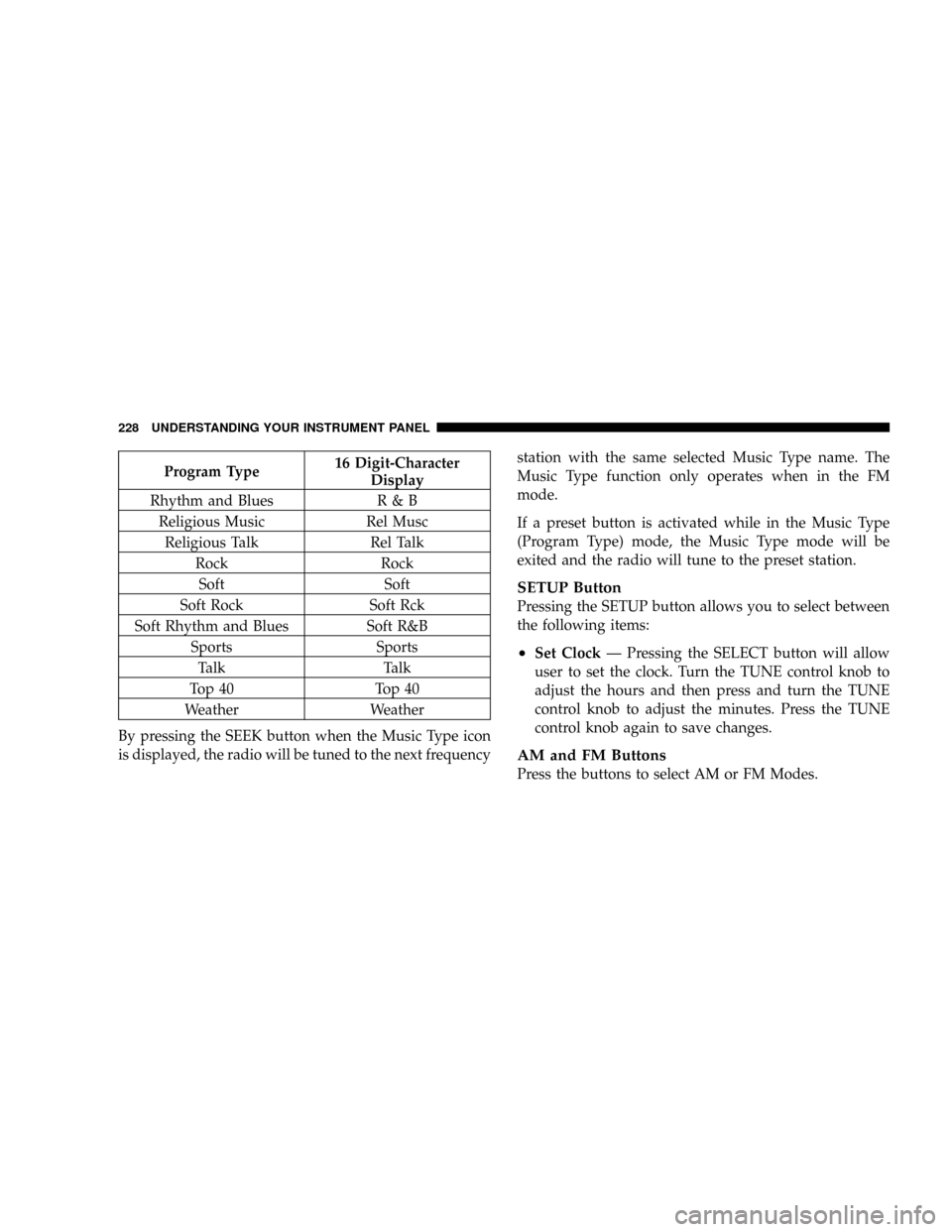
Program Type16 Digit-Character
Display
Rhythm and Blues R & B
Religious Music Rel Musc
Religious Talk Rel Talk
Rock Rock
Soft Soft
Soft Rock Soft Rck
Soft Rhythm and Blues Soft R&B
Sports Sports
Talk Talk
Top 40 Top 40
Weather Weather
By pressing the SEEK button when the Music Type icon
is displayed, the radio will be tuned to the next frequencystation with the same selected Music Type name. The
Music Type function only operates when in the FM
mode.
If a preset button is activated while in the Music Type
(Program Type) mode, the Music Type mode will be
exited and the radio will tune to the preset station.
SETUP Button
Pressing the SETUP button allows you to select between
the following items:
²Set ClockÐ Pressing the SELECT button will allow
user to set the clock. Turn the TUNE control knob to
adjust the hours and then press and turn the TUNE
control knob to adjust the minutes. Press the TUNE
control knob again to save changes.
AM and FM Buttons
Press the buttons to select AM or FM Modes.
228 UNDERSTANDING YOUR INSTRUMENT PANEL
Page 229 of 482

SET Button Ð To Set the Push-Button Memory
When you are receiving a station that you wish to
commit to push-button memory, press the SET button.
The symbol SET 1 will now show in the display window.
Select the button (1-6) you wish to lock onto this station
and press and release that button. If a button is not
selected within 5 seconds after pressing the SET button,
the station will continue to play but will not be stored
into push-button memory.
You may add a second station to each push-button by
repeating the above procedure with this exception: Press
the SET button twice and SET 2 will show in the display
window. Each button can be set for SET 1 and SET 2 in
both AM and FM. This allows a total of 12 AM and 12 FM
stations to be stored into push-button memory. The
stations stored in SET 2 memory can be selected by
pressing the push-button twice.Every time a preset button is used, a corresponding
button number will display.
Buttons1-6
These buttons tune the radio to the stations that you
commit to push-button memory {12 AM and 12 FM
stations}.
DISC Button
Pressing the DISC button will allow you to switch from
AM/FM modes to Disc modes.
Operation Instructions - CD MODE for CD and
MP3 Audio Play
NOTE:The ignition switch must be in the ON or ACC
position to operate the radio.
NOTE:This Radio is capable of playing compact discs
(CD), recordable compact discs (CD-R), rewritable com-
pact discs (CD-RW) compact discs with MP3 tracks and
multisession compact discs with CD and MP3 tracks.
UNDERSTANDING YOUR INSTRUMENT PANEL 229
4
Page 239 of 482

By pressing the SEEK button when the Music Type
function is active, the radio will be tuned to the next
channel with the same selected Music Type name.
If a preset button is activated while in the Music Type
(Program Type) mode, the Music Type mode will be
exited and the radio will tune to the preset channel.
SETUP Button
Pressing the SETUP button allows you to select the
following items:
²Display Sirius ID number Ð Press the SELECT button
to display the Sirius ID number. This number is used
to activate, deactivate, or change the Sirius subscrip-
tion.
SET Button Ð To Set the Push-Button Memory
When you are receiving a channel that you wish to
commit to push-button memory, press the SET button.
The symbol SET 1 will now show in the display window.Select the button (1-6) you wish to lock onto this channel
and press and release that button. If a button is not
selected within 5 seconds after pressing the SET button,
the channel will continue to play but will not be stored
into push-button memory.
You may add a second channel to each push-button by
repeating the above procedure with this exception: Press
the SET button twice and SET 2 will show in the display
window. Each button can be set for SET 1 and SET 2. This
allows a total of 12 Satellite channels to be stored into
push-button memory. The channels stored in SET 2
memory can be selected by pressing the push-button
twice.
Every time a preset button is used, a corresponding
button number will display.Buttons1-6
These buttons tune the radio to the channels that you
commit to push-button memory {12 Satellite stations}.
UNDERSTANDING YOUR INSTRUMENT PANEL 239
4
Page 246 of 482

During all List modes, the iPodtwill display all lists in
ªwrap-aroundº mode. So if the track you wish to select is
at the bottom of the list, you just turn the ªTUNE/
SCROLLº knob backwards (counter-clockwise) to get to
the track faster.
Radio Preset Buttons
In theListmode, the radio preset buttons are used as
shortcuts to the following lists on the iPodtdevice.
²1 ± Playlists
²2 ± Artists
²3 ± Albums
²4 ± Genres
²5 - Audiobooks
²6 ± PodcastsAfter pressing a preset button, you will see the list you
are in on the top line and the first item in that list on the
second line.
To exit theListmode without selecting a track, press the
same preset button again to go back toPlaymode.
LIST Button
Pressing the ªLISTº button will take to the top level
menu of the iPodt. This takes you to the same top level
menu as on your iPodt. Turn the ªTUNE/SCROLLº
knob to list the top menu item you wish to select and
then press the ªTUNE/SCROLLº knob. This will take
you to the next sub menu list item of the iPodtand you
can follow the same steps to go to the desired track in that
list. Not all iPodtsub menu levels are available on this
system.
MUSIC TYPE Button
The ªMUSIC TYPEº button is another shortcut button to
the genre listing on your iPodt.
246 UNDERSTANDING YOUR INSTRUMENT PANEL
Page 248 of 482

If the Compass/Temp/Audio screen is already displayed
when the AUDIO MODE button is pressed, then the
mode will change (i.e. from AM to FM, to Media mode,
etc., depending on which radio is in the vehicle).
When the EVIC is in the Compass/Temp/
Audio screen, press the FUNCTION SELECT
button to operate various radio, media, and
Universal Customer Interface (UCI) functions
(i.e. advance presets, select next folder, jump to
or start playing songs in playlists, etc., depend-
ing on which radio is in the vehicle and if
equipped with UCI).
When the EVIC is in the Compass/Temp/
Audio screen, press the SCROLL button to seek
up and down radio stations, tracks, chapters,
files, etc., depending on which radio is in the
vehicle.CD/DVD DISC MAINTENANCE
To keep the CD/DVD discs in good condition, take the
following precautions:
1. Handle the disc by its edge; avoid touching the
surface.
2. If the disc is stained, clean the surface with a soft cloth,
wiping from center to edge.
3. Do not apply paper, paper CD labels, or tape to the
disc; avoid scratching the disc.
4. Do not use solvents such as benzine, thinner, cleaners,
or antistatic sprays.
5. Store the disc in its case after playing.
6. Do not expose the disc to direct sunlight.
7. Do not store the disc where temperatures may become
too high.
FUNC-
TION
SELECT
Button
SCROLL
Button
248 UNDERSTANDING YOUR INSTRUMENT PANEL
Page 280 of 482

Transmission Limp Home Mode
The transmission is monitored for abnormal conditions.
If a condition is detected that could cause damage, the
transmission automatically shifts into second gear. The
transmission remains in second gear despite the forward
gear selected. ªPº (Park), ªRº (Reverse), and ªNº (Neu-
tral) will continue to operate. This Reset feature allows
the vehicle to be driven to a dealer for service without
damaging the transmission.
If the problem has been momentary, the transmission can
be reset to regain all forward gears.
²Stop the vehicle and shift into ªPº (Park).
²Turn the key to LOCK then start the engine.
²Shift into ªDº (Drive) and resume driving.NOTE:Even if the transmission can be reset, we recom-
mend that you visit a dealer at your earliest possible
convenience. Your dealer has diagnostic equipment to
determine if the problem could recur.
If the transmission cannot be reset, dealer service is
required.
5 Speed Automatic Transmission
Shifting from ªDº (Drive) to ªPº (Park) or ªRº (Reverse)
(or from ªPº or ªRº to ªDº) should be done only after the
accelerator pedal is released and the vehicle is stopped.
Be sure to keep your foot on the brake when moving the
selector lever between these gears.
280 STARTING AND OPERATING
Page 285 of 482

damage, the transmission will engage Limp Home Mode.
If vehicle acceleration worsens, or the transmission no
longer shifts, the transmission is most likely operating in
the Limp Home Mode. In this mode, the transmission
will remain in the current gear until the vehicle is
brought to a stop. After the vehicle has stopped, ªPº
(Park), ªRº (Reverse), and ªNº (Neutral) will continue to
operate. Second gear will operate in the ªDº (Drive)
shifter position. The Malfunction Indicator Light may be
illuminated.
A reset feature is available to allow the vehicle to be
driven to a dealer for service. To reset the transmission,
use the following procedure:
1. Stop the vehicle.
2. Move the selector lever to the ªPº (Park) position.
3. Turn off the engine.
4. Wait approximately 10 seconds.5. Restart the engine.
6. Move the selector lever to the desired range. If the
problem is no longer detected, the transmission will
return to normal operation.
NOTE:Even if the transmission can be reset, we recom-
mend that you visit a dealer at your earliest possible
convenience. Your dealer has diagnostic equipment to
determine if the problem could recur.
Have the transmission checked at your authorized dealer
as soon as possible.
If the problem has been momentary, the transmission can
be reset to regain all forward gears.
Permanent Transmission Limp Home Mode
Permanent Limp Home Mode will be activated if the
transmission enters temporary Limp Home Mode three
times. Follow the reset procedure described under ªTem-
porary Transmission Limp Home Modeº in this section.
STARTING AND OPERATING 285
5