light DODGE MAGNUM SRT 2007 1.G Owners Manual
[x] Cancel search | Manufacturer: DODGE, Model Year: 2007, Model line: MAGNUM SRT, Model: DODGE MAGNUM SRT 2007 1.GPages: 380, PDF Size: 6.63 MB
Page 291 of 380
NWindshield Washers/Rear Window Washer . . . 305
NExhaust System......................306
NCooling System.......................307
NHoses And Vacuum/Vapor Harnesses.......311
NFuel System.........................312
NBrake System........................312
NAutomatic Transmission................314
NFront And Rear Wheel Bearings...........315
NAppearance Care And Protection From
Corrosion...........................316
NCleaning The Center Console Cup Holders . . . 319
mFuses (Power Distribution Centers).........320
NFuses (Front Power Distribution Center).....320NFuses (Rear Power Distribution Center)......322
mVehicle Storage........................326
mReplacement Light Bulbs................326
mBulb Replacement......................327
NLow Beam Headlight, High Beam Headlight,
And Park/Turn Light..................327
NTail/Stop, Turn Signal Light, And Backup
Light..............................328
NLicense Light........................331
mFluids And Capacities...................331
mFluids, Lubricants, And Genuine Parts......332
NEngine.............................332
NChassis............................333
290 MAINTAINING YOUR VEHICLE
Page 293 of 380
ONBOARD DIAGNOSTIC SYSTEM Ð OBD II
Your vehicle is equipped with a sophisticated onboard
diagnostic system called OBD II. This system monitors
the performance of the emissions, engine, and automatic
transmission control systems. When these systems are
operating properly, your vehicle will provide excellent
performance and fuel economy, as well as engine emis-
sions well within current government regulations.
If any of these systems require service, the OBD II system
will turn on the ªMalfunction Indicator Light.º It will
also store diagnostic codes and other information to
assist your service technician in making repairs. Al-
though your vehicle will usually be drivable and not
need towing, see your dealer for service as soon as
possible.CAUTION!
Prolonged driving with the ªMalfunction Indicator
Lightº on could cause further damage to the emis-
sion control system. It could also affect fuel economy
and driveability. The vehicle must be serviced before
any emissions tests can be performed.
If the ªMalfunction Indicator Lightº is flashing
while the engine is running, severe catalytic con-
verter damage and power loss will soon occur. Im-
mediate service is required.
Loose Fuel Filler Cap
If the vehicle diagnostic system determines that the fuel
filler cap is loose, improperly installed, or damaged, a
ªCheck Gascapº message will display in the Electronic
Vehicle Information Center (EVIC) Ð if equipped. If this
occurs, tighten the fuel filler cap properly and press the
odometer reset button to turn off the message. If the
problem continues, the message will appear the next time
the vehicle is started.
292 MAINTAINING YOUR VEHICLE
Page 294 of 380
A loose, improperly installed, or damaged fuel filler cap
may also turn on the Malfunction Indicator Light (MIL).
EMISSIONS INSPECTION AND MAINTENANCE
PROGRAMS
In some localities, it may be a legal requirement to pass
an inspection of your vehicle's emissions control system.
Failure to pass could prevent vehicle registration.
For states, which have an I/M (Inspection and
Maintenance) requirement, this check verifies the
following: the MIL (Malfunction Indicator Lamp)
is functioning and is not on when the engine is running,
and that the OBD (On Board Diagnostic) system is ready
for testing.
Normally, the OBD system will be ready. The OBD
system maynotbe ready if your vehicle was recently
serviced, if you recently had a dead battery, or a battery
replacement. If the OBD system should be determined
not ready for the I/M test, your vehicle may fail the test.Your vehicle has a simple ignition key actuated test,
which you can use prior to going to the test station. To
check if your vehicle's OBD system is ready, you must do
the following:
1. Insert your ignition key into the ignition switch.
2. Turn the ignition to the ON position, but do not crank
or start the engine.
3. If you crank or start the engine, you will have to start
this test over.
4. As soon as you turn your key to the ON position, you
will see your MIL symbol come on as part of a normal
bulb check.
5. Approximately 15 seconds later, one of two things will
happen:
a. The MIL will flash for about 10 seconds and then
return to being fully illuminated until you turn off
the ignition key or start the engine. This means that
your vehicle's OBD system isnot readyand you
shouldnotproceed to the I/M station.
MAINTAINING YOUR VEHICLE 293
7
Page 314 of 380
Insure nylon tubing in these areas has not melted or
collapsed.
Inspect all hose connections such as clamps and cou-
plings to make sure they are secure and no leaks are
present.
NOTE:
²
Often, fluid such as oil, power steering fluid, and
brake fluid are used during assembly plant operations
to facilitate the assembly of hoses to couplings. There-
fore, oil wetness at the hose-coupling area is not
necessarily an indication of leakage. Actual dripping
of hot fluid when systems are under pressure (during
vehicle operation), should be noted before a hose is
replaced based on leakage.
²Inspect the brake hoses whenever the brake system is
serviced and at every engine oil change. Inspect hy-
draulic brake hoses for surface cracking, scuffing, or
worn spots. If there is any evidence of cracking,
scuffing, or worn spots, the hose should be replaced
immediately! Eventual deterioration of the hose can
take place resulting in a possibility of a burst failure.
WARNING!
Worn brake hoses can burst and cause brake failure.
You could have an accident. If you see any signs of
cracking, scuffing, or worn spots, have the brake
hoses replaced immediately.
Master Cylinder - Brake Fluid Level Check
Check the fluid level in the master cylinder immediately
if the brake system warning light indicates system fail-
ure.
Check the fluid level in the master cylinder when per-
forming underhood services.
Clean the top of the master cylinder area before removing
the cap. Add fluid to bring the level up to the top of the
ªFULLº mark on the side of the master cylinder reservoir.
Overfilling of fluid is not recommended because it may
cause leaking in the system.
Add enough fluid to bring the level up to the require-
ments described on the brake fluid reservoir. With disc
MAINTAINING YOUR VEHICLE 313
7
Page 319 of 380
Interior Care
Use MopartFabric Cleaner or equivalent to clean fabric
upholstery and MopartCarpet Cleaner for carpeting.
Interior Trim should be cleaned starting with a damp
cloth, or MopartSatin Select. Do not use harsh cleaners
or Armorall. Use MopartTotal Clean to clean vinyl
upholstery.
MopartTotal Clean is specifically recommended for
leather upholstery.
Your leather upholstery can be best preserved by regular
cleaning with a damp soft cloth. Small particles of dirt
can act as an abrasive and damage the leather upholstery
and should be removed promptly with a damp cloth.
Stubborn soils can be removed easily with a soft cloth
and MopartTotal Clean or equivalent. Care should be
taken to avoid soaking your leather upholstery with any
liquid. Please do not use polishes, oils, cleaning fluids,
solvents, detergents, or ammonia-based cleaners to clean
your leather upholstery. Application of a leather condi-
tioner is not required to maintain the original condition.WARNING!
Do not use volatile solvents for cleaning purposes.
Many are potentially flammable, and if used in
closed areas they may cause respiratory harm.
Cleaning Headlights
Your vehicle has plastic headlights that are lighter and
less susceptible to stone breakage than glass headlights.
Plastic is not as scratch resistant as glass and therefore
different lens cleaning procedures must be followed.
To minimize the possibility of scratching the lenses and
reducing light output, avoid wiping with a dry cloth. To
remove road dirt, wash with a mild soap solution fol-
lowed by rinsing.
Do not use abrasive cleaning components, solvents, steel
wool or other aggressive material to clean the lenses.
Glass Surfaces
All glass surfaces should be cleaned on a regular basis
with MopartGlass Cleaner or any commercial
household-type glass cleaner. Never use an abrasive type
318 MAINTAINING YOUR VEHICLE
Page 321 of 380
²Carefully tuck the front, followed by the rear, then side
edges of the cup holder into the center console.
FUSES (POWER DISTRIBUTION CENTERS)
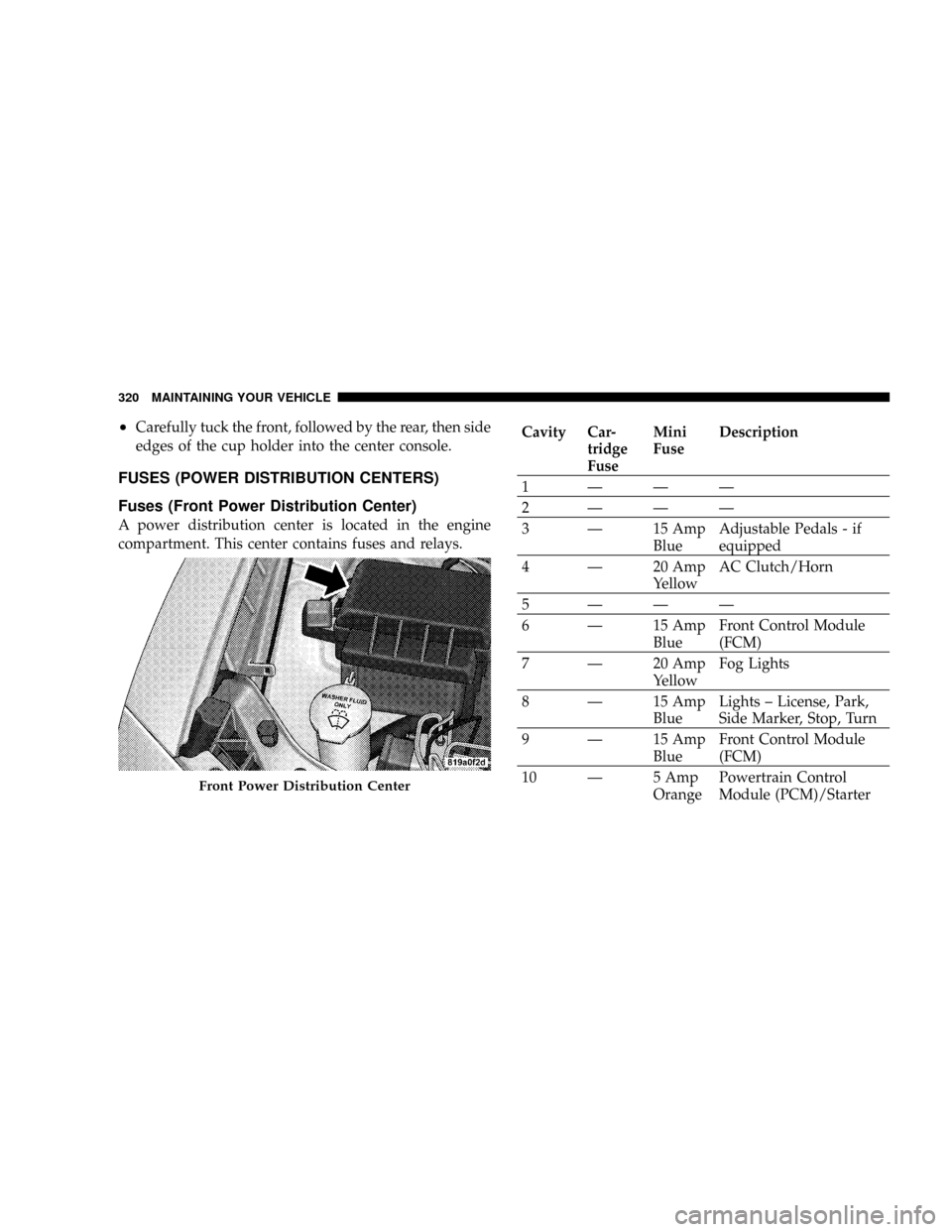
Fuses (Front Power Distribution Center)
A power distribution center is located in the engine
compartment. This center contains fuses and relays.
Cavity Car-
tridge
FuseMini
FuseDescription
1ÐÐÐ
2ÐÐÐ
3 Ð 15 Amp
BlueAdjustable Pedals - if
equipped
4 Ð 20 Amp
YellowAC Clutch/Horn
5ÐÐÐ
6 Ð 15 Amp
BlueFront Control Module
(FCM)
7 Ð 20 Amp
YellowFog Lights
8 Ð 15 Amp
BlueLights ± License, Park,
Side Marker, Stop, Turn
9 Ð 15 Amp
BlueFront Control Module
(FCM)
10 Ð 5 Amp
OrangePowertrain Control
Module (PCM)/Starter
Front Power Distribution Center
320 MAINTAINING YOUR VEHICLE
Page 324 of 380
Cavity Car-
tridge
FuseMini
FuseDescription
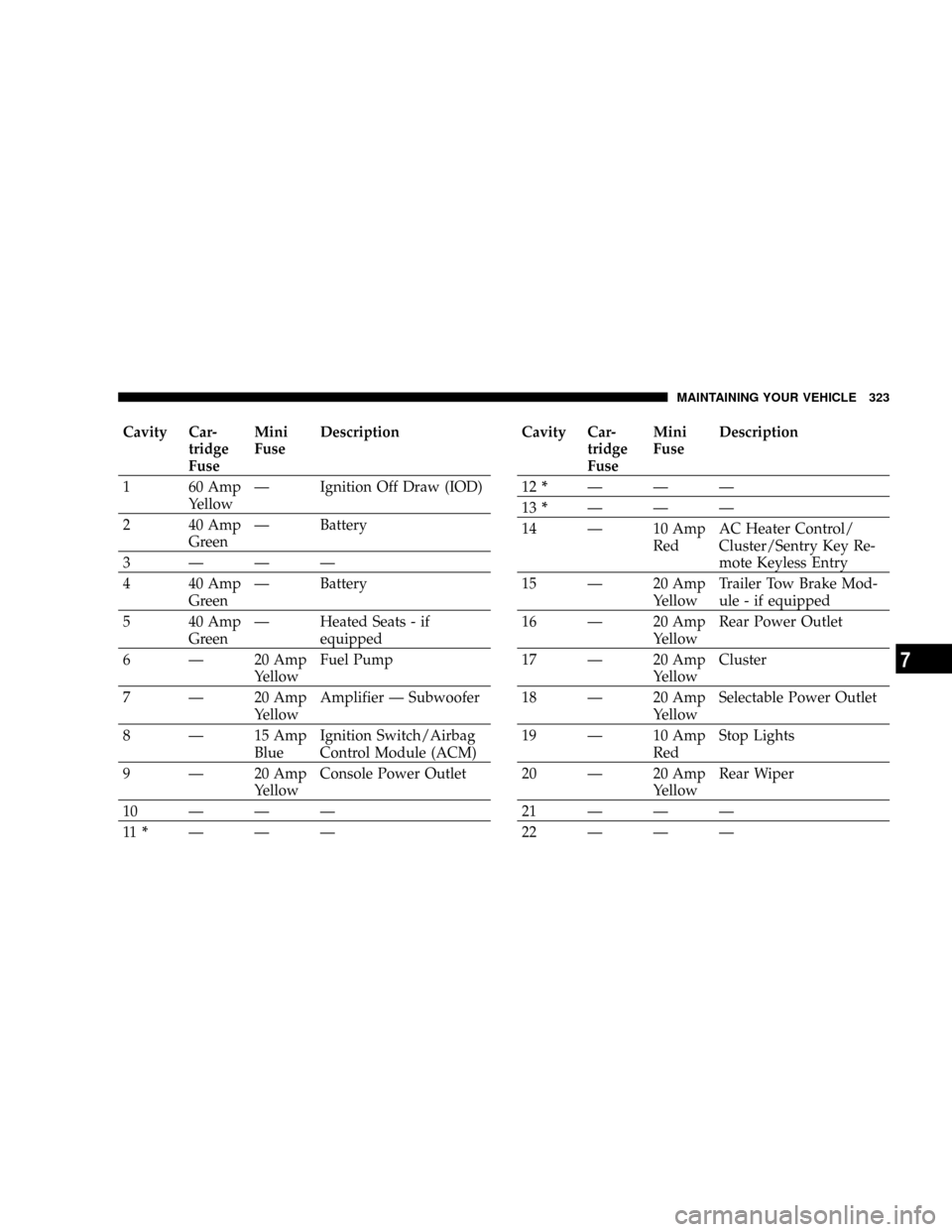
1 60 Amp
YellowÐ Ignition Off Draw (IOD)
2 40 Amp
GreenÐ Battery
3ÐÐÐ
4 40 Amp
GreenÐ Battery
5 40 Amp
GreenÐ Heated Seats - if
equipped
6 Ð 20 Amp
YellowFuel Pump
7 Ð 20 Amp
YellowAmplifier Ð Subwoofer
8 Ð 15 Amp
BlueIgnition Switch/Airbag
Control Module (ACM)
9 Ð 20 Amp
YellowConsole Power Outlet
10ÐÐÐ
11*ÐÐÐCavity Car-
tridge
FuseMini
FuseDescription
12*ÐÐÐ
13*ÐÐÐ
14 Ð 10 Amp
RedAC Heater Control/
Cluster/Sentry Key Re-
mote Keyless Entry
15 Ð 20 Amp
YellowTrailer Tow Brake Mod-
ule - if equipped
16 Ð 20 Amp
YellowRear Power Outlet
17 Ð 20 Amp
YellowCluster
18 Ð 20 Amp
YellowSelectable Power Outlet
19 Ð 10 Amp
RedStop Lights
20 Ð 20 Amp
YellowRear Wiper
21ÐÐÐ
22ÐÐÐ
MAINTAINING YOUR VEHICLE 323
7
Page 325 of 380
Cavity Car-
tridge
FuseMini
FuseDescription
23ÐÐÐ
24ÐÐÐ
25ÐÐÐ
26ÐÐÐ
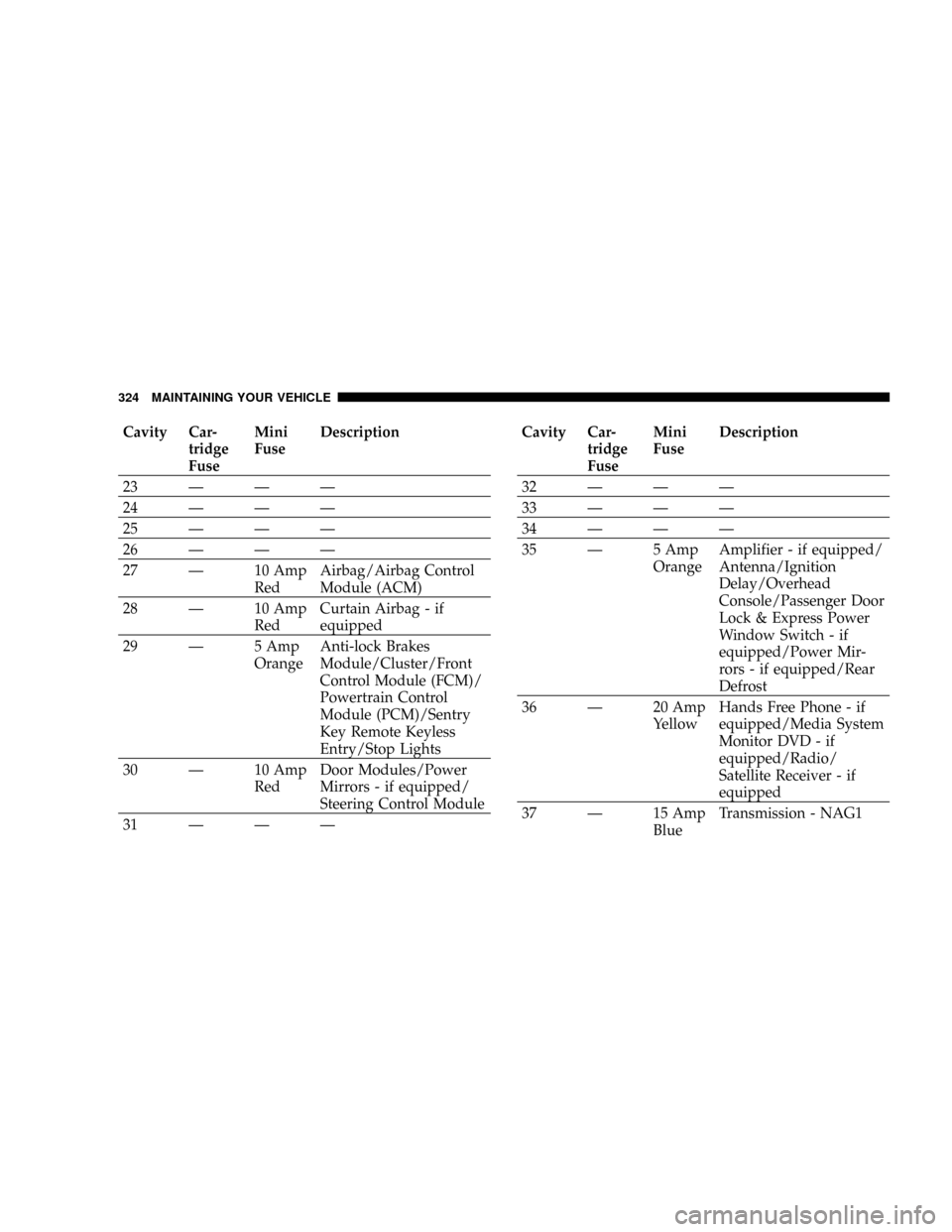
27 Ð 10 Amp
RedAirbag/Airbag Control
Module (ACM)
28 Ð 10 Amp
RedCurtain Airbag - if
equipped
29 Ð 5 Amp
OrangeAnti-lock Brakes
Module/Cluster/Front
Control Module (FCM)/
Powertrain Control
Module (PCM)/Sentry
Key Remote Keyless
Entry/Stop Lights
30 Ð 10 Amp
RedDoor Modules/Power
Mirrors - if equipped/
Steering Control Module
31ÐÐÐCavity Car-
tridge
FuseMini
FuseDescription
32ÐÐÐ
33ÐÐÐ
34ÐÐÐ
35 Ð 5 Amp
OrangeAmplifier - if equipped/
Antenna/Ignition
Delay/Overhead
Console/Passenger Door
Lock & Express Power
Window Switch - if
equipped/Power Mir-
rors - if equipped/Rear
Defrost
36 Ð 20 Amp
YellowHands Free Phone - if
equipped/Media System
Monitor DVD - if
equipped/Radio/
Satellite Receiver - if
equipped
37 Ð 15 Amp
BlueTransmission - NAG1
324 MAINTAINING YOUR VEHICLE
Page 327 of 380
VEHICLE STORAGE
If you are leaving your vehicle dormant for more than 21
days, you may want to take steps to protect your battery.
You may:
²Disconnect the negative cable from the battery.
²Anytime you store your vehicle, or keep it out of
service (i.e. vacation) for two weeks or more, run the
air conditioning system at idle for about five minutes
in the fresh air and high blower setting. This will
insure adequate system lubrication to minimize the
possibility of compressor damage when the system is
started again.
REPLACEMENT LIGHT BULBS
LIGHT BULBS Ð Interior Bulb Number
Rear Courtesy/Reading Lights.............. W5W
Rear Compartment (Liftgate) Light............ 578
Overhead Console Reading Lights............. 578
Visor Vanity Lights.....................A6220
Glove Box Light......................... 194
Door Courtesy.......................... 562
Shift Indicator Light.................JKLE14140
NOTE:For lighted switches, see your dealer for re-
placement instructions.
All of the interior bulbs are glass wedge base or glass
cartridge types. Aluminum base bulbs are not approved
and should not be used for replacement.
326 MAINTAINING YOUR VEHICLE
Page 328 of 380
LIGHT BULBS Ð Exterior Bulb Number
Low Beam Headlight.....................9006
High Beam Headlight.....................9005
Front Park/Turn Light...................3457A
Front Fog LightÐIf Equipped. . . 9145/H10 (Serviced at
Dealer)
Front Side Marker........194NA (Serviced at Dealer)
Tail/Stop/Turn Light...............3157KP27/7W
Rear Side Marker................3757APY27/7W
Backup Light......................921/W16W
Center High Mount Stop Light (CHMSL)....... LED
License.............................. W5W
BULB REPLACEMENT
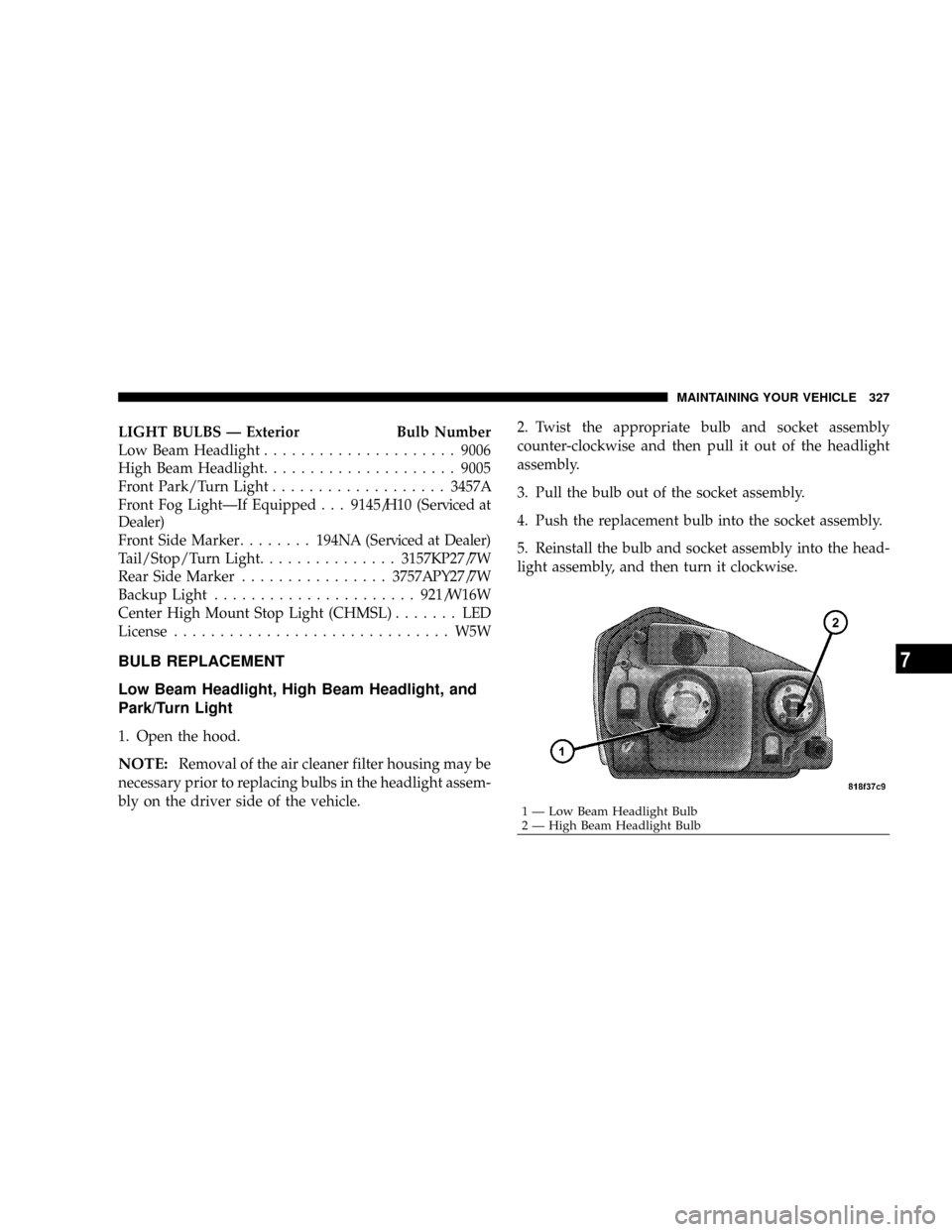
Low Beam Headlight, High Beam Headlight, and
Park/Turn Light
1. Open the hood.
NOTE:Removal of the air cleaner filter housing may be
necessary prior to replacing bulbs in the headlight assem-
bly on the driver side of the vehicle.2. Twist the appropriate bulb and socket assembly
counter-clockwise and then pull it out of the headlight
assembly.
3. Pull the bulb out of the socket assembly.
4. Push the replacement bulb into the socket assembly.
5. Reinstall the bulb and socket assembly into the head-
light assembly, and then turn it clockwise.
1 Ð Low Beam Headlight Bulb
2 Ð High Beam Headlight BulbMAINTAINING YOUR VEHICLE 327
7