warning light DODGE MAGNUM SRT 2008 1.G User Guide
[x] Cancel search | Manufacturer: DODGE, Model Year: 2008, Model line: MAGNUM SRT, Model: DODGE MAGNUM SRT 2008 1.GPages: 476, PDF Size: 5.82 MB
Page 86 of 476
CAUTION!
To avoid damage to the mirror during cleaning, never
spray any cleaning solution directly onto the mirror.
Apply the solution onto a clean cloth and wipe the
mirror clean.
Outside Mirrors
To receive maximum benefit, adjust the outside mirror(s)
to center on the adjacent lane of traffic and a slight
overlap of the view obtained from the inside mirror.
NOTE:The passenger-side convex outside mirror will
give a much wider view to the rear, and especially of the
lane next to your vehicle.
WARNING!
Vehicles and other objects seen in the passenger-side
convex mirror will look smaller and farther away
than they really are. Relying too much on your
passenger-side convex mirror could cause you to
collide with another vehicle or other object. Use your
inside mirror when judging the size or distance of a
vehicle seen in the passenger-side convex mirror.
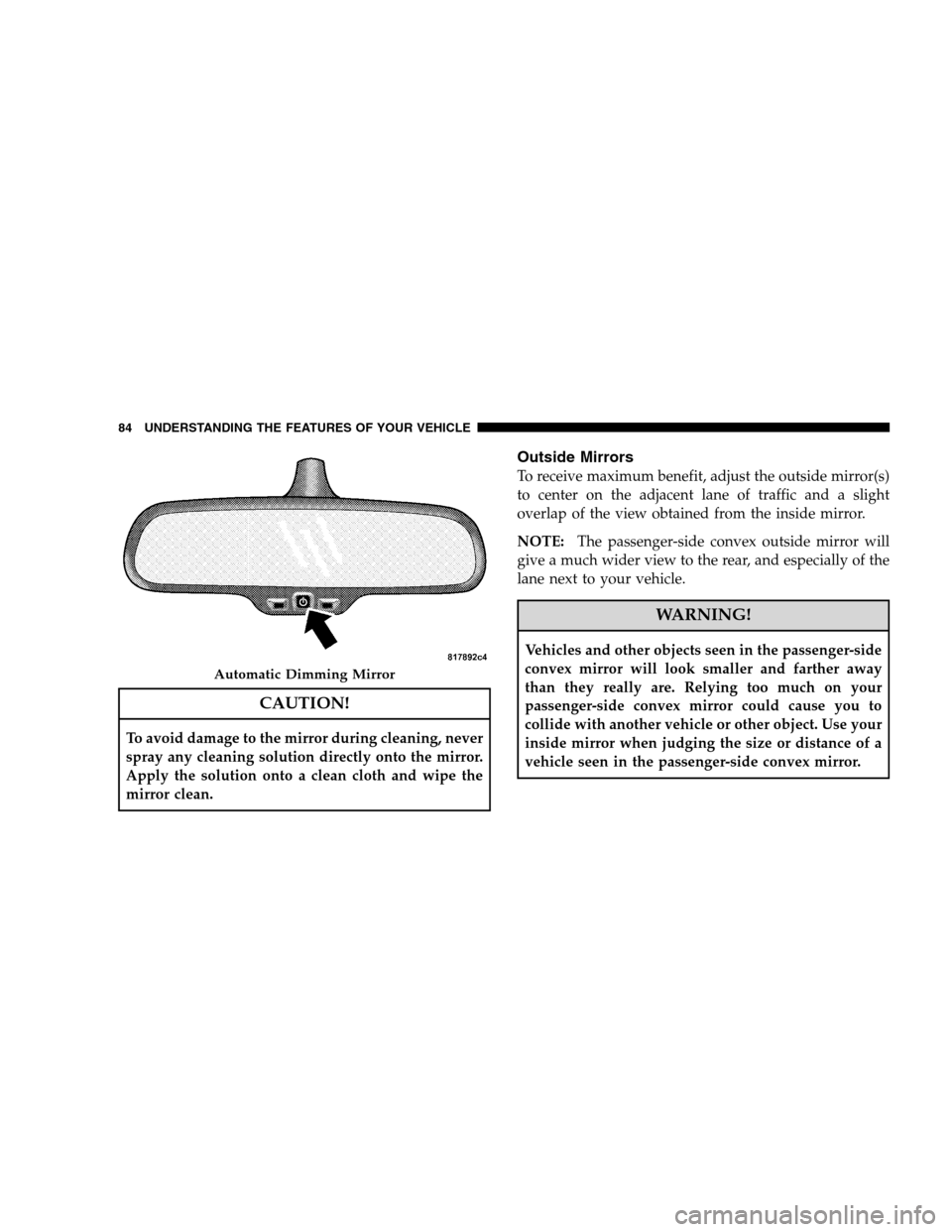
Automatic Dimming Mirror
84 UNDERSTANDING THE FEATURES OF YOUR VEHICLE
Page 136 of 476
WARNING!
Sudden loss of visibility through the windshield
could lead to an accident. You might not see other
vehicles or other obstacles. To avoid sudden icing of
the windshield during freezing weather, warm the
windshield with the defroster before and during
windshield washer use.
Mist Feature
Push the multifunction lever inward (toward the steering
column) to the first detent to activate a single wipe cycle
to clear off road mist or spray from a passing vehicle. The
wipers will continue to operate until you release the
lever.
Windshield Washers
To use the washer, push the multifunction lever inward
(toward the steering column) to the second detent and
hold it for as long as washer spray is desired.
If you activate the washer while the windshield wiper
control is in the delay range, the wipers will operate for
two wipe cycles after releasing the lever and then resume
the intermittent interval previously selected.
If you activate the washer while the windshield wiper is
turned off, the wipers will operate for three wipe cycles
and then turn off.
Headlights On with Wipers (Available with Auto
Headlights Only)
When this feature is active, the headlights will turn on
approximately 10 seconds after the wipers are turned ON
134 UNDERSTANDING THE FEATURES OF YOUR VEHICLE
Page 141 of 476
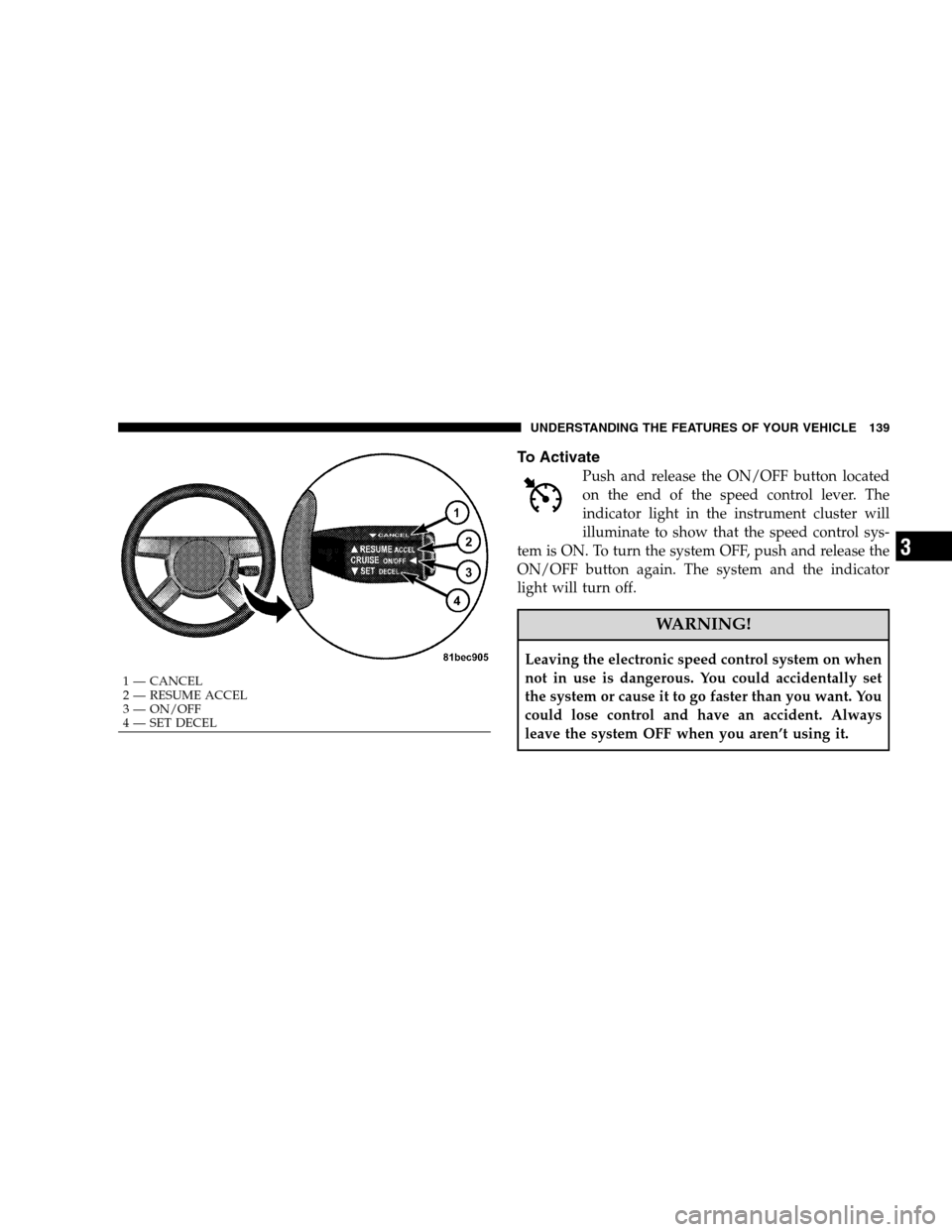
To Activate
Push and release the ON/OFF button located
on the end of the speed control lever. The
indicator light in the instrument cluster will
illuminate to show that the speed control sys-
tem is ON. To turn the system OFF, push and release the
ON/OFF button again. The system and the indicator
light will turn off.
WARNING!
Leaving the electronic speed control system on when
not in use is dangerous. You could accidentally set
the system or cause it to go faster than you want. You
could lose control and have an accident. Always
leave the system OFF when you aren’t using it.
1 — CANCEL
2 — RESUME ACCEL
3 — ON/OFF
4 — SET DECEL
UNDERSTANDING THE FEATURES OF YOUR VEHICLE 139
3
Page 143 of 476
Tapping the lever to RESUME ACCEL once will result in
a 1 mph (1.6 km/h) speed increase. Each time the lever is
tapped speed increases, so tapping the lever three times
will increase speed by 3 mph (4.8 km/h), etc.
To decrease speed while speed control is set, push
downward and hold the lever in SET DECEL. Release the
lever when the desired speed is reached, and a new set
speed will be established.
Tapping the lever to SET DECEL once will result in a 1
mph (1.6 km/h) speed decrease. Each time the lever is
tapped, speed decreases.
To Accelerate For Passing
Depress the accelerator as you would normally. When the
pedal is released, the vehicle will return to the set speed.
Using Speed Control on Hills
NOTE:The speed control system maintains speed up
and down hills. A slight speed change on moderate hills
is normal.
The automatic transmission will downshift while climb-
ing uphill or descending downhill. This downshift is
necessary to maintain vehicle set speed.
On steep hills, a greater speed loss or gain may occur, so
it may be preferable to drive without speed control.
WARNING!
Speed control can be dangerous where the system
can’t maintain a constant speed. Your vehicle could
go too fast for the conditions and you could lose
control. An accident could be the result. Don’t use
speed control in heavy traffic or on roads that are
winding, icy, snow-covered, or slippery.
UNDERSTANDING THE FEATURES OF YOUR VEHICLE 141
3
Page 155 of 476
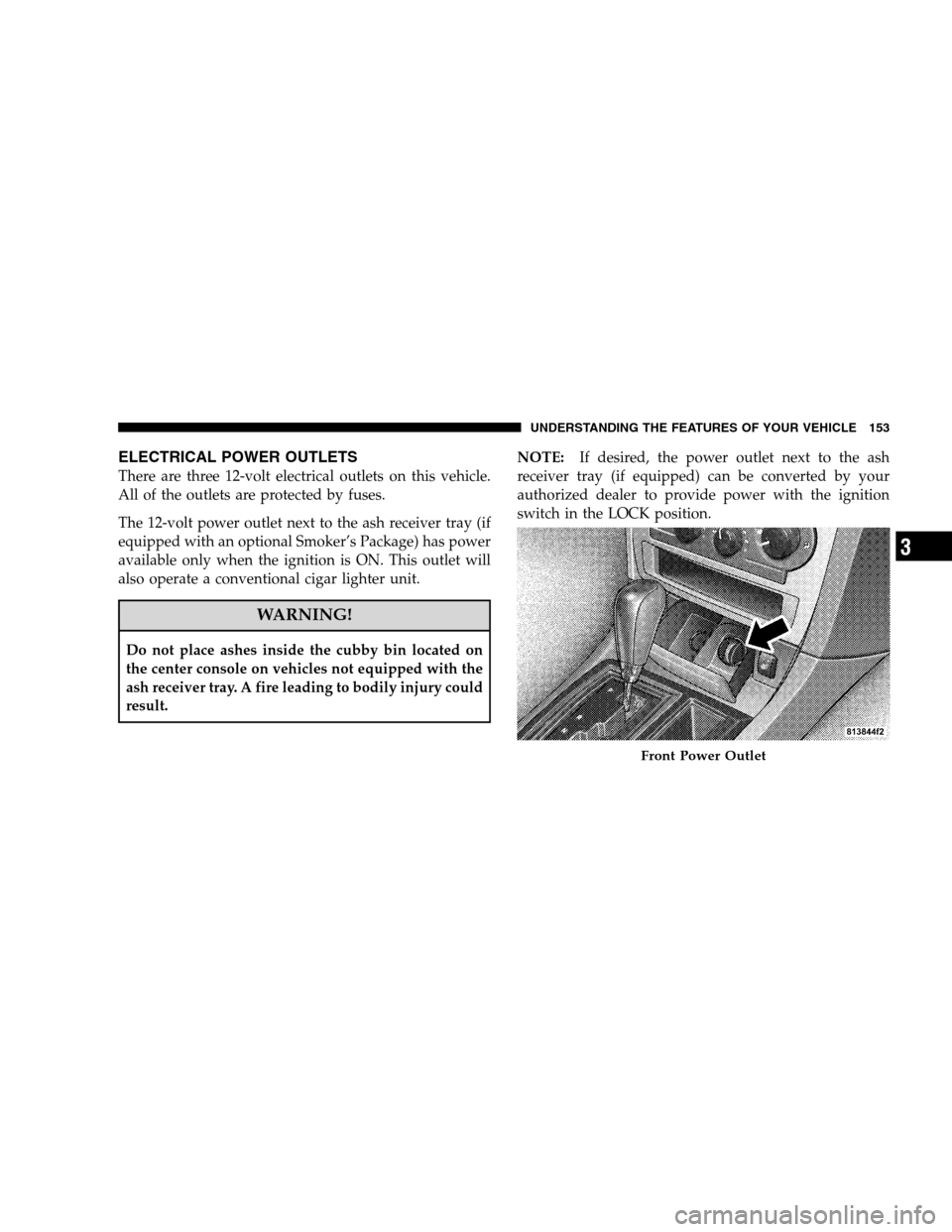
ELECTRICAL POWER OUTLETS
There are three 12-volt electrical outlets on this vehicle.
All of the outlets are protected by fuses.
The 12-volt power outlet next to the ash receiver tray (if
equipped with an optional Smoker’s Package) has power
available only when the ignition is ON. This outlet will
also operate a conventional cigar lighter unit.
WARNING!
Do not place ashes inside the cubby bin located on
the center console on vehicles not equipped with the
ash receiver tray. A fire leading to bodily injury could
result.NOTE:If desired, the power outlet next to the ash
receiver tray (if equipped) can be converted by your
authorized dealer to provide power with the ignition
switch in the LOCK position.
Front Power Outlet
UNDERSTANDING THE FEATURES OF YOUR VEHICLE 153
3
Page 180 of 476
NOTE:Check for an inoperative outside light bulb if
either indicator flashes at a rapid rate.
10. Airbag Warning Light
This light will turn on for six to eight seconds
as a bulb check when the ignition switch is first
turned ON. If the light is either not on during
starting, or stays on, or turns on while driving,
then have the system inspected at your authorized dealer
as soon as possible. (See page 61 for more information.)
11. Engine Temperature Warning Light
This light will turn on and a single chime will
sound to warn of an overheated engine condition.
When this light turns on, the engine temperature
is critically hot. The vehicle should be turned OFF
immediately and serviced as soon as possible. (See page
364 for more information.)12. Electronic Stability Program (ESP)/Traction
Control System (TCS) Indicator Light
If this indicator light flashes during accelera-
tion, ease up on the accelerator and apply as
little throttle as possible. Adapt your speed and
driving to the prevailing road conditions, and
do not switch off the ESP. (See page 300 for more
information.)
13. Electronic Stability Program (ESP) / Brake Assist
System (BAS) Malfunction Indicator Light
The yellow ESP/BAS malfunction indicator
light will turn on when the key in the ignition
switch is turned to the ON position. The light
should go out with the engine running. If the
light remains on after several ignition cycles, and the
vehicle has been driven several miles (kilometers) at
178 UNDERSTANDING YOUR INSTRUMENT PANEL
Page 181 of 476
speeds greater than 30 mph (48 km/h), see your autho-
rized dealer as soon as possible to have the problem
diagnosed and corrected. (See page 300 for more infor-
mation.)
14. Oil Pressure Warning Light
This light shows low engine oil pressure. The light
should turn on momentarily when the engine is
started. If the light turns on while driving, stop the
vehicle, and shut OFF the engine as soon as possible. A
single chime will sound when this light turns on.
Do not operate the vehicle until the cause is corrected.
This light does not show how much oil is in the engine.
The engine oil level must be checked using the procedure
shown in Section 7. (See page 385 for more information.)
15. High Beam Light
This light will turn on when the high beam
headlights are ON. Push the multifunction leveraway from the steering wheel to switch the headlights to
high beam. (See page 129 for more information.)
16. Seat Belt Reminder Light
This light will turn on for five to eight seconds as
a bulb check when the ignition switch is first
turned ON. A chime will sound if the driver’s seat
belt is unbuckled during the bulb check. The Seat Belt
Warning Light will flash or remain on continuously if the
driver’s seat belt remains unbuckled after the bulb check
or when driving. (See page 46 for more information.)
17. Transmission Range Indicator
This display indicator shows the automatic transmission
gear selection.
18. Front Fog Light Indicator — If Equipped
This light will turn on when the front fog lights are
ON. (See page 129 for more information.)
UNDERSTANDING YOUR INSTRUMENT PANEL 179
4
Page 182 of 476
19. Electronic Vehicle Information Center Display
This display shows the Electronic Vehicle Information
Center (EVIC) messages when the appropriate conditions
exist. (See page 185 for more information.)
Loose Fuel Filler Cap
If the vehicle diagnostic system determines that the fuel
filler cap is loose, improperly installed, or damaged, a
“Check Gascap” message will display in the EVIC.
Tighten the fuel filler cap properly and press the TRIP
ODOMETER button to turn off the message. If the
problem continues, the message will appear the next time
the vehicle is started.
A loose, improperly installed, or damaged fuel filler cap
may also turn on the Malfunction Indicator Light (MIL).
(See page 381 for more information.)20. Brake System Warning Light
This light monitors various brake functions,
including brake fluid level and parking brake
application. If the brake light turns on, it may
indicate that the parking brake is applied, that
the brake fluid level is low, or that there is a problem with
the Anti-Lock Brake System (ABS).
The dual brake system provides a reserve braking capac-
ity to a portion of the hydraulic system in the event of a
failure. Failure of either half of the dual brake system is
indicated by the Brake Warning Light, which will turn on
when the brake fluid level in the master cylinder drops
below a specified level.
The light will remain on until the cause is corrected.
NOTE:The light may flash momentarily during sharp
cornering maneuvers, which could change fluid level
conditions. The vehicle should have service performed,
and the brake fluid level checked.
180 UNDERSTANDING YOUR INSTRUMENT PANEL
Page 183 of 476
Immediate repair is necessary if brake failure is indicated.
WARNING!
Driving a vehicle with the brake light on is danger-
ous. Part of the brake system may have failed. It will
take longer to stop the vehicle. You could have an
accident. Have the vehicle checked immediately.
Vehicles equipped with ABS are also equipped with
Electronic Brake Force Distribution (EBD). Both the Brake
Warning Light and the ABS Light will turn on in the
event of an EBD failure. Immediate repair of the ABS is
required in the event of an EBD failure.
The operation of the Brake Warning Light can be checked
by turning the ignition switch from the LOCK position tothe ON position. The light should turn on for approxi-
mately two seconds and then turn off. The light will
remain on if the parking brake is applied or if a brake
fault is detected. If the parking brake is not applied and
the light remains on, or if the light does not turn on, have
the light inspected by an authorized dealer.
NOTE:The light will turn on when the ignition switch
is in the ON position and the parking brake is applied.
This light shows only that the parking brake is applied. It
does not show the degree of brake application. (See page
297 for more information.)
21. Vehicle Security Alarm (VSA) Indicator Light — If
Equipped
The VSA Indicator Light flashes rapidly when the VSA is
arming, and slowly when the VSA is armed. (See page 18
for more information.)
UNDERSTANDING YOUR INSTRUMENT PANEL 181
4
Page 186 of 476
23. Anti-Lock Brake Light
This light monitors the Anti-Lock Brake System
(ABS). The light will turn on when the ignition
switch is turned to the ON position and may stay on for
as long as four seconds.
If the ABS light remains on or turns on while driving,
then the Anti-Lock portion of the brake system is not
functioning and service is required. However, the con-
ventional brake system will continue to operate normally
if the BRAKE warning light is not on.
If the ABS light is on, the brake system should be serviced
as soon as possible to restore the benefits of Anti-Lock
Brakes. If the ABS light does not turn on when the
ignition switch is turned to the ON position, have the
light inspected by an authorized dealer. (See page 297 for
more information.)24. Low Fuel Indicator Light
This light will turn on and a single chime will
sound when the fuel level drops to 1/8 tank. (See
page 341 for more information.)
25. Malfunction Indicator Light (MIL)
This light is part of an onboard diagnostic system
called OBD. The OBD system monitors engine
and automatic transmission control systems. The
MIL will turn on when the key is in the ON position
before engine start. If the MIL does not come on when
turning the key from OFF to ON, have the condition
checked promptly.
Certain conditions such as a loose or missing gas cap,
poor fuel quality, etc., may illuminate the MIL after
engine start. The vehicle should be serviced if the MIL
stays on through several of your typical driving cycles. In
most situations, the vehicle will drive normally and will
not require towing.
184 UNDERSTANDING YOUR INSTRUMENT PANEL