radio controls DODGE NEON 2004 2.G Owners Manual
[x] Cancel search | Manufacturer: DODGE, Model Year: 2004, Model line: NEON, Model: DODGE NEON 2004 2.GPages: 241, PDF Size: 3.75 MB
Page 61 of 241
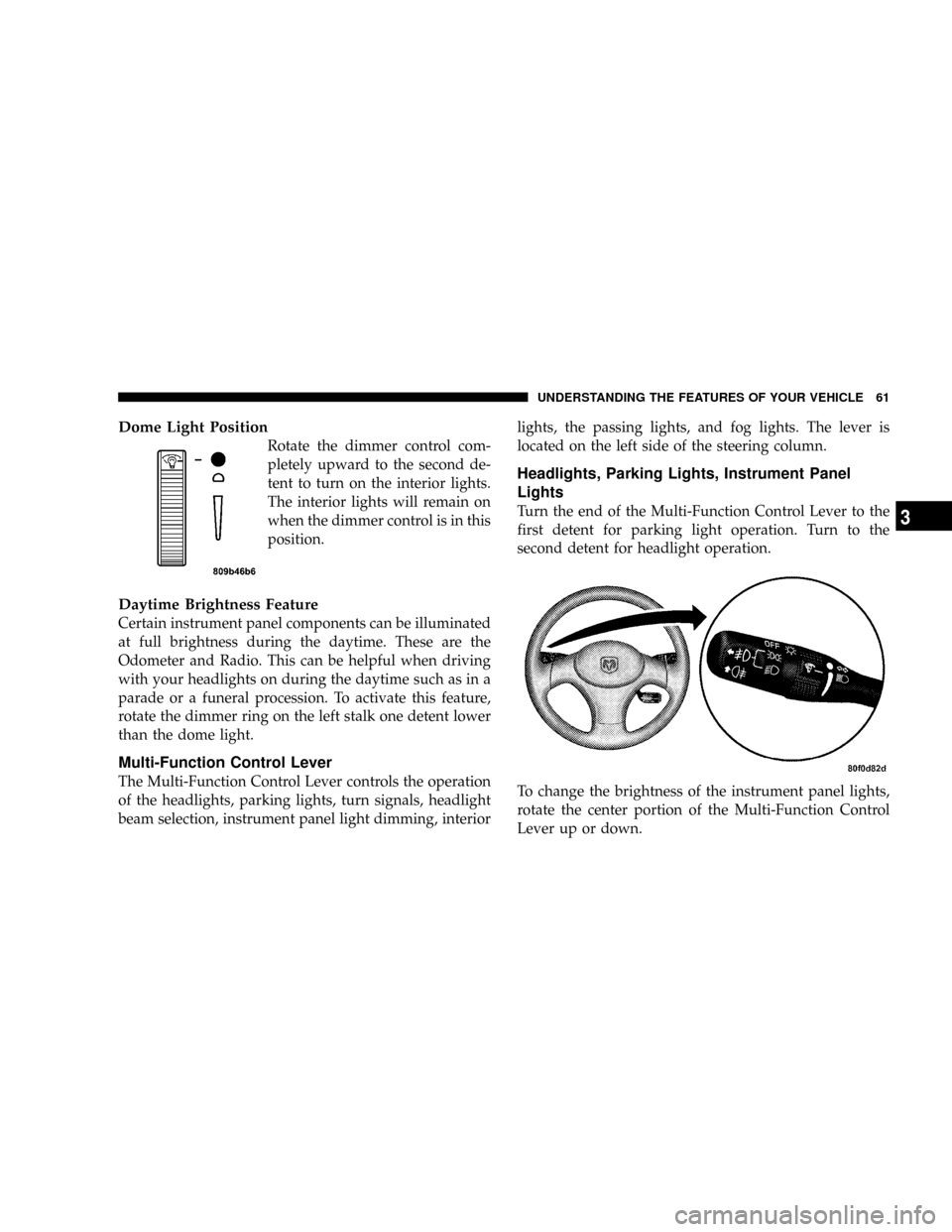
Dome Light Position
Rotate the dimmer control com-
pletely upward to the second de-
tent to turn on the interior lights.
The interior lights will remain on
when the dimmer control is in this
position.
Daytime Brightness Feature
Certain instrument panel components can be illuminated
at full brightness during the daytime. These are the
Odometer and Radio. This can be helpful when driving
with your headlights on during the daytime such as in a
parade or a funeral procession. To activate this feature,
rotate the dimmer ring on the left stalk one detent lower
than the dome light.
Multi-Function Control Lever
The Multi-Function Control Lever controls the operation
of the headlights, parking lights, turn signals, headlight
beam selection, instrument panel light dimming, interiorlights, the passing lights, and fog lights. The lever is
located on the left side of the steering column.
Headlights, Parking Lights, Instrument Panel
Lights
Turn the end of the Multi-Function Control Lever to the
first detent for parking light operation. Turn to the
second detent for headlight operation.
To change the brightness of the instrument panel lights,
rotate the center portion of the Multi-Function Control
Lever up or down.
UNDERSTANDING THE FEATURES OF YOUR VEHICLE 61
3
Page 72 of 241

NFade...............................86
NBass And Treble Tone Control.............86
NAM/FM Selection......................86
NMode Button.........................86
NCassette Player Features.................86
NCD Changer Control Capability Ð If
Equipped............................87
NRadio Display Messages.................89
mSales Code RBKÐAM/ FM Stereo Radio With
CD Player And CD Changer Controls
........89
NRadio Operation.......................89
NCD Player Operation....................91
NCD Changer Control Capability Ð If
Equipped............................93
NRadio Display Messages.................94
mSatellite Radio Ð If Equipped..............95
NSystem Activation......................95NElectronic Serial Number/Sirius Identification
Number (ENS/SID).....................95
NSelecting Satellite Mode In RBB And RBK
Radios..............................96
NSelecting Satellite Mode In RBP, RBU, RAZ,
And RBQ Radios......................96
NSelecting a Channel.....................96
NStoring And Selecting Pre-Set Channels.......97
NUsing The PTY (Program Type) Button
(If Equipped).........................97
NPTY Button9Scan9......................97
NPTY Button9Seek9......................97
NSatellite Antenna.......................97
NReception Quality......................97
mCassette Tape And Player Maintenance.......98
m6 Disc CD Changer Ð If Equipped..........99
NLoading The CD Changer................99
72 UNDERSTANDING YOUR INSTRUMENT PANEL
Page 73 of 241

NPlaying Discs.........................99
NSeek Button.........................100
NFF/Tune/RW........................100
NMode Button........................100
NProgram Button 1.....................100
NProgram Button 4 (Random Play)..........100
NProgram Button 5.....................100
NTime Button.........................100
NChanging Modes......................100
NRemoving Discs From The CD Changer.....101
NCD Changer Operation With The Changer
Off ...............................101mCompact Disc Maintenance...............101
mRadio Operation And Cellular Phones.......102
mClimate Controls......................102
NHeater Only.........................102
NSide Window Demisters.................103
NOutside Air Intake....................104
NAir Conditioning Ð If Equipped..........104
NOperating Tips.......................108
mElectric Rear Window Defroster...........110
UNDERSTANDING YOUR INSTRUMENT PANEL 73
4
Page 84 of 241

Electrical Disturbances
Radio waves may pick up electrical disturbances during
transmission. They mainly affect the wave amplitude,
and thus remain a part of the AM reception. They
interfere very little with the frequency variations that
carry the FM signal.
AM Reception
AM sound is based on wave amplitude, so AM reception
can be disrupted by such things as lightning, power lines
and neon signs.
FM Reception
Because FM transmission is based on frequency varia-
tions, interference that consists of amplitude variations
can be filtered out, leaving the reception relatively clear,
which is the major feature of FM radio.
SALES CODE RBBÐAM/FM STEREO RADIO
WITH CASSETTE TAPE PLAYER AND CD
CHANGER CAPABILITY
Operating Instructions
NOTE:
Power to operate the radio is supplied through
the ignition switch. It must be in the ON or ACC position
to operate the radio.
NOTE:When first learning the control functions, the
user should set the controls as shown in the following
list.
Tone Controls¼As illustrated.
Speaker Control¼Centered.
84 UNDERSTANDING YOUR INSTRUMENT PANEL
Page 86 of 241

stations to be locked into push-button memory. The
stations stored in SET 2 memory can be selected by
pressing the push-button twice.
Every time a preset button is used a corresponding
button number will be displayed.
Balance
The balance control adjusts the left-to-right speaker bal-
ance. Press the BAL button in and it will pop out. Adjust
the balance and push the button back in.
Fade
The fade control provides for balance between the front
and rear speakers. Press the FADE button in and it will
pop out. Adjust the balance and push the button back in.
Bass and Treble Tone Control
The tone controls consist of 2 separate bands. The bass
band is on the left, and the treble band is on the right.
Each band is adjusted by a slider control with a detent at
the mid-position. Moving the control up or down in-
creases or decreases amplification of that band. The mid
position provides a balanced output.
AM/FM Selection
Press the AM/FM button to change from AM to FM. The
operating mode will be displayed next to the station
frequency. The display will show ST when a stereo
station is received in the FM mode.
Mode Button
Press the MODE button to select between the cassette
tape player, CD changer, or the Satellite Radio (if
equipped). When the Satellite Radio (if equipped) is
selected ªSAº will appear in your radio display.
A CD or tape may remain in the player while in the
Satellite or radio mode.
Cassette Player Features
With ignition OFF and the sound system OFF, you can
eject the tape cassette by pushing the EJECT button.
You can turn the tape player ON by inserting a cassette or
activating the MODE button (with a cassette in the radio),
but only when the ignition and radio are on.
Each time a cassette is inserted the tape player will begin
playing on the side of the cassette that is facing up in the
player.
86 UNDERSTANDING YOUR INSTRUMENT PANEL
Page 87 of 241

Music Search
Pressing the SEEK button while playing a tape will start
the Music Search mode. Press the SEEK button up for the
next selection on the tape and down to return to the
beginning of the current selection, or return to the
beginning of the previous selection if the tape is within
the first 5 seconds of the current selection.
The SEEK symbol appears on the display when Music
Search is in operation. Music Search shuts off automati-
cally when a selection has been located.
Selective Music Search
Press the SEEK button up or down to move the track
number to skip forward or backward 1 to 7 selections.
Press the SEEK button once to move 1 selection, twice to
move 2 selections, etc.
Fast Forward And Rewind Buttons
Pressing the TUNE button up or down momentarily
activates Fast Forward or Rewind and makes the direc-
tional arrows appear on the display.
To stop Fast Forward or Rewind, press the TUNE button
again.
Time Button
Press the time button to toggle between station frequency
and time of day.
Pressing this button while playing a cassette tape will
change the side of the tape being played.
NR (Noise Reduction)
Pushing the Number 2 Pre-set button when a tape is
playing deactivates the Dolby Noise Reduction System*.
When Dolby is ON, the NR symbol appears on the
display. Each time a tape is inserted the Dolby will turn
ON.
* ªDolbyº noise reduction manufactured under license
from Dolby Laboratories Licensing Corporation. Dolby
and the double-D symbol are trademarks of Dolby Labo-
ratories Licensing Corporation.
CD Changer Control Capability Ð If Equipped
This radio is compatible with a remote mounted CD
changer available through Mopar Accessories. The fol-
lowing instructions are for the radio controls that operate
this CD changer.
UNDERSTANDING YOUR INSTRUMENT PANEL 87
4
Page 89 of 241

Radio Display Messages
Your radio has been designed to display certain messages
when a problem is detected with the CD player.
SALES CODE RBKÐAM/ FM STEREO RADIO
WITH CD PLAYER AND CD CHANGER
CONTROLS
Radio Operation
Power/Volume Control
Press the ON/VOL control to turn the radio on. Turn the
volume control clockwise to increase the volume.
NOTE:Power to operate the radio is supplied through
the ignition switch. It must be in the ON or ACC position
to operate the radio.
UNDERSTANDING YOUR INSTRUMENT PANEL 89
4
Page 90 of 241

Seek
Press and release the SEEK button to search for the next
station in either the AM or FM mode. Press the top of the
button to seek up and the bottom to seek down. The
radio will remain tuned to the new station until you
make another selection. Holding the button in will by-
pass stations without stopping until you release it.
Tune
Press the TUNE control up or down to increase or
decrease the frequency. If you press and hold the button,
the radio will continue to tune until you release the
button. The frequency will be displayed and continu-
ously updated while the button is pressed.
Balance
The Balance control adjusts the left-to-right speaker bal-
ance. Press the BAL button in and it will pop out. Adjust
the balance and push the button back in.
Fade
The Fade control provides for balance between the front
and rear speakers. Press the FADE button in and it will
pop out. Adjust the balance and push the button back in.
Bass and Treble Tone Control
The tone controls consist of 2 separate bands. The bass
band is on the left, and the treble band is on the right.
Each band is adjusted by a slider control with a detent at
the mid-position. Moving the control up or down in-
creases or decreases amplification of that band. The mid
position provides a balanced output.
AM/FM Selection
Press the AM/FM button to change from AM to FM. The
operating mode will be displayed next to the station
frequency. The display will show ST when a stereo
station is received.
To Set The Radio Push-Button Memory
When you are receiving a station that you wish to
commit to push-button memory, press the SET button.
SET 1 will show in the display window. Select the ª1±5º
button you wish to lock onto this station and press and
release that button. If a button is not selected within 5
seconds after pressing the SET button, the station will
continue to play but will not be locked into push-button
memory.
90 UNDERSTANDING YOUR INSTRUMENT PANEL
Page 93 of 241

CD Changer Control Capability Ð If Equipped
This radio is compatible with a remote mounted CD
changer available through Mopar Accessories. The fol-
lowing instructions are for the radio controls that operate
this CD changer.
Mode Button
To activate the CD changer, press the MODE button until
CD information appears on the display.
Push-Button
While the CD changer is playing, press the NUMBER 1
push-button or the NUMBER 5 push-button to select a
disc numbered higher or lower than the one currently
being played.
Seek Button
Press the SEEK up or down to select another track on the
same disc. A SEEK symbol will appear on the display.
Fast Forward And Rewind Buttons
Press and hold the FF button for fast forward. Press and
hold the RW button for fast reverse.The audio output can be heard when fast forward and
fast reverse are activated.
Random Play (RND)
Press the Random button to play the tracks on the
selected disc in random order for an interesting change of
pace.
Random can be cancelled by pressing the button a second
time or by ejecting the CD from the changer.
CD Diagnostic Indicators
When driving over a very rough road, the CD player may
skip momentarily. Skipping will not damage the disc or
the player, and play will resume automatically.
As a safeguard and to protect your CD player, one of the
following warning symbols may appear on your display.
A CD HOT symbol indicates the player is too hot.
CD HOT will pause the operation. Play can be resumed
when the operating temperature is corrected or another
MODE is selected.
UNDERSTANDING YOUR INSTRUMENT PANEL 93
4
Page 102 of 241

RADIO OPERATION AND CELLULAR PHONES
Under certain conditions, the operation of a cellular
phone in your vehicle can cause erratic or noisy perfor-
mance from your radio. This condition may be lessened
or eliminated by relocating the cellular phone antenna.
This condition is not harmful to the radio. If your radio
performance does not satisfactorily ªclearº by the repo-
sitioning of the antenna, it is recommended that the radio
volume be turned down or off during cellular phone
operation.
CLIMATE CONTROLS
Heater Only
The controls are as follows:
Fan Control
Use this control to regulate the
amount of air forced through the
system in any mode you select.
Turn the control clockwise to in-
crease fan speed. Turn the control
to the full counterclockwise posi-
tion to turn the fan off.
NOTE:There is always a small amount of air entering
the vehicle even when the fan is turned off. If this
becomes objectionable during cold weather, place the
mode control on FLOOR to direct the air flow away from
passengers.
Mode Control (Air Direction)
The mode control allows
you to choose from sev-
eral patterns of air distri-
bution. You can select ei-
ther a primary mode, as
identified by the sym-
bols, or a blend of two of
these modes. The center point between modes gives an
even blend of both modes. The closer the control is to a
particular mode, the more air distribution you receive
from that mode.
Panel
Air is directed through the adjustable outlets in
the instrument panel.
102 UNDERSTANDING YOUR INSTRUMENT PANEL