display DODGE NEON 2005 2.G Owners Manual
[x] Cancel search | Manufacturer: DODGE, Model Year: 2005, Model line: NEON, Model: DODGE NEON 2005 2.GPages: 246, PDF Size: 3.69 MB
Page 52 of 246

Lights
²
Briefly press the ªRightº button to toggle the right
reading lamp ªON/OFFº. Repeat the key press to
cycle the light
²Briefly press the ªLeftº button to toggle the left
reading lamp ªON/OFFº. Repeat the key press to
cycle the light.
NOTE:The light can be activated with the ignition off.
NOTE:The light(s) will automatically shut off after
seven minutes with ignition off.
Temperature
Press and hold the ªRightº button for 5±10 seconds (until
ÉF/ÉC toggles in the display) then release the button.
Repeat the key press to cycle the ÉF/ÉC in the display.Display ON/OFF
Press and hold the ªRightº button for 10±15 seconds
(until display toggles ON/OFF) then release the button.
Repeat the key press to cycle the display ON/OFF.
NOTE:The display will default ªONº at each new
ignition cycle.
Automatic Dimming Mirror
52 UNDERSTANDING THE FEATURES OF YOUR VEHICLE
Page 53 of 246
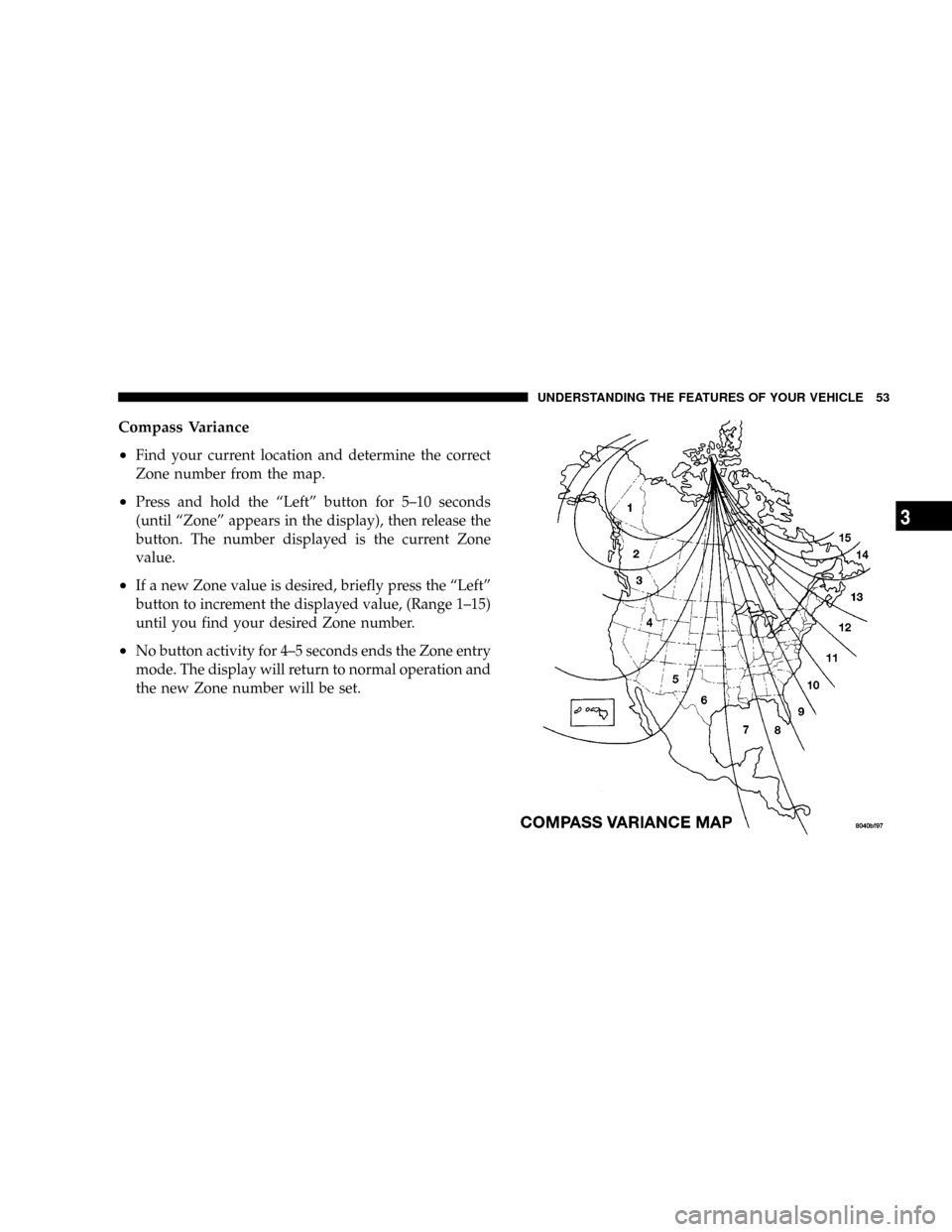
Compass Variance
²
Find your current location and determine the correct
Zone number from the map.
²Press and hold the ªLeftº button for 5±10 seconds
(until ªZoneº appears in the display), then release the
button. The number displayed is the current Zone
value.
²If a new Zone value is desired, briefly press the ªLeftº
button to increment the displayed value, (Range 1±15)
until you find your desired Zone number.
²No button activity for 4±5 seconds ends the Zone entry
mode. The display will return to normal operation and
the new Zone number will be set.
UNDERSTANDING THE FEATURES OF YOUR VEHICLE 53
3
Page 54 of 246
Compass Calibration
If ªCALº is not displayed, press and hold the ªLeftº
button for 10±15 seconds, or until ªCALº appears in the
display, then release the button. The compass is now in
calibration mode.
The mirror can be calibrated in one of two ways
²
Drive the vehicle in circles at less then 5 mph (8 km/h)
until ªCALº no longer appears in the display.
²Drive the vehicle under normal operating conditions.
Outside Mirror Ð Driver's Side
Adjust the outside mirror to center on the adjacent lane of
traffic, with a slight overlap of the view obtained on the
inside mirror.
Outside Mirror Ð Passenger's Side
Adjust the convex outside mirror so you can just see the
side of your vehicle in the part of the mirror closest to the
vehicle.
WARNING!
Vehicles and other objects seen in the passenger side
convex mirror will look smaller and farther away
than they really are. Relying too much on your
passenger side mirror could cause you to collide
with another vehicle or other object. Use your inside
mirror when judging the size or distance of a vehicle
seen in this convex mirror.
54 UNDERSTANDING THE FEATURES OF YOUR VEHICLE
Page 80 of 246

added. If the fuel level drops to about 1/2 gallon, the
fuel symbol will begin to flash and the chime will
sound several times.
16. Malfunction Indicator Light
This light is part of an onboard diagnostic
system called OBD that monitors emissions,
engine, and automatic transmission control
systems. The light will illuminate briefly when the key
is in the ON/RUN position before engine start. If the
bulb does not come on when turning the key from
OFF to ON/RUN, have the condition checked
promptly.
Certain conditions such as a loose or missing gas cap,
poor fuel quality, etc., may illuminate the light after
engine start. The vehicle should be serviced if the light
stays on through several of your typical driving cycles. In
most situations, the vehicle will drive normally and will
not require towing.
If the Malfunction Indicator Light flashes when the
engine is running, serious conditions may exist that
could lead to immediate loss of power or severe catalyticconverter damage. The vehicle should be serviced as
soon as possible if this occurs. (See page 166 for more
information.)
17. Odometer/Trip Odometer Reset Knob
Press this knob to switch between the odometer and trip
odometer. While the trip odometer is being displayed,
press and hold this knob for a few seconds to reset the
trip odometer to zero miles/kilometers.
18. Odometer/Trip Odometer
Shows the total distance the vehicle has been driven.
U.S. Federal regulations require that upon transfer of
vehicle ownership, the seller certify to the purchaser the
correct mileage that the vehicle has been driven. There-
fore, if the odometer reading changes during repair or
replacement, be sure to keep a record of the reading
before and after the service so the correct mileage can be
determined.
80 UNDERSTANDING YOUR INSTRUMENT PANEL
Page 81 of 246

19. Door Ajar Indicator
This vacuum fluorescent display indicator illuminates
when a door is not completely closed. If the door is open
for more than 8 minutes and the ignition key is in the
OFF position, the indicator will turn off.
20. Trip Indicator
This light will illuminate when the Trip Odometer is in
use.
21. Cruise Light Ð If Equipped
This indicator shows that the Speed Control
System is ON. (See page 65 for more infor-
mation.)
NOTE:
The word ªSETºwill notilluminate when the
Speed Control System is on.
22. Temperature Gauge
The temperature gauge shows engine coolant
temperature. Any reading between the light
blue and red areas of the gauge shows that the
engine cooling system is operating properly. Thegauge pointer may show a higher than normal tem-
perature when driving in hot weather, up mountain
grades, in heavy stop and go traffic, or when towing a
trailer.
If the pointer rises to theH(red) mark, the instrument
cluster will sound a chime. Pull off the road at a safe area.
With the vehicle in Park, idle the vehicle with the air
conditioner turned off until the pointer drops back into
the normal range. If the pointer remains on theH(red)
mark, turn the ignition off immediately and call for
service.
There are steps that you can take to slow down an
impending overheat condition. If your air conditioning is
on, turn it off. The air conditioning system adds heat to
the engine cooling system and turning off the A/C
removes this heat. You can also turn the Temperature
control to maximum heat, the Mode control to Floor and
the Fan control to High. This allows the heater core to act
as a supplement to the radiator and aids in removing heat
from the engine cooling system.
UNDERSTANDING YOUR INSTRUMENT PANEL 81
4
Page 82 of 246

ELECTRONIC DIGITAL CLOCK
The clock and radio each use the display panel built into
the radio. A digital readout shows the time in hours and
minutes whenever the ignition switch is in the ON or
ACC position.
When the ignition switch is in the OFF position, or when
the radio frequency is being displayed, time keeping is
accurately maintained.
Clock Setting Procedure
1. Turn the ignition switch to the ON or ACC position.
Using the tip of a ballpoint pen or similar object, press
either the hour (H) or minute (M) buttons on the radio.
The display will show TIME.
2. Press the H button to set hours or the M button to set
minutes. The time setting will increase each time you
press a button.
RADIO GENERAL INFORMATION
Radio Broadcast Signals
Your new radio will provide excellent reception under
most operating conditions. Like any system, however, car
radios have performance limitations, due to mobile op-
eration and natural phenomena, which might lead you to
believe your sound system is malfunctioning. To help
you understand and save you concern about these ªap-
parentº malfunctions, you must understand a point or
two about the transmission and reception of radio sig-
nals.
Two Types of Signals
There are two basic types of radio signals... AM or
Amplitude Modulation, in which the transmitted sound
causes the amplitude, or height, of the radio waves to
vary... and FM or Frequency Modulation, in which the
frequency of the wave is varied to carry the sound.
82 UNDERSTANDING YOUR INSTRUMENT PANEL
Page 84 of 246

NOTE:Power to operate the radio is supplied through
the ignition switch. It must be in the ON or ACC position
to operate the radio.
Electronic Volume Control
The electronic volume control turns continuously (360
degrees) in either direction without stopping. Turning the
volume control to the right increases the volume and to
the left decreases it.
When the audio system is turned on, the sound will be
set at the same volume level as last played.
For your convenience, the volume can be turned down,
but not up, when the audio system is off and the ignition
is ON.
Seek
Press and release the SEEK button to search for the next
station in either the AM or FM mode. Press the top of the
button to seek up and the bottom to seek down. The
radio will remain tuned to the new station until you
make another selection. Holding the button will bypass
stations without stopping until you release it.
Tune
Press the TUNE control up or down to increase or
decrease the frequency. If the button is pushed and held,
the radio will continue to tune until the button is
released. The frequency will be displayed and continu-
ously updated while the button is pushed.
To Set The Push-Button Memory
When you are receiving a station that you wish to
commit to push-button memory, press the SET button.
The symbol SET 1 will now show in the display window.
Select the ª1±5º button you wish to lock onto this station
and press and release that button. If a button is not
selected within 5 seconds after pressing the SET button,
the station will continue to play but will not be locked
into push-button memory.
You may add a second station to each push-button by
repeating the above procedure with this exception: Press
the SET button twice and SET 2 will show in the display
window. Each button can be set for SET 1 and SET 2 in
both AM and FM. This allows a total of 10 AM and 10 FM
84 UNDERSTANDING YOUR INSTRUMENT PANEL
Page 85 of 246

stations to be locked into push-button memory. The
stations stored in SET 2 memory can be selected by
pressing the push-button twice.
Every time a preset button is used a corresponding
button number will be displayed.
Audio
The audio button controls the BASS, TREBLE, BAL-
ANCE, and FADE.
Press the AUDIO button and BASS will be displayed.
Press the SEEK + or SEEK ± to increase or decrease the
Bass tones.
Press the AUDIO button a second time and TREB will be
displayed. Press the SEEK + or SEEK ± to increase or
decrease the Treble tones.
Press the AUDIO button a third time and BAL will be
displayed. Press the SEEK + or SEEK ± to adjust the
sound level from the right or left side speakers.
Press the AUDIO button a fourth time and FADE will be
displayed. Press the SEEK + or SEEK ± to adjust the
sound level between the front and rear speakers.Press the AUDIO button again or wait 5 seconds to exit
setting tone, balance, and fade.
AM/FM Selection
Press the AM/FM button to change from AM to FM. The
operating mode will be displayed next to the station
frequency. The display will show ST when a stereo
station is received in the FM mode.
Mode Button
Press the MODE button to select between the cassette
tape player, CD changer, or the Satellite Radio (if
equipped). When the Satellite Radio (if equipped) is
selected ªSATº will appear in your radio display.
A CD or tape may remain in the player while in the
Satellite or radio mode.
SCAN Button (Radio Mode)
Pressing the SCAN button causes the tuner to search for
the next listenable station, in either AM, FM or Satellite (if
equipped) frequencies, pausing for 5 seconds at each
listenable station before continuing to the next. To stop
the search, press SCAN a second time.
UNDERSTANDING YOUR INSTRUMENT PANEL 85
4
Page 86 of 246

Cassette Player Features
With ignition OFF and the sound system OFF, you can
eject the tape cassette by pushing the EJECT button.
You can turn the tape player ON by inserting a cassette or
activating the MODE button (with a cassette in the radio),
but only when the ignition and radio are on.
Each time a cassette is inserted the tape player will begin
playing on the side of the cassette that is facing up in the
player.
Music Search
Pressing the SEEK button while playing a tape will start
the Music Search mode. Press the SEEK button up for the
next selection on the tape and down to return to the
beginning of the current selection, or return to the
beginning of the previous selection if the tape is within
the first 5 seconds of the current selection.
The SEEK symbol appears on the display when Music
Search is in operation. Music Search shuts off automati-
cally when a selection has been located.
Selective Music Search
Press the SEEK button up or down to move the track
number to skip forward or backward 1 to 7 selections.
Press the SEEK button once to move 1 selection, twice to
move 2 selections, etc.
Fast Forward And Rewind Buttons
Pressing the TUNE button up or down momentarily
activates Fast Forward or Rewind and makes the direc-
tional arrows appear on the display.
To stop Fast Forward or Rewind, press the TUNE button
again.
Time Button
Press the time button to toggle between station frequency
and time of day.
SCAN Button (Cassette Mode)
Pressing this button while playing a cassette tape will
change the side of the tape being played.
NR (Noise Reduction)
Pushing the Number 2 Pre-set button when a tape is
playing deactivates the Dolby Noise Reduction System*.
86 UNDERSTANDING YOUR INSTRUMENT PANEL
Page 87 of 246

When Dolby is ON, the NR symbol appears on the
display. Each time a tape is inserted the Dolby will turn
ON.
* ªDolbyº noise reduction manufactured under license
from Dolby Laboratories Licensing Corporation. Dolby
and the double-D symbol are trademarks of Dolby Labo-
ratories Licensing Corporation.
CD Changer Control Capability Ð If Equipped
This radio is compatible with a remote mounted CD
changer available through Mopar Accessories. The fol-
lowing instructions are for the radio controls that operate
this CD changer.
Mode Button
To activate the CD changer, press the MODE button until
CD information appears on the display.
Push-Button
While the CD changer is playing, press the NUMBER 1
push-button or the NUMBER 5 push-button to select a
disc numbered higher or lower than the one currently
being played.
Seek Button
Press the SEEK up or down to select another track on the
same disc. A SEEK symbol will appear on the display.
Fast Forward And Rewind Buttons
Press and hold the FF button for fast forward. Press and
hold the RW button for fast reverse.
The audio output can be heard when fast forward and
fast reverse are activated.
Random Play (RND)
Press the Random button to play the tracks on the
selected disc in random order for an interesting change of
pace.
Random can be cancelled by pressing the button a second
time or by ejecting the CD from the changer.
SCAN Button (CD Mode)
Press this button to play the first 10 seconds of each track.
To stop the scan function, press the button a second time.
UNDERSTANDING YOUR INSTRUMENT PANEL 87
4