wheel DODGE NITRO 2008 1.G Owner's Manual
[x] Cancel search | Manufacturer: DODGE, Model Year: 2008, Model line: NITRO, Model: DODGE NITRO 2008 1.GPages: 434, PDF Size: 6.2 MB
Page 185 of 434

Vehicles equipped with steering wheel mounted buttons
(described in this section) are also equipped with the
EVIC. The EVIC consists of the following:
²System Status
²Vehicle information warning message displays
²Tire Pressure Monitor System (If Equipped)
²Personal Settings (Customer Programmable Features)
²Compass display
²Outside temperature display
²Trip computer functions
²UConnectŸ hands-free communication system dis-
plays (If Equipped)
²Navigation system screens (If Equipped)
²Audio mode displayThe system allows the driver to select information by
pressing the following buttons mounted on the steering
wheel:
Press and release the MENU button and the
mode displayed will change between Trip
Functions, Navigation (if equipped), System
Status, Personal Settings, and Telephone (if
equipped).
Press the FUNCTION SELECT button to accept
a selection. Also, the FUNCTION SELECT but-
ton changes the current CD track being played
(if so equipped) when the EVIC is in the
Compass/Temp/Audio screen.
Press the SCROLL button to scroll through Trip
Functions, Navigation (if equipped), System
Status Messages, and Personal Settings (Cus-
tomer Programmable Features).
INSTRUMENT PANEL AND CONTROLS 185
4
Page 197 of 434

AM Reception
AM sound is based on wave amplitude, so AM reception
can be disrupted by such things as lightning, power lines
and neon signs.
FM Reception
Because FM transmission is based on frequency varia-
tions, interference that consists of amplitude variations
can be filtered out, leaving the reception relatively clear,
which is the major feature of FM radio.
NOTE:The radio, steering wheel radio controls (if
equipped), and 6 disc CD/DVD changer (if equipped)
will remain active for up to 10 minutes after the ignition
switch has been turned off. Opening a vehicle front door
will cancel this feature.
SALES CODE REQ Ð AM/FM STEREO RADIO
AND 6±DISC CD/DVD CHANGER (MP3/WMA AUX
JACK)
NOTE:The radio sales code is located on the lower right
side of your radio faceplate.
REQ Radio
INSTRUMENT PANEL AND CONTROLS 197
4
Page 233 of 434

REMOTE SOUND SYSTEM CONTROLS Ð IF
EQUIPPED
The remote sound system controls are located on the rear
surface of the steering wheel. Reach behind the wheel to
access the switches.The right hand control is a rocker type switch with a push
button in the center. Pressing the top of the switch will
increase the volume and pressing the bottom of the
switch will decrease the volume.
The button located in the center of the right hand control
will switch modes to Radio or CD.
The left hand control is a rocker type switch with a push
button in the center. The function of the left hand control
is different depending on which mode you are in.
The following describes the left hand control operation in
each mode.
Radio Operation
Pressing the top of the switch will SEEK up for the next
listenable station and pressing the bottom of the switch
will SEEK down for the next listenable station.
INSTRUMENT PANEL AND CONTROLS 233
4
Page 242 of 434

mFour-Wheel Drive Operation...............265
NMP 143 Single-Speed Part-Time Transfer Case Ð
If Equipped.........................265
NShifting Procedure - Electronically Shifted
Transfer Case........................266
NMP 140 Single-Speed Full-Time Transfer Case Ð
If Equipped.........................267
mOn-Road Driving Tips...................268
mOff-Road Driving Tips...................268
NWhen To Use 4L Or 4LO (Low) Range......268
NDriving Through Water.................268
NDriving In Snow, Mud And Sand..........270
NHill Climbing........................270
NTraction Downhill.....................271NAfter Driving Off-Road.................271
mParking Brake.........................272
mAnti-Lock Brake System..................274
mPower Steering........................277
mTire Safety Information...................279
NTire Markings........................279
NTire Identification Number (TIN)..........282
NTire Loading And Tire Pressure...........283
mTires Ð General Information...............287
NTire Pressure.........................287
NTire Inflation Pressures.................288
NTire Pressures For High Speed Operation....290
NRadial-Ply Tires......................290
242 STARTING AND OPERATING
Page 244 of 434

mTrailer Towing.........................315
NCommon Towing Definitions.............315
NTrailer Hitch Classification...............319
NTrailer Towing Weights (Maximum Trailer
Weight Ratings)......................320
NTrailer And Tongue Weight..............323NTowing Requirements..................324
NTowing Tips.........................329
mRecreational Towing (Behind Motorhome, Etc.) . . 330
NTowing ± 2WD Models.................330
NTowing Ð 4WD Or All-Wheel Drive Models . . 331
244 STARTING AND OPERATING
Page 251 of 434
²When ªrockingº a stuck vehicle by shifting between a
forward gear and reverse, do not spin wheels faster
than 15 mph (24 km/h), or drivetrain damage may
result.
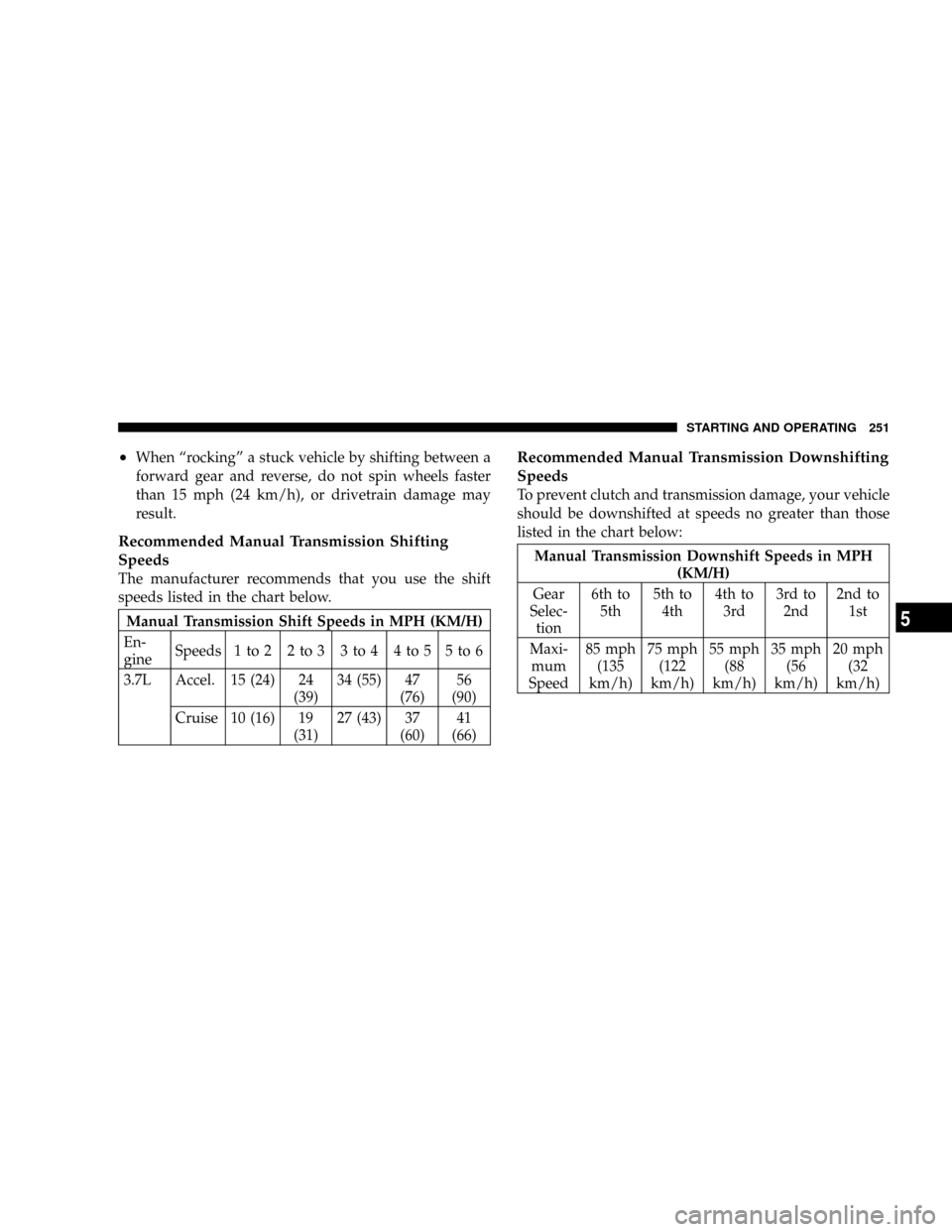
Recommended Manual Transmission Shifting
Speeds
The manufacturer recommends that you use the shift
speeds listed in the chart below.
Manual Transmission Shift Speeds in MPH (KM/H)
En-
gineSpeeds 1 to 2 2 to 3 3 to 4 4 to 5 5 to 6
3.7L Accel. 15 (24) 24
(39)34 (55) 47
(76)56
(90)
Cruise 10 (16) 19
(31)27 (43) 37
(60)41
(66)
Recommended Manual Transmission Downshifting
Speeds
To prevent clutch and transmission damage, your vehicle
should be downshifted at speeds no greater than those
listed in the chart below:
Manual Transmission Downshift Speeds in MPH
(KM/H)
Gear
Selec-
tion6th to
5th5th to
4th4th to
3rd3rd to
2nd2nd to
1st
Maxi-
mum
Speed85 mph
(135
km/h)75 mph
(122
km/h)55 mph
(88
km/h)35 mph
(56
km/h)20 mph
(32
km/h)
STARTING AND OPERATING 251
5
Page 262 of 434
N (Neutral)
Shift into N (Neutral) when the vehicle is standing for
prolonged periods with the engine running. The engine
may be started in this range. Set the parking brake if you
must leave the vehicle.
NOTE:Towing the vehicle, coasting, or driving for any
other reason with selector lever in N (Neutral) can result
in severe transmission damage. Refer to ªRecreational
Towingº in Section 5 and ªTowing a Disabled Vehicleº in
Section 6 of this manual.
D (Drive)
The transmission automatically upshifts through fifth
gear. The D (Drive) position provides optimum driving
characteristics under all normal operating conditions.
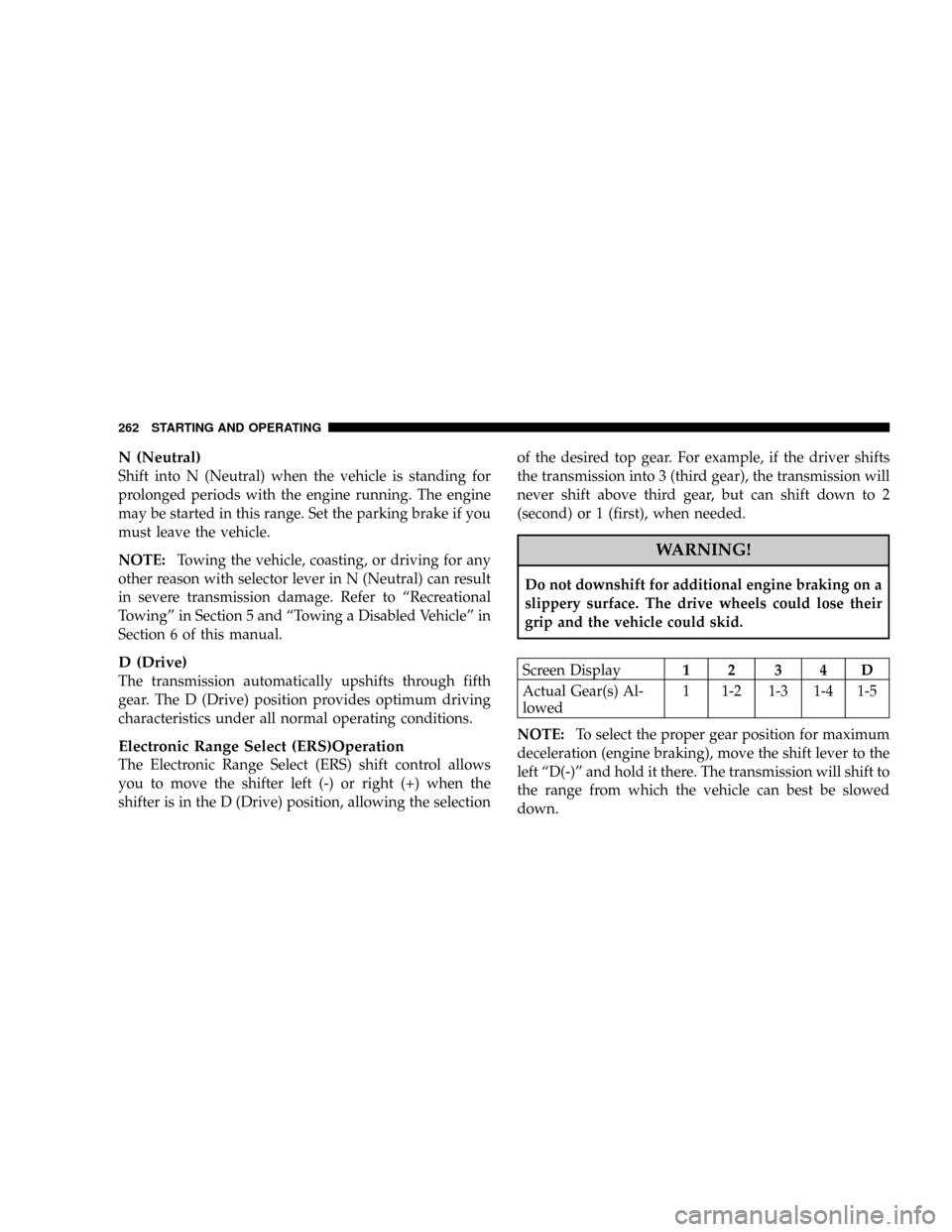
Electronic Range Select (ERS)Operation
The Electronic Range Select (ERS) shift control allows
you to move the shifter left (-) or right (+) when the
shifter is in the D (Drive) position, allowing the selectionof the desired top gear. For example, if the driver shifts
the transmission into 3 (third gear), the transmission will
never shift above third gear, but can shift down to 2
(second) or 1 (first), when needed.
WARNING!
Do not downshift for additional engine braking on a
slippery surface. The drive wheels could lose their
grip and the vehicle could skid.
Screen Display12 34D
Actual Gear(s) Al-
lowed1 1-2 1-3 1-4 1-5
NOTE:To select the proper gear position for maximum
deceleration (engine braking), move the shift lever to the
left ªD(-)º and hold it there. The transmission will shift to
the range from which the vehicle can best be slowed
down.
262 STARTING AND OPERATING
Page 265 of 434

the transmission. This condition is normal and will not
cause damage to the transmission. The torque converter
will refill within five seconds of shifting from Park into
any other gear position.
FOUR-WHEEL DRIVE OPERATION
MP 143 Single-Speed Part-Time Transfer Case Ð
If Equipped
Operating Information/Precautions
This is an electric shift transfer case and is operated by
the 4WD Control Switch (Transfer Case Switch), which is
located on the center console.
This electronically shifted transfer case provides 2 mode
positions: 2 (rear) wheel drive high range (2WD) and 4
wheel drive high range (4WD LOCK).The electronically shifted transfer case is designed to be
driven in the 2 wheel drive position (2WD) for normal
street and highway conditions (dry hard surfaced roads).
When additional traction is required, the transfer case
4WD LOCK position can be used to lock the front and
rear driveshafts together and force the front and rear
Transfer Case Switch
STARTING AND OPERATING 265
5
Page 266 of 434

wheels to rotate at the same speed. This is accomplished
by rotating the 4WD Control Switch to the desired
position - refer to ªShifting Procedureº for specific shift-
ing instructions. The 4WD LOCK position is designed for
loose, slippery road surfaces only. Driving in the 4WD
LOCK position on dry hard surfaced roads may cause
increased tire wear and damage to the driveline compo-
nents.
NOTE:Do not attempt to make a shift while only the
front or rear wheels are spinning. Shifting while only the
front or rear wheels are spinning can cause damage to the
transfer case.
Proper operation of 4 wheel drive vehicles depends on
tires of equal size, type and circumference on each wheel.
Any difference in tire size can cause damage to the
transfer case.Since 4 wheel drive provides improved traction, there is
a tendency to exceed safe turning and stopping speeds.
Do not go faster than road conditions permit.
Shifting Procedure - Electronically Shifted
Transfer Case
NOTE:If any of the requirements to select a new
transfer case position have not been met, the transfer case
will not shift. The ª4WDº Indicator Light (located in the
display under the tachometer) will flash until all the
requirements for the selected position have been met. To
retry a shift: return the control knob back to the original
position, make certain all shift requirements have been
met, wait five (5) seconds and try the shift again.
2WD,4WD LOCK
Rotate the 4WD Control Switch to the desired position.
Shifts between 2WD and 4WD LOCK can be done with
the vehicle stopped or in motion. With the vehicle in
motion, the transfer case will engage/disengage faster if
266 STARTING AND OPERATING
Page 267 of 434

you momentarily release the accelerator pedal after turn-
ing the control switch. If the vehicle is stopped, the
ignition key must be in the ON position with the engine
either RUNNING or OFF. This shift cannot be completed
if the key is in the ACC (Accessory) position.
NOTE:The 4 wheel drive system will not allow shifts
between 2WD/4WD LOCK if the front and/or rear
wheels are spinning (no traction). In this situation, the
ª4WDº Indicator Light (located in the display under the
tachometer) will flash. At this time, reduce speed and
stop spinning the wheels to complete the shift.
NOTE:Delayed shifting out of 4WD LOCK may be
experienced due to uneven tire wear, low tire pressure, or
excessive loading.MP 140 Single-Speed Full-Time Transfer Case Ð
If Equipped
Operating Information/Precautions
The MP 140 is a single speed (HI range only) transfer case
which provides convenient full-time all-wheel drive. No
driver interaction is required. This transfer case employs
an inter-axle differential that divides engine torque al-
most evenly with 48 percent torque to the front axle and
52 percent torque to the rear axle, this allows the front
and rear wheels to rotate at different speeds, on all road
surfaces. The Brake Traction Control System (BTC),
which combines standard ABS and Traction Control,
provides resistance to any wheel that is slipping to allow
additional torque transfer to wheels with traction.
STARTING AND OPERATING 267
5