lock DODGE NITRO 2008 1.G Service Manual
[x] Cancel search | Manufacturer: DODGE, Model Year: 2008, Model line: NITRO, Model: DODGE NITRO 2008 1.GPages: 434, PDF Size: 6.2 MB
Page 122 of 434
To prevent possible damage, do not slam the hood to
close it. Use a firm downward push at the center front
edge of the hood to ensure that both latches engage.
Never drive your vehicle unless the hood is fully closed,
with both latches engaged.
NOTE:Ensure hood prop rod is fully seated into clip
before closing hood to prevent damage to grille.
WARNING!
If the hood is not fully latched, it could fly up when
the vehicle is moving and block your forward vision.
Be sure all hood latches are fully latched before
driving.
LIGHTS
Interior Lights
The overhead light comes on when a door is opened. It
may also be turned on by rotating the control for the
dimmer switch on the multi-function control lever fully
upward.
The overhead light will automatically turn off in about 20
minutes if a door is left open or the dimmer control is left
in the dome light position. Turn the ignition switch ON to
restore the overhead light operation.
Daytime Brightness Feature
Certain instrument panel components (odometer, radio
display) can be illuminated at full brightness during the
daytime. This can be helpful when driving with your
headlights on during the daytime such as in a parade or
a funeral procession. To activate this feature, rotate the
left stalk one detent lower than the dome light.
122 UNDERSTANDING THE FEATURES OF YOUR VEHICLE
Page 127 of 434
If the lever is pulled while in the OFF position, the wipers
will operate for as long as the lever is held plus two wipe
cycles, then turn OFF.
Mist Feature
Push down on the wiper lever to activate a single wipe to
clear off road mist or spray from a passing vehicle. As
long as the lever is held down, the wipers will continue
to operate.
TILT STEERING COLUMN
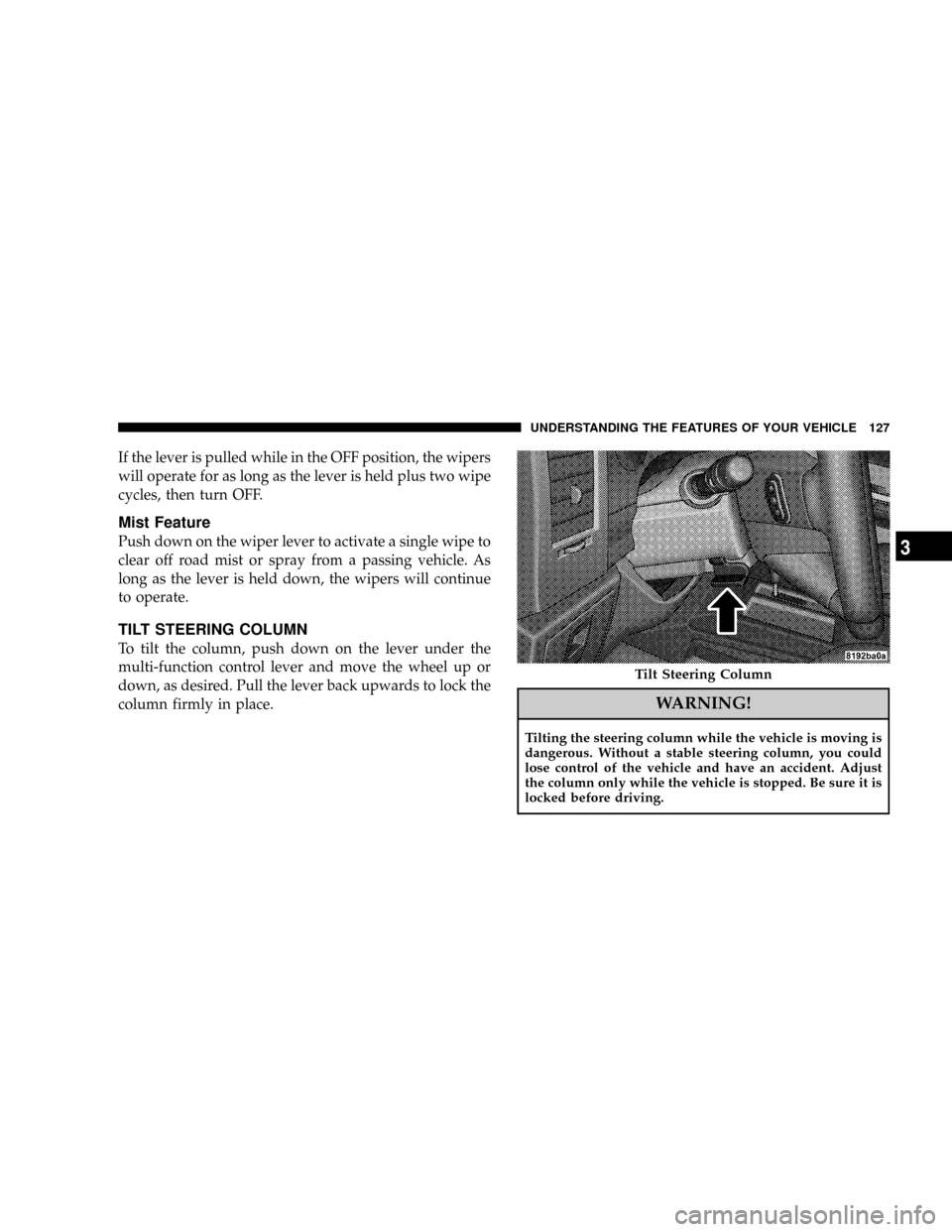
To tilt the column, push down on the lever under the
multi-function control lever and move the wheel up or
down, as desired. Pull the lever back upwards to lock the
column firmly in place.
WARNING!
Tilting the steering column while the vehicle is moving is
dangerous. Without a stable steering column, you could
lose control of the vehicle and have an accident. Adjust
the column only while the vehicle is stopped. Be sure it is
locked before driving.
Tilt Steering Column
UNDERSTANDING THE FEATURES OF YOUR VEHICLE 127
3
Page 131 of 434

On steep hills a greater speed loss or gain may occur so
it may be preferable to drive without speed control.
ELECTRONIC BRAKE CONTROL SYSTEM
Your vehicle is equipped with an advanced electronic
brake control system that includes ABS (Anti-Lock Brake
System), TCS (Traction Control System), BAS (Brake
Assist System), ERM (Electronic Roll Mitigation) and ESP
(Electronic Stability Program). All five systems work
together to enhance vehicle stability and control in vari-
ous driving conditions are commonly referred to as ESP.
ABS (Anti-Lock Brake System)
This system aids the driver in maintaining vehicle control
under adverse braking conditions. The system controls
hydraulic brake pressure to prevent wheel lock-up and
help avoid skidding on slippery surfaces during braking.
Refer to ªAnti-Lock Brake Systemº in Section 5 of this
manual for more information about ABS.
WARNING!
ABS (Anti-Lock Brake System) cannot prevent the
natural laws of physics from acting on the vehicle,
nor can it increase the traction afforded by prevailing
road conditions. ABS cannot prevent accidents, in-
cluding those resulting from excessive speed in
turns, driving on very slippery surfaces, or hydro-
planing. Only a safe, attentive, and skillful driver can
prevent accidents. The capabilities of an ABS-
equipped vehicle must never be exploited in a reck-
less or dangerous manner which could jeopardize the
user's safety or the safety of others.
UNDERSTANDING THE FEATURES OF YOUR VEHICLE 131
3
Page 132 of 434

TCS (Traction Control System)
This system monitors the amount of wheel spin of each of
the driven wheels. If wheel spin is detected, brake
pressure is applied to the slipping wheel(s) and engine
power is reduced to provide enhanced acceleration and
stability. A feature of the TCS system functions similar to
a limited slip differential and controls the wheel spin
across a driven axle. If one wheel on a driven axle is
spinning faster than the other, the system will apply the
brake of the spinning wheel. This will allow more engine
torque to be applied to the wheel that is not spinning.
This feature remains active even if TCS and ESP are in the
ªPartial Offº mode. Refer to ªESP (Electronic Stability
Program)º in this section.
BAS (Brake Assist System)
The BAS is designed to optimize the vehicle's braking
capability during emergency braking maneuvers. The
system detects an emergency braking situation by sens-
ing the rate and amount of brake application and then
applies optimum pressure to the brakes. This can help
reduce braking distances. The BAS complements the
anti-lock brake system (ABS). Applying the brakes very
quickly results in the best BAS assistance. To receive the
benefit of the system, you must apply continuous brak-
ing pressure during the stopping sequence. Do not
reduce brake pedal pressure unless braking is no longer
desired. Once the brake pedal is released, the BAS is
deactivated.
132 UNDERSTANDING THE FEATURES OF YOUR VEHICLE
Page 142 of 434

Similar to this Canadian law, some U.S. gate operators are
designed to ªtime-outº in the same manner.
It may be helpful to unplug the device during the cycling
process to prevent possible overheating of the garage
door or gate motor.
If you are having difficulties programming a garage door
opener or a gate operator, replace ªProgramming
HomeLinktº Step 3 with the following:
3. Continue to press and hold the HomeLinktbutton
while you press and release - every two seconds
(ªcycleº) your hand-held transmitter until HomeLinkt
has successfully accepted the frequency signal. The
indicator light will flash slowly and then rapidly when
fully trained.
If you unplugged the device for training, plug it back in
at this time.Then proceed with Step 4 under ªProgramming
HomeLinkt.º earlier in this section.
Using HomeLinkT
To operate, simply press and release the programmed
HomeLinktbutton. Activation will now occur for the
trained device (i.e. garage door opener, gate operator,
security system, entry door lock, home/office lighting,
etc. The hand-held transmitter of the device may also be
used at any time.
Reprogramming a Single HomeLinkTButton
To re-program a channel that has been previously
trained, follow these steps:
1. Turn the ignition switch to the ON/RUN position.
2. Press and hold the desired HomeLinktbutton until
the indicator light begins to flash after 20 seconds.Do not
release the button.
142 UNDERSTANDING THE FEATURES OF YOUR VEHICLE
Page 155 of 434

The cargo load floor is held by spring loaded latches. In
order to use the cargo load floor, use the following
procedure:
1. Push side mounted release handles (toward center of
vehicle) to release cover.2. Lift cover.
3. Flip cover over, and lock panel back into position.
Floor Panel
Load Floor
UNDERSTANDING THE FEATURES OF YOUR VEHICLE 155
3
Page 156 of 434

Rear Cargo Slide Out System (LOAD N GOT)ÐIf
Equipped
The sliding cargo load floor (LOAD N GOt) slides back
and forth on steel tracks for convenience. The maximum
load capacity is 400 lbs (181 kg). The floor panel can stop
every 2 inches (50 mm) when the handle is released, to
lock the panel in position.
1. Open the tailgate.
2. Squeeze the right hand release handle.
Release Handle
156 UNDERSTANDING THE FEATURES OF YOUR VEHICLE
Page 158 of 434

If the rear wiper is operating when the ignition is turned
OFF, the wiper will automatically return to the ªParkº
position. When the vehicle is restarted, the wiper will
resume function at whichever position the switch is set
at.
If the swing gate flip-up window is open or the swing
gate is open, connection to the rear window wiper is
interrupted preventing activation of the rear wiper blade.
When the swing gate flip-up window or the swing gate is
closed, the rear wiper switch or the ignition switch needs
to be turned OFF, and then to ON to restart the rear
wiper.
NOTE: The rear swing gate will lock while the rear
wiper is operating. The gate will stay locked until the
wiper is turned off and the gate is unlocked (by key,
lock switch, or key fob).
Windshield Wiper/Washer Switch
158 UNDERSTANDING THE FEATURES OF YOUR VEHICLE
Page 164 of 434

NTwo Types Of Signals..................196
NElectrical Disturbances..................196
NAM Reception.......................197
NFM Reception........................197
mSales Code REQ Ð AM/FM Stereo Radio And
6±Disc CD/DVD Changer (MP3/WMA AUX
Jack)................................197
NOperating Instructions - Radio Mode.......198
NOperation Instructions - (Disc Mode For CD
And MP3/WMA Audio Play, DVD-Video)....206
NNotes On Playing MP3/WMA Files........208
NList Button (Disc Mode For MP3/WMA
Play)..............................210
NInfo Button (Disc Mode For MP3/WMA
Play)..............................210mSales Code RES Ð AM/FM Stereo Radio With
CD Player (MP3 AUX Jack)................213
NOperating Instructions - Radio Mode.......213
NOperation Instructions - CD Mode For CD
And MP3 Audio Play..................219
NNotes On Playing MP3 Files.............221
NList Button (CD Mode For MP3 Play).......224
NInfo Button (CD Mode For MP3 Play).......224
mSales Code RER Ð AM/FM/CD/DVD Radio
With Navigation System Ð If Equipped.......225
NOperating Instructions Ð Satellite Radio.....226
NClock Setting Procedure.................226
mSatellite Radio (RSC) Ð If Equipped
(RER/REQ/REN Radios Only).............227
164 INSTRUMENT PANEL AND CONTROLS
Page 173 of 434

16. Electronic Stability Program (ESP) Indicator
Light/Traction Control System (TCS) Indicator Light
The yellow ESP indicator light in the speedom-
eter area illuminates with the key in the igni-
tion switch turned to the ON/RUN position. It
should go out with the engine running. The
9ESP/TCS Indicator Light9starts to flash as soon as the
tires lose traction and the ESP system becomes active. The
9ESP/TCS Indicator Light9also flashes when TCS is
active. If the9ESP/TCS Indicator Light9begins to flash
during acceleration, ease up on the accelerator and apply
as little throttle as possible. Be sure to adapt your speed
and driving to the prevailing road conditions. The ªESP/
TCS Indicator Lightº becomes illuminated when the
ESP-Off button has been pressed or ESP is only partially
available caused by lack of engine management or brake
thermal model.17. Voltage Warning Light
This light monitors the electrical system voltage.
The light should turn on momentarily as the
engine is started. If the light stays on or turns on while
driving, it indicates a problem with the charging system.
Immediate service should be obtained.
18. SERV (Service) 4WD Indicator Light Ð If Equipped
The ªSERV 4WD Indicator Lightº will come on
when the ignition key is turned to the ON
position and will stay on for 2 seconds. If the
light stays on or comes on during driving, it
means that the 4WD system is not functioning properly
and that service is required.
19. Anti-Lock Brake Warning Light
This light monitors the Anti-Lock Brake System
which is described elsewhere in this manual.
This light will come on when the ignition key is
turned to the ON position and may stay on for
INSTRUMENT PANEL AND CONTROLS 173
4