fuel DODGE NITRO 2011 1.G User Guide
[x] Cancel search | Manufacturer: DODGE, Model Year: 2011, Model line: NITRO, Model: DODGE NITRO 2011 1.GPages: 497, PDF Size: 3.89 MB
Page 215 of 497
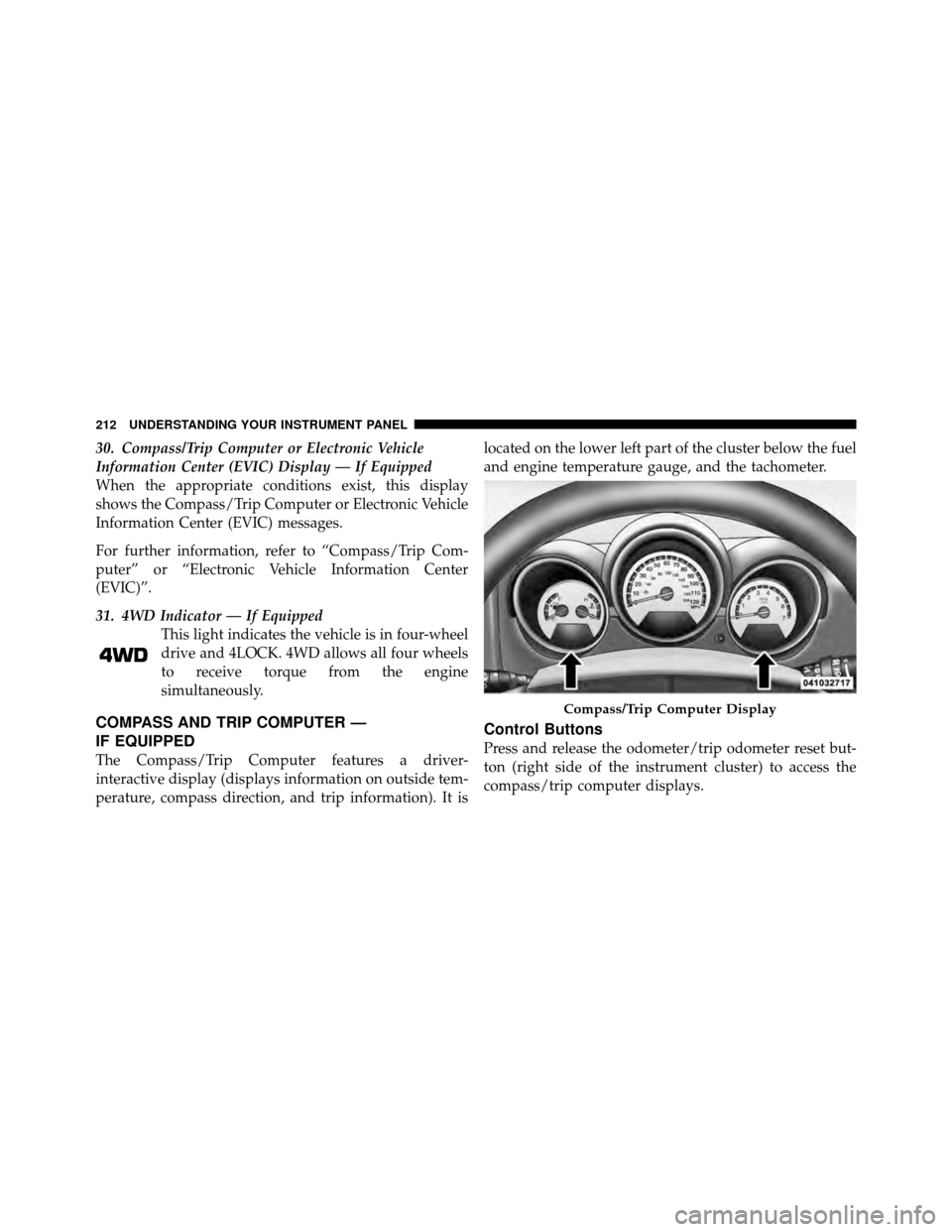
30. Compass/Trip Computer or Electronic Vehicle
Information Center (EVIC) Display — If Equipped
When the appropriate conditions exist, this display
shows the Compass/Trip Computer or Electronic Vehicle
Information Center (EVIC) messages.
For further information, refer to “Compass/Trip Com-
puter” or “Electronic Vehicle Information Center
(EVIC)”.
31. 4WD Indicator — If EquippedThis light indicates the vehicle is in four-wheel
drive and 4LOCK. 4WD allows all four wheels
to receive torque from the engine
simultaneously.
COMPASS AND TRIP COMPUTER —
IF EQUIPPED
The Compass/Trip Computer features a driver-
interactive display (displays information on outside tem-
perature, compass direction, and trip information). It is located on the lower left part of the cluster below the fuel
and engine temperature gauge, and the tachometer.
Control Buttons
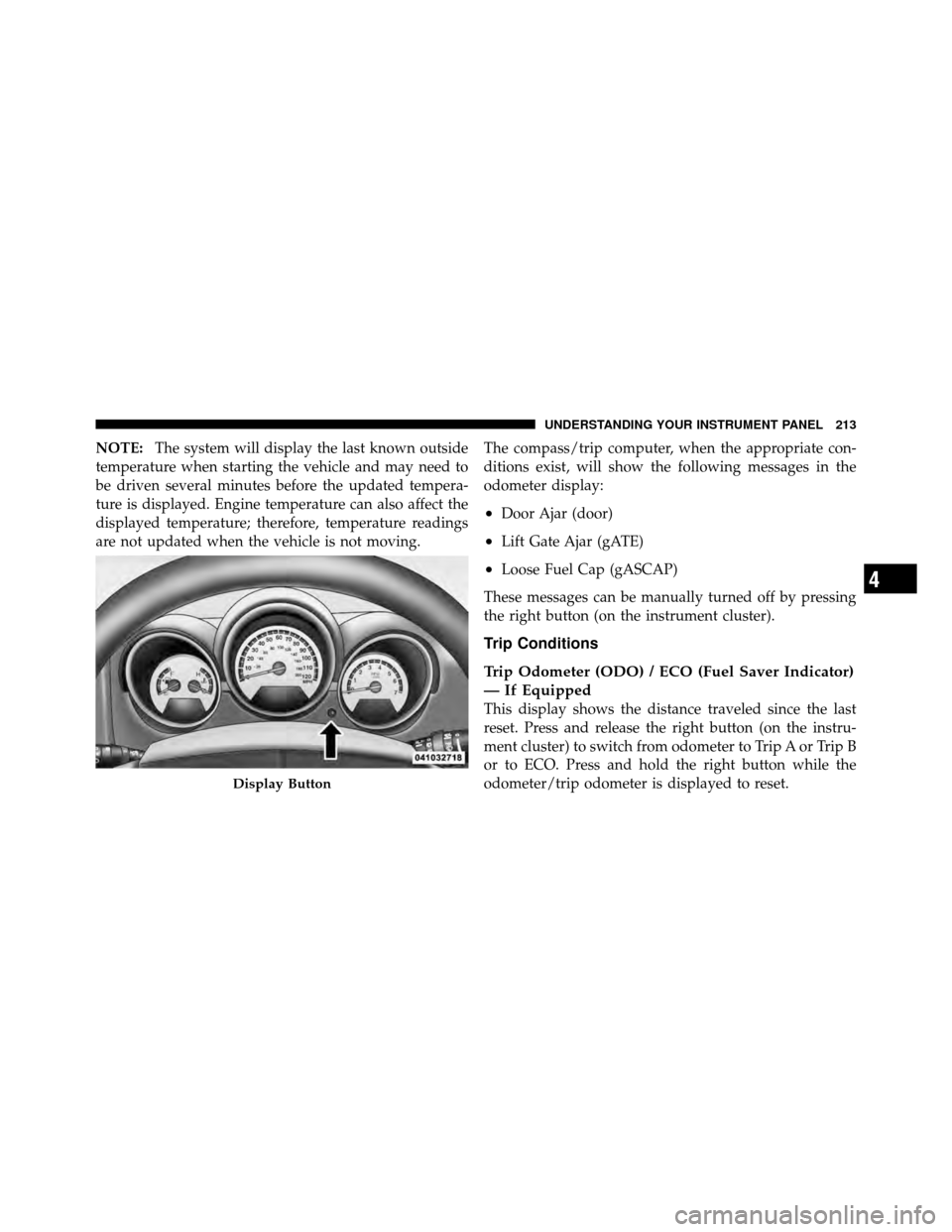
Press and release the odometer/trip odometer reset but-
ton (right side of the instrument cluster) to access the
compass/trip computer displays.
Compass/Trip Computer Display
212 UNDERSTANDING YOUR INSTRUMENT PANEL
Page 216 of 497
NOTE:The system will display the last known outside
temperature when starting the vehicle and may need to
be driven several minutes before the updated tempera-
ture is displayed. Engine temperature can also affect the
displayed temperature; therefore, temperature readings
are not updated when the vehicle is not moving. The compass/trip computer, when the appropriate con-
ditions exist, will show the following messages in the
odometer display:
•Door Ajar (door)
•Lift Gate Ajar (gATE)
•Loose Fuel Cap (gASCAP)
These messages can be manually turned off by pressing
the right button (on the instrument cluster).
Trip Conditions
Trip Odometer (ODO) / ECO (Fuel Saver Indicator)
— If Equipped
This display shows the distance traveled since the last
reset. Press and release the right button (on the instru-
ment cluster) to switch from odometer to Trip A or Trip B
or to ECO. Press and hold the right button while the
odometer/trip odometer is displayed to reset.
Display Button
4
UNDERSTANDING YOUR INSTRUMENT PANEL 213
Page 217 of 497
Trip A
Shows the total distance traveled for trip A since the last
reset.
Trip B
Shows the total distance traveled for trip B since the last
reset.
ECO (Fuel Saver Indicator) — If Equipped
The ECO-ON indicator will illuminate when you are
driving in a fuel efficient manner and can be used to
modify driving habits in order to increase fuel economy.
The ECO display will toggle between ECO and ECO-ON
depending on driving habits and vehicle usage.
Compass/Temperature Display
Compass Variance
Compass Variance is the difference between Magnetic
North and Geographic North. To compensate for the
differences, the variance should be set for the zone where
the vehicle is driven, per the zone map. Once properly
set, the compass will automatically compensate for the
differences and provide the most accurate compass head-
ing.
NOTE:
•A good calibration requires a level surface and an
environment free from large metallic objects such as
buildings, bridges, underground cables, railroad
tracks, etc.
•Magnetic materials should be kept away from the top
of the right rear quarter window. This is where the
compass sensor is located.
214 UNDERSTANDING YOUR INSTRUMENT PANEL
Page 221 of 497
•Left front turn signal light out (with a single chime)
•Left rear turn signal light out (with a single chime)
•Right front turn signal light out (with a single chime)
•Right rear turn signal light out (with a single chime)
•RKE Battery Low (with a single chime)
•Personal Settings not available – vehicle not in PARK
•Left/right front door ajar (one or more doors open,
with a single chime if speed is above 1 mph/1.6 km/h)
•Left/right rear door ajar (one or more doors open,
with a single chime if speed is above 1 mph/1.6 km/h)
•Door(s) ajar (with a single chime if vehicle is in
motion)
•Liftgate ajar (with a single chime)
•Left front low pressure (with a single chime). Refer to
“Tire Pressure Monitoring System” in “Starting And
Operating”.
•Left rear low pressure (with a single chime). Refer to
“Tire Pressure Monitoring System” in “Starting And
Operating”.
•Right front low pressure (with a single chime). Refer to
“Tire Pressure Monitoring System” in “Starting And
Operating”.
•Right rear low pressure (with a single chime). Refer to
“Tire Pressure Monitoring System” in “Starting And
Operating”.
•Check TPM System (with a single chime). Refer to
“Tire Pressure Monitoring System” in “Starting And
Operating”.
•Check Gascap (refer to “Adding Fuel” in “Starting
And Operating”).
218 UNDERSTANDING YOUR INSTRUMENT PANEL
Page 222 of 497
•Oil change required (with a single chime).
•Park Assist Disabled
•Service Park Assist System (with a single chime)
•ECO (Fuel Saver Indicator) — if equipped
Oil Change Required
Your vehicle is equipped with an engine oil change
indicator system. The “Oil Change Required” message
will flash in the EVIC display for approximately 10 sec-
onds after a single chime has sounded to indicate the next
scheduled oil change interval. The engine oil change
indicator system is duty cycle based, which means the
engine oil change interval may fluctuate dependent upon
your personal driving style. Unless reset, this message
will continue to display each time you turn the ignition
switch to the ON/RUN position. To turn off the message
temporarily, press and release the MENU button. To resetthe oil change indicator system (after performing the
scheduled maintenance) refer to the following procedure.
1. Turn the ignition switch to the ON position. (Do not
start the engine.)
2. Fully depress the accelerator pedal slowly three times
within 10 seconds.
3. Turn the ignition switch to the OFF/LOCK position.
NOTE:
If the indicator message illuminates when you
start the engine, the oil change indicator system did not
reset. If necessary, repeat this procedure.
Trip Functions
Press and release the MENU button until one of the
following trip functions displays in the EVIC:
•Average Fuel Economy
•Distance To Empty
4
UNDERSTANDING YOUR INSTRUMENT PANEL 219
Page 223 of 497
•Elapsed Time
•Display Units of Measure in
Press the SCROLL button to cycle through all the trip
computer functions.
The Trip Functions mode displays the following informa-
tion:
•Average Fuel Economy
Shows the average fuel economy since the last reset.
When the fuel economy is reset, the display will read
“RESET” or show dashes for two seconds. Then, the
history information will be erased, and the averaging will
continue from the last fuel average reading before the
reset.
•Distance To Empty (DTE)
Shows the estimated distance that can be traveled with
the fuel remaining in the tank. This estimated distance is
determined by a weighted average of the instantaneous and average fuel economy, according to the current fuel
tank level. DTE cannot be reset through the FUNCTION
SELECT button.
NOTE:
Significant changes in driving style or vehicle
loading will greatly affect the actual drivable distance of
the vehicle, regardless of the DTE displayed value.
When the DTE value is less than 30 miles (48 km)
estimated driving distance, the DTE display will change
to a text display of LOW FUEL. This display will con-
tinue until the vehicle runs out of fuel. Adding a signifi-
cant amount of fuel to the vehicle will turn off the LOW
FUEL text and a new DTE value will display.
•Elapsed Time
Shows the total elapsed time of travel since the last reset
when the ignition switch is in the ACC position. Elapsed
time will increment when the ignition switch is in the ON
or START position.
220 UNDERSTANDING YOUR INSTRUMENT PANEL
Page 224 of 497
•Display Units of Measure in:
To make your selection, press and release the FUNC-
TION SELECT button until “ENGLISH” or “METRIC”
appears.
To Reset The Display
Reset will only occur while a resettable function is being
displayed. Press and release the FUNCTION SELECT
button once to clear the resettable function being dis-
played. To reset all resettable functions, press and release
the FUNCTION SELECT button a second time within
three seconds of resetting the currently displayed func-
tion. (Reset ALL will display during this three-second
window).
Compass Display / ECO (Fuel Saver Mode) —
If Equipped
The compass readings indicate the direction
the vehicle is facing. Press and release the
compass button to display one of eight
compass readings and the outside tempera-
ture.
NOTE: The system will display the last known outside
temperature when starting the vehicle and may need to
be driven several minutes before the updated tempera-
ture is displayed. Engine temperature can also affect the
displayed temperature; therefore, temperature readings
are not updated when the vehicle is not moving.
ECO (Fuel Saver Mode) — If Equipped
The ECO message will display below the outside tem-
perature in the EVIC display. This message will appear
whenever you are driving in a fuel efficient manner.
COMPASS
Button
4
UNDERSTANDING YOUR INSTRUMENT PANEL 221
Page 225 of 497
This feature allows you to monitor when you are driving
in a fuel efficient manner, and it can be used to modify
driving habits in order to increase fuel economy.
Automatic Compass Calibration
This compass is self-calibrating, which eliminates the
need to manually reset the compass. When the vehicle is
new, the compass may appear erratic and the EVIC will
display CAL until the compass is calibrated. You may
also calibrate the compass by completing one or more
360–degree turns (in an area free from large metal or
metallic objects) until the CAL indicator displayed in the
EVIC turns off. The compass will now function normally.
NOTE:A good calibration requires a level surface and
an environment free from large metallic objects such as
buildings, bridges, underground cables, railroad tracks,
etc.
Manual Compass Calibration
If the compass appears erratic and the CAL indicator
does not appear in the EVIC display, you must put the
compass into the calibration mode manually as follows:
1. Turn the ignition switch ON.
2. Press the MENU button until Personal Settings
(Customer-Programmable Features) menu is reached.
3. Press the SCROLL button until “Calibrate Compass” is
displayed in the EVIC.
4. Press and release the FUNCTION SELECT button to
start the calibration. The CAL indicator will be displayed
in the EVIC.
5. Complete one or more 360–degree turns (in an area
free from large metal or metallic objects) until the CAL
indicator turns off. The compass will now function
normally.
222 UNDERSTANDING YOUR INSTRUMENT PANEL
Page 229 of 497
Delay Turning Headlights Off
When this feature is selected, the driver can choose to
have the headlights remain on for 0, 30, 60, or 90 seconds
when exiting the vehicle. To make your selection, press
and release the FUNCTION SELECT button until “0,”
“30,” “60,” or “90” appears.
Turn Headlights On with Remote Key Unlock
When this feature is selected, the headlights will activate
and remain on for up to 90 seconds when the doors are
unlocked with the RKE transmitter. To make your selec-
tion, press and release the FUNCTION SELECT button
until “OFF,” “30 sec.,” “60 sec.,” or “90 sec.” appears.
Delay Power Off to Accessories Until Exit
When this feature is selected, the power window
switches, radio, Uconnect Phone™ (if equipped), DVD
video system (if equipped), power sunroof (if equipped),
and power outlets will remain active for up to 10 minutes
after the ignition switch is turned off. Opening either frontvehicle door will cancel this feature. To make your
selection, press and release the FUNCTION SELECT
button until “Off,” “45 sec,” “5 min,” or “10 min” appears.
Enable/Disable the Rear Park Assist System
The Rear Park Assist system will scan for objects behind
the vehicle when the transmission is in the REVERSE
position and the vehicle speed is less than 11 mph
(18 km/h). The system can be enabled with turned ON or
turned OFF through the EVIC, to make your selection,
press and release the FUNCTION SELECT button. Refer
to “Rear Park Assist System” in “Understanding The
Features Of Your Vehicle” for system function and oper-
ating information.
Display Fuel Saver — If Equipped
The “ECO” message is located in the Compass/
Temperature display; this message can be turned on or
off. To make your selection, press and release the FUNC-
TION SELECT button until “ON” or “OFF” appears.
226 UNDERSTANDING YOUR INSTRUMENT PANEL
Page 279 of 497
FloorAir is directed through the floor outlets with a
small amount flowing through the defrost and side
window demist outlets.
Mix Air is directed through the floor, defrost, and side
window demist outlets. This setting works best in
cold or snowy conditions that require extra heat to
the windshield. This setting is good for maintaining
comfort while reducing moisture on the windshield.
Defrost Air is directed through the windshield and side
window demist outlets. Use this mode with maxi-
mum blower and temperature settings for best wind-
shield and side window defrosting. NOTE:
•The air conditioning compressor operates in Mix,
Defrost, or a blend of these modes, even if the Air
Conditioning (A/C) button is not pressed. This dehu-
midifies the air to help dry the windshield. To improve
fuel economy, use these modes only when necessary.
•For information on operating the Rear Defrost, refer to
“Rear Window Features” in “Understanding The Fea-
tures Of Your Vehicle”.
Recirculation Control Pressing the Recirculation Control button will
put the system in recirculation mode. This can
be used when outside conditions such as
smoke, odors, dust, or high humidity are pres-
ent. Activating recirculation will cause the LED in the
control button to illuminate. After ten minutes, the sys-
tem will return to normal mode function and the LED
will turn off.
276 UNDERSTANDING YOUR INSTRUMENT PANEL