wheel DODGE NITRO 2011 1.G Owner's Manual
[x] Cancel search | Manufacturer: DODGE, Model Year: 2011, Model line: NITRO, Model: DODGE NITRO 2011 1.GPages: 497, PDF Size: 3.89 MB
Page 307 of 497
Torque Converter Clutch
A feature designed to improve fuel economy has been
included in the automatic transmission on your vehicle.
A clutch within the torque converter engages automati-
cally at a calibrated speed at light throttle. It engages at
higher speeds under heavier acceleration. This may re-
sult in a slightly different feeling or response during
normal operation in high gear. When the vehicle speed
drops below a calibrated speed, or during acceleration,
the clutch automatically and smoothly disengages.
NOTE:If the vehicle has not been driven in several
days, the first few seconds of operation after shifting the
transmission into gear may seem sluggish. This is due to
the fluid partially draining from the torque converter into
the transmission. This condition is normal and will not
cause damage to the transmission. The torque converter
will refill within five seconds of starting the engine.
FOUR-WHEEL DRIVE OPERATION — IF EQUIPPED
Single-Speed Part-Time Transfer Case
Operating Information/Precautions
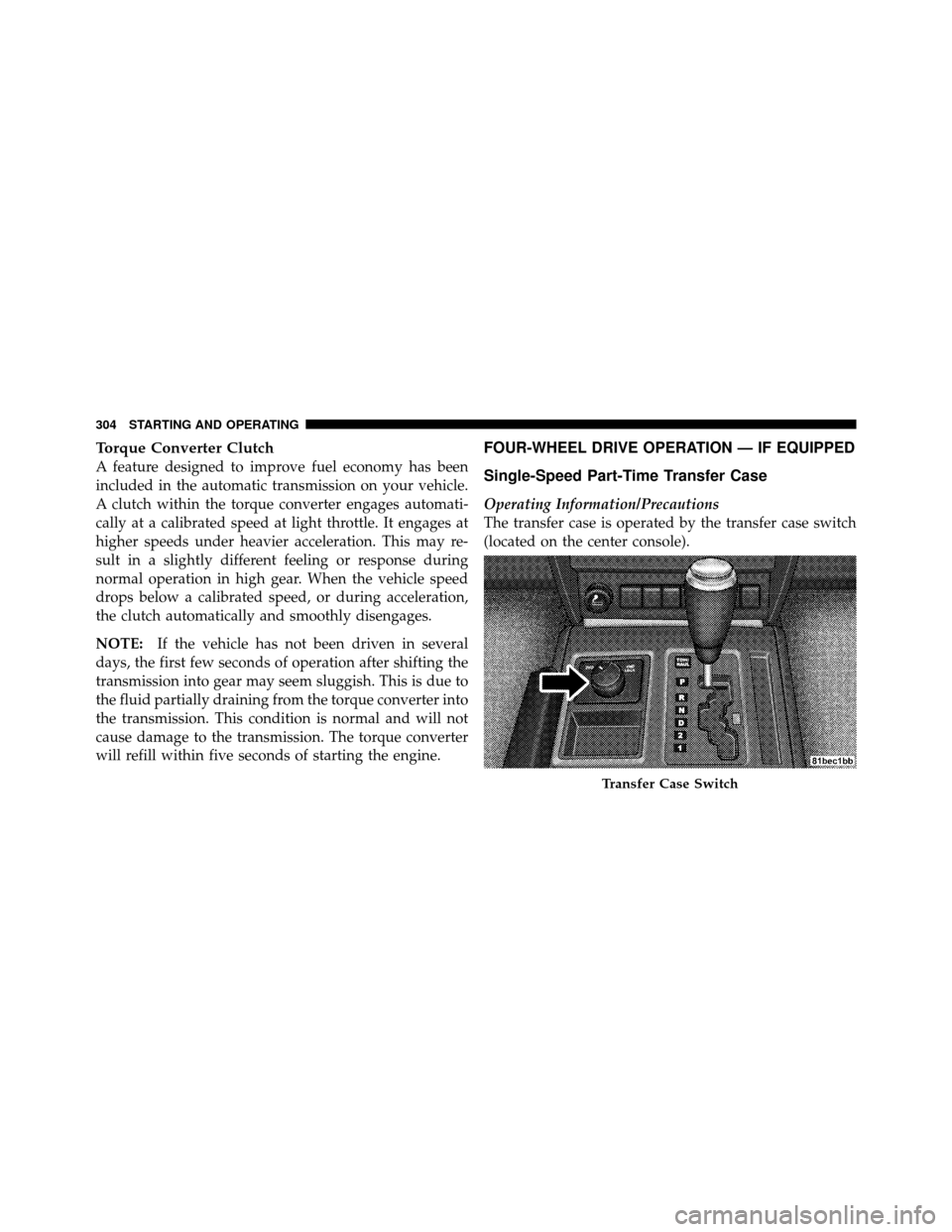
The transfer case is operated by the transfer case switch
(located on the center console).
Transfer Case Switch
304 STARTING AND OPERATING
Page 308 of 497
The electronically shifted transfer case provides two
mode positions:
•Two-wheel drive high range (2WD)
•Four-wheel drive high range (4WD LOCK)
The electronically shifted transfer case is designed to be
driven in the two-wheel drive position (2WD) for normal
street and highway conditions (dry hard surfaced roads).
When additional traction is required, the transfer case
4WD LOCK position can be used to lock the front and
rear driveshafts together and force the front and rear
wheels to rotate at the same speed. This is accomplished
by rotating the transfer case switch to the desired posi-
tion. Refer to “Shifting Procedure” for specific shifting
instructions. The 4WD LOCK position is designed for
loose, slippery road surfaces only.
CAUTION!
•Driving in the 4WD LOCK position on dry hard
surfaced roads may cause increased tire wear and
damage to the driveline components.
•Do not attempt to make a shift while only the front
or rear wheels are spinning. Shifting while only
the front or rear wheels are spinning can cause
damage to the transfer case.
Proper operation of four-wheel drive vehicles depends
on tires of equal size, type and circumference on each
wheel. Any difference in tire size can cause damage to the
transfer case. Tire rotation schedule should be followed
to balance tire wear.
Since four-wheel drive provides improved traction, there
is a tendency to exceed safe turning and stopping speeds.
Do not go faster than road conditions permit.
5
STARTING AND OPERATING 305
Page 309 of 497
Shifting Procedure – Electronically Shifted
Transfer Case
NOTE:If any of the requirements to select a new
transfer case position have not been met, the transfer case
will not shift. The “4WD Indicator Light” (located in the
display under the tachometer) will flash until all the
requirements for the selected position have been met. To
retry a shift, return the control knob back to the original
position, make certain all shift requirements have been
met, wait five seconds and try the shift again.
2WD⇔ 4WD LOCK
Rotate the transfer case switch to the desired position.
Shifts between 2WD and 4WD LOCK can be done with
the vehicle stopped or in motion. With the vehicle in
motion, the transfer case will engage/disengage faster if you momentarily release the accelerator pedal after turn-
ing the switch. If the vehicle is stopped, the ignition key
must be in the ON position with the engine either
RUNNING or OFF. This shift cannot be completed if the
key is in the ACC position.
NOTE:
•The four-wheel drive system will not allow shifts
between 2WD/4WD LOCK if the front and/or rear
wheels are spinning (no traction). In this situation, the
“4WD Indicator Light” (located in the display under
the tachometer) will flash. At this time, reduce speed
and stop spinning the wheels to complete the shift.
•Delayed shifting out of 4WD LOCK may be experi-
enced due to uneven tire wear, low tire pressure, or
excessive loading.
306 STARTING AND OPERATING
Page 310 of 497
ON-ROAD DRIVING TIPS
Utility vehicles have higher ground clearance and a
narrower track to make them capable of performing in a
wide variety of off-road applications. Specific design
characteristics give them a higher center of gravity than
ordinary cars.
An advantage of the higher ground clearance is a better
view of the road, allowing you to anticipate problems.
They are not designed for cornering at the same speeds as
conventional two-wheel drive vehicles any more than
low-slung sports cars are designed to perform satisfacto-
rily in off-road conditions. If at all possible, avoid sharp
turns or abrupt maneuvers. As with other vehicles of this
type, failure to operate this vehicle correctly may result in
loss of control or vehicle rollover.
POWER STEERING
The standard power steering system will give you good
vehicle response and increased ease of maneuverabilityin tight spaces. The system will provide mechanical
steering capability if power assist is lost.
If for some reason the power assist is interrupted, it will
still be possible to steer your vehicle. Under these condi-
tions, you will observe a substantial increase in steering
effort, especially at very low vehicle speeds and during
parking maneuvers.
NOTE:
•Increased noise levels at the end of the steering wheel
travel are considered normal and do not indicate that
there is a problem with the power steering system.
•Upon initial start-up in cold weather, the power steer-
ing pump may make noise for a short amount of time.
This is due to the cold, thick fluid in the steering
system. This noise should be considered normal, and it
does not in any way damage the steering system.
5
STARTING AND OPERATING 307
Page 311 of 497
WARNING!
Continued operation with reduced power steering
assist could pose a safety risk to yourself and others.
Service should be obtained as soon as possible.
CAUTION!
Prolonged operation of the steering system at the end
of the steering wheel travel will increase the steering
fluid temperature and it should be avoided when
possible. Damage to the power steering pump may
occur.
Power Steering Fluid Check
Checking the power steering fluid level at a defined
service interval is not required. The fluid should only be
checked if a leak is suspected, abnormal noises areapparent, and/or the system is not functioning as antici-
pated. Coordinate inspection efforts through an autho-
rized dealer.
CAUTION!
Do not use chemical flushes in your power steering
system as the chemicals can damage your power
steering components. Such damage is not covered by
the New Vehicle Limited Warranty.
WARNING!
Fluid level should be checked on a level surface and
with the engine off to prevent injury from moving
parts and to ensure accurate fluid level reading. Do
not overfill. Use only manufacturer’s recommended
power steering fluid.
308 STARTING AND OPERATING
Page 313 of 497
NOTE:
•When the parking brake is applied and the transmis-
sion is placed in gear, the “Brake Warning Light” will
flash. If vehicle speed is detected, a chime will sound
to alert the driver. Fully release the parking brake
before attempting to move the vehicle.
•This light only shows that the parking brake is ap-
plied. It does not show the degree of brake application.
When parking on a hill, it is important to turn the front
wheels toward the curb on a downhill grade and away
from the curb on an uphill grade. Apply the parking
brake before placing the shift lever in PARK, otherwise
the load on the transmission locking mechanism may
make it difficult to move the shift lever out of PARK. The
parking brake should always be applied whenever the
driver is not in the vehicle.
WARNING!
•Never use the PARK position as a substitute for
the parking brake. Always apply the parking
brake fully when parked to guard against vehicle
movement and possible injury or damage.
•Never leave children alone in a vehicle. Leaving
unattended children in a vehicle is dangerous for a
number of reasons. A child or others could be
seriously or fatally injured.
•Do not leave the key in the ignition. A child could
operate power windows, other controls, or move
the vehicle.
•Be sure the parking brake is fully disengaged
before driving; failure to do so can lead to brake
failure and a collision. (Continued)
310 STARTING AND OPERATING
Page 314 of 497
WARNING! (Continued)
•Always fully apply the parking brake when leav-
ing your vehicle or it may roll and cause damage or
injury. Also, be certain to leave the transmission in
PARK. Failure to do so may cause the vehicle to
roll and cause damage or injury.
CAUTION!
If the “Brake Warning Light” remains on with the
parking brake released, a brake system malfunction
is indicated. Have the brake system serviced by an
authorized dealer immediately.
ANTI-LOCK BRAKE SYSTEM
The Anti-Lock Brake System (ABS) is designed to aid the
driver in maintaining vehicle control under adverse
braking conditions. The system operates with a separatecomputer to modulate hydraulic pressure, to prevent
wheel lock-up and help avoid skidding on slippery
surfaces.
All vehicle wheels and tires must be the same size and
type, and tires must be properly inflated, to produce
accurate signals for the computer.
WARNING!
Significant over or under-inflation of tires or mixing
sizes of tires or wheels on the vehicle can lead to loss
of braking effectiveness.
The ABS conducts a low-speed self-test at about 12 mph
(20 km/h). If you have your foot lightly on the brake
while this test is occurring, you may feel slight pedal
movement. The movement can be more apparent on ice
and snow. This is normal.5
STARTING AND OPERATING 311
Page 316 of 497
•Do not “ride” the brakes by resting your foot on the
pedal. This could overheat the brakes and result in
unpredictable braking action, longer stopping dis-
tances, or brake damage.
•When descending mountains or hills, repeated brak-
ing can cause brake fade with loss of braking control.
Avoid repeated heavy braking by downshifting the
transmission or locking out overdrive whenever pos-
sible.
•Engines may idle at higher speeds during warm-up,
which could cause rear wheels to spin and result in
loss of vehicle control. Be especially careful while
driving on slippery roads, in close-quarter maneuver-
ing, parking, or stopping.
•Do not drive too fast for road conditions, especially
when roads are wet or slushy. A wedge of water canbuild up between the tire tread and the road. This
hydroplaning action can cause loss of traction, braking
ability, and control.
•After going through deep water or a car wash, brakes
may become wet, resulting in decreased performance
and unpredictable braking action. Dry the brakes by
gentle, intermittent pedal action while driving at very
slow speeds.
ELECTRONIC BRAKE CONTROL SYSTEM
Your vehicle is equipped with an advanced electronic
brake control system that includes an Anti-Lock Brake
System (ABS), Traction Control System (TCS), Brake
Assist System (BAS), Electronic Roll Mitigation (ERM)
and Electronic Stability Control (ESC). All five systems
work together to enhance vehicle stability and control in
various driving conditions and are commonly referred to
as ESC.
5
STARTING AND OPERATING 313
Page 317 of 497
Anti-Lock Brake System (ABS)
This system aids the driver in maintaining vehicle control
under adverse braking conditions. The system controls
hydraulic brake pressure to prevent wheel lockup and
help avoid skidding on slippery surfaces during braking.
Refer to “Anti-Lock Brake System” in “Starting and
Operating” for further information.
WARNING!
The Anti-Lock Brake System (ABS) cannot prevent
the natural laws of physics from acting on the ve-
hicle, nor can it increase the traction afforded by
prevailing road conditions. ABS cannot prevent col-
lisions, including those resulting from excessive
speed in turns, driving on very slippery surfaces, or
hydroplaning. The capabilities of an ABS-equipped
vehicle must never be exploited in a reckless or
dangerous manner which could jeopardize the user’s
safety or the safety of others.
Traction Control System (TCS)
This system monitors the amount of wheel spin of each of
the driven wheels. If wheel spin is detected, brake
pressure is applied to the slipping wheel(s) and engine
power is reduced to provide enhanced acceleration and
stability. A feature of the TCS system functions similar to
314 STARTING AND OPERATING
Page 318 of 497
a limited slip differential and controls the wheel spin
across a driven axle. If one wheel on a driven axle is
spinning faster than the other, the system will apply the
brake of the spinning wheel. This will allow more engine
torque to be applied to the wheel that is not spinning.
This feature remains active even if TCS and ESC are in
the “Partial Off” mode. Refer to “Electronic Stability
Control (ESC)” in this section for further information.
Brake Assist System (BAS)
The BAS is designed to optimize the vehicle’s braking
capability during emergency braking maneuvers. The
system detects an emergency braking situation by sens-
ing the rate and amount of brake application and then
applies optimum pressure to the brakes. This can help
reduce braking distances. The BAS complements the
Anti-Lock Brake System (ABS). Applying the brakes very
quickly results in the best BAS assistance. To receive the
benefit of the system, you must apply continuous brak-
ing pressure during the stopping sequence. Do notreduce brake pedal pressure unless braking is no longer
desired. Once the brake pedal is released, the BAS is
deactivated.
WARNING!
The Brake Assist System (BAS) cannot prevent the
natural laws of physics from acting on the vehicle,
nor can it increase the traction afforded by prevailing
road conditions. BAS cannot prevent collisions, in-
cluding those resulting from excessive speed in
turns, driving on very slippery surfaces, or hydro-
planing. The capabilities of a BAS-equipped vehicle
must never be exploited in a reckless or dangerous
manner which could jeopardize the user’s safety or
the safety of others.
5
STARTING AND OPERATING 315