reset DODGE POWER WAGON 2005 2.G User Guide
[x] Cancel search | Manufacturer: DODGE, Model Year: 2005, Model line: POWER WAGON, Model: DODGE POWER WAGON 2005 2.GPages: 455, PDF Size: 14.59 MB
Page 184 of 455

the radio will continue to tune until you release the
button. The frequency will be displayed and continu-
ously updated while the button is pressed.
To Set The Radio Push-Button Memory
When you are receiving a station that you wish to
commit to push-button memory, press the SET button.
SET 1 will show in the display window. Select the“1–5”
button you wish to lock onto this station and press and
release that button. If a button is not selected within 5
seconds after pressing the SET button, the station will
continue to play but will not be locked into push-button
memory.
You may add a second station to each push-button by
repeating the above procedure with this exception: Press
the SET button twice and SET 2 will show in the display
window. Each button can be set for SET 1 and SET 2 in
both AM and FM. This allows a total of 10 AM and 10 FM
stations to be locked into push-button memory. Thestations stored in SET 2 memory can be selected by
pressing the push-button twice. Every time a preset
button is used a corresponding button number will be
displayed.Audio
The audio button controls the BASS, TREBLE, BAL-
ANCE, and FADE.
Press the AUDIO button and BASS will be displayed.
Press the SEEK + or SEEK–to increase or decrease the
Bass tones.
Press the AUDIO button a second time and TREB will be
displayed. Press the SEEK + or SEEK–to increase or
decrease the Treble tones.
Press the AUDIO button a third time and BAL will be
displayed. Press the SEEK + or SEEK–to adjust the
sound level from the right or left side speakers.
184 UNDERSTANDING YOUR INSTRUMENT PANEL
Page 191 of 455

To Set The Radio Push-Button Memory
When you are receiving a station that you wish to
commit to push-button memory, press the SET RND
button. SET 1 will show in the display window. Select the
“1–6”button you wish to lock onto this station and press
and release that button. If a button is not selected within
5 seconds after pressing the SET RND button, the station
will continue to play but will not be locked into push-
button memory.
You may add a second station to each push-button by
repeating the above procedure with this exception: Press
the SET button twice and SET 2 will show in the display
window. Each button can be set for SET 1 and SET 2 in
both AM and FM. This allows a total of 12 AM and 12 FM
stations to be locked into push-button memory. The
stations stored in SET 2 memory can be selected by
pressing the corresponding push-button twice. Every
time a preset button is used, a corresponding button
number will be displayed.
Audio
The audio button controls the BASS, TREBLE, BAL-
ANCE, and FADE.
Press the AUDIO button and BASS will be displayed.
Press the SEEK + or SEEK–to increase or decrease the
Bass tones.
Press the AUDIO button a second time and TREB will be
displayed. Press the SEEK + or SEEK–to increase or
decrease the Treble tones.
Press the AUDIO button a third time and BAL will be
displayed. Press the SEEK + or SEEK–to adjust the
sound level from the right or left side speakers.
Press the AUDIO button a fourth time and FADE will be
displayed. Press the SEEK + or SEEK–to adjust the
sound level between the front and rear speakers.
Press the AUDIO button again or wait 5 seconds to exit
setting tone, balance, and fade.
UNDERSTANDING YOUR INSTRUMENT PANEL 191
4
Page 195 of 455
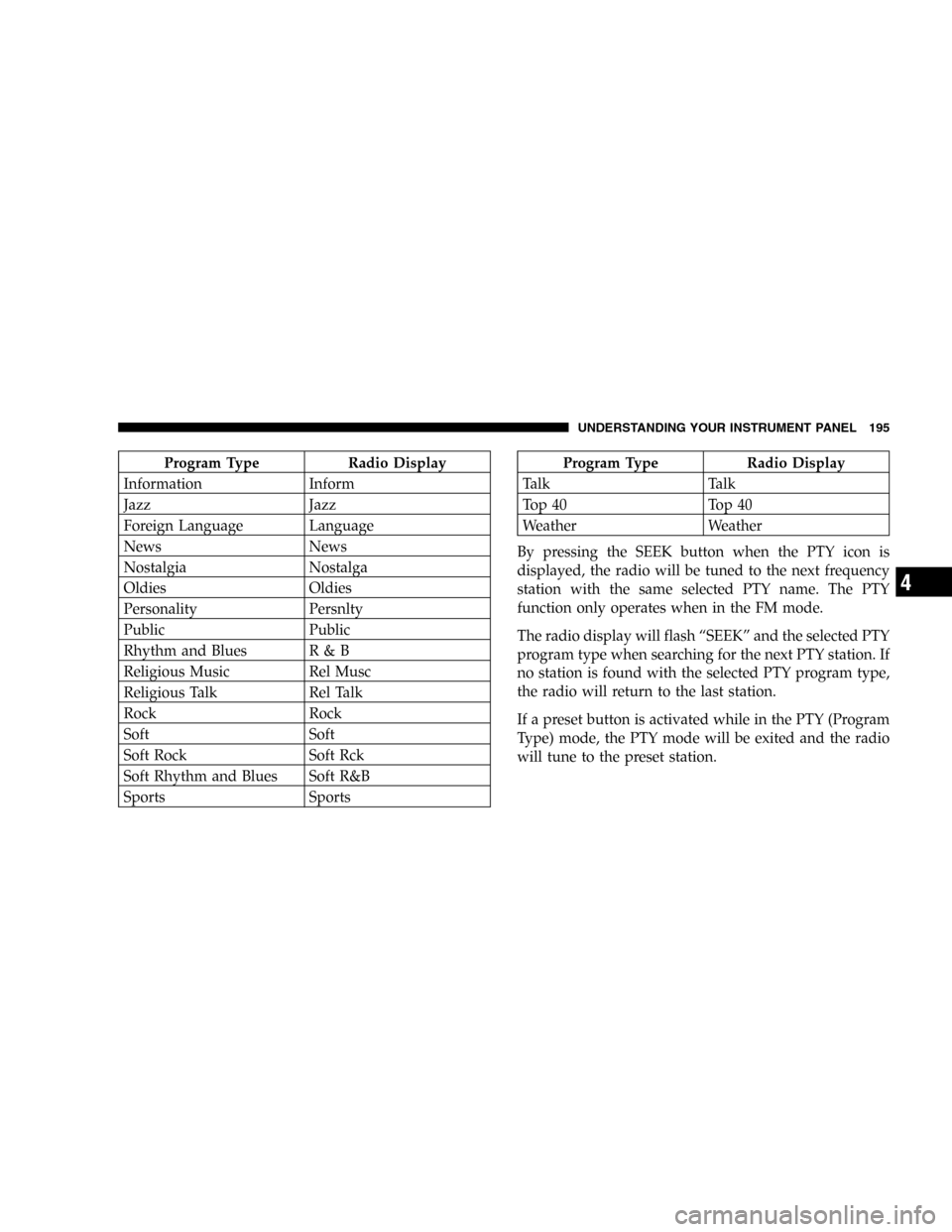
Program Type Radio Display
Information Inform
Jazz Jazz
Foreign Language Language
News News
Nostalgia Nostalga
Oldies Oldies
Personality Persnlty
Public Public
Rhythm and Blues R & B
Religious Music Rel Musc
Religious Talk Rel Talk
Rock Rock
Soft Soft
Soft Rock Soft Rck
Soft Rhythm and Blues Soft R&B
Sports SportsProgram Type Radio Display
Talk Talk
Top 40 Top 40
Weather Weather
By pressing the SEEK button when the PTY icon is
displayed, the radio will be tuned to the next frequency
station with the same selected PTY name. The PTY
function only operates when in the FM mode.
The radio display will flash“SEEK”and the selected PTY
program type when searching for the next PTY station. If
no station is found with the selected PTY program type,
the radio will return to the last station.
If a preset button is activated while in the PTY (Program
Type) mode, the PTY mode will be exited and the radio
will tune to the preset station.
UNDERSTANDING YOUR INSTRUMENT PANEL 195
4