phone DODGE POWER WAGON 2007 2.G Owner's Manual
[x] Cancel search | Manufacturer: DODGE, Model Year: 2007, Model line: POWER WAGON, Model: DODGE POWER WAGON 2007 2.GPages: 492, PDF Size: 8.25 MB
Page 107 of 492
Far End Audio Performance
²
Audio quality is maximized under:
²low-to-medium blower setting,
²low-to-medium vehicle speed,
²low road noise,
²smooth road surface,
²fully closed windows, and
²dry weather condition.
²Operation from driver seat.
²Performance, such as audio clarity, echo, and loudness
to a large degree rely on the phone and network, and
not the UConnectŸ system.
²Echo at far end can sometime be reduced by lowering
the in-vehicle audio volume.
Bluetooth Communication Link
Occasionally, Cellular phones have been found to lose
connection to the UConnectŸ system. When this hap-
pens, the connection can generally be re-established by
switching the phone off/on. Your cell phone is recom-
mended to remain in Bluetooth9on9mode.
Power-Up
After switching the ignition key from OFF to either ON
or ACC position, or after a reset, you must wait at least
five (5) seconds prior to using the system.
106 UNDERSTANDING THE FEATURES OF YOUR VEHICLE
Page 111 of 492
North American English
Primary Alternate(s)
Zero Oh
Add location Add new
All All of them
Confirmation prompts Confirmations prompts
Delete a name Delete
Language Select language
List names List all
List paired phones List phones
Pager Beeper
Phone pairing Pairing
Phonebook Phone book
Return to main menu Return. Main menu
Select phone select
Set up Phone settings phone set
upSEATS
The seating options available in this truck are the result of
extensive customer research and evaluations.
WARNING!
It is extremely dangerous to ride in a cargo area,
inside or outside of a vehicle. In a collision, people
riding in these areas are more likely to be seriously
injured or killed.
Do not allow people to ride in any area of your
vehicle that is not equipped with seats and seat belts.
Be sure everyone in your vehicle is in a seat and
using a seat belt properly.
110 UNDERSTANDING THE FEATURES OF YOUR VEHICLE
Page 150 of 492
All accessories connected to this/these outlet(s) should
be removed or turned OFF when the vehicle is not in use
to protect the battery against discharge.
NOTE:If desired, all of the power outlets can be
converted by your authorized dealer to provide power
with the ignition switch in the ON position only.CAUTION!
Electrical Outlet Use With Engine Off
²Many accessories that can be plugged in draw
power from the vehicle's battery, even when not
in use (i.e. cellular phones, etc.). Eventually, if
plugged in long enough, the vehicle's battery will
discharge sufficiently to degrade battery life
and/or prevent engine starting.
²Accessories that draw higher power (i.e. coolers,
vacuum cleaners, lights, etc.), will discharge the
battery even more quickly. Only use these inter-
mittently and with greater caution.
²After the use of high power draw accessories, or
long periods of the vehicle not being started (with
accessories still plugged in), the vehicle must be
driven a sufficient length of time to allow the
generator to recharge the vehicle's battery.
UNDERSTANDING THE FEATURES OF YOUR VEHICLE 149
3
Page 153 of 492
STORAGE
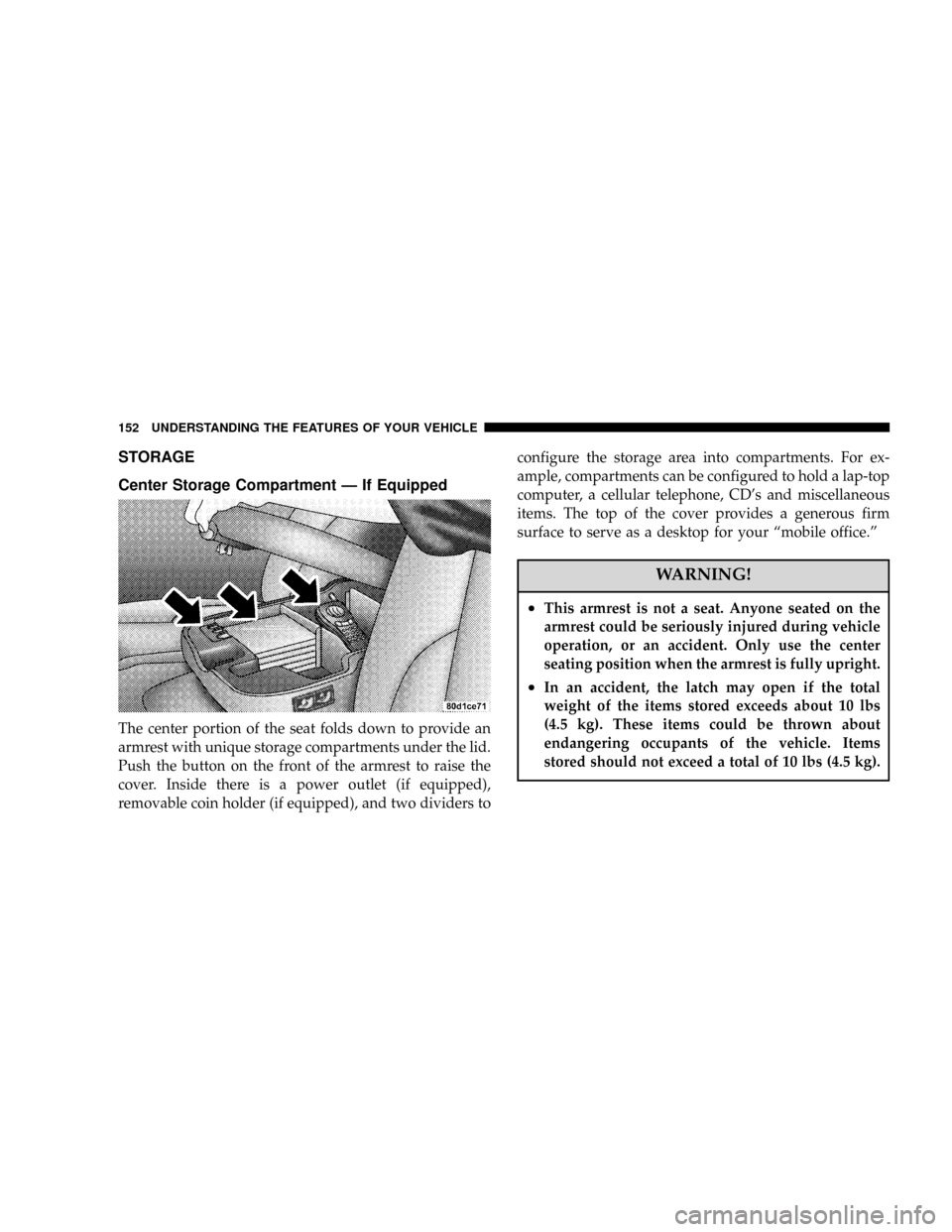
Center Storage Compartment Ð If Equipped
The center portion of the seat folds down to provide an
armrest with unique storage compartments under the lid.
Push the button on the front of the armrest to raise the
cover. Inside there is a power outlet (if equipped),
removable coin holder (if equipped), and two dividers toconfigure the storage area into compartments. For ex-
ample, compartments can be configured to hold a lap-top
computer, a cellular telephone, CD's and miscellaneous
items. The top of the cover provides a generous firm
surface to serve as a desktop for your ªmobile office.º
WARNING!
²This armrest is not a seat. Anyone seated on the
armrest could be seriously injured during vehicle
operation, or an accident. Only use the center
seating position when the armrest is fully upright.
²In an accident, the latch may open if the total
weight of the items stored exceeds about 10 lbs
(4.5 kg). These items could be thrown about
endangering occupants of the vehicle. Items
stored should not exceed a total of 10 lbs (4.5 kg).
152 UNDERSTANDING THE FEATURES OF YOUR VEHICLE
Page 168 of 492
UNDERSTANDING YOUR INSTRUMENT PANEL
CONTENTS
mInstruments And Controls.................171
mInstrument Cluster......................172
mInstrument Cluster Description.............173
mElectronic Digital Clock..................181
NClock Setting Procedure.................181
mRadio General Information................182
NRadio Broadcast Signals.................182
NTwo Types Of Signals..................182
NElectrical Disturbances..................182NAM Reception.......................182
NFM Reception........................183
mSales Code REF Ð AM/FM/CD (Single Disc)
Radio With Optional Satellite Radio And Hands
Free Phone Capability...................183
NOperating Instructions - Radio Mode.......183
NOperation Instructions - CD Mode.........187
NOperation Instructions - Auxiliary Mode.....189
NOperating Instructions - Hands Free Phone Ð
If Equipped.........................1904
Page 169 of 492
NOperating Instructions - Satellite Radio Ð If
Equipped...........................191
mSales Code RAQ ± AM/FM/CD (6-Disc) Radio
With Optional Satellite Radio, Hands Free Phone,
And Vehicle Entertainment Systems (VES)
Capabilities...........................191
NOperating Instructions - Radio Mode.......191
NOperation Instructions - (CD Mode For CD
Audio Play).........................196
NLoad/Eject Button (CD Mode For CD Audio
Play)..............................198
NNotes On Playing MP3 Files.............200
NOperation Instructions - (CD Mode For MP3
Audio Play).........................202
NLoad/Eject Button (CD Mode For MP3 Play) . . 202mSales Code RAK ± AM/FM/Cassette/CD (6-Disc)
Radio With Optional Satellite Radio, Hands Free
Phone, Video, MP3, And WMA Capabilities....204
NOperating Instructions - Radio Mode.......205
NOperating Instructions Ð Tape Player.......209
NSeek Button.........................209
NFast Forward (FF).....................210
NRewind (RW)........................210
NTape Eject...........................210
NScan Button.........................210
NChanging Tape Direction................210
NMetal Tape Selection...................210
NPinch Roller Release...................210
NNoise Reduction......................211
168 UNDERSTANDING YOUR INSTRUMENT PANEL
Page 171 of 492
NRadio Operation......................224
NTape Player.........................225
NCD Player..........................225
mCassette Tape And Player Maintenance.......225
mCompact Disc Maintenance................226
mRadio Operation And Cellular Phones........227
mClimate Controls.......................227NHeater Only Ð Fleet Vehicles.............228
NAir Conditioning And Heating Ð If Equipped . 230
NAir Conditioning With Dual Zone Temperature
Control Ð If Equipped.................233
NOperating Tips.......................237
NOperating Tips Chart...................240
170 UNDERSTANDING YOUR INSTRUMENT PANEL
Page 184 of 492
FM Reception
Because FM transmission is based on frequency varia-
tions, interference that consists of amplitude variations
can be filtered out, leaving the reception relatively clear,
which is the major feature of FM radio.
NOTE:The radio, steering wheel radio controls (if
equipped), and 6 disc CD/DVD changer (if equipped)
will remain active for up to 10 minutes after the ignition
switch has been turned off. Opening a vehicle front door
will cancel this feature.
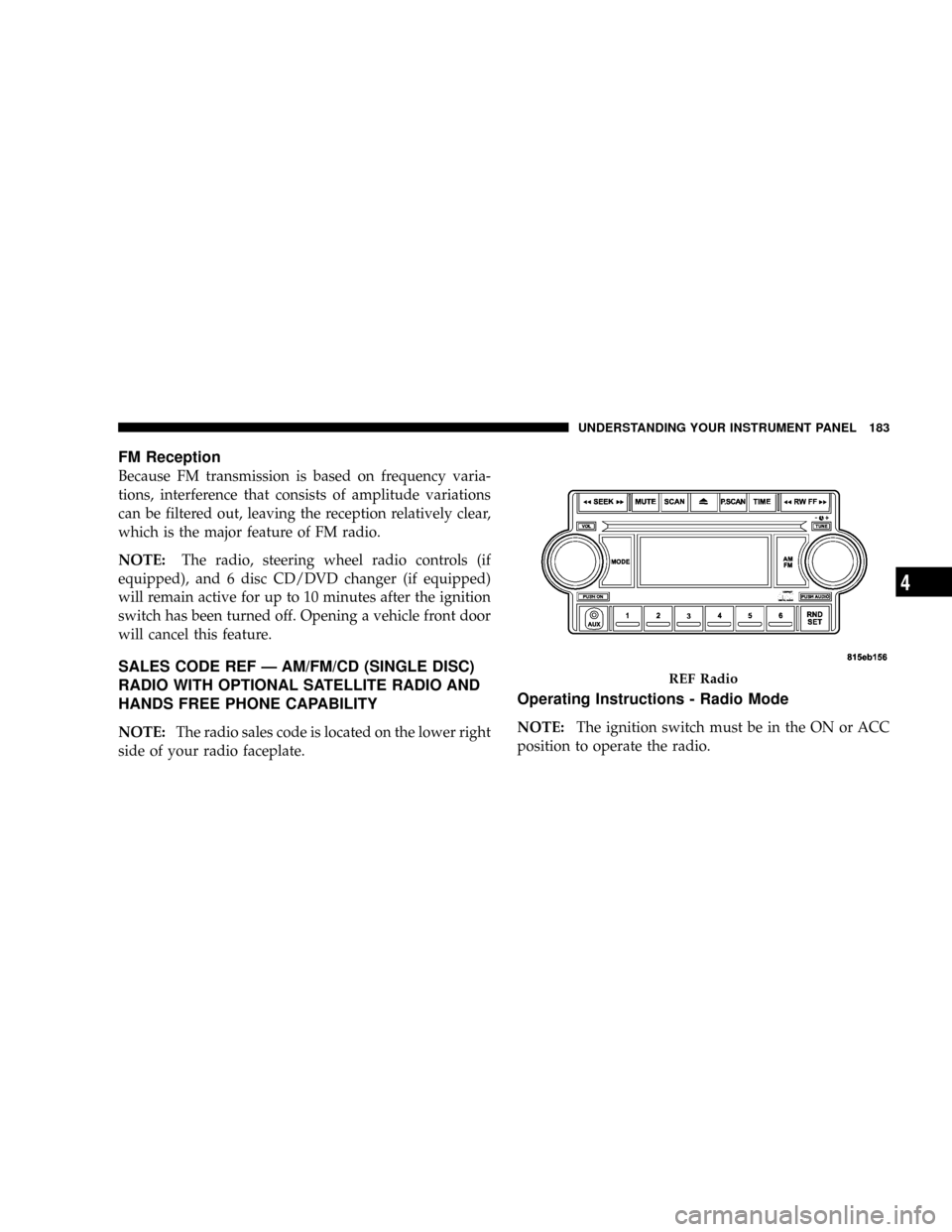
SALES CODE REF Ð AM/FM/CD (SINGLE DISC)
RADIO WITH OPTIONAL SATELLITE RADIO AND
HANDS FREE PHONE CAPABILITY
NOTE:The radio sales code is located on the lower right
side of your radio faceplate.
Operating Instructions - Radio Mode
NOTE:The ignition switch must be in the ON or ACC
position to operate the radio.
REF Radio
UNDERSTANDING YOUR INSTRUMENT PANEL 183
4
Page 185 of 492
Power Switch/Volume Control (Rotary)
Press the ON/VOL control to turn the radio ON. Press
the ON/VOL a second time to turn OFF the radio.
Electronic Volume Control
The electronic volume control turns continuously (360
degrees) in either direction without stopping. Turning the
volume control to the right increases the volume and to
the left decreases it.
When the audio system is turned on, the sound will be
set at the same volume level as last played.
For your convenience, the volume can be turned down,
but not up, when the audio system is off and the ignition
is ON.
Mode Button (Radio Mode)
Press the mode button repeatedly to select between the
CD player and Satellite Radio (if equipped).
SEEK Button (Radio Mode)
Press and release the SEEK button to search for the next
listenable station in either AM/FM or Satellite (if
equipped) mode. Press the right side of the button to seek
up and the left side to seek down. The radio will remain
tuned to the new station until you make another selec-
tion. Holding the button will bypass stations without
stopping until you release it.
MUTE Button (Radio Mode)
Press the MUTE button to cancel the sound from the
speakers.9MUTE9will display. Press the MUTE button a
second time and the sound from the speakers will return.
Rotating the volume control, turning the radio ON/OFF,
or turning ON/OFF the ignition, will cancel the MUTE
feature.
NOTE:In Hands Free Phone (if equipped) mode, the
MUTE button mutes the microphone.
184 UNDERSTANDING YOUR INSTRUMENT PANEL
Page 190 of 492
RND/SET Button (Random Play Button) (CD
Mode)
Press this button while the CD is playing to activate
Random Play. This feature plays the selections on the
compact disc in random order to provide an interesting
change of pace.
Press the SEEK button to move to the next randomly
selected track.
Press and hold the FF button to fast forward through the
tracks. Release the FF button to stop the fast forward
feature. If the RW button is pressed, the current track will
reverse to the beginning of the track and begin playing.
Press the RND button a second time to stop Random
Play.
Operation Instructions - Auxiliary Mode
The auxiliary (AUX) jack is an audio input jack, which
allows the user to plug in a portable device such as an
MP3 player, cassette player, or microphone and utilize
the vehicle's audio system to amplify the source and play
through the vehicle speakers.
The auxiliary mode becomes active when an electrical
device is plugged into the AUX jack using a standard 3.5
mm stereo audio cable and the user presses and releases
the MODE button until AUX appears on the display.
NOTE:The radio will return to the last stored mode if
the ignition switch is turned from the OFF/LOCK posi-
tion to the ACC position, the radio is turned on, and the
radio was previously in the AUX mode.
SEEK Button (Auxiliary Mode)
No function.
UNDERSTANDING YOUR INSTRUMENT PANEL 189
4