ignition DODGE POWER WAGON 2007 2.G Owner's Guide
[x] Cancel search | Manufacturer: DODGE, Model Year: 2007, Model line: POWER WAGON, Model: DODGE POWER WAGON 2007 2.GPages: 492, PDF Size: 8.25 MB
Page 107 of 492
Far End Audio Performance
²
Audio quality is maximized under:
²low-to-medium blower setting,
²low-to-medium vehicle speed,
²low road noise,
²smooth road surface,
²fully closed windows, and
²dry weather condition.
²Operation from driver seat.
²Performance, such as audio clarity, echo, and loudness
to a large degree rely on the phone and network, and
not the UConnectŸ system.
²Echo at far end can sometime be reduced by lowering
the in-vehicle audio volume.
Bluetooth Communication Link
Occasionally, Cellular phones have been found to lose
connection to the UConnectŸ system. When this hap-
pens, the connection can generally be re-established by
switching the phone off/on. Your cell phone is recom-
mended to remain in Bluetooth9on9mode.
Power-Up
After switching the ignition key from OFF to either ON
or ACC position, or after a reset, you must wait at least
five (5) seconds prior to using the system.
106 UNDERSTANDING THE FEATURES OF YOUR VEHICLE
Page 117 of 492
the switch a third time will turn the heated seats OFF. If
you do not purposefully turn the switch OFF, the seat
heating level will automatically change to the next lower
level, or OFF. The High heat level operates for 30 minutes
(approximate), the Low heat level operates for 30 min-
utes (approximate). The seat heat will also turn OFF
when the ignition is turned OFF. Both of the indicators
ON identifies High heat level. The lower indicator On
only, identifies Low heat level. Flashing indicator lights
on the switch indicate that the Heated Seat System needs
servicing.WARNING!
Persons who are unable to feel pain to the skin
because of advanced age, chronic illness, diabetes,
spinal cord injury, medication, alcohol use, exhaus-
tion or other physical condition must exercise care
when using the seat heater. It may cause burns even
at low temperatures, especially if used for long
periods of time.
Do not place anything on the seat that insulates
against heat, such as a blanket or cushion. This may
cause the seat heater to overheat.
116 UNDERSTANDING THE FEATURES OF YOUR VEHICLE
Page 121 of 492
Battery Saver
To protect the life of your vehicle's battery, Load Shed-
ding is provided for both the interior and exterior lights.
If the ignition is off and any door is left ajar for 10
minutes or the dimmer control is rotated upwards for 10
minutes, the interior lights will automatically turn off.
If the headlamps remain on while the ignition is cycled
off, the exterior lights will automatically turn off after 8
minutes. If the headlamps are turned on and left on for 8
minutes while the ignition is off, the exterior lights will
automatically turn off.
NOTE:Battery Saver mode is cancelled if the ignition is
ON.
Headlamp Delay
To aid in your exit, your vehicle is equipped with a
headlamp delay that will leave the headlamps on for 90
seconds. This delay is initiated when the ignition is
turned OFF while the headlamp switch is on, and then
the headlamp switch is cycled off. Headlamp delay can
be cancelled by either turning the headlamp switch ON
then OFF or by turning the ignition ON.
Headlights, Parking Lights, Panel Lights
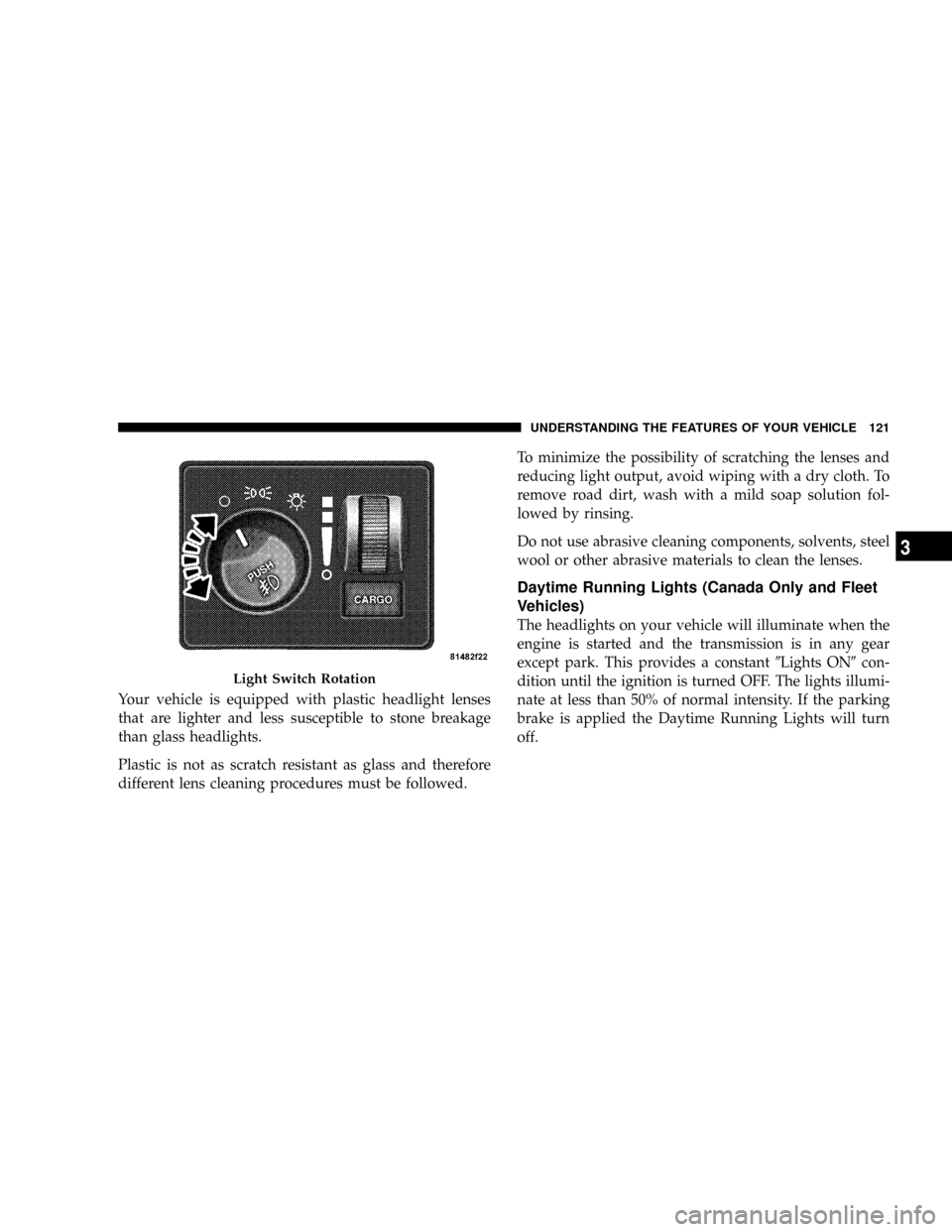
When the headlight switch is rotated to the first
position, the parking lights, taillights, side marker
lights, license plate light and instrument panel
lights are all turned on. The headlights will turn ON
when the switch is rotated to the second position.
120 UNDERSTANDING THE FEATURES OF YOUR VEHICLE
Page 122 of 492
Your vehicle is equipped with plastic headlight lenses
that are lighter and less susceptible to stone breakage
than glass headlights.
Plastic is not as scratch resistant as glass and therefore
different lens cleaning procedures must be followed.To minimize the possibility of scratching the lenses and
reducing light output, avoid wiping with a dry cloth. To
remove road dirt, wash with a mild soap solution fol-
lowed by rinsing.
Do not use abrasive cleaning components, solvents, steel
wool or other abrasive materials to clean the lenses.
Daytime Running Lights (Canada Only and Fleet
Vehicles)
The headlights on your vehicle will illuminate when the
engine is started and the transmission is in any gear
except park. This provides a constant9Lights ON9con-
dition until the ignition is turned OFF. The lights illumi-
nate at less than 50% of normal intensity. If the parking
brake is applied the Daytime Running Lights will turn
off.
Light Switch Rotation
UNDERSTANDING THE FEATURES OF YOUR VEHICLE 121
3
Page 123 of 492
Lights-on Reminder
If the headlights, parking lights, or cargo lights are left
on, after the ignition is turned off, a chime will sound
when the driver's door is opened.
Fog Lights Ð If Equipped
The foglights are turned ON by placing the head-
light rotary control in the parking light or head-
light position and pushing in the headlight rotary
control. The fog lights will operate only when the parking
lights are ON or when the vehicle headlights are ON low
beam. An indicator light located in the instrument cluster
will illuminate when the fog lights are on. The fog lights
will turn off when the switch is pushed a second time,
when the headlight switch is rotated to the OFF position,
or the high beam is selected.
Cargo Light Ð If Equipped
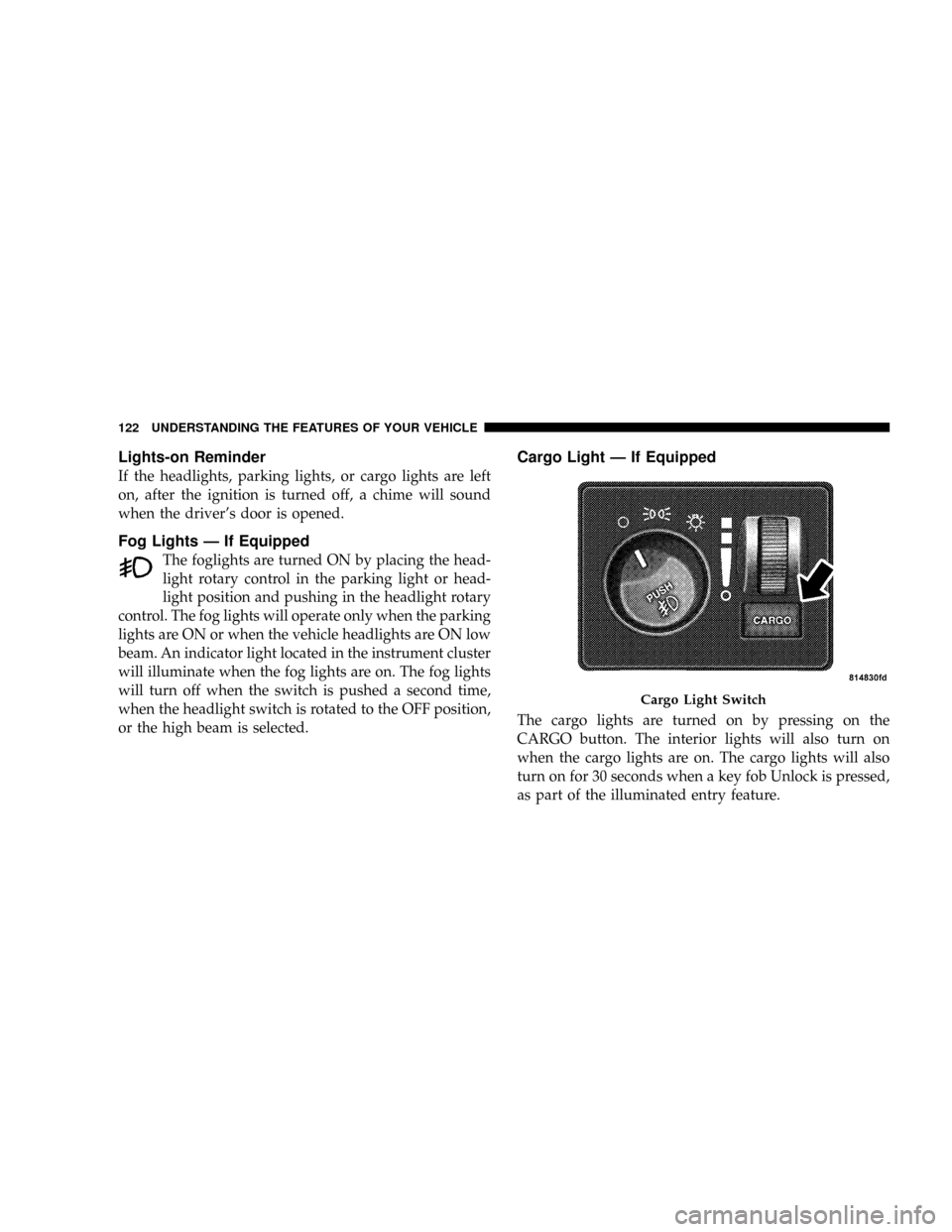
The cargo lights are turned on by pressing on the
CARGO button. The interior lights will also turn on
when the cargo lights are on. The cargo lights will also
turn on for 30 seconds when a key fob Unlock is pressed,
as part of the illuminated entry feature.
Cargo Light Switch
122 UNDERSTANDING THE FEATURES OF YOUR VEHICLE
Page 129 of 492
ELECTRONIC SPEED CONTROL Ð IF EQUIPPED
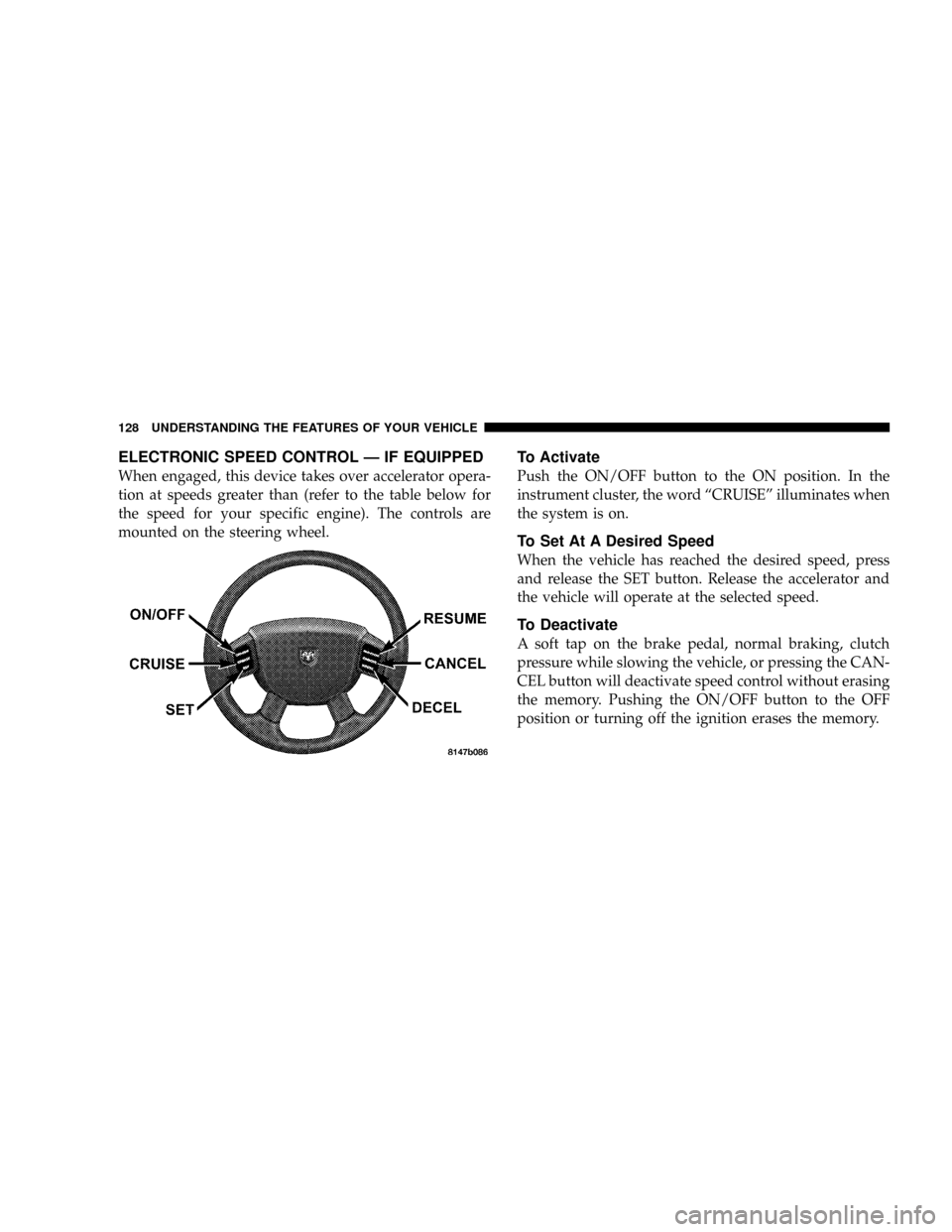
When engaged, this device takes over accelerator opera-
tion at speeds greater than (refer to the table below for
the speed for your specific engine). The controls are
mounted on the steering wheel.
To Activate
Push the ON/OFF button to the ON position. In the
instrument cluster, the word ªCRUISEº illuminates when
the system is on.
To Set At A Desired Speed
When the vehicle has reached the desired speed, press
and release the SET button. Release the accelerator and
the vehicle will operate at the selected speed.
To Deactivate
A soft tap on the brake pedal, normal braking, clutch
pressure while slowing the vehicle, or pressing the CAN-
CEL button will deactivate speed control without erasing
the memory. Pushing the ON/OFF button to the OFF
position or turning off the ignition erases the memory.
128 UNDERSTANDING THE FEATURES OF YOUR VEHICLE
Page 136 of 492
When the DTE value is less than 30 miles estimated
driving distance, the DTE display will change to an
alternating test display of ªLOº and ªFUELº. This dis-
play will continue until the vehicle runs out of fuel.
Adding a significant amount of fuel to the vehicle will
turn off the ªLO FUELº text and a new DTE value will be
displayed, based on the current values in the DTE
calculation and the current fuel tank level.
NOTE:It is possible for DTE to display ªLO FUELº
before the low fuel warning light turns on in the instru-
ment cluster. This could occur because low fuel warning
is set to a specified fuel tank volume and DTE is an
estimated distance calculation based on fuel economy
and remaining fuel tank volume.
Ram fuel tank volumes are as follows:
²34 gallons - short box models
²35 gallons - long box models
Trip Odometer (ODO)
This display shows the distance traveled since the last
reset. Resetting of this screen will cause the trip odometer
to change to Zero.
Elapsed Time (ET)
This display shows the accumulated ignition ON time
since the last reset. Resetting the Elapsed Time will cause
the display to change to Zero.
UNDERSTANDING THE FEATURES OF YOUR VEHICLE 135
3
Page 138 of 492
Manual Compass Calibration
NOTE:To ensure proper compass calibration, make
sure the compass variance is properly set before manu-
ally calibrating the compass.
If the compass appears erratic and the CAL symbol does
not appear, you must manually put the compass into the
ªCalibrationº mode.
Recalibrating The Compass
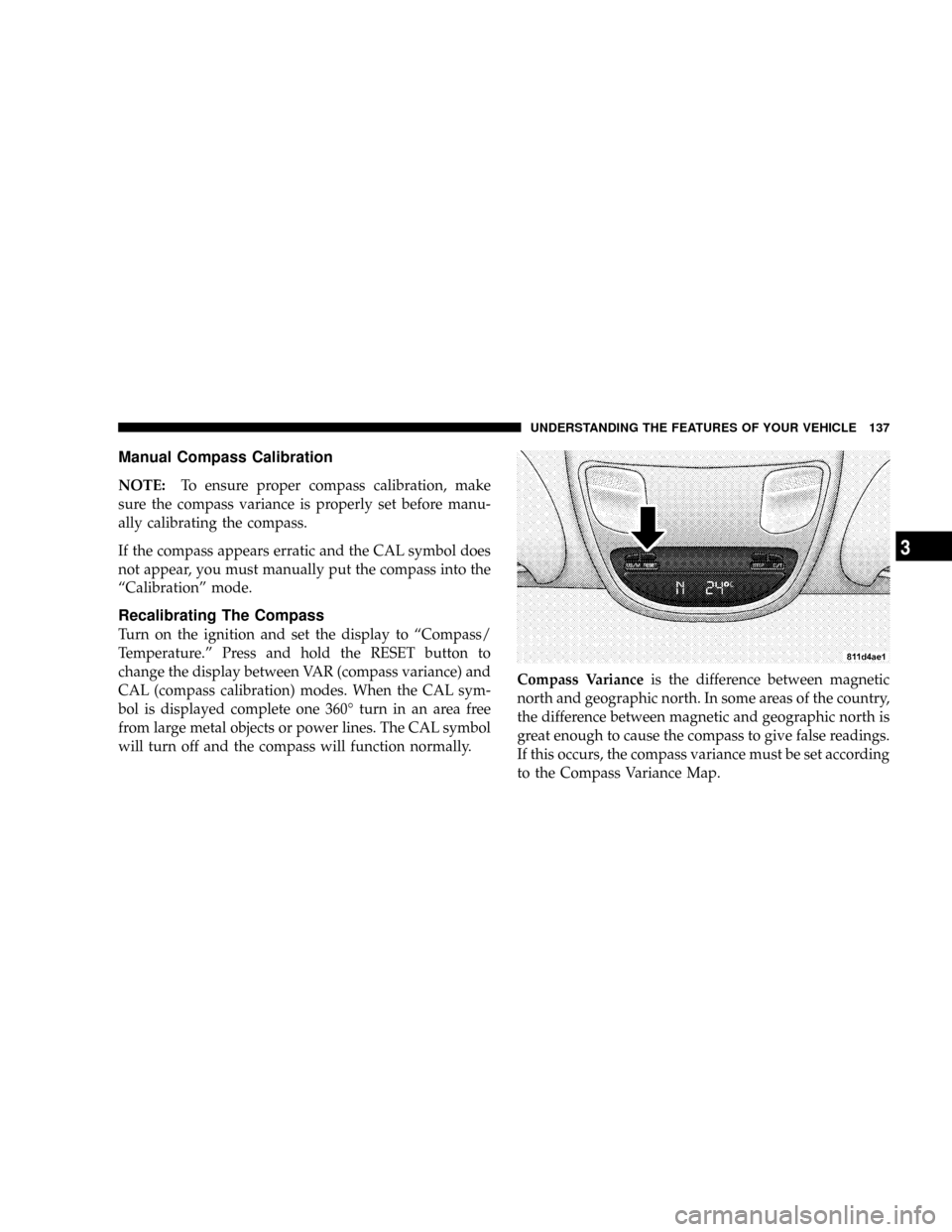
Turn on the ignition and set the display to ªCompass/
Temperature.º Press and hold the RESET button to
change the display between VAR (compass variance) and
CAL (compass calibration) modes. When the CAL sym-
bol is displayed complete one 360É turn in an area free
from large metal objects or power lines. The CAL symbol
will turn off and the compass will function normally.Compass Varianceis the difference between magnetic
north and geographic north. In some areas of the country,
the difference between magnetic and geographic north is
great enough to cause the compass to give false readings.
If this occurs, the compass variance must be set according
to the Compass Variance Map.
UNDERSTANDING THE FEATURES OF YOUR VEHICLE 137
3
Page 139 of 492
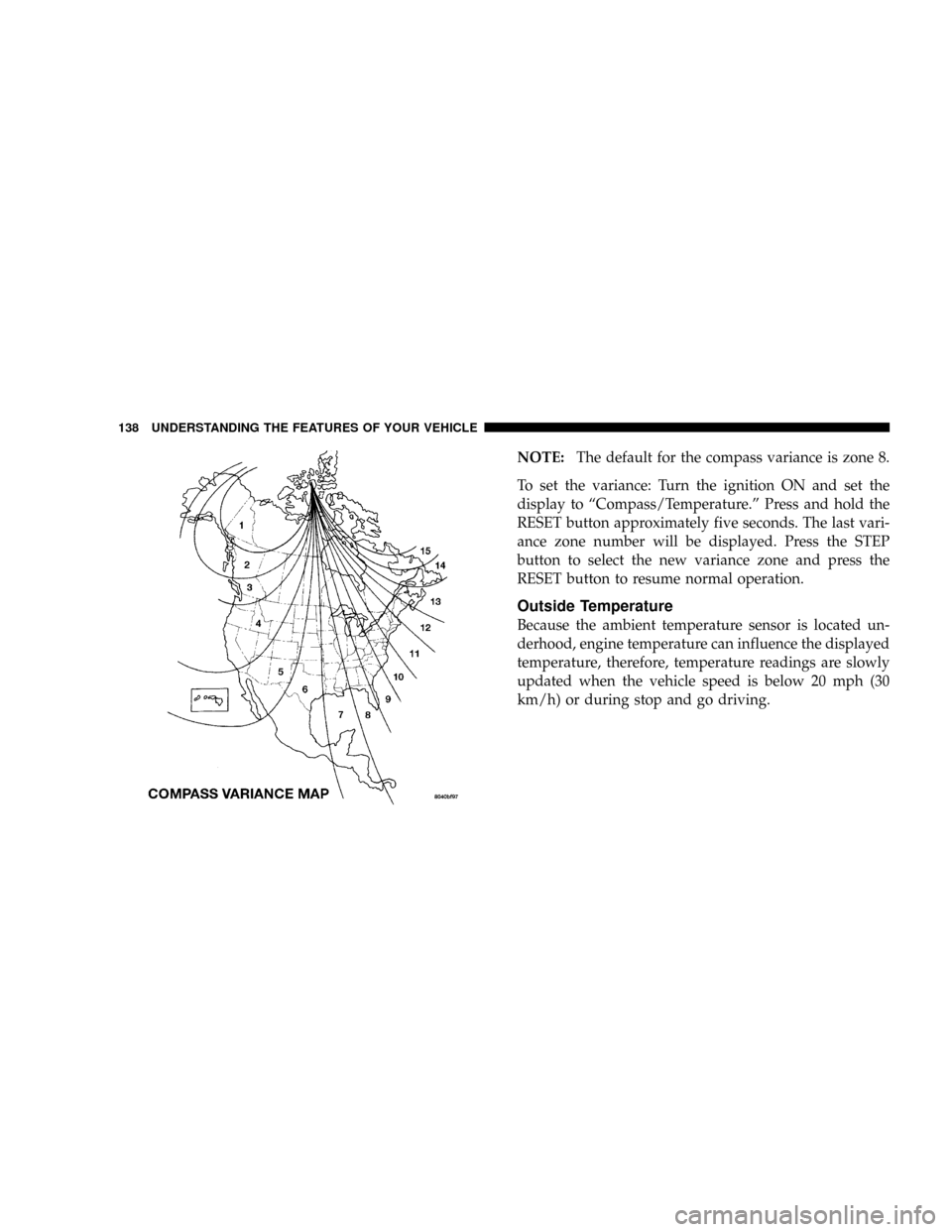
NOTE:The default for the compass variance is zone 8.
To set the variance: Turn the ignition ON and set the
display to ªCompass/Temperature.º Press and hold the
RESET button approximately five seconds. The last vari-
ance zone number will be displayed. Press the STEP
button to select the new variance zone and press the
RESET button to resume normal operation.
Outside Temperature
Because the ambient temperature sensor is located un-
derhood, engine temperature can influence the displayed
temperature, therefore, temperature readings are slowly
updated when the vehicle speed is below 20 mph (30
km/h) or during stop and go driving.
138 UNDERSTANDING THE FEATURES OF YOUR VEHICLE
Page 146 of 492
Security
If you sell your vehicle, be sure to erase the frequencies.
To erase all of the previously trained frequencies, hold
down both outside buttons until the green light begins to
flash.
This device complies with part 15 of FCC rules and with
RSS-210 of Industry Canada. Operation is subject to the
following conditions:
²This device may not cause harmful interference.
²This device must accept any interference that may be
received including interference that may cause undes-
ired operation.
NOTE:Changes or modifications not expressly ap-
proved by the party responsible for compliance could
void the user's authority to operate the equipment.HomeLinktis a trademark owned by Johnson Controls,
Inc.
POWER SUNROOF Ð IF EQUIPPED
The power sunroof switch is located between the sun
visors on the overhead console.
NOTE:The Power Accessory Delay feature will allow
the power sunroof to operate for ten minutes after the
ignition is turned off.
UNDERSTANDING THE FEATURES OF YOUR VEHICLE 145
3