clock DODGE RAM 1500 1998 2.G Workshop Manual
[x] Cancel search | Manufacturer: DODGE, Model Year: 1998, Model line: RAM 1500, Model: DODGE RAM 1500 1998 2.GPages: 2627
Page 1619 of 2627

FUEL FILTER / WATER
SEPARATOR
DESCRIPTION
The fuel filter/water separator assembly is located
on left side of engine above the starter motor. The
assembly also includes the fuel heater, Water-In-Fuel
(WIF) sensor, and fuel transfer pump.
OPERATION
The fuel filter/water separator protects the fuel
injection pump by removing water and contaminants
from the fuel. The construction of the filter/separator
allows fuel to pass through it, but helps prevent
moisture (water) from doing so. Moisture collects at
the bottom of the canister.
Refer to the maintenance schedules in the owners
manual for the recommended fuel filter replacement
intervals.
For draining of water from canister, refer to Fuel
Filter/Water Separator Removal/Installation section.
A Water-In-Fuel (WIF) sensor is attached to the
side of fuel filter housing. Refer to Water-In-Fuel
Sensor Description/Operation.
The fuel heater is installed into the top of the fil-
ter/separator housing. Refer to Fuel Heater Descrip-
tion/Operation.
REMOVAL
Refer to maintenance schedules in this manual, or
the owners manual for recommended fuel filter
replacement intervals.
Draining water from fuel filter/water separa-
tor housing:
The housing drain valve (Fig. 3) serves two pur-
poses. One is topartiallythe drain filter housing of
excess water. The other is tocompletelythe drain
housing for fuel filter, drain valve, heater element, ,
water-in-fuel sensor replacement or transfer pump
replacement.
The filter housing should be partially drained
whenever the water-in-fuel warning lamp remains
illuminated. (Note that lamp will be illuminated for
approximately two seconds when ignition key is ini-
tially placed in ON position for a bulb check).(1) A drain hose (Fig. 3) is located at the bottom of
drain valve. Place drain pan under drain hose.
(2)With engine not running,rotate drain valve
handle counter-clockwise (rearward) to OPEN
(DRAIN) position. Hold drain valve open until all
water and contaminants have been removed and
clean fuel exits.
(3) If drain valve, fuel heater element or Water-In-
Fuel (WIF) sensor is being replaced, drain housing
completely. Dispose of mixture in drain pan according
to applicable regulations.
(4) After draining operation, rotate valve handle
clockwise (forward) to the CLOSE position.
(5)Fuel Filter Replacement:The fuel filter is
located inside of the fuel filter housing.
(a) Clean all debris from around canister.
(b) Remove filter lid (Fig. 4) using a socket.
Attach socket to large hex on top of lid (Fig. 4).
Rotate counter-clockwise for removal. Remove
o-ring. Discard o-ring.
(c) Remove filter element by twisting element
sideways from filter lid.
(6)Water-In-Fuel (WIF) Sensor Replacement:
The WIF sensor is located on the side of the fuel fil-
ter housing (Fig. 3).
(a) Disconnect electrical connector at sensor.
(b) Clean area around sensor.
(c) Remove sensor by rotating counter-clockwise.
(d) Check condition of sensor o-ring. Replace if
damaged.
(7)Fuel Heater Element Replacement:The
heater element is located in the fuel filter housing
(Fig. 3).
(a) Remove fuel filter. See previous steps.
(b) Disconnect electrical connector.
(c) Remove two T-15 Torx head mounting screws
from fuel heater element.
(d) Remove fuel heater.
(8)Drain Valve Replacement:The drain valve
assembly is located on the side of the fuel filter hous-
ing (Fig. 3).
(a) Disconnect drain hose from the fuel drain
valve.
(b) Remove 4 drain valve mounting screws (T-15
Torx head).
(c) Remove drain valve from filter housing.
INSTALLATION
Refer to maintenance schedules for recommended
fuel filter replacement intervals.
(1) Thoroughly clean inside of filter housing, filter
cap and all related components.
(2)Fuel Filter:
(a)The engine has a self-priming low-pres-
sure fuel system. Refer to Standard Proce-
dures-Fuel System Priming.
ENGINE ROTATING (BARRING) TOOL - #7471B
(ALSO PART OF KIT #6860)
14 - 50 FUEL DELIVERY - DIESELDR
FUEL DELIVERY - DIESEL (Continued)
Page 1620 of 2627

(b) Install new o-ring to canister lid and lubri-
cate o-ring with clean engine oil.
(c) Position new element to canister lid. Place
this assembly into canister by rotating clockwise.
(d) Tighten cap to 34 N´m (25 ft. lbs.) torque. Do
not overtighten cap.
(3)Water-In-Fuel (WIF) Sensor:
(a) Install new o-ring seal to WIF sensor.
(b) Apply a light film of clean oil to o-ring seal.
(c) Install sensor into housing.
(d) Tighten sensor to 2.5 N´m (25 in. lbs.) torque.
(e) Connect electrical connector to WIF sensor.
(4)Fuel Heater Element:
(a) Install fuel heater into fuel filter housing.
(b) Install fuel heater thermostat into fuel filter
housing.
(c) Install fuel heater mounting screws and
tighten to 1-1.5 N´m (13 in. lbs.) torque.
(d) Connect electrical connector to fuel heater
thermostat.
(e) Install new filter cover O-ring onto fuel filter
housing cover and lubricate with clean engine oil.
(f) Tighten fuel filter housing cover (lid) to 34
N´m (25 ft. lbs.).
(5)Drain Valve:
(a) Install 2 new o-rings to valve and filter hous-
ing.
(b) Lubricate with silicon grease.
(c) Install fuel drain valve.
(d) Install 4 mounting screws and tighten to
1±1.5 N´m (8±13 in. lbs.) torque.
(e) Connect drain hose to drain valve.
(6) Start engine and check for leaks.
FUEL HEATER
DESCRIPTION
The fuel heater assembly is located on the side of
the fuel filter housing (Fig. 3).
The heater/element assembly is equipped with a
temperature sensor (thermostat) that senses fuel
temperature. This sensor is attached to the fuel heat-
er/element assembly.
OPERATION
The fuel heater is used to prevent diesel fuel from
waxing during cold weather operation.
When the temperature is below 45 8 degrees F,
the temperature sensor allows current to flow to the
heater element warming the fuel. When the temper-
ature is above 75 8 degrees F, the sensor stops cur-
rent flow to the heater element.
Battery voltage to operate the fuel heater element
is supplied from the ignition switch and through the
fuel heater relay. Also refer to Fuel Heater Relay.
Fig. 3 FILTER HOUSING
1 - FILTER HOUSING
2 - FUEL HEATER AND THERMOSTAT
3 - FUEL HEATER MOUNTING SCREWS
4 - FUEL HEATER ELEC. CONNECTOR
5 - WIF SENSOR
6 - WIF SENSOR ELEC. CONNECTOR
7 - DRAIN HOSE
8 - DRAIN VALVE MOUNTING SCREWS
9 - DRAIN VALVE
Fig. 4 FILTER COVER (LID)
1 - FILTER COVER
2 - ATTACH SOCKET HERE
DRFUEL DELIVERY - DIESEL 14 - 51
FUEL FILTER / WATER SEPARATOR (Continued)
Page 1662 of 2627

NOTE: When servicing the steering wheel after
removing the old bolt a new bolt must be used
when installing.
NOTE: When servicing the coupler a new bolt must
be used when installing.
DIAGNOSIS AND TESTING - STEERING
COLUMN
If the vehicle is involved in a front end collision/the
air bag has deployed the column must be inspected.
This inspection will determine if the Column has col-
lapsed. Inspect the column mounting capsules visu-
ally and manually push and pull them to check for
separation or fractures. If capsules are fractured or
have moved the column MUST be replaced.
REMOVAL
WARNING: BEFORE SERVICING THE STEERING
COLUMN THE AIRBAG SYSTEM MUST BE DIS-
ARMED. REFER TO ELECTRICAL RESTRAINT SYS-
TEM FOR SERVICE PROCEDURES. FAILURE TO DO
SO MAY RESULT IN ACCIDENTAL DEPLOYMENT OF
THE AIRBAG AND POSSIBLE PERSONAL INJURY.CAUTION: All fasteners must be torqued to specifi-
cation to ensure proper operation of the steering
column.
(1) Position the front wheelsstraight ahead.
(2) Disconnect the negative (ground) cable from
the battery.
(3) Remove the two switches from the steering
wheel.
(4) Remove the airbag, (Refer to 8 - ELECTRICAL/
RESTRAINTS/DRIVER AIRBAG - REMOVAL).
(5) Remove the steering wheel with special tool
CJ98±1 or an appropriate steering wheel puller.
CAUTION: Ensure the puller bolts are fully engaged
into the steering wheel and not into the clock-
spring, before attempting to remove the wheel. Fail-
ure to do so may damage the steering wheel/
clockspring.
(6) Remove the steering column opening cover
(Refer to 23 - BODY/INSTRUMENT PANEL/STEER-
ING COLUMN OPENING COVER - REMOVAL).
(7) Remove the tilt lever.
(8) Remove the column shrouds (Fig. 2).
(9) Remove the clock spring, (Refer to 8 - ELEC-
TRICAL/RESTRAINTS/CLOCKSPRING -
REMOVAL).
(10) Disconnect the wiring harness to the column.
Fig. 1 STEERING COLUMN
1 - LOCK CYLINDER
2 - GEAR SHIFT LEVER
3 - MOUNTING HOLES
4 - STEERING COLUMN
5 - TILT LEVER
Fig. 2 UPPER & LOWER SHROUDS
1 - UPPER SHROUD
2 - LOWER SHROUD
DRCOLUMN 19 - 7
COLUMN (Continued)
Page 1664 of 2627

(17) Remove the steering column assembly from
the vehicle. (Fig. 7)
INSTALLATION
WARNING: BEFORE SERVICING THE STEERING
COLUMN THE AIRBAG SYSTEM MUST BE DIS-
ARMED. REFER TO ELECTRICAL RESTRAINT SYS-
TEM FOR SERVICE PROCEDURES. FAILURE TO DO
SO MAY RESULT IN ACCIDENTAL DEPLOYMENT OF
THE AIRBAG AND POSSIBLE PERSONAL INJURY.
CAUTION: All fasteners must be torqued to specifi-
cation to ensure proper operation of the steering
column.
(1) Position the steering column on the dash panel
support and loosely install the mounting nuts.
(2) Firmly slide the steering column upward
against the studs in dash panel and hand tighten the
nuts.
(3) Install the steering shaft coupler on the steer-
ing shaft and loosely install anewbolt.
(4) Center steering column in dash opening and
tighten mounting nuts to 28 N´m (250 in. lbs.).
NOTE: Torque the upper left nut first then the lower
right nut. Then torque the lower left nut then the
upper right nut.
NOTE: A new bolt must be used for reinstallation.
(5) Tighten the coupler bolt to 57 N´m (42 ft. lbs.).(6) Install a new brake light switch (Refer to 8 -
ELECTRICAL/LAMPS/LIGHTING - EXTERIOR/
BRAKE LAMP SWITCH - REMOVAL).
(7) Install the shifter cable. (Refer to 21 - TRANS-
MISSION/TRANSAXLE/AUTOMATIC - 32RH/GEAR
SHIFT CABLE - INSTALLATION)
(8) Connect the wiring harness to the column.
(9) Install the SKIM module.
(10) Install the clockspring(Refer to 8 - ELECTRI-
CAL/RESTRAINTS/CLOCKSPRING - REMOVAL).
(11) Install the shrouds.
(12) Install the steering column opening cover
(Refer to 23 - BODY/INSTRUMENT PANEL/STEER-
ING COLUMN OPENING COVER - INSTALLA-
TION).
(13) Align the spline on the wheel hub to shaft.
(14) Then install the steering wheel and install a
newbolt. Tighten the bolt to 61 N´m (45 ft. lbs.).
(15) Install the airbag (Refer to 8 - ELECTRICAL/
RESTRAINTS/DRIVER AIRBAG - INSTALLATION).
(16) Install the two steering wheel switches.
(17) Install the tilt lever handle.
(18) Install the negative battery terminal.
(19) Test the operation of the horn, Electronic
PRNDL Indicator, lights and any other functions that
are steering column operated.
IGNITION SWITCH
DESCRIPTION
The ignition switch is located on the steering col-
umn. It is used as the main on/off switching device
for most electrical components. The mechanical key
cylinder is used to engage/disengage the electrical
ignition switch.
OPERATION
Vehicles equipped with an automatic trans-
mission and a steering column mounted shifter:
an interlock device is located within the shift cable.
This interlock device is used to lock the transmission
shifter in the PARK position when the key cylinder is
in any position and the brake pedal is not depressed.
DIAGNOSIS AND TESTING - IGNITION SWITCH
TEST AND REPAIR
If the key removal effort is excessive on a vehicle
with a automatic transmission first adjust the shift
linkage, (Refer to 21 - TRANSMISSION/TRANS-
AXLE/AUTOMATIC - 46RE/GEAR SHIFT CABLE -
ADJUSTMENTS).
If the ignition switch effort is excessive remove the
ignition key cylinder from the steering column. (Refer
to 19 - STEERING/COLUMN/LOCK CYLINDER
Fig. 7 STEERING COLUMN
1 - Steering Wheel
2 - Key Cylinder
3 - Gear Shift Lever
4 - Steering Column
5 - Tilt Lever Cable
DRCOLUMN 19 - 9
COLUMN (Continued)
Page 1665 of 2627

HOUSING - REMOVAL). Check the turning effort of
the key cylinder. If the ignition key cylinder effort is
excessive replace the key cylinder.
REMOVAL
SERVICE PRECAUTIONS
NOTE: The steering column on vehicles equipped
with an automatic transmission is not equipped
with an internal locking shaft with the ignition cyl-
inder. Alternative methods of locking the steering
wheel for service will have to be used.
The tilt and standard column (Fig. 8) have been
designed to be serviced as an assembly; without wir-
ing, switches, shrouds, steering wheel, etc. Most
steering column components can be serviced without
removing the steering column from the vehicle.
Safety goggles should be worn at all times when
working on steering columns.
To service the steering wheel, switches or airbag,
Refer to Electrical Restraints and follow all WARN-
INGS and CAUTIONS.
WARNING: THE AIRBAG SYSTEM IS A SENSITIVE,
COMPLEX ELECTRO-MECHANICAL UNIT. BEFORE
ATTEMPTING TO DIAGNOSE, REMOVE OR INSTALL
THE AIRBAG SYSTEM COMPONENTS YOU MUST
FIRST DISCONNECT AND ISOLATE THE BATTERY
NEGATIVE (GROUND) CABLE. THEN WAIT TWO
MINUTES FOR THE SYSTEM CAPACITOR TO DIS-
CHARGE. FAILURE TO DO SO COULD RESULT IN
ACCIDENTAL DEPLOYMENT OF THE AIRBAG ANDPOSSIBLE PERSONAL INJURY. THE FASTENERS,
SCREWS, AND BOLTS, ORIGINALLY USED FOR
THE AIRBAG COMPONENTS, HAVE SPECIAL COAT-
INGS AND ARE SPECIFICALLY DESIGNED FOR THE
AIRBAG SYSTEM. THEY MUST NEVER BE
REPLACED WITH ANY SUBSTITUTES. ANYTIME A
NEW FASTENER IS NEEDED, REPLACE WITH THE
CORRECT FASTENERS PROVIDED IN THE SERVICE
PACKAGE OR FASTENERS LISTED IN THE PARTS
BOOKS.
CAUTION: Do not hammer on steering column
shaft. This may cause damage to the shaft or bear-
ing.
CAUTION: Do not attempt to remove the pivot bolts
to disassemble the tilting mechanism.
The ignition key must be in the key cylinder for
cylinder removal. The key cylinder must be removed
first before removing ignition switch.
(1) Remove the negative (ground) cable from the
battery.
(2) Disable the airbag, (Refer to 8 - ELECTRICAL/
RESTRAINTS/DRIVER AIRBAG - REMOVAL).
(3) Remove the lower and upper shrouds.
(4) Remove key cylinder. (Refer to 19 - STEER-
ING/COLUMN/LOCK CYLINDER HOUSING -
REMOVAL).
(5) Disconnect the lower clockspring connectors.
(6) Remove the wire retainer from the tilt lever
bracket.
(7) Remove the tilt lever mounting screws to gain
access to the ignition switch mounting screws. (Fig.
9)
Fig. 8 STEERING COLUMN
1 - KEY CYLINDER
2 - GEAR SHIFT LEVER
3 - MOUNTING HOLES
4 - STEERING COLUMN
5 - IGNITION SWITCH
Fig. 9 IGNITION SWITCH WITH TILT
1 - IGNITION SWITCH
2 - TILT LEVER MECHANISM
19 - 10 COLUMNDR
IGNITION SWITCH (Continued)
Page 1666 of 2627

(8) For columns without tilt remove the bracket to
gain access to the ignition switch mounting screws.
(Fig. 10)
(9) Disconnect the electrical connector at rear of
ignition switch (Fig. 11).
(10) Remove ignition switch mounting screw.
(11) Using a small screwdriver, push on locking
tab and remove switch from steering column.
INSTALLATION
The ignition key must be in the key cylinder for
cylinder removal. The key cylinder must be removed
first before installing ignition switch.
(1) Before installing ignition switch, rotate the slot
in the switch to the ON position.(2) Connect the electrical connector to rear of the
ignition switch. Make sure that locking tabs are fully
seated into wiring connector.
(3) Position switch to column and install the
mounting screw. Tighten screw to 3 N´m (26 in. lbs.).
(4) Install the tilt lever bracket mounting screws.
Tighten screws to 4.5 N´m (40 in. lbs.).
(5) If the column is non-tilt install the bracket.
Tighten screws to 4.5 N´m (40 in. lbs.) (Fig. 10)
(6) Position the wire retainer into the tilt lever
bracket.
(7) Reconnect the lower clockspring connectors.
(8) Install the key cylinder.
(9) Install steering column upper and lower
shrouds.
(10) Enable the airbag system. (Refer to 8 - ELEC-
TRICAL/RESTRAINTS/DRIVER AIRBAG - INSTAL-
LATION).
KEY-IN IGNITION SWITCH
DESCRIPTION
The key-in ignition switch is integral to the igni-
tion switch, which is mounted on the left side of the
steering column. It closes a path to ground for the
Central Timer Module (CTM) when the ignition key
is inserted in the ignition key cylinder and the driver
door ajar switch is closed (driver door is open). The
key-in ignition switch opens the ground path when
the key is removed from the ignition key cylinder.
The ground path is also opened when the driver door
ajar switch is open (driver door is closed).
The key-in ignition switch cannot be repaired and,
if faulty or damaged, the entire ignition switch must
be replaced, (Refer to 19 - STEERING/COLUMN/IG-
NITION SWITCH - REMOVAL).
DIAGNOSIS AND TESTING - IGNITION SWITCH
AND KEY LOCK CYLINDER
ELECTRICAL DIAGNOSIS
For ignition switch electrical schematics, refer to
Ignition Switch in the appropriate section of Electri-
cal Wiring Diagrams.
MECHANICAL DIAGNOSIS (KEY DIFFICULT TO
ROTATE)
(Refer to 19 - STEERING/COLUMN/IGNITION
SWITCH - DIAGNOSIS AND TESTING).
Fig. 10 IGNITION SWITCH WITHOUT TILT
1 - Ignition Switch Mounting Screws
2 - Non-Tilt Mounitng Bracket Screws
Fig. 11 IGNITION SWITCH
1 - Ignition Switch
2 - Ignition Switch Mounting Screws
DRCOLUMN 19 - 11
IGNITION SWITCH (Continued)
Page 1670 of 2627

(2) Install the coupler to the intermediate shaft
using the marks made in the removal process.
NOTE: New pinch bolts must be used for reinstalla-
tion.
(3) Install the lower pinch bolt and tighten to 57
N´m (42 ft. lbs.).
(4) Install the upper pinch bolt and tighten to 57
N´m (42 ft. lbs.).
(5) Install the left front tire and wheel assembly
(Refer to 22 - TIRES/WHEELS/WHEELS - STAN-
DARD PROCEDURE).
(6) Lower the vehicle.
(7) Reconnect the negative battery cable.
(8) Unlock the steering wheel.
INSTALLATION - 4X4 HD
(1) Install the coupler to the steering gear.
(2) Install the coupler to the intermediate shaft.
NOTE: New pinch bolts must be used for reinstalla-
tion.
(3) Install the lower pinch bolt and tighten to 28
N´m (250 in. lbs.).
(4) Install the upper pinch bolt and tighten to 57
N´m (42 ft. lbs.).
(5) Install the left front tire and wheel assembly
(Refer to 22 - TIRES/WHEELS/WHEELS - STAN-
DARD PROCEDURE).
(6) Lower the vehicle.(7) Reconnect the negative battery cable.
(8) Unlock the steering wheel.
STEERING WHEEL
REMOVAL
(1) Disable and remove the driver's side air-
bag.(Refer to 8 - ELECTRICAL/RESTRAINTS/
DRIVER AIRBAG - REMOVAL).
(2) Partially remove the steering wheel bolt and
leave the bolt in the column.
(3) Install puller CJ98-1 or equivalent using the
top of the bolt to push on. (Fig. 21)
(4) Remove and discard the steering wheel bolt.
(5) Remove the steering wheel.
INSTALLATION
NOTE: Do not reuse the old steering wheel bolt (a
new bolt must be used)
(1) Install steering wheel to the column
NOTE: Be certain that the steering wheel mounting
bolt is tightened to the proper torque specification
to ensure proper clockspring operation.
(2) Install the new steering wheel bolt. Tighten the
bolt to 61 N´m (45 ft. lbs.).
(3) Install the driver's side air bag. (Refer to 8 -
ELECTRICAL/RESTRAINTS/DRIVER AIRBAG -
INSTALLATION).
Fig. 20 INTERMEDIATE STEERING SHAFT
1 - UPPER COUPLING BOOT AND BOLT
2 - INTERMEDIATE STEERING SHAFT
3 - LOWER COUPLING BOLT
4 - STEERING GEAR
Fig. 21 STEERING WHEEL PULLER
1 - STEERING WHEEL
2 - SPECIAL TOOL CJ98-1
DRCOLUMN 19 - 15
LOWER STEERING COUPLING (Continued)
Page 1671 of 2627

TILT LEVER KNOB RELEASE
REMOVAL
(1) Remove the tilt lever handle.
(2) Remove the steering column opening cover
(Refer to 23 - BODY/INSTRUMENT PANEL/STEER-
ING COLUMN OPENING COVER - REMOVAL).
(3) Remove the lower shroud.
NOTE: Use special care not to pry on the clock-
spring electrical connector when removing or
installing the mounting screw located next to the
clockspring.
(4) Remove the two mounting screws from the tilt
lever knob release bracket (Fig. 22).
(5) Disconnect the electrical harness plastic
mounting tab from the the bracket (Fig. 22).
(6) Unsnap the cable from the bracket (Fig. 23).
(7) Remove the end of the cable from the tilt lever
knob release bracket (Fig. 24).
INSTALLATION
(1) Route the cable into the tilt lever release knob
bracket (Fig. 24).
(2) Snap the cable end into the bracket (Fig. 23).
NOTE: Use special care not to pry on the clock-
spring electrical connector when removing or
installing the mounting screw located next to the
clockspring.
NOTE: New screws should be used when installing
the tilt lever release knob bracket to the column.(3) Install the tilt lever release knob bracket to the
column and install the two new mounting screws
(Fig. 22) Tighten the two new screws to 4.5 N´m (40
in. lbs.).
(4) Install the electrical harness plastic mounting
tab to the bracket (Fig. 22).
(5) Install the lower shroud.
(6) Install the steering column opening cover
(Refer to 23 - BODY/INSTRUMENT PANEL/STEER-
ING COLUMN OPENING COVER - INSTALLA-
TION).
(7) Install the tilt lever handle.
Fig. 22 TILT LEVER KNOB RELEASE BRACKET
1 - TILT LEVER RELEASE KNOB BRACKET
2 - ELECTRICAL HARNESS TAB
3 - MOUNTING SCREWS (2)
Fig. 23 CABLE UNSNAPPED
1 - TILT LEVER RLEASE KNOB BRACKET
2 - TILT LEVER CABLE REMOVAL/INSTALL
Fig. 24 END OF CABLE TO THE TILT LEVER
RELEASE KNOB
1 - TILT LEVER RELEASE KNOB BRACKET
2 - END OF CABLE REMOVAL/INSTALL
19 - 16 COLUMNDR
Page 1677 of 2627
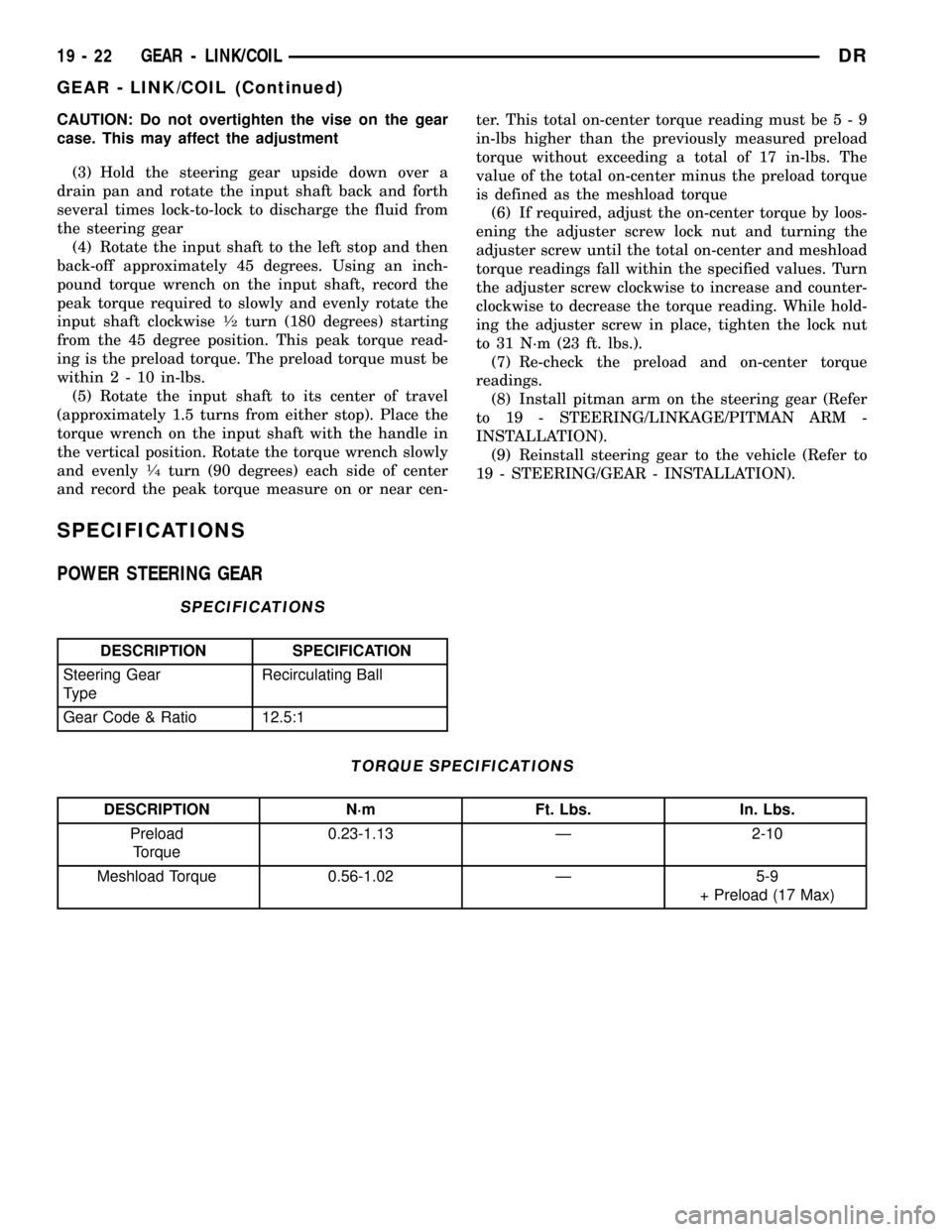
CAUTION: Do not overtighten the vise on the gear
case. This may affect the adjustment
(3) Hold the steering gear upside down over a
drain pan and rotate the input shaft back and forth
several times lock-to-lock to discharge the fluid from
the steering gear
(4) Rotate the input shaft to the left stop and then
back-off approximately 45 degrees. Using an inch-
pound torque wrench on the input shaft, record the
peak torque required to slowly and evenly rotate the
input shaft clockwise
1¤2turn (180 degrees) starting
from the 45 degree position. This peak torque read-
ing is the preload torque. The preload torque must be
within2-10in-lbs.
(5) Rotate the input shaft to its center of travel
(approximately 1.5 turns from either stop). Place the
torque wrench on the input shaft with the handle in
the vertical position. Rotate the torque wrench slowly
and evenly
1¤4turn (90 degrees) each side of center
and record the peak torque measure on or near cen-ter. This total on-center torque reading must be5-9
in-lbs higher than the previously measured preload
torque without exceeding a total of 17 in-lbs. The
value of the total on-center minus the preload torque
is defined as the meshload torque
(6) If required, adjust the on-center torque by loos-
ening the adjuster screw lock nut and turning the
adjuster screw until the total on-center and meshload
torque readings fall within the specified values. Turn
the adjuster screw clockwise to increase and counter-
clockwise to decrease the torque reading. While hold-
ing the adjuster screw in place, tighten the lock nut
to 31 N´m (23 ft. lbs.).
(7) Re-check the preload and on-center torque
readings.
(8) Install pitman arm on the steering gear (Refer
to 19 - STEERING/LINKAGE/PITMAN ARM -
INSTALLATION).
(9) Reinstall steering gear to the vehicle (Refer to
19 - STEERING/GEAR - INSTALLATION).
SPECIFICATIONS
POWER STEERING GEAR
SPECIFICATIONS
DESCRIPTION SPECIFICATION
Steering Gear
TypeRecirculating Ball
Gear Code & Ratio 12.5:1
TORQUE SPECIFICATIONS
DESCRIPTION N´m Ft. Lbs. In. Lbs.
Preload
Torque0.23-1.13 Ð 2-10
Meshload Torque 0.56-1.02 Ð 5-9
+ Preload (17 Max)
19 - 22 GEAR - LINK/COILDR
GEAR - LINK/COIL (Continued)
Page 1755 of 2627

MAINSHAFT AND GEARTRAIN
(1) Move 1-2 and 3-4 synchro sleeves into neutral.
(2) Remove drive gear thrust bearing from forward
end of mainshaft (Fig. 28).
(3) Remove fourth gear clutch gear and synchro
stop ring from mainshaft (Fig. 29).
(4) Roll gear case onto left side.
(5) Remove mainshaft assembly (Fig. 30) by lifting
front end of mainshaft slightly. Then grasp mainshaft
rear splines and turn spline end of mainshaft coun-
terclockwise to rotate shaft and geartrain out of case.
Tilt mainshaft outward and removed from case.
NOTE: Handling mainshaft carefully because gears
are lose on the mainshaft.
REVERSE IDLER AND COUNTERSHAFT
(1) Remove countershaft rear bearing plate (Fig.
31).
(2) Remove countershaft end play shim and rear
bearing cup (Fig. 32).
Fig. 28 DRIVE GEAR THRUST BEARING
1 - MAINSHAFT
2 - DRIVE GEAR THRUST BEARING
Fig. 29 FOURTH GEAR CLUTCH GEAR STOP RING
1 - FOURTH GEAR SYNCHRO STOP RING
2 - FOURTH SPEED CLUTCH GEAR
Fig. 30 MAINSHAFT AND GEARTRAIN
1 - MAINSHAFT AND CASE
Fig. 31 COUNTERSHAFT REAR BEARING PLATE
1 - REAR BEARING PLATE
2 - COUNTERSHAFT
Fig. 32 END PLAY SHIM AND REAR BEARING CUP
1 - COUNTERSHAFT REAR BEARING CUP
2 - END PLAY SHIM
21 - 52 MANUAL TRANSMISSION - NV4500DR
MANUAL TRANSMISSION - NV4500 (Continued)