wiring lighting DODGE RAM 1500 1998 2.G User Guide
[x] Cancel search | Manufacturer: DODGE, Model Year: 1998, Model line: RAM 1500, Model: DODGE RAM 1500 1998 2.GPages: 2627
Page 572 of 2627

centerline. The side-to-side outboard edge of high
intensity pattern should be from 150 mm (6 in.) left
to 150 mm (6 in.) right of headlamp centerline (Fig.
12).The preferred headlamp alignment is 1(
down for the up/down adjustment and 0 for the
left/right adjustment.The high beam pattern
should be correct when the low beams are aligned
properly.
To adjust low beam headlamp, rotate vertical align-
ment screw to achieve the specified aim.
LICENSE PLATE LAMP
REMOVAL
(1) Disconnect and isolate the battery negative
cable.
(2) Grasp license plate bulb socket and 1/4 turn
left to release from the license plate lamp unit.
(3) Pull bulb from license plate lamp socket.
INSTALLATION
(1) Install the bulb in the socket.
(2) Install the socket in to the license plate lamp
unit and 1/4 turn to lock.
(3) Connect the battery negative cable.
LICENSE PLATE LAMP UNIT
REMOVAL
(1) Disconnect and isolate the battery negative
cable.
(2) Disconnect the harness connector.
(3) Remove the retaining clip. (Fig. 13).
(4) Separate license plate lamp from vehicle.
INSTALLATION
(1) Position license plate lamp on the bumper.
(2) Install the clip.
(3) Reconnect the harness connector.
(4) Connect the battery negative cable.
MARKER LAMP UNIT
REMOVAL
REMOVAL - FENDER MARKER LAMP
(1) Grasp the lens assembly firmly and push it
rearward to remove the lens assembly from the
fender (Fig. 14).
(2) Turn the bulb socket counterclockwise a quar-
ter turn and remove the bulb socket from the lens
assembly.
Fig. 13 License Plate Lamp Panel
1 - REAR BUMPER
2 - WIRING CONNECTOR
3 - CLIP
4 - LICENSE PLATE LAMP UNIT
Fig. 14 Fender Extension And Marker Lamp
Assembly
1 - WIRING HARNESS AND BULB SOCKET
2 - MARKER LAMP LENS ASSEMBLY
DRLAMPS/LIGHTING - EXTERIOR 8L - 17
HEADLAMP UNIT (Continued)
Page 573 of 2627

REMOVAL - TAILGATE MARKER LAMP
(1) Remove the two screws that secure the lens
assembly to the tailgate (Fig. 15).
(2) Turn the bulb sockets counterclockwise a quar-
ter turn and remove the bulb sockets from the lens
assembly.
INSTALLATION
INSTALLATION - FENDER MARKER LAMP
(1) Install the bulb socket to the lens assembly.
Turn the bulb socket a quarter turn clockwise.
(2) Position the lens assembly against the fender.
Using firm pressure, push the lens assembly into the
fender.
INSTALLATION - TAILGATE MARKER LAMP
(1) Install the bulb sockets into the lens assembly.
Turn the bulb sockets a quarter turn clockwise.(2) Position the lens assembly to the tailgate.
Install and tighten the two screws securely.
MULTI-FUNCTION SWITCH
DESCRIPTION - TURN SIGNAL SYSTEM
The multi-function switch is a resistive MUX
switch that is monitored by the Instrument Cluster.
The turn signals are actuated with the lever on
Multi-Function Switch. The signals are automatically
turned off by a canceling cam (two lobes molded to
the back of the clock spring mechanism). The cam
comes in contact with the cancel actuator on the turn
signal (multi-function) switch assembly. Either cam
lobe, pushing on the cancel actuator, returns the
switch to the OFF position.
OPERATION - TURN SIGNAL SYSTEM
The Instrument Cluster monitors the multiplexed
multifunction switch. In a turning event the Instru-
ment Cluster senses a change in the turn signal
lever and illuminates the appropriate turn signal
indicator. At the same time, the Instrument Cluster
will send a J1850 message on the PCI bus to the
Front Control Module (FCM). The FCM will respond
by activating the appropriate relay in the Power Dis-
tribution Center.
A chime will sound after the turn is completed if
vehicle has traveled a distance of approximately 1.0
mile and a speed of 15 mph, with the turn signal ON.
DIAGNOSIS AND TESTING - MULTI-FUNCTION
SWITCH
To test the turn signal, headlamp beam select and
optical horn portion of the multi-function switch:
(1) Remove the multi-function switch, refer to
Electrical, Lamps/Lighting - Exterior, Multi-Function
Switch, Removal, and Installation.
(2) Using an ohmmeter check the resistance read-
ings between multi-function switch pins. Refer to
Wiring Diagrams for proper pin numbers and the
MULTI-FUNCTION SWITCH TESTS table.
MULTI-FUNCTION SWITCH TESTS
EXTERIOR LIGHTING FUNCTIONS
SWITCH POSITION CONNECTOR PINS RESISTANCE (OHMS)
Off 1 - 2 Open
Headlamp High Beams On 1 - 2 518 - 575
Hazard 3 - 2 115 - 128
Fig. 15 Tailgate Marker Lamp Housing
1 - RETAINING NUT (2)
2 - TAILGATE
3 - WIRING HARNESS AND BULB SOCKET
4 - SCREW (2)
5 - LENS ASSEMBLY
8L - 18 LAMPS/LIGHTING - EXTERIORDR
MARKER LAMP UNIT (Continued)
Page 575 of 2627

PARK LAMP RELAY
DESCRIPTION
The park lamp relay is located in the Power Dis-
tribution Center (PDC) of the vehicle. The park lamp
relay is a conventional International Standards
Organization (ISO) micro relay (Fig. 17). Relays con-
forming to the ISO specifications have common phys-
ical dimensions, current capacities, terminal
patterns, and terminal functions.
The park lamp relay cannot be adjusted or
repaired and, if faulty or damaged, the unit must be
replaced.
OPERATION
The park lamp relay is an electromechanical
switch that uses a low current input from the Front
Control Module (FCM) to control a high current out-
put to the park lamps. The movable common feed
contact point is held against the fixed normally
closed contact point by spring pressure. When the
relay coil is energized, an electromagnetic field is
produced by the coil windings. This electromagnetic
field draws the movable relay contact point away
from the fixed normally closed contact point, and
holds it against the fixed normally open contact
point. When the relay coil is de-energized, spring
pressure returns the movable contact point back
against the fixed normally closed contact point. A
resistor is connected in parallel with the relay coil in
the relay, and helps to dissipate voltage spikes and
electromagnetic interference that can be generated as
the electromagnetic field of the relay coil collapses.The park lamp relay terminals are connected to
the vehicle electrical system through a connector in
the Junction Block (JB). The inputs and outputs of
the headlamp low beam relay include:
²Common Feed Terminal- The common feed
terminal (30) is connected to the park lamps through
the park lamp relay output circuit and provides
ground to the park lamps when the relay is de-ener-
gized, and battery current to the park lamps when-
ever the relay is energized.
²Coil Ground Terminal- The coil ground termi-
nal (85) is connected to a control output of the Front
Control Module (FCM) through a park lamp relay
control circuit. The FCM controls park lamp opera-
tion by controlling a ground path through this cir-
cuit.
²Coil Battery Terminal- The coil battery ter-
minal (86) receives battery current at all times from
a fuse in the PDC through a fused B(+) circuit.
²Normally Open Terminal- The normally open
terminal (87) receives battery current at all times
from a fuse in the Power Distribution Center (PDC)
through a fused B(+) circuit.
²Normally Closed Terminal- The normally
closed terminal (87A) is connected to ground at all
times.
The park lamp relay can be diagnosed using con-
ventional diagnostic tools and methods.
DIAGNOSIS AND TESTING - PARK LAMP
RELAY
The park lamp relay (Fig. 18) is located in the
Power Distribution Center (PDC). Refer to the appro-
priate wiring information.
WARNING: ON VEHICLES EQUIPPED WITH AIR-
BAGS, DISABLE THE SUPPLEMENTAL RESTRAINT
SYSTEM BEFORE ATTEMPTING ANY STEERING
WHEEL, STEERING COLUMN, DRIVER AIRBAG,
PASSENGER AIRBAG, SEAT BELT TENSIONER,
FRONT IMPACT SENSORS, SIDE CURTAIN AIRBAG,
OR INSTRUMENT PANEL COMPONENT DIAGNOSIS
OR SERVICE. DISCONNECT AND ISOLATE THE
BATTERY NEGATIVE (GROUND) CABLE, THEN
WAIT TWO MINUTES FOR THE SYSTEM CAPACI-
TOR TO DISCHARGE BEFORE PERFORMING FUR-
THER DIAGNOSIS OR SERVICE. THIS IS THE ONLY
SURE WAY TO DISABLE THE SUPPLEMENTAL
RESTRAINT SYSTEM. FAILURE TO TAKE THE
PROPER PRECAUTIONS COULD RESULT IN ACCI-
DENTAL AIRBAG DEPLOYMENT AND POSSIBLE
PERSONAL INJURY.
(1) Remove the park lamp relay from the PDC.
(2) A relay in the de-energized position should
have continuity between terminals 87A and 30, and
Fig. 17 ISO Micro Relay
30 - COMMON FEED
85 - COIL GROUND
86 - COIL BATTERY
87 - NORMALLY OPEN
87A - NORMALLY CLOSED
8L - 20 LAMPS/LIGHTING - EXTERIORDR
Page 579 of 2627

TRAILER TOW WIRING
DESCRIPTION
Vehicles equipped with an optional factory-in-
stalled trailer towing package have a rear body wire
harness that includes an integral trailer tow wiring
take out that connects to a heavy duty, sealed, 7-pin
trailer tow connector located in the rear bumper (Fig.
23). This harness includes an adapter harness that
adapts the 7-pin trailer tow connector to a standard,
light-duty, 4-pin trailer tow connector. Refer to the
appropriate wiring information.
TURN LAMP
REMOVAL
REMOVAL - WITH CARGO BOX
(1) Disconnect and isolate the negative battery
cable.
(2) Remove the tail lamp unit (Refer to 8 - ELEC-
TRICAL/LAMPS/LIGHTING - EXTERIOR/TAIL
LAMP UNIT - REMOVAL).
(3) Remove the lamp back plate from the tail lamp
unit.
(4) Release the turn signal bulb locking tabs and
remove the bulb from the back plate.
REMOVAL - WITHOUT CARGO BOX
(1) Disconnect and isolate the negative battery
cable.(2) Remove the four screws that secure the tail
lamp lens to the tail lamp housing (Fig. 24).
(3) Separate the tail lamp lens from the tail lamp
housing.
(4) Push the turn signal bulb inward and rotate it
counter-clockwise.
(5) Remove the turn signal bulb from the tail lamp
socket.
INSTALLATION
INSTALLATION - WITH CARGO BOX
(1) Install the turn signal bulb into the lamp back
plate.
(2) Install the lamp back plate onto the tail lamp
unit.
(3) Install the tail lamp unit (Refer to 8 - ELEC-
TRICAL/LAMPS/LIGHTING - EXTERIOR/TAIL
LAMP UNIT - INSTALLATION).
(4) Reconnect the negative battery cable.
INSTALLATION - WITHOUT CARGO BOX
(1) Install the turn signal bulb into the tail lamp
socket by pushing inward and rotating it clockwise.
NOTE: Install the tail lamp lens with the clear por-
tion (back-up lens) at the top of the housing. Make
sure that the gasket is correctly in place and not
twisted or torn.
(2) Position the tail lamp lens and gasket onto the
tail lamp unit.
NOTE: Do not overtighten the tail lamp lens screws
or damage to the tail lamp lens may result.
(3) Install the four screws that secure the tail
lamp lens to the tail lamp unit. Tighten the screws
securely.
(4) Reconnect the negative battery cable.
Fig. 23 Trailer Tow Wiring
1 - RETAINER CLIP (4)
2 - REAR BODY HARNESS (TRAILER TOW TAKE OUT)
3 - RETAINER CLIP (2)
4 - WIRE HARNESS CONNECTOR
Fig. 24 Tail Lamp Lens
8L - 24 LAMPS/LIGHTING - EXTERIORDR
Page 581 of 2627

LAMPS/LIGHTING - INTERIOR
TABLE OF CONTENTS
page page
DOME LAMP
DESCRIPTION.........................26
OPERATION...........................26
REMOVAL.............................26
INSTALLATION.........................26
DOOR AJAR SWITCH
DESCRIPTION.........................27
OPERATION...........................27GLOVE BOX LAMP/SWITCH
REMOVAL.............................27
INSTALLATION.........................28
READING LAMP
DESCRIPTION.........................28
OPERATION...........................28
REMOVAL.............................28
INSTALLATION.........................29
DOME LAMP
DESCRIPTION
The dome lamp is controlled by the instrument
cluster which provides power at all times, regardless
of the ignition switch position. The ground circuit for
the lamp is switched through the integral dome lamp
switch or through the door ajar switches via the
instrument cluster.
The dome lamp lens and bulb are available for ser-
vice replacement. If either of the lamp switch or bulb
holders is faulty or damaged, the dome lamp assem-
bly must be replaced.
For service of the dome lamp bulb, refer to the
appropriate wiring information.
OPERATION
The dome lamp is activated by the door ajar
switches via the instrument cluster. When all of the
doors are closed, the lamp can be activated by
depressing the lens. When any door is open, depress-
ing the lamp lense to activate the lamp switch will
not turn the lamps off.
The instrument cluster monitors the door ajar
switches. When a door is open the instrument cluster
grounds the low side drivers to turn on the lamp.
Upon closing all doors, the instrument cluster ini-
tiates a 30 second timer. If any of the doors are
opened during the ªtime outº cycle, the instrument
cluster will reset the timer until all doors are closed.
The instrument cluster will faid to off when the doors
are closed and the ignition is turned ON, the time
out expires or the power locks are activated.
REMOVAL
(1) Using a small flat blade, pry the left side (driv-
er's side) of the dome lamp lens downward from
dome lamp.(2) Allow the lens to hang down (Fig. 1), this will
disengage the right side of the lamp (passenger's
side) from the headliner.
(3) Pull the right side of the lamp down and slide
the lamp to the right (Fig. 2).
(4) Separate the lamp from the headliner.
(5) Disengage dome lamp wire connector from body
wire harness.
(6) Separate dome lamp from vehicle.
INSTALLATION
(1) Position dome lamp at headliner.
(2) Connect dome lamp wire connector to body
wire harness.
(3) Position the left side of the lamp in the head-
liner opening and slide lamp to the left (Fig. 1).
Fig. 1 Dome Lamp Lens
1 - HEADLINER
2 - CONNECTOR
3 - DOME LAMP
4 - LENS
5 - BULB
8L - 26 LAMPS/LIGHTING - INTERIORDR
Page 583 of 2627

INSTALLATION
(1) Reach through the glove box opening and
behind the glove box lamp and switch mounting
bracket to feed the instrument panel wire harness
connectors out through the hole in the glove box
lamp and switch housing mounting bracket.
(2) Position the glove box lamp and switch unit to
the instrument panel.
(3) Reconnect the instrument panel wire harness
connector to the connector receptacle on the back of
the glove box lamp and switch unit.
(4) Push the glove box lamp and switch unit into
the hole in the mounting bracket on the instrument
panel glove box opening upper reinforcement.
(5) Install the glove box onto the instrument panel.
(Refer to 23 - BODY/INSTRUMENT PANEL/GLOVE
BOX - INSTALLATION) for the procedures.
(6) Close the glove box.
(7) Reconnect the battery negative cable.
READING LAMP
DESCRIPTION
The overhead console in this vehicle is equipped
with two individual reading and courtesy lamps. The
lamp lenses are the only visible components of these
lamps. Each lamp has its own switch, bulb, reflector
and lens within the overhead console.
The overhead console reading and courtesy lamps
are controlled by the instrument cluster which pro-
vides power at all times, regardless of the ignition
switch position. The ground circuit for the lamps is
switched through the integral reading and courtesy
lamp switches or through the door ajar switches.
Each lamp is designed and aimed to provide illumi-
nation that will be directed only to that side of the
vehicle on which the lamp is located.
The reading and courtesy lamp lenses and bulbs
are available for service replacement. The reading
and courtesy lamp switches, bulb holders and wiring
are only available as part of the overhead console
wire harness. If either of the lamp switches or bulb
holders is faulty or damaged, the entire overhead
console wire harness assembly must be replaced.
For service of the reading and courtesy lamp bulbs,
refer to the appropriate wiring information.
OPERATION
All reading and courtesy lamps located in the over-
head console are activated by the door ajar switches
via the instrument cluster. When all of the doors are
closed, these lamps can be individually activated by
depressing the corresponding lens. When any door is
open, depressing the lamp lenses to activate the lamp
switches will not turn the lamps off.The instrument cluster monitors the door ajar
switches. When a door is open the instrument cluster
grounds the low side drivers to turn on the lamps.
Upon closing all doors, the instrument cluster ini-
tiates a 30 second timer. If any of the doors are
opened during the ªtime outº cycle, the instrument
cluster will reset the timer until all doors are closed.
The instrument cluster will faid to off when the doors
are closed and the ignition is turned ON, the time
out expires or the power locks are activated.
REMOVAL
(1) Disconnect and isolate the battery negative
cable.
(2) Insert a long, narrow, flat-bladed tool between
the curved (outboard) edge of the reading and cour-
tesy lamp lens and the overhead console housing
(Fig. 4).
(3) Gently pry inward and downward against the
lens until the latch tab in the center of the outboard
edge of the reading and courtesy lamp lens is disen-
gaged from the overhead console housing.
(4) Pull firmly on the lens toward the outboard
side of the vehicle to disengage the two pivot tabs on
the inboard edge of the reading and courtesy lamp
lens are disengaged from the overhead console hous-
ing.
(5) Remove the reading and courtesy lamp lens
from the overhead console housing.
Fig. 4 Overhead Console Reading Lamp Bulb
Removal
1 - LENS
2 - FLAT BLADE
3 - CONSOLE
8L - 28 LAMPS/LIGHTING - INTERIORDR
GLOVE BOX LAMP/SWITCH (Continued)
Page 596 of 2627

ness connector. There should be continuity. If OK, go
to Step 4. If not OK, repair the open sensor return or
signal circuit as required.
(4) Remove the jumper wire from the ambient tem-
perature sensor wire harness connector. Check for
continuity between the sensor return circuit cavity of
the Front Control Module wire harness connector
and a good ground. There should be no continuity. If
OK, go to Step 5. If not OK, repair the shorted sen-
sor return circuit as required.
(5) Check for continuity between the ambient tem-
perature sensor signal circuit cavity of the Front
Control Module wire harness connector and a good
ground. There should be no continuity. If OK, refer to
Diagnosis and Testing - Overhead Consolein
this group. If not OK, repair the shorted ambient
temperature sensor signal circuit as required.
REMOVAL
(1) Open the hood.
(2) Disconnect and isolate the battery negative
cable.
(3) Working on the underside of the hood, remove
screw holding sensor to hood panel.
(4) Disconnect the sensor electrical connector and
remove sensor from vehicle.
INSTALLATION
(1) Connect the sensor electrical connector.
(2) Working on the underside of the hood, install
screw holding sensor to hood panel.
(3) Connect the battery negative cable.
(4) Close the hood.
UNIVERSAL TRANSMITTER
DESCRIPTION
Some DR models are equipped with a universal
transmitter transceiver. The universal transmitter is
integral to the Electronic Vehicle Information Center
(EVIC) and the Compass Mini-Trip Computer
(CMTC), which is located in the overhead console.
The only visible component of the universal transmit-
ter are the three transmitter push buttons centered
between the modules push buttons located just rear-
ward of the display screen in the overhead console.
The three universal transmitter push buttons are
identified with one, two or three light indicators so
that they be easily identified.
Each of the three universal transmitter push but-
tons control an independent radio transmitter chan-
nel. Each of these three channels can be trained to
transmit a different radio frequency signal for the
remote operation of garage door openers, motorized
gate openers, home or office lighting, security sys-tems or just about any other device that can be
equipped with a radio receiver in the 286 to 399
MegaHertz (MHz) frequency range for remote opera-
tion. The universal transmitter is capable of operat-
ing systems using either rolling code or non-rolling
code technology.
The electronics module displays messages and a
small house-shaped icon with one, two or three dots
corresponding to the three transmitter buttons to
indicate the status of the universal transmitter. The
EVIC messages are:
²Clearing Channels- Indicates that all of the
transmitter codes stored in the universal transmitter
have been successfully cleared.
²Channel ªXº Training- Indicates that the uni-
versal transmitter is in its transmitter learning
mode.
²Channel ªXº Trained- Indicates that the uni-
versal transmitter has successfully acquired a new
transmitter code.
²Channel ªXº Transmitting- Indicates that a
trained universal transmitter button has been
depressed and that the universal transmitter is
transmitting.
The universal transmitter cannot be repaired, and
is available for service only as a unit with the EVIC
or CMTC modules. If any part of the universal trans-
mitter is faulty or damaged, the complete EVIC or
CMTC module must be replaced.
OPERATION
The universal transmitter operates on a non-
switched source of battery current so the unit will
remain functional, regardless of the ignition switch
position. For more information on the features, pro-
gramming procedures and operation of the universal
transmitter, see the owner's manual in the vehicle
glove box.
DIAGNOSIS AND TESTING - UNIVERSAL
TRANSMITTER
If the Universal Transmitter is inoperative, but the
Electronic Vehicle Information Center (EVIC) is oper-
ating normally, see the owner's manual in the vehicle
glove box for instructions on training the Transmit-
ter. Retrain the Transmitter with a known good
transmitter as instructed in the owner's manual and
test the Transmitter operation again. If the unit is
still inoperative, test the universal transmitter with
Radio Frequency Detector special tool. If both the
Transmitter and the EVIC module are inoperative,
refer toElectronic Vehicle Information Center
Diagnosis and Testingin this group for further
diagnosis. For complete circuit diagrams, refer to
Wiring Diagrams. (Fig. 8) as described below:
DRMESSAGE SYSTEMS 8M - 11
AMBIENT TEMP SENSOR (Continued)
Page 604 of 2627
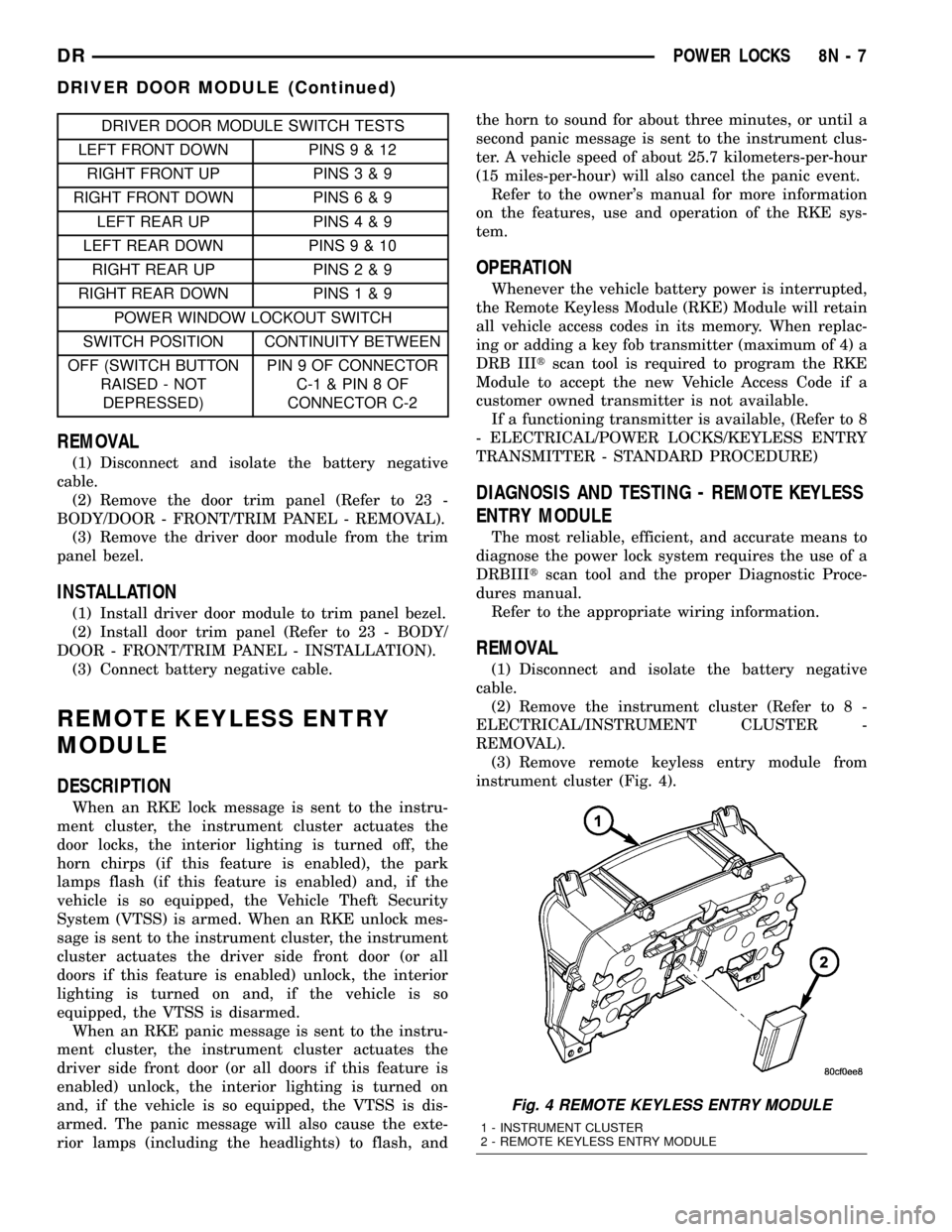
DRIVER DOOR MODULE SWITCH TESTS
LEFT FRONT DOWN PINS9&12
RIGHT FRONT UP PINS3&9
RIGHT FRONT DOWN PINS6&9
LEFT REAR UP PINS4&9
LEFT REAR DOWN PINS9&10
RIGHT REAR UP PINS2&9
RIGHT REAR DOWN PINS1&9
POWER WINDOW LOCKOUT SWITCH
SWITCH POSITION CONTINUITY BETWEEN
OFF (SWITCH BUTTON
RAISED - NOT
DEPRESSED)PIN 9 OF CONNECTOR
C-1&PIN8OF
CONNECTOR C-2
REMOVAL
(1) Disconnect and isolate the battery negative
cable.
(2) Remove the door trim panel (Refer to 23 -
BODY/DOOR - FRONT/TRIM PANEL - REMOVAL).
(3) Remove the driver door module from the trim
panel bezel.
INSTALLATION
(1) Install driver door module to trim panel bezel.
(2) Install door trim panel (Refer to 23 - BODY/
DOOR - FRONT/TRIM PANEL - INSTALLATION).
(3) Connect battery negative cable.
REMOTE KEYLESS ENTRY
MODULE
DESCRIPTION
When an RKE lock message is sent to the instru-
ment cluster, the instrument cluster actuates the
door locks, the interior lighting is turned off, the
horn chirps (if this feature is enabled), the park
lamps flash (if this feature is enabled) and, if the
vehicle is so equipped, the Vehicle Theft Security
System (VTSS) is armed. When an RKE unlock mes-
sage is sent to the instrument cluster, the instrument
cluster actuates the driver side front door (or all
doors if this feature is enabled) unlock, the interior
lighting is turned on and, if the vehicle is so
equipped, the VTSS is disarmed.
When an RKE panic message is sent to the instru-
ment cluster, the instrument cluster actuates the
driver side front door (or all doors if this feature is
enabled) unlock, the interior lighting is turned on
and, if the vehicle is so equipped, the VTSS is dis-
armed. The panic message will also cause the exte-
rior lamps (including the headlights) to flash, andthe horn to sound for about three minutes, or until a
second panic message is sent to the instrument clus-
ter. A vehicle speed of about 25.7 kilometers-per-hour
(15 miles-per-hour) will also cancel the panic event.
Refer to the owner's manual for more information
on the features, use and operation of the RKE sys-
tem.
OPERATION
Whenever the vehicle battery power is interrupted,
the Remote Keyless Module (RKE) Module will retain
all vehicle access codes in its memory. When replac-
ing or adding a key fob transmitter (maximum of 4) a
DRB IIItscan tool is required to program the RKE
Module to accept the new Vehicle Access Code if a
customer owned transmitter is not available.
If a functioning transmitter is available, (Refer to 8
- ELECTRICAL/POWER LOCKS/KEYLESS ENTRY
TRANSMITTER - STANDARD PROCEDURE)
DIAGNOSIS AND TESTING - REMOTE KEYLESS
ENTRY MODULE
The most reliable, efficient, and accurate means to
diagnose the power lock system requires the use of a
DRBIIItscan tool and the proper Diagnostic Proce-
dures manual.
Refer to the appropriate wiring information.
REMOVAL
(1) Disconnect and isolate the battery negative
cable.
(2) Remove the instrument cluster (Refer to 8 -
ELECTRICAL/INSTRUMENT CLUSTER -
REMOVAL).
(3) Remove remote keyless entry module from
instrument cluster (Fig. 4).
Fig. 4 REMOTE KEYLESS ENTRY MODULE
1 - INSTRUMENT CLUSTER
2 - REMOTE KEYLESS ENTRY MODULE
DRPOWER LOCKS 8N - 7
DRIVER DOOR MODULE (Continued)
Page 726 of 2627

WIRING
TABLE OF CONTENTS
page page
WIRING DIAGRAM INFORMATION....... 8W-01-1
COMPONENT INDEX.................. 8W-02-1
POWER DISTRIBUTION............... 8W-10-1
GROUND DISTRIBUTION.............. 8W-15-1
BUS COMMUNICATIONS.............. 8W-18-1
CHARGING SYSTEM.................. 8W-20-1
STARTING SYSTEM.................. 8W-21-1
FUEL/IGNITION SYSTEM.............. 8W-30-1
TRANSMISSION CONTROL SYSTEM..... 8W-31-1
VEHICLE SPEED CONTROL............ 8W-33-1
REAR WHEEL ANTILOCK BRAKES....... 8W-34-1
ALL WHEEL ANTILOCK BRAKES........ 8W-35-1
VEHICLE THEFT SECURITY SYSTEM..... 8W-39-1
INSTRUMENT CLUSTER............... 8W-40-1
HORN/CIGAR LIGHTER/POWER OUTLET . . 8W-41-1
AIR CONDITIONING.................. 8W-42-1
AIRBAG SYSTEM.................... 8W-43-1
INTERIOR LIGHTING.................. 8W-44-1AUDIO SYSTEM..................... 8W-47-1
REAR WINDOW DEFOGGER............ 8W-48-1
OVERHEAD CONSOLE................. 8W-49-1
FRONT LIGHTING.................... 8W-50-1
REAR LIGHTING..................... 8W-51-1
TURN SIGNALS...................... 8W-52-1
WIPERS............................ 8W-53-1
TRAILER TOW....................... 8W-54-1
NAVIGATION/TELECOMMUNICATION..... 8W-55-1
POWER WINDOWS................... 8W-60-1
POWER DOOR LOCKS................ 8W-61-1
POWER MIRRORS................... 8W-62-1
POWER SEATS...................... 8W-63-1
SPLICE INFORMATION................ 8W-70-1
CONNECTOR PIN-OUTS............... 8W-80-1
CONNECTOR/GROUND/SPLICE
LOCATION........................ 8W-91-1
POWER DISTRIBUTION............... 8W-97-1 DRWIRING 8W - 1
Page 733 of 2627
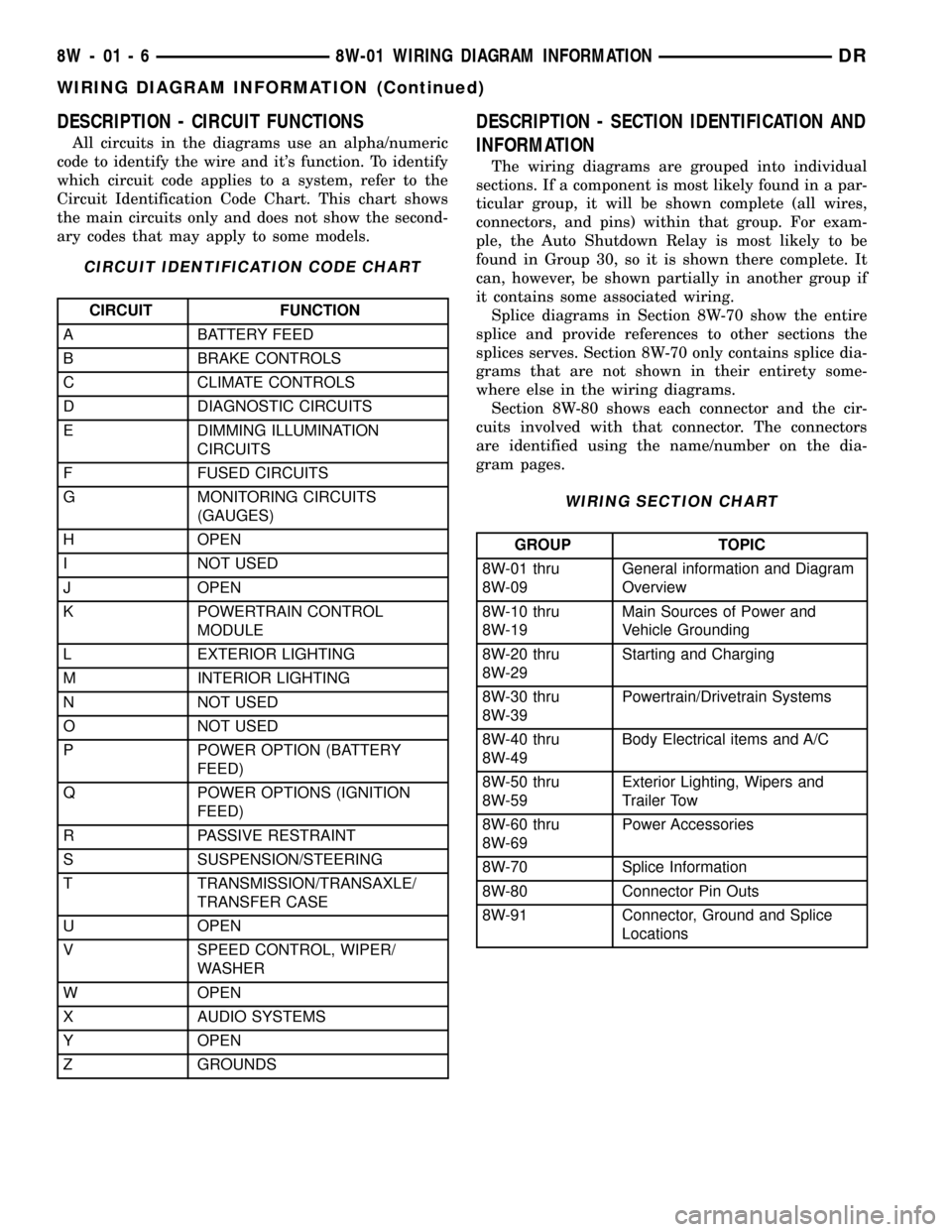
DESCRIPTION - CIRCUIT FUNCTIONS
All circuits in the diagrams use an alpha/numeric
code to identify the wire and it's function. To identify
which circuit code applies to a system, refer to the
Circuit Identification Code Chart. This chart shows
the main circuits only and does not show the second-
ary codes that may apply to some models.
CIRCUIT IDENTIFICATION CODE CHART
CIRCUIT FUNCTION
A BATTERY FEED
B BRAKE CONTROLS
C CLIMATE CONTROLS
D DIAGNOSTIC CIRCUITS
E DIMMING ILLUMINATION
CIRCUITS
F FUSED CIRCUITS
G MONITORING CIRCUITS
(GAUGES)
H OPEN
I NOT USED
J OPEN
K POWERTRAIN CONTROL
MODULE
L EXTERIOR LIGHTING
M INTERIOR LIGHTING
N NOT USED
O NOT USED
P POWER OPTION (BATTERY
FEED)
Q POWER OPTIONS (IGNITION
FEED)
R PASSIVE RESTRAINT
S SUSPENSION/STEERING
T TRANSMISSION/TRANSAXLE/
TRANSFER CASE
U OPEN
V SPEED CONTROL, WIPER/
WASHER
W OPEN
X AUDIO SYSTEMS
Y OPEN
Z GROUNDS
DESCRIPTION - SECTION IDENTIFICATION AND
INFORMATION
The wiring diagrams are grouped into individual
sections. If a component is most likely found in a par-
ticular group, it will be shown complete (all wires,
connectors, and pins) within that group. For exam-
ple, the Auto Shutdown Relay is most likely to be
found in Group 30, so it is shown there complete. It
can, however, be shown partially in another group if
it contains some associated wiring.
Splice diagrams in Section 8W-70 show the entire
splice and provide references to other sections the
splices serves. Section 8W-70 only contains splice dia-
grams that are not shown in their entirety some-
where else in the wiring diagrams.
Section 8W-80 shows each connector and the cir-
cuits involved with that connector. The connectors
are identified using the name/number on the dia-
gram pages.
WIRING SECTION CHART
GROUP TOPIC
8W-01 thru
8W-09General information and Diagram
Overview
8W-10 thru
8W-19Main Sources of Power and
Vehicle Grounding
8W-20 thru
8W-29Starting and Charging
8W-30 thru
8W-39Powertrain/Drivetrain Systems
8W-40 thru
8W-49Body Electrical items and A/C
8W-50 thru
8W-59Exterior Lighting, Wipers and
Trailer Tow
8W-60 thru
8W-69Power Accessories
8W-70 Splice Information
8W-80 Connector Pin Outs
8W-91 Connector, Ground and Splice
Locations
8W - 01 - 6 8W-01 WIRING DIAGRAM INFORMATIONDR
WIRING DIAGRAM INFORMATION (Continued)