roof DODGE RAM 2002 Service User Guide
[x] Cancel search | Manufacturer: DODGE, Model Year: 2002, Model line: RAM, Model: DODGE RAM 2002Pages: 2255, PDF Size: 62.07 MB
Page 559 of 2255
(4) Contact the head of the screw with the plastic
coated tip of the degaussing tool for about two sec-
onds.
(5) With the degaussing tool still energized, slowly
back it away from the screw. When the tip of the tool
is at least 61 centimeters (2 feet) from the screw
head, disconnect the tool.
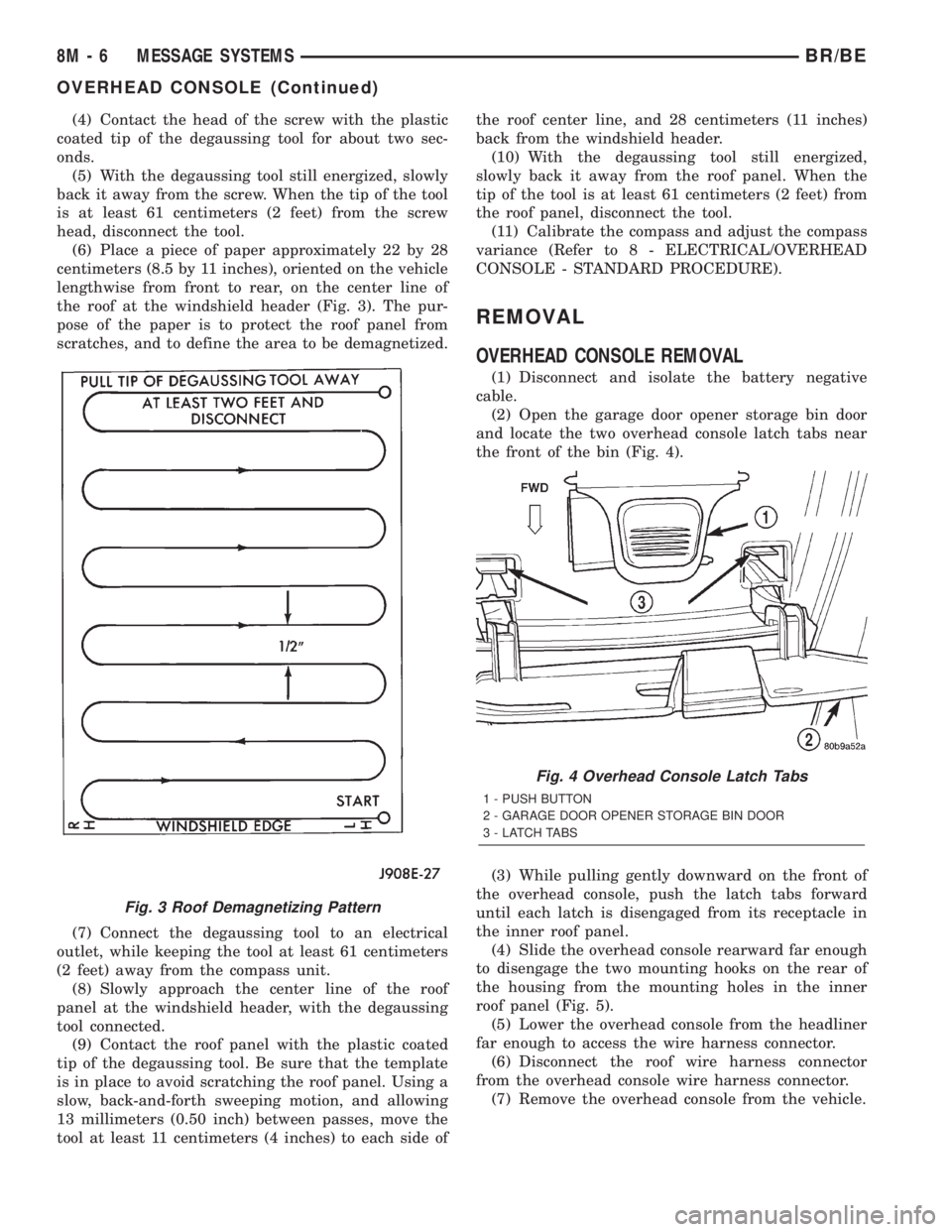
(6) Place a piece of paper approximately 22 by 28
centimeters (8.5 by 11 inches), oriented on the vehicle
lengthwise from front to rear, on the center line of
the roof at the windshield header (Fig. 3). The pur-
pose of the paper is to protect the roof panel from
scratches, and to define the area to be demagnetized.
(7) Connect the degaussing tool to an electrical
outlet, while keeping the tool at least 61 centimeters
(2 feet) away from the compass unit.
(8) Slowly approach the center line of the roof
panel at the windshield header, with the degaussing
tool connected.
(9) Contact the roof panel with the plastic coated
tip of the degaussing tool. Be sure that the template
is in place to avoid scratching the roof panel. Using a
slow, back-and-forth sweeping motion, and allowing
13 millimeters (0.50 inch) between passes, move the
tool at least 11 centimeters (4 inches) to each side ofthe roof center line, and 28 centimeters (11 inches)
back from the windshield header.
(10) With the degaussing tool still energized,
slowly back it away from the roof panel. When the
tip of the tool is at least 61 centimeters (2 feet) from
the roof panel, disconnect the tool.
(11) Calibrate the compass and adjust the compass
variance (Refer to 8 - ELECTRICAL/OVERHEAD
CONSOLE - STANDARD PROCEDURE).
REMOVAL
OVERHEAD CONSOLE REMOVAL
(1) Disconnect and isolate the battery negative
cable.
(2) Open the garage door opener storage bin door
and locate the two overhead console latch tabs near
the front of the bin (Fig. 4).
(3) While pulling gently downward on the front of
the overhead console, push the latch tabs forward
until each latch is disengaged from its receptacle in
the inner roof panel.
(4) Slide the overhead console rearward far enough
to disengage the two mounting hooks on the rear of
the housing from the mounting holes in the inner
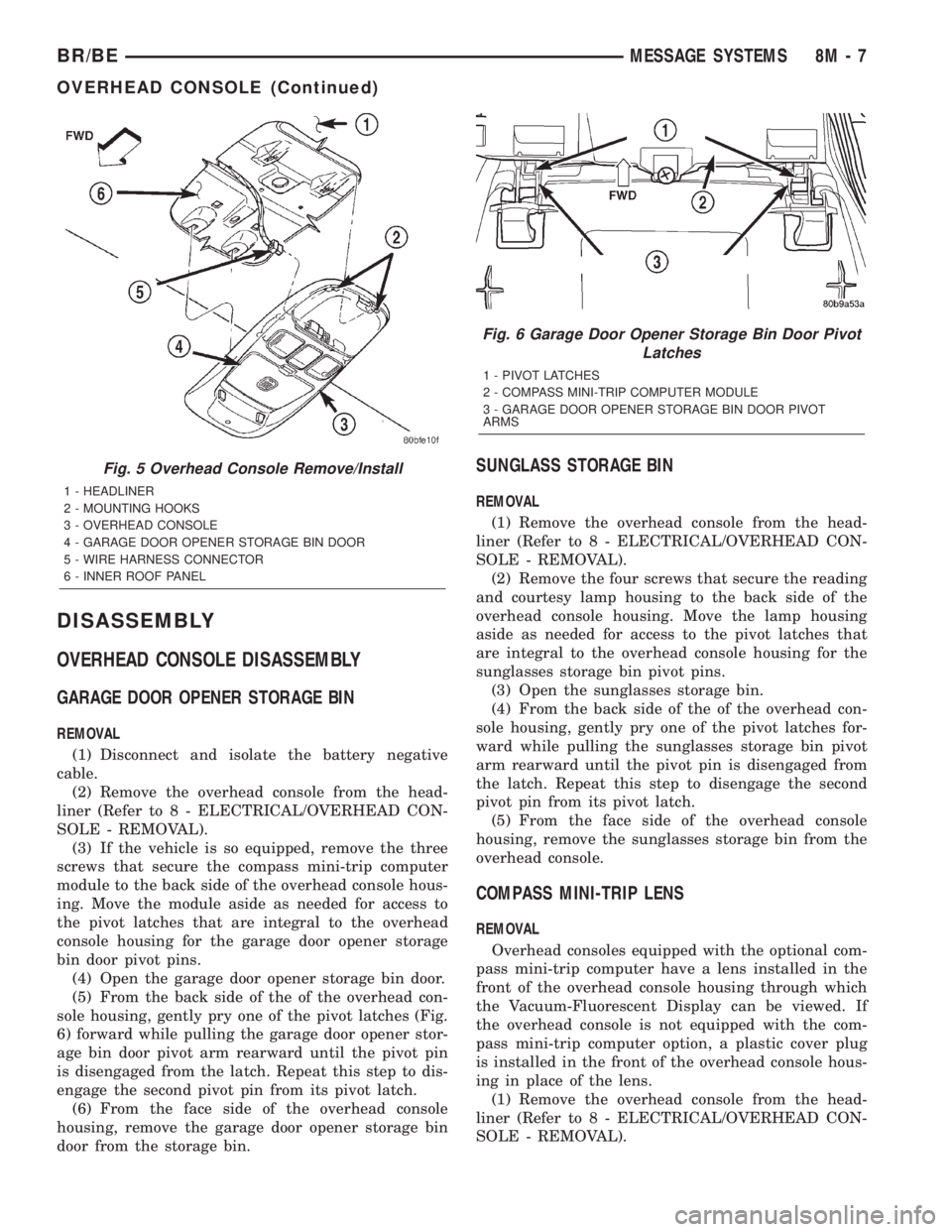
roof panel (Fig. 5).
(5) Lower the overhead console from the headliner
far enough to access the wire harness connector.
(6) Disconnect the roof wire harness connector
from the overhead console wire harness connector.
(7) Remove the overhead console from the vehicle.
Fig. 3 Roof Demagnetizing Pattern
Fig. 4 Overhead Console Latch Tabs
1 - PUSH BUTTON
2 - GARAGE DOOR OPENER STORAGE BIN DOOR
3 - LATCH TABS
8M - 6 MESSAGE SYSTEMSBR/BE
OVERHEAD CONSOLE (Continued)
Page 560 of 2255
DISASSEMBLY
OVERHEAD CONSOLE DISASSEMBLY
GARAGE DOOR OPENER STORAGE BIN
REMOVAL
(1) Disconnect and isolate the battery negative
cable.
(2) Remove the overhead console from the head-
liner (Refer to 8 - ELECTRICAL/OVERHEAD CON-
SOLE - REMOVAL).
(3) If the vehicle is so equipped, remove the three
screws that secure the compass mini-trip computer
module to the back side of the overhead console hous-
ing. Move the module aside as needed for access to
the pivot latches that are integral to the overhead
console housing for the garage door opener storage
bin door pivot pins.
(4) Open the garage door opener storage bin door.
(5) From the back side of the of the overhead con-
sole housing, gently pry one of the pivot latches (Fig.
6) forward while pulling the garage door opener stor-
age bin door pivot arm rearward until the pivot pin
is disengaged from the latch. Repeat this step to dis-
engage the second pivot pin from its pivot latch.
(6) From the face side of the overhead console
housing, remove the garage door opener storage bin
door from the storage bin.
SUNGLASS STORAGE BIN
REMOVAL
(1) Remove the overhead console from the head-
liner (Refer to 8 - ELECTRICAL/OVERHEAD CON-
SOLE - REMOVAL).
(2) Remove the four screws that secure the reading
and courtesy lamp housing to the back side of the
overhead console housing. Move the lamp housing
aside as needed for access to the pivot latches that
are integral to the overhead console housing for the
sunglasses storage bin pivot pins.
(3) Open the sunglasses storage bin.
(4) From the back side of the of the overhead con-
sole housing, gently pry one of the pivot latches for-
ward while pulling the sunglasses storage bin pivot
arm rearward until the pivot pin is disengaged from
the latch. Repeat this step to disengage the second
pivot pin from its pivot latch.
(5) From the face side of the overhead console
housing, remove the sunglasses storage bin from the
overhead console.
COMPASS MINI-TRIP LENS
REMOVAL
Overhead consoles equipped with the optional com-
pass mini-trip computer have a lens installed in the
front of the overhead console housing through which
the Vacuum-Fluorescent Display can be viewed. If
the overhead console is not equipped with the com-
pass mini-trip computer option, a plastic cover plug
is installed in the front of the overhead console hous-
ing in place of the lens.
(1) Remove the overhead console from the head-
liner (Refer to 8 - ELECTRICAL/OVERHEAD CON-
SOLE - REMOVAL).
Fig. 5 Overhead Console Remove/Install
1 - HEADLINER
2 - MOUNTING HOOKS
3 - OVERHEAD CONSOLE
4 - GARAGE DOOR OPENER STORAGE BIN DOOR
5 - WIRE HARNESS CONNECTOR
6 - INNER ROOF PANEL
Fig. 6 Garage Door Opener Storage Bin Door Pivot
Latches
1 - PIVOT LATCHES
2 - COMPASS MINI-TRIP COMPUTER MODULE
3 - GARAGE DOOR OPENER STORAGE BIN DOOR PIVOT
ARMS
BR/BEMESSAGE SYSTEMS 8M - 7
OVERHEAD CONSOLE (Continued)
Page 561 of 2255
(2) If the vehicle is so equipped, remove the com-
pass mini-trip computer module from the overhead
console (Refer to 8 - ELECTRICAL/OVERHEAD
CONSOLE/COMPASS/MINI-TRIP COMPUTER -
REMOVAL).
(3) From the back side of the overhead console,
push downward firmly and evenly on the rear of the
trip computer lens to disengage the rear mounting
boss, or the snap features of the cover plug from the
overhead console housing.
(4) From the face of the overhead console, pull the
trip computer lens or the cover plug rearward far
enough to disengage the four forward mounting tabs
from the overhead console housing.
(5) Remove the trip computer lens or the cover
plug from the overhead console housing.
ASSEMBLY
OVERHEAD CONSOLE ASSEMBLY
GARAGE DOOR OPENER STORAGE BIN
INSTALLATION
(1) From the face side of the overhead console
housing, position the garage door opener storage bin
door pivot arms through the openings in the front of
the storage bin.
(2) From the back side of the of the overhead con-
sole housing, align one of the pivot pins of the garage
door opener storage bin door with the pivot latch
integral to the overhead console housing. Press the
pivot arm forward until the pivot pin is engaged in
the latch. Repeat this step to engage the second pivot
pin with its pivot latch.
(3) Close the garage door opener storage bin door.
(4) If the vehicle is so equipped, position the com-
pass mini-trip computer module to the back side of
the overhead console housing. Install and tighten the
three screws that secure the module to the housing.
Tighten the screws to 2.2 N´m (20 in. lbs.).
(5) Install the overhead console onto the headliner
(Refer to 8 - ELECTRICAL/OVERHEAD CONSOLE -
INSTALLATION).
SUNGLASS STORAGE BIN
INSTALLATION
(1) From the face side of the overhead console
housing, position the sunglasses storage bin pivot
arms through the openings in the front of the storage
bin housing in the overhead console.
(2) From the back side of the of the overhead con-
sole housing, align one of the pivot pins of the sun-
glasses storage bin with the pivot latch integral to
the overhead console housing. Press the pivot armforward until the pivot pin is engaged in the latch.
Repeat this step to engage the second pivot pin with
its pivot latch.
(3) Close the sunglasses storage bin.
(4) Position the reading and courtesy lamp housing
to the back side of the overhead console housing.
Install and tighten the four screws that secure the
lamp housing to the back of the overhead console
housing. Tighten the screws to 2.2 N´m (20 in. lbs.).
(5) Install the overhead console onto the headliner
(Refer to 8 - ELECTRICAL/OVERHEAD CONSOLE -
INSTALLATION).
MINI-TRIP COMPUTER LENS
INSTALLATION
Overhead consoles equipped with the optional com-
pass mini-trip computer have a lens installed in the
front of the overhead console housing through which
the Vacuum-Fluorescent Display can be viewed. If
the overhead console is not equipped with the com-
pass mini-trip computer option, a plastic cover plug
is installed in the front of the overhead console hous-
ing in place of the lens.
(1) Remove the trip computer lens or the cover
plug onto the overhead console housing.
(2) From the face of the overhead console, push the
trip computer lens or the cover plug forward far
enough to engage the four forward mounting tabs in
the overhead console unit.
(3) From the face of the overhead console, align
the rear mounting boss of the trip computer lens or
the alignment pin of the cover plug with the recepta-
cle in the overhead console housing.
(4) Press firmly and evenly on the rear edge of the
trip computer lens or the cover plug until the rear
mounting boss is fully seated in the receptacle, or the
snap features of the cover plug are fully engaged in
the overhead console housing.
(5) Install the compass mini-trip computer module
onto the overhead console (Refer to 8 - ELECTRI-
CAL/OVERHEAD CONSOLE/COMPASS/MINI-TRIP
COMPUTER - INSTALLATION).
(6) Install the overhead console onto the headliner
(Refer to 8 - ELECTRICAL/OVERHEAD CONSOLE -
INSTALLATION).
INSTALLATION
OVERHEAD CONSOLE INSTALLATION
(1) Position the overhead console near the mount-
ing location on the headliner in the vehicle.
(2) Reconnect the roof wire harness connector to
the overhead console wire harness connector.
8M - 8 MESSAGE SYSTEMSBR/BE
OVERHEAD CONSOLE (Continued)
Page 562 of 2255
(3) Engage the two mounting hooks on the rear of
the overhead console housing in the mounting holes
in the inner roof panel.
(4) Slide the overhead console forward far enough
to align the two latches on the front of the housing
with their receptacles in the inner roof panel.
(5) Push upward firmly and evenly on the front of
the overhead console until each of the two latches is
fully engaged in its receptacle in the inner roof panel.
(6) Close the garage door opener storage bin door.
(7) Reconnect the battery negative cable.
SPECIAL TOOLS
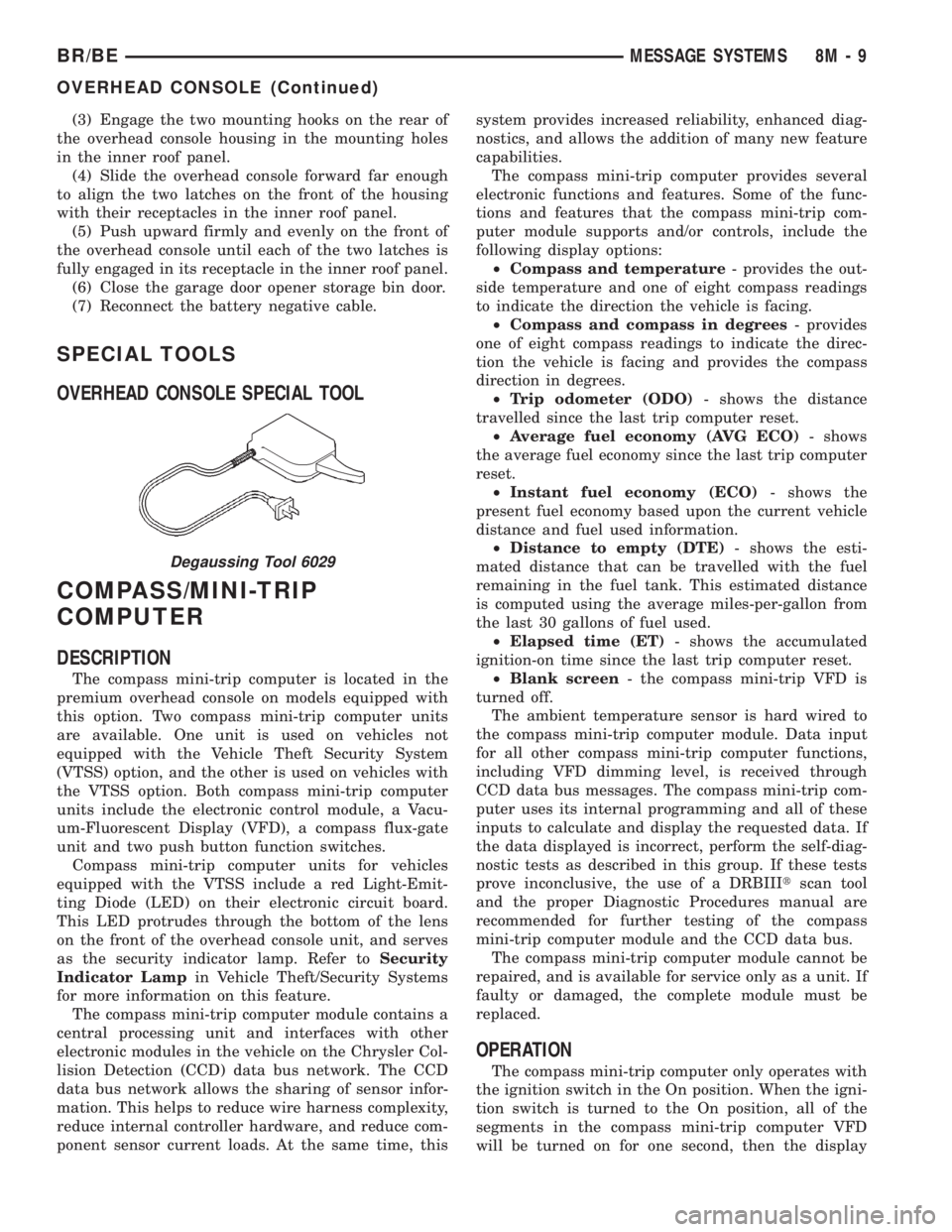
OVERHEAD CONSOLE SPECIAL TOOL
COMPASS/MINI-TRIP
COMPUTER
DESCRIPTION
The compass mini-trip computer is located in the
premium overhead console on models equipped with
this option. Two compass mini-trip computer units
are available. One unit is used on vehicles not
equipped with the Vehicle Theft Security System
(VTSS) option, and the other is used on vehicles with
the VTSS option. Both compass mini-trip computer
units include the electronic control module, a Vacu-
um-Fluorescent Display (VFD), a compass flux-gate
unit and two push button function switches.
Compass mini-trip computer units for vehicles
equipped with the VTSS include a red Light-Emit-
ting Diode (LED) on their electronic circuit board.
This LED protrudes through the bottom of the lens
on the front of the overhead console unit, and serves
as the security indicator lamp. Refer toSecurity
Indicator Lampin Vehicle Theft/Security Systems
for more information on this feature.
The compass mini-trip computer module contains a
central processing unit and interfaces with other
electronic modules in the vehicle on the Chrysler Col-
lision Detection (CCD) data bus network. The CCD
data bus network allows the sharing of sensor infor-
mation. This helps to reduce wire harness complexity,
reduce internal controller hardware, and reduce com-
ponent sensor current loads. At the same time, thissystem provides increased reliability, enhanced diag-
nostics, and allows the addition of many new feature
capabilities.
The compass mini-trip computer provides several
electronic functions and features. Some of the func-
tions and features that the compass mini-trip com-
puter module supports and/or controls, include the
following display options:
²Compass and temperature- provides the out-
side temperature and one of eight compass readings
to indicate the direction the vehicle is facing.
²Compass and compass in degrees- provides
one of eight compass readings to indicate the direc-
tion the vehicle is facing and provides the compass
direction in degrees.
²Trip odometer (ODO)- shows the distance
travelled since the last trip computer reset.
²Average fuel economy (AVG ECO)- shows
the average fuel economy since the last trip computer
reset.
²Instant fuel economy (ECO)- shows the
present fuel economy based upon the current vehicle
distance and fuel used information.
²Distance to empty (DTE)- shows the esti-
mated distance that can be travelled with the fuel
remaining in the fuel tank. This estimated distance
is computed using the average miles-per-gallon from
the last 30 gallons of fuel used.
²Elapsed time (ET)- shows the accumulated
ignition-on time since the last trip computer reset.
²Blank screen- the compass mini-trip VFD is
turned off.
The ambient temperature sensor is hard wired to
the compass mini-trip computer module. Data input
for all other compass mini-trip computer functions,
including VFD dimming level, is received through
CCD data bus messages. The compass mini-trip com-
puter uses its internal programming and all of these
inputs to calculate and display the requested data. If
the data displayed is incorrect, perform the self-diag-
nostic tests as described in this group. If these tests
prove inconclusive, the use of a DRBIIItscan tool
and the proper Diagnostic Procedures manual are
recommended for further testing of the compass
mini-trip computer module and the CCD data bus.
The compass mini-trip computer module cannot be
repaired, and is available for service only as a unit. If
faulty or damaged, the complete module must be
replaced.
OPERATION
The compass mini-trip computer only operates with
the ignition switch in the On position. When the igni-
tion switch is turned to the On position, all of the
segments in the compass mini-trip computer VFD
will be turned on for one second, then the display
Degaussing Tool 6029
BR/BEMESSAGE SYSTEMS 8M - 9
OVERHEAD CONSOLE (Continued)
Page 563 of 2255

will return to the last function being displayed before
the ignition was turned to the Off position. With the
ignition switch in the On position, momentarily
depressing and releasing the Step push button switch
will cause the compass-mini-trip computer to change
its mode of operation, and momentarily depressing
and releasing the U.S./Metric push button will cause
the unit to toggle between U.S. and Metric measure-
ments. While in either compass mode, depressing the
U.S./Metric push button for more than ten seconds
will toggle the display between the compass/temper-
ature and the compass/compass in degrees modes.
This compass mini-trip computer features several
functions that can be reset. If both the Step and U.S./
Metric push buttons are depressed at the same time
with the ignition switch in the On position, the trip
computer information that can be reset is reset.
Depressing and releasing the Step and U.S./Metric
push buttons at the same time for more than 100
milliseconds, but not more than one second while in
any display mode (except the compass/temperature
mode) will cause a local reset. A local reset affects
only the function currently displayed. See the Reset
Chart below for more information on this feature.
Performing a local reset while in the compass/tem-
perature mode enters the module into the compass
variance setting mode.
Depressing and releasing the Step and U.S./Metric
push buttons at the same time for more than two
seconds while in any display mode (except the com-
pass/temperature mode) will cause a global reset. A
global reset changes all of the trip computer func-
tions that can be reset.
For more information on the features and control
functions of the compass mini-trip computer, see the
owner's manual in the vehicle glove box.
DIAGNOSIS AND TESTING - COMPASS
MINI-TRIP COMPUTER
If the problem with the compass mini-trip com-
puter module is an inoperative security indicator
lamp, refer toSecurity Indicator Lampin Vehicle
Theft/Security Systems. If the problem with the com-
pass mini-trip computer module is an ªOCº or ªSCº in
the compass/thermometer display, refer toAmbient
Temperature Sensorin this section. If the problem
with the compass mini-trip computer module is an
inaccurate or scrambled display, refer toCMTC Self-
Diagnostic Testin this section. If the problem with
the compass mini-trip computer module is incorrect
Vacuum Fluorescent Display (VFD) dimming levels,
use a DRBtscan tool and the proper Diagnostic Pro-
cedures manual to test for the correct dimming mes-
sage inputs being received from the instrument
cluster over the Chrysler Collision Detection (CCD)
data bus. If the problem is a no-display condition,use the following procedures. For complete circuit
diagrams, refer toOverhead Consolein the Con-
tents of Wiring Diagrams.
(1) Check the fused B(+) fuse in the junction block.
If OK, go to Step 2. If not OK, repair the shorted cir-
cuit or component as required and replace the faulty
fuse.
(2) Check for battery voltage at the fused B(+) fuse
in the junction block. If OK, go to Step 3. If not OK,
repair the open fused B(+) circuit to the battery as
required.
(3) Check the fused ignition switch output (run/
start) fuse in the junction block. If OK, go to Step 4.
If not OK, repair the shorted circuit or component as
required and replace the faulty fuse.
(4) Turn the ignition switch to the On position.
Check for battery voltage at the fused ignition switch
output (run/start) fuse in the junction block. If OK,
go to Step 5. If not OK, repair the open fused ignition
switch output (run/start) circuit to the ignition switch
as required.
(5) Turn the ignition switch to the Off position.
Disconnect and isolate the battery negative cable.
Remove the overhead console. Check for continuity
between the ground circuit cavities of the roof wire
harness connector for the overhead console and a
good ground. There should be continuity. If OK, go to
Step 6. If not OK, repair the open ground circuit to
ground as required.
(6) Connect the battery negative cable. Check for
battery voltage at the fused B(+) circuit cavity of the
roof wire harness connector for the overhead console.
If OK, go to Step 7. If not OK, repair the open fused
B(+) circuit to the junction block fuse as required.
(7) Turn the ignition switch to the On position.
Check for battery voltage at the fused ignition switch
output (run/start) circuit cavity of the roof wire har-
ness connector for the overhead console. If OK, refer
toSelf-Diagnostic Testin the Diagnosis and Test-
ing section of this group for further diagnosis of the
compass mini-trip computer module and the CCD
data bus. If not OK, repair the open fused ignition
switch output (run/start) circuit to the junction block
fuse as required.
CMTC SELF-DIAGNOSTIC TEST
A self-diagnostic test is used to determine that the
compass mini-trip computer module is operating
properly electrically. Initiate the self-diagnostic test
as follows:
(1) With the ignition switch in the Off position,
simultaneously depress and hold the Step button and
the U.S./Metric button.
(2) Turn the ignition switch to the On position.
(3) Continue to hold both buttons depressed until
the compass mini-trip computer module enters the
8M - 10 MESSAGE SYSTEMSBR/BE
COMPASS/MINI-TRIP COMPUTER (Continued)
Page 565 of 2255
AMBIENT TEMP SENSOR
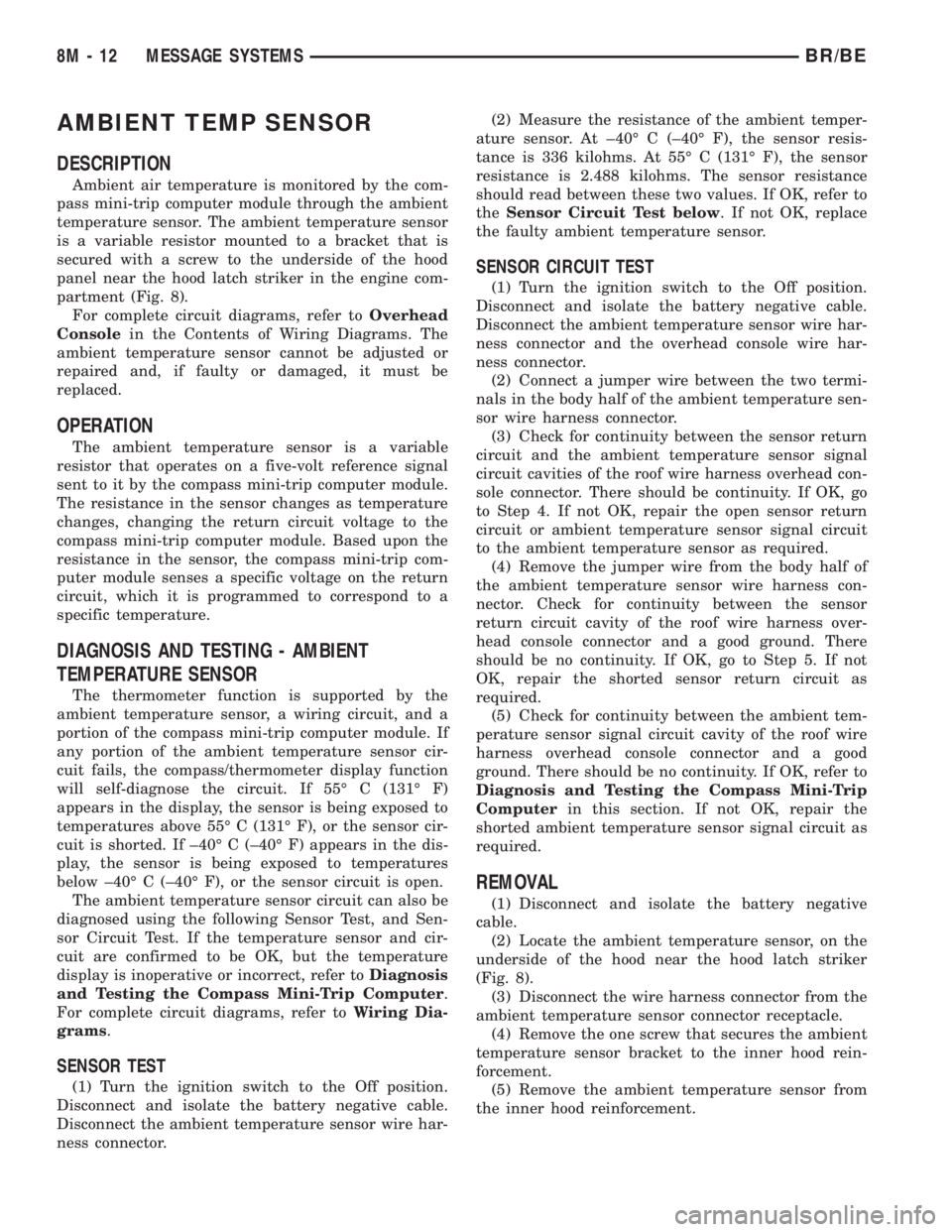
DESCRIPTION
Ambient air temperature is monitored by the com-
pass mini-trip computer module through the ambient
temperature sensor. The ambient temperature sensor
is a variable resistor mounted to a bracket that is
secured with a screw to the underside of the hood
panel near the hood latch striker in the engine com-
partment (Fig. 8).
For complete circuit diagrams, refer toOverhead
Consolein the Contents of Wiring Diagrams. The
ambient temperature sensor cannot be adjusted or
repaired and, if faulty or damaged, it must be
replaced.
OPERATION
The ambient temperature sensor is a variable
resistor that operates on a five-volt reference signal
sent to it by the compass mini-trip computer module.
The resistance in the sensor changes as temperature
changes, changing the return circuit voltage to the
compass mini-trip computer module. Based upon the
resistance in the sensor, the compass mini-trip com-
puter module senses a specific voltage on the return
circuit, which it is programmed to correspond to a
specific temperature.
DIAGNOSIS AND TESTING - AMBIENT
TEMPERATURE SENSOR
The thermometer function is supported by the
ambient temperature sensor, a wiring circuit, and a
portion of the compass mini-trip computer module. If
any portion of the ambient temperature sensor cir-
cuit fails, the compass/thermometer display function
will self-diagnose the circuit. If 55É C (131É F)
appears in the display, the sensor is being exposed to
temperatures above 55É C (131É F), or the sensor cir-
cuit is shorted. If ±40É C (±40É F) appears in the dis-
play, the sensor is being exposed to temperatures
below ±40É C (±40É F), or the sensor circuit is open.
The ambient temperature sensor circuit can also be
diagnosed using the following Sensor Test, and Sen-
sor Circuit Test. If the temperature sensor and cir-
cuit are confirmed to be OK, but the temperature
display is inoperative or incorrect, refer toDiagnosis
and Testing the Compass Mini-Trip Computer.
For complete circuit diagrams, refer toWiring Dia-
grams.
SENSOR TEST
(1) Turn the ignition switch to the Off position.
Disconnect and isolate the battery negative cable.
Disconnect the ambient temperature sensor wire har-
ness connector.(2) Measure the resistance of the ambient temper-
ature sensor. At ±40É C (±40É F), the sensor resis-
tance is 336 kilohms. At 55É C (131É F), the sensor
resistance is 2.488 kilohms. The sensor resistance
should read between these two values. If OK, refer to
theSensor Circuit Test below. If not OK, replace
the faulty ambient temperature sensor.
SENSOR CIRCUIT TEST
(1) Turn the ignition switch to the Off position.
Disconnect and isolate the battery negative cable.
Disconnect the ambient temperature sensor wire har-
ness connector and the overhead console wire har-
ness connector.
(2) Connect a jumper wire between the two termi-
nals in the body half of the ambient temperature sen-
sor wire harness connector.
(3) Check for continuity between the sensor return
circuit and the ambient temperature sensor signal
circuit cavities of the roof wire harness overhead con-
sole connector. There should be continuity. If OK, go
to Step 4. If not OK, repair the open sensor return
circuit or ambient temperature sensor signal circuit
to the ambient temperature sensor as required.
(4) Remove the jumper wire from the body half of
the ambient temperature sensor wire harness con-
nector. Check for continuity between the sensor
return circuit cavity of the roof wire harness over-
head console connector and a good ground. There
should be no continuity. If OK, go to Step 5. If not
OK, repair the shorted sensor return circuit as
required.
(5) Check for continuity between the ambient tem-
perature sensor signal circuit cavity of the roof wire
harness overhead console connector and a good
ground. There should be no continuity. If OK, refer to
Diagnosis and Testing the Compass Mini-Trip
Computerin this section. If not OK, repair the
shorted ambient temperature sensor signal circuit as
required.
REMOVAL
(1) Disconnect and isolate the battery negative
cable.
(2) Locate the ambient temperature sensor, on the
underside of the hood near the hood latch striker
(Fig. 8).
(3) Disconnect the wire harness connector from the
ambient temperature sensor connector receptacle.
(4) Remove the one screw that secures the ambient
temperature sensor bracket to the inner hood rein-
forcement.
(5) Remove the ambient temperature sensor from
the inner hood reinforcement.
8M - 12 MESSAGE SYSTEMSBR/BE
Page 1028 of 2255
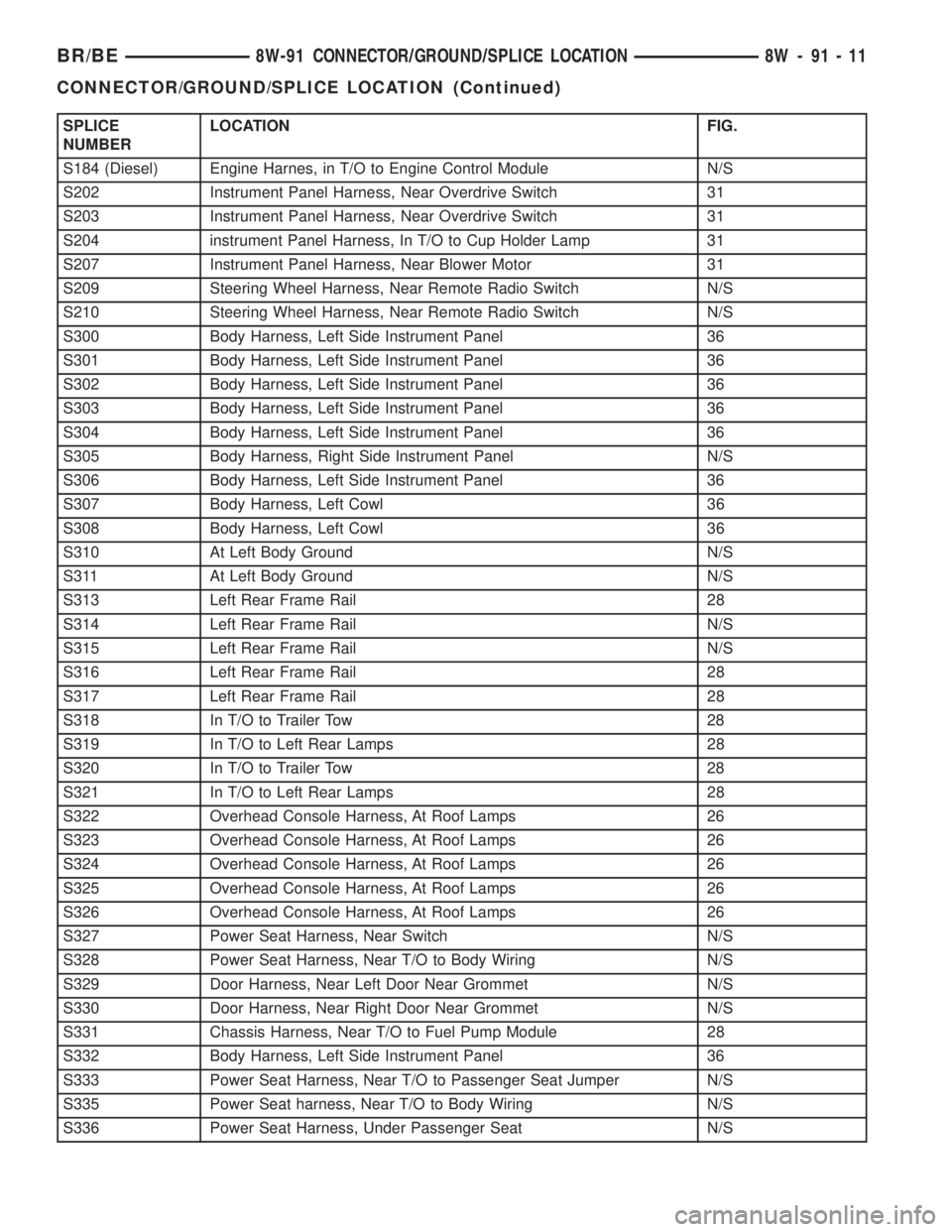
SPLICE
NUMBERLOCATION FIG.
S184 (Diesel) Engine Harnes, in T/O to Engine Control Module N/S
S202 Instrument Panel Harness, Near Overdrive Switch 31
S203 Instrument Panel Harness, Near Overdrive Switch 31
S204 instrument Panel Harness, In T/O to Cup Holder Lamp 31
S207 Instrument Panel Harness, Near Blower Motor 31
S209 Steering Wheel Harness, Near Remote Radio Switch N/S
S210 Steering Wheel Harness, Near Remote Radio Switch N/S
S300 Body Harness, Left Side Instrument Panel 36
S301 Body Harness, Left Side Instrument Panel 36
S302 Body Harness, Left Side Instrument Panel 36
S303 Body Harness, Left Side Instrument Panel 36
S304 Body Harness, Left Side Instrument Panel 36
S305 Body Harness, Right Side Instrument Panel N/S
S306 Body Harness, Left Side Instrument Panel 36
S307 Body Harness, Left Cowl 36
S308 Body Harness, Left Cowl 36
S310 At Left Body Ground N/S
S311 At Left Body Ground N/S
S313 Left Rear Frame Rail 28
S314 Left Rear Frame Rail N/S
S315 Left Rear Frame Rail N/S
S316 Left Rear Frame Rail 28
S317 Left Rear Frame Rail 28
S318 In T/O to Trailer Tow 28
S319 In T/O to Left Rear Lamps 28
S320 In T/O to Trailer Tow 28
S321 In T/O to Left Rear Lamps 28
S322 Overhead Console Harness, At Roof Lamps 26
S323 Overhead Console Harness, At Roof Lamps 26
S324 Overhead Console Harness, At Roof Lamps 26
S325 Overhead Console Harness, At Roof Lamps 26
S326 Overhead Console Harness, At Roof Lamps 26
S327 Power Seat Harness, Near Switch N/S
S328 Power Seat Harness, Near T/O to Body Wiring N/S
S329 Door Harness, Near Left Door Near Grommet N/S
S330 Door Harness, Near Right Door Near Grommet N/S
S331 Chassis Harness, Near T/O to Fuel Pump Module 28
S332 Body Harness, Left Side Instrument Panel 36
S333 Power Seat Harness, Near T/O to Passenger Seat Jumper N/S
S335 Power Seat harness, Near T/O to Body Wiring N/S
S336 Power Seat Harness, Under Passenger Seat N/S
BR/BE8W-91 CONNECTOR/GROUND/SPLICE LOCATION 8W - 91 - 11
CONNECTOR/GROUND/SPLICE LOCATION (Continued)
Page 1029 of 2255
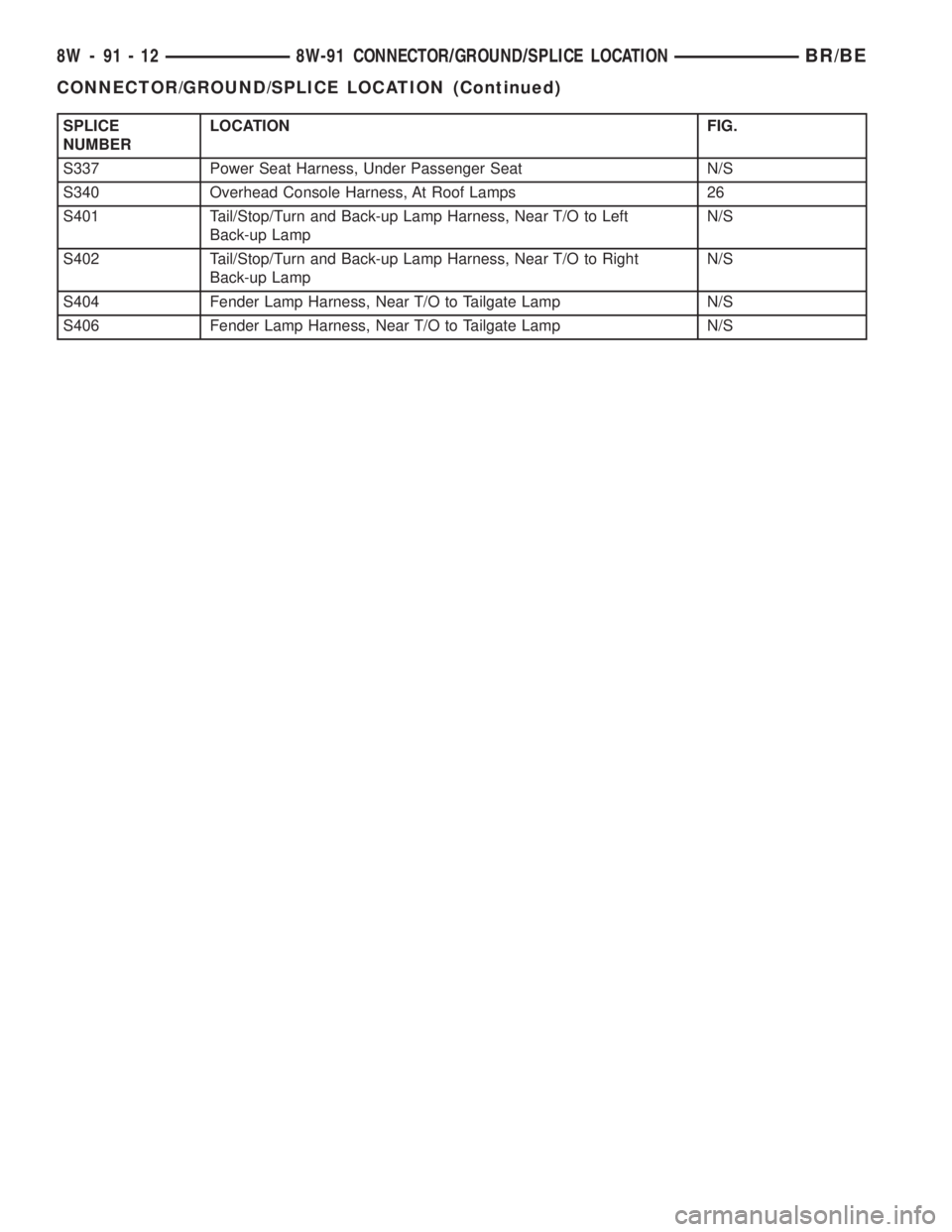
SPLICE
NUMBERLOCATION FIG.
S337 Power Seat Harness, Under Passenger Seat N/S
S340 Overhead Console Harness, At Roof Lamps 26
S401 Tail/Stop/Turn and Back-up Lamp Harness, Near T/O to Left
Back-up LampN/S
S402 Tail/Stop/Turn and Back-up Lamp Harness, Near T/O to Right
Back-up LampN/S
S404 Fender Lamp Harness, Near T/O to Tailgate Lamp N/S
S406 Fender Lamp Harness, Near T/O to Tailgate Lamp N/S
8W - 91 - 12 8W-91 CONNECTOR/GROUND/SPLICE LOCATIONBR/BE
CONNECTOR/GROUND/SPLICE LOCATION (Continued)
Page 1126 of 2255
(13) Disconnect the heater hoses and bypass hose.
(14) Remove the closed crankcase ventilation and
evaporation control systems.
(15) Remove intake manifold bolts.
(16) Lift the intake manifold and throttle body out
of the engine compartment as an assembly.
(17) Remove and discard the flange side gaskets
and the front and rear end seals.
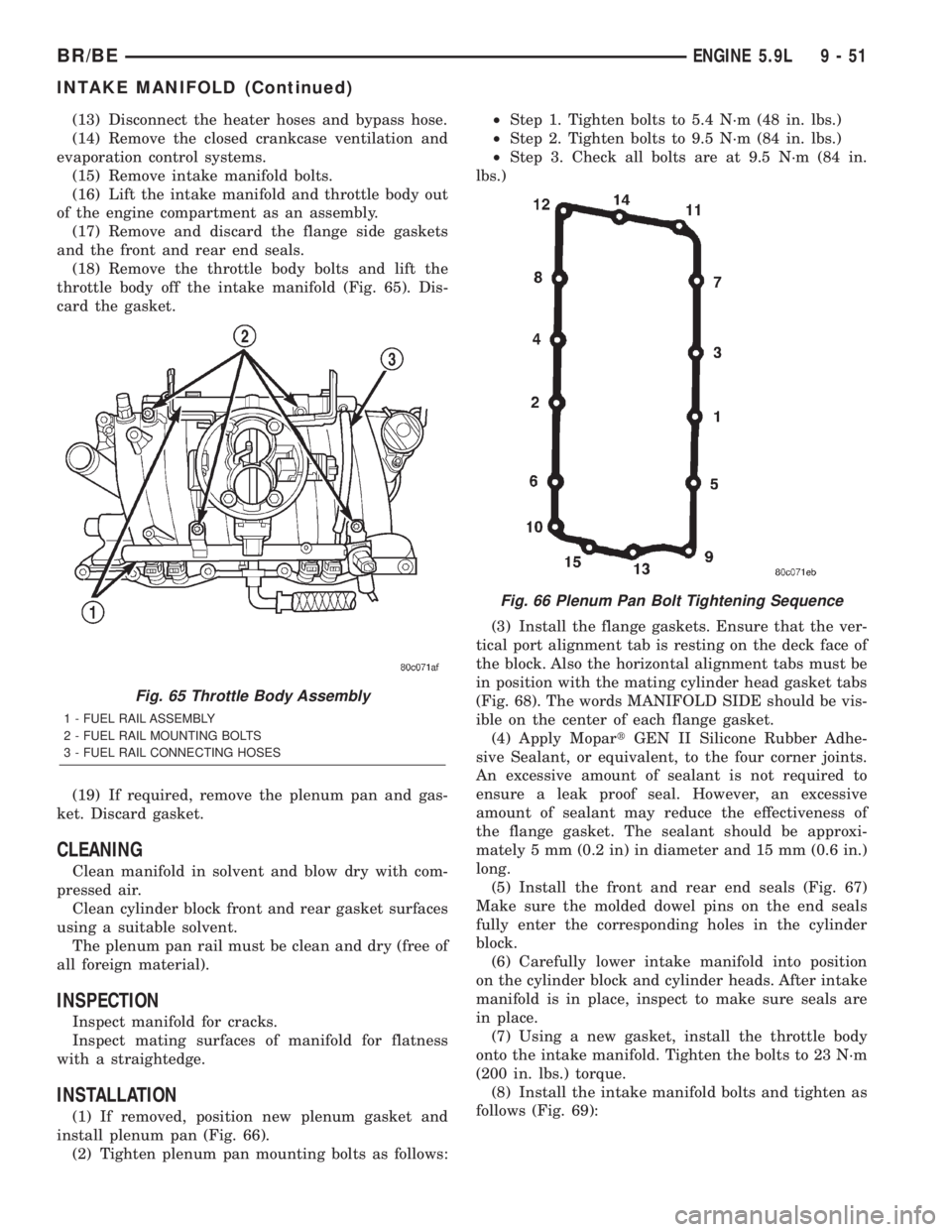
(18) Remove the throttle body bolts and lift the
throttle body off the intake manifold (Fig. 65). Dis-
card the gasket.
(19) If required, remove the plenum pan and gas-
ket. Discard gasket.
CLEANING
Clean manifold in solvent and blow dry with com-
pressed air.
Clean cylinder block front and rear gasket surfaces
using a suitable solvent.
The plenum pan rail must be clean and dry (free of
all foreign material).
INSPECTION
Inspect manifold for cracks.
Inspect mating surfaces of manifold for flatness
with a straightedge.
INSTALLATION
(1) If removed, position new plenum gasket and
install plenum pan (Fig. 66).
(2) Tighten plenum pan mounting bolts as follows:²Step 1. Tighten bolts to 5.4 N´m (48 in. lbs.)
²Step 2. Tighten bolts to 9.5 N´m (84 in. lbs.)
²Step 3. Check all bolts are at 9.5 N´m (84 in.
lbs.)
(3) Install the flange gaskets. Ensure that the ver-
tical port alignment tab is resting on the deck face of
the block. Also the horizontal alignment tabs must be
in position with the mating cylinder head gasket tabs
(Fig. 68). The words MANIFOLD SIDE should be vis-
ible on the center of each flange gasket.
(4) Apply MopartGEN II Silicone Rubber Adhe-
sive Sealant, or equivalent, to the four corner joints.
An excessive amount of sealant is not required to
ensure a leak proof seal. However, an excessive
amount of sealant may reduce the effectiveness of
the flange gasket. The sealant should be approxi-
mately 5 mm (0.2 in) in diameter and 15 mm (0.6 in.)
long.
(5) Install the front and rear end seals (Fig. 67)
Make sure the molded dowel pins on the end seals
fully enter the corresponding holes in the cylinder
block.
(6) Carefully lower intake manifold into position
on the cylinder block and cylinder heads. After intake
manifold is in place, inspect to make sure seals are
in place.
(7) Using a new gasket, install the throttle body
onto the intake manifold. Tighten the bolts to 23 N´m
(200 in. lbs.) torque.
(8) Install the intake manifold bolts and tighten as
follows (Fig. 69):
Fig. 65 Throttle Body Assembly
1 - FUEL RAIL ASSEMBLY
2 - FUEL RAIL MOUNTING BOLTS
3 - FUEL RAIL CONNECTING HOSES
Fig. 66 Plenum Pan Bolt Tightening Sequence
BR/BEENGINE 5.9L 9 - 51
INTAKE MANIFOLD (Continued)
Page 1183 of 2255
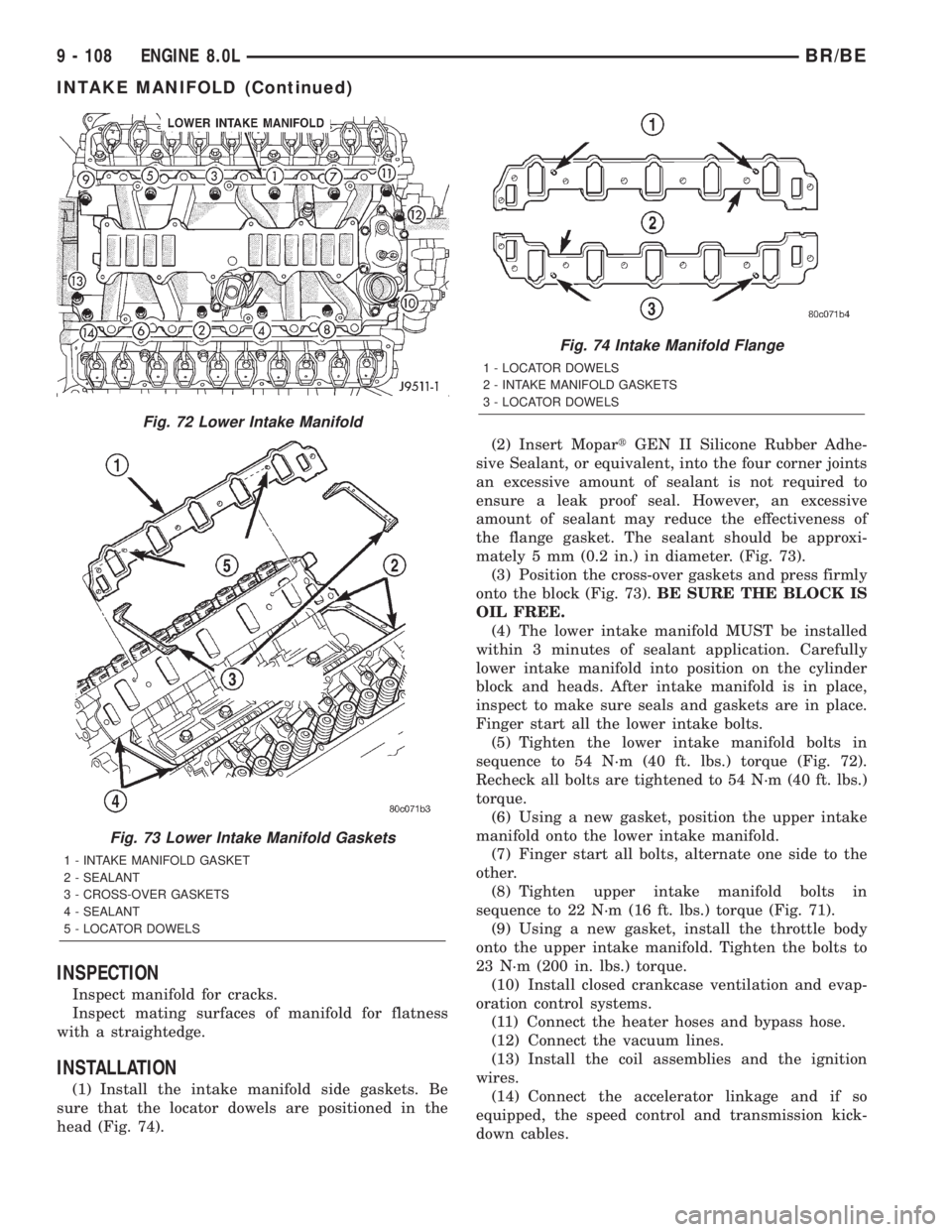
INSPECTION
Inspect manifold for cracks.
Inspect mating surfaces of manifold for flatness
with a straightedge.
INSTALLATION
(1) Install the intake manifold side gaskets. Be
sure that the locator dowels are positioned in the
head (Fig. 74).(2) Insert MopartGEN II Silicone Rubber Adhe-
sive Sealant, or equivalent, into the four corner joints
an excessive amount of sealant is not required to
ensure a leak proof seal. However, an excessive
amount of sealant may reduce the effectiveness of
the flange gasket. The sealant should be approxi-
mately 5 mm (0.2 in.) in diameter. (Fig. 73).
(3) Position the cross-over gaskets and press firmly
onto the block (Fig. 73).BE SURE THE BLOCK IS
OIL FREE.
(4) The lower intake manifold MUST be installed
within 3 minutes of sealant application. Carefully
lower intake manifold into position on the cylinder
block and heads. After intake manifold is in place,
inspect to make sure seals and gaskets are in place.
Finger start all the lower intake bolts.
(5) Tighten the lower intake manifold bolts in
sequence to 54 N´m (40 ft. lbs.) torque (Fig. 72).
Recheck all bolts are tightened to 54 N´m (40 ft. lbs.)
torque.
(6) Using a new gasket, position the upper intake
manifold onto the lower intake manifold.
(7) Finger start all bolts, alternate one side to the
other.
(8) Tighten upper intake manifold bolts in
sequence to 22 N´m (16 ft. lbs.) torque (Fig. 71).
(9) Using a new gasket, install the throttle body
onto the upper intake manifold. Tighten the bolts to
23 N´m (200 in. lbs.) torque.
(10) Install closed crankcase ventilation and evap-
oration control systems.
(11) Connect the heater hoses and bypass hose.
(12) Connect the vacuum lines.
(13) Install the coil assemblies and the ignition
wires.
(14) Connect the accelerator linkage and if so
equipped, the speed control and transmission kick-
down cables.
Fig. 72 Lower Intake Manifold
Fig. 73 Lower Intake Manifold Gaskets
1 - INTAKE MANIFOLD GASKET
2 - SEALANT
3 - CROSS-OVER GASKETS
4 - SEALANT
5 - LOCATOR DOWELS
Fig. 74 Intake Manifold Flange
1 - LOCATOR DOWELS
2 - INTAKE MANIFOLD GASKETS
3 - LOCATOR DOWELS
9 - 108 ENGINE 8.0LBR/BE
INTAKE MANIFOLD (Continued)