lock DODGE RAM 2002 Service Repair Manual
[x] Cancel search | Manufacturer: DODGE, Model Year: 2002, Model line: RAM, Model: DODGE RAM 2002Pages: 2255, PDF Size: 62.07 MB
Page 1769 of 2255
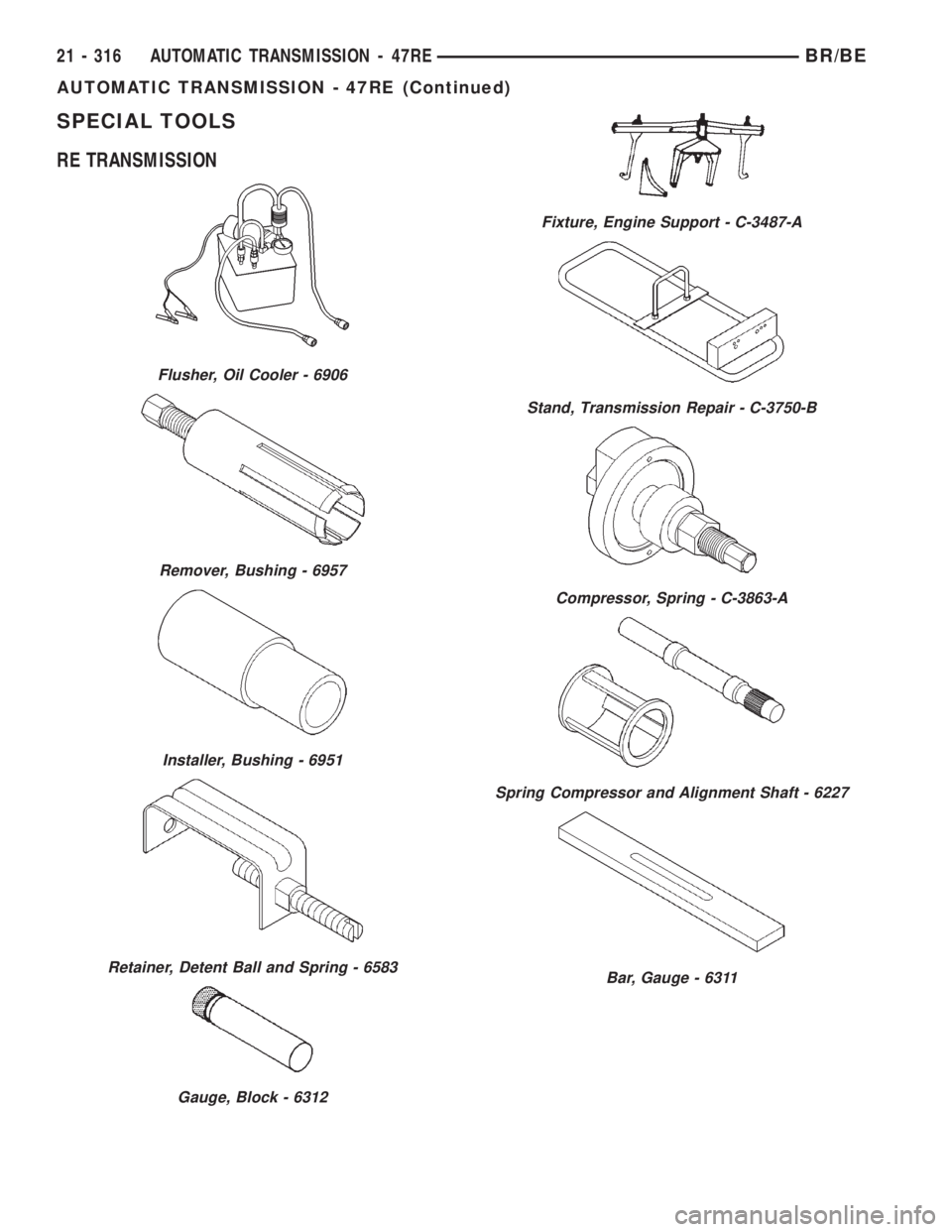
SPECIAL TOOLS
RE TRANSMISSION
Flusher, Oil Cooler - 6906
Remover, Bushing - 6957
Installer, Bushing - 6951
Retainer, Detent Ball and Spring - 6583
Gauge, Block - 6312
Fixture, Engine Support - C-3487-A
Stand, Transmission Repair - C-3750-B
Compressor, Spring - C-3863-A
Spring Compressor and Alignment Shaft - 6227
Bar, Gauge - 6311
21 - 316 AUTOMATIC TRANSMISSION - 47REBR/BE
AUTOMATIC TRANSMISSION - 47RE (Continued)
Page 1774 of 2255
case, and the other is acted on with a pushing force
by a servo piston. The front band is a single-wrap
design (the band does not completely encompass/
wrap the drum that it holds).
LOW/REVERSE (REAR) BAND
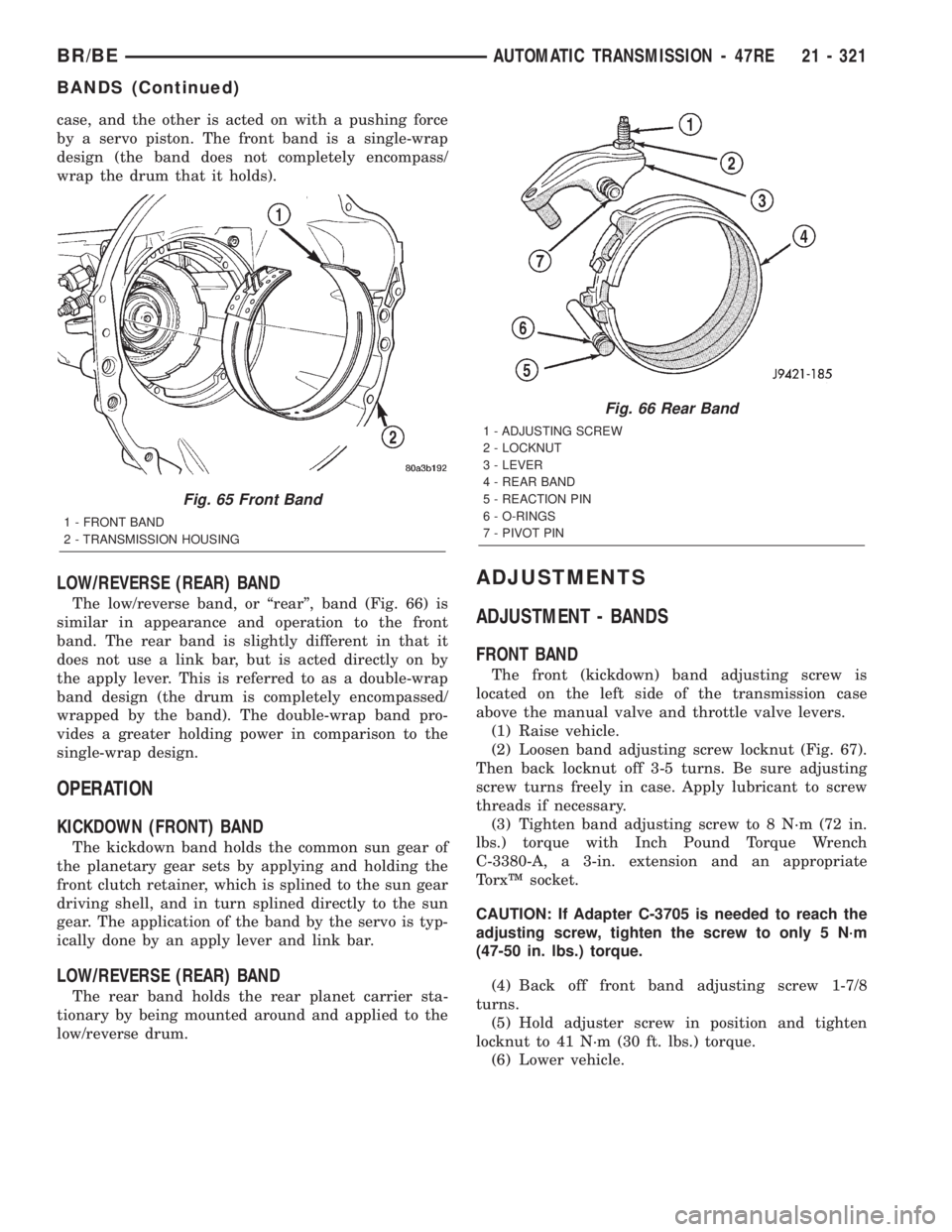
The low/reverse band, or ªrearº, band (Fig. 66) is
similar in appearance and operation to the front
band. The rear band is slightly different in that it
does not use a link bar, but is acted directly on by
the apply lever. This is referred to as a double-wrap
band design (the drum is completely encompassed/
wrapped by the band). The double-wrap band pro-
vides a greater holding power in comparison to the
single-wrap design.
OPERATION
KICKDOWN (FRONT) BAND
The kickdown band holds the common sun gear of
the planetary gear sets by applying and holding the
front clutch retainer, which is splined to the sun gear
driving shell, and in turn splined directly to the sun
gear. The application of the band by the servo is typ-
ically done by an apply lever and link bar.
LOW/REVERSE (REAR) BAND
The rear band holds the rear planet carrier sta-
tionary by being mounted around and applied to the
low/reverse drum.
ADJUSTMENTS
ADJUSTMENT - BANDS
FRONT BAND
The front (kickdown) band adjusting screw is
located on the left side of the transmission case
above the manual valve and throttle valve levers.
(1) Raise vehicle.
(2) Loosen band adjusting screw locknut (Fig. 67).
Then back locknut off 3-5 turns. Be sure adjusting
screw turns freely in case. Apply lubricant to screw
threads if necessary.
(3) Tighten band adjusting screw to 8 N´m (72 in.
lbs.) torque with Inch Pound Torque Wrench
C-3380-A, a 3-in. extension and an appropriate
TorxŸ socket.
CAUTION: If Adapter C-3705 is needed to reach the
adjusting screw, tighten the screw to only 5 N´m
(47-50 in. lbs.) torque.
(4) Back off front band adjusting screw 1-7/8
turns.
(5) Hold adjuster screw in position and tighten
locknut to 41 N´m (30 ft. lbs.) torque.
(6) Lower vehicle.
Fig. 65 Front Band
1 - FRONT BAND
2 - TRANSMISSION HOUSING
Fig. 66 Rear Band
1 - ADJUSTING SCREW
2 - LOCKNUT
3 - LEVER
4 - REAR BAND
5 - REACTION PIN
6 - O-RINGS
7 - PIVOT PIN
BR/BEAUTOMATIC TRANSMISSION - 47RE 21 - 321
BANDS (Continued)
Page 1775 of 2255
REAR BAND
The transmission oil pan must be removed for
access to the rear band adjusting screw.
(1) Raise vehicle.
(2) Remove transmission oil pan and drain fluid.
(3) Loosen band adjusting screw locknut 5-6 turns.
Be sure adjusting screw turns freely in lever.
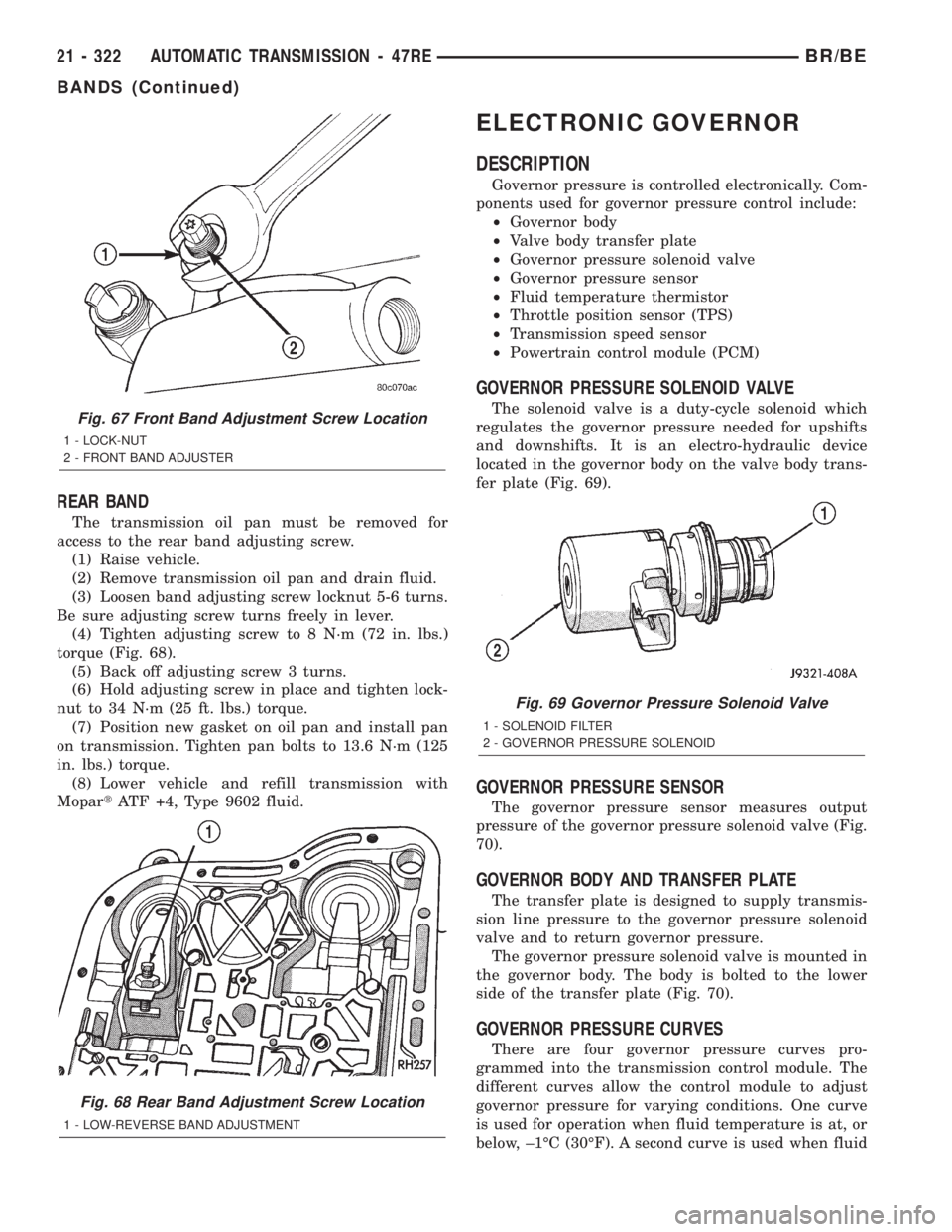
(4) Tighten adjusting screw to 8 N´m (72 in. lbs.)
torque (Fig. 68).
(5) Back off adjusting screw 3 turns.
(6) Hold adjusting screw in place and tighten lock-
nut to 34 N´m (25 ft. lbs.) torque.
(7) Position new gasket on oil pan and install pan
on transmission. Tighten pan bolts to 13.6 N´m (125
in. lbs.) torque.
(8) Lower vehicle and refill transmission with
MopartATF +4, Type 9602 fluid.
ELECTRONIC GOVERNOR
DESCRIPTION
Governor pressure is controlled electronically. Com-
ponents used for governor pressure control include:
²Governor body
²Valve body transfer plate
²Governor pressure solenoid valve
²Governor pressure sensor
²Fluid temperature thermistor
²Throttle position sensor (TPS)
²Transmission speed sensor
²Powertrain control module (PCM)
GOVERNOR PRESSURE SOLENOID VALVE
The solenoid valve is a duty-cycle solenoid which
regulates the governor pressure needed for upshifts
and downshifts. It is an electro-hydraulic device
located in the governor body on the valve body trans-
fer plate (Fig. 69).
GOVERNOR PRESSURE SENSOR
The governor pressure sensor measures output
pressure of the governor pressure solenoid valve (Fig.
70).
GOVERNOR BODY AND TRANSFER PLATE
The transfer plate is designed to supply transmis-
sion line pressure to the governor pressure solenoid
valve and to return governor pressure.
The governor pressure solenoid valve is mounted in
the governor body. The body is bolted to the lower
side of the transfer plate (Fig. 70).
GOVERNOR PRESSURE CURVES
There are four governor pressure curves pro-
grammed into the transmission control module. The
different curves allow the control module to adjust
governor pressure for varying conditions. One curve
is used for operation when fluid temperature is at, or
below, ±1ÉC (30ÉF). A second curve is used when fluid
Fig. 67 Front Band Adjustment Screw Location
1 - LOCK-NUT
2 - FRONT BAND ADJUSTER
Fig. 68 Rear Band Adjustment Screw Location
1 - LOW-REVERSE BAND ADJUSTMENT
Fig. 69 Governor Pressure Solenoid Valve
1 - SOLENOID FILTER
2 - GOVERNOR PRESSURE SOLENOID
21 - 322 AUTOMATIC TRANSMISSION - 47REBR/BE
BANDS (Continued)
Page 1790 of 2255
DISASSEMBLY
(1) Mark position of support in oil pump body for
assembly alignment reference. Use scriber or paint to
make alignment marks.
(2) Place pump body on two wood blocks.
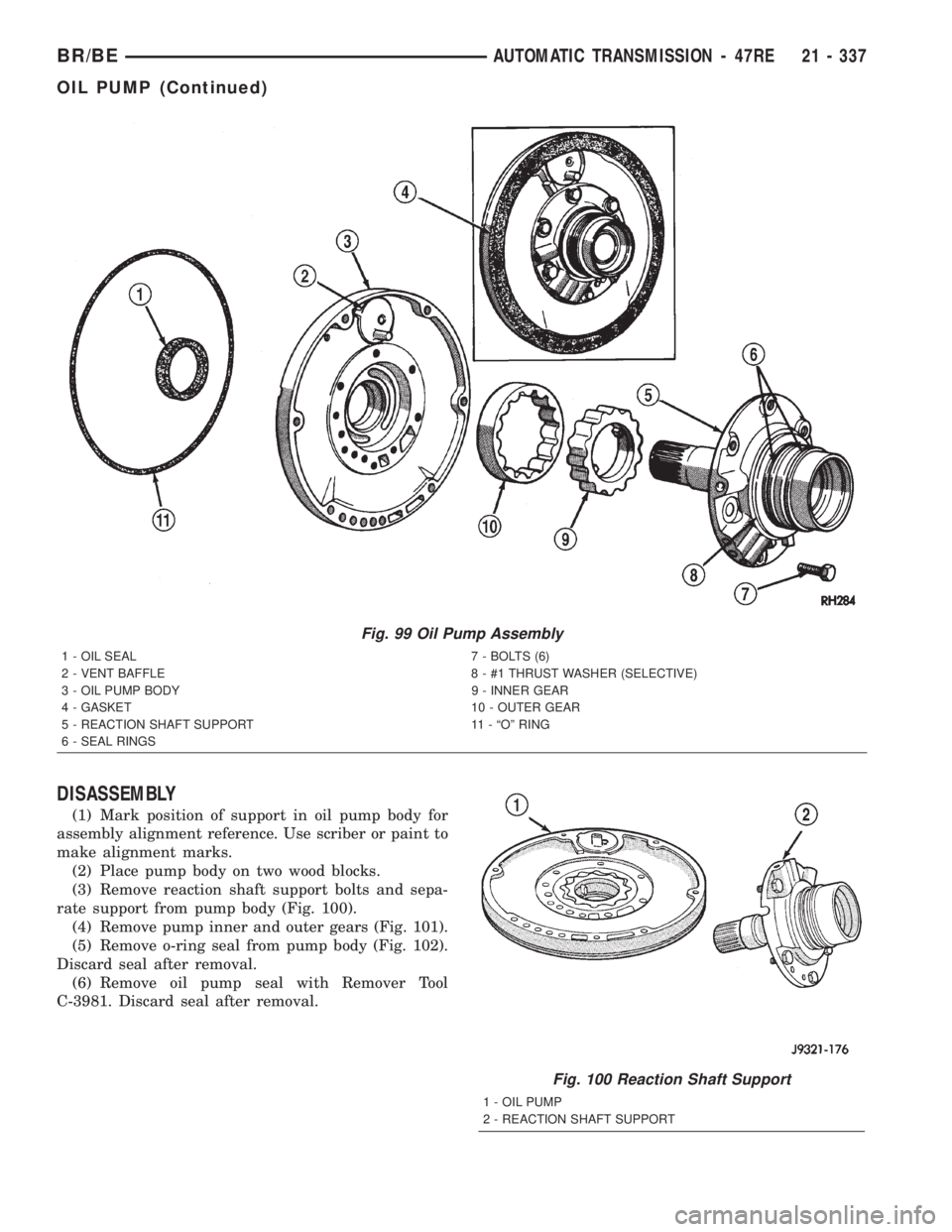
(3) Remove reaction shaft support bolts and sepa-
rate support from pump body (Fig. 100).
(4) Remove pump inner and outer gears (Fig. 101).
(5) Remove o-ring seal from pump body (Fig. 102).
Discard seal after removal.
(6) Remove oil pump seal with Remover Tool
C-3981. Discard seal after removal.
Fig. 99 Oil Pump Assembly
1 - OIL SEAL 7 - BOLTS (6)
2 - VENT BAFFLE 8 - #1 THRUST WASHER (SELECTIVE)
3 - OIL PUMP BODY 9 - INNER GEAR
4 - GASKET 10 - OUTER GEAR
5 - REACTION SHAFT SUPPORT 11 - ªOº RING
6 - SEAL RINGS
Fig. 100 Reaction Shaft Support
1 - OIL PUMP
2 - REACTION SHAFT SUPPORT
BR/BEAUTOMATIC TRANSMISSION - 47RE 21 - 337
OIL PUMP (Continued)
Page 1804 of 2255
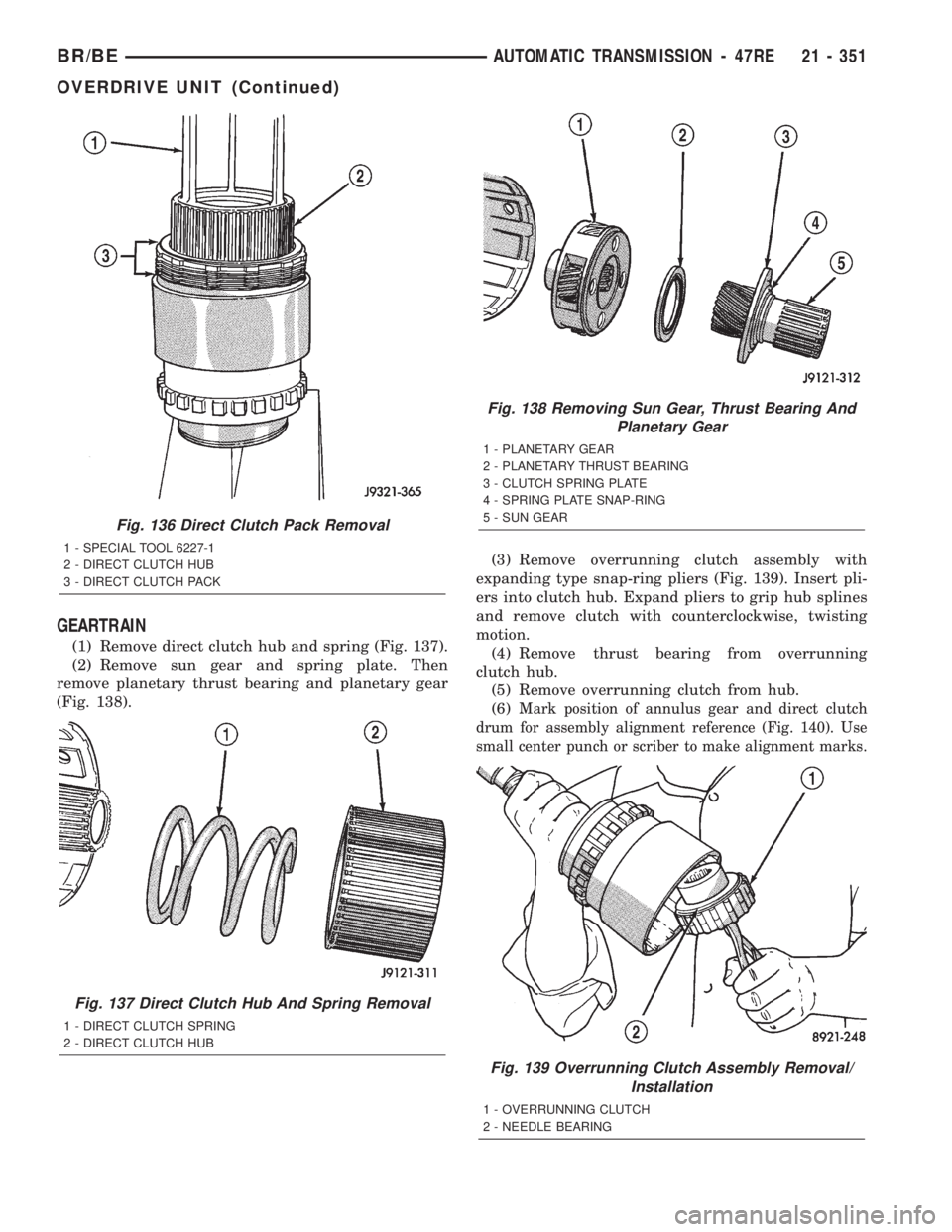
GEARTRAIN
(1) Remove direct clutch hub and spring (Fig. 137).
(2) Remove sun gear and spring plate. Then
remove planetary thrust bearing and planetary gear
(Fig. 138).(3) Remove overrunning clutch assembly with
expanding type snap-ring pliers (Fig. 139). Insert pli-
ers into clutch hub. Expand pliers to grip hub splines
and remove clutch with counterclockwise, twisting
motion.
(4) Remove thrust bearing from overrunning
clutch hub.
(5) Remove overrunning clutch from hub.
(6)
Mark position of annulus gear and direct clutch
drum for assembly alignment reference (Fig. 140). Use
small center punch or scriber to make alignment marks.
Fig. 136 Direct Clutch Pack Removal
1 - SPECIAL TOOL 6227-1
2 - DIRECT CLUTCH HUB
3 - DIRECT CLUTCH PACK
Fig. 137 Direct Clutch Hub And Spring Removal
1 - DIRECT CLUTCH SPRING
2 - DIRECT CLUTCH HUB
Fig. 138 Removing Sun Gear, Thrust Bearing And
Planetary Gear
1 - PLANETARY GEAR
2 - PLANETARY THRUST BEARING
3 - CLUTCH SPRING PLATE
4 - SPRING PLATE SNAP-RING
5 - SUN GEAR
Fig. 139 Overrunning Clutch Assembly Removal/
Installation
1 - OVERRUNNING CLUTCH
2 - NEEDLE BEARING
BR/BEAUTOMATIC TRANSMISSION - 47RE 21 - 351
OVERDRIVE UNIT (Continued)
Page 1806 of 2255
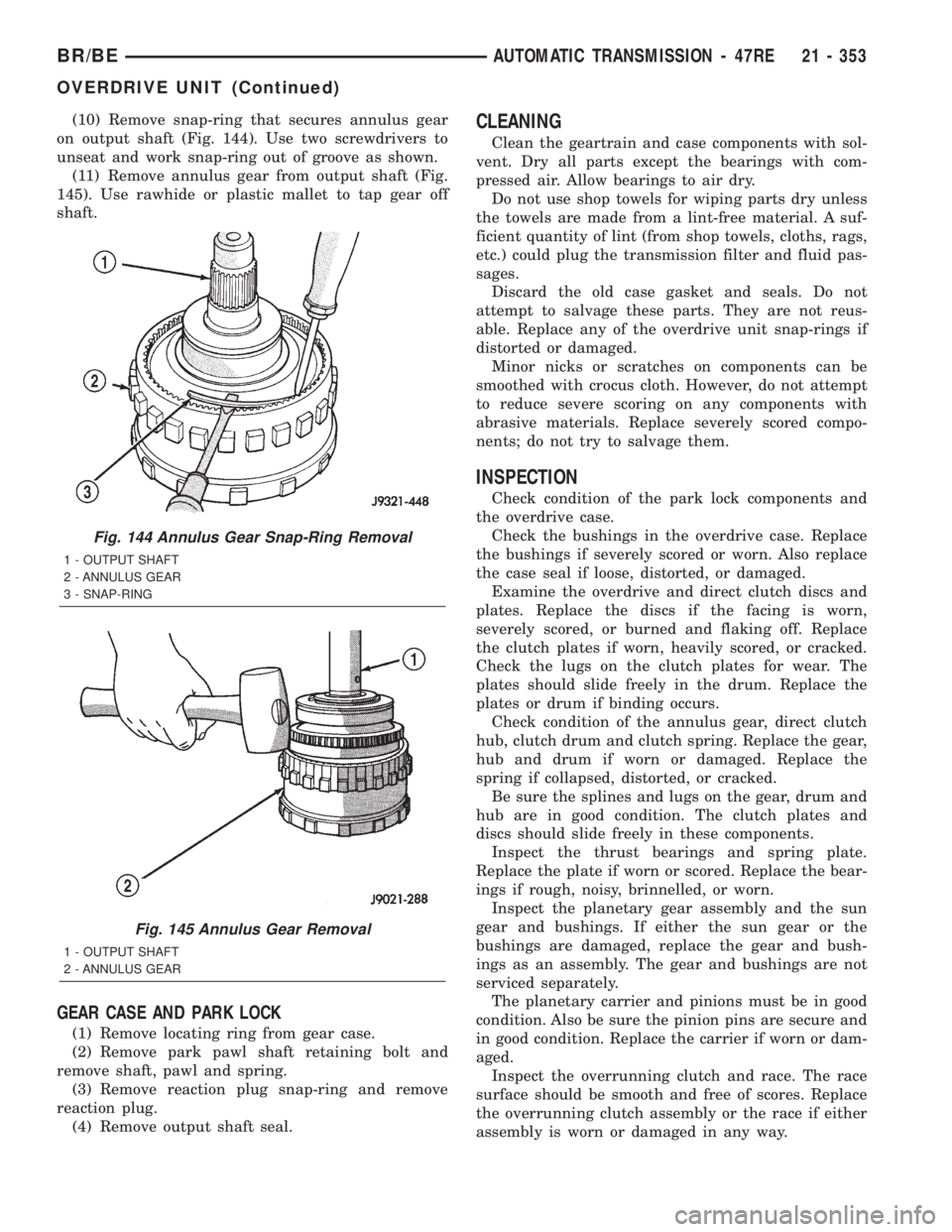
(10) Remove snap-ring that secures annulus gear
on output shaft (Fig. 144). Use two screwdrivers to
unseat and work snap-ring out of groove as shown.
(11) Remove annulus gear from output shaft (Fig.
145). Use rawhide or plastic mallet to tap gear off
shaft.
GEAR CASE AND PARK LOCK
(1) Remove locating ring from gear case.
(2) Remove park pawl shaft retaining bolt and
remove shaft, pawl and spring.
(3) Remove reaction plug snap-ring and remove
reaction plug.
(4) Remove output shaft seal.
CLEANING
Clean the geartrain and case components with sol-
vent. Dry all parts except the bearings with com-
pressed air. Allow bearings to air dry.
Do not use shop towels for wiping parts dry unless
the towels are made from a lint-free material. A suf-
ficient quantity of lint (from shop towels, cloths, rags,
etc.) could plug the transmission filter and fluid pas-
sages.
Discard the old case gasket and seals. Do not
attempt to salvage these parts. They are not reus-
able. Replace any of the overdrive unit snap-rings if
distorted or damaged.
Minor nicks or scratches on components can be
smoothed with crocus cloth. However, do not attempt
to reduce severe scoring on any components with
abrasive materials. Replace severely scored compo-
nents; do not try to salvage them.
INSPECTION
Check condition of the park lock components and
the overdrive case.
Check the bushings in the overdrive case. Replace
the bushings if severely scored or worn. Also replace
the case seal if loose, distorted, or damaged.
Examine the overdrive and direct clutch discs and
plates. Replace the discs if the facing is worn,
severely scored, or burned and flaking off. Replace
the clutch plates if worn, heavily scored, or cracked.
Check the lugs on the clutch plates for wear. The
plates should slide freely in the drum. Replace the
plates or drum if binding occurs.
Check condition of the annulus gear, direct clutch
hub, clutch drum and clutch spring. Replace the gear,
hub and drum if worn or damaged. Replace the
spring if collapsed, distorted, or cracked.
Be sure the splines and lugs on the gear, drum and
hub are in good condition. The clutch plates and
discs should slide freely in these components.
Inspect the thrust bearings and spring plate.
Replace the plate if worn or scored. Replace the bear-
ings if rough, noisy, brinnelled, or worn.
Inspect the planetary gear assembly and the sun
gear and bushings. If either the sun gear or the
bushings are damaged, replace the gear and bush-
ings as an assembly. The gear and bushings are not
serviced separately.
The planetary carrier and pinions must be in good
condition. Also be sure the pinion pins are secure and
in good condition. Replace the carrier if worn or dam-
aged.
Inspect the overrunning clutch and race. The race
surface should be smooth and free of scores. Replace
the overrunning clutch assembly or the race if either
assembly is worn or damaged in any way.
Fig. 144 Annulus Gear Snap-Ring Removal
1 - OUTPUT SHAFT
2 - ANNULUS GEAR
3 - SNAP-RING
Fig. 145 Annulus Gear Removal
1 - OUTPUT SHAFT
2 - ANNULUS GEAR
BR/BEAUTOMATIC TRANSMISSION - 47RE 21 - 353
OVERDRIVE UNIT (Continued)
Page 1808 of 2255
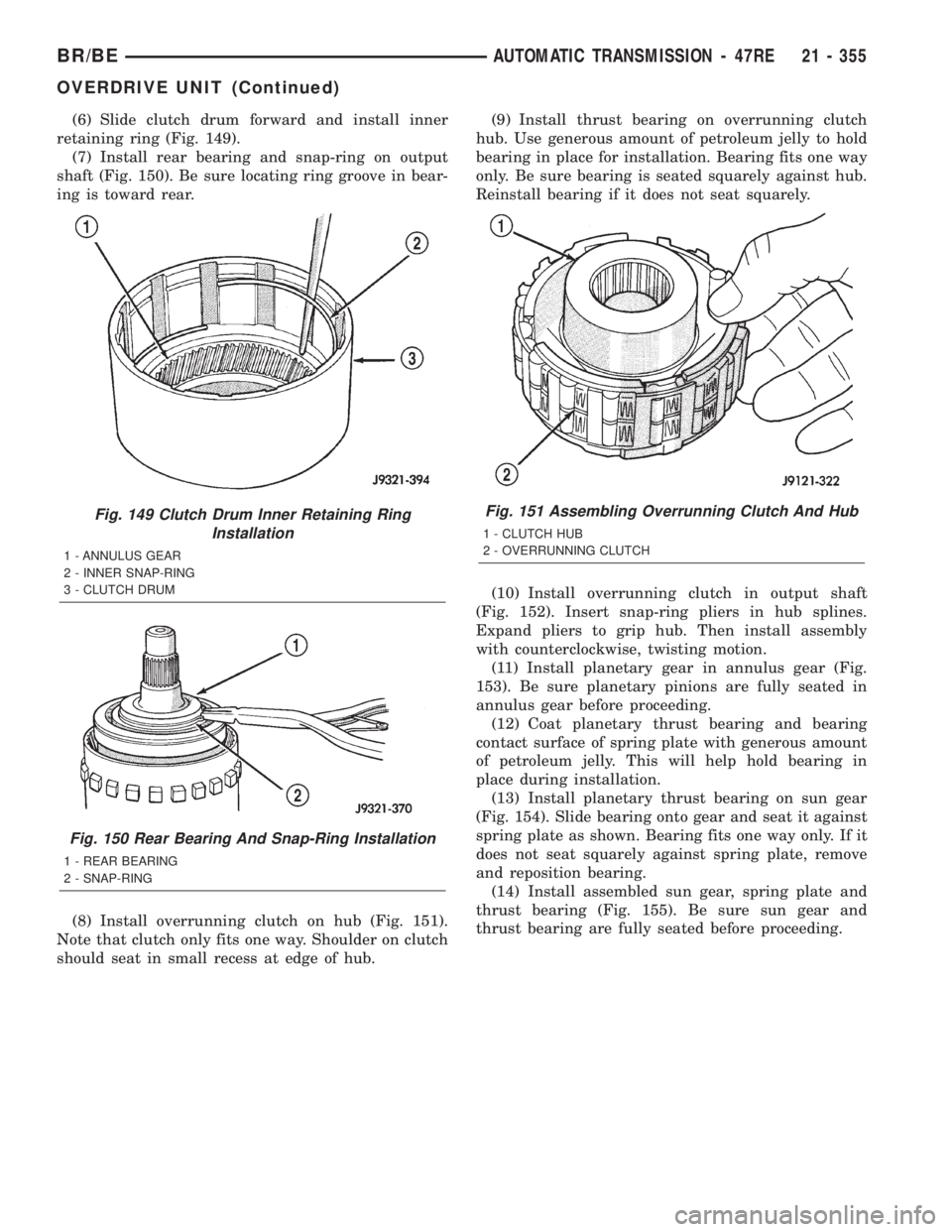
(6) Slide clutch drum forward and install inner
retaining ring (Fig. 149).
(7) Install rear bearing and snap-ring on output
shaft (Fig. 150). Be sure locating ring groove in bear-
ing is toward rear.
(8) Install overrunning clutch on hub (Fig. 151).
Note that clutch only fits one way. Shoulder on clutch
should seat in small recess at edge of hub.(9) Install thrust bearing on overrunning clutch
hub. Use generous amount of petroleum jelly to hold
bearing in place for installation. Bearing fits one way
only. Be sure bearing is seated squarely against hub.
Reinstall bearing if it does not seat squarely.
(10) Install overrunning clutch in output shaft
(Fig. 152). Insert snap-ring pliers in hub splines.
Expand pliers to grip hub. Then install assembly
with counterclockwise, twisting motion.
(11) Install planetary gear in annulus gear (Fig.
153). Be sure planetary pinions are fully seated in
annulus gear before proceeding.
(12) Coat planetary thrust bearing and bearing
contact surface of spring plate with generous amount
of petroleum jelly. This will help hold bearing in
place during installation.
(13) Install planetary thrust bearing on sun gear
(Fig. 154). Slide bearing onto gear and seat it against
spring plate as shown. Bearing fits one way only. If it
does not seat squarely against spring plate, remove
and reposition bearing.
(14) Install assembled sun gear, spring plate and
thrust bearing (Fig. 155). Be sure sun gear and
thrust bearing are fully seated before proceeding.
Fig. 149 Clutch Drum Inner Retaining Ring
Installation
1 - ANNULUS GEAR
2 - INNER SNAP-RING
3 - CLUTCH DRUM
Fig. 150 Rear Bearing And Snap-Ring Installation
1 - REAR BEARING
2 - SNAP-RING
Fig. 151 Assembling Overrunning Clutch And Hub
1 - CLUTCH HUB
2 - OVERRUNNING CLUTCH
BR/BEAUTOMATIC TRANSMISSION - 47RE 21 - 355
OVERDRIVE UNIT (Continued)
Page 1812 of 2255
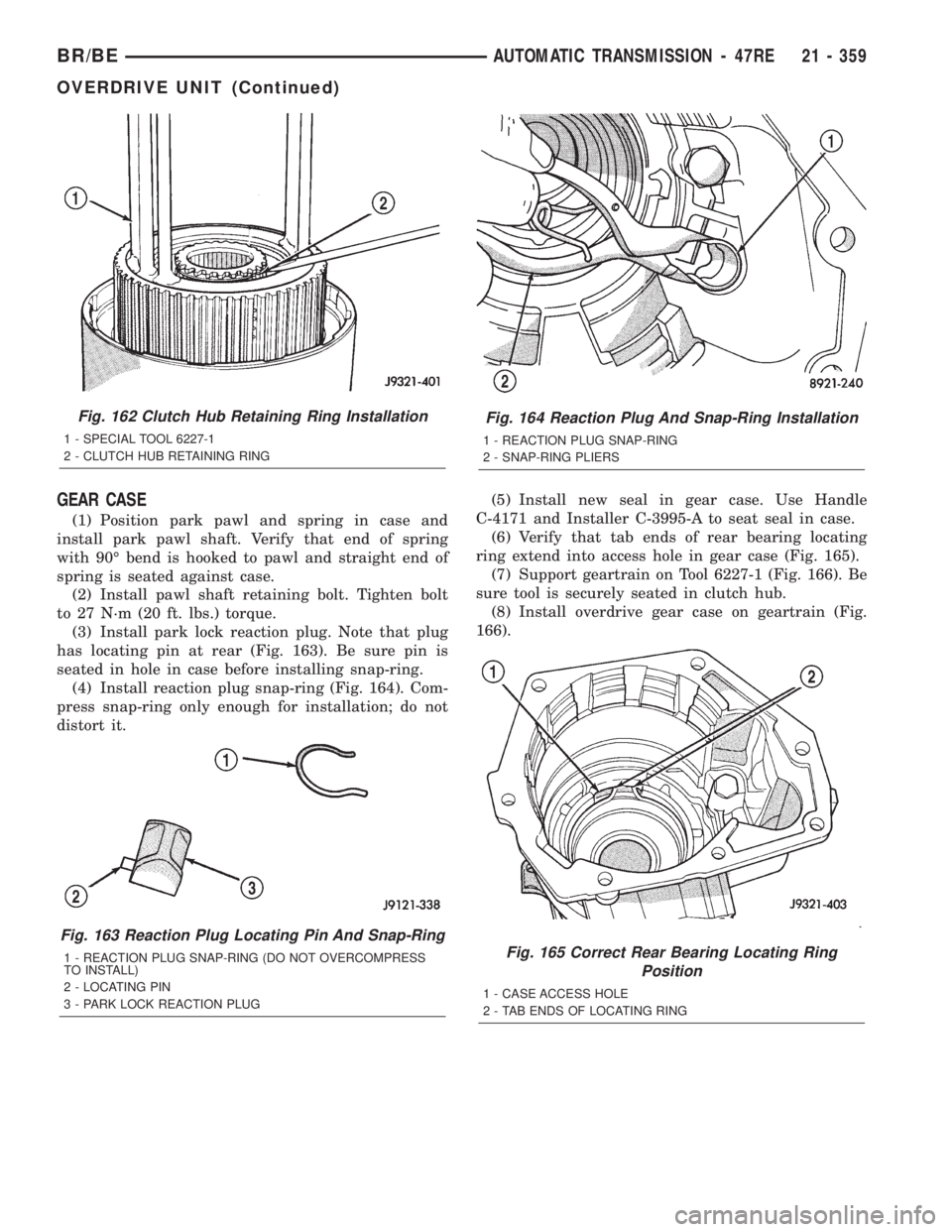
GEAR CASE
(1) Position park pawl and spring in case and
install park pawl shaft. Verify that end of spring
with 90É bend is hooked to pawl and straight end of
spring is seated against case.
(2) Install pawl shaft retaining bolt. Tighten bolt
to 27 N´m (20 ft. lbs.) torque.
(3) Install park lock reaction plug. Note that plug
has locating pin at rear (Fig. 163). Be sure pin is
seated in hole in case before installing snap-ring.
(4) Install reaction plug snap-ring (Fig. 164). Com-
press snap-ring only enough for installation; do not
distort it.(5) Install new seal in gear case. Use Handle
C-4171 and Installer C-3995-A to seat seal in case.
(6) Verify that tab ends of rear bearing locating
ring extend into access hole in gear case (Fig. 165).
(7) Support geartrain on Tool 6227-1 (Fig. 166). Be
sure tool is securely seated in clutch hub.
(8) Install overdrive gear case on geartrain (Fig.
166).
Fig. 162 Clutch Hub Retaining Ring Installation
1 - SPECIAL TOOL 6227-1
2 - CLUTCH HUB RETAINING RING
Fig. 163 Reaction Plug Locating Pin And Snap-Ring
1 - REACTION PLUG SNAP-RING (DO NOT OVERCOMPRESS
TO INSTALL)
2 - LOCATING PIN
3 - PARK LOCK REACTION PLUG
Fig. 164 Reaction Plug And Snap-Ring Installation
1 - REACTION PLUG SNAP-RING
2 - SNAP-RING PLIERS
Fig. 165 Correct Rear Bearing Locating Ring
Position
1 - CASE ACCESS HOLE
2 - TAB ENDS OF LOCATING RING
BR/BEAUTOMATIC TRANSMISSION - 47RE 21 - 359
OVERDRIVE UNIT (Continued)
Page 1813 of 2255
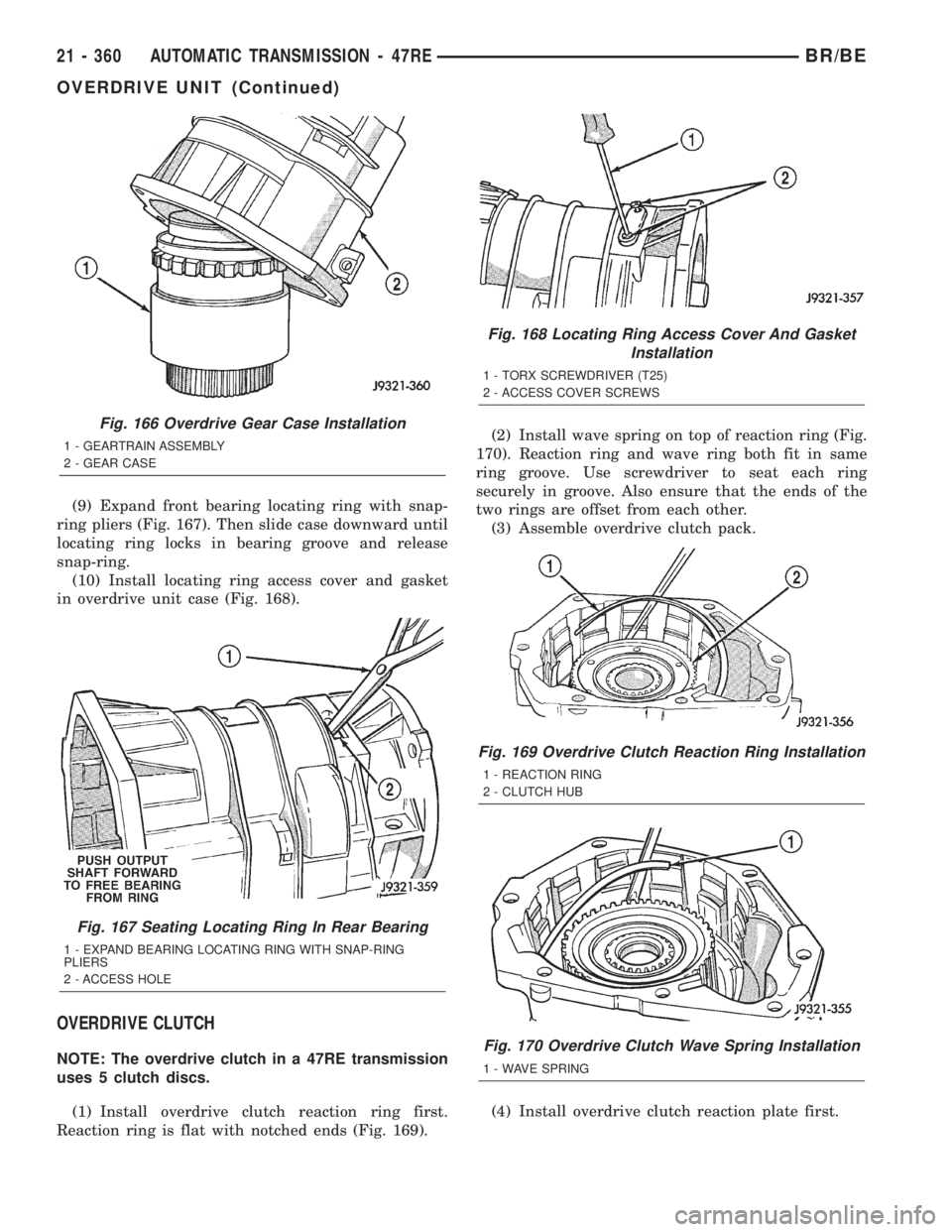
(9) Expand front bearing locating ring with snap-
ring pliers (Fig. 167). Then slide case downward until
locating ring locks in bearing groove and release
snap-ring.
(10) Install locating ring access cover and gasket
in overdrive unit case (Fig. 168).
OVERDRIVE CLUTCH
NOTE: The overdrive clutch in a 47RE transmission
uses 5 clutch discs.
(1) Install overdrive clutch reaction ring first.
Reaction ring is flat with notched ends (Fig. 169).(2) Install wave spring on top of reaction ring (Fig.
170). Reaction ring and wave ring both fit in same
ring groove. Use screwdriver to seat each ring
securely in groove. Also ensure that the ends of the
two rings are offset from each other.
(3) Assemble overdrive clutch pack.
(4) Install overdrive clutch reaction plate first.
Fig. 166 Overdrive Gear Case Installation
1 - GEARTRAIN ASSEMBLY
2 - GEAR CASE
Fig. 167 Seating Locating Ring In Rear Bearing
1 - EXPAND BEARING LOCATING RING WITH SNAP-RING
PLIERS
2 - ACCESS HOLE
Fig. 168 Locating Ring Access Cover And Gasket
Installation
1 - TORX SCREWDRIVER (T25)
2 - ACCESS COVER SCREWS
Fig. 169 Overdrive Clutch Reaction Ring Installation
1 - REACTION RING
2 - CLUTCH HUB
Fig. 170 Overdrive Clutch Wave Spring Installation
1 - WAVE SPRING
21 - 360 AUTOMATIC TRANSMISSION - 47REBR/BE
OVERDRIVE UNIT (Continued)
Page 1814 of 2255
NOTE: The reaction plate is thicker than the pres-
sure plate in a 47RE transmission.
(5) Install first clutch disc followed by first clutch
plate. Then install remaining clutch discs and plates
in same order.
(6) Install clutch pack pressure plate.
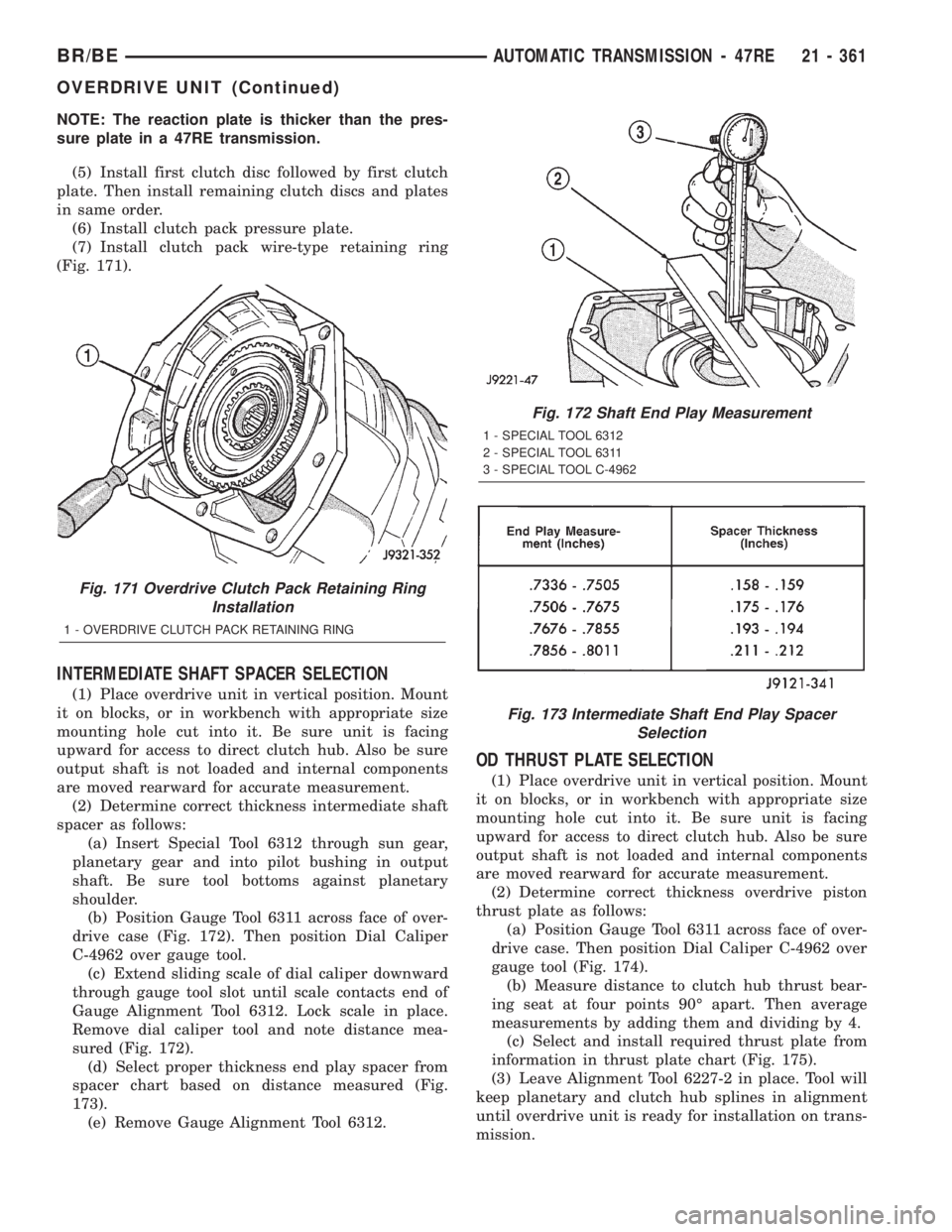
(7) Install clutch pack wire-type retaining ring
(Fig. 171).
INTERMEDIATE SHAFT SPACER SELECTION
(1) Place overdrive unit in vertical position. Mount
it on blocks, or in workbench with appropriate size
mounting hole cut into it. Be sure unit is facing
upward for access to direct clutch hub. Also be sure
output shaft is not loaded and internal components
are moved rearward for accurate measurement.
(2) Determine correct thickness intermediate shaft
spacer as follows:
(a) Insert Special Tool 6312 through sun gear,
planetary gear and into pilot bushing in output
shaft. Be sure tool bottoms against planetary
shoulder.
(b) Position Gauge Tool 6311 across face of over-
drive case (Fig. 172). Then position Dial Caliper
C-4962 over gauge tool.
(c) Extend sliding scale of dial caliper downward
through gauge tool slot until scale contacts end of
Gauge Alignment Tool 6312. Lock scale in place.
Remove dial caliper tool and note distance mea-
sured (Fig. 172).
(d) Select proper thickness end play spacer from
spacer chart based on distance measured (Fig.
173).
(e) Remove Gauge Alignment Tool 6312.
OD THRUST PLATE SELECTION
(1) Place overdrive unit in vertical position. Mount
it on blocks, or in workbench with appropriate size
mounting hole cut into it. Be sure unit is facing
upward for access to direct clutch hub. Also be sure
output shaft is not loaded and internal components
are moved rearward for accurate measurement.
(2) Determine correct thickness overdrive piston
thrust plate as follows:
(a) Position Gauge Tool 6311 across face of over-
drive case. Then position Dial Caliper C-4962 over
gauge tool (Fig. 174).
(b) Measure distance to clutch hub thrust bear-
ing seat at four points 90É apart. Then average
measurements by adding them and dividing by 4.
(c) Select and install required thrust plate from
information in thrust plate chart (Fig. 175).
(3) Leave Alignment Tool 6227-2 in place. Tool will
keep planetary and clutch hub splines in alignment
until overdrive unit is ready for installation on trans-
mission.
Fig. 171 Overdrive Clutch Pack Retaining Ring
Installation
1 - OVERDRIVE CLUTCH PACK RETAINING RING
Fig. 172 Shaft End Play Measurement
1 - SPECIAL TOOL 6312
2 - SPECIAL TOOL 6311
3 - SPECIAL TOOL C-4962
Fig. 173 Intermediate Shaft End Play Spacer
Selection
BR/BEAUTOMATIC TRANSMISSION - 47RE 21 - 361
OVERDRIVE UNIT (Continued)