ECU DODGE RAM 2003 Service Owners Manual
[x] Cancel search | Manufacturer: DODGE, Model Year: 2003, Model line: RAM, Model: DODGE RAM 2003Pages: 2895, PDF Size: 83.15 MB
Page 534 of 2895
reads from ª8º to ª18º volts. An International Control
and Display Symbol icon for ªBattery Charging Con-
ditionº is located on the cluster overlay, directly
below the right end of the gauge scale. The voltage
gauge graphics are black against a white field except
for a single red graduation at each end of the gauge
scale, making them clearly visible within the instru-
ment cluster in daylight. When illuminated from
behind by the panel lamps dimmer controlled cluster
illumination lighting with the exterior lamps turned
On, the black graphics appear blue and the red
graphics still appear red. The orange gauge needle is
internally illuminated. Gauge illumination is pro-
vided by replaceable incandescent bulb and bulb
holder units located on the instrument cluster elec-
tronic circuit board. The voltage gauge is serviced as
a unit with the instrument cluster.
OPERATION
The voltage gauge gives an indication to the vehi-
cle operator of the electrical system voltage. This
gauge is controlled by the instrument cluster circuit
board based upon cluster programming and elec-
tronic messages received by the cluster from the
Powertrain Control Module (PCM) on vehicles
equipped with a gasoline engine, or from the Engine
Control Module (ECM) on vehicles equipped with a
diesel engine over the Programmable Communica-
tions Interface (PCI) data bus. The voltage gauge is
an air core magnetic unit that receives battery cur-
rent on the instrument cluster electronic circuit
board through the fused ignition switch output (run-
start) circuit whenever the ignition switch is in the
On or Start positions. The cluster is programmed to
move the gauge needle back to the left end of the
scale after the ignition switch is turned to the Off
position. The instrument cluster circuitry controls
the gauge needle position and provides the following
features:
²System Voltage Message- Each time the clus-
ter receives a system voltage message from the PCM
or ECM indicating the system voltage is between
about 9.5 volts and about 15 volts, the gauge needle
is moved to the relative voltage position on the gauge
scale.
²System Voltage Low (Charge Fail) Message
- Each time the cluster receives three consecutive
messages from the PCM or ECM indicating the elec-
trical system voltage is less than about 9 volts
(charge fail condition), the gauge needle is moved to
the graduation on the far left end of the gauge scale
and the check gauges indicator is illuminated. The
gauge needle remains at the far left end of the gauge
scale and the check gauges indicator remains illumi-
nated until the cluster receives a single message
from the PCM or ECM indicating the electrical sys-tem voltage is greater than about 9.5 volts (but less
than about 15.5 volts), or until the ignition switch is
turned to the Off position, whichever occurs first. On
vehicles equipped with the optional diesel engine, the
ECM is programmed to restrict the voltage gauge
needle to a position above the graduation on the far
left end of the gauge scale and suppress the check
engine indicator operation until after the engine
intake manifold air heater has completed a pre-heat
or post-heat cycle.
²System Voltage High Message- Each time
the cluster receives three consecutive messages from
the PCM or ECM indicating the electrical system
voltage is greater than about 15.5 volts, the gauge
needle is moved to the graduation on the far right
end of the gauge scale and the check gauges indica-
tor is illuminated. The gauge needle remains at the
right end of the gauge scale and the check gauges
indicator remains illuminated until the cluster
receives a message from the PCM or ECM indicating
the electrical system voltage is less than about 15.0
volts (but greater than about 9.5 volts), or until the
ignition switch is turned to the Off position, which-
ever occurs first.
²Communication Error- If the cluster fails to
receive a system voltage message, it will hold the
gauge needle at the last indication for about five sec-
onds or until the ignition switch is turned to the Off
position, whichever occurs first. After five seconds,
the cluster will move the gauge needle to the far left
end of the gauge scale.
²Actuator Test- Each time the cluster is put
through the actuator test, the voltage gauge needle
will be swept to several calibration points on the
gauge scale in a prescribed sequence in order to con-
firm the functionality of the gauge and the cluster
control circuitry.
On vehicles with a gasoline engine, the PCM con-
tinually monitors the system voltage to control the
generator output. On vehicles with a diesel engine,
the ECM continually monitors the system voltage to
control the generator output. The PCM or ECM then
sends the proper system voltage messages to the
instrument cluster. For further diagnosis of the volt-
age gauge or the instrument cluster circuitry that
controls the gauge, (Refer to 8 - ELECTRICAL/IN-
STRUMENT CLUSTER - DIAGNOSIS AND TEST-
ING). If the instrument cluster turns on the check
gauges indicator due to a charge fail or voltage high
condition, it may indicate that the charging system
requires service. For proper diagnosis of the charging
system, the PCM, the ECM, the PCI data bus, or the
electronic message inputs to the instrument cluster
that control the voltage gauge, a DRBIIItscan tool is
required. Refer to the appropriate diagnostic infor-
mation.
DRINSTRUMENT CLUSTER 8J - 41
VOLTAGE GAUGE (Continued)
Page 536 of 2895
tery current input on the fused ignition switch out-
put (run-start) circuit. Therefore, the indicator will
always be off when the ignition switch is in any posi-
tion except On or Start. The indicator only illumi-
nates when it is switched to ground by the
instrument cluster circuitry. The instrument cluster
will turn on the washer fluid indicator for the follow-
ing reasons:
²Washer Fluid Indicator Lamp-On Message-
Each time the cluster receives a washer fluid indica-
tor lamp-on message from the FCM indicating that a
low washer condition has been detected for sixty con-
secutive seconds, the washer fluid indicator is illumi-
nated and a single chime tone is sounded. The
indicator remains illuminated until the cluster
receives a washer fluid indicator lamp-off message
for sixty consecutive seconds from the FCM or until
the ignition switch is turned to the Off position,
whichever occurs first. The chime tone feature will
only repeat during the same ignition cycle if the
washer fluid indicator is cycled off and then on again
by the appropriate washer fluid lamp messages from
the FCM.
²Actuator Test- Each time the cluster is put
through the actuator test, the washer fluid indicator
will be turned on, then off again during the VFD por-
tion of the test to confirm the functionality of the
VFD and the cluster control circuitry.
The FCM continually monitors the washer fluid
level switch in the washer reservoir to determine the
level of the washer fluid. The FCM then sends the
proper washer fluid indicator lamp-on and lamp-off
messages to the instrument cluster. For further diag-
nosis of the washer fluid indicator or the instrument
cluster circuitry that controls the indicator, (Refer to
8 - ELECTRICAL/INSTRUMENT CLUSTER - DIAG-
NOSIS AND TESTING). For proper diagnosis of the
washer fluid level switch, the FCM, the PCI data
bus, or the electronic message inputs to the instru-
ment cluster that control the washer fluid indicator,
a DRBIIItscan tool is required. Refer to the appro-
priate diagnostic information.WATER-IN-FUEL INDICATOR
DESCRIPTION
A water-in-fuel indicator is only found in the
instrument clusters for vehicles equipped with an
optional diesel engine. The water-in-fuel indicator is
located near the lower edge of the instrument cluster,
between the tachometer and the speedometer. The
water-in-fuel indicator consists of stencil-like cutout
of the International Control and Display Symbol icon
for ªWater In Fuelº in the opaque layer of the instru-
ment cluster overlay. The dark outer layer of the
overlay prevents the indicator from being clearly vis-
ible when it is not illuminated. A red Light Emitting
Diode (LED) behind the cutout in the opaque layer of
the overlay causes the icon to appear in red through
the translucent outer layer of the overlay when the
indicator is illuminated from behind by the LED,
which is soldered onto the instrument cluster elec-
tronic circuit board. The water-in-fuel indicator is
serviced as a unit with the instrument cluster.
OPERATION
The water-in-fuel indicator gives an indication to
the vehicle operator when there is excessive water in
the fuel system. This indicator is controlled by a
transistor on the instrument cluster circuit board
based upon the cluster programming and electronic
messages received by the cluster from the Engine
Control Module (ECM) over the Programmable Com-
munications Interface (PCI) data bus. The water-in-
fuel indicator Light Emitting Diode (LED) is
completely controlled by the instrument cluster logic
circuit, and that logic will only allow this indicator to
operate when the instrument cluster receives a bat-
tery current input on the fused ignition switch out-
put (run-start) circuit. Therefore, the LED will
always be off when the ignition switch is in any posi-
tion except On or Start. The LED only illuminates
when it is provided a path to ground by the instru-
ment cluster transistor. The instrument cluster will
turn on the water-in-fuel indicator for the following
reasons:
DRINSTRUMENT CLUSTER 8J - 43
WASHER FLUID INDICATOR (Continued)
Page 541 of 2895
HEADLAMP DIAGNOSIS
CONDITION POSSIBLE CAUSES CORRECTION
HEADLAMPS ARE DIM
WITH ENGINE IDLING
OR IGNITION TURNED
OFF1. Loose or corroded battery
cables.1. Clean and secure battery cable clamps and
posts.
2. Loose or worn generator drive
belt.2. Adjust or replace generator drive belt.
3. Charging system output too low. 3. Test and repair charging system, refer to
Electrical, Charging
4. Battery has insufficient charge. 4. Test battery state-of-charge, refer to
Electrical, Battery System.
5. Battery is sulfated or shorted. 5. Load test battery, refer to Electrical, Battery
System.
6. Poor lighting circuit ground. 6. Test for voltage drop across ground circuits,
refer to Electrical, Wiring Diagram Information.
HEADLAMP BULBS
BURN OUT
FREQUENTLY1. Integrated Control Module (ICM)
not controlling voltage.1. Test and repair Integrated Control Module.
2. Loose or corroded terminals or
splices in circuit.2. Inspect and repair all connectors and splices.
Refer to Electrical, Wiring Information.
HEADLAMPS ARE DIM
WITH ENGINE
RUNNING ABOVE IDLE1. Charging system output too low. 1. Test and repair charging system, refer to
Electrical, Wiring Information.
2. Poor lighting circuit ground. 2. Test for voltage drop across ground circuits,
refer to Electrical, Wiring Information.
3. High resistance in headlamp
circuit.3. Test amperage draw of headlamp circuit.
HEADLAMPS FLASH
RANDOMLY1. Poor lighting circuit ground. 1. Test for voltage drop across ground
locations, refer to Electrical, Wiring Information.
2. Variable resistance in headlamp
circuit.2. Test amperage draw of headlamp circuit.
3. Loose or corroded terminals or
splices in circuit.3. Inspect and repair all connectors and splices,
refer to Electrical, Wiring Information.
4. Faulty headlamp switch. 4. Replace headlamp switch.
5. Front Control Module
Malfunction.5. Refer to appropriate ICM/FCM diagnostics.
8L - 4 LAMPS/LIGHTING - EXTERIORDR
LAMPS/LIGHTING - EXTERIOR (Continued)
Page 542 of 2895
CONDITION POSSIBLE CAUSES CORRECTION
HEADLAMPS DO NOT
ILLUMINATE1. No voltage to headlamps. 1. Repair open headlamp circuit, refer to
Electrical, Wiring Information.
2. No ground at headlamps. 2. Repair circuit ground, refer to Electrical,
Wiring Information.
3. Broken connector terminal or
wire splice in headlamp circuit.3. Repair connector terminal or wire splice.
4. Faulty or burned out bulb. 4. Replace headlamp bulb(s).
5. Integrated Control Module
malfunction.5. Refer to appropriate Body Control Module
diagnostics.
6. J1850 Bus Communication 6. Verify messages being transmitted by
Instrument Cluster and received by FCM.
7. Front Control Module
Malfunction.7. Refer to appropriate ICM/FCM diagnostics.
HEADLAMPS ON WITH
IGNITION IN RUN, WITH
HEADLAMP SWITCH
OFF1. Faulty headlamp switch. 1. Replace headlamp switch (review Instrument
Cluster logged faults).
2. Diagnostic tool indicates (4.7 -
5.0V) on headlamp switch input to
Instrument Cluster.2. Inspect and repair terminals, connectors and
open circuits.
3. J1850 Bus Communication. 3. Verify messages being transmitted by
Instrument Cluster and received by FCM.
4. Front Control Module
Malfunction.4. Refer to appropriate ICM/FCM diagnostics.
FOG LAMP DIAGNOSIS
CONDITION POSSIBLE CAUSES CORRECTION
FOG LAMPS ARE DIM
WITH ENGINE IDLING
OR IGNITION TURNED
OFF.1. Loose or corroded battery
cables.1. Clean and secure battery cable clamps and
posts.
2. Loose or worn generator drive
belt.2. Adjust or replace generator drive belt.
3. Charging system output too low. 3. Test and repair charging system. Refer to
Electrical, Charging,
4. Battery has insufficient charge. 4. Test battery state-of-charge. Refer to
Electrical, Battery System.
5. Battery is sulfated or shorted. 5. Load test battery. Refer to Electrical, Battery
System.
6. Poor lighting circuit ground. 6. Test for voltage drop across ground
locations. Refer to Electrical, Wiring
Information.
FOG LAMP BULBS
BURN OUT
FREQUENTLY1. Charging system output too
high.1. Test and repair charging system. Refer to
Electrical, Charging.
2. Loose or corroded terminals or
splices in circuit.2. Inspect and repair all connectors and splices.
Refer to Electrical, Wiring Information.
DRLAMPS/LIGHTING - EXTERIOR 8L - 5
LAMPS/LIGHTING - EXTERIOR (Continued)
Page 547 of 2895
INSTALLATION
(1) Press and hold the brake pedal down.
(2) Align the tab on thenewswitch with the notch
in the switch bracket. Insert the switch in the
bracket and turn it clockwise about 30É to lock it in
place.
(3) Connect the harness wires to the switch.
(4) Release the brake pedal.
(5) Move the release lever on the switch parallel
with the connector to engage the switch plunger. The
switch is now adjusted andcan notbe adjusted
again.
CENTER HIGH MOUNTED
STOP LAMP
REMOVAL
(1) Disconnect and isolate the battery negative
cable.
(2) Remove the CHMSL from the roof panel. Refer
to (Refer to 8 - ELECTRICAL/LAMPS/LIGHTING -
EXTERIOR/CENTER HIGH MOUNTED STOP
LAMP UN - REMOVAL).
(3) Turn the bulb socket 1/4 turn counterclockwise.
(4) Separate the socket from the lamp.
(5) Remove the bulb.
INSTALLATION
(1) Position the bulb in the socket and press into
place.
(2) Position the socket in the lamp.
(3) Turn the bulb socket 1/4 turn clockwise.
(4) Install the CHMSL. Refer to (Refer to 8 -
ELECTRICAL/LAMPS/LIGHTING - EXTERIOR/
CENTER HIGH MOUNTED STOP LAMP UN -
INSTALLATION).
(5) Connect the battery negative cable.
CENTER HIGH MOUNTED
STOP LAMP UNIT
REMOVAL
(1) Disconnect and isolate the battery negative
cable.
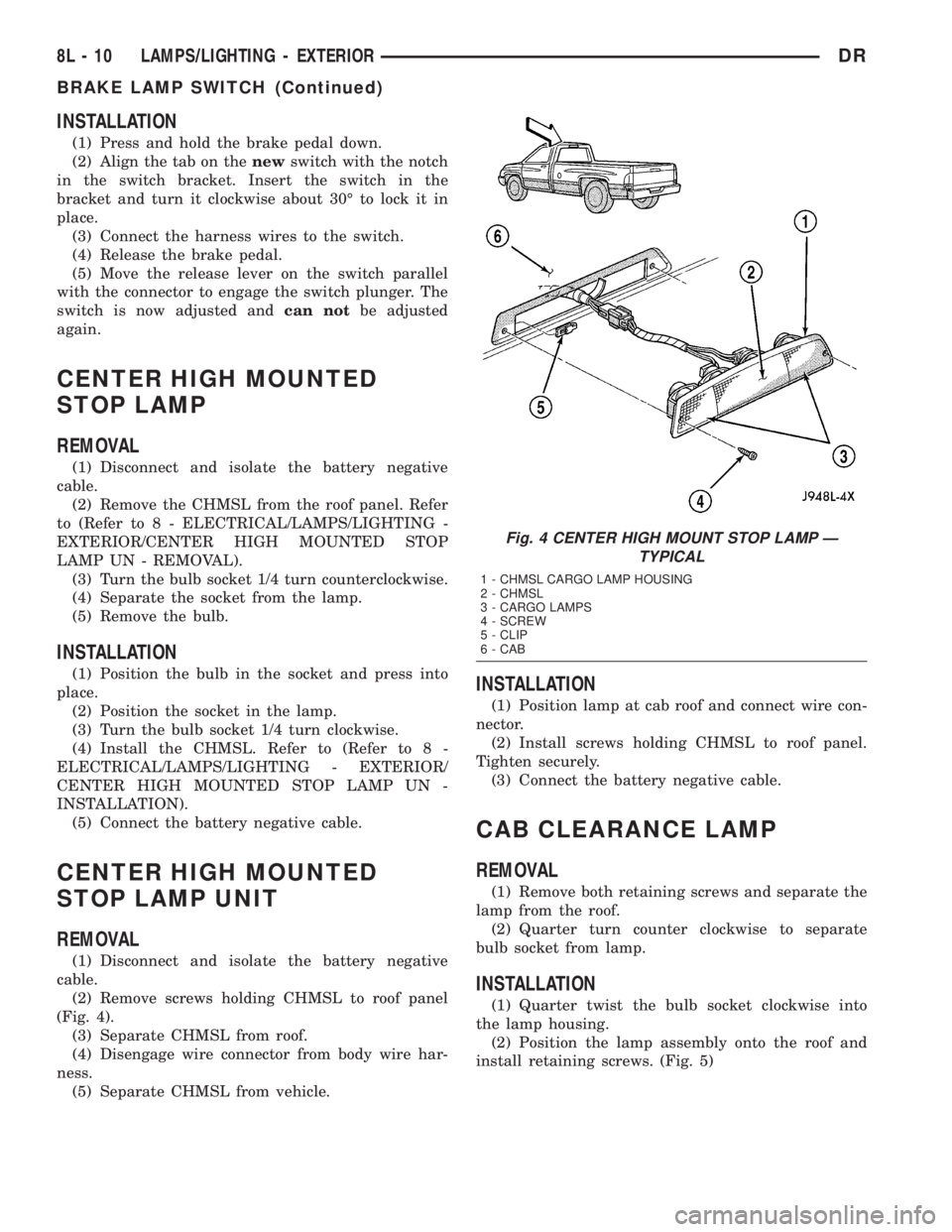
(2) Remove screws holding CHMSL to roof panel
(Fig. 4).
(3) Separate CHMSL from roof.
(4) Disengage wire connector from body wire har-
ness.
(5) Separate CHMSL from vehicle.
INSTALLATION
(1) Position lamp at cab roof and connect wire con-
nector.
(2) Install screws holding CHMSL to roof panel.
Tighten securely.
(3) Connect the battery negative cable.
CAB CLEARANCE LAMP
REMOVAL
(1) Remove both retaining screws and separate the
lamp from the roof.
(2) Quarter turn counter clockwise to separate
bulb socket from lamp.
INSTALLATION
(1) Quarter twist the bulb socket clockwise into
the lamp housing.
(2) Position the lamp assembly onto the roof and
install retaining screws. (Fig. 5)
Fig. 4 CENTER HIGH MOUNT STOP LAMP Ð
TYPICAL
1 - CHMSL CARGO LAMP HOUSING
2 - CHMSL
3 - CARGO LAMPS
4 - SCREW
5 - CLIP
6 - CAB
8L - 10 LAMPS/LIGHTING - EXTERIORDR
BRAKE LAMP SWITCH (Continued)
Page 551 of 2895
HEADLAMP SWITCH
DESCRIPTION
The multiplexed headlamp switch is located on the
instrument panel. The headlamp switch controls the
parking lamps, fog lamps and the headlamps. A sep-
arate switch in the module controls the interior
lamps and instrument cluster illumination. This
switch also contains a rheostat for controlling the
illumination level of the cluster lamps.
OPERATION
The multiplexed headlamp switch has an off, park-
ing lamp, fog lamp and a headlamp on position. High
beams are controlled by the multiplexed multifunc-
tion switch on the steering column. The fog lamps
are illuminated by pulling back on the headlamp
switch knob when in the parking lamp or headlamp
ON position.The headlamp switch cannot be
repaired. It must be replaced.
The Instrument Cluster monitors the headlamp
and multifunction switch operation. When the head-
lamp switch is rotated to the parking lamp or On
position the Instrument Cluster sends a J1850 mes-
sage to the Front Control Module, which is mated to
the power distribution center to become the Inte-
grated Control Module, to illuminate the appropriate
bulbs. When the multifunction switch is activated to
the optical horn or high beam position the Instru-
ment Cluster illuminates the high beam indicator
and sends a J1850 message to the Front Control
Module to illuminate the appropriate bulbs.
REMOVAL
WARNING: ON VEHICLES EQUIPPED WITH AIR-
BAGS, DISABLE THE AIRBAG SYSTEM BEFORE
ATTEMPTING ANY STEERING WHEEL, STEERING
COLUMN, OR INSTRUMENT PANEL COMPONENT
DIAGNOSIS OR SERVICE. DISCONNECT AND ISO-
LATE THE BATTERY NEGATIVE (GROUND) CABLE,
THEN WAIT TWO MINUTES FOR THE AIRBAG SYS-
TEM CAPACITOR TO DISCHARGE BEFORE PER-
FORMING FURTHER DIAGNOSIS OR SERVICE. THIS
IS THE ONLY SURE WAY TO DISABLE THE AIRBAG
SYSTEM. FAILURE TO TAKE THE PROPER PRE-
CAUTIONS COULD RESULT IN ACCIDENTAL AIR-
BAG DEPLOYMENT AND POSSIBLE PERSONAL
INJURY.
(1) Disconnect and isolate the battery negative
cable.
(2) Remove the left instrument panel bezel. (Refer
to 23 - BODY/INSTRUMENT PANEL/CLUSTER
BEZEL - REMOVAL).
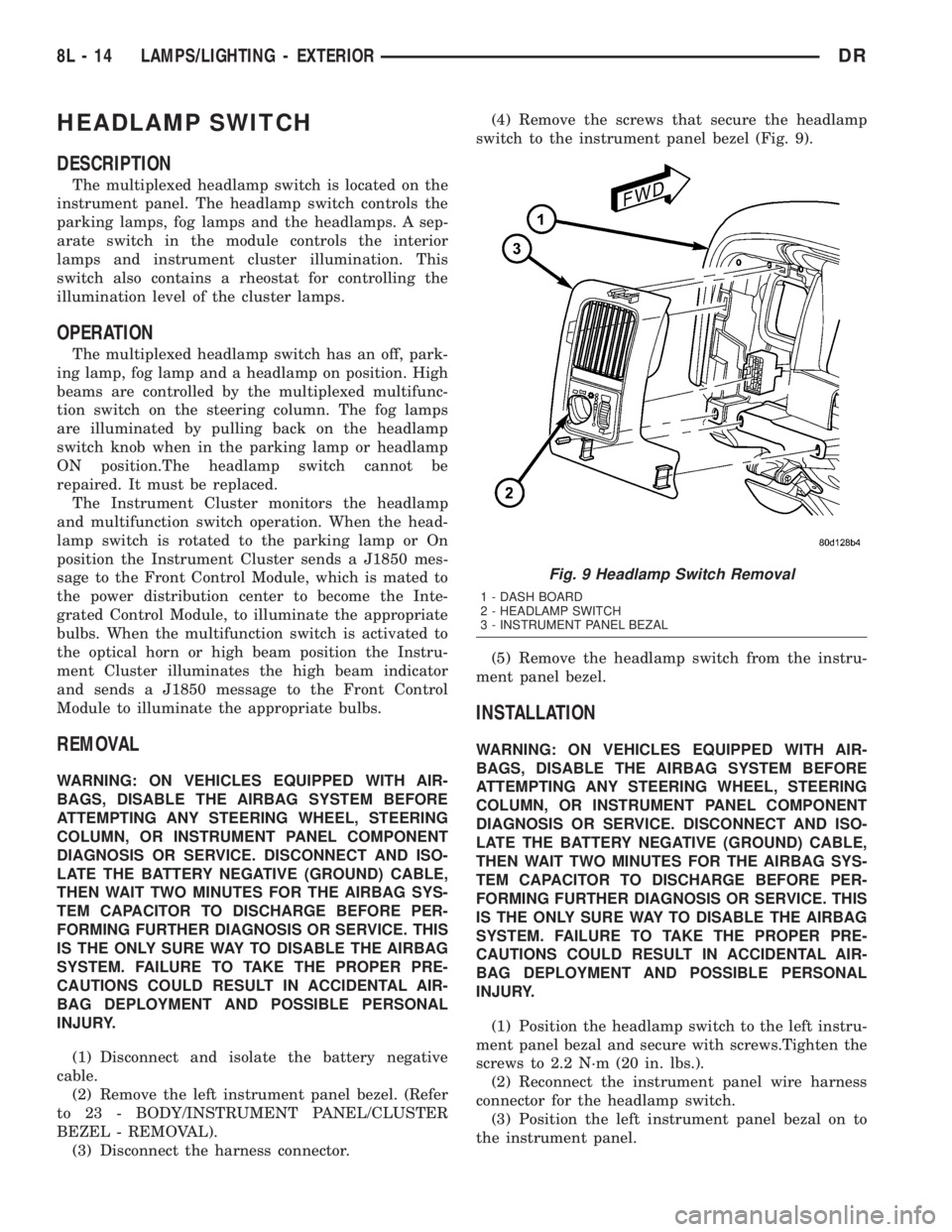
(3) Disconnect the harness connector.(4) Remove the screws that secure the headlamp
switch to the instrument panel bezel (Fig. 9).
(5) Remove the headlamp switch from the instru-
ment panel bezel.
INSTALLATION
WARNING: ON VEHICLES EQUIPPED WITH AIR-
BAGS, DISABLE THE AIRBAG SYSTEM BEFORE
ATTEMPTING ANY STEERING WHEEL, STEERING
COLUMN, OR INSTRUMENT PANEL COMPONENT
DIAGNOSIS OR SERVICE. DISCONNECT AND ISO-
LATE THE BATTERY NEGATIVE (GROUND) CABLE,
THEN WAIT TWO MINUTES FOR THE AIRBAG SYS-
TEM CAPACITOR TO DISCHARGE BEFORE PER-
FORMING FURTHER DIAGNOSIS OR SERVICE. THIS
IS THE ONLY SURE WAY TO DISABLE THE AIRBAG
SYSTEM. FAILURE TO TAKE THE PROPER PRE-
CAUTIONS COULD RESULT IN ACCIDENTAL AIR-
BAG DEPLOYMENT AND POSSIBLE PERSONAL
INJURY.
(1) Position the headlamp switch to the left instru-
ment panel bezal and secure with screws.Tighten the
screws to 2.2 N´m (20 in. lbs.).
(2) Reconnect the instrument panel wire harness
connector for the headlamp switch.
(3) Position the left instrument panel bezal on to
the instrument panel.
Fig. 9 Headlamp Switch Removal
1 - DASH BOARD
2 - HEADLAMP SWITCH
3 - INSTRUMENT PANEL BEZAL
8L - 14 LAMPS/LIGHTING - EXTERIORDR
Page 560 of 2895
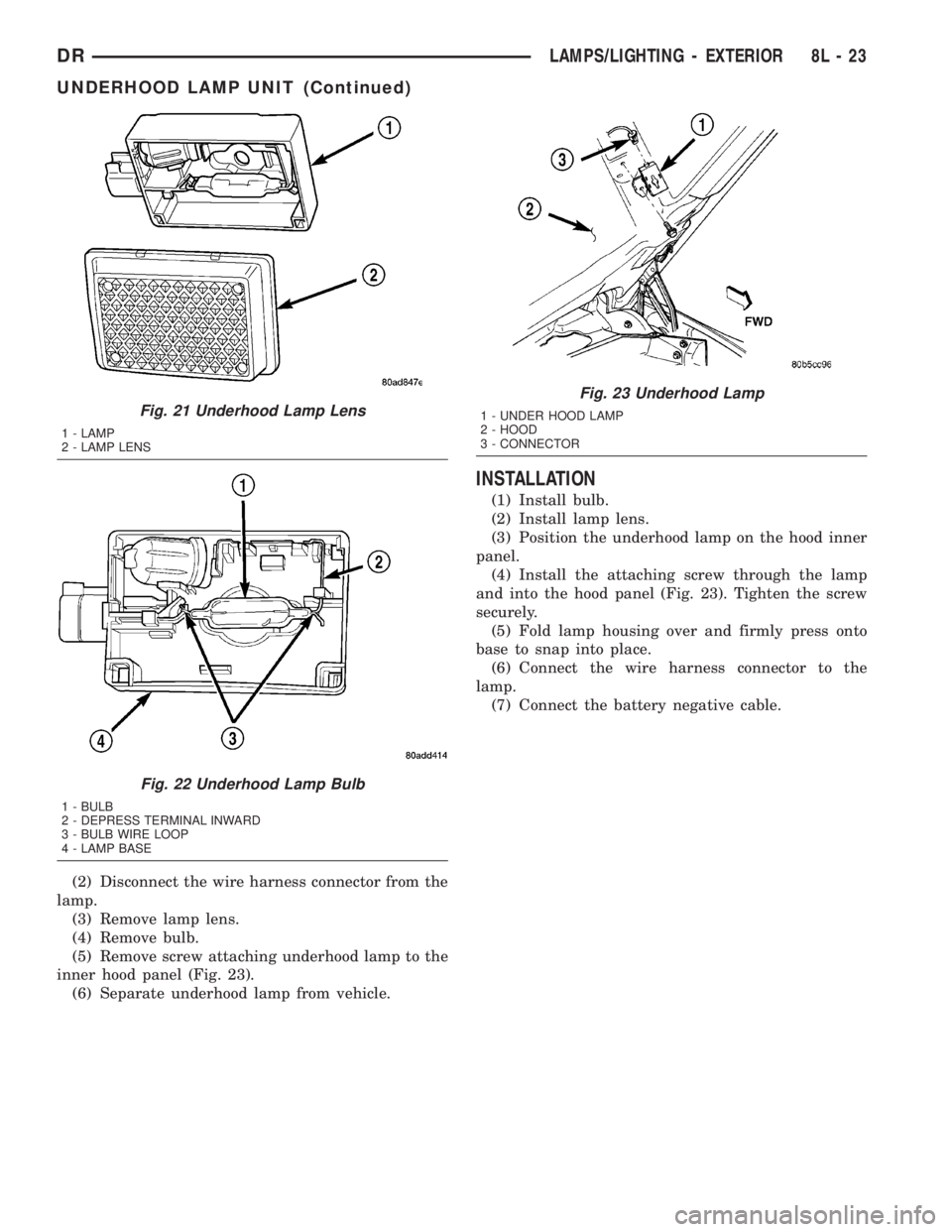
(2) Disconnect the wire harness connector from the
lamp.
(3) Remove lamp lens.
(4) Remove bulb.
(5) Remove screw attaching underhood lamp to the
inner hood panel (Fig. 23).
(6) Separate underhood lamp from vehicle.
INSTALLATION
(1) Install bulb.
(2) Install lamp lens.
(3) Position the underhood lamp on the hood inner
panel.
(4) Install the attaching screw through the lamp
and into the hood panel (Fig. 23). Tighten the screw
securely.
(5) Fold lamp housing over and firmly press onto
base to snap into place.
(6) Connect the wire harness connector to the
lamp.
(7) Connect the battery negative cable.
Fig. 21 Underhood Lamp Lens
1 - LAMP
2 - LAMP LENS
Fig. 22 Underhood Lamp Bulb
1 - BULB
2 - DEPRESS TERMINAL INWARD
3 - BULB WIRE LOOP
4 - LAMP BASE
Fig. 23 Underhood Lamp
1 - UNDER HOOD LAMP
2 - HOOD
3 - CONNECTOR
DRLAMPS/LIGHTING - EXTERIOR 8L - 23
UNDERHOOD LAMP UNIT (Continued)
Page 561 of 2895
LAMPS/LIGHTING - INTERIOR
TABLE OF CONTENTS
page page
DOME LAMP
DESCRIPTION.........................24
OPERATION...........................24
REMOVAL.............................24
INSTALLATION.........................24
DOOR AJAR SWITCH
DESCRIPTION.........................25
OPERATION...........................25GLOVE BOX LAMP/SWITCH
REMOVAL.............................25
INSTALLATION.........................25
READING LAMP
DESCRIPTION.........................26
OPERATION...........................26
REMOVAL.............................26
INSTALLATION.........................26
DOME LAMP
DESCRIPTION
The dome lamp is controlled by the instrument
cluster which provides power at all times, regardless
of the ignition switch position. The ground circuit for
the lamp is switched through the integral dome lamp
switch or through the door ajar switches via the
instrument cluster.
The dome lamp lens and bulb are available for ser-
vice replacement. If either of the lamp switch or bulb
holders is faulty or damaged, the dome lamp assem-
bly must be replaced.
For service of the dome lamp bulb, refer to the
appropriate wiring information.
OPERATION
The dome lamp is activated by the door ajar
switches via the instrument cluster. When all of the
doors are closed, the lamp can be activated by
depressing the lens. When any door is open, depress-
ing the lamp lense to activate the lamp switch will
not turn the lamps off.
The instrument cluster monitors the door ajar
switches. When a door is open the instrument cluster
grounds the low side drivers to turn on the lamp.
Upon closing all doors, the instrument cluster ini-
tiates a 30 second timer. If any of the doors are
opened during the ªtime outº cycle, the instrument
cluster will reset the timer until all doors are closed.
The instrument cluster will faid to off when the doors
are closed and the ignition is turned ON, the time
out expires or the power locks are activated.
REMOVAL
(1) Using a small flat blade, pry the left side (driv-
er's side) of the dome lamp lens downward from
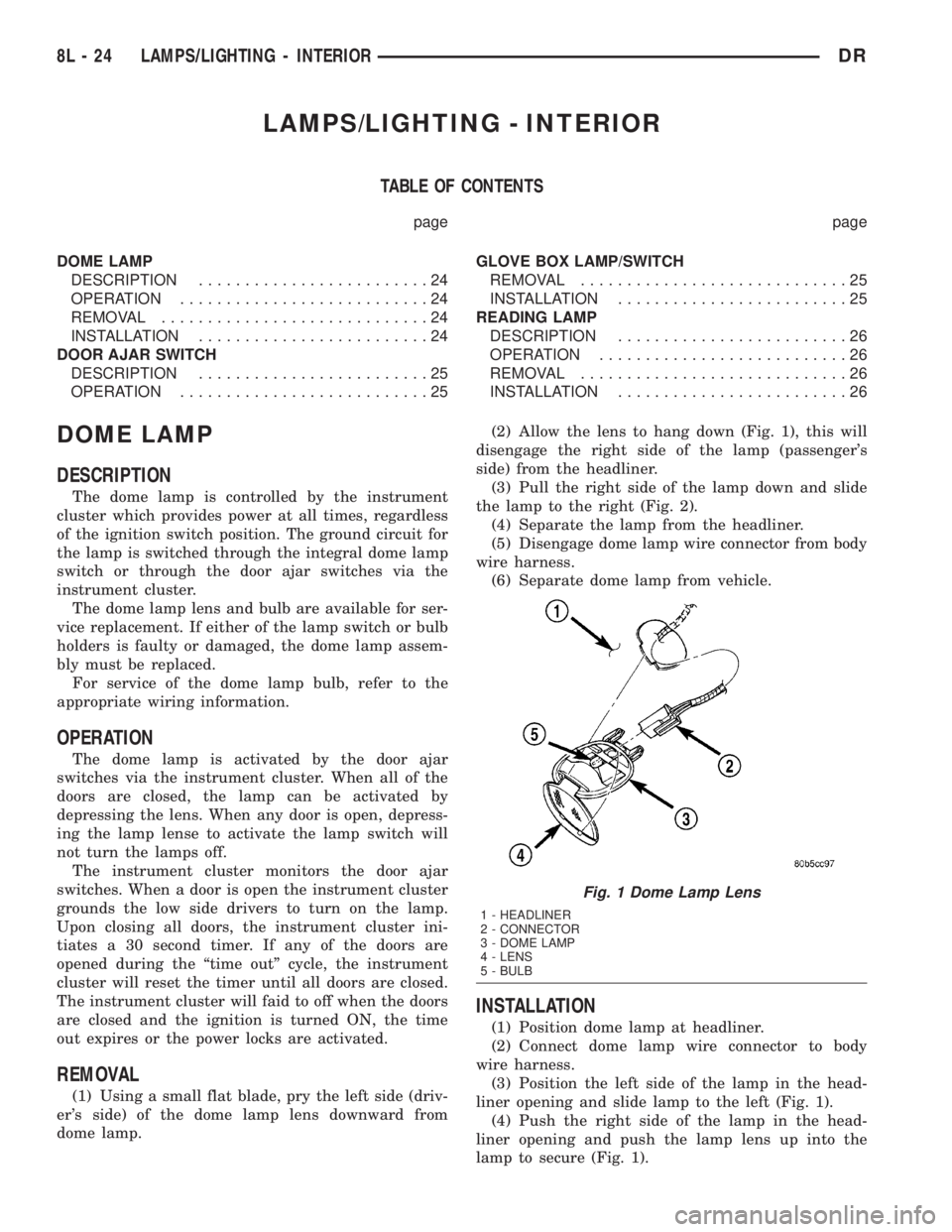
dome lamp.(2) Allow the lens to hang down (Fig. 1), this will
disengage the right side of the lamp (passenger's
side) from the headliner.
(3) Pull the right side of the lamp down and slide
the lamp to the right (Fig. 2).
(4) Separate the lamp from the headliner.
(5) Disengage dome lamp wire connector from body
wire harness.
(6) Separate dome lamp from vehicle.
INSTALLATION
(1) Position dome lamp at headliner.
(2) Connect dome lamp wire connector to body
wire harness.
(3) Position the left side of the lamp in the head-
liner opening and slide lamp to the left (Fig. 1).
(4) Push the right side of the lamp in the head-
liner opening and push the lamp lens up into the
lamp to secure (Fig. 1).
Fig. 1 Dome Lamp Lens
1 - HEADLINER
2 - CONNECTOR
3 - DOME LAMP
4 - LENS
5 - BULB
8L - 24 LAMPS/LIGHTING - INTERIORDR
Page 574 of 2895
then sends the proper ambient temperature mes-
sages to the EVIC, CMTC over the PCI J1850 data
bus.
The temperature function is supported by the
ambient temperature sensor, a wiring circuit, the
Front Control Module, the Programmable Communi-
cations Interface (PCI) data bus, and a portion of the
Electronics module. If any portion of the ambient
temperature sensor circuit fails, the Front Control
Module will self-diagnose the circuit.
For complete circuit diagrams, refer toWiring.
DIAGNOSIS AND TESTING
DIAGNOSIS AND TESTING - AMBIENT
TEMPERATURE SENSOR
(1) Turn the ignition switch to the Off position.
Disconnect and isolate the battery negative cable.
Disconnect the ambient temperature sensor wire har-
ness connector.
(2) Measure the resistance of the ambient temper-
ature sensor. At 24É C (75É F), the sensor resistance
should be approximately 10.3 kilohms. At 30É C (86É
F), the sensor resistance should be approximately
7.57 kilohms. The sensor resistance should decrease
as the temperature rises. If OK, refer toDiagnosis
and Testing - Ambient Temperature Sensor Cir-
cuitin this group. If not OK, replace the faulty
ambient temperature sensor.
NOTE: The ambient temperature sensor is a very
sensitive device. When testing, be certain the tem-
perature sensor has had time to stabilize (room
temperature) before attempting to read the sensor
resistance. Failure to let the ambient temperature
sensor temperature stabilize could result in a mis-
leading test.
DIAGNOSIS AND TESTING - AMBIENT
TEMPERATURE SENSOR CIRCUIT
(1) Turn the ignition switch to the Off position.
Disconnect and isolate the battery negative cable.
Disconnect the ambient temperature sensor wire har-
ness connector and the Front Control Module wire
harness connector.
(2) Connect a jumper wire between the two termi-
nals of the ambient temperature sensor wire harness
connector.
(3) Check for continuity between the sensor return
circuit and the ambient temperature sensor signal
circuit cavities of the Front Control Module wire har-
ness connector. There should be continuity. If OK, go
to Step 4. If not OK, repair the open sensor return or
signal circuit as required.(4) Remove the jumper wire from the ambient tem-
perature sensor wire harness connector. Check for
continuity between the sensor return circuit cavity of
the Front Control Module wire harness connector
and a good ground. There should be no continuity. If
OK, go to Step 5. If not OK, repair the shorted sen-
sor return circuit as required.
(5) Check for continuity between the ambient tem-
perature sensor signal circuit cavity of the Front
Control Module wire harness connector and a good
ground. There should be no continuity. If OK, refer to
Diagnosis and Testing - Overhead Consolein
this group. If not OK, repair the shorted ambient
temperature sensor signal circuit as required.
REMOVAL
(1) Open the hood.
(2) Disconnect and isolate the battery negative
cable.
(3) Working on the underside of the hood, remove
screw holding sensor to hood panel.
(4) Disconnect the sensor electrical connector and
remove sensor from vehicle.
INSTALLATION
(1) Connect the sensor electrical connector.
(2) Working on the underside of the hood, install
screw holding sensor to hood panel.
(3) Connect the battery negative cable.
(4) Close the hood.
UNIVERSAL TRANSMITTER
DESCRIPTION
Some DR models are equipped with a universal
transmitter transceiver. The universal transmitter is
integral to the Electronic Vehicle Information Center
(EVIC) and the Compass Mini-Trip Computer
(CMTC), which is located in the overhead console.
The only visible component of the universal transmit-
ter are the three transmitter push buttons centered
between the modules push buttons located just rear-
ward of the display screen in the overhead console.
The three universal transmitter push buttons are
identified with one, two or three light indicators so
that they be easily identified.
Each of the three universal transmitter push but-
tons control an independent radio transmitter chan-
nel. Each of these three channels can be trained to
transmit a different radio frequency signal for the
remote operation of garage door openers, motorized
gate openers, home or office lighting, security sys-
tems or just about any other device that can be
equipped with a radio receiver in the 286 to 399
MegaHertz (MHz) frequency range for remote opera-
DRMESSAGE SYSTEMS 8M - 11
AMBIENT TEMP SENSOR (Continued)
Page 579 of 2895
less Entry (RKE) system radio frequency transmit-
ters, if equipped.
Certain functions and features of the power lock
system rely upon resources shared with other elec-
tronic modules in the vehicle over the Programmable
Communications Interface (PCI) data bus network.
For proper diagnosis of these electronic modules or of
the PCI data bus network, the use of a DRB IIIt
scan tool and the appropriate diagnostic information
are required.
CENTRAL LOCKING/UNLOCKING
The instrument cluster will lock all doors when a
cylinder lock switch is activated in the ªlockº posi-
tion. When the instrument cluster receives an unlock
command from one of the cylinder lock switches, it
will unlock only that door. If the instrument cluster
receives a second command within a 5 second period,
it will unlock all the remaining doors. The illumi-
nated entry will activate during door unlock.
ENHANCED ACCIDENT RESPONSE
Upon detection of an airbag deployment by way of
the PCI bus, the instrument cluster will:
²Immediately disable the power door lock output.
²Unlock all doors by activating the door unlock
output for approximately 300 milliseconds.
²After actuating the door unlock output, allow
the door lock motors to be activated if the door lock
input has been inactive (not erratic) for 2 seconds
since the reception of the airbag deployment mes-
sage.
REMOTE KEYLESS ENTRY
A Radio Frequency (RF) type Remote Keyless
Entry (RKE) system is an available factory-installed
option on this model. The RKE system allows the use
of a remote battery-powered radio transmitter to sig-
nal the instrument cluster to actuate the power lock
system. The RKE receiver operates on non-switched
battery current through a fuse in the Integrated
Power Module (IPM), so that the system remains
operational, regardless of the ignition switch position.
The RKE transmitters are also equipped with a
Panic button. If the Panic button on the RKE trans-
mitter is depressed, the horn will sound and the
exterior lights will flash on the vehicle for about
three minutes, or until the Panic button is depressed
a second time. A vehicle speed of about 25.7 kilome-
ters-per-hour (15 miles-per-hour) will also cancel the
panic event.
The RKE system can also perform other functions
on this vehicle. If the vehicle is equipped with the
optional Vehicle Theft Security System (VTSS), the
RKE transmitter will arm the VTSS when the Lockbutton is depressed, and disarm the VTSS when the
Unlock button is depressed.
The RKE system includes two transmitters when
the vehicle is shipped from the factory, but the sys-
tem can retain the vehicle access codes of up to a
total of four transmitters. The transmitter codes are
retained in the RKE module memory, even if the bat-
tery is disconnected. If an RKE transmitter is faulty
or lost, new transmitter vehicle access codes can be
programmed into the system using a DRB IIItscan
tool.
This vehicle also offers several customer program-
mable features, which allows the selection of several
optional electronic features to suit individual prefer-
ences. Customer programmable feature options
affecting the RKE system include:
²Remote Unlock Sequence- Allows the option
of having only the driver side front door unlock when
the RKE transmitter Unlock button is depressed the
first time. The remaining doors unlock when the but-
ton is depressed a second time within 5 seconds of
the first unlock press. Another option is having all
doors unlock upon the first depression of the RKE
transmitter Unlock button.
²Sound Horn on Lock- Allows the option of
having the horn sound a short chirp as an audible
verification that the RKE system received a valid
Lock request from the RKE transmitter, or having no
audible verification.
²Flash Lights with Lock and Unlock- Allows
the option of having the park lamps flash as an opti-
cal verification that the RKE system received a valid
Lock request or Unlock request from the RKE trans-
mitter, or having no optical verification.
²Programming Additional Transmitters-
Allows up to a total of four transmitter vehicle access
codes to be stored in the receiver memory.
Certain functions and features of the RKE system
rely upon resources shared with other electronic
modules in the vehicle over the Programmable Com-
munications Interface (PCI) data bus network. The
PCI data bus network allows the sharing of sensor
information. This helps to reduce wire harness com-
plexity, internal controller hardware, and component
sensor current loads. For diagnosis of these electronic
modules or of the PCI data bus network, the use of a
DRB IIItscan tool and the appropriate diagnostic
information are required.
OPERATION
POWER LOCKS
The instrument cluster locks or unlocks the doors
when an actuation input signal from a door lock
switch or Remote Keyless Entry Module (RKE) is
received. The instrument cluster turns on the output
8N - 2 POWER LOCKSDR
POWER LOCKS (Continued)