air condition DODGE RAM 2003 Service Owners Manual
[x] Cancel search | Manufacturer: DODGE, Model Year: 2003, Model line: RAM, Model: DODGE RAM 2003Pages: 2895, PDF Size: 83.15 MB
Page 534 of 2895
reads from ª8º to ª18º volts. An International Control
and Display Symbol icon for ªBattery Charging Con-
ditionº is located on the cluster overlay, directly
below the right end of the gauge scale. The voltage
gauge graphics are black against a white field except
for a single red graduation at each end of the gauge
scale, making them clearly visible within the instru-
ment cluster in daylight. When illuminated from
behind by the panel lamps dimmer controlled cluster
illumination lighting with the exterior lamps turned
On, the black graphics appear blue and the red
graphics still appear red. The orange gauge needle is
internally illuminated. Gauge illumination is pro-
vided by replaceable incandescent bulb and bulb
holder units located on the instrument cluster elec-
tronic circuit board. The voltage gauge is serviced as
a unit with the instrument cluster.
OPERATION
The voltage gauge gives an indication to the vehi-
cle operator of the electrical system voltage. This
gauge is controlled by the instrument cluster circuit
board based upon cluster programming and elec-
tronic messages received by the cluster from the
Powertrain Control Module (PCM) on vehicles
equipped with a gasoline engine, or from the Engine
Control Module (ECM) on vehicles equipped with a
diesel engine over the Programmable Communica-
tions Interface (PCI) data bus. The voltage gauge is
an air core magnetic unit that receives battery cur-
rent on the instrument cluster electronic circuit
board through the fused ignition switch output (run-
start) circuit whenever the ignition switch is in the
On or Start positions. The cluster is programmed to
move the gauge needle back to the left end of the
scale after the ignition switch is turned to the Off
position. The instrument cluster circuitry controls
the gauge needle position and provides the following
features:
²System Voltage Message- Each time the clus-
ter receives a system voltage message from the PCM
or ECM indicating the system voltage is between
about 9.5 volts and about 15 volts, the gauge needle
is moved to the relative voltage position on the gauge
scale.
²System Voltage Low (Charge Fail) Message
- Each time the cluster receives three consecutive
messages from the PCM or ECM indicating the elec-
trical system voltage is less than about 9 volts
(charge fail condition), the gauge needle is moved to
the graduation on the far left end of the gauge scale
and the check gauges indicator is illuminated. The
gauge needle remains at the far left end of the gauge
scale and the check gauges indicator remains illumi-
nated until the cluster receives a single message
from the PCM or ECM indicating the electrical sys-tem voltage is greater than about 9.5 volts (but less
than about 15.5 volts), or until the ignition switch is
turned to the Off position, whichever occurs first. On
vehicles equipped with the optional diesel engine, the
ECM is programmed to restrict the voltage gauge
needle to a position above the graduation on the far
left end of the gauge scale and suppress the check
engine indicator operation until after the engine
intake manifold air heater has completed a pre-heat
or post-heat cycle.
²System Voltage High Message- Each time
the cluster receives three consecutive messages from
the PCM or ECM indicating the electrical system
voltage is greater than about 15.5 volts, the gauge
needle is moved to the graduation on the far right
end of the gauge scale and the check gauges indica-
tor is illuminated. The gauge needle remains at the
right end of the gauge scale and the check gauges
indicator remains illuminated until the cluster
receives a message from the PCM or ECM indicating
the electrical system voltage is less than about 15.0
volts (but greater than about 9.5 volts), or until the
ignition switch is turned to the Off position, which-
ever occurs first.
²Communication Error- If the cluster fails to
receive a system voltage message, it will hold the
gauge needle at the last indication for about five sec-
onds or until the ignition switch is turned to the Off
position, whichever occurs first. After five seconds,
the cluster will move the gauge needle to the far left
end of the gauge scale.
²Actuator Test- Each time the cluster is put
through the actuator test, the voltage gauge needle
will be swept to several calibration points on the
gauge scale in a prescribed sequence in order to con-
firm the functionality of the gauge and the cluster
control circuitry.
On vehicles with a gasoline engine, the PCM con-
tinually monitors the system voltage to control the
generator output. On vehicles with a diesel engine,
the ECM continually monitors the system voltage to
control the generator output. The PCM or ECM then
sends the proper system voltage messages to the
instrument cluster. For further diagnosis of the volt-
age gauge or the instrument cluster circuitry that
controls the gauge, (Refer to 8 - ELECTRICAL/IN-
STRUMENT CLUSTER - DIAGNOSIS AND TEST-
ING). If the instrument cluster turns on the check
gauges indicator due to a charge fail or voltage high
condition, it may indicate that the charging system
requires service. For proper diagnosis of the charging
system, the PCM, the ECM, the PCI data bus, or the
electronic message inputs to the instrument cluster
that control the voltage gauge, a DRBIIItscan tool is
required. Refer to the appropriate diagnostic infor-
mation.
DRINSTRUMENT CLUSTER 8J - 41
VOLTAGE GAUGE (Continued)
Page 540 of 2895
within 45 seconds. The system will not activate if
more than 45 seconds elapse between ignition switch
OFF and headlamp switch OFF. The FCM will allow
the headlamps to remain ON for 60 seconds (config-
urable) before they automatically turn off (If the key
is in the ignition during the headlamp time delay
mode, then the headlamps including panel dimming
will be ON).
LAMP OUTAGE
If one or more of the following lamps (Low and/or
High beams, Brake and/or Turn Signal) are out, then
a ªlamps outº indicator located in the cluster will
illuminate.
OPTICAL HORN/HIGH BEAMS
When the multiplexed multifunction switch is
pulled to the first detent (optical horn) signal, the
headlamps are ON, the Instrument Cluster shall
send a message via J1850 to the FCM to turn on the
headlamps drivers to illuminate all four filaments
(Low and High beams). When the multifunction
switch is pulled to the second detent (high beam) sig-
nal and the headlamps are ON, the Instrument Clus-
ter shall send a message via J1850 to the FCM to
turn on the headlamps drivers. The High Beams are
illuminated and the Low Beams and Fog Lamps (if
ON) are extinguished. If the headlamps were in the
high beam configuration when power was removed
from the headlamps, the headlamps will return to
their last state prior to being shut off.
DIAGNOSIS AND TESTING - LAMPS/LIGHTING
- EXTERIOR
WARNING: EYE PROTECTION SHOULD BE USED
WHEN SERVICING GLASS COMPONENTS. PER-
SONAL INJURY CAN RESULT.
CAUTION: Do not touch the glass of halogen bulbs
with fingers or other possibly oily surface, reduced
bulb life will result. Do not use bulbs other than
those indicated in the Bulb Application table. Dam-
age to lamp and/or Daytime Running Lamp Module
can result. Do not use fuses, circuit breakers or
relays having greater amperage value than indi-
cated on the fuse panel or in the Owners Manual.
When a vehicle experiences problems with the
headlamp system, verify the condition of the battery
connections, fuses, charging system, headlamp bulbs,
wire connectors, relay, multifunction switch, and
headlamp switch. Refer to the appropriate wiring
information.
Each vehicle is equipped with various lamp assem-
blies. A good ground is necessary for proper lighting
operation. Grounding is provided by the lamp socket
when it comes in contact with the metal body, or
through a separate ground wire.
When changing lamp bulbs check the socket for
loose pin connections and corrosion. Repair as neces-
sary.
When it is necessary to remove components to ser-
vice another, it should not be necessary to apply
excessive force or bend a component to remove it.
Before damaging a trim component, verify hidden
fasteners or captured edges are not holding the com-
ponent in place.
DRLAMPS/LIGHTING - EXTERIOR 8L - 3
LAMPS/LIGHTING - EXTERIOR (Continued)
Page 541 of 2895
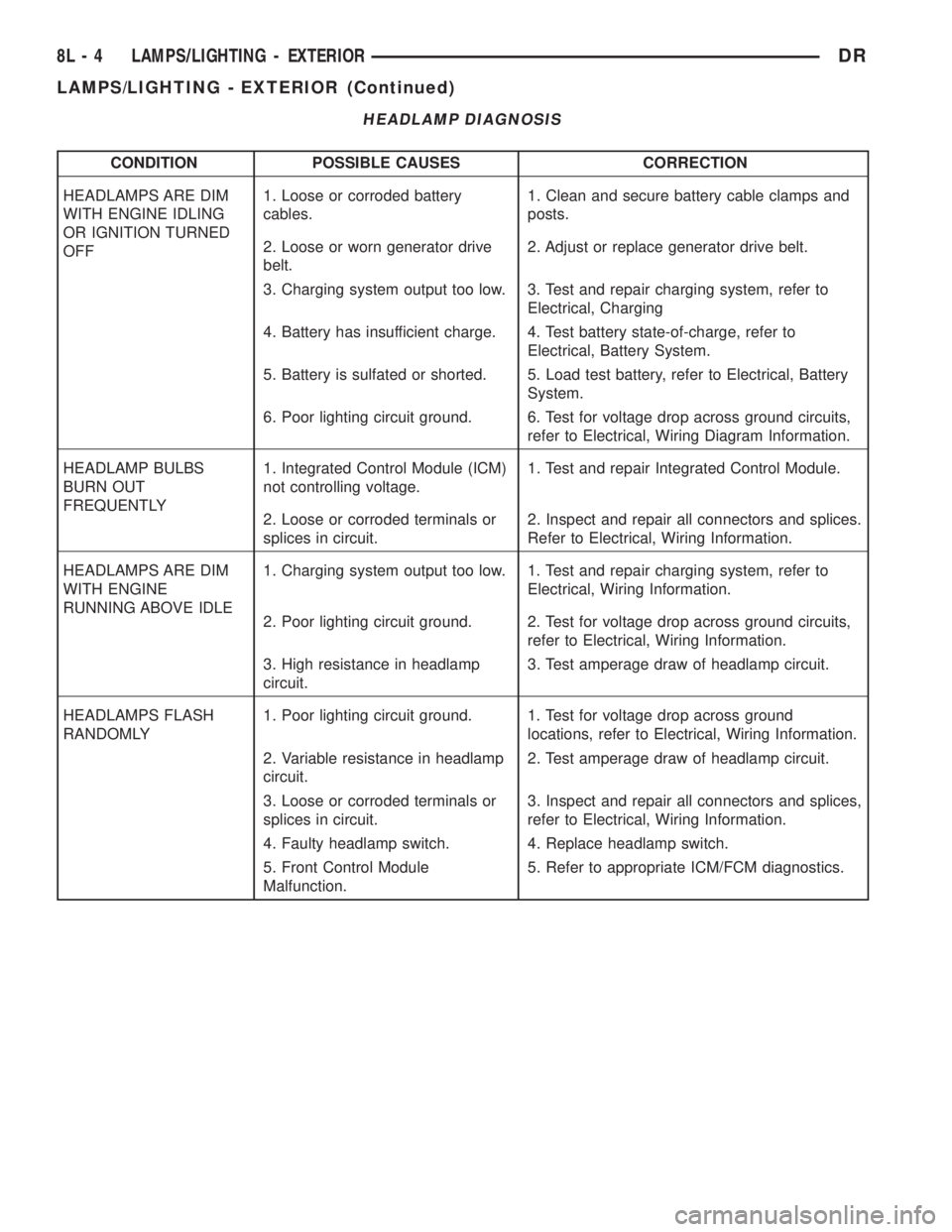
HEADLAMP DIAGNOSIS
CONDITION POSSIBLE CAUSES CORRECTION
HEADLAMPS ARE DIM
WITH ENGINE IDLING
OR IGNITION TURNED
OFF1. Loose or corroded battery
cables.1. Clean and secure battery cable clamps and
posts.
2. Loose or worn generator drive
belt.2. Adjust or replace generator drive belt.
3. Charging system output too low. 3. Test and repair charging system, refer to
Electrical, Charging
4. Battery has insufficient charge. 4. Test battery state-of-charge, refer to
Electrical, Battery System.
5. Battery is sulfated or shorted. 5. Load test battery, refer to Electrical, Battery
System.
6. Poor lighting circuit ground. 6. Test for voltage drop across ground circuits,
refer to Electrical, Wiring Diagram Information.
HEADLAMP BULBS
BURN OUT
FREQUENTLY1. Integrated Control Module (ICM)
not controlling voltage.1. Test and repair Integrated Control Module.
2. Loose or corroded terminals or
splices in circuit.2. Inspect and repair all connectors and splices.
Refer to Electrical, Wiring Information.
HEADLAMPS ARE DIM
WITH ENGINE
RUNNING ABOVE IDLE1. Charging system output too low. 1. Test and repair charging system, refer to
Electrical, Wiring Information.
2. Poor lighting circuit ground. 2. Test for voltage drop across ground circuits,
refer to Electrical, Wiring Information.
3. High resistance in headlamp
circuit.3. Test amperage draw of headlamp circuit.
HEADLAMPS FLASH
RANDOMLY1. Poor lighting circuit ground. 1. Test for voltage drop across ground
locations, refer to Electrical, Wiring Information.
2. Variable resistance in headlamp
circuit.2. Test amperage draw of headlamp circuit.
3. Loose or corroded terminals or
splices in circuit.3. Inspect and repair all connectors and splices,
refer to Electrical, Wiring Information.
4. Faulty headlamp switch. 4. Replace headlamp switch.
5. Front Control Module
Malfunction.5. Refer to appropriate ICM/FCM diagnostics.
8L - 4 LAMPS/LIGHTING - EXTERIORDR
LAMPS/LIGHTING - EXTERIOR (Continued)
Page 542 of 2895
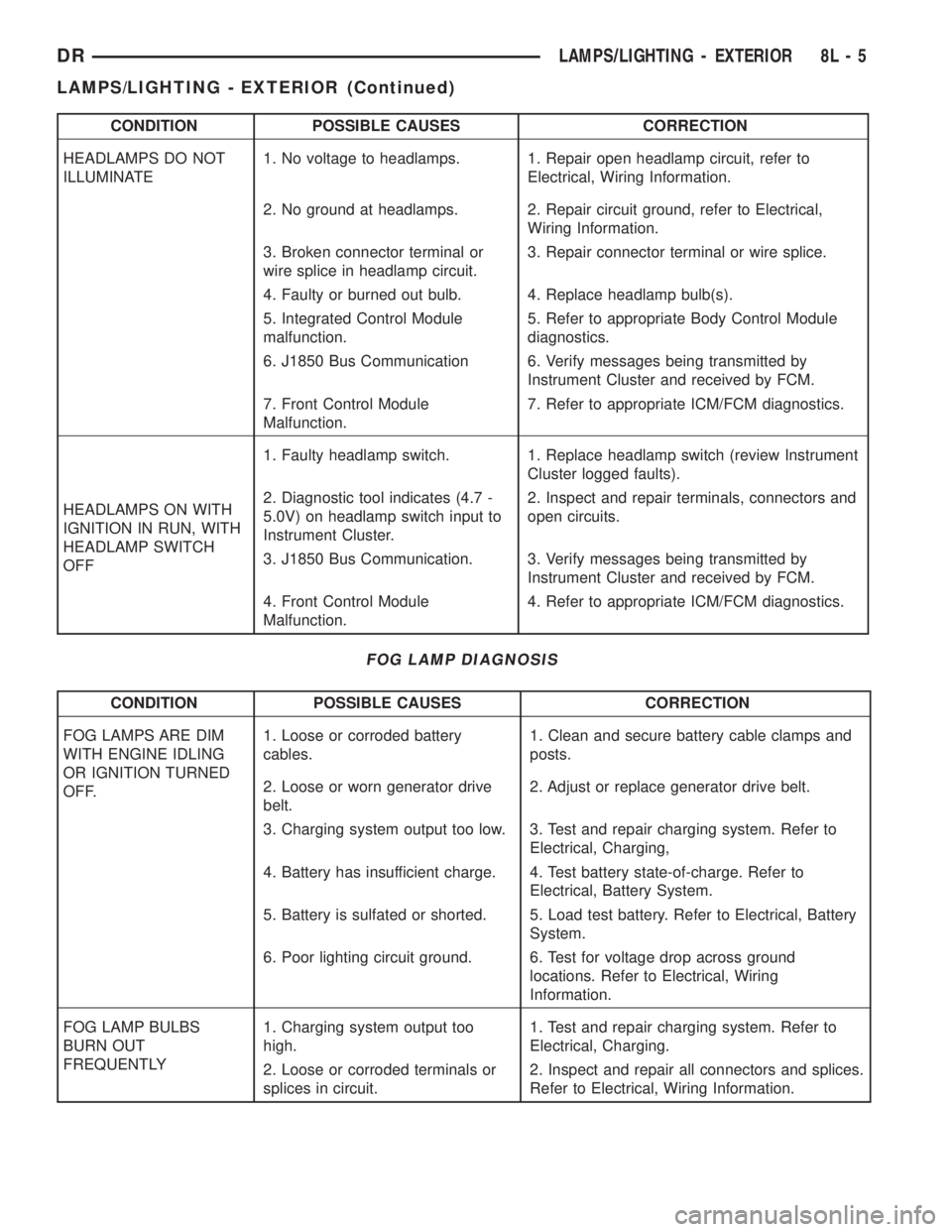
CONDITION POSSIBLE CAUSES CORRECTION
HEADLAMPS DO NOT
ILLUMINATE1. No voltage to headlamps. 1. Repair open headlamp circuit, refer to
Electrical, Wiring Information.
2. No ground at headlamps. 2. Repair circuit ground, refer to Electrical,
Wiring Information.
3. Broken connector terminal or
wire splice in headlamp circuit.3. Repair connector terminal or wire splice.
4. Faulty or burned out bulb. 4. Replace headlamp bulb(s).
5. Integrated Control Module
malfunction.5. Refer to appropriate Body Control Module
diagnostics.
6. J1850 Bus Communication 6. Verify messages being transmitted by
Instrument Cluster and received by FCM.
7. Front Control Module
Malfunction.7. Refer to appropriate ICM/FCM diagnostics.
HEADLAMPS ON WITH
IGNITION IN RUN, WITH
HEADLAMP SWITCH
OFF1. Faulty headlamp switch. 1. Replace headlamp switch (review Instrument
Cluster logged faults).
2. Diagnostic tool indicates (4.7 -
5.0V) on headlamp switch input to
Instrument Cluster.2. Inspect and repair terminals, connectors and
open circuits.
3. J1850 Bus Communication. 3. Verify messages being transmitted by
Instrument Cluster and received by FCM.
4. Front Control Module
Malfunction.4. Refer to appropriate ICM/FCM diagnostics.
FOG LAMP DIAGNOSIS
CONDITION POSSIBLE CAUSES CORRECTION
FOG LAMPS ARE DIM
WITH ENGINE IDLING
OR IGNITION TURNED
OFF.1. Loose or corroded battery
cables.1. Clean and secure battery cable clamps and
posts.
2. Loose or worn generator drive
belt.2. Adjust or replace generator drive belt.
3. Charging system output too low. 3. Test and repair charging system. Refer to
Electrical, Charging,
4. Battery has insufficient charge. 4. Test battery state-of-charge. Refer to
Electrical, Battery System.
5. Battery is sulfated or shorted. 5. Load test battery. Refer to Electrical, Battery
System.
6. Poor lighting circuit ground. 6. Test for voltage drop across ground
locations. Refer to Electrical, Wiring
Information.
FOG LAMP BULBS
BURN OUT
FREQUENTLY1. Charging system output too
high.1. Test and repair charging system. Refer to
Electrical, Charging.
2. Loose or corroded terminals or
splices in circuit.2. Inspect and repair all connectors and splices.
Refer to Electrical, Wiring Information.
DRLAMPS/LIGHTING - EXTERIOR 8L - 5
LAMPS/LIGHTING - EXTERIOR (Continued)
Page 543 of 2895
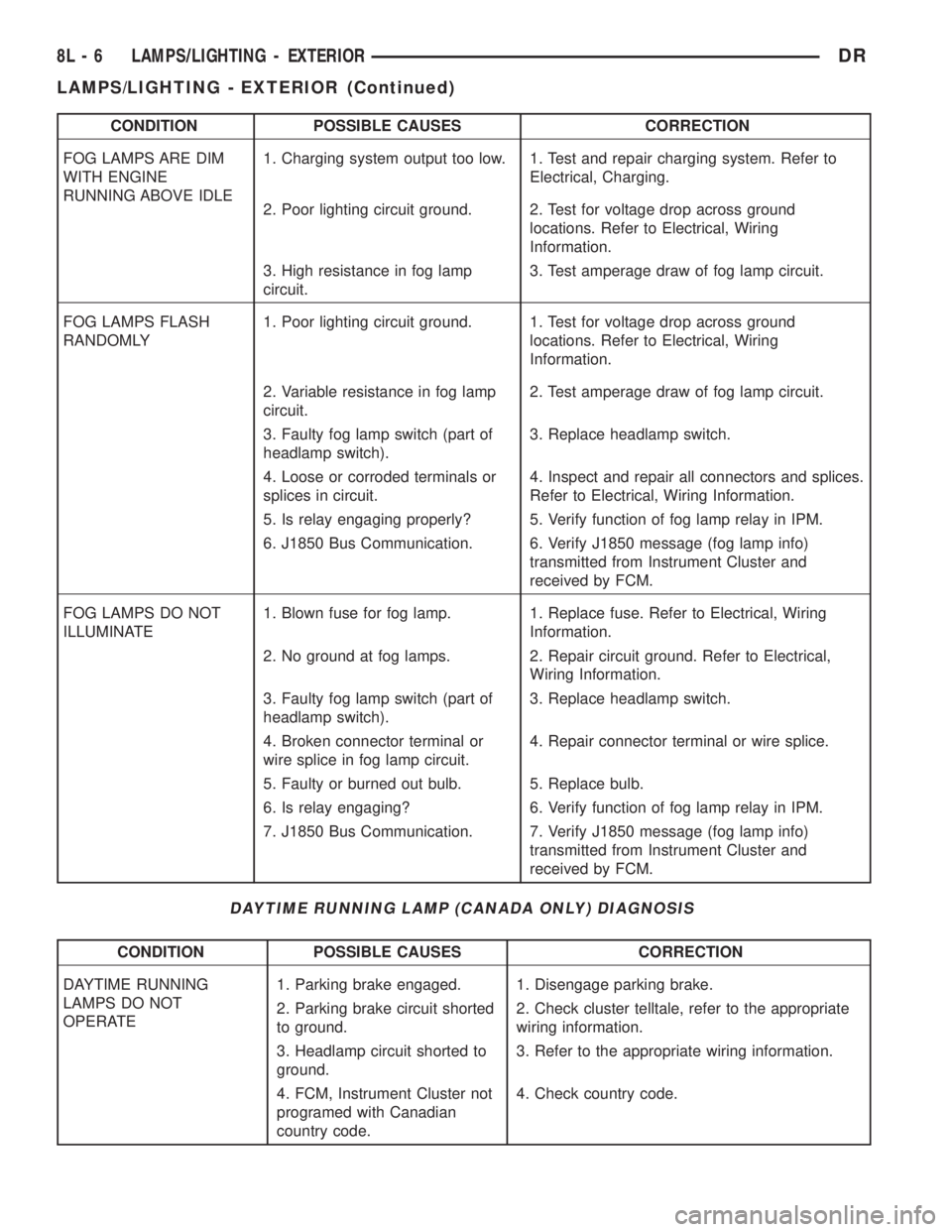
CONDITION POSSIBLE CAUSES CORRECTION
FOG LAMPS ARE DIM
WITH ENGINE
RUNNING ABOVE IDLE1. Charging system output too low. 1. Test and repair charging system. Refer to
Electrical, Charging.
2. Poor lighting circuit ground. 2. Test for voltage drop across ground
locations. Refer to Electrical, Wiring
Information.
3. High resistance in fog lamp
circuit.3. Test amperage draw of fog lamp circuit.
FOG LAMPS FLASH
RANDOMLY1. Poor lighting circuit ground. 1. Test for voltage drop across ground
locations. Refer to Electrical, Wiring
Information.
2. Variable resistance in fog lamp
circuit.2. Test amperage draw of fog lamp circuit.
3. Faulty fog lamp switch (part of
headlamp switch).3. Replace headlamp switch.
4. Loose or corroded terminals or
splices in circuit.4. Inspect and repair all connectors and splices.
Refer to Electrical, Wiring Information.
5. Is relay engaging properly? 5. Verify function of fog lamp relay in IPM.
6. J1850 Bus Communication. 6. Verify J1850 message (fog lamp info)
transmitted from Instrument Cluster and
received by FCM.
FOG LAMPS DO NOT
ILLUMINATE1. Blown fuse for fog lamp. 1. Replace fuse. Refer to Electrical, Wiring
Information.
2. No ground at fog lamps. 2. Repair circuit ground. Refer to Electrical,
Wiring Information.
3. Faulty fog lamp switch (part of
headlamp switch).3. Replace headlamp switch.
4. Broken connector terminal or
wire splice in fog lamp circuit.4. Repair connector terminal or wire splice.
5. Faulty or burned out bulb. 5. Replace bulb.
6. Is relay engaging? 6. Verify function of fog lamp relay in IPM.
7. J1850 Bus Communication. 7. Verify J1850 message (fog lamp info)
transmitted from Instrument Cluster and
received by FCM.
DAYTIME RUNNING LAMP (CANADA ONLY) DIAGNOSIS
CONDITION POSSIBLE CAUSES CORRECTION
DAYTIME RUNNING
LAMPS DO NOT
OPERATE1. Parking brake engaged. 1. Disengage parking brake.
2. Parking brake circuit shorted
to ground.2. Check cluster telltale, refer to the appropriate
wiring information.
3. Headlamp circuit shorted to
ground.3. Refer to the appropriate wiring information.
4. FCM, Instrument Cluster not
programed with Canadian
country code.4. Check country code.
8L - 6 LAMPS/LIGHTING - EXTERIORDR
LAMPS/LIGHTING - EXTERIOR (Continued)
Page 565 of 2895
overhead console assembly to the roof header can
also affect compass operation. If the vehicle roof
should become magnetized, the demagnetizing and
calibration procedures found in this section may be
required to restore proper compass operation.
TEMPERATURE DISPLAY
All the available overhead consoles on this model
include Temperature information. The temperature
displays the outside ambient temperature in whole
degrees. The temperature display can be toggled
from Fahrenheit to Celsius by selecting the desired
U.S./Metric option from the customer programmable
features. The displayed temperature is not an instant
reading of conditions, but an average temperature. It
may take the temperature display several minutes to
respond to a major temperature change, such as driv-
ing out of a heated garage into winter temperatures.
When the ignition switch is turned to the Off posi-
tion, the last displayed temperature reading stays in
the electronic control modules, (CMTC, EVIC) mem-
ory. When the ignition switch is turned to the On
position again, the electronic module will display the
memory temperature for one minute; then update the
display to the current average temperature reading
within five minutes.
The temperature function is supported by an ambi-
ent temperature sensor. This sensor is mounted out-
side the passenger compartment near the front and
center of the vehicle, and is hard wired to the Front
Control Module (FCM). The FCM sends temperature
status messages to the module over the J1850 PCI
data bus circuit. For more information on the ambi-ent temperature sensor, refer to Ambient Tempera-
ture Sensor later in this section.
Following are general descriptions of the major
components used in the overhead console. Refer to
Wiring Diagrams for complete circuit schematics.
OPERATION
Refer to the vehicle Owner's Manual for specific
operation of each overhead console and its systems.
DIAGNOSIS AND TESTING - OVERHEAD
CONSOLE
If the problem with the overhead console is an
inaccurate or scrambled display, refer toSELF-DI-
AGNOSTIC TESTlater in this text. If the problem
with the overhead console is incorrect Vacuum Fluo-
rescent Display (VFD) dimming levels, use a DRB
IIItscan tool and the proper Diagnostic Procedures
manual to test for the correct dimming message
inputs being received from the Body Control Module
(BCM) or Front Control Module (FCM) over the
J1850 Programmable Communications Interface
(PCI) data bus circuit. If the problem is a no-display
condition, use the following procedure. For complete
circuit diagrams, refer toOverhead Consolein the
Wiring Diagrams section of the service manual.
(1) Remove the overhead console from the head-
liner (Refer to 8 - ELECTRICAL/OVERHEAD CON-
SOLE - REMOVAL).
(2) Check for battery voltage at the overhead con-
sole electrical connector. Refer to Wiring for connec-
tor information. If OK, go to Step 3. If not OK, Check
for battery voltage at the appropriate B(+) fuse in the
integrated power module, repair the open fused B(+)
circuit as required.
(3) Turn the ignition switch to the On position.
Check the fused ignition switch output circuit(s) at
the overhead console electrical connector. If OK, go to
Step 4. If not OK, repair the open or shorted circuit
as required.
(4) Turn the ignition switch to the Off position.
Disconnect and isolate the battery negative cable.
Check for continuity between the ground circuit cav-
ity of the overhead console electrical connector and a
good ground. There should be continuity. If OK, refer
toSELF-DIAGNOSTIC TESTbelow for further
diagnosis of the electronics module and the J1850
PCI data bus circuit. If not OK, repair the open
ground circuit as required.
SELF-DIAGNOSTIC TEST
A self-diagnostic test is built-in to the module to
determine that the electronics module is operating
properly, and that all the J1850 PCI data bus mes-
sages are being received for proper operation. To per-
form the self-diagnostic test proceed as follows:
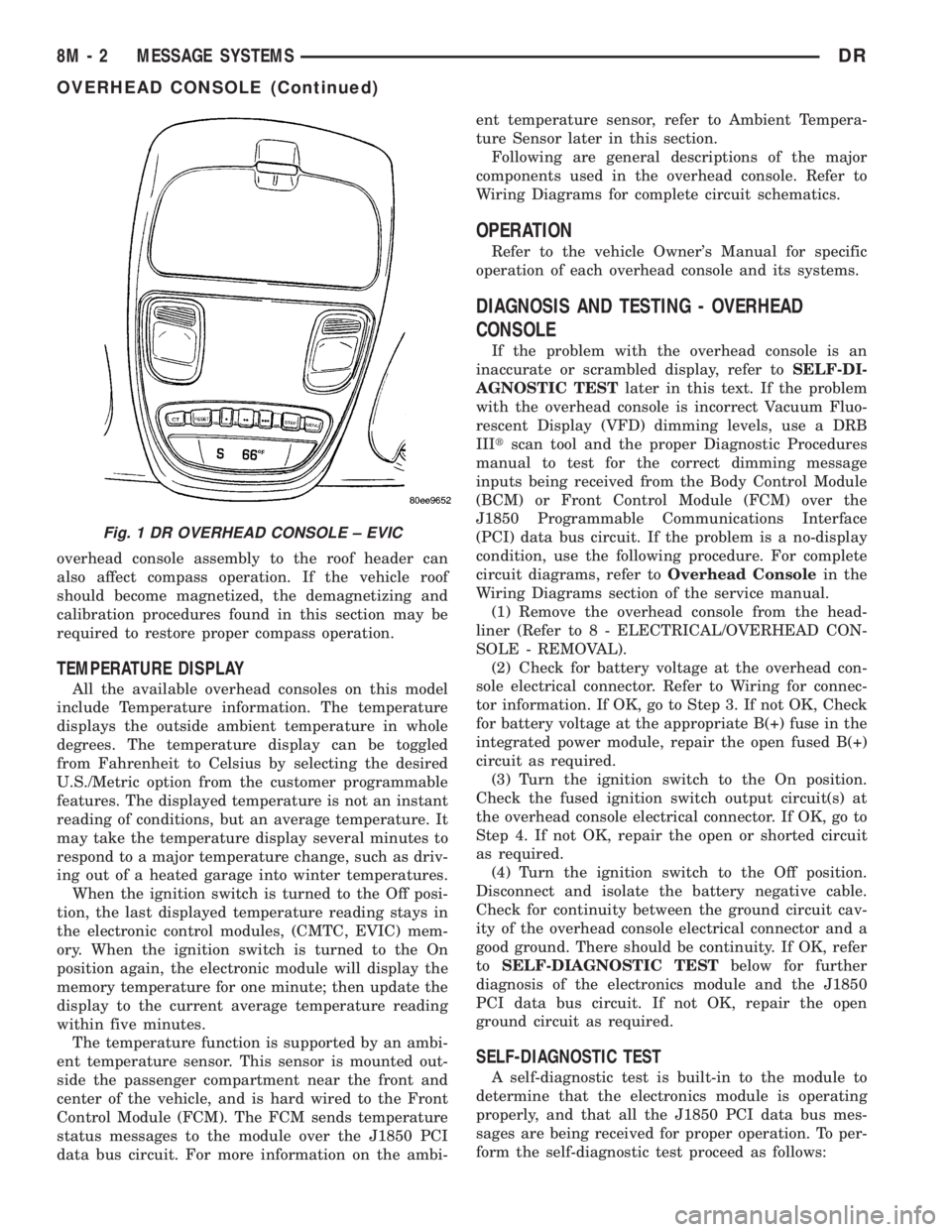
Fig. 1 DR OVERHEAD CONSOLE ± EVIC
8M - 2 MESSAGE SYSTEMSDR
OVERHEAD CONSOLE (Continued)
Page 580 of 2895
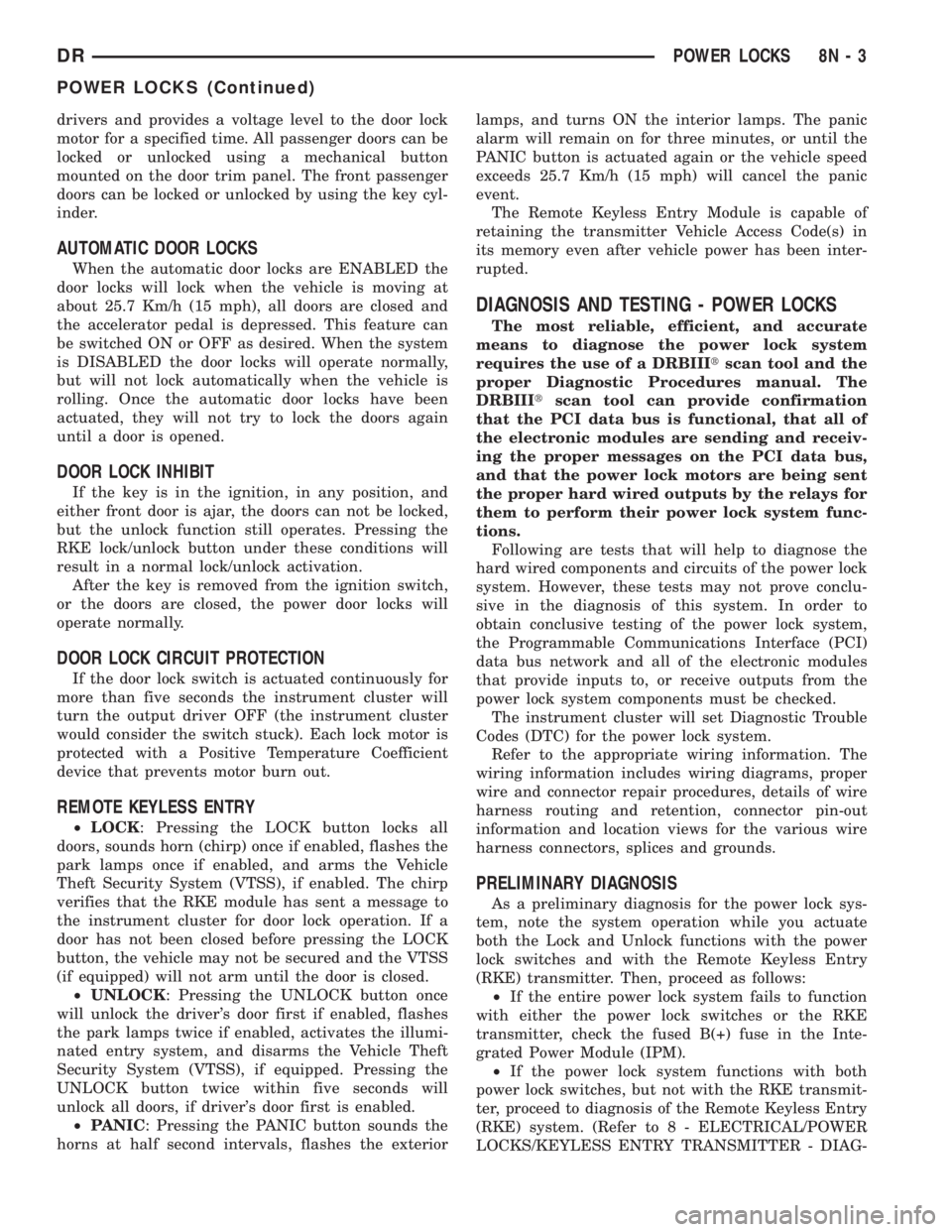
drivers and provides a voltage level to the door lock
motor for a specified time. All passenger doors can be
locked or unlocked using a mechanical button
mounted on the door trim panel. The front passenger
doors can be locked or unlocked by using the key cyl-
inder.
AUTOMATIC DOOR LOCKS
When the automatic door locks are ENABLED the
door locks will lock when the vehicle is moving at
about 25.7 Km/h (15 mph), all doors are closed and
the accelerator pedal is depressed. This feature can
be switched ON or OFF as desired. When the system
is DISABLED the door locks will operate normally,
but will not lock automatically when the vehicle is
rolling. Once the automatic door locks have been
actuated, they will not try to lock the doors again
until a door is opened.
DOOR LOCK INHIBIT
If the key is in the ignition, in any position, and
either front door is ajar, the doors can not be locked,
but the unlock function still operates. Pressing the
RKE lock/unlock button under these conditions will
result in a normal lock/unlock activation.
After the key is removed from the ignition switch,
or the doors are closed, the power door locks will
operate normally.
DOOR LOCK CIRCUIT PROTECTION
If the door lock switch is actuated continuously for
more than five seconds the instrument cluster will
turn the output driver OFF (the instrument cluster
would consider the switch stuck). Each lock motor is
protected with a Positive Temperature Coefficient
device that prevents motor burn out.
REMOTE KEYLESS ENTRY
²LOCK: Pressing the LOCK button locks all
doors, sounds horn (chirp) once if enabled, flashes the
park lamps once if enabled, and arms the Vehicle
Theft Security System (VTSS), if enabled. The chirp
verifies that the RKE module has sent a message to
the instrument cluster for door lock operation. If a
door has not been closed before pressing the LOCK
button, the vehicle may not be secured and the VTSS
(if equipped) will not arm until the door is closed.
²UNLOCK: Pressing the UNLOCK button once
will unlock the driver's door first if enabled, flashes
the park lamps twice if enabled, activates the illumi-
nated entry system, and disarms the Vehicle Theft
Security System (VTSS), if equipped. Pressing the
UNLOCK button twice within five seconds will
unlock all doors, if driver's door first is enabled.
²PANIC: Pressing the PANIC button sounds the
horns at half second intervals, flashes the exteriorlamps, and turns ON the interior lamps. The panic
alarm will remain on for three minutes, or until the
PANIC button is actuated again or the vehicle speed
exceeds 25.7 Km/h (15 mph) will cancel the panic
event.
The Remote Keyless Entry Module is capable of
retaining the transmitter Vehicle Access Code(s) in
its memory even after vehicle power has been inter-
rupted.
DIAGNOSIS AND TESTING - POWER LOCKS
The most reliable, efficient, and accurate
means to diagnose the power lock system
requires the use of a DRBIIItscan tool and the
proper Diagnostic Procedures manual. The
DRBIIItscan tool can provide confirmation
that the PCI data bus is functional, that all of
the electronic modules are sending and receiv-
ing the proper messages on the PCI data bus,
and that the power lock motors are being sent
the proper hard wired outputs by the relays for
them to perform their power lock system func-
tions.
Following are tests that will help to diagnose the
hard wired components and circuits of the power lock
system. However, these tests may not prove conclu-
sive in the diagnosis of this system. In order to
obtain conclusive testing of the power lock system,
the Programmable Communications Interface (PCI)
data bus network and all of the electronic modules
that provide inputs to, or receive outputs from the
power lock system components must be checked.
The instrument cluster will set Diagnostic Trouble
Codes (DTC) for the power lock system.
Refer to the appropriate wiring information. The
wiring information includes wiring diagrams, proper
wire and connector repair procedures, details of wire
harness routing and retention, connector pin-out
information and location views for the various wire
harness connectors, splices and grounds.
PRELIMINARY DIAGNOSIS
As a preliminary diagnosis for the power lock sys-
tem, note the system operation while you actuate
both the Lock and Unlock functions with the power
lock switches and with the Remote Keyless Entry
(RKE) transmitter. Then, proceed as follows:
²If the entire power lock system fails to function
with either the power lock switches or the RKE
transmitter, check the fused B(+) fuse in the Inte-
grated Power Module (IPM).
²If the power lock system functions with both
power lock switches, but not with the RKE transmit-
ter, proceed to diagnosis of the Remote Keyless Entry
(RKE) system. (Refer to 8 - ELECTRICAL/POWER
LOCKS/KEYLESS ENTRY TRANSMITTER - DIAG-
DRPOWER LOCKS 8N - 3
POWER LOCKS (Continued)
Page 582 of 2895
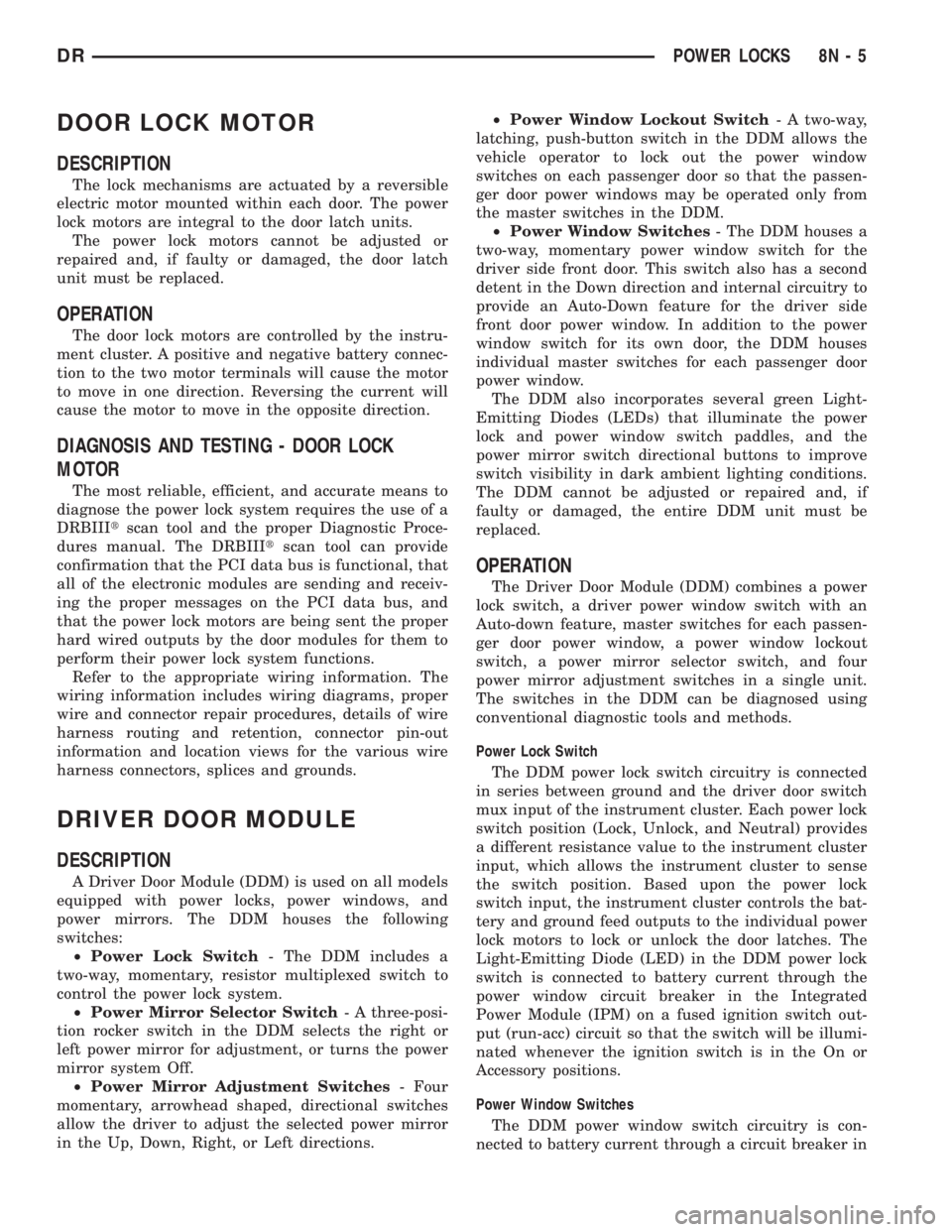
DOOR LOCK MOTOR
DESCRIPTION
The lock mechanisms are actuated by a reversible
electric motor mounted within each door. The power
lock motors are integral to the door latch units.
The power lock motors cannot be adjusted or
repaired and, if faulty or damaged, the door latch
unit must be replaced.
OPERATION
The door lock motors are controlled by the instru-
ment cluster. A positive and negative battery connec-
tion to the two motor terminals will cause the motor
to move in one direction. Reversing the current will
cause the motor to move in the opposite direction.
DIAGNOSIS AND TESTING - DOOR LOCK
MOTOR
The most reliable, efficient, and accurate means to
diagnose the power lock system requires the use of a
DRBIIItscan tool and the proper Diagnostic Proce-
dures manual. The DRBIIItscan tool can provide
confirmation that the PCI data bus is functional, that
all of the electronic modules are sending and receiv-
ing the proper messages on the PCI data bus, and
that the power lock motors are being sent the proper
hard wired outputs by the door modules for them to
perform their power lock system functions.
Refer to the appropriate wiring information. The
wiring information includes wiring diagrams, proper
wire and connector repair procedures, details of wire
harness routing and retention, connector pin-out
information and location views for the various wire
harness connectors, splices and grounds.
DRIVER DOOR MODULE
DESCRIPTION
A Driver Door Module (DDM) is used on all models
equipped with power locks, power windows, and
power mirrors. The DDM houses the following
switches:
²Power Lock Switch- The DDM includes a
two-way, momentary, resistor multiplexed switch to
control the power lock system.
²Power Mirror Selector Switch- A three-posi-
tion rocker switch in the DDM selects the right or
left power mirror for adjustment, or turns the power
mirror system Off.
²Power Mirror Adjustment Switches- Four
momentary, arrowhead shaped, directional switches
allow the driver to adjust the selected power mirror
in the Up, Down, Right, or Left directions.²Power Window Lockout Switch- A two-way,
latching, push-button switch in the DDM allows the
vehicle operator to lock out the power window
switches on each passenger door so that the passen-
ger door power windows may be operated only from
the master switches in the DDM.
²Power Window Switches- The DDM houses a
two-way, momentary power window switch for the
driver side front door. This switch also has a second
detent in the Down direction and internal circuitry to
provide an Auto-Down feature for the driver side
front door power window. In addition to the power
window switch for its own door, the DDM houses
individual master switches for each passenger door
power window.
The DDM also incorporates several green Light-
Emitting Diodes (LEDs) that illuminate the power
lock and power window switch paddles, and the
power mirror switch directional buttons to improve
switch visibility in dark ambient lighting conditions.
The DDM cannot be adjusted or repaired and, if
faulty or damaged, the entire DDM unit must be
replaced.
OPERATION
The Driver Door Module (DDM) combines a power
lock switch, a driver power window switch with an
Auto-down feature, master switches for each passen-
ger door power window, a power window lockout
switch, a power mirror selector switch, and four
power mirror adjustment switches in a single unit.
The switches in the DDM can be diagnosed using
conventional diagnostic tools and methods.
Power Lock Switch
The DDM power lock switch circuitry is connected
in series between ground and the driver door switch
mux input of the instrument cluster. Each power lock
switch position (Lock, Unlock, and Neutral) provides
a different resistance value to the instrument cluster
input, which allows the instrument cluster to sense
the switch position. Based upon the power lock
switch input, the instrument cluster controls the bat-
tery and ground feed outputs to the individual power
lock motors to lock or unlock the door latches. The
Light-Emitting Diode (LED) in the DDM power lock
switch is connected to battery current through the
power window circuit breaker in the Integrated
Power Module (IPM) on a fused ignition switch out-
put (run-acc) circuit so that the switch will be illumi-
nated whenever the ignition switch is in the On or
Accessory positions.
Power Window Switches
The DDM power window switch circuitry is con-
nected to battery current through a circuit breaker in
DRPOWER LOCKS 8N - 5
Page 608 of 2895
ment in the event of an accidental deployment. When
handling a non-deployed seat belt tensioner, take
proper care to keep fingers out from under the
retractor cover and away from the seat belt webbing
where it exits from the retractor cover. In addition,
the supplemental restraint system should be dis-
armed whenever any steering wheel, steering col-
umn, seat belt tensioner, driver airbag, passenger
airbag, side curtain airbag, or instrument panel com-
ponents require diagnosis or service. Failure to
observe this warning could result in accidental air-
bag deployment and possible personal injury.
All damaged, faulty or non-deployed airbags and
seat belt tensioners which are replaced on vehicles
are to be handled and disposed of properly. If an air-
bag or seat belt tensioner unit is faulty or damaged
and non-deployed, refer to the Hazardous Substance
Control System for proper disposal. Dispose of all
non-deployed and deployed airbags and seat belt ten-
sioners in a manner consistent with state, provincial,
local and federal regulations.
SUPPLEMENTAL RESTRAINT STORAGE
Airbags and seat belt tensioners must be stored in
their original, special container until they are used
for service. Also, they must be stored in a clean, dry
environment; away from sources of extreme heat,
sparks, and high electrical energy. Always place or
store any airbag on a surface with its trim cover or
airbag cushion side facing up, to minimize movement
in case of an accidental deployment.
STANDARD PROCEDURE - SERVICE AFTER A
SUPPLEMENTAL RESTRAINT DEPLOYMENT
Any vehicle which is to be returned to use follow-
ing a supplemental restraint deployment, must have
the deployed restraints replaced. In addition, if the
driver airbag has been deployed, the clockspring
must be replaced. If the passenger airbag is
deployed, the passenger airbag door must be
replaced. The seat belt tensioners are deployed by
the same signal that deploys the driver and passen-
ger airbags and must also be replaced if either front
airbag has been deployed. If a side curtain airbag
has been deployed, the complete airbag unit, the
headliner, as well as the upper A, B, and C-pillar
trim must be replaced. These components are not
intended for reuse and will be damaged or weakened
as a result of a supplemental restraint deployment,
which may or may not be obvious during a visual
inspection.
It is also critical that the mounting surfaces and/or
mounting brackets for the Airbag Control Module
(ACM) and Side Impact Airbag Control Module
(SIACM) be closely inspected and restored to their
original conditions following any vehicle impact dam-age. Because the ACM and SIACM each contain
impact sensors that are used by the supplemental
restraint system to monitor or confirm the direction
and severity of a vehicle impact, improper orientation
or insecure fastening of these components may cause
airbags not to deploy when required, or to deploy
when not required. All other vehicle components
should be closely inspected following any supplemen-
tal restraint deployment, but are to be replaced only
as required by the extent of the visible damage
incurred.
CLEANUP PROCEDURE
Following a supplemental restraint deployment,
the vehicle interior will contain a powdery residue.
This residue consists primarily of harmless particu-
late by-products of the small pyrotechnic charge that
initiates the propellant used to deploy a supplemen-
tal restraint. However, this residue may also contain
traces of sodium hydroxide powder, a chemical
by-product of the propellant material that is used to
generate the inert gas that inflates the airbag. Since
sodium hydroxide powder can irritate the skin, eyes,
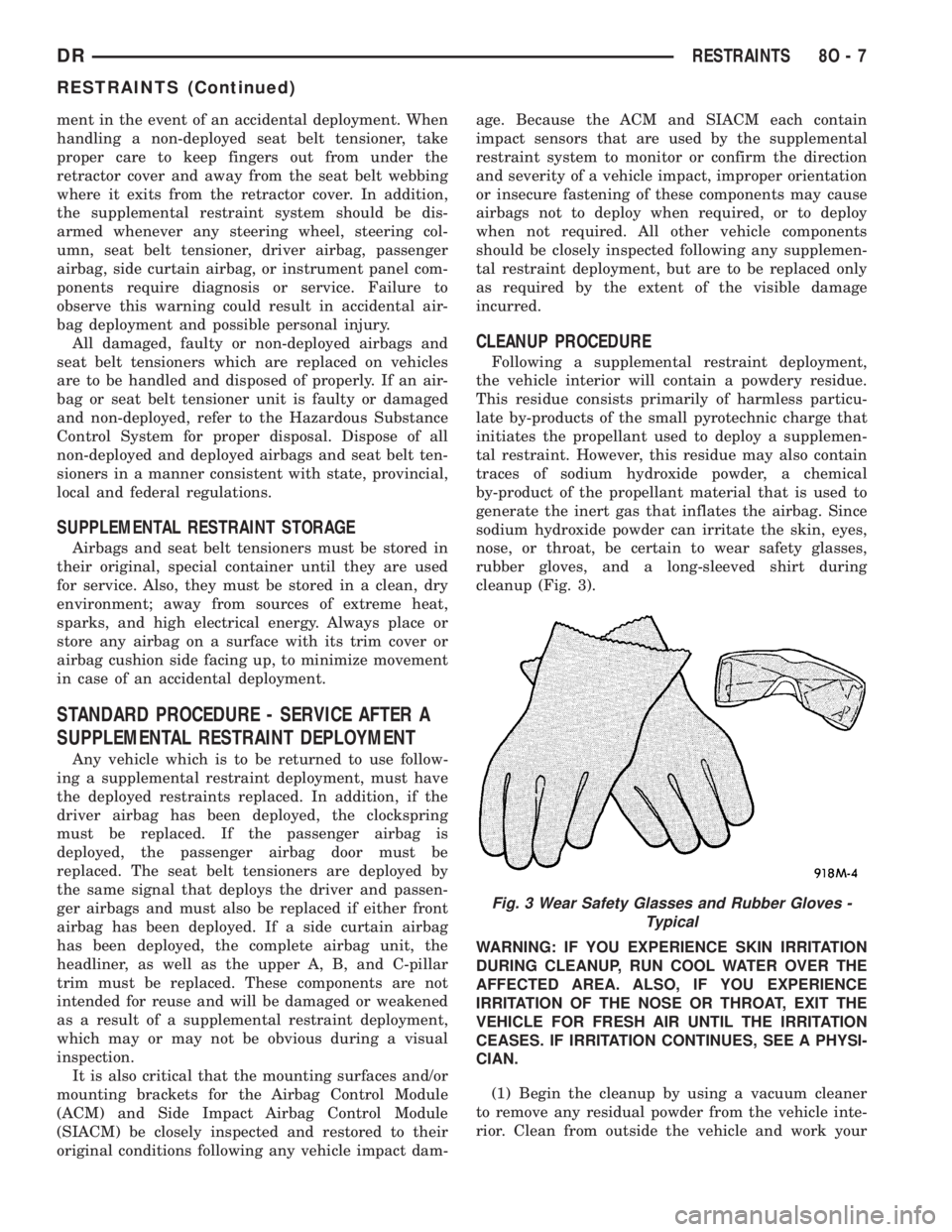
nose, or throat, be certain to wear safety glasses,
rubber gloves, and a long-sleeved shirt during
cleanup (Fig. 3).
WARNING: IF YOU EXPERIENCE SKIN IRRITATION
DURING CLEANUP, RUN COOL WATER OVER THE
AFFECTED AREA. ALSO, IF YOU EXPERIENCE
IRRITATION OF THE NOSE OR THROAT, EXIT THE
VEHICLE FOR FRESH AIR UNTIL THE IRRITATION
CEASES. IF IRRITATION CONTINUES, SEE A PHYSI-
CIAN.
(1) Begin the cleanup by using a vacuum cleaner
to remove any residual powder from the vehicle inte-
rior. Clean from outside the vehicle and work your
Fig. 3 Wear Safety Glasses and Rubber Gloves -
Typical
DRRESTRAINTS 8O - 7
RESTRAINTS (Continued)
Page 609 of 2895
way inside, so that you avoid kneeling or sitting on a
non-cleaned area.
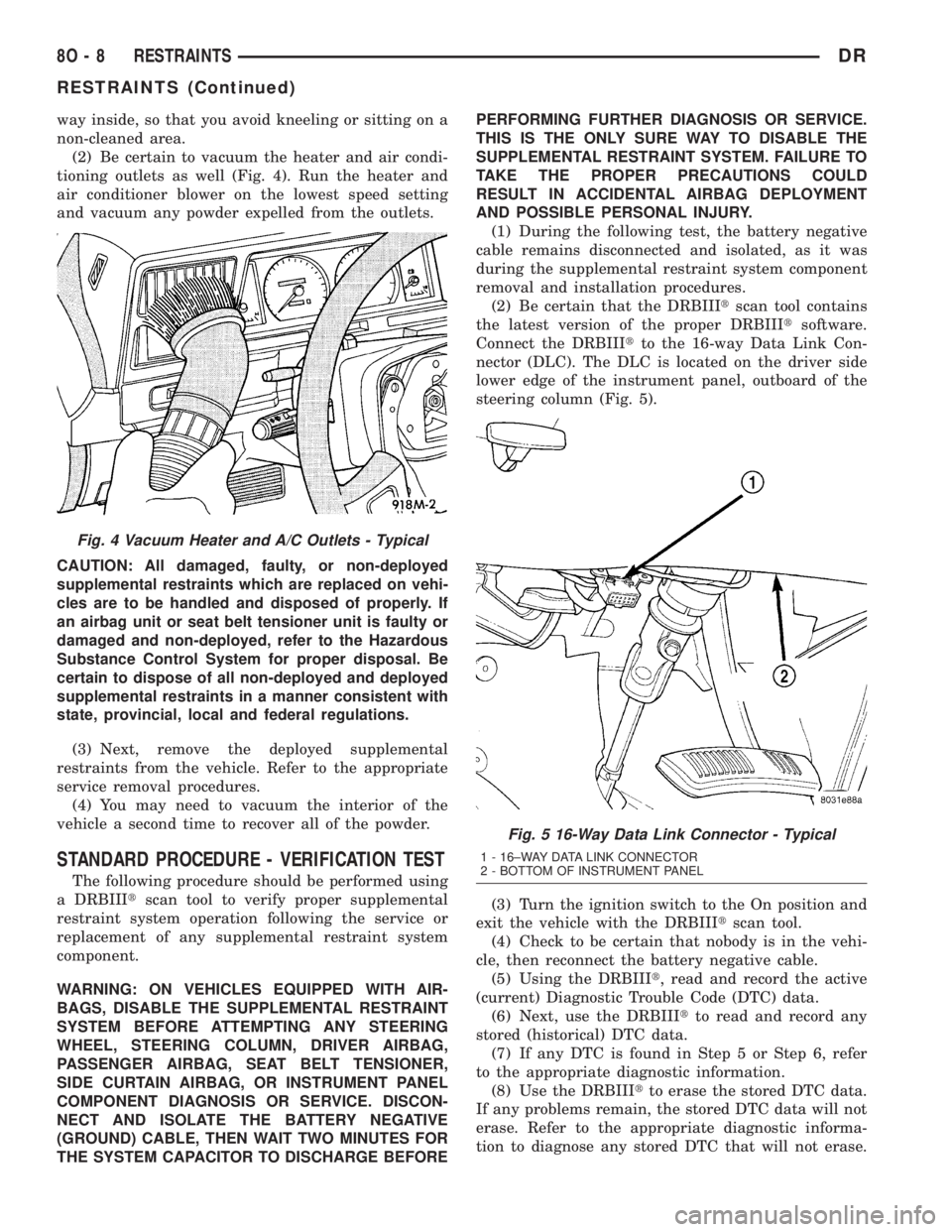
(2) Be certain to vacuum the heater and air condi-
tioning outlets as well (Fig. 4). Run the heater and
air conditioner blower on the lowest speed setting
and vacuum any powder expelled from the outlets.
CAUTION: All damaged, faulty, or non-deployed
supplemental restraints which are replaced on vehi-
cles are to be handled and disposed of properly. If
an airbag unit or seat belt tensioner unit is faulty or
damaged and non-deployed, refer to the Hazardous
Substance Control System for proper disposal. Be
certain to dispose of all non-deployed and deployed
supplemental restraints in a manner consistent with
state, provincial, local and federal regulations.
(3) Next, remove the deployed supplemental
restraints from the vehicle. Refer to the appropriate
service removal procedures.
(4) You may need to vacuum the interior of the
vehicle a second time to recover all of the powder.
STANDARD PROCEDURE - VERIFICATION TEST
The following procedure should be performed using
a DRBIIItscan tool to verify proper supplemental
restraint system operation following the service or
replacement of any supplemental restraint system
component.
WARNING: ON VEHICLES EQUIPPED WITH AIR-
BAGS, DISABLE THE SUPPLEMENTAL RESTRAINT
SYSTEM BEFORE ATTEMPTING ANY STEERING
WHEEL, STEERING COLUMN, DRIVER AIRBAG,
PASSENGER AIRBAG, SEAT BELT TENSIONER,
SIDE CURTAIN AIRBAG, OR INSTRUMENT PANEL
COMPONENT DIAGNOSIS OR SERVICE. DISCON-
NECT AND ISOLATE THE BATTERY NEGATIVE
(GROUND) CABLE, THEN WAIT TWO MINUTES FOR
THE SYSTEM CAPACITOR TO DISCHARGE BEFOREPERFORMING FURTHER DIAGNOSIS OR SERVICE.
THIS IS THE ONLY SURE WAY TO DISABLE THE
SUPPLEMENTAL RESTRAINT SYSTEM. FAILURE TO
TAKE THE PROPER PRECAUTIONS COULD
RESULT IN ACCIDENTAL AIRBAG DEPLOYMENT
AND POSSIBLE PERSONAL INJURY.
(1) During the following test, the battery negative
cable remains disconnected and isolated, as it was
during the supplemental restraint system component
removal and installation procedures.
(2) Be certain that the DRBIIItscan tool contains
the latest version of the proper DRBIIItsoftware.
Connect the DRBIIItto the 16-way Data Link Con-
nector (DLC). The DLC is located on the driver side
lower edge of the instrument panel, outboard of the
steering column (Fig. 5).
(3) Turn the ignition switch to the On position and
exit the vehicle with the DRBIIItscan tool.
(4) Check to be certain that nobody is in the vehi-
cle, then reconnect the battery negative cable.
(5) Using the DRBIIIt, read and record the active
(current) Diagnostic Trouble Code (DTC) data.
(6) Next, use the DRBIIItto read and record any
stored (historical) DTC data.
(7) If any DTC is found in Step 5 or Step 6, refer
to the appropriate diagnostic information.
(8) Use the DRBIIItto erase the stored DTC data.
If any problems remain, the stored DTC data will not
erase. Refer to the appropriate diagnostic informa-
tion to diagnose any stored DTC that will not erase.
Fig. 4 Vacuum Heater and A/C Outlets - Typical
Fig. 5 16-Way Data Link Connector - Typical
1 - 16±WAY DATA LINK CONNECTOR
2 - BOTTOM OF INSTRUMENT PANEL
8O - 8 RESTRAINTSDR
RESTRAINTS (Continued)