ESP DODGE RAM 2003 Service Owner's Guide
[x] Cancel search | Manufacturer: DODGE, Model Year: 2003, Model line: RAM, Model: DODGE RAM 2003Pages: 2895, PDF Size: 83.15 MB
Page 514 of 2895
input from the headlamp switch, or until the ignition
switch is turned to the Off position, whichever occurs
first.
²Actuator Test- Each time the cluster is put
through the actuator test, the cargo lamp indicator
will be turned on, then off again during the bulb
check portion of the test to confirm the functionality
of the LED and the cluster control circuitry.
The instrument cluster continually monitors the
headlamp dimmer switch circuit to determine the
proper interior lamps features and panel lamps illu-
mination levels to provide. The cluster then energizes
and de-energizes a low side driver circuit to control
the exterior cargo lamp. Each time the instrument
cluster energizes the cargo lamp driver and the igni-
tion switch is in the On or start positions, the cluster
also turns on the cargo lamp indicator. For further
diagnosis of the cargo lamp indicator or the instru-
ment cluster circuitry that controls the indicator,
(Refer to 8 - ELECTRICAL/INSTRUMENT CLUS-
TER - DIAGNOSIS AND TESTING). For proper
diagnosis of the cargo lamp or the headlamp switch
inputs to the instrument cluster that control the
cargo lamp indicator, a DRBIIItscan tool is required.
Refer to the appropriate diagnostic information.
CHECK GAUGES INDICATOR
DESCRIPTION
A check gauges indicator is standard equipment on
all instrument clusters. On vehicles equipped with a
gasoline engine, the check gauges indicator is located
near the lower edge of the instrument cluster,
between the tachometer and the speedometer. On
vehicles equipped with a diesel engine, the check
gauges indicator is located on the left side of the
instrument cluster, to the left of the voltage gauge.
The check gauges indicator consists of a stencil-like
cutout of the words ªCHECK GAGESº in the opaque
layer of the instrument cluster overlay. The dark
outer layer of the overlay prevents the indicator from
being clearly visible when it is not illuminated. A red
Light Emitting Diode (LED) behind the cutout in the
opaque layer of the overlay causes the ªCHECK
GAGESº text to appear in red through the translu-
cent outer layer of the overlay when the indicator is
illuminated from behind by the LED, which is sol-
dered onto the instrument cluster electronic circuit
board. The check gauges indicator is serviced as a
unit with the instrument cluster.
OPERATION
The check gauges indicator gives an indication to
the vehicle operator when certain instrument cluster
gauge readings reflect a condition requiring immedi-ate attention. This indicator is controlled by a tran-
sistor on the instrument cluster circuit board based
upon cluster programming and electronic messages
received by the cluster from the Powertrain Control
Module (PCM) on vehicles equipped with a gasoline
engine, or from the Engine Control Module (ECM) on
vehicles equipped with a diesel engine over the Pro-
grammable Communications Interface (PCI) data
bus. The check gauges indicator Light Emitting
Diode (LED) is completely controlled by the instru-
ment cluster logic circuit, and that logic will only
allow this indicator to operate when the instrument
cluster receives a battery current input on the fused
ignition switch output (run-start) circuit. Therefore,
the LED will always be off when the ignition switch
is in any position except On or Start. The LED only
illuminates when it is provided a path to ground by
the instrument cluster transistor. The instrument
cluster will turn on the check gauges indicator for
the following reasons:
²Bulb Test- Each time the ignition switch is
turned to the On position the check gauges indicator
is illuminated for about two seconds as a bulb test.
²Engine Temperature High Message- Each
time the cluster receives a message from the PCM or
ECM indicating the engine coolant temperature of a
gasoline engine is about 122É C (252É F) or higher, or
of a diesel engine is about 112É C (233É F) or higher,
the check gauges indicator will be illuminated. The
indicator remains illuminated until the cluster
receives a message from the PCM or ECM indicating
that the engine coolant temperature of a gasoline
engine is below about 122É C (252É F), or of a diesel
engine is below about 112É C (233É F), or until the
ignition switch is turned to the Off position, which-
ever occurs first.
²Engine Oil Pressure Low Message- Each
time the cluster receives a message from the PCM or
ECM indicating the engine oil pressure is about 41
kPa (6 psi) or lower, the check gauges indicator will
be illuminated. The indicator remains illuminated
until the cluster receives a message from the PCM or
ECM indicating that the engine oil pressure is above
about 41 kPa (6 psi), or until the ignition switch is
turned to the Off position, whichever occurs first.
The cluster will only turn the indicator on in
response to an engine oil pressure low message if the
engine speed is greater than zero.
²System Voltage Low (Charge Fail) Message
- Each time the cluster receives a message from the
PCM or ECM indicating the electrical system voltage
is less than about 11.5 volts (charge fail condition),
the check gauges indicator will be illuminated. The
indicator remains illuminated until the cluster
receives a message from the PCM or ECM indicating
the electrical system voltage is greater than about
DRINSTRUMENT CLUSTER 8J - 21
CARGO LAMP INDICATOR (Continued)
Page 520 of 2895
The gear selector indicator displays the following
characters from left to right: ªP,º ªR,º ªN,º ªD,º ª2,º
and ª1.º Respectively, these characters represent the
park, reverse, neutral, drive, second gear, and first
gear positions of the transmission gear selector lever
on the steering column. The VFD illuminates a rect-
angular box around the character that represents the
currently selected lever position.
The gear selector indicator characters and graphics
appear in the same blue-green color and at the same
lighting level as the odometer/trip odometer informa-
tion when illuminated by the instrument cluster elec-
tronic circuit board. During daylight hours (exterior
lamps Off) the gear selector indicator VFD is illumi-
nated at full brightness for clear visibility. At night
(exterior lamps are On) the VFD lighting level is
adjusted with the other cluster illumination lamps
using the panel lamps dimmer thumbwheel on the
headlamp switch. However, a ªParadeº mode position
of the panel lamps dimmer thumbwheel allows the
VFD to be illuminated at full brightness when the
vehicle is driven in daylight hours with the exterior
lamps turned On. The gear selector indicator VFD is
serviced as a unit with the instrument cluster.
OPERATION
The electronic gear selector indicator gives an indi-
cation to the vehicle operator of the transmission
gear that has been selected with the automatic trans-
mission gear selector lever. This indicator is con-
trolled by the instrument cluster circuit board based
upon cluster programming. The cluster circuitry
automatically configures itself for the proper trans-
mission and automatic transmission model based
upon the hard wired transmission range sensor mux
circuit input to the cluster. The gear selector indica-
tor information is displayed by a dedicated Vacuum
Fluorescent Display (VFD) unit on the instrument
cluster electronic circuit board, and the VFD will not
display the gear selector indicator information after
the ignition switch is turned to the Off position. The
instrument cluster circuitry configures the gear selec-
tor indicator VFD based upon the following inputs
from the transmission range sensor:
²Open Circuit- If the cluster is configured for
an automatic transmission and the transmission
range sensor mux circuit is open, the cluster circuitry
controls the gear selector indicator display based
upon electronic messages received from the electronic
Transmission Control Module (TCM) over the Pro-
grammable Communications Interface (PCI) data
bus. If the transmission range sensor mux circuit is
open and no electronic messages are received from
the TCM within two seconds, the instrument cluster
circuitry will not display any gear selector position
until the condition is resolved or until the ignitionswitch is turned to the Off position, whichever occurs
first.
²Resolved Circuit- If the transmission range
sensor mux circuit is resolved, the cluster circuitry
controls the gear selector indicator display based
upon the resistance value of the hard wired input
from the transmission range sensor. If the cluster is
configured for an automatic transmission with a
transmission range sensor input and detects a short
to ground or an open in the transmission range sen-
sor mux input, the instrument cluster circuitry will
not display any gear selector position in the VFD.
The VFD display for the short-to-ground and open
circuit conditions will continue until the condition is
resolved or until the ignition switch is turned to the
Off position, whichever occurs first.
²Actuator Test- Each time the cluster is put
through the actuator test, the gear selector indicator
VFD will display all of its characters at once during
the VFD portion of the test to confirm the function-
ality of the VFD and the cluster control circuitry.
On models with a TCM, the TCM continually mon-
itors the transmission range sensor, then sends the
proper gear selector indicator position messages to
the instrument cluster. On models without a TCM,
the instrument cluster continually monitors the hard
wired transmission range sensor multiplexed input.
For further diagnosis of the gear selector indicator or
the instrument cluster circuitry that controls this
function, (Refer to 8 - ELECTRICAL/INSTRUMENT
CLUSTER - DIAGNOSIS AND TESTING). For fur-
ther diagnosis of the transmission range sensor on
models without a TCM, (Refer to 21 - TRANSMIS-
SION/TRANSAXLE/AUTOMATIC - 42RE/TRANS-
MISSION RANGE SENSOR - DIAGNOSIS AND
TESTING) or (Refer to 21 - TRANSMISSION/
TRANSAXLE/AUTOMATIC - 46RE/TRANSMISSION
RANGE SENSOR - DIAGNOSIS AND TESTING).
On models with a TCM, for proper diagnosis of the
transmission range sensor, the TCM, the PCI data
bus, or the electronic message inputs to the instru-
ment cluster that control the gear selector indicator,
a DRBIIItscan tool is required. Refer to the appro-
priate diagnostic information.
HIGH BEAM INDICATOR
DESCRIPTION
A high beam indicator is standard equipment on
all instrument clusters. The high beam indicator is
located near the upper edge of the instrument clus-
ter, between the tachometer and the speedometer.
The high beam indicator consists of a stencil-like cut-
out of the International Control and Display Symbol
icon for ªHigh Beamº in the opaque layer of the
DRINSTRUMENT CLUSTER 8J - 27
GEAR SELECTOR INDICATOR (Continued)
Page 526 of 2895
ECM indicating the engine oil pressure is below
about 41 kPa (6 psi), the gauge needle is moved to
the graduation at the far left end of the gauge scale,
the check gauges indicator is illuminated, and a sin-
gle chime tone is generated. The gauge needle
remains at the left end of the gauge scale and the
check gauges indicator remains illuminated until the
cluster receives a message from the PCM or ECM
indicating that the engine oil pressure is above about
41 kPa (6 psi), or until the ignition switch is turned
to the Off position, whichever occurs first. The clus-
ter will only turn the check gauges indicator on in
response to an engine oil pressure low message if the
engine speed message is greater than zero.
²Communication Error- If the cluster fails to
receive an engine oil pressure message, it will hold
the gauge needle at the last indication about five sec-
onds or until the ignition switch is turned to the Off
position, whichever occurs first. After five seconds,
the cluster will move the gauge needle to the left end
of the gauge scale.
²Actuator Test- Each time the cluster is put
through the actuator test, the oil pressure gauge nee-
dle will be swept to several calibration points on the
gauge scale in a prescribed sequence in order to con-
firm the functionality of the gauge and the cluster
control circuitry.
On vehicles with a gasoline engine, the PCM con-
tinually monitors the engine oil pressure sensor to
determine the engine oil pressure. On vehicles with a
diesel engine, the ECM continually monitors the
engine oil pressure sensor to determine the engine oil
pressure. The PCM or ECM then sends the proper
engine oil pressure messages to the instrument clus-
ter. For further diagnosis of the oil pressure gauge or
the instrument cluster circuitry that controls the
gauge, (Refer to 8 - ELECTRICAL/INSTRUMENT
CLUSTER - DIAGNOSIS AND TESTING). If the
instrument cluster turns on the check gauges indica-
tor due to a low oil pressure gauge reading, it may
indicate that the engine or the engine oiling system
requires service. For proper diagnosis of the engine
oil pressure sensor, the PCM, the ECM, the PCI data
bus, or the electronic message inputs to the instru-
ment cluster that control the oil pressure gauge, a
DRBIIItscan tool is required. Refer to the appropri-
ate diagnostic information.
OVERDRIVE OFF INDICATOR
DESCRIPTION
An overdrive off indicator is standard equipment
on all instrument clusters. However, on vehicles not
equipped with the optional overdrive automatic
transmission, this indicator is electronically disabled.The overdrive off indicator consists of the words ªO/D
OFFº, which appear in the lower portion of the odom-
eter/trip odometer indicator Vacuum Fluorescent Dis-
play (VFD) unit. The VFD is soldered onto the
cluster electronic circuit board and is visible through
a window with a smoked clear lens located on the
lower edge of the tachometer gauge dial face of the
cluster overlay. The dark lens over the VFD prevents
the indicator from being clearly visible when it is not
illuminated. The words ªO/D OFFº appear in an
amber color and at the same lighting level as the
odometer/trip odometer information when they are
illuminated by the instrument cluster electronic cir-
cuit board. The overdrive off indicator is serviced as
a unit with the VFD in the instrument cluster.
OPERATION
The overdrive off indicator gives an indication to
the vehicle operator when the Off position of the
overdrive off switch has been selected, disabling the
electronically controlled overdrive feature of the auto-
matic transmission. This indicator is controlled by
the instrument cluster circuit board based upon clus-
ter programming and electronic messages received by
the cluster from the Powertrain Control Module
(PCM) over the Programmable Communications
Interface (PCI) data bus. The overdrive off indicator
is completely controlled by the instrument cluster
logic circuit, and that logic will only allow this indi-
cator to operate when the instrument cluster receives
a battery current input on the fused ignition switch
output (run-start) circuit. Therefore, the indicator
will always be off when the ignition switch is in any
position except On or Start. The indicator only illu-
minates when it is switched to ground by the instru-
ment cluster circuitry. The instrument cluster will
turn on the overdrive off indicator for the following
reasons:
²Overdrive Off Lamp-On Message- Each time
the cluster receives an overdrive off lamp-on message
from the PCM indicating that the Off position of the
overdrive off switch has been selected, the overdrive
off indicator will be illuminated. The indicator
remains illuminated until the cluster receives an
overdrive off lamp-off message from the PCM, or
until the ignition switch is turned to the Off position,
whichever occurs first.
²Actuator Test- Each time the cluster is put
through the actuator test, the overdrive off indicator
will be turned on, then off again during the VFD por-
tion of the test to confirm the functionality of the
VFD and the cluster control circuitry.
The PCM continually monitors the overdrive off
switch to determine the proper outputs to the auto-
matic transmission. The PCM then sends the proper
overdrive off lamp-on and lamp-off messages to the
DRINSTRUMENT CLUSTER 8J - 33
OIL PRESSURE GAUGE (Continued)
Page 555 of 2895
lobe, pushing on the cancel actuator, returns the
switch to the OFF position.
OPERATION - TURN SIGNAL SYSTEM
The Instrument Cluster monitors the multiplexed
multifunction switch. In a turning event the Instru-
ment Cluster senses a change in the turn signal
lever and illuminates the appropriate turn signal
indicator. At the same time, the Instrument Cluster
will send a J1850 message on the PCI bus to the
Front Control Module (FCM). The FCM will respond
by activating the appropriate relay in the Power Dis-
tribution Center.
A chime will sound after the turn is completed if
vehicle has traveled a distance of approximately 1.0
mile and a speed of 15 mph, with the turn signal ON.
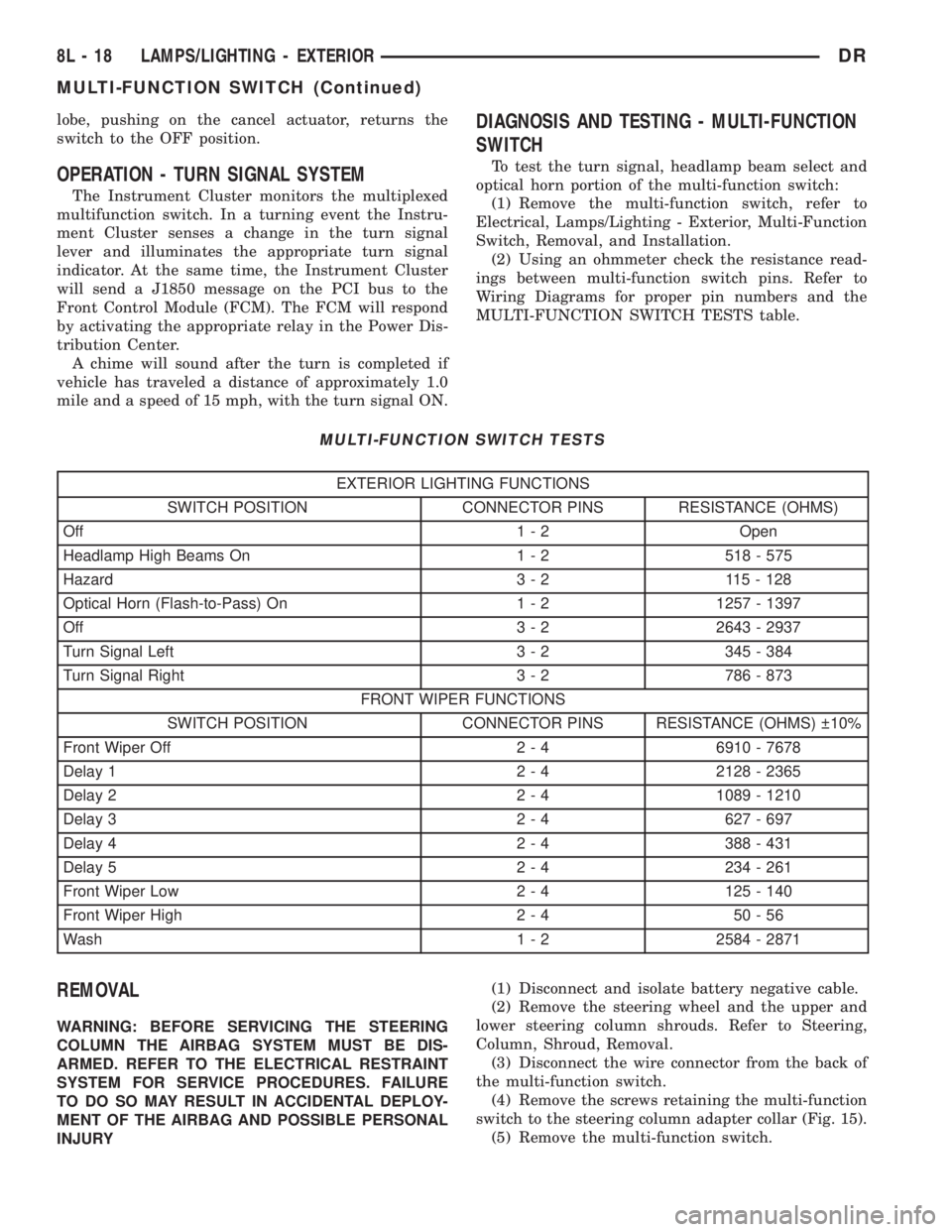
DIAGNOSIS AND TESTING - MULTI-FUNCTION
SWITCH
To test the turn signal, headlamp beam select and
optical horn portion of the multi-function switch:
(1) Remove the multi-function switch, refer to
Electrical, Lamps/Lighting - Exterior, Multi-Function
Switch, Removal, and Installation.
(2) Using an ohmmeter check the resistance read-
ings between multi-function switch pins. Refer to
Wiring Diagrams for proper pin numbers and the
MULTI-FUNCTION SWITCH TESTS table.
MULTI-FUNCTION SWITCH TESTS
EXTERIOR LIGHTING FUNCTIONS
SWITCH POSITION CONNECTOR PINS RESISTANCE (OHMS)
Off 1 - 2 Open
Headlamp High Beams On 1 - 2 518 - 575
Hazard 3 - 2 115 - 128
Optical Horn (Flash-to-Pass) On 1 - 2 1257 - 1397
Off 3 - 2 2643 - 2937
Turn Signal Left 3 - 2 345 - 384
Turn Signal Right 3 - 2 786 - 873
FRONT WIPER FUNCTIONS
SWITCH POSITION CONNECTOR PINS RESISTANCE (OHMS) 10%
Front Wiper Off 2 - 4 6910 - 7678
Delay 1 2 - 4 2128 - 2365
Delay 2 2 - 4 1089 - 1210
Delay 3 2 - 4 627 - 697
Delay 4 2 - 4 388 - 431
Delay 5 2 - 4 234 - 261
Front Wiper Low 2 - 4 125 - 140
Front Wiper High 2 - 4 50 - 56
Wash 1 - 2 2584 - 2871
REMOVAL
WARNING: BEFORE SERVICING THE STEERING
COLUMN THE AIRBAG SYSTEM MUST BE DIS-
ARMED. REFER TO THE ELECTRICAL RESTRAINT
SYSTEM FOR SERVICE PROCEDURES. FAILURE
TO DO SO MAY RESULT IN ACCIDENTAL DEPLOY-
MENT OF THE AIRBAG AND POSSIBLE PERSONAL
INJURY(1) Disconnect and isolate battery negative cable.
(2) Remove the steering wheel and the upper and
lower steering column shrouds. Refer to Steering,
Column, Shroud, Removal.
(3) Disconnect the wire connector from the back of
the multi-function switch.
(4) Remove the screws retaining the multi-function
switch to the steering column adapter collar (Fig. 15).
(5) Remove the multi-function switch.
8L - 18 LAMPS/LIGHTING - EXTERIORDR
MULTI-FUNCTION SWITCH (Continued)
Page 563 of 2895
(4) Push the glove box lamp and switch unit into
the hole in the mounting bracket on the instrument
panel glove box opening upper reinforcement.
(5) Install the glove box onto the instrument panel.
(Refer to 23 - BODY/INSTRUMENT PANEL/GLOVE
BOX - INSTALLATION) for the procedures.
(6) Close the glove box.
(7) Reconnect the battery negative cable.
READING LAMP
DESCRIPTION
The overhead console in this vehicle is equipped
with two individual reading and courtesy lamps. The
lamp lenses are the only visible components of these
lamps. Each lamp has its own switch, bulb, reflector
and lens within the overhead console.
The overhead console reading and courtesy lamps
are controlled by the instrument cluster which pro-
vides power at all times, regardless of the ignition
switch position. The ground circuit for the lamps is
switched through the integral reading and courtesy
lamp switches or through the door ajar switches.
Each lamp is designed and aimed to provide illumi-
nation that will be directed only to that side of the
vehicle on which the lamp is located.
The reading and courtesy lamp lenses and bulbs
are available for service replacement. The reading
and courtesy lamp switches, bulb holders and wiring
are only available as part of the overhead console
wire harness. If either of the lamp switches or bulb
holders is faulty or damaged, the entire overhead
console wire harness assembly must be replaced.
For service of the reading and courtesy lamp bulbs,
refer to the appropriate wiring information.
OPERATION
All reading and courtesy lamps located in the over-
head console are activated by the door ajar switches
via the instrument cluster. When all of the doors are
closed, these lamps can be individually activated by
depressing the corresponding lens. When any door is
open, depressing the lamp lenses to activate the lamp
switches will not turn the lamps off.
The instrument cluster monitors the door ajar
switches. When a door is open the instrument cluster
grounds the low side drivers to turn on the lamps.
Upon closing all doors, the instrument cluster ini-
tiates a 30 second timer. If any of the doors are
opened during the ªtime outº cycle, the instrument
cluster will reset the timer until all doors are closed.
The instrument cluster will faid to off when the doors
are closed and the ignition is turned ON, the time
out expires or the power locks are activated.
REMOVAL
(1) Disconnect and isolate the battery negative
cable.
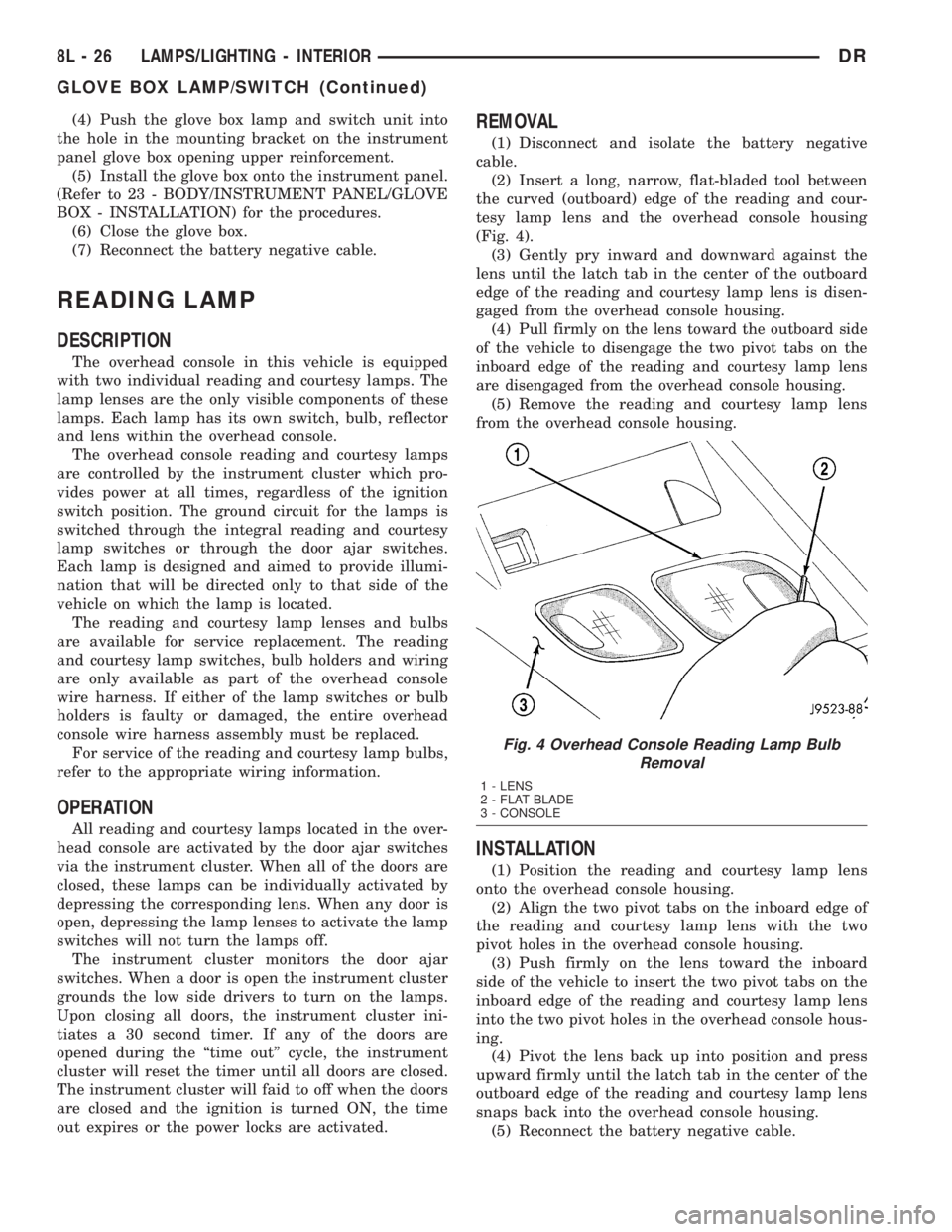
(2) Insert a long, narrow, flat-bladed tool between
the curved (outboard) edge of the reading and cour-
tesy lamp lens and the overhead console housing
(Fig. 4).
(3) Gently pry inward and downward against the
lens until the latch tab in the center of the outboard
edge of the reading and courtesy lamp lens is disen-
gaged from the overhead console housing.
(4)
Pull firmly on the lens toward the outboard side
of the vehicle to disengage the two pivot tabs on the
inboard edge of the reading and courtesy lamp lens
are disengaged from the overhead console housing.
(5) Remove the reading and courtesy lamp lens
from the overhead console housing.
INSTALLATION
(1) Position the reading and courtesy lamp lens
onto the overhead console housing.
(2) Align the two pivot tabs on the inboard edge of
the reading and courtesy lamp lens with the two
pivot holes in the overhead console housing.
(3) Push firmly on the lens toward the inboard
side of the vehicle to insert the two pivot tabs on the
inboard edge of the reading and courtesy lamp lens
into the two pivot holes in the overhead console hous-
ing.
(4) Pivot the lens back up into position and press
upward firmly until the latch tab in the center of the
outboard edge of the reading and courtesy lamp lens
snaps back into the overhead console housing.
(5) Reconnect the battery negative cable.
Fig. 4 Overhead Console Reading Lamp Bulb
Removal
1 - LENS
2 - FLAT BLADE
3 - CONSOLE
8L - 26 LAMPS/LIGHTING - INTERIORDR
GLOVE BOX LAMP/SWITCH (Continued)
Page 565 of 2895
overhead console assembly to the roof header can
also affect compass operation. If the vehicle roof
should become magnetized, the demagnetizing and
calibration procedures found in this section may be
required to restore proper compass operation.
TEMPERATURE DISPLAY
All the available overhead consoles on this model
include Temperature information. The temperature
displays the outside ambient temperature in whole
degrees. The temperature display can be toggled
from Fahrenheit to Celsius by selecting the desired
U.S./Metric option from the customer programmable
features. The displayed temperature is not an instant
reading of conditions, but an average temperature. It
may take the temperature display several minutes to
respond to a major temperature change, such as driv-
ing out of a heated garage into winter temperatures.
When the ignition switch is turned to the Off posi-
tion, the last displayed temperature reading stays in
the electronic control modules, (CMTC, EVIC) mem-
ory. When the ignition switch is turned to the On
position again, the electronic module will display the
memory temperature for one minute; then update the
display to the current average temperature reading
within five minutes.
The temperature function is supported by an ambi-
ent temperature sensor. This sensor is mounted out-
side the passenger compartment near the front and
center of the vehicle, and is hard wired to the Front
Control Module (FCM). The FCM sends temperature
status messages to the module over the J1850 PCI
data bus circuit. For more information on the ambi-ent temperature sensor, refer to Ambient Tempera-
ture Sensor later in this section.
Following are general descriptions of the major
components used in the overhead console. Refer to
Wiring Diagrams for complete circuit schematics.
OPERATION
Refer to the vehicle Owner's Manual for specific
operation of each overhead console and its systems.
DIAGNOSIS AND TESTING - OVERHEAD
CONSOLE
If the problem with the overhead console is an
inaccurate or scrambled display, refer toSELF-DI-
AGNOSTIC TESTlater in this text. If the problem
with the overhead console is incorrect Vacuum Fluo-
rescent Display (VFD) dimming levels, use a DRB
IIItscan tool and the proper Diagnostic Procedures
manual to test for the correct dimming message
inputs being received from the Body Control Module
(BCM) or Front Control Module (FCM) over the
J1850 Programmable Communications Interface
(PCI) data bus circuit. If the problem is a no-display
condition, use the following procedure. For complete
circuit diagrams, refer toOverhead Consolein the
Wiring Diagrams section of the service manual.
(1) Remove the overhead console from the head-
liner (Refer to 8 - ELECTRICAL/OVERHEAD CON-
SOLE - REMOVAL).
(2) Check for battery voltage at the overhead con-
sole electrical connector. Refer to Wiring for connec-
tor information. If OK, go to Step 3. If not OK, Check
for battery voltage at the appropriate B(+) fuse in the
integrated power module, repair the open fused B(+)
circuit as required.
(3) Turn the ignition switch to the On position.
Check the fused ignition switch output circuit(s) at
the overhead console electrical connector. If OK, go to
Step 4. If not OK, repair the open or shorted circuit
as required.
(4) Turn the ignition switch to the Off position.
Disconnect and isolate the battery negative cable.
Check for continuity between the ground circuit cav-
ity of the overhead console electrical connector and a
good ground. There should be continuity. If OK, refer
toSELF-DIAGNOSTIC TESTbelow for further
diagnosis of the electronics module and the J1850
PCI data bus circuit. If not OK, repair the open
ground circuit as required.
SELF-DIAGNOSTIC TEST
A self-diagnostic test is built-in to the module to
determine that the electronics module is operating
properly, and that all the J1850 PCI data bus mes-
sages are being received for proper operation. To per-
form the self-diagnostic test proceed as follows:
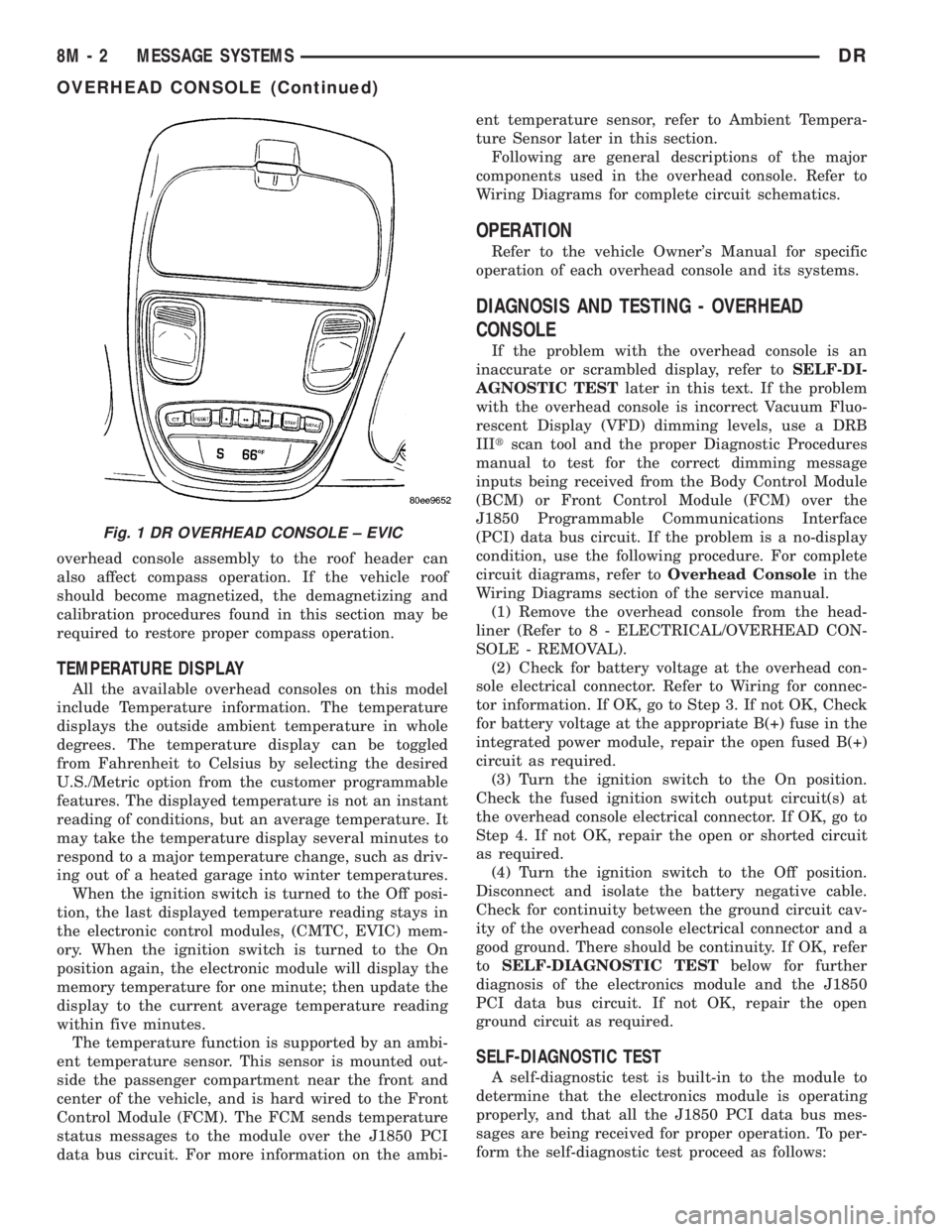
Fig. 1 DR OVERHEAD CONSOLE ± EVIC
8M - 2 MESSAGE SYSTEMSDR
OVERHEAD CONSOLE (Continued)
Page 572 of 2895
(2) Momentarily depress and release the Menu
push button to step through the programmable fea-
tures list. Each programmable feature and its cur-
rently selected option will appear on the EVIC
display in the sequence shown in the Programmable
Features list that follows.
(3) Momentarily depress and release the Step push
button to step through the available options for the
programmable feature being displayed.
(4) The option that last appears in the display
with a programmable feature before exiting the pro-
gramming mode, becomes the newly selected pro-
grammable feature option.
(5) The EVIC exits the programming mode and
returns to its normal operating mode when the C/T
push button is depressed or when the end of the pro-
grammable features menu list is reached, whichever
occurs first.
PROGRAMMABLE FEATURES
²LANGUAGE?- The options include English,
Francaise, Deutsch, Italiana, or Espanol. The default
is English. All EVIC display nomenclature, including
the trip computer functions, warning messages and
the programmable features appear in the selected
language.
²DISPLAY U.S. OR METRIC?- The options
include U.S. and M. The default is U.S. This feature
toggles the trip computer temperature, fuel economy
and odometer display readings between U.S. and
metric units of measure.
²SERVICE INTV. =- The options include from
3200 to 12000 kilometers in 800 kilometer incre-
ments (2000 to 6000 miles in 500 mile increments).
The default is 12000 kilometers (6000 miles). The
selected distance becomes the interval at which the
Perform Service warning message will be displayed
by the EVIC. If a new distance is selected, a second
programmable feature appears,RESET SERVICE
DISTANCE?- The options include No and Yes. The
default is Yes. When Yes is selected, the accumulated
distance since the last previous Perform Service
warning message will be reset to zero because the
service interval has been changed. When No is
selected, the distance until the next Perform Service
warning message is reduced by the accumulated dis-
tance since the last previous message.
²AUTO DOOR LOCKS?- The options include
Yes and No. The default is Yes. When Yes is selected,
all doors lock automatically when vehicle speed
reaches 25 kilometers-per-hour (15 miles-per-hour). If
YES is selected, a second programmable feature
appears,AUTO UNLOCK ON EXIT?- The options
again include Yes and No. The default is No. When
Yes is selected, following each Auto Door Lock event
all doors will automatically unlock when the driverdoor is opened, if the vehicle is stopped and the
transmission gear selector is in Park or Neutral. The
Auto Door Unlock event will only occur once follow-
ing each Auto Door Lock event.
²REMOTE UNLOCK- The options include
Driver Door 1st and All Doors. The default is Driver
Door 1st. When Diver Door 1st is selected, only the
driver door unlocks when the Unlock button of the
Remote Keyless Entry (RKE) transmitter is
depressed once. The Unlock button of the RKE trans-
mitter must be depressed twice to unlock all doors.
When All Doors is selected, all doors unlock when the
Unlock button of the RKE transmitter is depressed
once.
²SOUND HORN ON LOCK?- The options
include On and Off. The default is No. When Yes is
selected, a short horn chirp will provide an audible
confirmation when the RKE receiver recognizes a
valid Lock signal from an RKE transmitter. When No
is selected, no horn chirp will occur with the RKE
Lock event. This feature may be selected indepen-
dent of theFLASH LIGHTS WITH LOCKS?pro-
grammable feature.
²FLASH LIGHTS WITH LOCKS?- The options
include Yes and No. The default is Yes. When Yes is
selected, a single flash of the hazard warning lamps
will provide an optical confirmation when the RKE
receiver recognizes a valid Lock signal from an RKE
transmitter, and two flashes of the same lamps will
occur when the RKE receiver recognizes a valid
Unlock signal from an RKE transmitter. When No is
selected, no lamp flash will occur with the RKE Lock
or Unlock event. This feature may be selected inde-
pendent of theSOUND HORN ON LOCK?pro-
grammable feature.
²HEADLAMP DELAY =- The options include
Off, 30 Sec, 60 Sec, and 90 Sec. The default is 90 Sec.
When a time interval is selected, the headlamps will
remain on for that length of time when the head-
lamps are turned off after the ignition is turned off,
or if the Auto mode is selected on vehicles with the
Auto Headlamps option. When Off is selected, the
headlamp delay feature is disabled.
²TRAIN REMOTE- When this feature is
selected the driver can choose to train up to four
remote keyless entry transmitters. The options
include Yes and No. The default is No. When Yes is
selected and the MENU button is pressed the EVIC
will display ªPRESS REMOTE LOCK & UNLOCK
THEN PRESS UNLOCKº, followed by a chime to
indicate the training sequence can commence. You
have approximately 30 seconds to train up to four
transmitters, after each transmitter is trained a
chime will sound indicating that the training was
successful. If remote link to memory is ªYESº , the
first transmitter trained will be associated with
DRMESSAGE SYSTEMS 8M - 9
ELECTRONIC VEHICLE INFO CENTER (Continued)
Page 573 of 2895
memory setting 1 and the second transmitter trained
will be associated with memory setting 2. Additional
transmitters will not be associated with a memory
setting. When you have finished training the trans-
mitters, press the menu button again and the EVIC
will display ªTRAIN DONE ªXº TRAINED. If no
transmitters are trained within approximately 30
seconds the EVIC will display ªTRAIN TIMEOUTº.
REMOVAL
(1) Disconnect and isolate the battery negative
cable.
(2) Remove the overhead console from the headlin-
er.(Refer to 8 - ELECTRICAL/OVERHEAD CON-
SOLE - REMOVAL).
(3) Disconnect the EVIC module electrical connec-
tor. Depress the retaining tab and pull straight
apart.
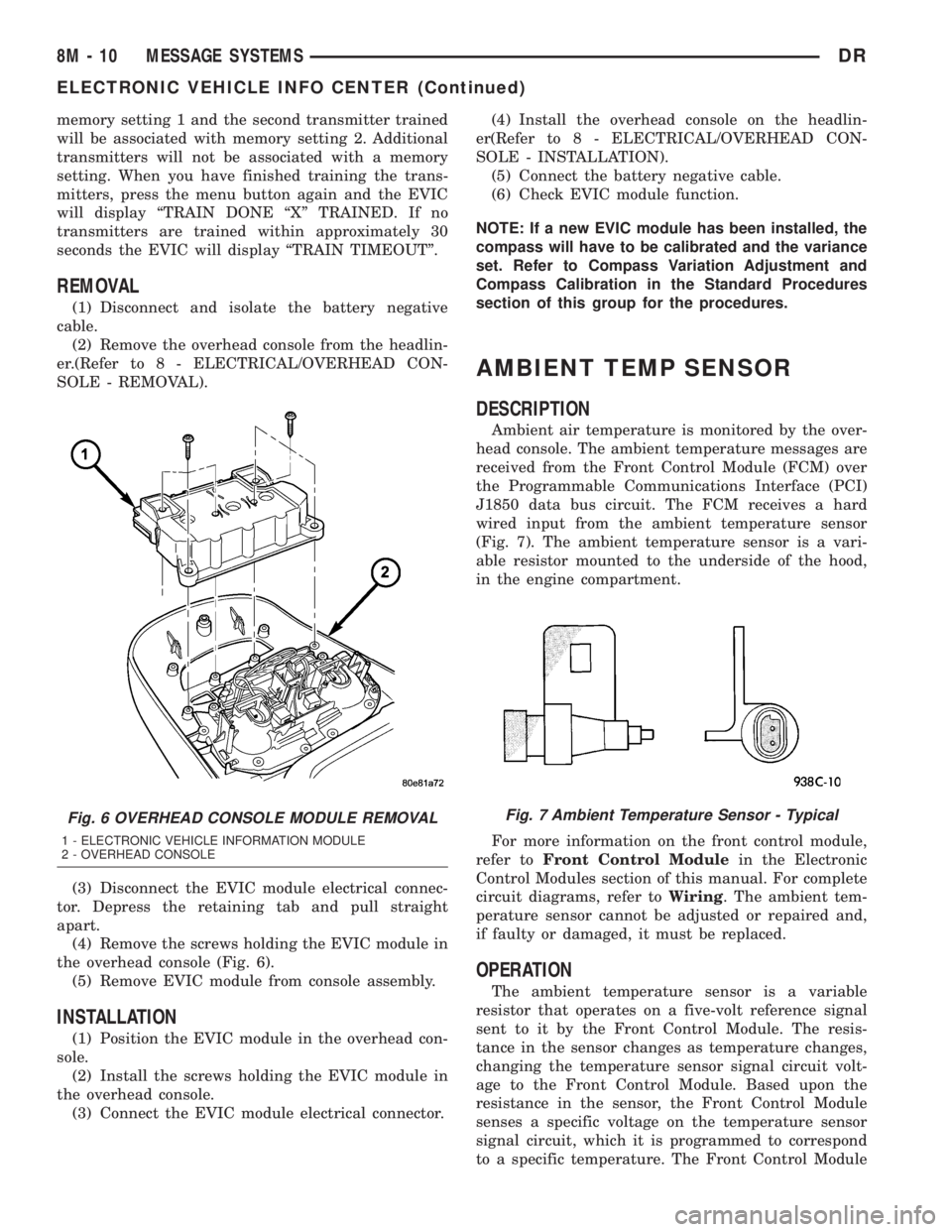
(4) Remove the screws holding the EVIC module in
the overhead console (Fig. 6).
(5) Remove EVIC module from console assembly.
INSTALLATION
(1) Position the EVIC module in the overhead con-
sole.
(2) Install the screws holding the EVIC module in
the overhead console.
(3) Connect the EVIC module electrical connector.(4) Install the overhead console on the headlin-
er(Refer to 8 - ELECTRICAL/OVERHEAD CON-
SOLE - INSTALLATION).
(5) Connect the battery negative cable.
(6) Check EVIC module function.
NOTE: If a new EVIC module has been installed, the
compass will have to be calibrated and the variance
set. Refer to Compass Variation Adjustment and
Compass Calibration in the Standard Procedures
section of this group for the procedures.
AMBIENT TEMP SENSOR
DESCRIPTION
Ambient air temperature is monitored by the over-
head console. The ambient temperature messages are
received from the Front Control Module (FCM) over
the Programmable Communications Interface (PCI)
J1850 data bus circuit. The FCM receives a hard
wired input from the ambient temperature sensor
(Fig. 7). The ambient temperature sensor is a vari-
able resistor mounted to the underside of the hood,
in the engine compartment.
For more information on the front control module,
refer toFront Control Modulein the Electronic
Control Modules section of this manual. For complete
circuit diagrams, refer toWiring. The ambient tem-
perature sensor cannot be adjusted or repaired and,
if faulty or damaged, it must be replaced.
OPERATION
The ambient temperature sensor is a variable
resistor that operates on a five-volt reference signal
sent to it by the Front Control Module. The resis-
tance in the sensor changes as temperature changes,
changing the temperature sensor signal circuit volt-
age to the Front Control Module. Based upon the
resistance in the sensor, the Front Control Module
senses a specific voltage on the temperature sensor
signal circuit, which it is programmed to correspond
to a specific temperature. The Front Control Module
Fig. 6 OVERHEAD CONSOLE MODULE REMOVAL
1 - ELECTRONIC VEHICLE INFORMATION MODULE
2 - OVERHEAD CONSOLE
Fig. 7 Ambient Temperature Sensor - Typical
8M - 10 MESSAGE SYSTEMSDR
ELECTRONIC VEHICLE INFO CENTER (Continued)
Page 575 of 2895
tion. The universal transmitter is capable of operat-
ing systems using either rolling code or non-rolling
code technology.
The electronics module displays messages and a
small house-shaped icon with one, two or three dots
corresponding to the three transmitter buttons to
indicate the status of the universal transmitter. The
EVIC messages are:
²Clearing Channels- Indicates that all of the
transmitter codes stored in the universal transmitter
have been successfully cleared.
²Channel ªXº Training- Indicates that the uni-
versal transmitter is in its transmitter learning
mode.
²Channel ªXº Trained- Indicates that the uni-
versal transmitter has successfully acquired a new
transmitter code.
²Channel ªXº Transmitting- Indicates that a
trained universal transmitter button has been
depressed and that the universal transmitter is
transmitting.
The universal transmitter cannot be repaired, and
is available for service only as a unit with the EVIC
or CMTC modules. If any part of the universal trans-
mitter is faulty or damaged, the complete EVIC or
CMTC module must be replaced.
OPERATION
The universal transmitter operates on a non-
switched source of battery current so the unit will
remain functional, regardless of the ignition switch
position. For more information on the features, pro-
gramming procedures and operation of the universal
transmitter, see the owner's manual in the vehicle
glove box.
DIAGNOSIS AND TESTING - UNIVERSAL
TRANSMITTER
If the Universal Transmitter is inoperative, but the
Electronic Vehicle Information Center (EVIC) is oper-
ating normally, see the owner's manual in the vehicle
glove box for instructions on training the Transmit-
ter. Retrain the Transmitter with a known good
transmitter as instructed in the owner's manual and
test the Transmitter operation again. If the unit is
still inoperative, test the universal transmitter with
Radio Frequency Detector special tool. If both the
Transmitter and the EVIC module are inoperative,
refer toElectronic Vehicle Information Center
Diagnosis and Testingin this group for further
diagnosis. For complete circuit diagrams, refer to
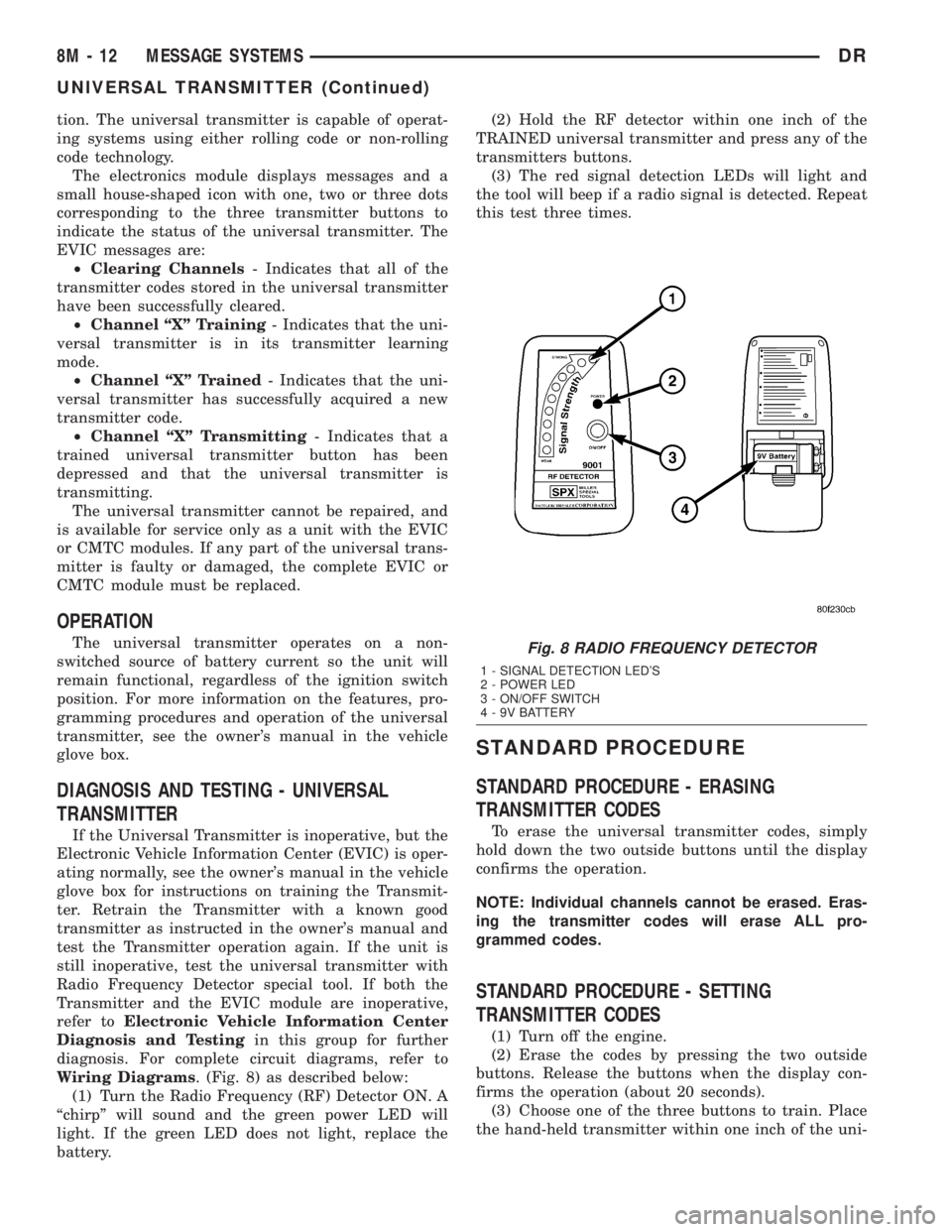
Wiring Diagrams. (Fig. 8) as described below:
(1) Turn the Radio Frequency (RF) Detector ON. A
ªchirpº will sound and the green power LED will
light. If the green LED does not light, replace the
battery.(2) Hold the RF detector within one inch of the
TRAINED universal transmitter and press any of the
transmitters buttons.
(3) The red signal detection LEDs will light and
the tool will beep if a radio signal is detected. Repeat
this test three times.
STANDARD PROCEDURE
STANDARD PROCEDURE - ERASING
TRANSMITTER CODES
To erase the universal transmitter codes, simply
hold down the two outside buttons until the display
confirms the operation.
NOTE: Individual channels cannot be erased. Eras-
ing the transmitter codes will erase ALL pro-
grammed codes.
STANDARD PROCEDURE - SETTING
TRANSMITTER CODES
(1) Turn off the engine.
(2) Erase the codes by pressing the two outside
buttons. Release the buttons when the display con-
firms the operation (about 20 seconds).
(3) Choose one of the three buttons to train. Place
the hand-held transmitter within one inch of the uni-
Fig. 8 RADIO FREQUENCY DETECTOR
1 - SIGNAL DETECTION LED'S
2 - POWER LED
3 - ON/OFF SWITCH
4 - 9V BATTERY
8M - 12 MESSAGE SYSTEMSDR
UNIVERSAL TRANSMITTER (Continued)
Page 579 of 2895
less Entry (RKE) system radio frequency transmit-
ters, if equipped.
Certain functions and features of the power lock
system rely upon resources shared with other elec-
tronic modules in the vehicle over the Programmable
Communications Interface (PCI) data bus network.
For proper diagnosis of these electronic modules or of
the PCI data bus network, the use of a DRB IIIt
scan tool and the appropriate diagnostic information
are required.
CENTRAL LOCKING/UNLOCKING
The instrument cluster will lock all doors when a
cylinder lock switch is activated in the ªlockº posi-
tion. When the instrument cluster receives an unlock
command from one of the cylinder lock switches, it
will unlock only that door. If the instrument cluster
receives a second command within a 5 second period,
it will unlock all the remaining doors. The illumi-
nated entry will activate during door unlock.
ENHANCED ACCIDENT RESPONSE
Upon detection of an airbag deployment by way of
the PCI bus, the instrument cluster will:
²Immediately disable the power door lock output.
²Unlock all doors by activating the door unlock
output for approximately 300 milliseconds.
²After actuating the door unlock output, allow
the door lock motors to be activated if the door lock
input has been inactive (not erratic) for 2 seconds
since the reception of the airbag deployment mes-
sage.
REMOTE KEYLESS ENTRY
A Radio Frequency (RF) type Remote Keyless
Entry (RKE) system is an available factory-installed
option on this model. The RKE system allows the use
of a remote battery-powered radio transmitter to sig-
nal the instrument cluster to actuate the power lock
system. The RKE receiver operates on non-switched
battery current through a fuse in the Integrated
Power Module (IPM), so that the system remains
operational, regardless of the ignition switch position.
The RKE transmitters are also equipped with a
Panic button. If the Panic button on the RKE trans-
mitter is depressed, the horn will sound and the
exterior lights will flash on the vehicle for about
three minutes, or until the Panic button is depressed
a second time. A vehicle speed of about 25.7 kilome-
ters-per-hour (15 miles-per-hour) will also cancel the
panic event.
The RKE system can also perform other functions
on this vehicle. If the vehicle is equipped with the
optional Vehicle Theft Security System (VTSS), the
RKE transmitter will arm the VTSS when the Lockbutton is depressed, and disarm the VTSS when the
Unlock button is depressed.
The RKE system includes two transmitters when
the vehicle is shipped from the factory, but the sys-
tem can retain the vehicle access codes of up to a
total of four transmitters. The transmitter codes are
retained in the RKE module memory, even if the bat-
tery is disconnected. If an RKE transmitter is faulty
or lost, new transmitter vehicle access codes can be
programmed into the system using a DRB IIItscan
tool.
This vehicle also offers several customer program-
mable features, which allows the selection of several
optional electronic features to suit individual prefer-
ences. Customer programmable feature options
affecting the RKE system include:
²Remote Unlock Sequence- Allows the option
of having only the driver side front door unlock when
the RKE transmitter Unlock button is depressed the
first time. The remaining doors unlock when the but-
ton is depressed a second time within 5 seconds of
the first unlock press. Another option is having all
doors unlock upon the first depression of the RKE
transmitter Unlock button.
²Sound Horn on Lock- Allows the option of
having the horn sound a short chirp as an audible
verification that the RKE system received a valid
Lock request from the RKE transmitter, or having no
audible verification.
²Flash Lights with Lock and Unlock- Allows
the option of having the park lamps flash as an opti-
cal verification that the RKE system received a valid
Lock request or Unlock request from the RKE trans-
mitter, or having no optical verification.
²Programming Additional Transmitters-
Allows up to a total of four transmitter vehicle access
codes to be stored in the receiver memory.
Certain functions and features of the RKE system
rely upon resources shared with other electronic
modules in the vehicle over the Programmable Com-
munications Interface (PCI) data bus network. The
PCI data bus network allows the sharing of sensor
information. This helps to reduce wire harness com-
plexity, internal controller hardware, and component
sensor current loads. For diagnosis of these electronic
modules or of the PCI data bus network, the use of a
DRB IIItscan tool and the appropriate diagnostic
information are required.
OPERATION
POWER LOCKS
The instrument cluster locks or unlocks the doors
when an actuation input signal from a door lock
switch or Remote Keyless Entry Module (RKE) is
received. The instrument cluster turns on the output
8N - 2 POWER LOCKSDR
POWER LOCKS (Continued)