lock DODGE RAM 2003 Service Repair Manual
[x] Cancel search | Manufacturer: DODGE, Model Year: 2003, Model line: RAM, Model: DODGE RAM 2003Pages: 2895, PDF Size: 83.15 MB
Page 513 of 2895
WARNING: ON VEHICLES EQUIPPED WITH AIR-
BAGS, DISABLE THE SUPPLEMENTAL RESTRAINT
SYSTEM BEFORE ATTEMPTING ANY STEERING
WHEEL, STEERING COLUMN, DRIVER AIRBAG,
PASSENGER AIRBAG, SEAT BELT TENSIONER,
SIDE CURTAIN AIRBAG, OR INSTRUMENT PANEL
COMPONENT DIAGNOSIS OR SERVICE. DISCON-
NECT AND ISOLATE THE BATTERY NEGATIVE
(GROUND) CABLE, THEN WAIT TWO MINUTES FOR
THE SYSTEM CAPACITOR TO DISCHARGE BEFORE
PERFORMING FURTHER DIAGNOSIS OR SERVICE.
THIS IS THE ONLY SURE WAY TO DISABLE THE
SUPPLEMENTAL RESTRAINT SYSTEM. FAILURE TO
TAKE THE PROPER PRECAUTIONS COULD
RESULT IN ACCIDENTAL AIRBAG DEPLOYMENT
AND POSSIBLE PERSONAL INJURY.
INDICATOR ILLUMINATES DURING BULB TEST, BUT DOES
NOT WHEN PARK BRAKE APPLIED
(1) Disconnect and isolate the battery negative
cable. Disconnect the body wire harness connector for
the park brake switch from the switch terminal.
Apply the parking brake. Check for continuity
between the park brake switch terminal and a good
ground. There should be continuity. If OK, go to Step
2. If not OK, replace the faulty park brake switch.
(2) Disconnect the instrument panel wire harness
connector (Connector C1) for the instrument cluster
from the cluster connector receptacle. Check for con-
tinuity between the park brake switch sense circuit
cavities of the body wire harness connector for the
park brake switch and the instrument panel wire
harness connector for the instrument cluster. There
should be continuity. If not OK, repair the open park
brake switch sense circuit between the park brake
switch and the instrument cluster as required.
INDICATOR REMAINS ILLUMINATED - BRAKE SYSTEM
CHECKS OK
(1) Disconnect and isolate the battery negative
cable. Disconnect the body wire harness connector for
the park brake switch from the switch terminal.
Check for continuity between the terminal of the
park brake switch and a good ground. There should
be no continuity with the park brake released, and
continuity with the park brake applied. If OK, go to
Step 2. If not OK, replace the faulty park brake
switch.
(2) Disconnect the instrument panel wire harness
connector (Connector C1) for the instrument cluster
from the cluster connector receptacle. Check for con-
tinuity between the park brake switch sense circuit
cavity of the body wire harness connector for the
park brake switch and a good ground. There should
be no continuity. If not OK, repair the shorted parkbrake switch sense circuit between the park brake
switch and the instrument cluster as required.
CARGO LAMP INDICATOR
DESCRIPTION
A cargo lamp indicator is standard equipment on
all instrument clusters. The cargo lamp indicator is
located on the right side of the instrument cluster, to
the right of the oil pressure gauge. The cargo lamp
indicator consists of a stencil-like cutout of the words
ªCARGO LAMPº in the opaque layer of the instru-
ment cluster overlay. The dark outer layer of the
overlay prevents the indicator from being clearly vis-
ible when it is not illuminated. An amber Light
Emitting Diode (LED) behind the cutout in the
opaque layer of the overlay causes the ªCARGO
LAMPº text to appear in amber through the translu-
cent outer layer of the overlay when the indicator is
illuminated from behind by the LED, which is sol-
dered onto the instrument cluster electronic circuit
board. The cargo lamp indicator is serviced as a unit
with the instrument cluster.
OPERATION
The cargo lamp indicator gives an indication to the
vehicle operator when the exterior cargo lamp is illu-
minated. This indicator is controlled by a transistor
on the instrument cluster circuit board based upon
cluster programming, a hard wired multiplex input
received by the cluster from the headlamp panel
lamps dimmer switch on the headlamp dimmer
switch mux circuit, and electronic unlock request
messages received from the optional Remote Keyless
Entry (RKE) receiver module. The cargo lamp indica-
tor Light Emitting Diode (LED) is completely con-
trolled by the instrument cluster logic circuit, and
that logic will allow only this indicator to operate
whenever the instrument cluster receives a battery
current input on the fused ignition switch output
(run-start) circuit. Therefore, the LED will always be
off when the ignition switch is in any position except
On or Start. The LED only illuminates when it is
provided a path to ground by the instrument cluster
transistor. The instrument cluster will turn on the
cargo lamp indicator for the following reasons:
²Bulb Test- Each time the ignition switch is
turned to the On position the cargo lamp indicator is
illuminated for about two seconds as a bulb test.
²Cargo Lamp-On Input- Each time the cluster
detects a cargo lamp-on input from the headlamp
switch on the headlamp dimmer switch mux circuit,
the cargo lamp and the cargo lamp indicator will be
illuminated. The cargo lamp and indicator remain
illuminated until the cluster receives a cargo lamp-off
8J - 20 INSTRUMENT CLUSTERDR
BRAKE/PARK BRAKE INDICATOR (Continued)
Page 528 of 2895
nated. A red Light Emitting Diode (LED) behind the
cutout in the opaque layer of the overlay causes the
indicator to appear in red through the translucent
outer layer of the overlay when it is illuminated from
behind by the LED, which is soldered onto the
instrument cluster electronic circuit board. The secu-
rity indicator is serviced as a unit with the instru-
ment cluster.
OPERATION
The security indicator gives an indication to the
vehicle operator when the Vehicle Theft Security Sys-
tem (VTSS) is arming or is armed. On models
equipped with the Sentry Key Immobilizer System
(SKIS), the security indicator also gives an indication
to the vehicle operator of the status of the SKIS. This
indicator is controlled by a transistor on the instru-
ment cluster circuit board based upon cluster pro-
gramming, hard wired inputs to the cluster from the
various security system components, electronic mes-
sages received by the cluster from the Remote Key-
less Entry (RKE) receiver module over a dedicated
serial bus, and electronic messages received by the
cluster from the Sentry Key Immobilizer Module
(SKIM) over the Programmable Communications
Interface (PCI) data bus. The security indicator Light
Emitting Diode (LED) is completely controlled by the
instrument cluster logic circuit, and that logic will
allow this indicator to operate whenever the instru-
ment cluster receives a battery current input on the
fused B(+) circuit. Therefore, the LED can be illumi-
nated regardless of the ignition switch position. The
LED only illuminates when it is provided a path to
ground by the instrument cluster transistor. The
instrument cluster will turn on the security indicator
for the following reasons:
²Bulb Test- Each time the ignition switch is
turned to the On position, the SKIM tells the cluster
to illuminate the SKIS indicator for about two sec-
onds as a bulb test.
²VTSS Indication- During the sixteen second
VTSS arming function, the cluster will flash the
security indicator on and off repeatedly at a steady,
fast rate to indicate that the VTSS is in the process
of arming. Following successful VTSS arming, the
cluster flashes the security indicator on and off con-
tinuously at a slower rate to indicate that the VTSS
is armed. The security indicator continues flashing at
the slower rate until the VTSS is disarmed or trig-
gered. If the VTSS has alarmed and rearmed, the
cluster will flash the security indicator at a steady,
slow rate for about thirty seconds after the VTSS is
disarmed.
²SKIM Lamp-On Message- Each time the clus-
ter receives a lamp-on message from the SKIM, the
security indicator will be illuminated. The indicatorcan be flashed on and off, or illuminated solid, as dic-
tated by the SKIM message. The indicator remains
illuminated solid or continues to flash until the clus-
ter receives a lamp-off message from the SKIM, or
until the ignition switch is turned to the Off position,
whichever occurs first. For more information on the
SKIS and the security indicator control parameters,
(Refer to 8 - ELECTRICAL/VEHICLE THEFT SECU-
RITY/SENTRY KEY IMMOBILIZER SYSTEM -
OPERATION).
²Communication Error- If the cluster receives
no SKIS lamp-on or lamp-off messages from the
SKIM for twenty consecutive seconds, the SKIS indi-
cator is illuminated by the instrument cluster. The
indicator remains controlled and illuminated by the
cluster until a valid SKIS lamp-on or lamp-off mes-
sage is received from the SKIM.
²Actuator Test- Each time the instrument clus-
ter is put through the actuator test, the security indi-
cator will be turned on, then off again during the
bulb check portion of the test to confirm the function-
ality of the LED and the cluster control circuitry.
The instrument cluster circuitry controls the secu-
rity indicator whenever the ignition switch is in the
Off position and the VTSS is arming, armed, or
alarming. Whenever the ignition switch is in the On
or Start positions, the SKIM performs a self-test to
decide whether the SKIS is in good operating condi-
tion and whether a valid key is present in the igni-
tion lock cylinder. The SKIM then sends the proper
lamp-on or lamp-off messages to the instrument clus-
ter. For further diagnosis of the security indicator or
the instrument cluster circuitry that controls the
indicator, (Refer to 8 - ELECTRICAL/INSTRUMENT
CLUSTER - DIAGNOSIS AND TESTING). If the
instrument cluster flashes the SKIS indicator upon
ignition On, or turns on the SKIS indicator solid
after the bulb test, it indicates that a SKIS malfunc-
tion has occurred or that the SKIS is inoperative. For
proper diagnosis of the VTSS, the SKIS, the SKIM,
the PCI data bus, or the electronic message inputs to
the instrument cluster that control the security indi-
cator, a DRBIIItscan tool is required. Refer to the
appropriate diagnostic information.
SERVICE 4WD INDICATOR
DESCRIPTION
A service 4WD indicator is standard equipment on
all instrument clusters. However, on vehicles not
equipped with the optional four-wheel drive system
and electronically shifted transfer case, this indicator
is electronically disabled. The service 4WD indicator
consists of the words ªSERVICE 4x4º, which appears
in the lower portion of the odometer/trip odometer
DRINSTRUMENT CLUSTER 8J - 35
SECURITY INDICATOR (Continued)
Page 539 of 2895
MULTI-FUNCTION SWITCH
DESCRIPTION - TURN SIGNAL SYSTEM.....17
OPERATION - TURN SIGNAL SYSTEM.......18
DIAGNOSIS AND TESTING - MULTI-
FUNCTION SWITCH...................18
REMOVAL.............................18
INSTALLATION.........................19
PARK LAMP RELAY
DESCRIPTION.........................19
OPERATION...........................19
DIAGNOSIS AND TESTING - PARK LAMP
RELAY..............................20
REMOVAL.............................20
INSTALLATION.........................21
PARK/TURN SIGNAL LAMP
REMOVAL.............................21
INSTALLATION.........................21TAIL LAMP
REMOVAL.............................21
INSTALLATION.........................21
TAIL LAMP UNIT
REMOVAL.............................21
INSTALLATION.........................21
TRAILER TOW WIRING
DESCRIPTION.........................22
TURN LAMP
REMOVAL.............................22
INSTALLATION.........................22
UNDERHOOD LAMP
REMOVAL.............................22
INSTALLATION.........................22
UNDERHOOD LAMP UNIT
REMOVAL.............................22
INSTALLATION.........................23
LAMPS/LIGHTING - EXTERIOR
DESCRIPTION
The exterior lighting system for this model include
the following components:
²Backup Lamps
²Brake Lamps
²Daytime Running Lamps
²Front Fog Lamps
²Hazard Warning Lamps
²Headlamps
²Park Lamps
²Turn Signal Lamps
Other components of the exterior lighting system
for this model include:
²Backup Lamp Switch
²Brake Lamp Switch
²Front Control Module
²Front Fog Lamp Relay
²Hazard Switch
²Multi-Function Switch
²Park Lamp Relay
²Trailer Tow Connectors
Some of the interior and exterior lighting functions
are governed by the front control module. The head-
lamp, dome, and door ajar switchs provide signals to
the instrument cluster. The instrument cluster sends
a J1850 message to the front control module to
enable the necessary components for illumination.
Hard wired circuitry connects the exterior lighting
system components to the electrical system of the
vehicle. Refer to the appropriate wiring information.
OPERATION
DAYTIME RUNNING LAMPS
Power is reduced using pulse-width modulation to
the high beams, where by the power is switched on
and off rapidly instead of remaining on continuously.
The duration and interval of the power pulses is pro-
grammed into the Front Control Module (FCM).
HEADLAMP SYSTEM
The instrument cluster monitors both the multi-
plexed headlamp and multifunction switches. The
instrument cluster transmits a J1850 bus message to
the front control module (FCM) to activate the head-
lamps. The headlamp system will default to head-
lamps ON position when ignition switch is ON and
when an open or short circuit failure occurs on the
headlamp switch input to the instrument cluster. The
system will return to normal operation when the
open or short is repaired. A fault will be reported by
the Instrument Cluster when a failure occurs on the
dimmer or headlamp switch input.
If the exterior lamps are ON, and the headlamp
switch is in any position other than OFF, with the
ignition switch OFF (LOCK) after 5 minutes, the
Instrument Cluster transmits a message via J1850
informing the the FCM. The FCM will then turn off
the headlamps, park lamps and fog lamps. This fea-
ture (load shed) prevents the vehicle battery from
being discharged when the vehicle lights have been
left ON.
HEADLAMP TIME DELAY SYSTEM
The headlamp time delay system is activated by
turning the headlamps ON (high or low beam) while
the engine is running, turning the ignition switch
OFF, and then turning the headlamp switch OFF
8L - 2 LAMPS/LIGHTING - EXTERIORDR
Page 546 of 2895
Vehicles equipped with the speed control option use
a dual function brake lamp switch. The PCM moni-
tors the state of the dual function brake lamp switch.
The brake switch is equipped with three sets of
contacts, one normally open and the other two nor-
mally closed (brakes disengaged). The PCM sends a
12 volt signal to one of the normally closed contacts
in the brake switch, which is returned to the PCM as
a brake switch state signal. With the contacts closed,
the 12 volt signal is pulled to ground causing the sig-
nal to go low. The low voltage signal, monitored by
the PCM, indicates that the brakes are not applied.
When the brakes are applied, the contacts open,
causing the PCM's output brake signal to go high,
disengaging the speed control, cutting off PCM power
to the speed control solenoids.
The second set of normally closed contacts supplies
12 volts from the PCM any time speed control is
turned on. Through the brake switch, voltage is
routed to the speed control servo solenoids. The
speed control solenoids (vacuum, vent and dump) are
provided this voltage any time the speed control is
ON and the brakes are disengaged.
When the driver applies the brakes, the contacts
open and voltage is interrupted to the solenoids. The
normally open contacts are fed battery voltage. When
the brakes are applied, battery voltage is supplied to
the brake lamps.
The brake lamp switch can only be adjusted once.
That is at the initial installation of the switch. If the
switch is not adjusted properly or has been removed,
a new switch must be installed and adjusted.
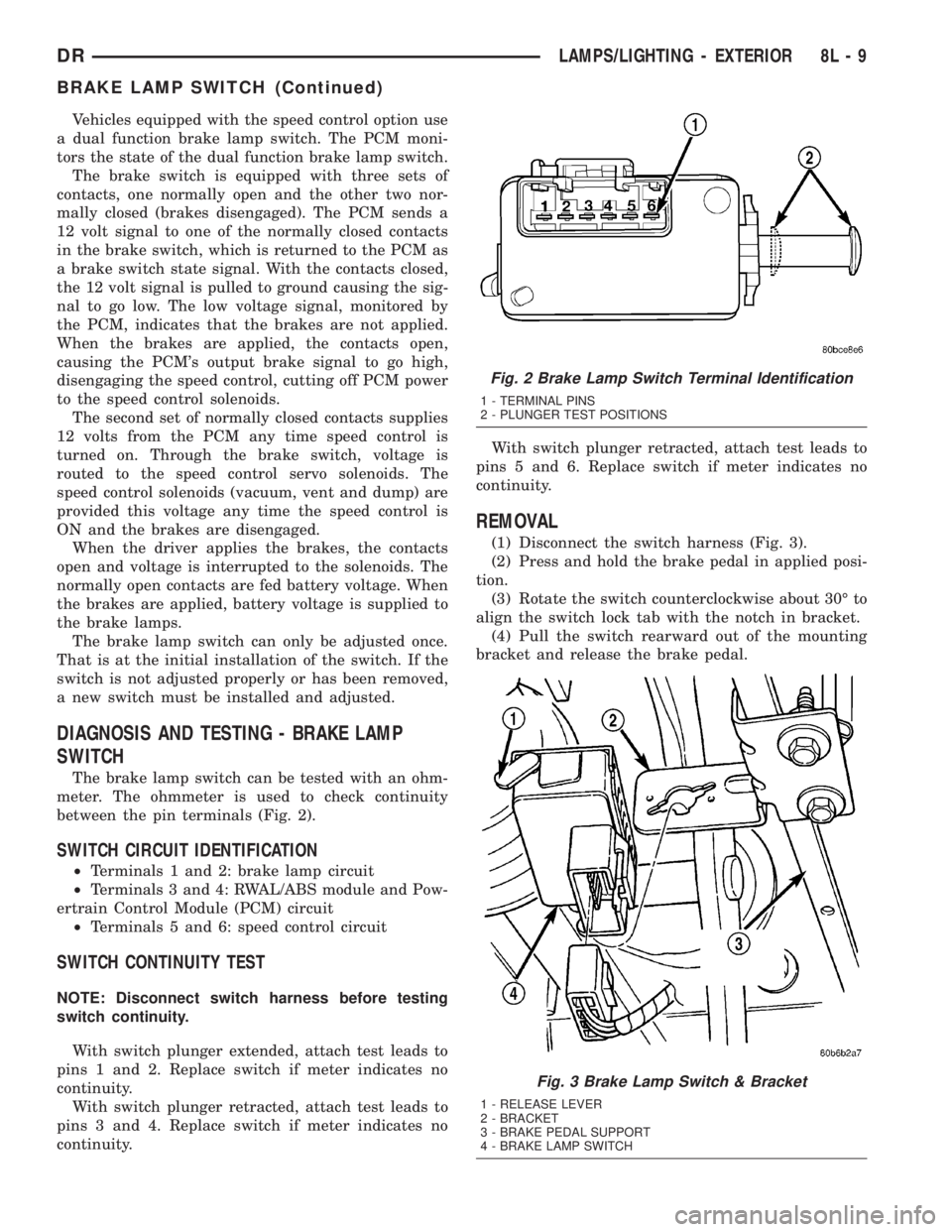
DIAGNOSIS AND TESTING - BRAKE LAMP
SWITCH
The brake lamp switch can be tested with an ohm-
meter. The ohmmeter is used to check continuity
between the pin terminals (Fig. 2).
SWITCH CIRCUIT IDENTIFICATION
²Terminals 1 and 2: brake lamp circuit
²Terminals 3 and 4: RWAL/ABS module and Pow-
ertrain Control Module (PCM) circuit
²Terminals 5 and 6: speed control circuit
SWITCH CONTINUITY TEST
NOTE: Disconnect switch harness before testing
switch continuity.
With switch plunger extended, attach test leads to
pins 1 and 2. Replace switch if meter indicates no
continuity.
With switch plunger retracted, attach test leads to
pins 3 and 4. Replace switch if meter indicates no
continuity.With switch plunger retracted, attach test leads to
pins 5 and 6. Replace switch if meter indicates no
continuity.
REMOVAL
(1) Disconnect the switch harness (Fig. 3).
(2) Press and hold the brake pedal in applied posi-
tion.
(3) Rotate the switch counterclockwise about 30É to
align the switch lock tab with the notch in bracket.
(4) Pull the switch rearward out of the mounting
bracket and release the brake pedal.
Fig. 2 Brake Lamp Switch Terminal Identification
1 - TERMINAL PINS
2 - PLUNGER TEST POSITIONS
Fig. 3 Brake Lamp Switch & Bracket
1 - RELEASE LEVER
2 - BRACKET
3 - BRAKE PEDAL SUPPORT
4 - BRAKE LAMP SWITCH
DRLAMPS/LIGHTING - EXTERIOR 8L - 9
BRAKE LAMP SWITCH (Continued)
Page 547 of 2895
INSTALLATION
(1) Press and hold the brake pedal down.
(2) Align the tab on thenewswitch with the notch
in the switch bracket. Insert the switch in the
bracket and turn it clockwise about 30É to lock it in
place.
(3) Connect the harness wires to the switch.
(4) Release the brake pedal.
(5) Move the release lever on the switch parallel
with the connector to engage the switch plunger. The
switch is now adjusted andcan notbe adjusted
again.
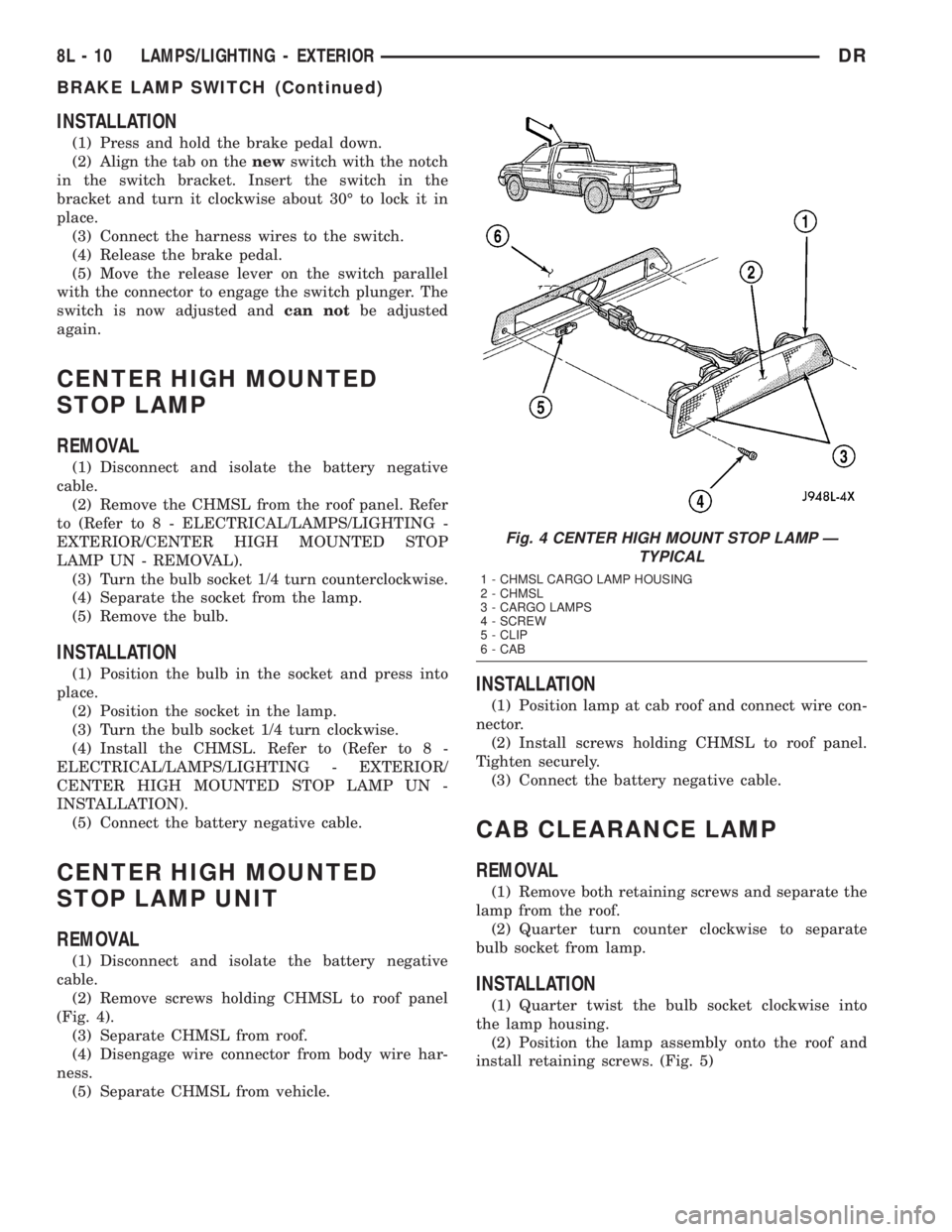
CENTER HIGH MOUNTED
STOP LAMP
REMOVAL
(1) Disconnect and isolate the battery negative
cable.
(2) Remove the CHMSL from the roof panel. Refer
to (Refer to 8 - ELECTRICAL/LAMPS/LIGHTING -
EXTERIOR/CENTER HIGH MOUNTED STOP
LAMP UN - REMOVAL).
(3) Turn the bulb socket 1/4 turn counterclockwise.
(4) Separate the socket from the lamp.
(5) Remove the bulb.
INSTALLATION
(1) Position the bulb in the socket and press into
place.
(2) Position the socket in the lamp.
(3) Turn the bulb socket 1/4 turn clockwise.
(4) Install the CHMSL. Refer to (Refer to 8 -
ELECTRICAL/LAMPS/LIGHTING - EXTERIOR/
CENTER HIGH MOUNTED STOP LAMP UN -
INSTALLATION).
(5) Connect the battery negative cable.
CENTER HIGH MOUNTED
STOP LAMP UNIT
REMOVAL
(1) Disconnect and isolate the battery negative
cable.
(2) Remove screws holding CHMSL to roof panel
(Fig. 4).
(3) Separate CHMSL from roof.
(4) Disengage wire connector from body wire har-
ness.
(5) Separate CHMSL from vehicle.
INSTALLATION
(1) Position lamp at cab roof and connect wire con-
nector.
(2) Install screws holding CHMSL to roof panel.
Tighten securely.
(3) Connect the battery negative cable.
CAB CLEARANCE LAMP
REMOVAL
(1) Remove both retaining screws and separate the
lamp from the roof.
(2) Quarter turn counter clockwise to separate
bulb socket from lamp.
INSTALLATION
(1) Quarter twist the bulb socket clockwise into
the lamp housing.
(2) Position the lamp assembly onto the roof and
install retaining screws. (Fig. 5)
Fig. 4 CENTER HIGH MOUNT STOP LAMP Ð
TYPICAL
1 - CHMSL CARGO LAMP HOUSING
2 - CHMSL
3 - CARGO LAMPS
4 - SCREW
5 - CLIP
6 - CAB
8L - 10 LAMPS/LIGHTING - EXTERIORDR
BRAKE LAMP SWITCH (Continued)
Page 553 of 2895
LICENSE PLATE LAMP
REMOVAL
(1) Disconnect and isolate the battery negative
cable.
(2) Grasp license plate bulb socket and 1/4 turn
left to release from the license plate lamp unit.
(3) Pull bulb from license plate lamp socket.
INSTALLATION
(1) Install the bulb in the socket.
(2) Install the socket in to the license plate lamp
unit and 1/4 turn to lock.
(3) Connect the battery negative cable.
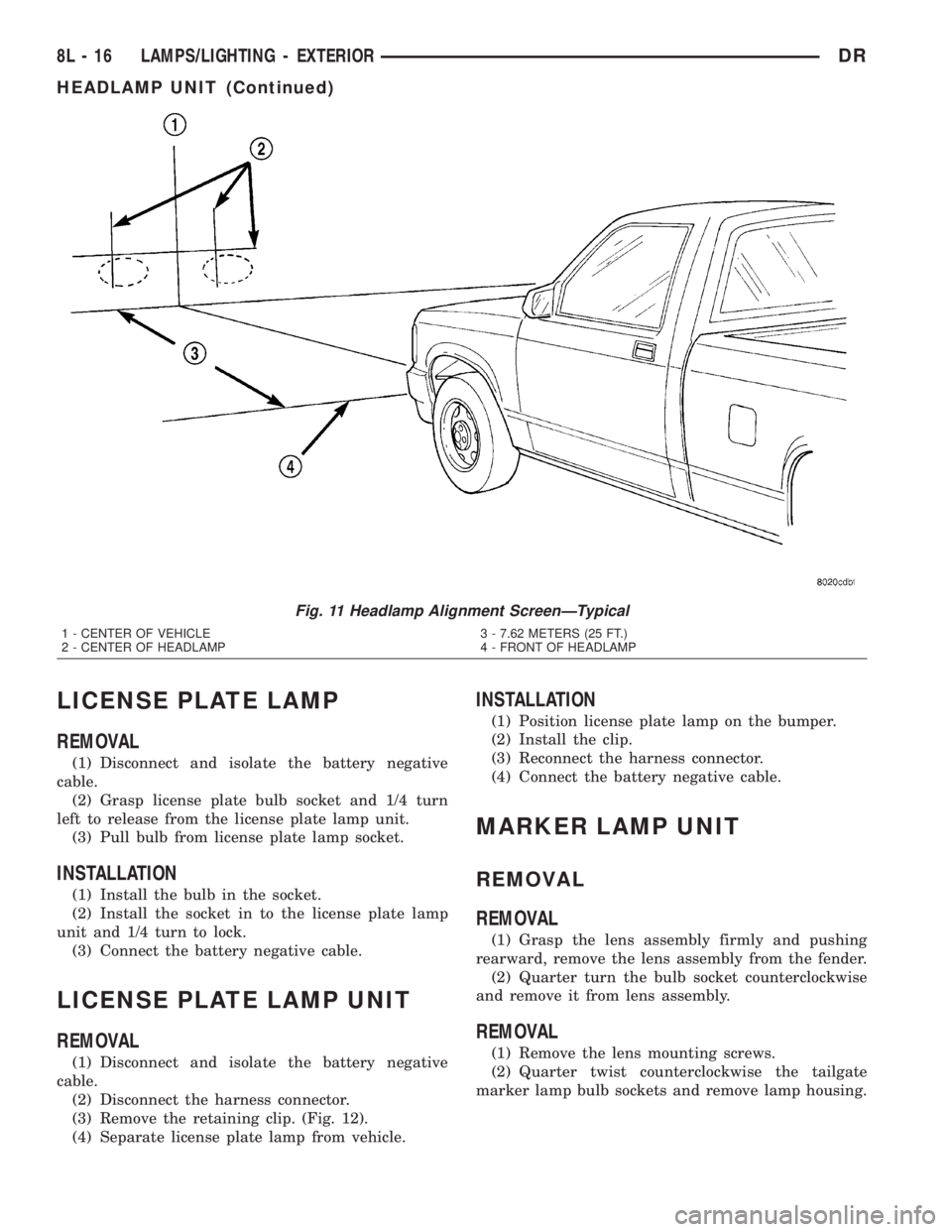
LICENSE PLATE LAMP UNIT
REMOVAL
(1) Disconnect and isolate the battery negative
cable.
(2) Disconnect the harness connector.
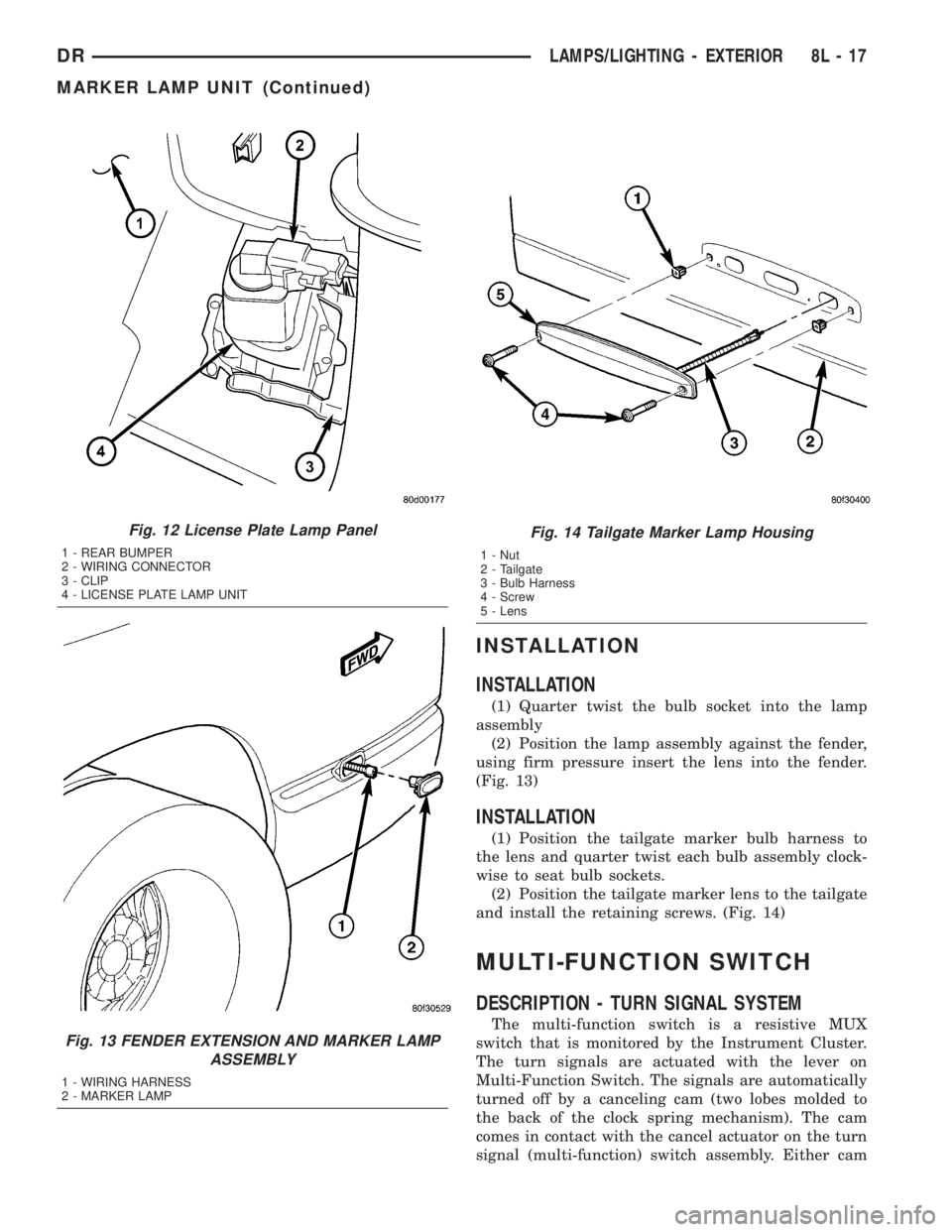
(3) Remove the retaining clip. (Fig. 12).
(4) Separate license plate lamp from vehicle.
INSTALLATION
(1) Position license plate lamp on the bumper.
(2) Install the clip.
(3) Reconnect the harness connector.
(4) Connect the battery negative cable.
MARKER LAMP UNIT
REMOVAL
REMOVAL
(1) Grasp the lens assembly firmly and pushing
rearward, remove the lens assembly from the fender.
(2) Quarter turn the bulb socket counterclockwise
and remove it from lens assembly.
REMOVAL
(1) Remove the lens mounting screws.
(2) Quarter twist counterclockwise the tailgate
marker lamp bulb sockets and remove lamp housing.
Fig. 11 Headlamp Alignment ScreenÐTypical
1 - CENTER OF VEHICLE
2 - CENTER OF HEADLAMP3 - 7.62 METERS (25 FT.)
4 - FRONT OF HEADLAMP
8L - 16 LAMPS/LIGHTING - EXTERIORDR
HEADLAMP UNIT (Continued)
Page 554 of 2895
INSTALLATION
INSTALLATION
(1) Quarter twist the bulb socket into the lamp
assembly
(2) Position the lamp assembly against the fender,
using firm pressure insert the lens into the fender.
(Fig. 13)
INSTALLATION
(1) Position the tailgate marker bulb harness to
the lens and quarter twist each bulb assembly clock-
wise to seat bulb sockets.
(2) Position the tailgate marker lens to the tailgate
and install the retaining screws. (Fig. 14)
MULTI-FUNCTION SWITCH
DESCRIPTION - TURN SIGNAL SYSTEM
The multi-function switch is a resistive MUX
switch that is monitored by the Instrument Cluster.
The turn signals are actuated with the lever on
Multi-Function Switch. The signals are automatically
turned off by a canceling cam (two lobes molded to
the back of the clock spring mechanism). The cam
comes in contact with the cancel actuator on the turn
signal (multi-function) switch assembly. Either cam
Fig. 12 License Plate Lamp Panel
1 - REAR BUMPER
2 - WIRING CONNECTOR
3 - CLIP
4 - LICENSE PLATE LAMP UNIT
Fig. 13 FENDER EXTENSION AND MARKER LAMP
ASSEMBLY
1 - WIRING HARNESS
2 - MARKER LAMP
Fig. 14 Tailgate Marker Lamp Housing
1 - Nut
2 - Tailgate
3 - Bulb Harness
4 - Screw
5 - Lens
DRLAMPS/LIGHTING - EXTERIOR 8L - 17
MARKER LAMP UNIT (Continued)
Page 556 of 2895
(6) Remove the screws retaining the clock spring
to the multifunction switch.
INSTALLATION
WARNING: BEFORE SERVICING THE STEERING
COLUMN THE AIRBAG SYSTEM MUST BE DIS-
ARMED. REFER TO THE ELECTRICAL RESTRAINT
SYSTEM FOR SERVICE PROCEDURES. FAILURE
TO DO SO MAY RESULT IN ACCIDENTAL DEPLOY-
MENT OF THE AIRBAG AND POSSIBLE PERSONAL
INJURY.
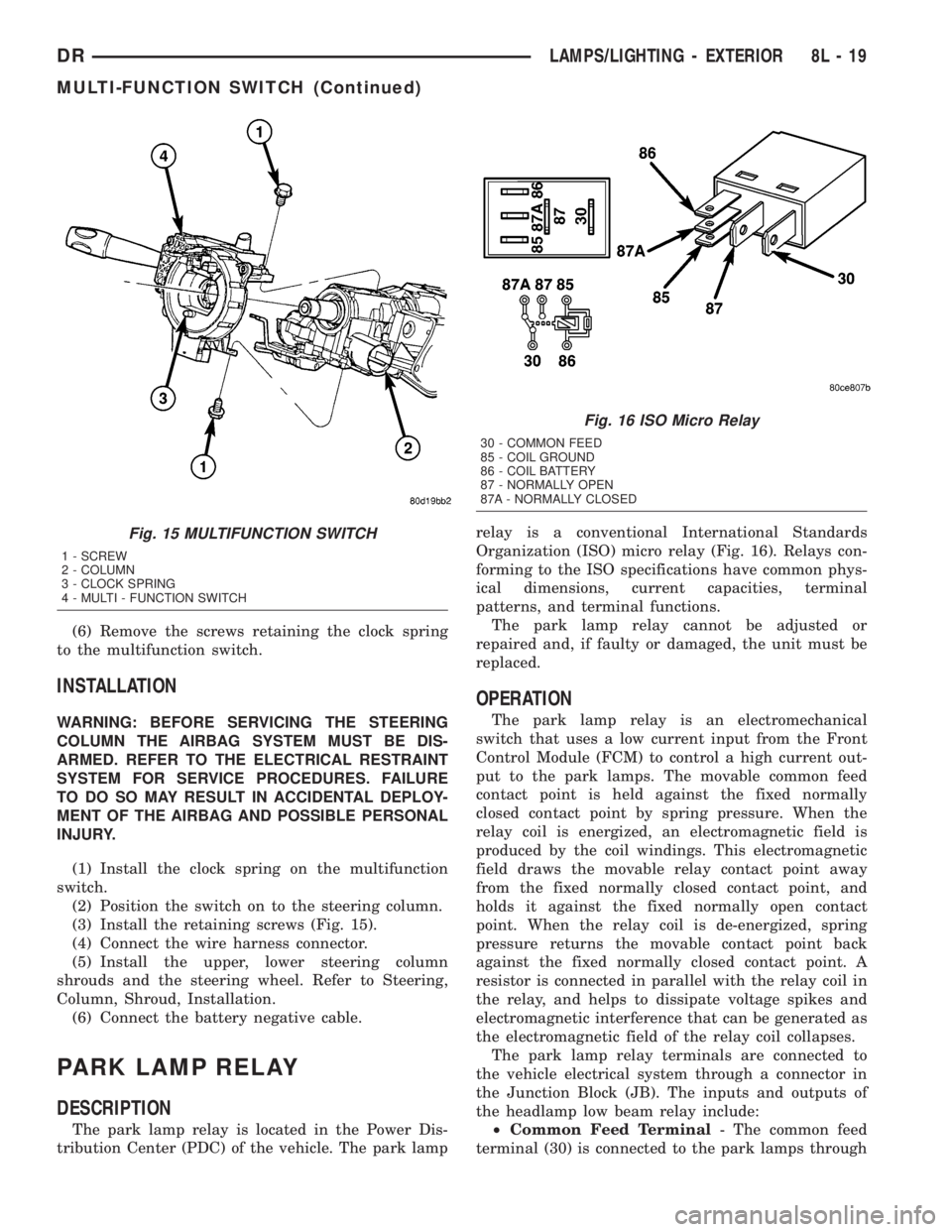
(1) Install the clock spring on the multifunction
switch.
(2) Position the switch on to the steering column.
(3) Install the retaining screws (Fig. 15).
(4) Connect the wire harness connector.
(5) Install the upper, lower steering column
shrouds and the steering wheel. Refer to Steering,
Column, Shroud, Installation.
(6) Connect the battery negative cable.
PARK LAMP RELAY
DESCRIPTION
The park lamp relay is located in the Power Dis-
tribution Center (PDC) of the vehicle. The park lamprelay is a conventional International Standards
Organization (ISO) micro relay (Fig. 16). Relays con-
forming to the ISO specifications have common phys-
ical dimensions, current capacities, terminal
patterns, and terminal functions.
The park lamp relay cannot be adjusted or
repaired and, if faulty or damaged, the unit must be
replaced.
OPERATION
The park lamp relay is an electromechanical
switch that uses a low current input from the Front
Control Module (FCM) to control a high current out-
put to the park lamps. The movable common feed
contact point is held against the fixed normally
closed contact point by spring pressure. When the
relay coil is energized, an electromagnetic field is
produced by the coil windings. This electromagnetic
field draws the movable relay contact point away
from the fixed normally closed contact point, and
holds it against the fixed normally open contact
point. When the relay coil is de-energized, spring
pressure returns the movable contact point back
against the fixed normally closed contact point. A
resistor is connected in parallel with the relay coil in
the relay, and helps to dissipate voltage spikes and
electromagnetic interference that can be generated as
the electromagnetic field of the relay coil collapses.
The park lamp relay terminals are connected to
the vehicle electrical system through a connector in
the Junction Block (JB). The inputs and outputs of
the headlamp low beam relay include:
²Common Feed Terminal- The common feed
terminal (30) is connected to the park lamps through
Fig. 15 MULTIFUNCTION SWITCH
1 - SCREW
2 - COLUMN
3 - CLOCK SPRING
4 - MULTI - FUNCTION SWITCH
Fig. 16 ISO Micro Relay
30 - COMMON FEED
85 - COIL GROUND
86 - COIL BATTERY
87 - NORMALLY OPEN
87A - NORMALLY CLOSED
DRLAMPS/LIGHTING - EXTERIOR 8L - 19
MULTI-FUNCTION SWITCH (Continued)
Page 558 of 2895
INSTALLATION
WARNING: ON VEHICLES EQUIPPED WITH AIR-
BAGS, DISABLE THE SUPPLEMENTAL RESTRAINT
SYSTEM BEFORE ATTEMPTING ANY STEERING
WHEEL, STEERING COLUMN, DRIVER AIRBAG,
PASSENGER AIRBAG, SEAT BELT TENSIONER,
FRONT IMPACT SENSORS, SIDE CURTAIN AIRBAG,
OR INSTRUMENT PANEL COMPONENT DIAGNOSIS
OR SERVICE. DISCONNECT AND ISOLATE THE
BATTERY NEGATIVE (GROUND) CABLE, THEN
WAIT TWO MINUTES FOR THE SYSTEM CAPACI-
TOR TO DISCHARGE BEFORE PERFORMING FUR-
THER DIAGNOSIS OR SERVICE. THIS IS THE ONLY
SURE WAY TO DISABLE THE SUPPLEMENTAL
RESTRAINT SYSTEM. FAILURE TO TAKE THE
PROPER PRECAUTIONS COULD RESULT IN ACCI-
DENTAL AIRBAG DEPLOYMENT AND POSSIBLE
PERSONAL INJURY.
(1) Position the park lamp relay to the proper
receptacle in the Power Distribution Center (PDC).
(2) Align the park lamp relay terminals with the
terminal cavities in the PDC.
(3) Press firmly and evenly on the top of the park
lamp relay until the terminals are fully seated in the
PDC.
(4) Install the PDC cover.
(5) Reconnect the battery negative cable.
PARK/TURN SIGNAL LAMP
REMOVAL
(1) Disconnect and isolate the negative battery
cable.
(2) Remove the headlamp unit.(Refer to 8 - ELEC-
TRICAL/LAMPS/LIGHTING - EXTERIOR/HEAD-
LAMP UNIT - REMOVAL).
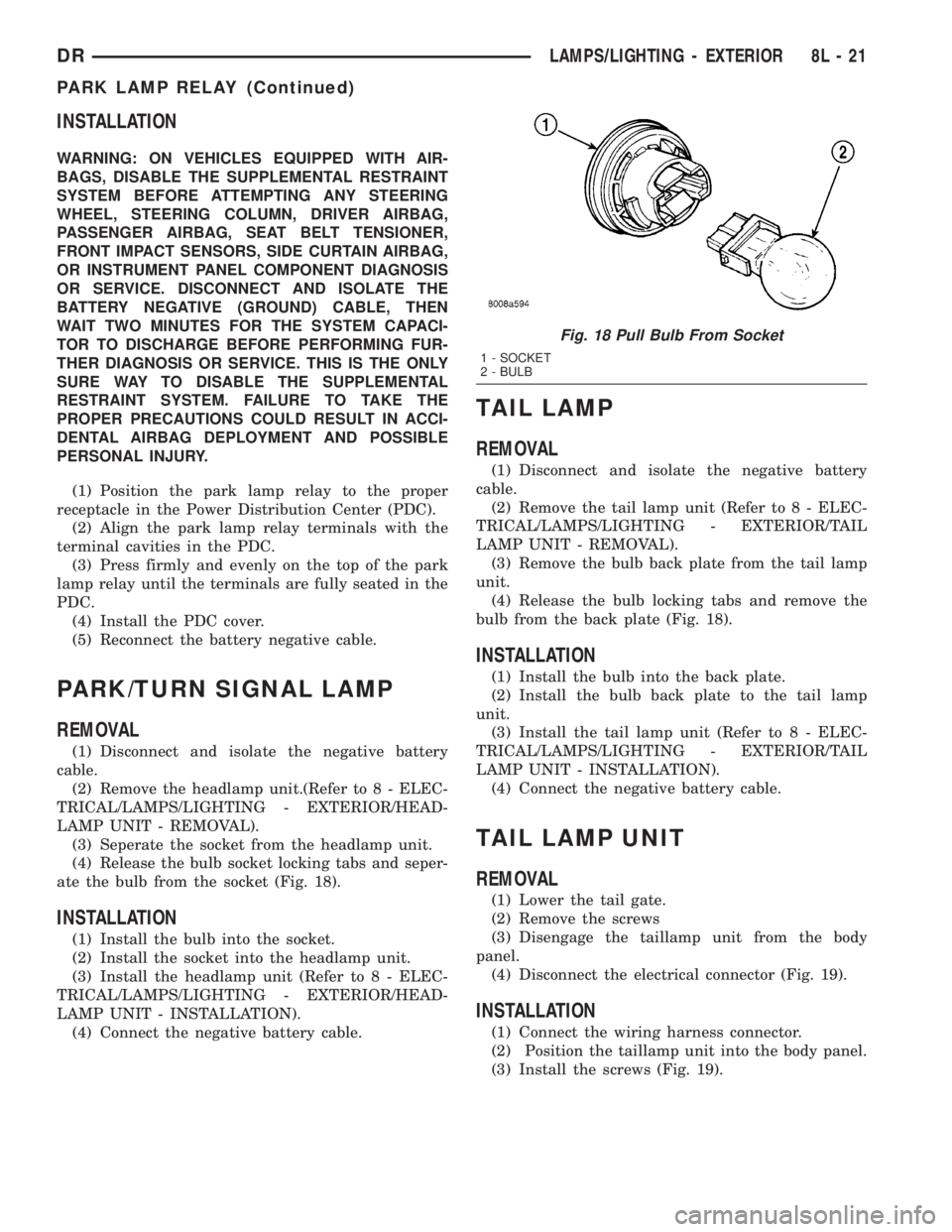
(3) Seperate the socket from the headlamp unit.
(4) Release the bulb socket locking tabs and seper-
ate the bulb from the socket (Fig. 18).
INSTALLATION
(1) Install the bulb into the socket.
(2) Install the socket into the headlamp unit.
(3) Install the headlamp unit (Refer to 8 - ELEC-
TRICAL/LAMPS/LIGHTING - EXTERIOR/HEAD-
LAMP UNIT - INSTALLATION).
(4) Connect the negative battery cable.
TAIL LAMP
REMOVAL
(1) Disconnect and isolate the negative battery
cable.
(2) Remove the tail lamp unit (Refer to 8 - ELEC-
TRICAL/LAMPS/LIGHTING - EXTERIOR/TAIL
LAMP UNIT - REMOVAL).
(3) Remove the bulb back plate from the tail lamp
unit.
(4) Release the bulb locking tabs and remove the
bulb from the back plate (Fig. 18).
INSTALLATION
(1) Install the bulb into the back plate.
(2) Install the bulb back plate to the tail lamp
unit.
(3) Install the tail lamp unit (Refer to 8 - ELEC-
TRICAL/LAMPS/LIGHTING - EXTERIOR/TAIL
LAMP UNIT - INSTALLATION).
(4) Connect the negative battery cable.
TAIL LAMP UNIT
REMOVAL
(1) Lower the tail gate.
(2) Remove the screws
(3) Disengage the taillamp unit from the body
panel.
(4) Disconnect the electrical connector (Fig. 19).
INSTALLATION
(1) Connect the wiring harness connector.
(2) Position the taillamp unit into the body panel.
(3) Install the screws (Fig. 19).
Fig. 18 Pull Bulb From Socket
1 - SOCKET
2 - BULB
DRLAMPS/LIGHTING - EXTERIOR 8L - 21
PARK LAMP RELAY (Continued)
Page 561 of 2895
LAMPS/LIGHTING - INTERIOR
TABLE OF CONTENTS
page page
DOME LAMP
DESCRIPTION.........................24
OPERATION...........................24
REMOVAL.............................24
INSTALLATION.........................24
DOOR AJAR SWITCH
DESCRIPTION.........................25
OPERATION...........................25GLOVE BOX LAMP/SWITCH
REMOVAL.............................25
INSTALLATION.........................25
READING LAMP
DESCRIPTION.........................26
OPERATION...........................26
REMOVAL.............................26
INSTALLATION.........................26
DOME LAMP
DESCRIPTION
The dome lamp is controlled by the instrument
cluster which provides power at all times, regardless
of the ignition switch position. The ground circuit for
the lamp is switched through the integral dome lamp
switch or through the door ajar switches via the
instrument cluster.
The dome lamp lens and bulb are available for ser-
vice replacement. If either of the lamp switch or bulb
holders is faulty or damaged, the dome lamp assem-
bly must be replaced.
For service of the dome lamp bulb, refer to the
appropriate wiring information.
OPERATION
The dome lamp is activated by the door ajar
switches via the instrument cluster. When all of the
doors are closed, the lamp can be activated by
depressing the lens. When any door is open, depress-
ing the lamp lense to activate the lamp switch will
not turn the lamps off.
The instrument cluster monitors the door ajar
switches. When a door is open the instrument cluster
grounds the low side drivers to turn on the lamp.
Upon closing all doors, the instrument cluster ini-
tiates a 30 second timer. If any of the doors are
opened during the ªtime outº cycle, the instrument
cluster will reset the timer until all doors are closed.
The instrument cluster will faid to off when the doors
are closed and the ignition is turned ON, the time
out expires or the power locks are activated.
REMOVAL
(1) Using a small flat blade, pry the left side (driv-
er's side) of the dome lamp lens downward from
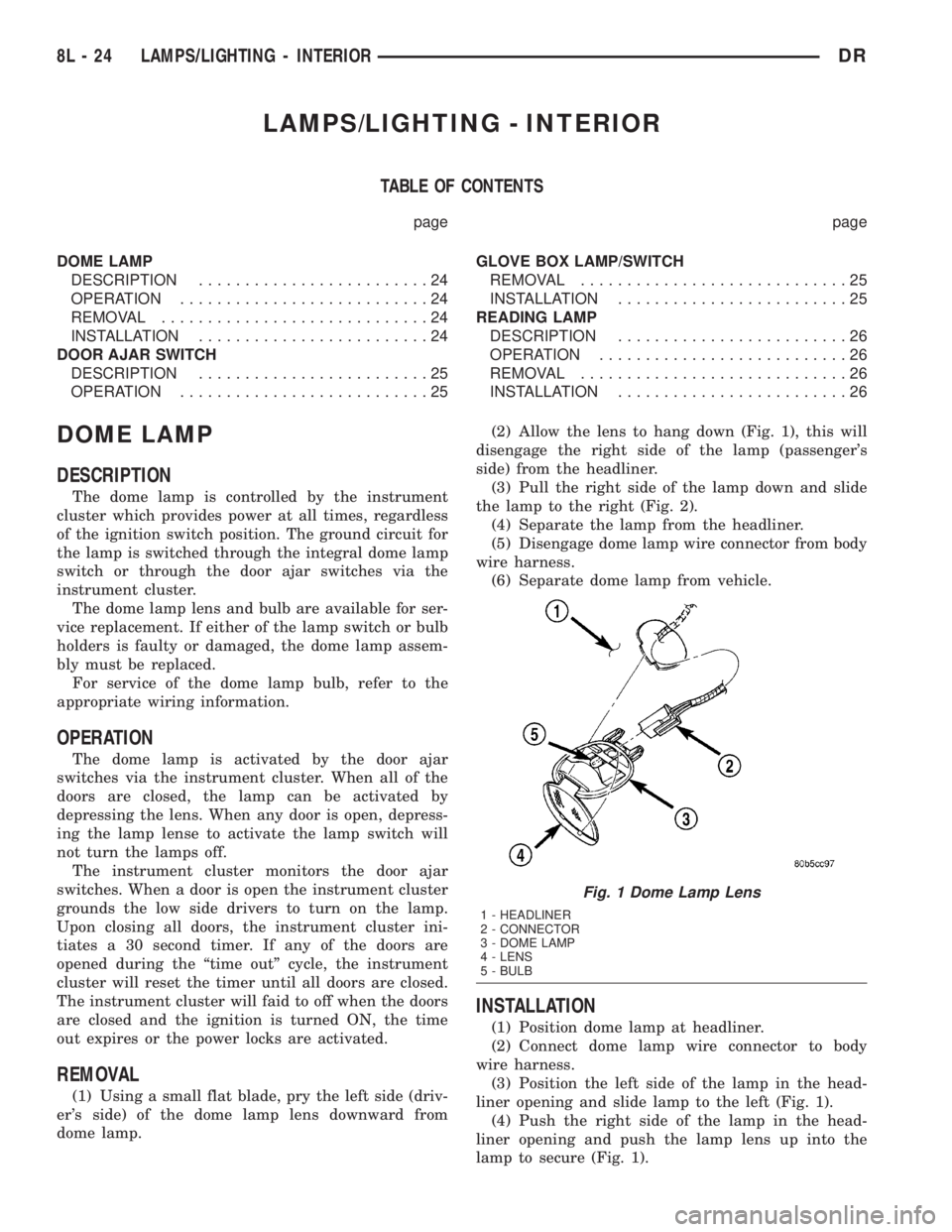
dome lamp.(2) Allow the lens to hang down (Fig. 1), this will
disengage the right side of the lamp (passenger's
side) from the headliner.
(3) Pull the right side of the lamp down and slide
the lamp to the right (Fig. 2).
(4) Separate the lamp from the headliner.
(5) Disengage dome lamp wire connector from body
wire harness.
(6) Separate dome lamp from vehicle.
INSTALLATION
(1) Position dome lamp at headliner.
(2) Connect dome lamp wire connector to body
wire harness.
(3) Position the left side of the lamp in the head-
liner opening and slide lamp to the left (Fig. 1).
(4) Push the right side of the lamp in the head-
liner opening and push the lamp lens up into the
lamp to secure (Fig. 1).
Fig. 1 Dome Lamp Lens
1 - HEADLINER
2 - CONNECTOR
3 - DOME LAMP
4 - LENS
5 - BULB
8L - 24 LAMPS/LIGHTING - INTERIORDR