hood open DODGE RAM 2003 Service User Guide
[x] Cancel search | Manufacturer: DODGE, Model Year: 2003, Model line: RAM, Model: DODGE RAM 2003Pages: 2895, PDF Size: 83.15 MB
Page 687 of 2895
WASHER NOZZLE
DESCRIPTION
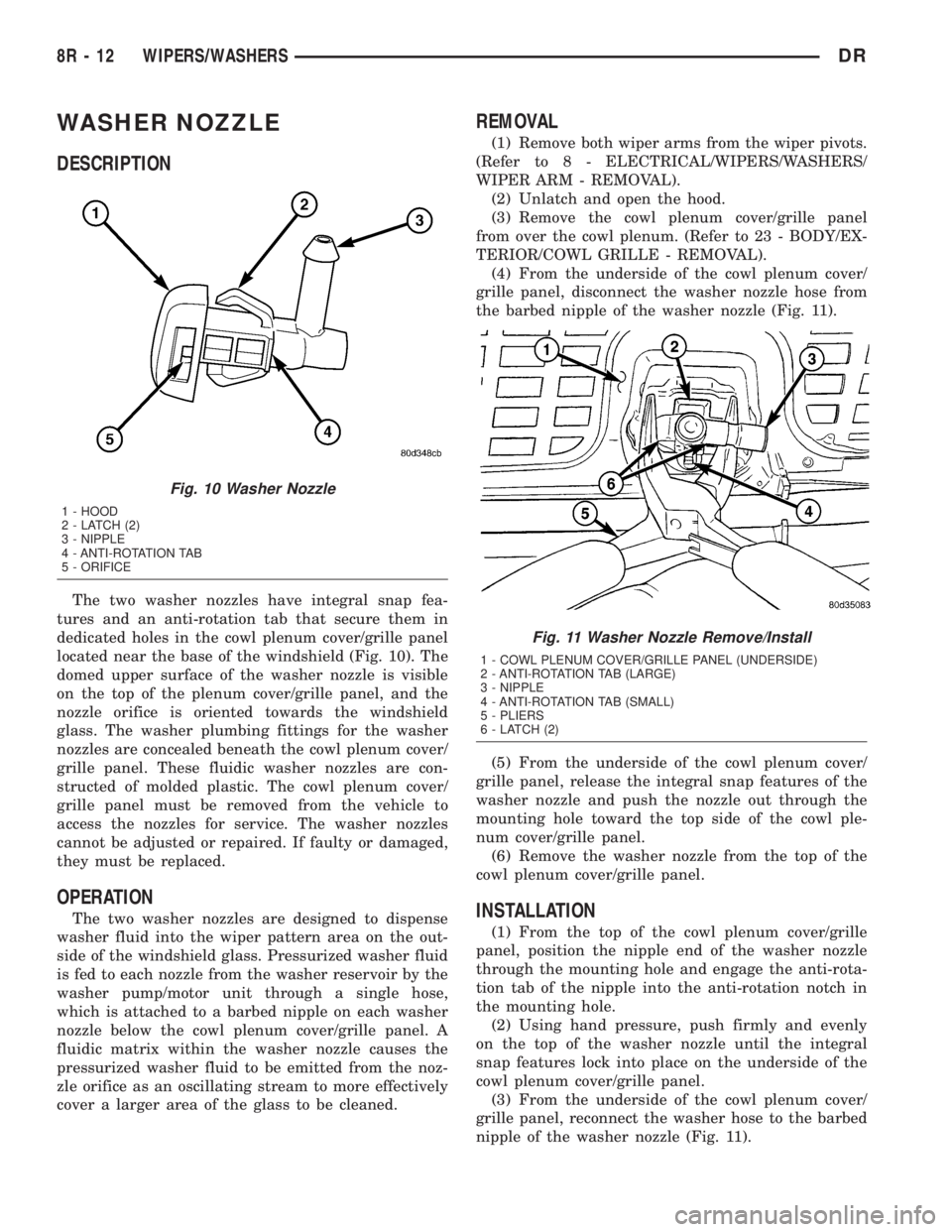
The two washer nozzles have integral snap fea-
tures and an anti-rotation tab that secure them in
dedicated holes in the cowl plenum cover/grille panel
located near the base of the windshield (Fig. 10). The
domed upper surface of the washer nozzle is visible
on the top of the plenum cover/grille panel, and the
nozzle orifice is oriented towards the windshield
glass. The washer plumbing fittings for the washer
nozzles are concealed beneath the cowl plenum cover/
grille panel. These fluidic washer nozzles are con-
structed of molded plastic. The cowl plenum cover/
grille panel must be removed from the vehicle to
access the nozzles for service. The washer nozzles
cannot be adjusted or repaired. If faulty or damaged,
they must be replaced.
OPERATION
The two washer nozzles are designed to dispense
washer fluid into the wiper pattern area on the out-
side of the windshield glass. Pressurized washer fluid
is fed to each nozzle from the washer reservoir by the
washer pump/motor unit through a single hose,
which is attached to a barbed nipple on each washer
nozzle below the cowl plenum cover/grille panel. A
fluidic matrix within the washer nozzle causes the
pressurized washer fluid to be emitted from the noz-
zle orifice as an oscillating stream to more effectively
cover a larger area of the glass to be cleaned.
REMOVAL
(1) Remove both wiper arms from the wiper pivots.
(Refer to 8 - ELECTRICAL/WIPERS/WASHERS/
WIPER ARM - REMOVAL).
(2) Unlatch and open the hood.
(3) Remove the cowl plenum cover/grille panel
from over the cowl plenum. (Refer to 23 - BODY/EX-
TERIOR/COWL GRILLE - REMOVAL).
(4) From the underside of the cowl plenum cover/
grille panel, disconnect the washer nozzle hose from
the barbed nipple of the washer nozzle (Fig. 11).
(5) From the underside of the cowl plenum cover/
grille panel, release the integral snap features of the
washer nozzle and push the nozzle out through the
mounting hole toward the top side of the cowl ple-
num cover/grille panel.
(6) Remove the washer nozzle from the top of the
cowl plenum cover/grille panel.
INSTALLATION
(1) From the top of the cowl plenum cover/grille
panel, position the nipple end of the washer nozzle
through the mounting hole and engage the anti-rota-
tion tab of the nipple into the anti-rotation notch in
the mounting hole.
(2) Using hand pressure, push firmly and evenly
on the top of the washer nozzle until the integral
snap features lock into place on the underside of the
cowl plenum cover/grille panel.
(3) From the underside of the cowl plenum cover/
grille panel, reconnect the washer hose to the barbed
nipple of the washer nozzle (Fig. 11).
Fig. 10 Washer Nozzle
1 - HOOD
2 - LATCH (2)
3 - NIPPLE
4 - ANTI-ROTATION TAB
5 - ORIFICE
Fig. 11 Washer Nozzle Remove/Install
1 - COWL PLENUM COVER/GRILLE PANEL (UNDERSIDE)
2 - ANTI-ROTATION TAB (LARGE)
3 - NIPPLE
4 - ANTI-ROTATION TAB (SMALL)
5 - PLIERS
6 - LATCH (2)
8R - 12 WIPERS/WASHERSDR
Page 689 of 2895
However, conventional diagnostic methods may not
prove conclusive in the diagnosis of the instrument
cluster, the Front Control Module (FCM), or the elec-
tronic message inputs to or outputs from the instru-
ment cluster and the FCM that control the operation
of the washer pump/motor unit. The most reliable,
efficient, and accurate means to diagnose the washer
pump/motor unit, the instrument cluster, the FCM,
or the electronic message inputs and outputs related
to the washer pump/motor unit operation requires
the use of a DRBIIItscan tool. Refer to the appro-
priate diagnostic information.
REMOVAL
The washer pump/motor unit can be removed from
the washer reservoir without removing the reservoir
from the vehicle.
(1) Unlatch and open the hood.
(2) Disconnect and isolate the battery negative
cable.
(3) Disconnect the washer hose from the barbed
outlet nipple of the washer pump/motor unit and
allow the washer fluid to drain into a clean container
for reuse.
(4) Disconnect the right (except V-10 or diesel
engine) or left (V-10 or diesel engine only) headlamp
and dash wire harness connector for the washer
pump/motor unit from the motor connector receptacle
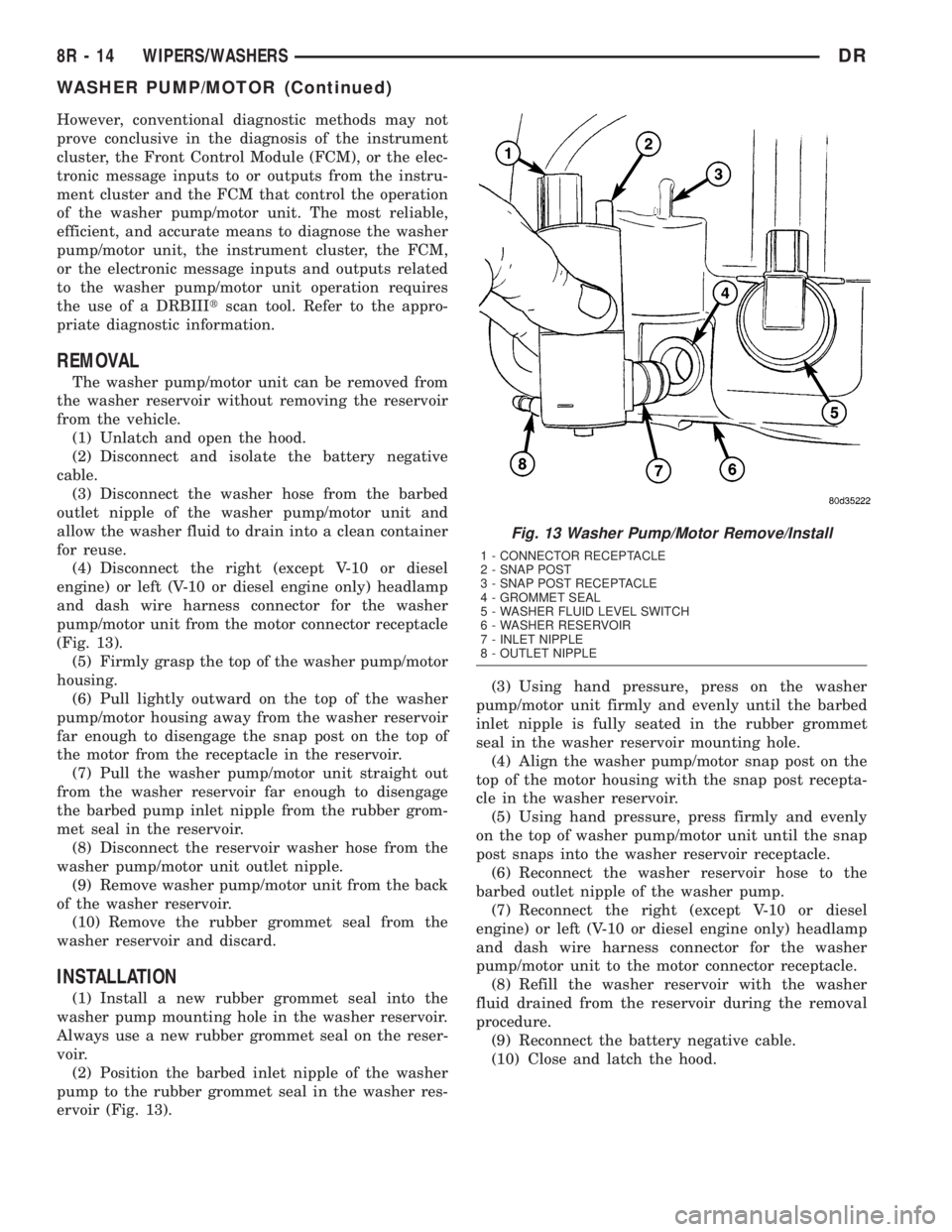
(Fig. 13).
(5) Firmly grasp the top of the washer pump/motor
housing.
(6) Pull lightly outward on the top of the washer
pump/motor housing away from the washer reservoir
far enough to disengage the snap post on the top of
the motor from the receptacle in the reservoir.
(7) Pull the washer pump/motor unit straight out
from the washer reservoir far enough to disengage
the barbed pump inlet nipple from the rubber grom-
met seal in the reservoir.
(8) Disconnect the reservoir washer hose from the
washer pump/motor unit outlet nipple.
(9) Remove washer pump/motor unit from the back
of the washer reservoir.
(10) Remove the rubber grommet seal from the
washer reservoir and discard.
INSTALLATION
(1) Install a new rubber grommet seal into the
washer pump mounting hole in the washer reservoir.
Always use a new rubber grommet seal on the reser-
voir.
(2) Position the barbed inlet nipple of the washer
pump to the rubber grommet seal in the washer res-
ervoir (Fig. 13).(3) Using hand pressure, press on the washer
pump/motor unit firmly and evenly until the barbed
inlet nipple is fully seated in the rubber grommet
seal in the washer reservoir mounting hole.
(4) Align the washer pump/motor snap post on the
top of the motor housing with the snap post recepta-
cle in the washer reservoir.
(5) Using hand pressure, press firmly and evenly
on the top of washer pump/motor unit until the snap
post snaps into the washer reservoir receptacle.
(6) Reconnect the washer reservoir hose to the
barbed outlet nipple of the washer pump.
(7) Reconnect the right (except V-10 or diesel
engine) or left (V-10 or diesel engine only) headlamp
and dash wire harness connector for the washer
pump/motor unit to the motor connector receptacle.
(8) Refill the washer reservoir with the washer
fluid drained from the reservoir during the removal
procedure.
(9) Reconnect the battery negative cable.
(10) Close and latch the hood.
Fig. 13 Washer Pump/Motor Remove/Install
1 - CONNECTOR RECEPTACLE
2 - SNAP POST
3 - SNAP POST RECEPTACLE
4 - GROMMET SEAL
5 - WASHER FLUID LEVEL SWITCH
6 - WASHER RESERVOIR
7 - INLET NIPPLE
8 - OUTLET NIPPLE
8R - 14 WIPERS/WASHERSDR
WASHER PUMP/MOTOR (Continued)
Page 691 of 2895
REMOVAL
REMOVAL - EXCEPT V-10 OR DIESEL ENGINE
(1) Unlatch and open the hood.
(2) Disconnect and isolate the battery negative
cable.
(3) Remove the fasteners securing the coolant
recovery container or the coolant pressure container
to the top of the cooling module and move the con-
tainer aside. It is not necessary to open or drain the
engine cooling system. (Refer to 7 - COOLING/EN-
GINE/COOLANT RECOVERY CONTAINER -
REMOVAL) or (Refer to 7 - COOLING/ENGINE/
COOLANT RECOVERY PRESSURE CONTAINER -
REMOVAL).
(4) Disconnect the reservoir washer hose from the
barbed nipple of the inline fitting at the engine com-
partment washer hose in the right headlamp and
dash wire harness and allow the washer fluid to
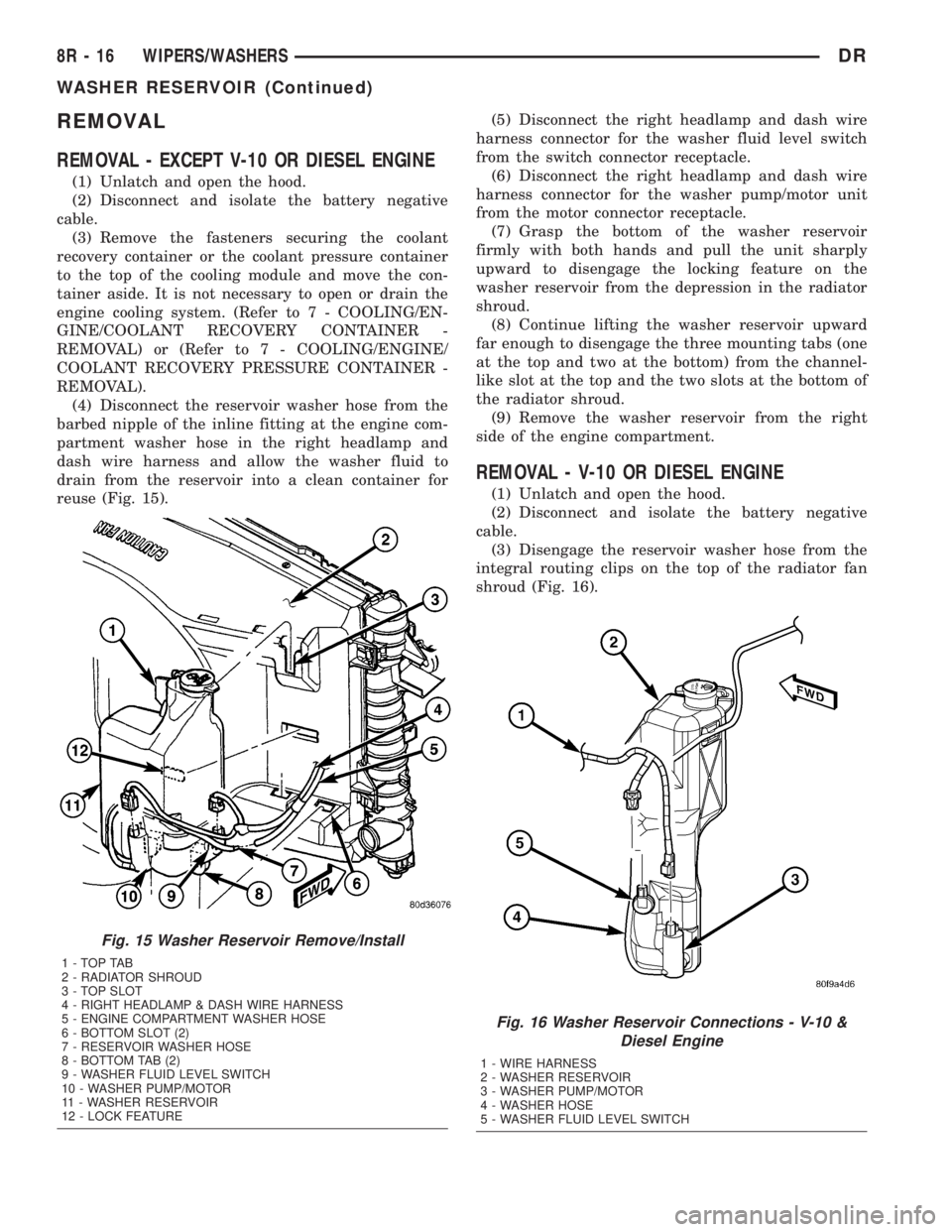
drain from the reservoir into a clean container for
reuse (Fig. 15).(5) Disconnect the right headlamp and dash wire
harness connector for the washer fluid level switch
from the switch connector receptacle.
(6) Disconnect the right headlamp and dash wire
harness connector for the washer pump/motor unit
from the motor connector receptacle.
(7) Grasp the bottom of the washer reservoir
firmly with both hands and pull the unit sharply
upward to disengage the locking feature on the
washer reservoir from the depression in the radiator
shroud.
(8) Continue lifting the washer reservoir upward
far enough to disengage the three mounting tabs (one
at the top and two at the bottom) from the channel-
like slot at the top and the two slots at the bottom of
the radiator shroud.
(9) Remove the washer reservoir from the right
side of the engine compartment.
REMOVAL - V-10 OR DIESEL ENGINE
(1) Unlatch and open the hood.
(2) Disconnect and isolate the battery negative
cable.
(3) Disengage the reservoir washer hose from the
integral routing clips on the top of the radiator fan
shroud (Fig. 16).
Fig. 15 Washer Reservoir Remove/Install
1-TOPTAB
2 - RADIATOR SHROUD
3 - TOP SLOT
4 - RIGHT HEADLAMP & DASH WIRE HARNESS
5 - ENGINE COMPARTMENT WASHER HOSE
6 - BOTTOM SLOT (2)
7 - RESERVOIR WASHER HOSE
8 - BOTTOM TAB (2)
9 - WASHER FLUID LEVEL SWITCH
10 - WASHER PUMP/MOTOR
11 - WASHER RESERVOIR
12 - LOCK FEATURE
Fig. 16 Washer Reservoir Connections - V-10 &
Diesel Engine
1 - WIRE HARNESS
2 - WASHER RESERVOIR
3 - WASHER PUMP/MOTOR
4 - WASHER HOSE
5 - WASHER FLUID LEVEL SWITCH
8R - 16 WIPERS/WASHERSDR
WASHER RESERVOIR (Continued)
Page 698 of 2895
²Motor- The wiper motor features an integral
die cast bracket to which the wiper module bracket is
secured with a stamped steel clamp and two screws
near the top and which has two rubber insulated
mounting ears at the bottom. This die casting also
serves as the wiper motor transmission housing from
which the wiper motor output shaft exits. A nut
secures the wiper motor crank arm to the motor out-
put shaft. The two-speed permanent magnet wiper
motor features an integral transmission, an internal
park switch, and an internal automatic resetting cir-
cuit breaker.
²Pivots- The two front wiper pivots are secured
within the die cast pivot brackets on the outboard
ends of the wiper module main member. The lever
arms that extend from the center of the pivot shafts
each have a ball stud on their end. The upper end of
each pivot shaft where the wiper arms will be fas-
tened each has a serrated driver with a keyway. The
lower ends of the pivot shafts are installed through
lubricated bushings in the pivot brackets and are
secured with snap rings.
The wiper module cannot be adjusted or repaired.
If any component of the module is faulty or damaged,
the entire wiper module unit must be replaced.
OPERATION
The wiper module operation is controlled by the
battery current inputs received by the wiper motor
through the wiper on/off and wiper high/low relays.
The wiper motor speed is controlled by current flow
to either the low speed or the high speed set of
brushes. The park switch is a single pole, single
throw, momentary switch within the wiper motor
that is mechanically actuated by the wiper motor
transmission components. The park switch alter-
nately opens and closes the wiper park switch sense
circuit to ground, depending upon the position of the
wipers on the glass. This feature allows the motor to
complete its current wipe cycle after the wiper sys-
tem has been turned Off, and to park the wiper
blades in the lowest portion of the wipe pattern. The
automatic resetting circuit breaker protects the
motor from overloads. The wiper motor crank arm,
the two wiper linkage members, and the two wiper
pivots mechanically convert the rotary output of the
wiper motor to the back and forth wiping motion of
the wiper arms and blades on the glass.
REMOVAL
(1) Remove both wiper arms from the wiper pivots.
(Refer to 8 - ELECTRICAL/WIPERS/WASHERS/
WIPER ARM - REMOVAL).
(2) Unlatch and open the hood.
(3) Disconnect and isolate the battery negative
cable.
(4) Remove the cowl plenum cover/grille panel
from over the cowl plenum. (Refer to 23 - BODY/EX-
TERIOR/COWL GRILLE - REMOVAL).
(5) Disconnect the left headlamp and dash wire
harness connector for the wiper motor from the
motor pigtail wire connector (Fig. 26).
(6) Remove the two screws that secure the wiper
module to the top of the cowl plenum panel at the
pivot brackets.
(7) Remove the two screws that secure the wiper
module to the bottom of the cowl plenum panel.
(8) Remove the wiper module from the cowl ple-
num panel as a unit.
INSTALLATION
(1) Position the wiper module into the cowl ple-
num as a unit (Fig. 26).
(2) Install the two screws that secure the wiper
module to the top of the cowl plenum panel at the
pivot brackets. Tighten the screw on the driver side,
followed by the screw on the passenger side. Tighten
the screws to 7 N´m (60 in. lbs.).
(3) Install and tighten the screws that secure the
wiper module to the bottom of the cowl plenum
panel. Tighten the screw on the passenger side, fol-
lowed by the screw on the driver side. Tighten the
screws to 7 N´m (60 in. lbs.).
(4) Reconnect the left headlamp and dash wire
harness connector for the wiper motor to the motor
pigtail wire connector.
(5) Reinstall the cowl plenum cover/grille panel
over the cowl plenum. (Refer to 23 - BODY/EXTERI-
OR/COWL GRILLE - INSTALLATION).
(6) Reconnect the battery negative cable.
(7) Close and latch the hood.
(8) Reinstall both wiper arms onto the wiper piv-
ots. (Refer to 8 - ELECTRICAL/WIPERS/WASHERS/
WIPER ARMS - INSTALLATION).
DRWIPERS/WASHERS 8R - 23
WIPER MODULE (Continued)
Page 2524 of 2895
SELECTOR SWITCH
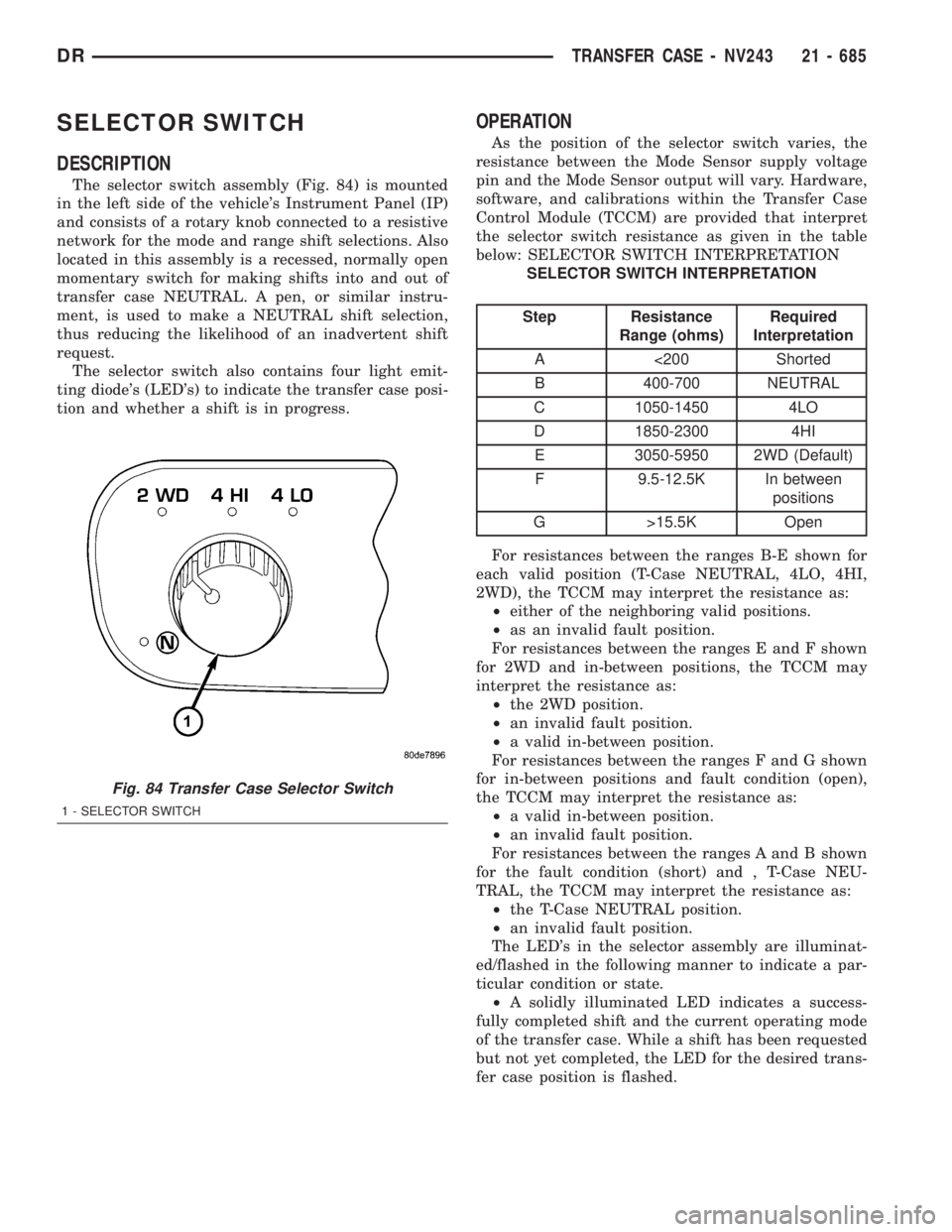
DESCRIPTION
The selector switch assembly (Fig. 84) is mounted
in the left side of the vehicle's Instrument Panel (IP)
and consists of a rotary knob connected to a resistive
network for the mode and range shift selections. Also
located in this assembly is a recessed, normally open
momentary switch for making shifts into and out of
transfer case NEUTRAL. A pen, or similar instru-
ment, is used to make a NEUTRAL shift selection,
thus reducing the likelihood of an inadvertent shift
request.
The selector switch also contains four light emit-
ting diode's (LED's) to indicate the transfer case posi-
tion and whether a shift is in progress.
OPERATION
As the position of the selector switch varies, the
resistance between the Mode Sensor supply voltage
pin and the Mode Sensor output will vary. Hardware,
software, and calibrations within the Transfer Case
Control Module (TCCM) are provided that interpret
the selector switch resistance as given in the table
below: SELECTOR SWITCH INTERPRETATION
SELECTOR SWITCH INTERPRETATION
Step Resistance
Range (ohms)Required
Interpretation
A <200 Shorted
B 400-700 NEUTRAL
C 1050-1450 4LO
D 1850-2300 4HI
E 3050-5950 2WD (Default)
F 9.5-12.5K In between
positions
G >15.5K Open
For resistances between the ranges B-E shown for
each valid position (T-Case NEUTRAL, 4LO, 4HI,
2WD), the TCCM may interpret the resistance as:
²either of the neighboring valid positions.
²as an invalid fault position.
For resistances between the ranges E and F shown
for 2WD and in-between positions, the TCCM may
interpret the resistance as:
²the 2WD position.
²an invalid fault position.
²a valid in-between position.
For resistances between the ranges F and G shown
for in-between positions and fault condition (open),
the TCCM may interpret the resistance as:
²a valid in-between position.
²an invalid fault position.
For resistances between the ranges A and B shown
for the fault condition (short) and , T-Case NEU-
TRAL, the TCCM may interpret the resistance as:
²the T-Case NEUTRAL position.
²an invalid fault position.
The LED's in the selector assembly are illuminat-
ed/flashed in the following manner to indicate a par-
ticular condition or state.
²A solidly illuminated LED indicates a success-
fully completed shift and the current operating mode
of the transfer case. While a shift has been requested
but not yet completed, the LED for the desired trans-
fer case position is flashed.
Fig. 84 Transfer Case Selector Switch
1 - SELECTOR SWITCH
DRTRANSFER CASE - NV243 21 - 685
Page 2558 of 2895
SELECTOR SWITCH
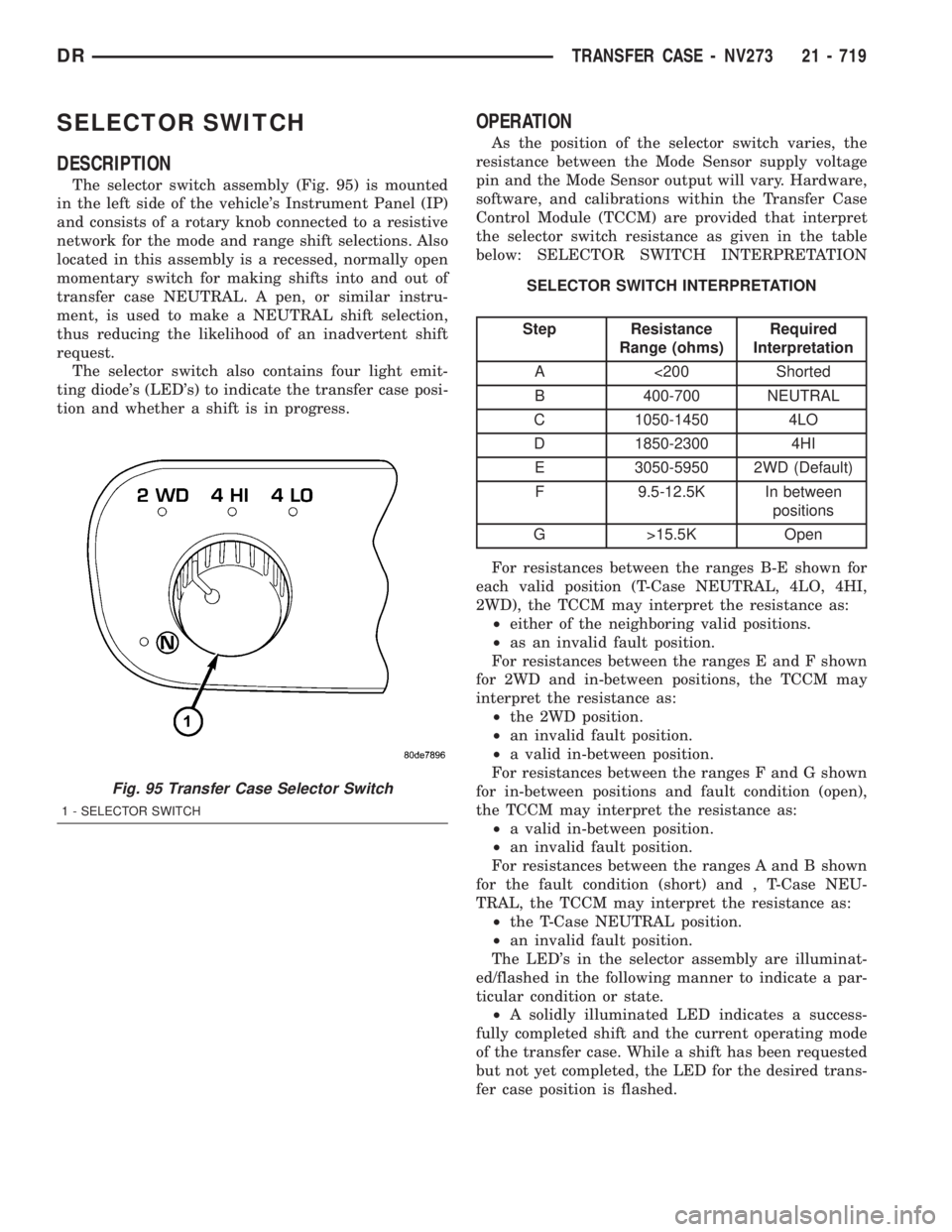
DESCRIPTION
The selector switch assembly (Fig. 95) is mounted
in the left side of the vehicle's Instrument Panel (IP)
and consists of a rotary knob connected to a resistive
network for the mode and range shift selections. Also
located in this assembly is a recessed, normally open
momentary switch for making shifts into and out of
transfer case NEUTRAL. A pen, or similar instru-
ment, is used to make a NEUTRAL shift selection,
thus reducing the likelihood of an inadvertent shift
request.
The selector switch also contains four light emit-
ting diode's (LED's) to indicate the transfer case posi-
tion and whether a shift is in progress.
OPERATION
As the position of the selector switch varies, the
resistance between the Mode Sensor supply voltage
pin and the Mode Sensor output will vary. Hardware,
software, and calibrations within the Transfer Case
Control Module (TCCM) are provided that interpret
the selector switch resistance as given in the table
below: SELECTOR SWITCH INTERPRETATION
SELECTOR SWITCH INTERPRETATION
Step Resistance
Range (ohms)Required
Interpretation
A <200 Shorted
B 400-700 NEUTRAL
C 1050-1450 4LO
D 1850-2300 4HI
E 3050-5950 2WD (Default)
F 9.5-12.5K In between
positions
G >15.5K Open
For resistances between the ranges B-E shown for
each valid position (T-Case NEUTRAL, 4LO, 4HI,
2WD), the TCCM may interpret the resistance as:
²either of the neighboring valid positions.
²as an invalid fault position.
For resistances between the ranges E and F shown
for 2WD and in-between positions, the TCCM may
interpret the resistance as:
²the 2WD position.
²an invalid fault position.
²a valid in-between position.
For resistances between the ranges F and G shown
for in-between positions and fault condition (open),
the TCCM may interpret the resistance as:
²a valid in-between position.
²an invalid fault position.
For resistances between the ranges A and B shown
for the fault condition (short) and , T-Case NEU-
TRAL, the TCCM may interpret the resistance as:
²the T-Case NEUTRAL position.
²an invalid fault position.
The LED's in the selector assembly are illuminat-
ed/flashed in the following manner to indicate a par-
ticular condition or state.
²A solidly illuminated LED indicates a success-
fully completed shift and the current operating mode
of the transfer case. While a shift has been requested
but not yet completed, the LED for the desired trans-
fer case position is flashed.
Fig. 95 Transfer Case Selector Switch
1 - SELECTOR SWITCH
DRTRANSFER CASE - NV273 21 - 719
Page 2614 of 2895
FRONT FENDER
REMOVAL
(1) Remove the antenna, if equipped. (Refer to 8 -
ELECTRICAL/AUDIO/ANTENNA BODY & CABLE -
REMOVAL)
(2) Remove the battery tray, if required. (Refer to 8
- ELECTRICAL/BATTERY SYSTEM/TRAY -
REMOVAL)
(3) Remove the cowl grille. (Refer to 23 - BODY/
EXTERIOR/COWL GRILLE - REMOVAL)
(4) Remove the headlamp unit. (Refer to 8 - ELEC-
TRICAL/LAMPS/LIGHTING - EXTERIOR/HEAD-
LAMP UNIT - REMOVAL)
(5) Remove the wheelhouse splash shield. (Refer to
23 - BODY/EXTERIOR/FRONT WHEELHOUSE
SPLASH SHIELD - REMOVAL)
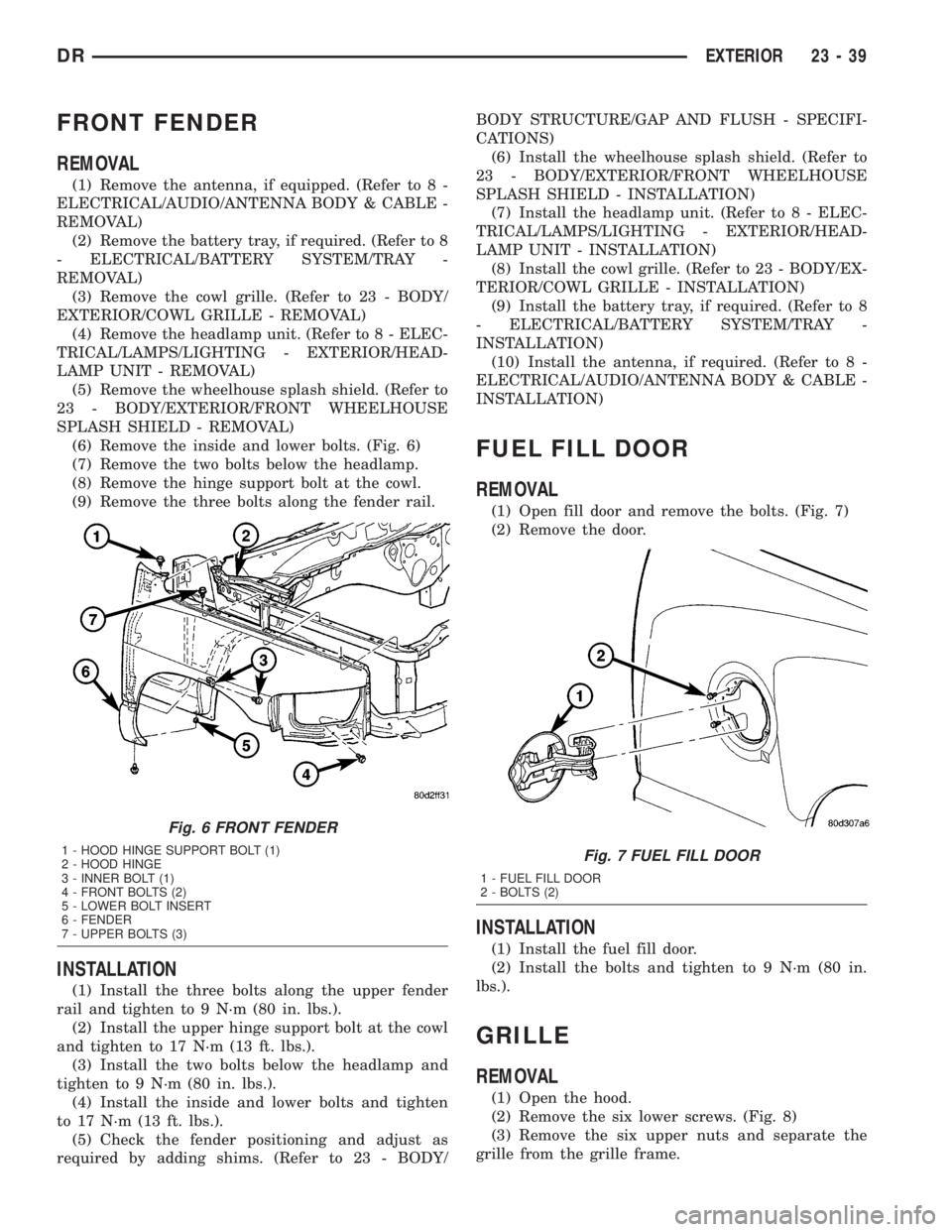
(6) Remove the inside and lower bolts. (Fig. 6)
(7) Remove the two bolts below the headlamp.
(8) Remove the hinge support bolt at the cowl.
(9) Remove the three bolts along the fender rail.
INSTALLATION
(1) Install the three bolts along the upper fender
rail and tighten to 9 N´m (80 in. lbs.).
(2) Install the upper hinge support bolt at the cowl
and tighten to 17 N´m (13 ft. lbs.).
(3) Install the two bolts below the headlamp and
tighten to 9 N´m (80 in. lbs.).
(4) Install the inside and lower bolts and tighten
to 17 N´m (13 ft. lbs.).
(5) Check the fender positioning and adjust as
required by adding shims. (Refer to 23 - BODY/BODY STRUCTURE/GAP AND FLUSH - SPECIFI-
CATIONS)
(6) Install the wheelhouse splash shield. (Refer to
23 - BODY/EXTERIOR/FRONT WHEELHOUSE
SPLASH SHIELD - INSTALLATION)
(7) Install the headlamp unit. (Refer to 8 - ELEC-
TRICAL/LAMPS/LIGHTING - EXTERIOR/HEAD-
LAMP UNIT - INSTALLATION)
(8) Install the cowl grille. (Refer to 23 - BODY/EX-
TERIOR/COWL GRILLE - INSTALLATION)
(9) Install the battery tray, if required. (Refer to 8
- ELECTRICAL/BATTERY SYSTEM/TRAY -
INSTALLATION)
(10) Install the antenna, if required. (Refer to 8 -
ELECTRICAL/AUDIO/ANTENNA BODY & CABLE -
INSTALLATION)
FUEL FILL DOOR
REMOVAL
(1) Open fill door and remove the bolts. (Fig. 7)
(2) Remove the door.
INSTALLATION
(1) Install the fuel fill door.
(2) Install the bolts and tighten to 9 N´m (80 in.
lbs.).
GRILLE
REMOVAL
(1) Open the hood.
(2) Remove the six lower screws. (Fig. 8)
(3) Remove the six upper nuts and separate the
grille from the grille frame.
Fig. 6 FRONT FENDER
1 - HOOD HINGE SUPPORT BOLT (1)
2 - HOOD HINGE
3 - INNER BOLT (1)
4 - FRONT BOLTS (2)
5 - LOWER BOLT INSERT
6 - FENDER
7 - UPPER BOLTS (3)Fig. 7 FUEL FILL DOOR
1 - FUEL FILL DOOR
2 - BOLTS (2)
DREXTERIOR 23 - 39
Page 2622 of 2895
HOOD
REMOVAL
(1) Open the hood.
(2) Using a grease pencil or equivalent, mark the
position of the hinges on the hood.
(3) Remove the hood hinge nuts and remove the
hood.
(4) Remove the grille. (Refer to 23 - BODY/EXTE-
RIOR/GRILLE - REMOVAL)
(5) Remove the hood lamp and ambient tempera-
ture sensor.
INSTALLATION
(1) Install the hood lamp and ambient temperature
sensor.
(2) Install the grille. (Refer to 23 - BODY/EXTERI-
OR/GRILLE - INSTALLATION)
(3) Install the hood and install the nuts.
(4) Line up the marks made previously and
tighten the nuts to 23 N´m (17 ft. lbs.).
(5) Check the hood fit and adjust if required.
(Refer to 23 - BODY/BODY STRUCTURE/GAP AND
FLUSH - SPECIFICATIONS)
LATCH
REMOVAL
(1) Open the hood.
(2) Using a grease pencil or equivalent, mark the
position of the latch on the radiator crossmember.
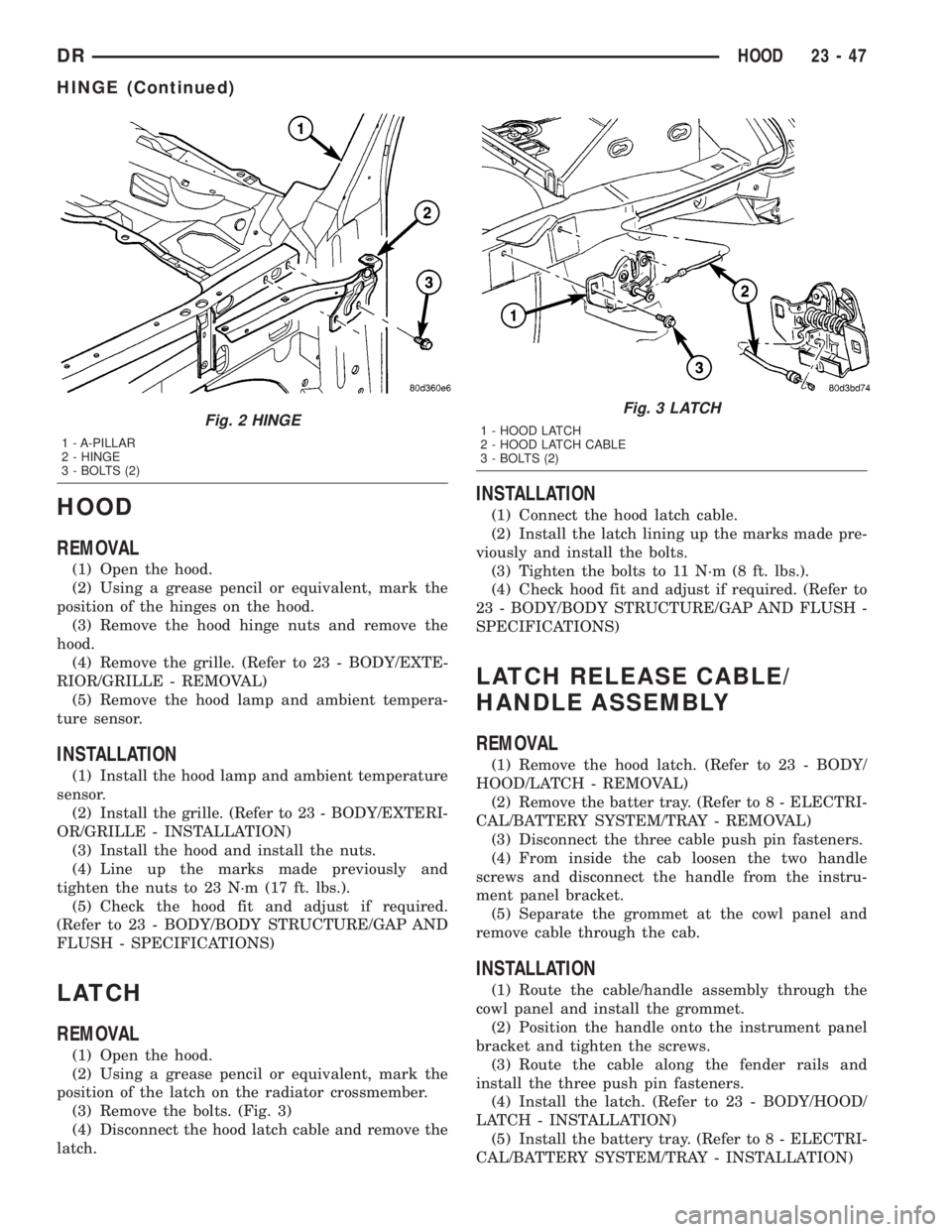
(3) Remove the bolts. (Fig. 3)
(4) Disconnect the hood latch cable and remove the
latch.
INSTALLATION
(1) Connect the hood latch cable.
(2) Install the latch lining up the marks made pre-
viously and install the bolts.
(3) Tighten the bolts to 11 N´m (8 ft. lbs.).
(4) Check hood fit and adjust if required. (Refer to
23 - BODY/BODY STRUCTURE/GAP AND FLUSH -
SPECIFICATIONS)
LATCH RELEASE CABLE/
HANDLE ASSEMBLY
REMOVAL
(1) Remove the hood latch. (Refer to 23 - BODY/
HOOD/LATCH - REMOVAL)
(2) Remove the batter tray. (Refer to 8 - ELECTRI-
CAL/BATTERY SYSTEM/TRAY - REMOVAL)
(3) Disconnect the three cable push pin fasteners.
(4) From inside the cab loosen the two handle
screws and disconnect the handle from the instru-
ment panel bracket.
(5) Separate the grommet at the cowl panel and
remove cable through the cab.
INSTALLATION
(1) Route the cable/handle assembly through the
cowl panel and install the grommet.
(2) Position the handle onto the instrument panel
bracket and tighten the screws.
(3) Route the cable along the fender rails and
install the three push pin fasteners.
(4) Install the latch. (Refer to 23 - BODY/HOOD/
LATCH - INSTALLATION)
(5) Install the battery tray. (Refer to 8 - ELECTRI-
CAL/BATTERY SYSTEM/TRAY - INSTALLATION)
Fig. 2 HINGE
1 - A-PILLAR
2 - HINGE
3 - BOLTS (2)
Fig. 3 LATCH
1 - HOOD LATCH
2 - HOOD LATCH CABLE
3 - BOLTS (2)
DRHOOD 23 - 47
HINGE (Continued)
Page 2623 of 2895
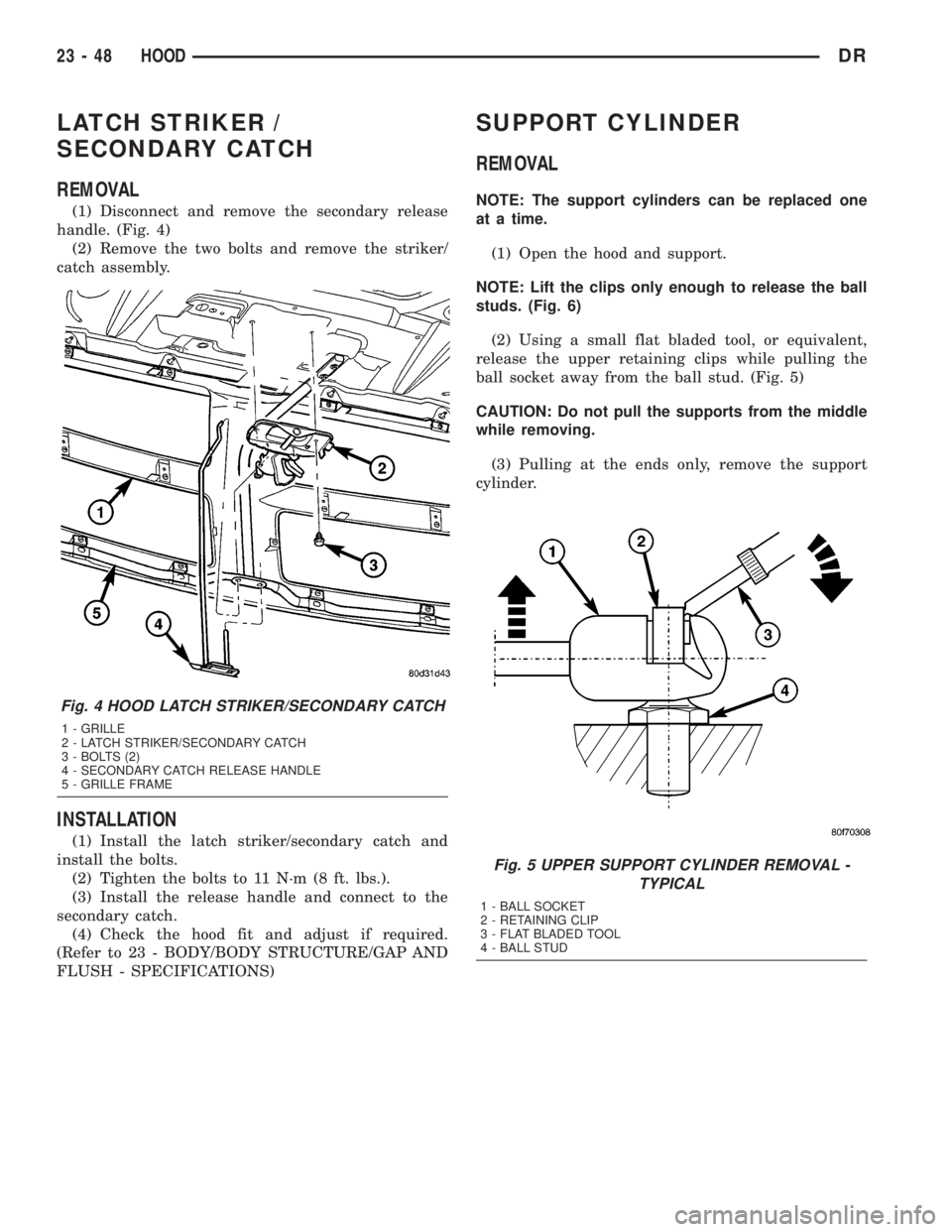
LATCH STRIKER /
SECONDARY CATCH
REMOVAL
(1) Disconnect and remove the secondary release
handle. (Fig. 4)
(2) Remove the two bolts and remove the striker/
catch assembly.
INSTALLATION
(1) Install the latch striker/secondary catch and
install the bolts.
(2) Tighten the bolts to 11 N´m (8 ft. lbs.).
(3) Install the release handle and connect to the
secondary catch.
(4) Check the hood fit and adjust if required.
(Refer to 23 - BODY/BODY STRUCTURE/GAP AND
FLUSH - SPECIFICATIONS)
SUPPORT CYLINDER
REMOVAL
NOTE: The support cylinders can be replaced one
at a time.
(1) Open the hood and support.
NOTE: Lift the clips only enough to release the ball
studs. (Fig. 6)
(2) Using a small flat bladed tool, or equivalent,
release the upper retaining clips while pulling the
ball socket away from the ball stud. (Fig. 5)
CAUTION: Do not pull the supports from the middle
while removing.
(3) Pulling at the ends only, remove the support
cylinder.
Fig. 4 HOOD LATCH STRIKER/SECONDARY CATCH
1 - GRILLE
2 - LATCH STRIKER/SECONDARY CATCH
3 - BOLTS (2)
4 - SECONDARY CATCH RELEASE HANDLE
5 - GRILLE FRAME
Fig. 5 UPPER SUPPORT CYLINDER REMOVAL -
TYPICAL
1 - BALL SOCKET
2 - RETAINING CLIP
3 - FLAT BLADED TOOL
4 - BALL STUD
23 - 48 HOODDR
Page 2632 of 2895
(11) Install the right a-pillar trim panel. (Refer to
23 - BODY/INTERIOR/A-PILLAR TRIM - INSTAL-
LATION)
(12) Position the right end cap and seat the
attachment clips fully.
(13) Install the one HVAC mounting screw.
(14) Connect the radio antenna.
(15) Connect the two electrical connectors at the
right cowl panel.
(16) Install the right cowl trim cover. (Refer to 23 -
BODY/INTERIOR/COWL TRIM - INSTALLATION)
(17) Connect the air bag control module electrical
connector.
(18) Install the center bracket bolts and tighten to
12 N´m (9 ft. lbs.).
(19) Install the floor console, if equipped. (Refer to
23 - BODY/INTERIOR/FLOOR CONSOLE - INSTAL-
LATION)
(20) Install the air bag control module cover, if
equipped.
(21) Connect the park brake release handle actua-
tor rod.
(22) Install the hood release handle and tighten
the screws.
(23) Install the two bolts at the column support
bracket and tighten to 14 N´m (10 ft. lbs.).
(24) Install the steering column. (Refer to 19 -
STEERING/COLUMN - INSTALLATION)
(25) Connect the wire harness electrical connectors
above the brake pedal.
(26) Install the two top instrument panel bolts and
tighten to 12 N´m (9 ft. lbs.).
(27) Install the four top instrument panel screws.
(28) Install the instrument panel top cover. (Refer
to 23 - BODY/INSTRUMENT PANEL/INSTRUMENT
PANEL TOP COVER - INSTALLATION)
INSTRUMENT PANEL
HEADLAMP SWITCH BEZEL
REMOVAL
WARNING: ON VEHICLES EQUIPPED WITH AIR-
BAGS, DISABLE THE AIRBAG SYSTEM BEFORE
ATTEMPTING ANY STEERING WHEEL, STEERING
COLUMN, SEAT BELT TENSIONER, OR INSTRU-
MENT PANEL COMPONENT DIAGNOSIS OR SER-
VICE. DISCONNECT AND ISOLATE THE BATTERY
NEGATIVE (GROUND) CABLE, THEN WAIT TWO
MINUTES FOR THE AIRBAG SYSTEM CAPACITOR
TO DISCHARGE BEFORE PERFORMING FURTHER
DIAGNOSIS OR SERVICE. THIS IS THE ONLY SURE
WAY TO DISABLE THE AIRBAG SYSTEM. FAILURE
TO TAKE THE PROPER PRECAUTIONS COULDRESULT IN ACCIDENTAL AIRBAG DEPLOYMENT
AND POSSIBLE PERSONAL INJURY.
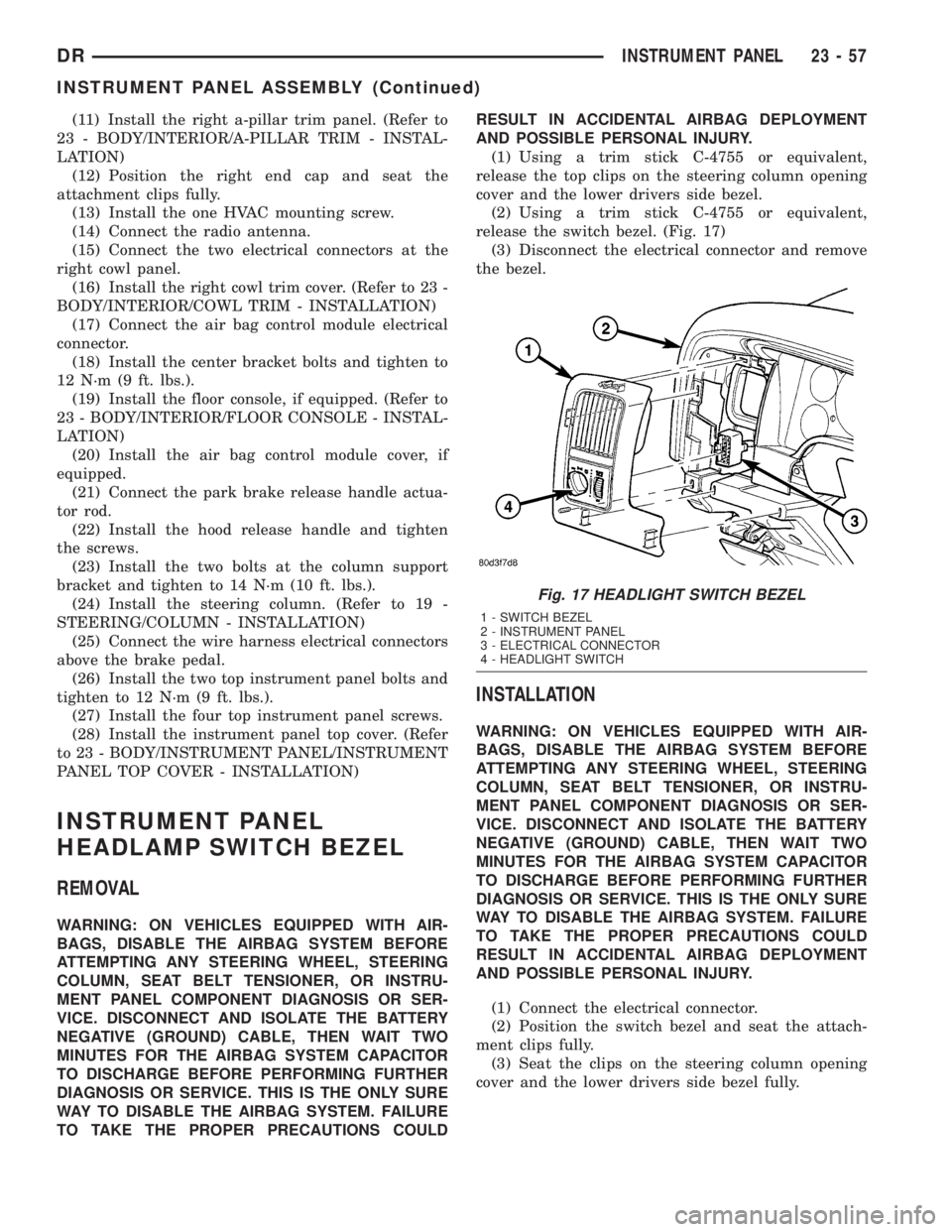
(1) Using a trim stick C-4755 or equivalent,
release the top clips on the steering column opening
cover and the lower drivers side bezel.
(2) Using a trim stick C-4755 or equivalent,
release the switch bezel. (Fig. 17)
(3) Disconnect the electrical connector and remove
the bezel.
INSTALLATION
WARNING: ON VEHICLES EQUIPPED WITH AIR-
BAGS, DISABLE THE AIRBAG SYSTEM BEFORE
ATTEMPTING ANY STEERING WHEEL, STEERING
COLUMN, SEAT BELT TENSIONER, OR INSTRU-
MENT PANEL COMPONENT DIAGNOSIS OR SER-
VICE. DISCONNECT AND ISOLATE THE BATTERY
NEGATIVE (GROUND) CABLE, THEN WAIT TWO
MINUTES FOR THE AIRBAG SYSTEM CAPACITOR
TO DISCHARGE BEFORE PERFORMING FURTHER
DIAGNOSIS OR SERVICE. THIS IS THE ONLY SURE
WAY TO DISABLE THE AIRBAG SYSTEM. FAILURE
TO TAKE THE PROPER PRECAUTIONS COULD
RESULT IN ACCIDENTAL AIRBAG DEPLOYMENT
AND POSSIBLE PERSONAL INJURY.
(1) Connect the electrical connector.
(2) Position the switch bezel and seat the attach-
ment clips fully.
(3) Seat the clips on the steering column opening
cover and the lower drivers side bezel fully.
Fig. 17 HEADLIGHT SWITCH BEZEL
1 - SWITCH BEZEL
2 - INSTRUMENT PANEL
3 - ELECTRICAL CONNECTOR
4 - HEADLIGHT SWITCH
DRINSTRUMENT PANEL 23 - 57
INSTRUMENT PANEL ASSEMBLY (Continued)